Pages

Showing posts with label usage. Show all posts

Monday, October 12, 2015

Social Connections 9 - The IBM Connections User Group Puts Together An Awesome Agenda

View Comments
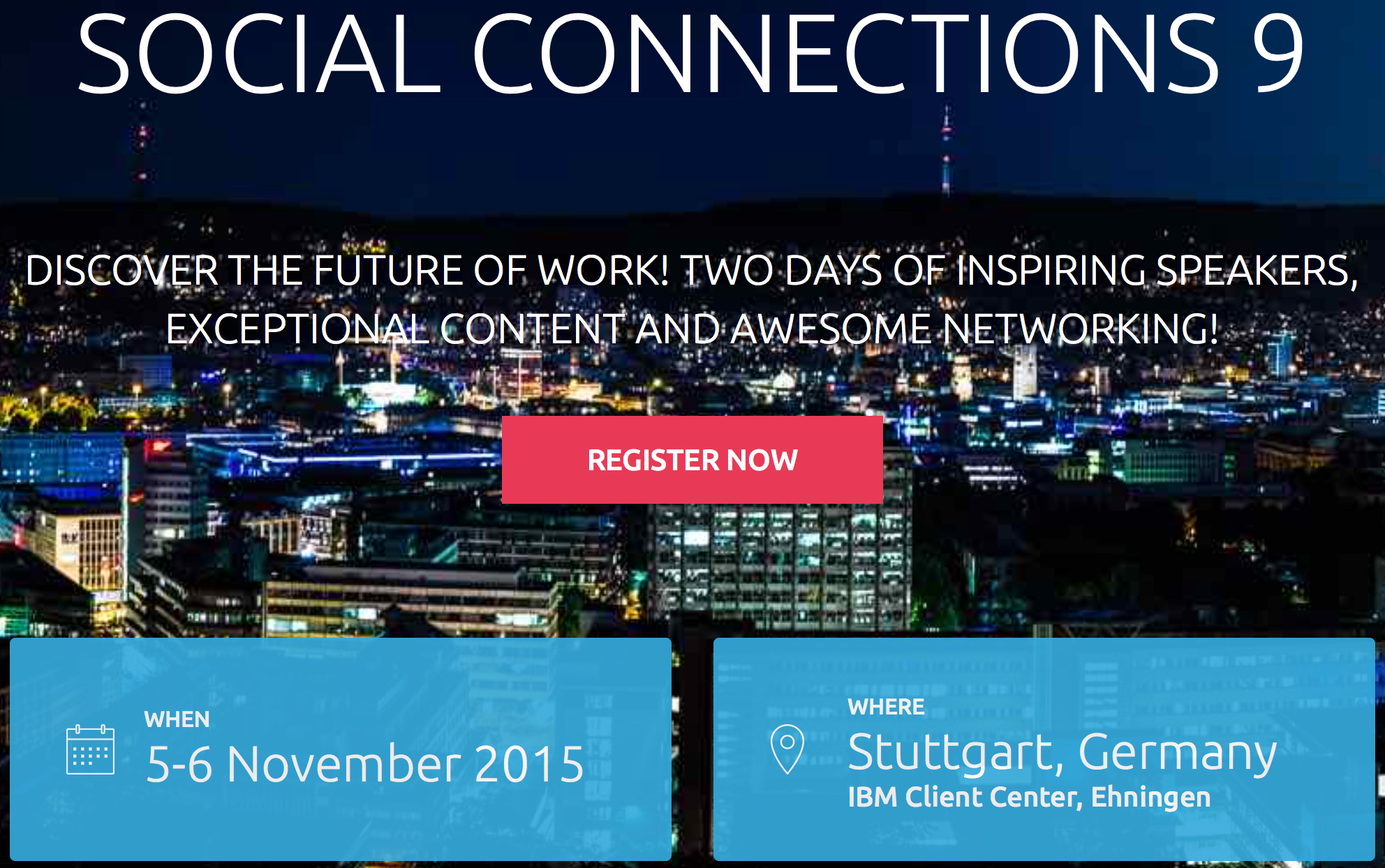
In just a few weeks, the 9th Social Connections will kick off and it has one of the best agendas ever. If I counted correctly, there's 70 sessions over two days so I'm sure what whatever content you are looking for, it'll be there. With a focus on IBM Connections and Social Business, this is a first-class event for the user community. If you are working with, using, or what to learn more about IBM Connections, you need to make every effort to attend!


At the end of the first day, attendees will head out to Sensapolis and from what I can tell, it's going to be a fun night !


As it tends to happen with this user group conference, the timing seems to line up with our next IBM Connections release. As announced at IBM ConnectED earlier this year, we are getting close to releasing our next major on prem release of IBM Connections.  This year, René Schimmer will be attending the conference and will share all the details about What's Coming in IBM Connections Next.


Ready to sign up ? Register here ! Oh and don't forget to follow the Social Connections team on Twitter and like their page on Facebook to keep up with all the news about the event.

Tuesday, October 21, 2014

How To Take Notes While Mobile With the IBM Connections iPad App

View Comments
As I get ready to go to IBM Insight next week it occurred to me that it's good timing to talk about a question that I've gotten recently. Specifically, some colleagues have been asking about a way to take notes while traveling for a customer meeting or industry conference.

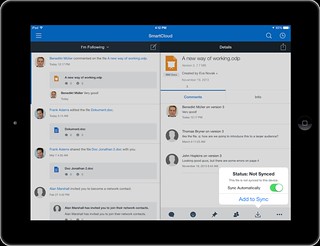
The way I do it is with the IBM Connections iPad app.  In the demo below, you'll see how to start creating a note from scratch.  One of my favorite capabilities is that you can co-edit with multiple people at the same time.


So imagine going to a conference and you and other colleagues at all taking notes in the same place without overwriting each other.  Perhaps one of you is taking pictures during the keynote and adding them to the note, while the other is writing down key bullet points.

Once you are done, you can publish the note and make it available to other colleagues in the organization that perhaps couldn't travel to your meeting.

Because this is all done inside the Connections app, the document security is kept and you don't need to take it out to another editor, and then bring it back.


So what do you need to make this happen? Whether you are a cloud or on-prem customer all you need is the latest version of our free iPad mobile app plus the IBM Docs add-on.

If you want to start playing with this, you can start a free 60 day trial of IBM Connections Social Cloud today!

Thursday, October 9, 2014

Google Hangout Replay: A Social Business, Cloud, Mobile and IBM Connections Conversation

View Comments
Last week I had the opportunity to try out Google Hangout On Air. It's been something that I've wanted to try for a while and with the latest cloud release of IBM Connections last week, it would be a good time to try it out.

Joining me is Luis Suarez (no, not the guy who bites), an independent social business advisor and Simon Vaughan, an IBM Champion and one of the organizers of Social Connections, the IBM Connections User Group.

The whole thing was very informal, and again, it's something that I did to play with the concept and understand what's possible and what's not, while at the same time having a great conversation with subject matter experts on the other side of the ocean.

The result? I have to say I really enjoyed the conversation (it's all about my favorite topics so what's not to like!) and got me wondering if something like this is something that we should try to do on a regular basis (perhaps as a complement to 5 minute tips on IBM Connections).

Check out the replay of the Hangout:


What do you think ? Is this something that we should do more of ? Tell me what you think!

Wednesday, October 8, 2014

5 Can't Miss Features of IBM Connections

View Comments
About two weeks ago, I was asked to present to a group of internal IBMers tips and tricks to get the most out of IBM Connections, our social collaboration platform.

I actually reached out to my internal network and asked for suggestions on a good topic. Quickly, I realized that everyone had their own favorite feature or aspect of the product.

That got me thinking that maybe it's worth me putting together a quick presentation that shows people how I get the most out of the product to improve my productivity.

Then it got hard. How could I pick just a handful of things where IBM Connections makes my life easier ?

I had to iterate a couple of times.  In the end I decided that a good way to format it would be to focus on 5 integration aspects that maximize the value I get out of the product.

Check out the slides that I took them through:


Do these match what you would've presented?

Wednesday, August 20, 2014

Continental AG Goes Full Out with IBM Connections To Get Things Done Faster

View Comments
Last week, I ran into this video posted by Continental AG, a company of 170,000 people, which talks about their business networking event for their 450 social business ambassadors.  Continental spoke at IBM Connect 2014 about their usage of IBM Connections.

Continental brought the participants from 37 different countries to Hamburg Germany to start the conversation around how to improve the culture of communication and how to give employees a helping hand.

To do this, Continental chose an open space, which they say it's similar to social media, where it's a big, empty and fluid environment.

The goal was to spend 2 days and officially become GUIDEs. Individual interviews mention how the goal is to break the barriers between countries to become agile, interact better with others by knowing them better, and getting things done faster and more efficiently.  For them, it was critical to exemplify their culture and core values like trust, freedom, solidarity and a winning mentality.

Check out the video below:


I really like this approach and reminds me of what IBM did initially with our Blue IQ Ambassadors, though I was extremely impressed with Continental's approach to bring all these people together in a room to together learn and launch their social business platform.

Well done!

Tuesday, August 19, 2014

Mobile Comparison of IBM Connections & Yammer

View Comments
I typically get questions about how collaboration platforms compare, especially in a post-PC, mobile first era. The term was made popular by Steve Jobs in 2007 (though first coined at MIT), and 3 months ago Microsoft CEO said the company had entered the post-PC era. So mobile.. a critical capability. Can't be without it. It's essential.

So here we are in 2014 -- a post-PC / Mobile First era, so let's take a look at comparing the mobile collaboration capabilities provided by IBM, with their market leading enterprise social collaboration platform called Connections, and Microsoft with a confusing story around SharePoint/Office 365/Yammer.

To that end, I wanted to share a video that one of my colleagues, Reynout van Adrichem Boogaert, put together. It's a bit long because it does an amazing job at taking an in-depth look at collaborating while on the go -- a must for today's workforce.

Of course, we can always look at app store ratings (Yammer has 3/5 stars in the app store, while the IBM Connections mobile app has 4.5/5 stars) which gives one angle, but let's get the full story.

The video starts with a description of what the Yammer app can do and can't do.


Now, what if you are in a situation where your company has made a decision to use some Microsoft technology?  Well, another one of my colleagues has you covered.  Omar Davison recently shared this video (you may have seen Suzanne Livingston's post last week) which tells the story of how you can use IBM Connections to enhance your Microsoft SharePoint and Microsoft Office tools.

Here's the 3 minute video:


Ready to get started? Don't wait, start a free trial now (no credit card required)!


Thursday, August 14, 2014

TemboSocial Plugs Into IBM Connections and Takes Ideation To The Next Level

View Comments
By now, I'm sure that you are aware of TemboSocial. They have been adding value to IBM Connections, the market leading enterprise social collaboration platform, and it's some great work and I've talked about them in the past.

The first add-on they created was a bit over 2 years ago when they first introduced The Hive for IBM Connections, a social recognition module.

Last year, they further integrated with the IBM Connections platform by taking advantage of new integration points and extending our native mobile app in iOS and Android.

Now, TemboSocial has introduced TemboSocial Ideas for IBM Connections.  This new add-on plugs directly into a team site within IBM Connections and takes ideation to the next level.

With this add-on, you can crowdsource and gather ideas, surface the best ideas and comments, and the experts and moderators can curate the best contributions and provide updates on the idea (e.g. "In Progress", "Under Review", "Closed", etc). Additionally, it includes detailed real-time reports to determine sentiment, where the best ideas are coming from (e.g. by geography, role, workgroup, etc) and you can filter by time to measure the impact of your campaigns and see the results of your promotions.


Update 2:30pm ET: Tembosocial Ideas is front and center at the customer IBM Webinar "Innovation Starts with Social: How IBM Connections Social Software can Transform your Organization - Tuesday August 26th"

"Join ICS NA Executive Sales Leader Laura Wolf and Tembosocial president and founder Steven Green on Tuesday August 26th. It's the "Aha" moment for LOB how to best get value from, Social (on-prem or cloud), how existing Social organizations can make Social more strategic, and where first time Social organizations can effectively start. "

Registration here: https://events.na.collabserv.com/portal/wippages/register.php?id=65a4c4e364&l=en-US.
Since a picture is worth a 1000 words and a video is worth (a trillion?) words, check out this video to see how it works:


For more info, check out TemboSocial Ideas for IBM Connections.

Wednesday, May 14, 2014

Embarking in a Social Business Transformation? Check Out These Storyboards to Drive a Culture Shift

View Comments
We are now less than a week away for our May 21st event to unveil IBM Connections Next. If you haven't registered yet, go ahead and register now and spread the word to your friends, family, neighbors, customers, partners, etc.

One aspect to keep in mind is that as you embark on your social business transformation, you are ready to drive a transformation shift in your enterprise. After all, it's people who create value for your business, and without them, you won't be able to reap all the benefits.

One way to do that is via storyboards where you can paint a typical business scenario and clearly highlight how things are jus so much better when using a social platform, such as IBM Connections.

Jim Claussen, the same guy who is doing the daily 5 minute podcast on IBM Connections tips, has decided to publish a series of storyboards to help people understand how their lives can be so much better.

I've embedded the first two chapters below.  If you like them, you should do the same and embed these two presentations in your IBM Connections deployment to share with the rest of the organization. Here's chapter 1:


And chapter 2:


I'll be interested to know what you think about this approach.  Let me know!

To be notified of other chapters once they are published, follow IBM Social Business on Slideshare.

Tuesday, May 13, 2014

Give Us Your Toughest Social Business Questions for Pardon the Interruption

View Comments
This quarter is proving to be a busy one. First, we are about to unveil IBM Connections Next in a little over a week.  If you haven't yet, take 2 minutes to go ahead and register for the May 21st event so that you can get all the details around IBM Connections Next.

Then on May 22nd, join us on the Live Q&A to answer your product questions around IBM Connections Next.

And if that's not enough, in June I'm going to be going to Prague for the IBM Connections User Group meeting.  As part of that event, I'll be participating in a session that follows the popular Pardon the Interruption format.


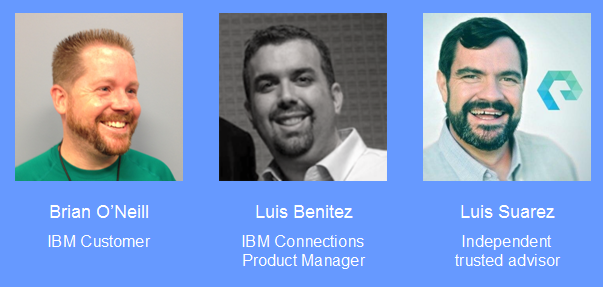
In this session, I will join the guy who fired himself from IBM and is now and independent and trusted social business consultant Luis Suarez.  Additionally, I'll join Brian O’Neill, an IBM Customer and IBM Champion to discuss your most difficult questions around social business (see below on how you can submit questions).

The concept is that we will have a lively, fast paced discussion on 12 to 14 IBM Connections and Social Business topics. We’ll have 3 minutes for each topic with 60 seconds for each one of us to answer. Stuart McIntyre will be the moderator for the discussion and yell at us if we go beyond our 60 seconds!
And the very best part of this session? To submit topics/ideas for us to discuss, tweet them using the #soccnxPTI hashtag. We’ll be monitoring this tag up to the week before the conference!

Thursday, May 8, 2014

Tell Me: How Do You Use Online Files Today ?

View Comments
One of the best parts of my job is to work directly with end users to understand how they use our products (or in some cases, those of our competitors).  Sometimes, however, this just doesn't scale and in order to understand usage patterns we conduct surveys to reach a wider audience. And since I know a lot of you love to give us feedback, this is your opportunity!  

As you may know, I'm currently the Product Manager for Files within IBM Connections, IBM's social collaboration platform. With the help of the the IBM Docs design team, we are working on improving the Connections file editing experience and would like to extend a special feedback opportunity to those interested. 


The team is seeking to gain a thorough understanding of features involved in editing files on Connections (or other products). For example, do you find the ability to insert an image to be a basic, intermediate or advanced feature? How often do you use that specific feature and is it useful on your phone and/or tablet? 

Just like the upcoming May 21st event to introduce IBM Connections Next, please share this with everyone you know:  your customers, your partners, your own end users, family, friends, etc.  

Available surveys (please go through as much as you can)

General File Editing (A): Estimated time: 10 mins.  https://www-950.ibm.com/survey/oid/wsb.dll/s/ag57d 
General File Editing (B):  Estimated time: 15 mins.  https://www-950.ibm.com/survey/oid/wsb.dll/s/ag57e 

Document Editing:  Estimated time: 5 mins. https://www-950.ibm.com/survey/oid/wsb.dll/s/ag57f 

Spreadsheet Editing:  Estimated time: 15 mins.  https://www-950.ibm.com/survey/oid/wsb.dll/s/ag580 

Presentation Editing:  Estimated time: 15 mins.  https://www-950.ibm.com/survey/oid/wsb.dll/s/ag581

Thanks!

Tuesday, March 11, 2014

Tip: How To Share Links Using The IBM Connections Mobile App

View Comments
Various users have reached out to me asking how they can share links / pages as they surf the web from their mobile device with their network in IBM Connections.

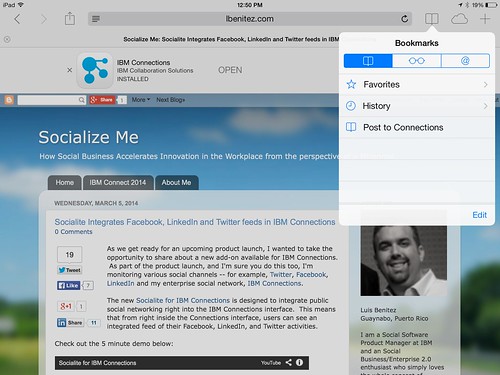
The trick is to use what's called bookmarklets. Follow these instructions to add the two bookmark lets to your browser and then you'll be able to quickly share links from your mobile browser to the IBM Connections Mobile app. I've written these instructions for Safari on iPad so these might vary based on your browser and/or mobile device.

  1. Open Safari on your iPad
  2. Add this page as a bookmark (click on the "Share" button in the top left)
  3. Find the bookmarklet below that you want. Select and copy the Javascript in the text field.

    To post a link as a status update:

    javascript:window.location='ibmscp://com.ibm.connections/updates?action=post&message='+encodeURIComponent(window.location.href)+''

    To save the link as a Bookmark in Connections

    javascript:window.location='ibmscp://com.ibm.connections/bookmarks?url='+encodeURIComponent(window.location.href)+'&title='+encodeURIComponent(document.title)+'&action=create'
  4. Go to your bookmarks (the book icon in the top right) and tap "Edit" in the bottom right. 
  5. Tap the new bookmark you just made of this page.
  6. Edit the name (e.g. Share in Connections) and in the URL field paste the Javascript you copied on step 3 above.
  7. Now to do the actual share, go to any web page, go to your bookmarks and tap the bookmarklet you want to use.


Voilá.

If you want to create your own bookmark lets for other things, check out this documentation on opening links to start the IBM Connections Mobile app. And if you are interested in other Bookmarklets (e.g. for Digg, Reddit, Pinterest, etc) check out this page.

Enjoy! 

Tuesday, March 4, 2014

I'm going to Social Connections VI - The IBM Connections User Group

View Comments
I'm now back from my 2 week vacation and it's March !! I can't believe it! I'm still working on follow up items from IBM Connect 2014 -- believe it or not.

As you may have seen, I'm going to be participating at this year's Social Connections - the IBM Connections User group.


If you are an IBM Connections user, you need to participate in this year's event. This will be the 6th user gathering in 2.5 years and this event will be taking place in Prague. This will be my first time in Prague so I'm looking forward to this. If you've been there and have recommendations of things to do and places to visit, let me know!

How much? The cost to attend is free (just need to cover air and hotel). To register go here.  When? June 16 and 17 . Where? At the Hotel Ambassador Ziata Husa.

At the conference, I'll be sharing more specific details around IBM Connections "Next" which you have probably already heard bits and pieces on from IBM Connect 2014. If you still haven't seen it, here's a capture of the demo I did at this year's OGS:


And speaking of catching up with IBM Connect 2014, here's a roundup of what I have so far of all the press coverage:

And see what analysts were saying...

Enderle Group's Rob Enderle, How to Do a Social IT Event #IBMConnect: "Innovation, Speed, Design, Interaction, Engagement: These are the messages of IBM Connect and IBM delivered them amazingly well."

Michael Sampson's blog, Thoughts on IBM Connections Mail (“Mail Next”): "At IBM Connect 2014 today, IBM announced “Mail Next,” to be branded under the IBM Connections family. It was positioned as a re-think of email".From what I picked up, my understanding is that the worlds of email traffic / conversations are logically and physically separate from the “social” conversations and interactions happening in IBM Connections. Mail Next gives you email messages, tasks, and meetings within email. Connections Next gives you @mentions in Connections, events in Connections, tasks in Activities in Connections, etc.

Nojitter' Blair Pleasant, Positioning for the Cloud: IBM's cloud directions for 2014 include enhanced offerings such as a new Web mail experience; meetings and chat with improved audio and video; a strengthened guest model; and mobile everywhere. IBM has been evolving its IBM Connections collaboration solution, which supports cloud, premise, or hybrid deployments, to become "the leading social platform," featuring social networking, mail, meetings, chat, document sharing, and more.

Larry Hawes from Dow Brook Advisory Services, IBM Mails In Tightly Integrated Knowledge Worker Experience at IBM Connect 2014, "The announcements made at IBM Connect 2014 are about helping existing and potential customer organizations to better understand and leverage the synergies created within the ICS offerings portfolio. More importantly, the IBM dashboards announced and demonstrated at the event should make it easier for individual workers to use the combined communication, collaboration, content and task management capabilities available to them on the desktop and mobile devices to locate expertise, share knowledge and get work done."

Constellation Research's Alan Lepofsky, Purposeful Collaboration - Presented at IBM Connect 2014:
  • Collaboration (internal and external) is a critical component of successful organizations
  • “Social” features can be part of a stand-alone platform, integrated with, or integrated into enterprise software solutions/processes
  • The processes can be function specific or cross departmental boundaries
So don't wait -- register today here ! 

Tuesday, January 21, 2014

Softissimo Shows their Translation Solution for IBM Connections

View Comments
As we continue the countdown towards IBM Connect 2014 (if you are counting, we are now 5 days away!) , I wanted to share the latest plug-in for IBM Connections.  This one would be extremely valuable for worldwide organizations.

Today, IBM Connections is translated into 25 languages. This removes the barrier to collaboration as the interface is automatically translated into my preferred language. That's great that I can access the interface in Spanish, for example, but what happens when one of my colleagues posts a status update in German?

Reverso can solve that problem with their new plug-in for IBM Connections.  The plug-in can translate user created content into the language of my choice. Today, Reverso claims to have more than 200 customers with over 3 million users taking advantage of their translation services daily.

Check out how it works in the 3 minute demo below:

Reverso Translate for IBM Connections from Reverso on Vimeo.

To learn more, check out Reverso's corporate product page.

Wednesday, July 31, 2013

Book Review: Doing Business with IBM Connections Suite

View Comments

Thanks to a long flight yesterday, I just finished going through Doings Business with IBM Connections: Opportunities for Improving Processes, Driving Results, and Achieving Great Outcomes with IBM Connections 4.5 written by Michael Sampson. You will notice that the title of this post mentions the IBM Connections Suite and I'll get to why soon. Michael Sampson is an independent consultant focused on helping organizations optimize collaboration.

After going through the book, I must say that this is going to be a recurring recommendation to all current and prospective customers. The book is intended for collaboration strategists, line of business managers and users of IBM Connections. I think the book hits the mark and is perfect for that intended audience.

At its core, the book focuses on how to best use IBM Connections to address various collaboration scenarios such as:

  • Finding Expertise
  • Co-authoring documents
  • Capturing ideas for innovation
  • Managing meetings
  • Running a project
  • Making decisions
  • and more (a total of 10 scenarios are covered)

For each collaboration scenario, Michael follows a consistent flow. First, describe what the collaboration scenario is and how organizations typically tackle this (i.e. "the old way"). Next, a typical work scenario is laid out to highlight the challenges that users face today.

Next, the process is clearly laid out on how to use IBM Connections to solve this challenge (i.e. "the new, faster, better, optimized way"). The author does a tremendous job of not only giving you a set of steps to follow, but also explains why he is providing that recommendation.

Next, each scenario includes case studies from customers that have been successful using Connections for the particular collaboration scenario (and it even includes customers that I hadn't heard of before!! ). Finally, each scenario has a section for Advanced Concepts where the author provides additional best practices (e.g. when talking about ideation, he references how to avoid a repeat of the "suggestion box").

One of the most common use cases (or scenarios as Michael calls them) that I hear is running a project. Coincidentally, we published a video showcasing these capabilities last week:

Throughout the book, the author constantly emphasizes the IBM Connections Mobile apps, which I believe recognizes the increase demand of the mobile workforce and strategies for bring your own device (BYOD). Additionally, the book is not limited to just the core Connections product but includes real-time meetings, document libraries and more which are all capabilities of the IBM Connections Suite.

This book provides independent advice on how to drive business with IBM Connections, accelerate adoption, and reduce time to value.

To purchase a copy of the book and/or learn more, go here.

Disclosure: I wrote a quote for the front page of the book and received a copy of the book.
Wednesday, September 19, 2012

New IBM Connections Desktop Plug-In Now Available

View Comments

With the release of IBM Connections 4.0, IBM is now updating its many extension points. Today, I wanted to share the news that the new IBM Connections Desktop Plug-Ins are now available for download. The plug-in, of course, remains free and is fully supported by IBM.

The Desktop plugin is a single install which brings IBM Connections into Microsoft Outlook, Word, PowerPoint, Excel and Windows Explorer (depending on what you have installed). Here's a list of some of the features you can use:

  • Upload local files to IBM Connections from Windows Explorer or from your desktop
  • Share uploaded files with people, communities, or folders in IBM Connections
  • Work on files locally and publish them to IBM Connections
  • View people's contact details and get in touch with them
  • Pin, follow, or like IBM Connections files and folders
  • View or contribute comments for a file
  • Lock a file when you are editing it to prevent file conflicts
  • View and restore files from IBM Connections Trash
  • Share folders with IBM Connections Communities

One of the things that really stands out is how all of the social features from IBM Connections Files are available directly from Windows Explorer. From Windows Explorer, I can like files, comment on them, share them and more without ever having to open a browser. How cool is that!!??!!

If you haven't seen this plug-in in action, then I recommend that you take a peek at the videos created by my colleague Ron Denham.

First, how it integrates with Microsoft Word, PowerPoint and Excel:

Next, how it integrates with Microsoft Outlook:

Finally, how it integrates directly into Windows Explorer to provide access to files whenever you want:

To download the free plug-in, download it from our App Catalog.

Monday, September 17, 2012

Grow Revenue By Using the IBM Social Collaboration Platform [VIDEO]

View Comments
And the demo movies for IBM Connections v4.0 keep coming in.  Let me tell you a little about this one.

Before using IBM's Social Collaboration Platform, Greenwell's profits were not growing and they were losing market share.

Greenwell's marketing manager decided to leverage the IBM's Social Collaboration Platform and from that point on, the successes kept piling in.

Check out the success story:


The ROI of using IBM's Social Collaboration Platform is clear. Greenwell was able to:
  • Discover new opportunities
  • Rebuild brand recognition
  • Increase market share
  • Invigorate its customer base
Congrats to the team at Greenwell! (By the way, in case you didn't attend our conference earlier this year, Greenwell is a fictional company).

This is a great video that you can use to drive adoption and clearly understand the business value of using a Social Collaboration Platform powered by IBM Connections.

What do you think? If you are not using the IBM Social Collaboration Platform, you should start today!

Tuesday, September 11, 2012

Introducing the Top 4 Ways to use IBM Connections

View Comments

It's here! The Top 4 Ways to use IBM Connections based on tips from IBMers and IBM Champions. If you've ever been asked by peers how they can use IBM Connections, this is great resource for them.

The way the page has been structured is that it provides an overview first of what is Connections and then ways in which IBM Connections, as a social collaboration platform, can make you and your peers more effective and productive.

Quotes from two IBM Champions, Lisa Duke and Femke Goedhart, and two IBMers, Suzanne Livingston and Luis Suarez, show real examples of people who use Connections on a daily basis to make their job easier.

I really like the visual layout of the page and I hope you do too. The page also has links to download the free mobile apps for IBM Connections as well as all the desktop plug-ins (e.g. Microsoft Outlook, Word, PowerPoint, and much more)!

So what are the Top 4 Ways to use IBM Connections? You'll have to check out this new page to find out!.

Let me know what you think about the page in the comments.

Oh and if you want to learn more about IBM Connections, don't forget to register and attend for the webcast From liking to Leading: The Success of your Business is Social (click the invite below to register):


Register today!

Tuesday, July 31, 2012

How To Customize the IBM Connections Mobile App for iOS, Android & BlackBerry

View Comments

Today IBM has published documentation on how to customize the mobile apps for IBM Connections. To customize the mobile apps, you need to have IBM Connections 3.0.1.1 CR2 installed (which you can get from here). As the IT admin, you have the control on the following settings:

  • Allow iTunes Sharing - whether iOS users can transfer files to the app via iTunes
  • Allow Web Sharing - whether uses accessing Connections via a browser should be re-directed to download the native app
  • Remember Password - whether to allow end users to store their passwords in their device
  • The ability to enable/disable different components of Connections (e.g. enable Files but disable Wikis)
  • For Files, there's a set of additional configuration options:
    • Encryption - whether downloaded files should be encrypted
    • Allow Upload/Download
    • Allow Export - whether downloaded files can be shared with other apps/folders
  • The name of the app and module can be fully configured
  • SSO authentication options (Siteminder, SPNEGO, etc)
  • Ability to add new applications to the app

If you haven't seen them yet, I've recorded a demo showing the latest Android and iOS apps. Here they are again.

iOS (iPad):

Android:

To access the documentation, click here http://www-01.ibm.com/support/docview.wss?uid=swg21606189

Friday, July 6, 2012

TemboSocial announces The Hive for IBM Connections

View Comments
TemboSocial has just enabled their product The Hive to integrate directly into IBM Connections.

The Hive delivers social recognition in real-time, resulting in more engaged and productive employees. Recognition is shared with everyone, creating a collaborative environment that builds on the knowledge and achievement within your organization. The Hive is a system of social recognition that changes how you motivate and retain employees, how your company celebrates success, and how you reinforce your corporate culture and values.

TemboSocial says that it's important to recognize employees as a recent Gallup poll has found that 71% of employees do not feel recognized.

To demonstrate the integration, TemboSocial has created a demo which shows how TD Bank is using social recognition to celebrate customer successes. TD Bank has called their local implementation "WOW Moments". You may remember that TD Bank joined us in Orlando earlier this year to talk about their IBM Connections rollout and the successes they have achieved with it. TD Bank has also been featured in many press articles given their success in becoming a social business. Here's what Karey Stanley, Manager of the Global Recognition Program at TD Bank had to say:
"Our President and CEO Tim Hockey was concerned that, while the heroic stories were important, what’s really important to us is the little things that people do every day that enable them to connect emotionally with customers – and those are the things we wanted to share with each other."
The Hive for IBM Connections integrates either at the community level or at the profile level or both. The Hive also provides an administrator dashboard where admins can configure badges, awards, and much more.

Check out the demo below:


If you are interested in learning more, reach out to the team at TemboSocial.

Wednesday, June 27, 2012

How To Get Users on the IBM Connections Mobile Apps Fast!

View Comments

By now, you are aware of the new IBM Connections mobile apps for iOS and Android that were released a couple of weeks ago.

The feedback so far has been amazing! The ratings and comments in the app store have been fantastic.

Today, I wanted to share a quick tip with you so you can help everyone in your organization get started with the mobile app. In fact, I highlighted this in my original blog post and I've received several questions already on how to do this.

The new mobile apps now support app provisioning via a link. This means that you can post a link in Connections or send it via email and when users click on it from their mobile device, the app is immediately launched and pre-configured for your server.

To do this, simply build a URL similar to the one below:

ibmscp://com.ibm.connections/launch?accountserver=https%3A%2F%2Fwww.bleedyellow.com%2Fmobile&accountuser=luis_benitez%40us.ibm.com&accountname=BleedYellow

and then send an email to your users and ask them to click on the link, for example:

Click this link to get started!

Notice that the URL contains the user ID of the person and the values are URL encoded. The URL above would be my unique URL to configure the app with BleedYellow.

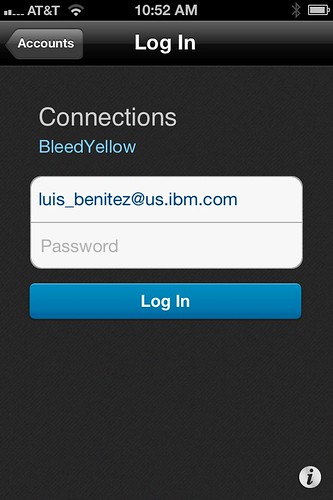
When the user clicks on that link, they are immediately brought over to the IBM Connections Mobile app and this is what they see:


Notice that everything is pretty much configured. The end user doesn't have to figure out what the URL is to their server. At this point all the user has to do is enter their password and off they go! Pretty cool, huh? The same URL will work both for the Android and iOS apps.

Enjoy!