Pages

Showing posts with label collaboration. Show all posts

Wednesday, April 5, 2017

My first 100 days with Office 365

View Comments
For the past couple of months, I've been using Office 365 -- a big shift after leaving IBM back in December. At the new gig, one of my responsibilities is to drive the implementation and adoption of Office 365 -- one of the various initiatives in moving to the cloud.

I'm still in the process of collecting data and measuring the adoption within the organization. Thus, wanted to start with my own experience and document my growing pains so far. One of the first things that I noticed is the breakout of apps and getting used to when to use what. For example for chats, I could do 1:1 messages over Skype, Teams, Yammer, and of course email. To see what's going on across the organization, I could use Newsfeed, Yammer, or Delve.  To keep track of tasks, I could use Planner, Tasks, or OneNote. There's a 60-page white paper that explains when to use what, but this seems like a big area for Microsoft to look at consolidating.


So here's my experience so far with some of these apps.

Outlook

After using Notes/Verse for about 15 years, the transition to Outlook was "interesting". I do like the meeting forward feature. Makes it easy to get others added to an invite, instead of having to ask the meeting owner to add others. Of course, it's also happened where people I've invited to a meeting have forwarded the invite to others without my consent 😁. I also like scheduling Skype meeting directly from within Outlook.

Here's a few things I struggled with (in no particular order):
  • Getting used to tons of open windows - in Notes, emails opened within the same app by default and it didn't clutter your desktop. In Outlook (at least on Mac) there's windows everywhere!
  • Distribution lists - there doesn't seem to be a way to build my own public distribution lists. They have the concept of Groups, but emails sent to a Group doesn't come into the inbox, it goes to another separate inbox so people miss them. 
  • Delegation - I was used to easily delegating meetings to other people. Within Outlook, I need to forward an invitation, and then decline the invite so the person knows I'm not going.
  • Emojis - This may be a simple one, but for some reason the emojis seem to get lost when sending/receiving messages. A happy face, for example, is converted to J . It took me a while to figure out why people were putting J's in their emails. πŸ˜‰
Skype

This is one that I've struggled with the most. At the end of the day, Skype for Business is the same Lync client, just re-branded so that's probably why the experience is not the best. I was expecting the actual consumer version of Skype. My pain points:

  • I have a million "conversations" with the same person (see above). This seems to be the biggest pain point that Skype for Business users are reporting. This is horrible as the conversation for some crazy reason is broken into multiple chats. Notice above how my conversation with Mara, which happened in a span of 20 minutes, is broken into 3 different conversations. Thus, when I'm trying to find what one person and I talked about, I have to dig through multiple conversations to find what I need. Ugh!!! Microsoft Teams 1:1 chat addresses this. Similarly, Sametime, a contact was just a contact and it was a lot simpler to browse the chat history. 
  • I can't paste images into a conversation - this seems to be a Mac limitation
  • Video calls are flaky - Microsoft Teams has been better in my experience so far
  • Missed conversations emails - An interesting feature that Skype has is that if you "miss" a conversation, you get an email alerting you. However, it's happened way too much that I'm online and connected and engaged, and yet somehow I get an email that I missed a conversation when I really didn't.
Teams

Teams is the latest app that Microsoft has added to Office 365. It competes with the likes of Slack IBM Watson Workspace. I decided to give Teams a try and get my team engaged in it. One of the capabilities that I like is the integrated Planner module where I've built kanban boards to keep track of high level project status. 


The integrated video meeting experience is really great as well, in fact, I like it a lot more than the Skype for Business experience. You can take a "typed" conversation to a "visual" conversation very easily and still remain in context.

Some improvements I would like to see:
  • Planner on mobile - Right now, the Teams mobile app for iOS doesn't allow me to see/manage tasks on mobile. Also, Planner on Teams doesn't work well with the standalone Planner app in Office 365. New tasks/boards created in Teams don't show up in the Planner hub forcing me to check two different places for a consolidated view.
  • Stability for the desktop app on Mac - The desktop app for Mac is built on Electron so at the end of the day it's just a web browser wrapped in a rich desktop app. For some reason, it's still very flaky. For example, when I switch to the Planner tab in a team, it seems to hang. Other times, the app doesn't start correctly and I've had to re-install several times. 
  • Native notifications - as notifications come in, Microsoft doesn't seem to be using native notifications on Mac OS X so if I step out and come back, I can't see what I missed within Notification Center
  • Threaded replies usability - We are still getting used to threaded replies. Right now, it seems very confusing as sometimes people reply to the thread and other times they just reply as a new message. At the same time, when a new reply comes in to a thread, it moves within the conversation and it breaks the flow of other conversations. 
  • Awareness usability - Notifications don't seem to be reliable at the moment as the team constantly reports that they miss out on new activity and since things move around in the conversation, it makes it hard to understand when someone will get notified of a new message. @mentions seem to be the best way to drive awareness of new content.
  • Single version of the truth - sharing a OneDrive file into a Team creates another copy of the file and saves it in the Team's file repository. This makes it complicated as now we have to manage two copies of the file and manually keep them in sync. Ideally, sharing a OneDrive file into the team, gives the team access to the file providing a single version of the truth.
I also like some of the top ideas requested by users for Teams.

OneDrive for Business

It looks like Microsoft has been improving their OneDrive client recently. I've been able to sync my personal OneDrive and SharePoint sites to my Mac seamlessly. Some things could still be improved:
  • Sharing files from desktop - I'm used to right-clicking on a file and being able to share a file with a colleague. With OneDrive, you are forced to open a browser, log in, find the file and then share it from there. IBM Connections, Box, and others have had this for a long time so Microsoft is behind on this one. 
  • Cloud file sync improvements - From within PowerPoint, Excel and Word, you can share a file with others, BUT not if you open the file directly from Finder. You need to again, open a browser, log in, find the file and choose "Edit in PowerPoint" (for example) so that the file opens from the cloud. It would be a lot better if PowerPoint detected that I'm opening a file from Finder that's being already synced to OneDrive/SharePoint.
  • Copy link to OneDrive files - This is another one that kills me... Sometimes I'm in a Skype or Teams chat and I want to paste a link to a file. I'm used to right-clicking on a file directly from Finder and getting a link to a file. With OneDrive, I need to open a browser, log in, find the file, then copy the link to the file. 
  • Finding files shared with me - There doesn't seem to be a view that shows me all files that I have access to. OneDrive has a "Shared with Me" view that only shows individual files where I've been explicitly added as a viewer/editor. However, if a file is in folder I have access to (and hence I have implicit access), those files don't show up there. This makes it hard to go back to a file that I know I have access to, but don't know where it is...
  • Commenting on files - Unless I'm doing something wrong, there doesn't seem to be a way where viewers can comment on files. Comments in OneDrive seem to be "inside the file" so therefore, you need to be editor to be able to edit the file and add comments inside the file. This is a flaw since I don't want people to edit files, just review and give me feedback. It would also be nice to have @mentions in file comments.
  • File update notifications - As my team works on files, I'm not notified when they make updates to their files or mine. We end up pinging each other or emailing each other to let each other know when a new file update is ready for review.
Surprisingly, none of these seem to be in the top ideas for OneDrive for Business...

---

I'll stop here since this is getting long and it's been quite a brain dump. I want to start playing more with Delve, SharePoint and others and will share more on those later! 
Monday, November 14, 2016

Demo: IBM Watson Workspace for Sales

View Comments
If you watched the last demo of IBM Watson Workspace for Marketing this will be part two of that series. This demo is focused on the day of the life of sellers and how IBM Watson Workspace can make their life better. If you missed the breakout session hosted by Rob Ingram, Rishi Vaish and Alan Lepofsky at World of Watson, this is a good way to catch up.


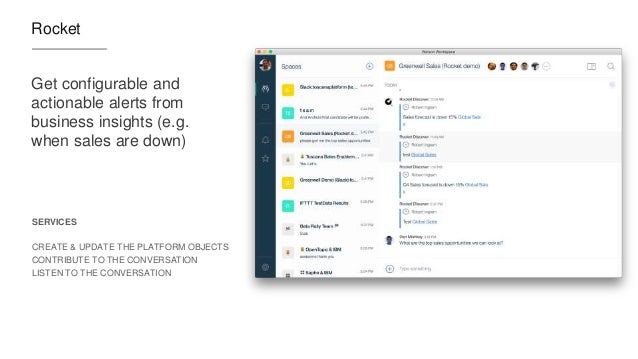
The video demonstrates how IBM Watson Workspace uses its cognitive capabilities to get you the information you need in context without having to jump back and forth between multiple tools. In the scenario example, we show a sales manager asking his team for the top sales opportunities. Watson Workspace understands this question and knows where to go and get the information: Salesforce. The latest opportunities and their status are then brought directly in context. Then it's time to sign the contract. The goal for this demo (and the previous one) is that it shows all integrations that have been built with the APIs that exist today.

The following integrations are shown:
  • Salesforce
  • DocuSign
  • Rocket Software
Check out the 2 min demo video below:


Missed the other videos? Check these out:
Enjoy!

Monday, November 7, 2016

Demo: IBM Watson Workspace for Marketing

View Comments
As things settle from the IBM World of Watson conference two weeks ago, today I wanted to take the opportunity to share one of the demos that was shown in a breakout session hosted by Rob Ingram, Rishi Vaish and Alan Lepofsky.

The video that demonstrates how IBM Watson Workspace can improve your life as someone who works in marketing. It makes team collaboration easy and saves you time by bringing everything together and summarizing it for you (using some cool Watson services) so you can take action on what really matters.


Additionally the following integrations are shown (thanks to Sapho for building some of these):

  • Google Adwords
  • Marketo
  • SAP
  • Outlook Online (part of Office 365)
  • and more...
Check out the 3 min demo video below:


We'll soon post other videos so stay tuned!

Enjoy!

Wednesday, October 26, 2016

Let's talk Integrations with IBM Watson Workspace

View Comments
Yesterday, IBM unveiled a new category called IBM Watson Work and two offerings available to all IBM World of Watson conference attendees: IBM Watson Work Services and IBM Watson Workspace.

If you've been following me for a while, you know I'm a big fan of integrations, app dev, and platforms. Well, today I'm happy to share the news that IBM Watson Workspace works with IFTTT. In fact, it's the first IBM app to be part of the IFTTT ecosystem. If you are not familiar with IFTTT (that is IF This Then That), they make it super easy to connect the apps that you love together and configure what they call recipes. In other words, when something happens in one app, then do something in another app. IFTTT currently has 370+ apps in the catalog, so chances are that you can integrate with what you want (e.g. Box, Gmail, your car, you smart home devices and more!)

To start creating your own integration with IFTTT, head out to: ifttt.com/workspace . Fist bump to the IFTTT team for helping share the news:


If you missed the keynote yesterday or you want to review the announcements, you can catch the replay here:


And here's a recap of the key tweets!

Tuesday, October 25, 2016

IBM Announces a New Category: IBM Watson Work

View Comments
In today's press release, IBM announced a new category called IBM Watson Work. In that category there are two new offerings that will be available: IBM Watson Work Services and IBM Watson Workspace. IBM Watson Workspace uses cognitive analytics to help users communicate with their teams and focus on key business outcomes. Teams now have a single space to manage all their work conversations and avoid information overload with smart summaries that highlight the most relevant actions and decisions so team members stay aligned and prioritize daily tasks quicker. This is what you may heard before as Project Toscana.

IBM Watson Workspace is built on a platform that we call IBM Watson Work Services. Watson Work Services provides a set of APIs built to help developers build apps that understand conversations and interpret user needs and intent using natural methods of communication. Developers can use these to infuse Watson Work capabilities into existing work applications and products or accelerate differentiation when building new apps.

Here's an excerpt from the press release:
Businesses today need to apply cognitive-powered productivity applications and services to digital content, conversations, and workflows to empower their employees with the ability to find, connect and work with the right experts; speed access to relevant content and insights; and provide the time and space to work simply and together.
  • IBM Watson Workspace learns how an individual works and interacts, and consolidates multiple work conversations from various communications channels into a single space. Using Watson, the technology is able highlight the most urgent action items, point to the right content needed at the time, and automate everyday tasks so employees can focus on key business outcomes. 
  • IBM Watson Work Services are a set of cognitive APIs –Action Identification, Moment Identification, and Summarization – given to developers through the offering’s website so they can infuse cognitive capabilities into existing work products and applications such as IBM Watson Workspace, third party applications, and when building new applications. The technology uses natural language classifiers that are pre-trained to identify key ‘actions, questions, decisions, and commitments in a conversation. It can analyze and disambiguate context to facilitate fulfillment of the next action. For example, if someone says: "Great point –let's schedule a meeting to discuss further," the system can identify 'schedule a meeting' as an action, and help the person find the best time to continue the conversation.

One of the cognitive capabilities available today in the preview is called "Moments". You know how painful it is to catch up when you've been away from work on vacation, out for a meeting or just lunch. You come back to a mess of information, and the time you spend catching up, is time that you are falling behind. No more! With Moments, Watson gives you summaries of conversations (think of it like Cliff Notes!) and at a glance you can see what was talked about, who was engaged, the content that was shared, etc. In seconds, you are caught up and aligned with your team.


Today, Inhi Cho, GM for IBM Collaboration Solutions, takes the stage at 4pm PT to share more about this announcement and it will be live streamed! And I get the opportunity to walk the audience through the flow. If you want to watch the live stream today, head out at 4PM PT to: https://ibmgo.com/wow16/session/NhtQjL5BRJGM4FJqC


IBM Watson Workspace (aka WW aka "dubdub" as the cool kids would say) is currently invite-only.  All IBM World of Watson attendees have access to IBM Watson Workspace. They can just log in with their IBM ID/password that they used to register for the conference. Those attendees can invite as many people as they wish, and those in turn can also invite others. So if you don't have an invite yet, find someone that attended the conference so they can hook you up.


Monday, October 17, 2016

Live Streaming Schedule for IBM World of Watson

View Comments
We are just one week away and I've been getting some questions on the live streaming schedule for IBM World of Watson 2016 (WoW). I'm happy to share that the most important keynotes will be live streamed via IBMGo.


Of course, one you can't miss is on Tuesday @ 4pm PT. Inhi Cho Suh will be sharing some cool updates on what's going on with Project Toscana (among other announcements related to the Future of Work). Here's the details as quoted from Marco Tempest, who will be joining us for the keynote:


Another highlight, like I had mentioned earlier, will be Ginni Rometty on Wednesday at 1pm PT.


To see more and sign up, go here: https://ibmgo.com/wow16/schedule pick your favorite sessions and add them to your calendar.

Thursday, September 22, 2016

World of Watson 2016 is Just Around the Corner

View Comments
We are now 31 days away from World of Watson!

So what's going to happen at World of Watson? First, let's start with Imagine Dragons! Grammy award-winning rockers and Las Vegas hometown heroes Imagine Dragons will perform exclusively for World of Watson attendees. Following their multi-platinum debut album ‘Night Visions,’ the alt-rock group has been playing sold out arenas all over the world. Their sophomore album ‘Smoke + Mirrors’ debuted at #1 on the Billboard 200, and their music videos have amassed over 1 billion views on YouTube.


Next, of course, there's the sessions. A can't miss session will be on Wednesday with IBM CEO, Ginni Rometty.


I've put together a list so you can see what's being covered by the IBM Collaboration Solutions team. One that stands out to me is the title for Inhi's keynote on Tuesday at 1p.  She's promising magic and I'm not going to miss it!

We will also be sharing an update on Project Toscana. The teams are all heads down and hard at work on Project Toscana. As you can see below, I'll be leading a session on the Platform and APIs and will be sharing how you can start using them right at the conference. Rishi Vaish and Rob Ingram will also be sharing the latest with Project Toscana.


Speaker
Date/Time
Location
The Value of Cognitive SaaS Solutions
Lou Sassano, Bob McCandless
Mon @ 11a
Breakers F
Teaming in the Cognitive Era
Rob Ingram, Luis Benitez
Mon @ 11a
Theater
Collaborative Analytics: The Next Frontier for Social and Collaboration Systems
Marie Wallace, Kevin Lawrence
Mon @ 1p
Breakers E
Find Content Experts Using Cognitive Collaboration
Scott Rogers, Francois Nasser
Mon @ 3p
Breakers F
Watson at Work: Trends and Directions
Inhi Cho
Tues @ 1p
Keynote
Work Smart, Play More: Teaming in the Cognitive Era
Rishi Vaish, Rob Ingram
Tues @ 3p
Breakers E
The Future of Work with Watson: Build Tomorrow’s Workplace Today with the Magic of Cognitive
Inhi Cho
Tues @ 4p
South Seas Ballroom
Work Smart with IBM and Box: Cognitive Content at Work
RenΓ© Schimmer, Nisha Phatak (Box)
Weds @ 8a
Breakers E
The Cognitive Way: Business Communication and Engagement with IBM and Cisco
Ed Brill, Chris Crummey
Weds @ 11a
Breakers E
Dev@: Cognitive Team Collaboration with IBM "Toscana" APIs and SDK
Luis Benitez, Miguel Estrada, Joe Russo
Weds @ 4p
Breakers E
Work Smart with IBM and Actiance: Cognitive Content Governance at Work
RenΓ© Schimmer, Heidi Ambler
Thurs @ 9a
Breakers F


Haven't registered yet? You still have time. Go register here. See you there!

Thursday, September 8, 2016

The Office of the Future: Automation and Innovation in the Virtual Workplace

View Comments


The workplace is changing. Although the physical office can still be a place of productivity and collaboration, companies are empowering the individual worker by providing all the tools necessary to be a valuable member of the organization from any corner of the globe. Today’s workforce is becoming increasingly flexible, mobile, and even global in nature — virtual collaboration is at the center of the workplace and shaping the way businesses operate now and for the foreseeable future.

The strong influence mobility has had on the workplace can be found at the epicenter of this shift. As smartphones and tablets have become rooted in our personal lives, workers have found these devices to be beneficial in facilitating their work responsibilities as well. As a result, many employers have embraced the Bring Your Own Device (BYOD) trend to foster collaboration among employees outside the office. The introduction of mobile devices in the workplace has deeply affected the way people work as they increasingly rely on their personal smartphone and tablet for email, note-taking, and video conferencing. Since BYOD policies have allowed workers the flexibility to conduct regular business from even the most far-reaching areas around the world, the need to confine work between the four walls of an office has decreased, depending on the company, driving further adoption among telecommuters.

The same factors that are driving companies to downsize their physical office spaces has resulted in the rise of temporary contractors as an alternative to full-time employees, thereby creating the need for secure collaboration apps with functionality spanning across corporate firewalls. Advances in mobility and Internet-based technologies have enabled employers to connect with individuals willing to work on a short-term basis without needing to be located within the same time zone. By breaking down the geographic boundaries that have historically limited organizations to a select pool of qualified candidates, mobile devices and collaboration apps now allow independent employees to hit the ground running and remain connected to their working groups from anywhere in the world. The opportunity for employers and hiring managers is compelling, as the potential size of talent pools multiplies significantly. In fact, a recent study surveying more than 33,000 workers in 26 countries found that contractors are more engaged and more innovative than regular employees.

In the office of the future, the evolution of technology allows the workplace to become increasingly virtualized. Within a virtualized environment, cloud is the most important ingredient to help businesses automate processes, simplify content, and facilitate workflows by providing a centralized, secure infrastructure for collaborative solutions. In addition, in past years there were only a select few enterprise-ready devices with applications for business collaboration – most notably, BlackBerry devices. Now, there are a wide array of devices offering improved functionalities to drive productivity and reduce the need for multiple machines.

With cloud becoming a key enabler of the virtual office and open to all organizations, small-and medium-sized businesses (SMBs) have benefited greatly from cloud by operating with the same top-notch software as their larger peers. In the early 2000s, collaboration tools were catered to companies running software on-premises, namely large organizations with significant IT budgets and footprints. Now, in large part because of the prevalence of the cloud, SMBs are getting more value from cloud-based vendors. In fact, Jim Deters, founder of Galvanize, famously said, “Two guys in a Starbucks can have access to the same computing power as a Fortune 500 company.” As more collaboration apps have evolved to cater towards the burgeoning cloud-first mentality among corporates, SMBs now are back in the game and able to leverage the same apps that enterprises are utilizing to drive their own process efficiencies. Since SMBs can procure first-class collaboration, the IT playing field continues to equalize across the size spectrum, thereby allowing smaller organizations to focus on their core competencies. As a result, large enterprises are forced to find new ways to innovate and remain nimble to thwart off potential competitive threats from smaller and more agile businesses.

Cognitive computing also offers a significant advantage that many have not yet tapped. Collaboration apps such as instant messaging are fundamental in helping employees sync up with each other but can also have a downside: creating too many interruptions.

Can cognitive help reduce the interruptions? Today’s workers are interrupted every three minutes on average, and it takes about 23 minutes to refocus, causing a potentially endless loop of being unproductive. To address this pain point, for example, IBM is facilitating the development of information-empowered workforces by infusing cognitive into its collaboration tools to help people work together in more intuitive ways. One of the ways to achieve this is to streamline and collapse all the apps into one collaboration solution so workers can address the action items that matter in an efficient manner.

A frequently overlooked source of interruption is unnecessary noise arising from workers’ email inboxes. Take a practical example: end users often receive multiple emails a day containing the same question. Adopting a system that can understand the question and offer the same answer to the same question automatically would reduce the amount of time a worker would spend on addressing redundant messages so they can focus on the important tasks. With society producing vast amounts of data – too much for the human brain to handle – the key to harnessing its full potential is to build cognitive-infused tools. A growing consortium of businesses recognizing the potential of untapped data has driven a major increase in the use of analytics within the workplace. Widely used to predict everything from supply chain cycles to customer buying habits, analytics are even powering tools and apps to help workers understand priorities of their tasks by reducing noise. Automation, however, when abused, can actually make workers counterproductive by creating excessive noise. As more and more capabilities become automated, there is a surge in the quantum of notifications. Automation needs to be properly managed; therefore, we need to think about it as a form of machine intelligence to keep the information moving seamlessly.

In truth, the virtualized workspace is not a one-size fits all solution. Employers need to customize environments and policies for their teams by leveraging free trials and capabilities to assess what does and what does not work for their organization. Another thing to keep in mind is resisting the urge to adopt too many apps, which may end up making employees counterproductive and create too many silos of information. A good rule of thumb in choosing a beneficial collaboration solution is to keep in mind and evaluate how one app mixes the collaboration ingredients, or the “Cs”: context, content, conversation, colleagues, and commitments.


There is a lot of promise in the concept of information-driven workforces. Companies that are able to leverage analytics are one step closer to successfully building a more collaborative and informed workforce. We are in the midst of great advances in making our workforce more connected, and collaboration tools have been at the core of this technological and cultural transformation. The next step is bringing analytics to the table to serve a dual purpose: help free up individual workers to dedicate time to more pressing and demanding work streams, as well as drive enhanced productivity within the team by identifying optimal division of labor and assessing project status and improvements. All the data is there – it is simply a matter of being able to leverage it.  

Tuesday, March 29, 2016

Social Connections 10 Is Coming -- Register Today!

View Comments
Social Connections 10 has been scheduled and keynotes are starting to be announced. Social Connections is the IBM Connections user group. With a focus on IBM Connections and Social Business, this is a first-class event for the user community. If you are working with IBM Connections, I'd strongly recommend that you make every effort to attend!

Last year, the conference was held in Boston and now it's coming back to this side of the Atlantic to Toronto on June 6-7, 2016.


There will be a two day program, starting with complimentary breakfast on Monday 6th of June, with the formal agenda kicking off in the morning with keynote sessions, the first one being held by Chief Emergineer Luis Suarez. After lunch (featuring our Solution Showcase) the rest of the day will be devoted to breakout sessions delivered by international-quality speakers in multiple tracks, including:
  • Case Studies
  • Management
  • Administration
  • Development
  • Design
  • Future of Work
  • Sponsors
The formal agenda for the day will end with SpeedSponsoring, followed by the always popular evening gala reception (location to be announced later). On Tuesday, we'll kick off with our second major keynote with Toronto native Alan Lepofsky, VP at Constellation Research. This will be followed by a full-day program that will include more than 25 fantastic breakout sessions, including a series of popular 15-minute Spotlight 'TED-style' sessions for those that prefer a wide range of speakers and topics.

Can't wait? Go register today (Pro tip: Early bird discounts end at the end of this month -- so don't delay)! You can also go here to submit an abstract.

Monday, March 14, 2016

IBM Verse Integration with Box Is Now Available

View Comments
As part of the IBM + Box partnership, IBM today has released Box support for IBM Verse. This new integration allows IBM Verse users to easily send files stored in Box to others.  You might remember hearing about this as part of the keynote at IBM Connect 2016 earlier this year. If you missed the keynote and the demos, here's the replay.


IBM Verse users that have this feature will be able to bring in their Box files when composing a message.  In the file picker, they'll be able to browse all Box folders that they have access to, or upload a brand new file and store it in Box:


Additionally, notice that in the bottom left you'll be able to select the access type for the folder or file being shared. Users will be able to select to share the file/folder with anyone that has the link, everyone in their company, or just the people that have access to the respective folder. Once the file or folder has been picked, a link is added to the message and is ready to be sent!


Note: If you don't see this option, let your admin know so that they can turn this feature on for you. In the admin panel, they can go to Email & Calendar Options and from there turn on Box (and offline as well!!):


Monday, January 18, 2016

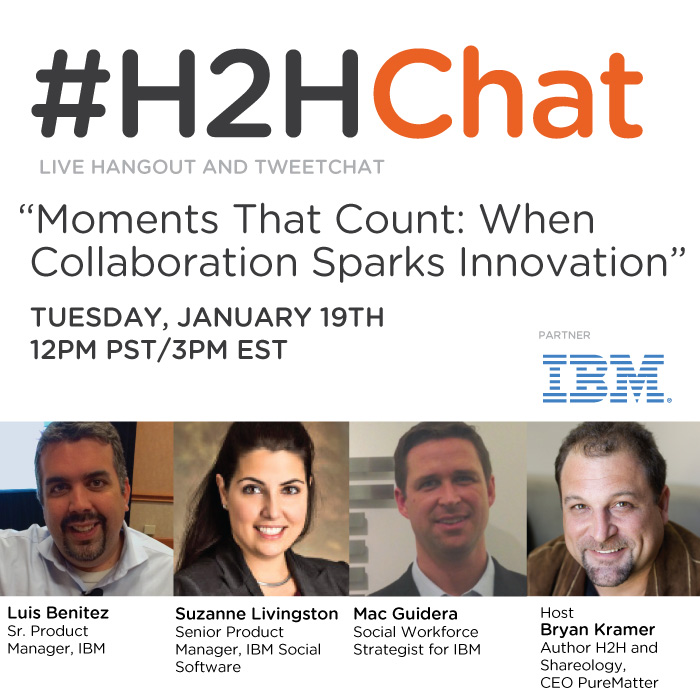
Tomorrow: Join the #H2HChat Moments That Count: When Collaboration Sparks Innovation

View Comments
Tomorrow, I'll be joining my colleagues Suzanne Livingston and Mac Guidera at the Tweetchat hosted by Bryan Kramer to talk about Collaboration and Innovation. We'll talk about the importance of harnessing technology to empower employees towards greater collaboration. Then, we'll discuss the challenges organizations face as they embark upon such transformation and how they can create a workplace culture in which collaboration via digital solutions is valued and practiced. This is a chat that is important for anyone interested in the transformational impact of technology on the workplace.

It all starts at 3pm ET ! We'll be using the #H2HChat hashtag in case you want to join us.


To reserve a seat go here and to follow the conversation live tomorrow check out this page.

Thursday, January 14, 2016

Check Out the Latest IBM Docs 2.0 Demo

View Comments
Happy New Year!

Now that we are back in business in the new year I wanted to take the time to share a bit more on IBM Docs 2.0 beyond the announcement last year. In a very short time, I've already started to hear very good positive feedback on the release which is great !


One of the things that I wanted to share is the latest demo video that we posted over the holidays. The video covers all the basics and you can see how simple it is to take advantage of this capability to create files together with your team members anytime, anywhere!

Check out the 3 minute video below:


As we get ready for IBM Connect 2016 (you are going, right?) you'll also want to reserve time to learn more about IBM Docs. Check out the IBM Connect 2016 Session Preview Tool and add the IBM Docs sessions to your agenda.

To learn more, check out the post from Jim Puckett, our IBM Docs Product Manager . See you at IBM Connect!

Friday, December 18, 2015

Available for Download: IBM Docs 2.0 and IBM Connections 5.5

View Comments
As promised earlier this week, the recently announced IBM Connections 5.5 and IBM Docs 2.0 are now available for download.

As part of the launch, on Wednesday the product managers hosted a webcast to take you through some of the highlights of that release. If you missed it, you can still watch the recording.  Then, yesterday the product managers hosted an "Ask the Product Managers" session. There were so many questions that came in and were answered in hour! That session was also recorded. I did get a suggestion about getting a transcript and posting that for consumption so will look into that.


Below you will also find a presentation similar to what was used at the webcast earlier this week with details on what's new in this release.


And if you want to see IBM Connections 5.5 in action, check out the demo below:


Go get it and happy installing ! (oh and happy holidays and happy new year!)

Friday, December 11, 2015

Webcast: What's New in IBM Connections & IBM Docs (on-premises)

View Comments
As we wrap up the year, and given there are only 20 more days in the year, I can safely say that we are just days away from announcing the next major on-premises release of IBM Connections and IBM Docs. In fact, next week is going to be HUGE ! (if that's not a reveal, I don't know what is).


Next week we will be hosting two events that you'll definitely want to join to get up to speed with all the details around the release.  First, we'll host a webcast to talk about all the new capabilities for IBM Connections, including the always favorite demos!  Here are the details:
  • Title: What’s Coming in the Next Major Release of IBM Connections & IBM Docs (On-Premises)
  • Date: Wednesday, December 16, 2015
  • Time: 11:00 AM Eastern Standard Time
  • Registration link
Next, as a follow up to the webcast, the IBM Connections Product Managers will host a "Ask the Product Managers" session (it's a good opportunity to ask us what you want to know before IBM Connect 2016). Here are the details:
  • Title: Ask the IBM Connections Project Managers 
  • Date: Thursday, December 17, 2015
  • Time: 11:00 AM Eastern Standard Time
  • Registration link
Want to learn more about IBM Connections and Docs ? Check out this video and start a free trial today:


See you next week!

Tuesday, November 24, 2015

Using IBM Docs with IBM Content Navigator for Real-Time Co-Editing

View Comments
As we get ready for another major on-prem release of IBM Docs, IBM's collaborative editing solution, I wanted to share a bit of how IBM Docs integrates with other repositories beyond IBM Connections.

For example, if you are using IBM Content Navigator, you have the option to use IBM Docs on top of that.  With IBM Docs, you can edit Microsoft Office files in their native format directly in the browser, without having to do complicated download and re-upload steps. You can also create brand new spreadsheets, presentations, and documents directly within the browser which accelerates the content creation process.

Here's a quick presentation that one of my colleagues put together as a demo of IBM Docs inside IBM Content Navigator so you can walk through the experience end to end.


And here's a demo so you can see it in action:


And check out what one of our customers has to say. Kleber Bonadia, Director of IT at Flex Contact Center, talks about how they use IBM Connections Files to collaborate with their own customers to support their own rapid growth:


So if you are a using IBM Content Navigator, make sure you don't forget to use IBM Docs as well!

Thursday, November 5, 2015

Gartner Recognizes IBM as a Leader in the 2015 Magic Quadrant for Social Software in the Workplace for IBM Connections

View Comments
Put it in the books! For the 7th year in a row, Gartner has placed IBM as a Leader in their recently released 2015 Magic Quadrant for Social Software in the Workplace* based on IBM Connections.

We are now getting ready for another major release of IBM Connections and organizations continue to report value from deploying a social collaboration platform such as IBM Connections.


If you haven't seen IBM Connections lately, check out this video that we recently published to showcase our secure file editing capabilities for iOS and Android.


So where do we go from here? And don't forget to register for IBM Connect on January 2016. We are also just coming back from IBM Insight 2015 and I shared some content so you can see what was presented there.

Update 16/Nov/2015: To download the report, you can access it from this page. And then start a free trial of IBM Connections!


*Gartner, Magic Quadrant for Social Software in the Workplace, Mike Gotta, Nikos Drakos, Jeffrey Mann, 26 October 2015


Gartner does not endorse any vendor, product or service depicted in its research publications, and does not advise technology users to select only those vendors with the highest ratings or other designation. Gartner research publications consist of the opinions of Gartner's research organization and should not be construed as statements of fact. Gartner disclaims all warranties, expressed or implied, with respect to this research, including any warranties of merchantability or fitness for a particular purpose.

Wednesday, November 4, 2015

IBM Insight 2015 - Check Out What You Missed

View Comments
Last week was a wild ride over at IBM Insight 2015. The IBM Verse and IBM Connections teams were there to share the latest about our products. It was a great opportunity to meet new customers, partners, and fellow IBMers.

One of the highlights of the conference, was the Super Session by my colleague Rob Koplowitz. He co-presented with Jason Silva, the host of the TV show Brain Games (catch it on Netflix). You can watch a replay of his session here:


I co-presented on 3 different sessions around Application Development on top of our cloud platform, Mobile Collaboration, and working with content with IBM's enterprise file sync and share (EFSS) offering, IBM Connections. A key capability here that I wanted to cover was the latest and greatest around IBM Docs. We actually have a major release of IBM Docs coming up here very soon. And given that IBM Docs seamlessly works with IBM Content Navigator it was really well received. If you have IBM Content Navigator, don't forget to take advantage of your entitlement to IBM Docs today!

I've uploaded the presentations so you can see the content that was shared.


So what's next ? You NEED to come to IBM Connect 2016 in January 2016. In fact, John Hernandez invites you personally:

Tuesday, November 3, 2015

IBM Ranked as Leader in the 2015 Aragon Research Globe for Enterprise Social Software

View Comments
And the great news keep piling up as we get ready for another major IBM Connections release. I'm just back from IBM Insight 2015 and will share some content soon about that but wanted to get this out soon!

The latest to hit the wire is that IBM Connections has been ranked as a Leader for the third year in a row in the third Aragon Research Globe for Enterprise Social Software. This is in addition to the Gartner report where IBM came out as a leader in the Enterprise Social Software MQ (more on that soon)!
According to Aragon's announcement, the report evaluates 22 social collaboration vendors against 3 dimensions: Strategy, Performance, and Reach. Based on the evaluation of each vendor, each vendor is placed in 1 of 4 spheres: Leader, Innovator, Specialist or Contender. Again, IBM was ranked as a Leader.

“When it comes to Social Software and Communities, the biggest challenge for the enterprise has been connecting people with critical content and knowledge,”said Jim Lundy, CEO and Lead Analyst at Aragon Research. “Our new Aragon Research Globe for Social Software will help buyers understand the current state of the market and why the market has shifted from feature comparisons to use cases, and how ESNs are helping the enterprise get to faster outcomes.”

Aragon called out the growing number of apps available for IBM Connections: With its growing set of partner apps, IBM Connections can be configured to meet multiple business user needs.

A great example of a customer reaping the benefits of becoming a social business with IBM Connections is Verisure. Check out this video where they share the benefits that they've seen:


Update 19/Nov/2015: To download and read the report, click here. To start a free trial of IBM Connections in cloud, go here.

Monday, October 12, 2015

Social Connections 9 - The IBM Connections User Group Puts Together An Awesome Agenda

View Comments
In just a few weeks, the 9th Social Connections will kick off and it has one of the best agendas ever. If I counted correctly, there's 70 sessions over two days so I'm sure what whatever content you are looking for, it'll be there. With a focus on IBM Connections and Social Business, this is a first-class event for the user community. If you are working with, using, or what to learn more about IBM Connections, you need to make every effort to attend!


At the end of the first day, attendees will head out to Sensapolis and from what I can tell, it's going to be a fun night !


As it tends to happen with this user group conference, the timing seems to line up with our next IBM Connections release. As announced at IBM ConnectED earlier this year, we are getting close to releasing our next major on prem release of IBM Connections.  This year, RenΓ© Schimmer will be attending the conference and will share all the details about What's Coming in IBM Connections Next.


Ready to sign up ? Register here ! Oh and don't forget to follow the Social Connections team on Twitter and like their page on Facebook to keep up with all the news about the event.