It's been a couple of months now since my last project on Node.js . The other day I wanted to set up an example of a dashboard with sentiment coming from Twitter around a keyword.
To keep things simple, I used IFTTT to export tweets to a CSV file. With that I could then use Watson's libraries to measure sentiment. To start, I created a new trial account on BlueMix. Once there, go to Services - Watson - Create Watson service. Once there pick Natural Language Understanding and it will create an instance of the service. This Watson service helps to make sense out of pretty much any text.
The screen should look like this:
With the tweets now in a CSV and Watson at the ready, it was time to put the pieces together with node.js. I took advantage of the following node.js libraries: csv-parser, csv-write-stream, watson-developer-cloud.
Let me walk through the code (which I'll put on Github soon). First, import and setup the libraries (you get the Watson credentials directly from Bluemix and my preference is to store them as environment variables):
Next, read the CSV, parse it, measure it and write a new CSV out all with this one line of code:
The function sentimentFromWatson is key above. That function takes advantage of the Watson library already available. Here's what that function looks like:
And that's it! In total, you have a quick sample in 20-30 lines of code to measure sentiment from Twitter. Below is the graphic that I created. In a span of a weekend, the keyword that I was monitoring had some positive tweets and others that were negative. Overall, that weekend was pretty neutral.
(Note: the free plan for Watson Natural Language Understanding gives you 1,000 calls / day. If you expect more than 1,000 tweets / day you'll need a paid plan).
Overall, this took me about 30 minutes to put together and a bit of troubleshooting. If you haven't played with Node.js and Watson yet, go for it!
How Social Business Accelerates Innovation in the Workplace from the perspective of a Millennial
Showing posts with label development. Show all posts
Wednesday, May 31, 2017
Thursday, November 3, 2016
IBM Watson Workspace -- Code Talks So Here's The First Samples
Time for the next post on IBM Watson Workspace. In this post I wanted to share some code samples that could help you get going in your development of apps for IBM Watson Workspace using the IBM Watson Work Services and APIs.
I know many developers, including myself, learn a lot from code samples (probably more than using actual API documentation). So to build on my post from earlier this week, we have published the first 5 code samples into the Watson Work org in Github and there should be more posted this week and next. My samples are the Twitter and Weather apps. I built these as fully functioning apps that you can deploy to a server and get up and going in a few minutes. And once they are running, feel free to hack away!
To make things simpler, I've also included a one-click button to deploy the app to Bluemix (which I thought was freaking cool how they make this possible). This, however, is not a required step. If you want to use with another cloud provider, by all means. Back to Bluemix, when you click the button, Bluemix pulls down the code from Github and magically gets it up and running.
One cool thing is that even before the samples were available, I already picked up a few blogs of developers using the APIs:
I know many developers, including myself, learn a lot from code samples (probably more than using actual API documentation). So to build on my post from earlier this week, we have published the first 5 code samples into the Watson Work org in Github and there should be more posted this week and next. My samples are the Twitter and Weather apps. I built these as fully functioning apps that you can deploy to a server and get up and going in a few minutes. And once they are running, feel free to hack away!
To make things simpler, I've also included a one-click button to deploy the app to Bluemix (which I thought was freaking cool how they make this possible). This, however, is not a required step. If you want to use with another cloud provider, by all means. Back to Bluemix, when you click the button, Bluemix pulls down the code from Github and magically gets it up and running.
One cool thing is that even before the samples were available, I already picked up a few blogs of developers using the APIs:
- https://redbooth.com/blog/ibm-watson-workspace-integration
- https://guedebyte.wordpress.com/2016/10/28/watson-workspace-work-services-needs-code-code-code-community-code-code-and-even-more-code-and-community/
- https://blog.rocketsoftware.com/2016/10/live-ibm-world-watson-putting-business-social/
- https://kbild.ch/2016/10/watson-workspace-send-nagios-monitoring-alerts-to-a-ww-space/
- http://opentopic.com/ibm-workspaces/
- http://blog.sapho.com/sapho-ibm-watson-workspace-collaboration-and-productivity-made-easy
Welcome #watsonworkspace! Nice that you join my sidebar in my Eclipse / IBM Notes Client. Next Step: Post a message! pic.twitter.com/7C4hyz6MDt— Christian Güdemann (@guedeWebGate) October 31, 2016
So quick tour of the Weather app. It uses the Weather Underground APIs to get current conditions based on a US zipcode. I use the node module to convert the zip code to city and state:
With that info, I now call the Weather Underground APIs to get the current conditions:
Now with the data that I get back, I build a message to post back to IBM Watson Workspace and put it in the appropriate JSON construct:
and then call the API to post it back:
So that should give you an idea on how to listen to a conversation, act on it, and then respond back. I followed a similar flow to build the Twitter app and my hope is you can take it and hack it to build your own. And if you are in the mood to help improve these samples, pull requests are welcome!
Now definitely check out what Redbooth, Rocket, OpenTopic, Sapho and others have done... VERY COOL! (and just to make it more enticing.. Sapho for example has Marketo and Google Adword integration... )
const cityState = zipcode.lookup(zc);
With that info, I now call the Weather Underground APIs to get the current conditions:
client.conditions(opts, function(err, data) {
Now with the data that I get back, I build a message to post back to IBM Watson Workspace and put it in the appropriate JSON construct:
const messageData = { type: "appMessage", version: 1.0, annotations: [ { type: "generic", version: 1.0, color: "#D5212B", title: "Current weather conditions", text: message } ] };
and then call the API to post it back:
request(sendMessageOptions, (err, response, body) => {
So that should give you an idea on how to listen to a conversation, act on it, and then respond back. I followed a similar flow to build the Twitter app and my hope is you can take it and hack it to build your own. And if you are in the mood to help improve these samples, pull requests are welcome!
Now definitely check out what Redbooth, Rocket, OpenTopic, Sapho and others have done... VERY COOL! (and just to make it more enticing.. Sapho for example has Marketo and Google Adword integration... )
Tuesday, November 1, 2016
Building apps with IBM Watson Work Services
Last week we launched IBM Watson Workspace and IBM Watson Work Services and one of the crtical aspects of this launch is the platform and extensibility provided by these offerings.
Miguel Estrada, Joe Russo, and myself had a session at IBM World of Watson 2016 to talk about the capabilities of the platform. To recap, the idea of IBM Watson Work Services is to provide a platform that understands conversations in context. IBM Watson Workspace is a great example of what you can do with that platform since it's, well, built on the platform! In fact, you use the platform services to extend the IBM Watson Workspace app.
As we worked towards the launch, we worked with various partners and developers who were interested in using these APIs. At the conference last week, we were able to show integration with Sapho, OpenTopic, Kenexa, DocuSign, Salesforce, Redbooth, Rocket, and more.
Here are our slides:
Now here's some good news. I know a lot of developers learn from code samples and I'm happy to announce that our first code samples are now available on Github: http://github.com/watsonwork. Feel free to fork and contribute as well!
When you are ready to start creating apps, head out to https://workspace.ibm.com/developer/apps and you can start getting them registered there. Once you get them registered, go the settings for any space, and in the apps menu you'll be able to see your apps and add them to the space. It'll look something like this (those are 3 sample apps that I've built and will be sharing in the GitHub link above):
I also recorded a quick demo of the developer experience to get you going faster. Check it out here:
Now go on and start building your apps! I can't wait to see what you'll show at IBM Connect 2017. There are 111 days left - GO GO GO!
Miguel Estrada, Joe Russo, and myself had a session at IBM World of Watson 2016 to talk about the capabilities of the platform. To recap, the idea of IBM Watson Work Services is to provide a platform that understands conversations in context. IBM Watson Workspace is a great example of what you can do with that platform since it's, well, built on the platform! In fact, you use the platform services to extend the IBM Watson Workspace app.
As we worked towards the launch, we worked with various partners and developers who were interested in using these APIs. At the conference last week, we were able to show integration with Sapho, OpenTopic, Kenexa, DocuSign, Salesforce, Redbooth, Rocket, and more.
Here are our slides:
Now here's some good news. I know a lot of developers learn from code samples and I'm happy to announce that our first code samples are now available on Github: http://github.com/watsonwork. Feel free to fork and contribute as well!
When you are ready to start creating apps, head out to https://workspace.ibm.com/developer/apps and you can start getting them registered there. Once you get them registered, go the settings for any space, and in the apps menu you'll be able to see your apps and add them to the space. It'll look something like this (those are 3 sample apps that I've built and will be sharing in the GitHub link above):
I also recorded a quick demo of the developer experience to get you going faster. Check it out here:
Now go on and start building your apps! I can't wait to see what you'll show at IBM Connect 2017. There are 111 days left - GO GO GO!
Friday, May 6, 2016
ICYMI: The XPages Runtime is Now Available in IBM Bluemix
Earlier this year, we had announced the availability of the XPages runtime as beta in IBM Bluemix. Then at IBM Connect, XPages on Bluemix was featured during the keynote where a quick app was built integrated with Watson to quickly tag / categorize images using the Watson Image Analyzer service.
So in case you missed it, earlier this week, the XPages runtime for IBM Bluemix went from Beta to full release, generally available.
This allows developers already familiar with the XPages framework to leverage the power of IBM Bluemix to quickly build powerful apps in the cloud, possibly integrated with other Bluemix services (like Watson). For added security, you can connect to your existing user directory for ID management.
It's now been a couple of days and it's been great to see the reaction over Twitter and other social channels.
If you still haven't seen XPages, To help get you up to speed on developing XPages applications on Bluemix, here is a list of videos we have published in the past.
Ready to get started? Check out how to build apps with XPages for Bluemix. Can't wait to see the apps that you build!
So in case you missed it, earlier this week, the XPages runtime for IBM Bluemix went from Beta to full release, generally available.
This allows developers already familiar with the XPages framework to leverage the power of IBM Bluemix to quickly build powerful apps in the cloud, possibly integrated with other Bluemix services (like Watson). For added security, you can connect to your existing user directory for ID management.
It's now been a couple of days and it's been great to see the reaction over Twitter and other social channels.
If you still haven't seen XPages, To help get you up to speed on developing XPages applications on Bluemix, here is a list of videos we have published in the past.
- XPages has landed
- Boilerplate tutorial
- Designer tooling
- XPages Service
- Node.js + REST + service
- Hybrid applications
Ready to get started? Check out how to build apps with XPages for Bluemix. Can't wait to see the apps that you build!
Monday, April 25, 2016
How To Edit Files in Sharepoint or Box with IBM Docs
One of the capabilities that we highlighted as part of the IBM Docs 2.0 release was the new set of APIs to allow real-time co-editing of files in repositories other than IBM Connections (e.g. Alfresco, SharePoint, etc).
So first, what is IBM Docs ? The goal of IBM Docs is to make it easier for teams to create and allow for collaborative editing of word processing, spreadsheet and presentation documents in real time. This online editor provides key collaborative services such as coediting, file management and contextual commenting (so you can see who typed what).
At IBM Connect earlier this year, Jim Puckett, product manager for IBM Docs, shared an overview of IBM Docs which you can see here:
With the new set of APIs you can now build collaborative applications. So if you are an ISV looking for a way to embed co-editing, check out IBM Docs. Van Staub first shared how to integrate Docs with any app. Then he took it to the next level and describes how to edit files stored in SharePoint with IBM Docs.
Last week, IBM published a tech note that describes the process to set up IBM Docs to edit files stored in Box. This provides a common editing capabilities for files, irrespective of where they are stored.
Want to learn more ? Come to Social Connections 10 in Toronto in early June! Check out the full agenda that was just announced last week. Register today!
See you there!
So first, what is IBM Docs ? The goal of IBM Docs is to make it easier for teams to create and allow for collaborative editing of word processing, spreadsheet and presentation documents in real time. This online editor provides key collaborative services such as coediting, file management and contextual commenting (so you can see who typed what).
At IBM Connect earlier this year, Jim Puckett, product manager for IBM Docs, shared an overview of IBM Docs which you can see here:
With the new set of APIs you can now build collaborative applications. So if you are an ISV looking for a way to embed co-editing, check out IBM Docs. Van Staub first shared how to integrate Docs with any app. Then he took it to the next level and describes how to edit files stored in SharePoint with IBM Docs.
Last week, IBM published a tech note that describes the process to set up IBM Docs to edit files stored in Box. This provides a common editing capabilities for files, irrespective of where they are stored.
Want to learn more ? Come to Social Connections 10 in Toronto in early June! Check out the full agenda that was just announced last week. Register today!
See you there!
Tags:
box,
business-partners,
cloud,
connect,
development,
docs,
documentation,
files,
integration,
sharepoint,
social-business
Wednesday, April 13, 2016
From IBM Connect: Visualizing the IBM Connections Profiles Data
One of the great things of IBM Connect is all the great content that's shared. I remember going to my first conference and readily absorbing as much content as possible and putting it into practice. Of course, with so much content, sometimes you can't attend all sessions. It's all good, however, when speakers choose to share their content in platforms such as Slideshare.
I recently ran into this deck that Matt Milza shared and figured I would re-share as it's a great example of what can be done with the IBM Connections APIs. In the presentation, Matt provides a background on the APIs, examples on how to interact with them, and then shows a practical implementation of something he did for a customer.
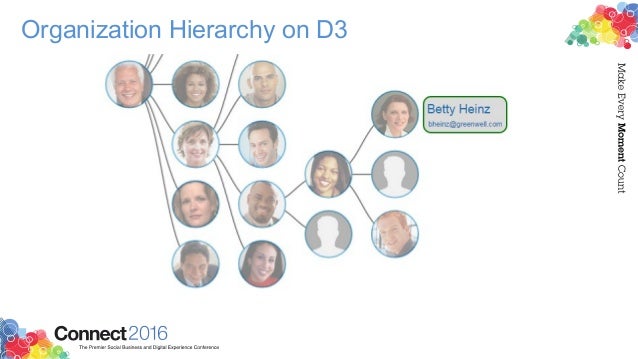
Using the social data stored within the system, Matt created this simple visualization of the report-to chain for an organization.
To walk through the process, check this out:
Want to learn more about building apps for IBM Connections? Check out: http://developer.ibm.com/social/
I recently ran into this deck that Matt Milza shared and figured I would re-share as it's a great example of what can be done with the IBM Connections APIs. In the presentation, Matt provides a background on the APIs, examples on how to interact with them, and then shows a practical implementation of something he did for a customer.
Using the social data stored within the system, Matt created this simple visualization of the report-to chain for an organization.
To walk through the process, check this out:
Want to learn more about building apps for IBM Connections? Check out: http://developer.ibm.com/social/
Tags:
api,
conference,
connect,
connections,
development,
dojo,
intranet,
presentations,
profiles,
verse
Monday, March 21, 2016
TimeToAct Brings Custom Apps and Forms to IBM Connections
TimeToAct recently announced new capabilities for IBM Connections Communities as part of their XCC Social Intranet solution.
If you are not familiar with XCC, it's a lightweight Web Content Management System that integrates into IBM Connections. It enhances IBM Connections with classic Web Content Management capabilities and thus integrates the two antipodes of an intranet, i.e. peer-to-peer collaboration with internal (top-down) communications.
For example, you can use the Atom/RSS Feed App, Clipping App, HTML App, and now the Forms Builder App. This app allows business users to quickly build simple apps to collect and report on information without having to code anything.
What's cool about this is that it opens up the possibilities for everyone in the organization to create simple apps. This in turn drives engagement and adoption which accelerates ROI.
In the video below, you'll see how easy you can build Forms to build an HR form to submit open positions or apply to open positions. The video also shows an example of building a media gallery (for example to have users post classifieds).
To learn more, visit http://connections-apps.com/product/xcc-web-content-custom-apps-for-ibm-connections/#contact
If you are not familiar with XCC, it's a lightweight Web Content Management System that integrates into IBM Connections. It enhances IBM Connections with classic Web Content Management capabilities and thus integrates the two antipodes of an intranet, i.e. peer-to-peer collaboration with internal (top-down) communications.
For example, you can use the Atom/RSS Feed App, Clipping App, HTML App, and now the Forms Builder App. This app allows business users to quickly build simple apps to collect and report on information without having to code anything.
What's cool about this is that it opens up the possibilities for everyone in the organization to create simple apps. This in turn drives engagement and adoption which accelerates ROI.
In the video below, you'll see how easy you can build Forms to build an HR form to submit open positions or apply to open positions. The video also shows an example of building a media gallery (for example to have users post classifieds).
To learn more, visit http://connections-apps.com/product/xcc-web-content-custom-apps-for-ibm-connections/#contact
Tags:
atom,
business-partners,
business-value,
cloud,
connections,
development,
feb,
forms,
integration,
intranet,
rss,
social-business
Wednesday, February 10, 2016
From IBM Connect 2016: XPages App Built on Bluemix Using Watson and IBM Connections Cloud
Last week at IBM Connect 2016, Chris Crummey demoed a sample app built on the XPages runtime running on Bluemix.
The app combines IBM Connections Cloud, IBM Watson Analytics and IBM Bluemix. The idea is that the app allows you to upload images and then uses IBM Watson (the Visual Recognition Service) to help with automatic classification of the files. Based on the image that has been uploaded, Watson will then suggest some tags to use with the file.
Here's a recap of that demo:
Here's a photo from Daniel Brix on Twitter that showed it on the big screen:
If you missed IBM Connect 2016, well, you missed a great show! I'll share some more content from the conference in upcoming posts so stay tuned to those. For now, I quickly wanted to get this out and then work on my IBM InterConnect 2016 sessions.
The app combines IBM Connections Cloud, IBM Watson Analytics and IBM Bluemix. The idea is that the app allows you to upload images and then uses IBM Watson (the Visual Recognition Service) to help with automatic classification of the files. Based on the image that has been uploaded, Watson will then suggest some tags to use with the file.
Here's a recap of that demo:
Here's a photo from Daniel Brix on Twitter that showed it on the big screen:
If you missed IBM Connect 2016, well, you missed a great show! I'll share some more content from the conference in upcoming posts so stay tuned to those. For now, I quickly wanted to get this out and then work on my IBM InterConnect 2016 sessions.
Tags:
bluemix,
cloud,
conference,
connect,
connections,
demo,
development,
files,
integration,
watson,
xpages
Monday, January 25, 2016
The IBM Connections Cloud January 2016 is Now Available
Just in time for IBM Connect 2016, there are now more capabilities that have been added to IBM Connections Cloud.
Here's a snapshot of what's new this month:
Real-time alerts help you focus on items that need your attention
Stay up to date with things that require your attention and response. The new notification center in the navigation bar increases your awareness less disruptively. See alerts with a single click - no matter where you are in the service. Allows you stay on track or swiftly shift gears depending on what is required at the moment. Note: This is slowly rolling out to all customers. If you don't see it, you'll have it by end of the month.

Organize your files how you want to
Now you can create nested folders to organize your content in a familiar hierarchy. You can create sub-folders within folders to give your content a structure that makes it easier for you and other users to manage content. For both My Files and Community Files , you can build a hierarchy of folders with tree-navigation on the side of the Connections Files page.

Nested folders are also supported in the Connections Mobile app and in the IBM Connections Desktop Plugins for Microsoft Windows and the IBM Connections Plugin for Microsoft Outlook when syncing your offline files with Connections Files in the cloud.
Here's a snapshot of what's new this month:
Real-time alerts help you focus on items that need your attention
Stay up to date with things that require your attention and response. The new notification center in the navigation bar increases your awareness less disruptively. See alerts with a single click - no matter where you are in the service. Allows you stay on track or swiftly shift gears depending on what is required at the moment. Note: This is slowly rolling out to all customers. If you don't see it, you'll have it by end of the month.

Leverage 3rd party apps to maximize value of Communities
Community owners can add third-party apps to Communities. A new extension point opens up the possibilities for Independent Software Vendors (ISVs) to create apps for Communities. Developers can now write custom responsive apps that can be surfaced within Communities. Community owners don't have to do anything different from what they do today. As soon as a new third party app has been approved by the administrator, it'll be available for all community owners of that organization. AppFusions has already taken advantage of this integration and has created a Community app for OneDrive. Check out the demo below:
Organize your files how you want to
Now you can create nested folders to organize your content in a familiar hierarchy. You can create sub-folders within folders to give your content a structure that makes it easier for you and other users to manage content. For both My Files and Community Files , you can build a hierarchy of folders with tree-navigation on the side of the Connections Files page.

Nested folders are also supported in the Connections Mobile app and in the IBM Connections Desktop Plugins for Microsoft Windows and the IBM Connections Plugin for Microsoft Outlook when syncing your offline files with Connections Files in the cloud.
Drag and drop support added on Microsoft Windows
Also new in January is the ability to drag and drop files from the Windows desktop directly to an IBM Connections folder in the IBM Connections Desktop Plugins for Microsoft Windows .
Improved user experience working with files
The sidebar is now resizable and labels have replaced the icons on the tabs making it easier to navigate and view information and comments.

Also new in January is the ability to drag and drop files from the Windows desktop directly to an IBM Connections folder in the IBM Connections Desktop Plugins for Microsoft Windows .
Improved user experience working with files
The sidebar is now resizable and labels have replaced the icons on the tabs making it easier to navigate and view information and comments.

To see what else is new, check out this page. Hope to see you next week at IBM Connect 2016!
Tags:
cloud,
communities,
connections,
development,
files,
homepage,
integration,
notifications,
plugins
Thursday, January 21, 2016
XPages Runtime Beta Now Available on Bluemix
As it's typical by this time of the year with IBM Connect just around the corner we start to hear about advancements in many of our product areas.
Go and check out the beta XPages runtime and come to IBM Connect 2016 in Orlando, next week. That will be a great opportunity to learn more about the service. If you go to the IBM Connect Session Preview Tool, you'll find plenty of sessions to meet the experts on XPages. Specifically, the following sessions will give you a strong introduction to Bluemix and the IBM XPages for Bluemix runtime:
Want more ?? Brian shared more XPages on Bluemix videos in his blog announcement.
Hope to see you next week at IBM Connect 2016 next year! As per Brian's blog, please share your feedback over at dW Answers and please tag your entries with xpages-runtime.
As you may have seen in the IBM Bluemix blog, the XPages runtime moves from experimental and enters the BETA release phase on Bluemix. For the last 6 months we've had the XPages runtime available on IBM Bluemix as an experimental service. Now we are taking this to the next phase as we continue to prepare for a general release later this year.
Go and check out the beta XPages runtime and come to IBM Connect 2016 in Orlando, next week. That will be a great opportunity to learn more about the service. If you go to the IBM Connect Session Preview Tool, you'll find plenty of sessions to meet the experts on XPages. Specifically, the following sessions will give you a strong introduction to Bluemix and the IBM XPages for Bluemix runtime:
AD1529 – IBM Domino App.Next – Broadening Your Horizons with Bluemix
AD1542 – Get Hands-On with XPages Apps for Bluemix
Check out this quick intro from Brian:
AD1542 – Get Hands-On with XPages Apps for Bluemix
Check out this quick intro from Brian:
Want more ?? Brian shared more XPages on Bluemix videos in his blog announcement.
Hope to see you next week at IBM Connect 2016 next year! As per Brian's blog, please share your feedback over at dW Answers and please tag your entries with xpages-runtime.
Wednesday, November 4, 2015
IBM Insight 2015 - Check Out What You Missed
Last week was a wild ride over at IBM Insight 2015. The IBM Verse and IBM Connections teams were there to share the latest about our products. It was a great opportunity to meet new customers, partners, and fellow IBMers.
One of the highlights of the conference, was the Super Session by my colleague Rob Koplowitz. He co-presented with Jason Silva, the host of the TV show Brain Games (catch it on Netflix). You can watch a replay of his session here:
I co-presented on 3 different sessions around Application Development on top of our cloud platform, Mobile Collaboration, and working with content with IBM's enterprise file sync and share (EFSS) offering, IBM Connections. A key capability here that I wanted to cover was the latest and greatest around IBM Docs. We actually have a major release of IBM Docs coming up here very soon. And given that IBM Docs seamlessly works with IBM Content Navigator it was really well received. If you have IBM Content Navigator, don't forget to take advantage of your entitlement to IBM Docs today!
I've uploaded the presentations so you can see the content that was shared.
So what's next ? You NEED to come to IBM Connect 2016 in January 2016. In fact, John Hernandez invites you personally:
One of the highlights of the conference, was the Super Session by my colleague Rob Koplowitz. He co-presented with Jason Silva, the host of the TV show Brain Games (catch it on Netflix). You can watch a replay of his session here:
I co-presented on 3 different sessions around Application Development on top of our cloud platform, Mobile Collaboration, and working with content with IBM's enterprise file sync and share (EFSS) offering, IBM Connections. A key capability here that I wanted to cover was the latest and greatest around IBM Docs. We actually have a major release of IBM Docs coming up here very soon. And given that IBM Docs seamlessly works with IBM Content Navigator it was really well received. If you have IBM Content Navigator, don't forget to take advantage of your entitlement to IBM Docs today!
I've uploaded the presentations so you can see the content that was shared.
So what's next ? You NEED to come to IBM Connect 2016 in January 2016. In fact, John Hernandez invites you personally:
Tags:
bluemix,
cognitive,
collaboration,
conference,
connections,
development,
docs,
domino,
file-sync,
files,
ibm,
insight,
integration,
mobile,
presentations,
social-business
Monday, June 22, 2015
The IBM Connections Cloud June 2015 Release Is Now Live -- Check it out!
Over the weekend we pushed out updates to our IBM Connections Cloud users (for those fathers out there, consider it a Happy Father's Day gift).
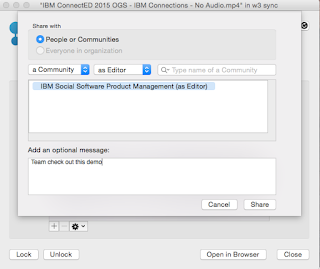
You will find updates throughout the experience both in the web and desktop. For example, for Mac users you can now share files with Communities directly from Finder without ever needing to open a browser. Just right-click on the file, and voilá:
Another update this month was for developers. Developers can now take advantage of the embedded experience extension point within the Activity Stream. Each person and community has an activity stream (which follows the ActivityStrea.ms / OpenSocial 2.0 standard) which allows 3rd party apps to inject events into it (e.g. you could get alerts from an app telling you that an approval is required).
One of the first developers to take advantage of this in the cloud is AppFusions. They've now built connectors that are sure to please various roles within an organization. For example, if you want to get updates to files updates in Box, you can. If you want to get updates when new code has been submitted to GitHub, you can. Or maybe you are a marketer and want to stay up to date with updates from Twitter.
Check out this video to see it in action!
The following slides summarize all the cool new things that are now available for IBM Connections cloud users. Check these out to get an idea of what else is new:
And stay tuned for more news very very soon...
You will find updates throughout the experience both in the web and desktop. For example, for Mac users you can now share files with Communities directly from Finder without ever needing to open a browser. Just right-click on the file, and voilá:

Another update this month was for developers. Developers can now take advantage of the embedded experience extension point within the Activity Stream. Each person and community has an activity stream (which follows the ActivityStrea.ms / OpenSocial 2.0 standard) which allows 3rd party apps to inject events into it (e.g. you could get alerts from an app telling you that an approval is required).
One of the first developers to take advantage of this in the cloud is AppFusions. They've now built connectors that are sure to please various roles within an organization. For example, if you want to get updates to files updates in Box, you can. If you want to get updates when new code has been submitted to GitHub, you can. Or maybe you are a marketer and want to stay up to date with updates from Twitter.
Check out this video to see it in action!
The following slides summarize all the cool new things that are now available for IBM Connections cloud users. Check these out to get an idea of what else is new:
And stay tuned for more news very very soon...
Tags:
business-partners,
cloud,
communities,
connections,
development,
docs,
files,
integration,
mac,
social-business
Tuesday, April 21, 2015
How To Integrate Your App with IBM Connections Cloud with 2 Lines of Code
Last week I was at the IBM Connections user group conference, called Social Connections, in Boston MA. There, I got the opportunity to meet with many end users as well as developers interested in building apps for IBM Connections.
A particular session that I got great feedback from developers was the one titled Mastering the IBM Connections Developers Experience. Vijay Francis and Paul Bastide took the audience through the options to integrate with IBM Connections Cloud. One of the samples was how to take an existing app and bring in our navigation components into it in less than 30 seconds!
So imagine you have an app like this:
Now let's take that and add the IBM Connections Cloud navigation to it. Add a couple of lines of code and boom!
Now, you have an easy and consistent way for users to go back and forth between your app and the main Connections interface. So how did I do this? As easy as 1-2-3:
For more information check out these links:
A particular session that I got great feedback from developers was the one titled Mastering the IBM Connections Developers Experience. Vijay Francis and Paul Bastide took the audience through the options to integrate with IBM Connections Cloud. One of the samples was how to take an existing app and bring in our navigation components into it in less than 30 seconds!
So imagine you have an app like this:

Now let's take that and add the IBM Connections Cloud navigation to it. Add a couple of lines of code and boom!

Now, you have an easy and consistent way for users to go back and forth between your app and the main Connections interface. So how did I do this? As easy as 1-2-3:
- Add the following before the closing body tag in your web app
<script src="https://apps.na.collabserv.com/navbar/banner/partner/navBar?oneui=3" type="text/javascript"></script>
- Add the following to the head tag
<link href="http://apps.na.collabserv.com/theming/theme/css/3" rel="stylesheet" type="text/css"></link>
- Add the following CSS classes to your opening body tag
class="lotusui30 lotusui30_body lotusui30_fonts scloud3"
For more information check out these links:
- Add the Connections banner to your app
- IBM Connections Cloud Navigation Tips & Tricks - Van Staub
- Seamless User Experience with IBM Connections Cloud - Paul Bastide
- Reuse the IBM Connections Cloud Banner in Apps - Niklas Heidloff
- How to Build a Hello World App for IBM Connections
- IBM Connections Developers - http://developer.ibm.com/social
Monday, February 2, 2015
IBM ConnectED 2015 Keynote Recap - the IBM Connections Demo
It's hard to believe that just a week ago was the keynote (aka OGS ... aka the Opening General Session) at IBM ConnectED . This year I again had the opportunity to demo during the keynote and present IBM Connections Next, the next iteration of our market leading enterprise social collaboration platform.
Prior to the demos, some interesting stats were shared. The one that caught my attention the most is that the IBM Verse announcement gathered more impressions than any other IBM announcement, including Watson, the IBM + Apple partnership and the IBM + Twitter partnership. That's HUGE!
The onto the demos. This year, Scott Souder focused on IBM Verse and I focused exclusively on IBM Connections. I wanted the audience to take a way a few things: 1) our focus on design, 2) our focus on helping people understand what's important so you can work on what matters, and 3) our focus on reducing interruptions.
(photo credit: Ed Brill)
Updated 11/Feb/2015: Here's a recording of the OGS (and you can skip to 37:30 for the IBM Connections demo):
For another perspective, one of the attendees in the first row captured the keynote and made it available in YouTube. Enjoy the keynote here (and you can skip to 54:00 for the IBM Connections demo):
And here's a sampling of the tweets during the OGS:
Beyond IBM Connections Next, there was also an announcement for a new IBM Connections offering that's just for Files. This will be the lead offering to compete in the Enterprise File Sync and Share space. This is in response to many users loving our file sync capabilities, and in some cases asking for just that (without the other collaboration aspects from Connections such as Communities, Wikis, Blogs, etc). Analysts have also already highly rated IBM as a leader in the Enterprise File Sync and Share space.
This new offering will give you Files only, along with expertise search, social analytics and access to our desktop and mobile apps. Users will have the option to buy upgrade to other cloud offerings such as Chat, IBM Verse, Web Meetings, IBM Docs, etc. The offering will be available as part of our March 2015 deployment.
Additionally, customers looking for compliance will be able to start using the Actiance Vantage offering with IBM Connections Cloud soon.
From the OGS, I headed over to the Dolphin for the What's New and Coming in IBM Connections and IBM Connections Mobile. I'll cover that in the next post.
Prior to the demos, some interesting stats were shared. The one that caught my attention the most is that the IBM Verse announcement gathered more impressions than any other IBM announcement, including Watson, the IBM + Apple partnership and the IBM + Twitter partnership. That's HUGE!
The onto the demos. This year, Scott Souder focused on IBM Verse and I focused exclusively on IBM Connections. I wanted the audience to take a way a few things: 1) our focus on design, 2) our focus on helping people understand what's important so you can work on what matters, and 3) our focus on reducing interruptions.

Updated 11/Feb/2015: Here's a recording of the OGS (and you can skip to 37:30 for the IBM Connections demo):
For another perspective, one of the attendees in the first row captured the keynote and made it available in YouTube. Enjoy the keynote here (and you can skip to 54:00 for the IBM Connections demo):
And here's a sampling of the tweets during the OGS:
Beyond IBM Connections Next, there was also an announcement for a new IBM Connections offering that's just for Files. This will be the lead offering to compete in the Enterprise File Sync and Share space. This is in response to many users loving our file sync capabilities, and in some cases asking for just that (without the other collaboration aspects from Connections such as Communities, Wikis, Blogs, etc). Analysts have also already highly rated IBM as a leader in the Enterprise File Sync and Share space.
This new offering will give you Files only, along with expertise search, social analytics and access to our desktop and mobile apps. Users will have the option to buy upgrade to other cloud offerings such as Chat, IBM Verse, Web Meetings, IBM Docs, etc. The offering will be available as part of our March 2015 deployment.
Additionally, customers looking for compliance will be able to start using the Actiance Vantage offering with IBM Connections Cloud soon.
From the OGS, I headed over to the Dolphin for the What's New and Coming in IBM Connections and IBM Connections Mobile. I'll cover that in the next post.
Monday, September 29, 2014
New Release of IBM Connections Social Cloud Is Here
Here's one way to start the week on a high note. Over the weekend, we enabled the latest features for our Q3 (or fall release) of IBM Connections Social Cloud, which, as you can tell off the bat, features a new name and tons of goodies. Mitch and Chris had already shared the news about the new name, which we made public back in January of this year at IBM Connect 2014.
You may have already seen the blog from last week from Rebecca Buisan which previewed some of the things that we turned on this past weekend. Let me take the opportunity to go into a bit more detail.
First, you'll notice that we have a brand new site over at http://ibmcloud.com/social as you can see above. We want to make it easy to find what you need and direct your attention to what matters. As you may remember, last month we turned on video chat. This month, we've added features to make it easier to find experts, synchronize your files to the desktop, and increased engagement capabilities by using @mentions in more content areas (for example, forums, to-do's and more). I'm not fond of text, so check out this presentation for all the details of what's new:
How's that for a release ? But wait...! There's more!
Developers.. we haven't forgotten about you!! We are launching a new site just for you over at http://developer.ibm.com/social (screenshot above) very soon. We are going to be doing some continuous updates to this page so expect to see more changes soon. Additionally, we've created a schedule to continuously share content with you via the team blog. This will get you more content from more people and gives a hand to the super awesome Niklas Heidloff. If you haven't subscribed to that one, do it now.
Want to get your hands on all of this? Start a trial today over at http://ibmcloud.com/social .
You may have already seen the blog from last week from Rebecca Buisan which previewed some of the things that we turned on this past weekend. Let me take the opportunity to go into a bit more detail.
First, you'll notice that we have a brand new site over at http://ibmcloud.com/social as you can see above. We want to make it easy to find what you need and direct your attention to what matters. As you may remember, last month we turned on video chat. This month, we've added features to make it easier to find experts, synchronize your files to the desktop, and increased engagement capabilities by using @mentions in more content areas (for example, forums, to-do's and more). I'm not fond of text, so check out this presentation for all the details of what's new:
How's that for a release ? But wait...! There's more!
Developers.. we haven't forgotten about you!! We are launching a new site just for you over at http://developer.ibm.com/social (screenshot above) very soon. We are going to be doing some continuous updates to this page so expect to see more changes soon. Additionally, we've created a schedule to continuously share content with you via the team blog. This will get you more content from more people and gives a hand to the super awesome Niklas Heidloff. If you haven't subscribed to that one, do it now.
Want to get your hands on all of this? Start a trial today over at http://ibmcloud.com/social .
Tags:
blogs,
business-value,
cloud,
communities,
connections,
development,
documentation,
file-sync,
files,
integration,
iOS,
mobile,
profiles,
search
Friday, April 25, 2014
Developers: Learn About Adding Social Features to Existing Apps with the IBM Connections SDK
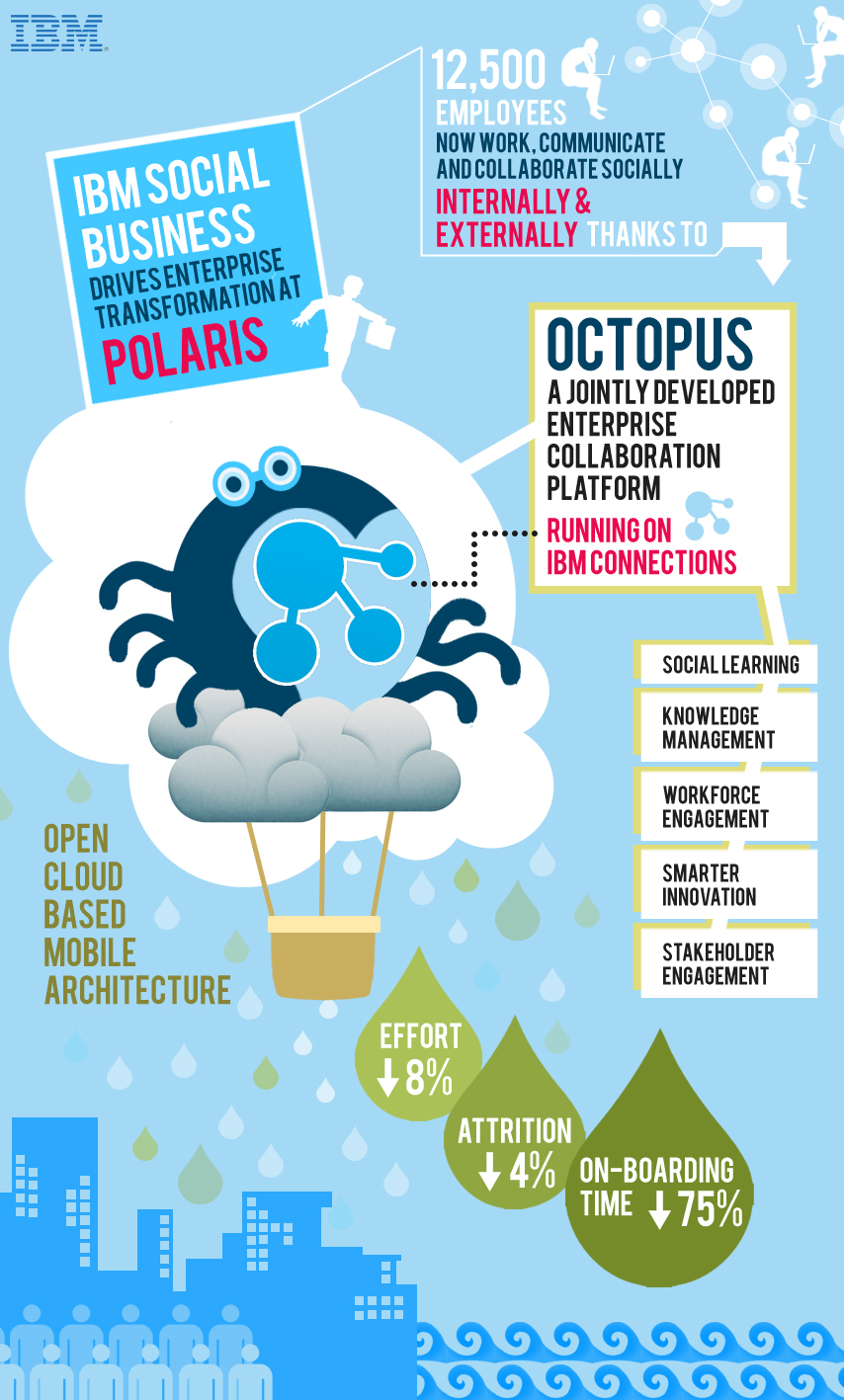
IBM yesterday announced that Polaris Financial Technology has selected IBM Connections to provide employees with a top notch digital experience to improve workforce productivity and accelerate business growth.
So how did they do this? Working with IBM, Polaris designed and developed Octopus, an enterprise social platform that runs on IBM Connections and uses APIs provided in the IBM Social Business Toolkit. This application makes it easy for IBM partners and clients like Polaris to build an entirely new class of cloud-based social business applications for their businesses using the Connections foundation. With Octopus, Polaris is able to apply social networking, social learning, digital experiences and knowledge/content management tools based on an open cloud-based, mobile architecture.
If you are a developer and want to learn more about how to get started with the SDK, then add this to your agenda:
To register for the developer webcast, click here.
And that's not all! IBM Connections Next is just around the corner so don't forget to register for the webcast on May 21 to learn more about what's coming in IBM Connections Next.
By adopting IBM’s leading enterprise social collaboration platform, Polaris FT is transforming how its 12,500 employees connect, communicate and collaborate to drive greater workforce productivity. Instead of relying solely on email to drive essential business tasks and project coordination, the new platform allows Polaris FT to leverage the collective knowledge of every employee to fuel new innovation, ideation and future business growth. This includes a significant reduction in the time it takes to on-board employees new to the company.
So how did they do this? Working with IBM, Polaris designed and developed Octopus, an enterprise social platform that runs on IBM Connections and uses APIs provided in the IBM Social Business Toolkit. This application makes it easy for IBM partners and clients like Polaris to build an entirely new class of cloud-based social business applications for their businesses using the Connections foundation. With Octopus, Polaris is able to apply social networking, social learning, digital experiences and knowledge/content management tools based on an open cloud-based, mobile architecture.
If you are a developer and want to learn more about how to get started with the SDK, then add this to your agenda:
What: How to Add Social Features to Existing Applications with the IBM Social Business ToolkitThis session will show you how to explore the Social API’s that are provided by IBM Connections. You will see the API’s running live in the Cloud. You will also learn about the building blocks that can be reused to add social features to your own applications. Finally you will see a demonstration of how an existing application has been extended to include social features.
Date: Apr 28, 2014
Time: 10:00 AM - 10:30 AM (Eastern Time)
To register for the developer webcast, click here.
And that's not all! IBM Connections Next is just around the corner so don't forget to register for the webcast on May 21 to learn more about what's coming in IBM Connections Next.
Wednesday, April 9, 2014
How To Build a Hello World App for IBM Connections
Work is quickly ramping up as the product management team is working on the go to market activities for IBM Connections "Next". For example, yesterday I was working on updating the current IBM Connections Reviewer's Guide with information about the new release. I also submitted two abstracts for the upcoming Social Connections VI user group meeting, which I hope get selected, but more on that later!
In case you don't know by now, my background is in app development and I wanted to take an opportunity to share a couple of new items in the IBM Connections SDK.
First, a pre-release of the iOS SDK is now available so that you can build your own iPhone/iPad apps as seen in the screenshot below. Second, those of you developing for on-premises servers, the latest version of the QuickStart image which has Connections and Sametime all pre-installed is now available on SoftLayer. And for those of you PHP lovers, there's now a PHP version of the IBM Connections SDK.
And that's not all. For those of you looking to develop apps for IBM Connections in the Cloud, Niklas Heildoff has posted several articles to help you get started:
Developers, start coding!!
In case you don't know by now, my background is in app development and I wanted to take an opportunity to share a couple of new items in the IBM Connections SDK.
First, a pre-release of the iOS SDK is now available so that you can build your own iPhone/iPad apps as seen in the screenshot below. Second, those of you developing for on-premises servers, the latest version of the QuickStart image which has Connections and Sametime all pre-installed is now available on SoftLayer. And for those of you PHP lovers, there's now a PHP version of the IBM Connections SDK.
And that's not all. For those of you looking to develop apps for IBM Connections in the Cloud, Niklas Heildoff has posted several articles to help you get started:
- Use the IBM Connections Banner in Custom Apps - One of the key aspects of building a custom app is integrating with the look and feel of the overall platform. IBM Connections in the Cloud provides a simple way to incorporate the main navigation into your own app giving end users a single, integrated end user experience and all you need to do is include a couple of lines of code!
- Extending the User Interface of IBM Connections - IBM Connections in the cloud provides various extensions to make it super easy to extend the user experience. For example, let's say that you want to add a "Send a Thank You Award" button in someone's profile. A couple of clicks and voilá.
- Build a Hello World App for IBM Connections in Less than 5 minutes - This video walks through setting up your development environment and build a sample Hello World app to integrate with our cloud environment using the IBM Connections SDK. In this case, it explains how to set up the Eclipse development environment, setting up Tomcat, get the right OAuth keys and go! Check it out below:
Developers, start coding!!
Tags:
business-partners,
cloud,
connections,
demo,
development,
ipad,
iphone,
mobile,
php,
sdk,
smartcloud,
social-business
Monday, February 10, 2014
The Code Behind My IBM Connect 2014 Keynote Demo - Part 4
And here we come. The 4th and final post on the code that I used during the IBM Connect 2014 keynote (the OGS!). If you need to catch up, here's Part 1, Part 2, and Part 3.
The next part of code that we created for the keynote demo was the file viewer. It's worth noting that we first did this file viewer to render IBM SmartCloud Connections files inside our portal. In the end, we ended showing this directly in the community landing page (which is one of the new features we announced -- the ability for community managers to create their own custom landing page for their community).
Here's how it looked:
Basically, in our demo community, we had 5 files and we showed the details of the file, a file preview, and when clicked, we did an animation to let you share/download the file (as you can see in the 3rd file above).
So how did we do this? The majority of the work was done using the IBM Connections SDK. In there, we went into the JavaScript Playground and found the code snippet to generate a list of files. Sweet!!
The other piece of magic was the Flippy plugin for jQuery which is the one that provided the animation to flip the file preview and offer options to share and download.
So here's how it all came together:
1) Include the right JavaScript:
2) The CSS magic:
3. The HTML placeholder where things will show up:
4. The template of how things will be rendered
5. Call the API!
And that's it! In the next few posts, I'll go deeper to cover the announcements from IBM Connect in regards to IBM Connections. Stay tuned !
The next part of code that we created for the keynote demo was the file viewer. It's worth noting that we first did this file viewer to render IBM SmartCloud Connections files inside our portal. In the end, we ended showing this directly in the community landing page (which is one of the new features we announced -- the ability for community managers to create their own custom landing page for their community).
Here's how it looked:
Basically, in our demo community, we had 5 files and we showed the details of the file, a file preview, and when clicked, we did an animation to let you share/download the file (as you can see in the 3rd file above).
So how did we do this? The majority of the work was done using the IBM Connections SDK. In there, we went into the JavaScript Playground and found the code snippet to generate a list of files. Sweet!!
The other piece of magic was the Flippy plugin for jQuery which is the one that provided the animation to flip the file preview and offer options to share and download.
So here's how it all came together:
1) Include the right JavaScript:
<script src="http://ajax.googleapis.com/ajax/libs/dojo/1.8.0/dojo/dojo.js"></script>
<script src="jquery-1.9.1.min.js"></script>
<script src="jquery.flippy.min.js"></script>
<script src="/sbt.proxy/library?lib=dojo&ver=1.8.0"></script>
<script src="http://netdna.bootstrapcdn.com/bootstrap/2.1.1/js/bootstrap.min.js"></script>
2) The CSS magic:
<style>
body {
font-family: "HelveticaNeue-Light", "Helvetica Neue Light", "Helvetica Neue", sans-serif;
font-weight: 300;
color: #444;
line-height: 1.2;
margin: auto;
width: 100%;
#background-color: #f0f0f0;
#background-image:url('cloud.jpg');
background-repeat: no-repeat;
-webkit-background-size: cover;
-moz-background-size: cover;
-o-background-size: cover;
background-size: cover;
}
a {
color: #1c8aae !important;
text-decoration: none !important;
}
.card {
background-image:none;
margin: 20px;
padding: 10px;
width: 150px;
background-color: #fff;
border-radius: 10px;
-webkit-border-radius: 10px;
-moz-border-radius: 10px;
border-color: #fff;
border-style: solid;
box-shadow: 0 0 4px rgba(0, 0, 0, .2);
-webkit-box-shadow: 0 0 4px rgba(0, 0, 0, .2);
-moz-box-shadow: 0 0 4px rgba(0, 0, 0, .2);
float: left;
}
.share{
background-image:none;
margin: 20px;
padding: 10px;
width: 150px;
background-color: #fff;
border-radius: 10px;
-webkit-border-radius: 10px;
-moz-border-radius: 10px;
border-color: #fff;
border-style: solid;
box-shadow: 0 0 4px rgba(0, 0, 0, .2);
-webkit-box-shadow: 0 0 4px rgba(0, 0, 0, .2);
-moz-box-shadow: 0 0 4px rgba(0, 0, 0, .2);
float: left;
}
.preview{
width: 128px;
height: 128px;
border-radius: 67px;
-webkit-border-radius: 67px;
-moz-border-radius: 67px;
border-color: #fff;
border-style: solid;
box-shadow: 0 0 3px rgba(0, 0, 0, .4);
-webkit-box-shadow: 0 0 3px rgba(0, 0, 0, .4);
-moz-box-shadow: 0 0 3px rgba(0, 0, 0, .4);
}
</style>
3. The HTML placeholder where things will show up:
<body>
<div id="myGrid" class="myCommunity"></div>
...
4. The template of how things will be rendered
<script type="text/template" id="fileRow">
<div id="share-${uid}" class="share" onmouseDown="removeDialog('${uid}');" >
<div id="fileCard-${uid}" onmouseDown="shareDialog('${uid}','${title}');">
<img class="preview" style="margin-top:20px;margin-bottom:20px" width="128" height="128" src="http://apps.na.collabservtest.lotus.com/viewer/app/lcfiles/${uid}/1/thumbnails/image.jpg" />
<br>
<a class="entry-title" rel="bookmark" target="_blank" title="${tooltip}" href="https://apps.na.collabservtest.lotus.com/communities/service/html/communityview?communityUuid=2cb8c1b5-bbd5-4379-b53d-de747b50be1a#fullpageWidgetId=W0b65f6404e4a_4c64_b0c8_ace24556bbab&file=${uid}" >${title}</a>
<div style="font-size:75%;color:#666">${authorName} ${_nls.created} ${createdLabel}</div>
<div style="font-size:75%;color:#666">${recommendationsCount} Likes • ${hitCount} ${_nls.downloads} • ${commentsCount} ${_nls.comments}
</div>
</div>
</div>
</script>
5. Call the API!
<script>
require(["sbt/dom","sbt/lang", "sbt/connections/controls/files/FileGrid", "sbt/connections/controls/bootstrap/FileRendererMixin"], function(dom,lang, FileGrid,FileRendererMixin ) {
var grid = new FileGrid({
type : "communityFiles",
endpoint : "smartcloud",
hidePager: "true",
hideSorter: "true",
communityId : "2cb8c1b5-bbd5-4379-b53d-de747b50be1a"
});
// create custom action
grid.fileAction = {
getTooltip : function(item) {
return "Share with Non-Greenwell people";
},
execute : function(item,opts,event) {
//do something here
}
};
lang.mixin(grid.renderer, FileRendererMixin);
var domNode = dom.byId("fileRow");
var CustomFileRow = domNode.text || domNode.textContent;
grid.renderer.template = CustomFileRow;
dom.byId("myGrid").appendChild(grid.domNode);
grid.update();
});
</script>
And that's it! In the next few posts, I'll go deeper to cover the announcements from IBM Connect in regards to IBM Connections. Stay tuned !
Tags:
activity-streams,
api,
cloud,
connect,
connections,
customization,
development,
files,
integration,
javascript,
portal,
sdk,
social-business
Friday, February 7, 2014
The Code Behind My IBM Connect 2014 Keynote Demo - Part 3
Alright, let's move on to the next piece shown at the OGS. If you want to know what this is, I would suggest you catch up with Part 1 and Part 2.
The next part I got ready for the keynote was people search. But I wanted to move away from the typical search results list. I wanted something more visual and easier to digest. I wanted results to be more visual, maybe like a slideshow of people cards that I could flip through.
After doing a bit of searching, I landed on another jQuery plugin, this time the Baraja plugin and it got me something like this:
So what's the magic here? Let's walk through the parts:
1. As usual, include the right JavaScript:
2. Then the CSS for styling
3. The placeholder where things will show up:
4. Call the API!
The missing piece here is the call to the People Search API of IBM Connections to generate searchResults. I'll leave that as an exercise to the reader. Once I gathered all the data, I created a searchResult which would look like this (so that it matches the CSS I shared above):
The next part I got ready for the keynote was people search. But I wanted to move away from the typical search results list. I wanted something more visual and easier to digest. I wanted results to be more visual, maybe like a slideshow of people cards that I could flip through.
After doing a bit of searching, I landed on another jQuery plugin, this time the Baraja plugin and it got me something like this:
So what's the magic here? Let's walk through the parts:
1. As usual, include the right JavaScript:
<script src="jquery-1.9.1.min.js"></script>
<script type="text/javascript" src="Baraja/js/modernizr.custom.79639.js"></script>
<script type="text/javascript" src="Baraja/js/jquery.baraja.js"></script>
2. Then the CSS for styling
<style type="text/css">
.homepage {
font-family: "HelveticaNeue-Light", "Helvetica Neue Light", "Helvetica Neue", sans-serif;
font-weight: 300;
color: #444;
line-height: 1.2;
background-color: #f0f0f0;
}
a {
color: #1c8aae !important;
text-decoration: none !important;
}
.photo {
width: 100px;
height: 100px;
border-radius: 55px;
-webkit-border-radius: 55px;
-moz-border-radius: 55px;
border-color: #fff;
border-style: solid;
box-shadow: 0 0 3px rgba(0, 0, 0, .4);
-webkit-box-shadow: 0 0 3px rgba(0, 0, 0, .4);
-moz-box-shadow: 0 0 3px rgba(0, 0, 0, .4);
}
.fn
{
font-family: "HelveticaNeue-Bold", "Helvetica Neue Bold","Helvetica Neue", sans-serif;
font-weight: 600;
text-decoration: none;
color: #444 !important;
font-size: 18pt;
}
.inputForm
{
border: solid 1px #e9ecef;
width: 280px;
height: 30px;
padding: 8px;
-webkit-border-radius: 15px; //For Safari, etc.
-moz-border-radius: 15px; //For Mozilla, etc.
border-radius: 15px; //CSS3 Feature
box-shadow: 0 0 4px rgba(0, 0, 0, .2);
-webkit-box-shadow: 0 0 4px rgba(0, 0, 0, .2);
-moz-box-shadow: 0 0 4px rgba(0, 0, 0, .2);
}
.searchEntry {
text-align: center;
margin: auto;
padding-top: 20px;
}
.searchResults {
padding-top: 20px;
width: 260px;
height: 600px;
margin: 30px auto;
}
ul.baraja-container li {
border-radius: 10px;
padding: 5px;
box-shadow: 0 0 4px rgba(0, 0, 0, .1);
-webkit-box-shadow: 0 0 4px rgba(0, 0, 0, .1);
-moz-box-shadow: 0 0 4px rgba(0, 0, 0, .1);
-webkit-user-select: none;
-khtml-user-select: none;
-moz-user-select: none;
-ms-user-select: none;
user-select: none;
width: 250px;
height: 250px;
margin: 0;
position: absolute;
top: 0;
left: 0;
cursor: pointer;
background: #f0f0f0;
font-size: 12pt;
text-align: center;
pointer-events: auto;
-webkit-backface-visibility: hidden;
-moz-backface-visibility: hidden;
-ms-backface-visibility: hidden;
-o-backface-visibility: hidden;
backface-visibility: hidden;
}
ul.baraja-container li img {
margin-top: 20px;
}
ul.baraja-container li p {
line-height: 1.0px;
}
ul.baraja-container li div {
text-align: center;
}
ul.baraja-container {
list-style-type: none;
width: 260px;
height: 310px;
margin: 0 auto 30px;
position: relative;
padding: 0;
}
.score {
font-size: 18pt;
color: #1c8aae !important;
text-decoration: none !important;
}
.bullet {
font-size: 8pt;
color: #666;
}
</style>
3. The placeholder where things will show up:
<body style="margin: 0;">
<div class="homepage">
<div class="searchEntry">
<input type="text" class="inputForm" id="searchBox" />
</div>
<div class="searchResults" id="searchResults">
<ul id="baraja-el" class="baraja-container">
</ul>
</div>
...
4. Call the API!
<script>
var $el = $( '#baraja-el' ),
baraja = $el.baraja();
baraja.add( searchResults ) );
baraja.fan( {
speed : 500,
easing : 'ease-out',
range : 100,
direction : 'right',
origin : { x : 50, y : 200 },
center : true
} );
</script>
The missing piece here is the call to the People Search API of IBM Connections to generate searchResults. I'll leave that as an exercise to the reader. Once I gathered all the data, I created a searchResult which would look like this (so that it matches the CSS I shared above):
<li><img class="photo" src="http://connections.demolotus.com/profiles/photo.do?userid=3123a1db-21f9-466f-b19e-1a49383fa2db" alt="image1"/><br/><br/><div><span class="fn">Bill Ranney</span> <span class="bullet">•</span> <span class="score">10</span></div><p>Sr. Business Manager</p><p>10 followers</p></li>In terms of the score, that was work that we did based on the work with Marie Wallace. Check out her blog for more details.
Thursday, February 6, 2014
The Code Behind My IBM Connect 2014 Keynote Demo - Part 2
Yesterday, I shared the initial piece of code that I got working in getting ready for the IBM Connect 2014 keynote demo. If you haven't seen that, take a look at that before going through this post.
As I explained yesterday, I wanted to get a Pinterest-like layout for the activity stream within the portal, and that's what I showed yesterday. I then wanted to take that example and also add that to the landing page of a community. That way, as a community manager I can not only see the latest updates but I can also share and direct my team to the content I want them to see. Here's a snapshot of the community landing page I showed:
And there you have it! You can now render the IBM Connections activity stream in a grid format with resizable cards.
The big changes between yesterday's post and today are mostly in step 2 (the CSS required for the rendering), step 4 (the template for the rendering of each activity stream entry) and step 5 (we now call the community stream API instead of the overall activity stream API).
Fun !!
As I explained yesterday, I wanted to get a Pinterest-like layout for the activity stream within the portal, and that's what I showed yesterday. I then wanted to take that example and also add that to the landing page of a community. That way, as a community manager I can not only see the latest updates but I can also share and direct my team to the content I want them to see. Here's a snapshot of the community landing page I showed:
Notice that in this layout, the stream shows up in a multi-column view, and the profile photo is under each card (instead of inside the card as in yesterday's post).
The trick? Just some minor tweaks to the code from yesterday. I still used jQuery, the Waterfall plugin, and some CSS magic. Here's the code:
1. Include the right JavaScript:
<script src="jquery-1.9.1.min.js"></script>
<script src="waterfall-master/demos/js/libs/handlebars/handlebars.js"></script>
<script src="waterfall-master/demos/js/waterfall.min.js"></script>
<script src="jquery.timeago.js" type="text/javascript"></script>
2. The CSS magic
<style type="text/css">
.homepage {
font-family: "HelveticaNeue-Light", "Helvetica Neue Light", "Helvetica Neue", sans-serif;
font-weight: 300;
color: #444;
line-height: 1.2;
margin: auto;
width: 740px;
background-color: #f0f0f0;
}
.newsfeed {
margin: auto;
width: 740px;
background-color: #f0f0f0;
padding-top: 20px;
}
.columnHeader {
font-family: "HelveticaNeue-Bold", "Helvetica Neue Bold","Helvetica Neue", sans-serif;
font-weight: 600;
font-size: 90%;
}
a {
color: #1c8aae !important;
text-decoration: none !important;
}
.date {
color: #d9d9d9 !important;
text-decoration: none !important;
}
.timeago {
color: gray !important;
border-bottom: none !important;
}
.card {
border: 2px solid #FAFAFA;
box-shadow: 0 1px 2px rgba(34, 25, 25, 0.4);
-webkit-column-break-inside: avoid;
-moz-column-break-inside: avoid;
column-break-inside: avoid;
padding: 5px;
background-color: #fff;
background: -webkit-linear-gradient(45deg, #FFF, #F9F9F9);
opacity: 1;
width: 330px;
-webkit-transition: all .2s ease;
-moz-transition: all .2s ease;
-o-transition: all .2s ease;
transition: all .2s ease;
}
.leftColumn {
float: left;
}
.rightColumn {
float: left;
padding-top:29px;
padding-left: 10px;
}
.photo {
width: 65px;
height: 65px;
border-radius: 35px;
-webkit-border-radius: 35px;
-moz-border-radius: 35px;
border-color: #fff;
border-style: solid;
box-shadow: 0 0 3px rgba(0, 0, 0, .4);
-webkit-box-shadow: 0 0 3px rgba(0, 0, 0, .4);
-moz-box-shadow: 0 0 3px rgba(0, 0, 0, .4);
}
.attachment {
max-width: 290px;
max-height: 290px;
}
.signature {
font-size: 75%;
color: gray;
padding-top: 10px;
}
.div {
float:left;
padding-top: 10px;
}
.asentry {
width: 345px;
}
.sharkfin {
margin-top:-13px;
margin-left:25px;
}
.message {
padding: 20px 10px 20px 10px;
}
.attachDiv {
width: 299px;
height: 299px;
}
</style>
3. Create the HTML placeholder where the content will be rendered asynchronously
<body style="margin: 0;">
<div class="homepage">
<div class="newsfeed">
<div id="container" class="container"></div>
</div>
</div>
....
4. The template for how the activity stream will be rendered:
<!-- This controls how the Activity stream is rendered -->
<script type="text/x-handlebars-template" id="waterfall-tpl">
{{#list}}
<div class="asentry">
<div class="card">
<div class="message">
{{{title}}} {{#if object.summary}} "<i>{{{object.summary}}}</i>" {{/if}}
<br/>
{{#each object.attachments}}
<div class="attachDiv">
<img class="attachment" src="{{this.url}}" >
</div>
{{/each}}
</div>
</div>
<img class="sharkfin" src="sharkfin-2.png">
<div class="signature">
<div class="leftColumn">
<img class="photo" src="{{photoId actor}}" />
</div>
<div class="rightColumn">
<a class="date" href="{{object.url}}">
<abbr class="timeago" title="{{published}}">{{makeDatePretty published}}</abbr>
</a>
• <span class="action">Like ( {{object.likes.totalItems}} )</span> •
<span class="action">Comment ( {{object.replies.totalItems}} )</span>
</div>
</div>
</div>
{{/list}}
</script>
5. Call the Waterfall plug-in
<script>
// Now call the activity stream API and load the stream
$('#container').waterfall({
itemCls: 'asentry',
colWidth: 345,
gutterWidth: 20,
gutterHeight: 20,
maxPage: 1,
isAnimated: true,
maxCol: 2,
isFadeIn: true,
debug: false,
checkImagesLoaded: false,
path: function(page) {
return 'http://connections.demolotus.com/connections/opensocial/basic/rest/activitystreams/urn:lsid:lconn.ibm.com:communities.community:' + params.communityId + '/@all/@all?rollup=true&shortStrings=true&&format=json&page=' + page;
}
});
</script>
And there you have it! You can now render the IBM Connections activity stream in a grid format with resizable cards.
The big changes between yesterday's post and today are mostly in step 2 (the CSS required for the rendering), step 4 (the template for the rendering of each activity stream entry) and step 5 (we now call the community stream API instead of the overall activity stream API).
Fun !!
Subscribe to:
Posts (Atom)