Pages

Showing posts with label javascript. Show all posts

Tuesday, April 21, 2015

How To Integrate Your App with IBM Connections Cloud with 2 Lines of Code

View Comments
Last week I was at the IBM Connections user group conference, called Social Connections, in Boston MA.  There, I got the opportunity to meet with many end users as well as developers interested in building apps for IBM Connections.

A particular session that I got great feedback from developers was the one titled Mastering the IBM Connections Developers Experience. Vijay Francis and Paul Bastide took the audience through the options to integrate with IBM Connections Cloud.  One of the samples was how to take an existing app and bring in our navigation components into it in less than 30 seconds!

So imagine you have an app like this:


Now let's take that and add the IBM Connections Cloud navigation to it.  Add a couple of lines of code and boom!


Now, you have an easy and consistent way for users to go back and forth between your app and the main Connections interface. So how did I do this? As easy as 1-2-3:

  1. Add the following before the closing body tag in your web app

    <script src="https://apps.na.collabserv.com/navbar/banner/partner/navBar?oneui=3" type="text/javascript"></script>
  2. Add the following to the head tag

    <link href="http://apps.na.collabserv.com/theming/theme/css/3" rel="stylesheet" type="text/css"></link>
  3. Add the following CSS classes to your opening body tag

    class="lotusui30 lotusui30_body lotusui30_fonts scloud3"
And if you look at the steps above, basically you are using 2 lines of code to do the integration. Easy!

For more information check out these links:

Monday, February 10, 2014

The Code Behind My IBM Connect 2014 Keynote Demo - Part 4

View Comments
And here we come. The 4th and final post on the code that I used during the IBM Connect 2014 keynote (the OGS!). If you need to catch up, here's Part 1, Part 2, and Part 3.

The next part of code that we created for the keynote demo was the file viewer.  It's worth noting that we first did this file viewer to render IBM SmartCloud Connections files inside our portal. In the end, we ended showing this directly in the community landing page (which is one of the new features we announced -- the ability for community managers to create their own custom landing page for their community).

Here's how it looked:


Basically, in our demo community, we had 5 files and we showed the details of the file, a file preview, and when clicked, we did an animation to let you share/download the file (as you can see in the 3rd file above).

So how did we do this? The majority of the work was done using the IBM Connections SDK.  In there, we went into the JavaScript Playground and found the code snippet to generate a list of files. Sweet!!

The other piece of magic was the Flippy plugin for jQuery which is the one that provided the animation to flip the file preview and offer options to share and download.

So here's how it all came together:

1) Include the right JavaScript:

<script src="http://ajax.googleapis.com/ajax/libs/dojo/1.8.0/dojo/dojo.js"></script>
<script src="jquery-1.9.1.min.js"></script>
<script src="jquery.flippy.min.js"></script>
<script src="/sbt.proxy/library?lib=dojo&amp;ver=1.8.0"></script>
<script src="http://netdna.bootstrapcdn.com/bootstrap/2.1.1/js/bootstrap.min.js"></script>


2) The CSS magic:

<style>

body {
font-family: "HelveticaNeue-Light", "Helvetica Neue Light", "Helvetica Neue", sans-serif;
font-weight: 300;
color: #444;
line-height: 1.2;
margin: auto;
width: 100%;
#background-color: #f0f0f0;
#background-image:url('cloud.jpg');
background-repeat: no-repeat;
-webkit-background-size: cover;
-moz-background-size: cover;
-o-background-size: cover;
background-size: cover;
}
a {
color: #1c8aae !important;
text-decoration: none !important;
}
.card {
background-image:none;
margin: 20px;
padding: 10px;
width: 150px;
background-color: #fff;
border-radius: 10px;
-webkit-border-radius: 10px;
-moz-border-radius: 10px;
border-color: #fff;
border-style: solid;
box-shadow: 0 0 4px rgba(0, 0, 0, .2);
-webkit-box-shadow: 0 0 4px rgba(0, 0, 0, .2);
-moz-box-shadow: 0 0 4px rgba(0, 0, 0, .2);
float: left;

}

.share{
background-image:none;
margin: 20px;
padding: 10px;
width: 150px;
background-color: #fff;
border-radius: 10px;
-webkit-border-radius: 10px;
-moz-border-radius: 10px;
border-color: #fff;
border-style: solid;
box-shadow: 0 0 4px rgba(0, 0, 0, .2);
-webkit-box-shadow: 0 0 4px rgba(0, 0, 0, .2);
-moz-box-shadow: 0 0 4px rgba(0, 0, 0, .2);
float: left;

}

.preview{

width: 128px;
height: 128px;
border-radius: 67px;
-webkit-border-radius: 67px;
-moz-border-radius: 67px;
border-color: #fff;
border-style: solid;
box-shadow: 0 0 3px rgba(0, 0, 0, .4);
-webkit-box-shadow: 0 0 3px rgba(0, 0, 0, .4);
-moz-box-shadow: 0 0 3px rgba(0, 0, 0, .4);

}
</style>

3.  The HTML placeholder where things will show up:

<body>
<div id="myGrid" class="myCommunity"></div>
...


4.  The template of how things will be rendered

<script type="text/template" id="fileRow">
<div id="share-${uid}" class="share" onmouseDown="removeDialog('${uid}');" >
<div id="fileCard-${uid}" onmouseDown="shareDialog('${uid}','${title}');">

<img class="preview" style="margin-top:20px;margin-bottom:20px" width="128" height="128" src="http://apps.na.collabservtest.lotus.com/viewer/app/lcfiles/${uid}/1/thumbnails/image.jpg" />
<br>
<a class="entry-title" rel="bookmark" target="_blank" title="${tooltip}" href="https://apps.na.collabservtest.lotus.com/communities/service/html/communityview?communityUuid=2cb8c1b5-bbd5-4379-b53d-de747b50be1a#fullpageWidgetId=W0b65f6404e4a_4c64_b0c8_ace24556bbab&file=${uid}" >${title}</a>

<div style="font-size:75%;color:#666">${authorName} ${_nls.created} ${createdLabel}</div>

<div style="font-size:75%;color:#666">${recommendationsCount} Likes &nbsp;&bull;&nbsp;${hitCount} ${_nls.downloads} &nbsp;&bull;&nbsp; ${commentsCount} ${_nls.comments}

</div>
</div>
</div>
</script>


5. Call the API!

<script>
require(["sbt/dom","sbt/lang", "sbt/connections/controls/files/FileGrid", "sbt/connections/controls/bootstrap/FileRendererMixin"], function(dom,lang, FileGrid,FileRendererMixin ) {
var grid = new FileGrid({
type : "communityFiles",
endpoint : "smartcloud",
hidePager: "true",
hideSorter: "true",
communityId : "2cb8c1b5-bbd5-4379-b53d-de747b50be1a"

});

// create custom action
grid.fileAction = {
getTooltip : function(item) {
return "Share with Non-Greenwell people";
},

execute : function(item,opts,event) {
//do something here

}
};

lang.mixin(grid.renderer, FileRendererMixin);
var domNode = dom.byId("fileRow");
var CustomFileRow = domNode.text || domNode.textContent;
grid.renderer.template = CustomFileRow;
dom.byId("myGrid").appendChild(grid.domNode);

grid.update();
});

</script>

And that's it! In the next few posts, I'll go deeper to cover the announcements from IBM Connect in regards to IBM Connections. Stay tuned !

Friday, February 7, 2014

The Code Behind My IBM Connect 2014 Keynote Demo - Part 3

View Comments
Alright, let's move on to the next piece shown at the OGS. If you want to know what this is, I would suggest you catch up with Part 1 and Part 2.

The next part I got ready for the keynote was people search. But I wanted to move away from the typical search results list. I wanted something more visual and easier to digest. I wanted results to be more visual, maybe like a slideshow of people cards that I could flip through.

After doing a bit of searching, I landed on another jQuery plugin, this time the Baraja plugin and it got me something like this:


So what's the magic here? Let's walk through the parts:

1. As usual, include the right JavaScript:

<script src="jquery-1.9.1.min.js"></script>
<script type="text/javascript" src="Baraja/js/modernizr.custom.79639.js"></script>
<script type="text/javascript" src="Baraja/js/jquery.baraja.js"></script>


2. Then the CSS for styling

<style type="text/css">
.homepage {
font-family: "HelveticaNeue-Light", "Helvetica Neue Light", "Helvetica Neue", sans-serif;
font-weight: 300;
color: #444;
line-height: 1.2;
background-color: #f0f0f0;
}

a {
color: #1c8aae !important;
text-decoration: none !important;
}

.photo {
width: 100px;
height: 100px;
border-radius: 55px;
-webkit-border-radius: 55px;
-moz-border-radius: 55px;
border-color: #fff;
border-style: solid;
box-shadow: 0 0 3px rgba(0, 0, 0, .4);
-webkit-box-shadow: 0 0 3px rgba(0, 0, 0, .4);
-moz-box-shadow: 0 0 3px rgba(0, 0, 0, .4);
}

.fn
{
font-family: "HelveticaNeue-Bold", "Helvetica Neue Bold","Helvetica Neue", sans-serif;
font-weight: 600;
text-decoration: none;
color: #444 !important;
font-size: 18pt;
}

.inputForm
{
border: solid 1px #e9ecef;
width: 280px;
height: 30px;
padding: 8px;
-webkit-border-radius: 15px; //For Safari, etc.
-moz-border-radius: 15px; //For Mozilla, etc.
border-radius: 15px; //CSS3 Feature
box-shadow: 0 0 4px rgba(0, 0, 0, .2);
-webkit-box-shadow: 0 0 4px rgba(0, 0, 0, .2);
-moz-box-shadow: 0 0 4px rgba(0, 0, 0, .2);
}

.searchEntry {
text-align: center;
margin: auto;
padding-top: 20px;

}

.searchResults {
padding-top: 20px;
width: 260px;
height: 600px;
margin: 30px auto;
}

ul.baraja-container li {
border-radius: 10px;
padding: 5px;
box-shadow: 0 0 4px rgba(0, 0, 0, .1);
-webkit-box-shadow: 0 0 4px rgba(0, 0, 0, .1);
-moz-box-shadow: 0 0 4px rgba(0, 0, 0, .1);
-webkit-user-select: none;
-khtml-user-select: none;
-moz-user-select: none;
-ms-user-select: none;
user-select: none;
width: 250px;
height: 250px;
margin: 0;
position: absolute;
top: 0;
left: 0;
cursor: pointer;
background: #f0f0f0;
font-size: 12pt;
text-align: center;
pointer-events: auto;
-webkit-backface-visibility: hidden;
-moz-backface-visibility: hidden;
-ms-backface-visibility: hidden;
-o-backface-visibility: hidden;
backface-visibility: hidden;

}

ul.baraja-container li img {
margin-top: 20px;
}

ul.baraja-container li p {
line-height: 1.0px;
}

ul.baraja-container li div {
text-align: center;
}

ul.baraja-container {
list-style-type: none;
width: 260px;
height: 310px;
margin: 0 auto 30px;
position: relative;
padding: 0;
}

.score {
font-size: 18pt;
color: #1c8aae !important;
text-decoration: none !important;
}

.bullet {
font-size: 8pt;
color: #666;
}

</style>

3. The placeholder where things will show up:

<body style="margin: 0;">

<div class="homepage">
<div class="searchEntry">
<input type="text" class="inputForm" id="searchBox" />
</div>

<div class="searchResults" id="searchResults">
<ul id="baraja-el" class="baraja-container">

</ul>
</div>
...


4. Call the API!

<script>
var $el = $( '#baraja-el' ),
baraja = $el.baraja();
baraja.add( searchResults ) );
baraja.fan( {
speed : 500,
easing : 'ease-out',
range : 100,
direction : 'right',
origin : { x : 50, y : 200 },
center : true
} );
</script>

The missing piece here is the call to the People Search API of IBM Connections to generate searchResults. I'll leave that as an exercise to the reader. Once I gathered all the data, I created a searchResult which would look like this (so that it matches the CSS I shared above):
<li><img class="photo" src="http://connections.demolotus.com/profiles/photo.do?userid=3123a1db-21f9-466f-b19e-1a49383fa2db" alt="image1"/><br/><br/><div><span class="fn">Bill Ranney</span> <span class="bullet">&bull;</span> <span class="score">10</span></div><p>Sr. Business Manager</p><p>10 followers</p></li>
In terms of the score, that was work that we did based on the work with Marie Wallace. Check out her blog for more details.

Thursday, February 6, 2014

The Code Behind My IBM Connect 2014 Keynote Demo - Part 2

View Comments
Yesterday, I shared the initial piece of code that I got working in getting ready for the IBM Connect 2014 keynote demo. If you haven't seen that, take a look at that before going through this post.

As I explained yesterday, I wanted to get a Pinterest-like layout for the activity stream within the portal, and that's what I showed yesterday. I then wanted to take that example and also add that to the landing page of a community. That way, as a community manager I can not only see the latest updates  but I can also share and direct my team to the content I want them to see.  Here's a snapshot of the community landing page I showed:


Notice that in this layout, the stream shows up in a multi-column view, and the profile photo is under each card (instead of inside the card as in yesterday's post). 

The trick? Just some minor tweaks to the code from yesterday. I still used jQuery, the Waterfall plugin, and some CSS magic.  Here's the code:

1. Include the right JavaScript:

<script src="jquery-1.9.1.min.js"></script>
<script src="waterfall-master/demos/js/libs/handlebars/handlebars.js"></script>
<script src="waterfall-master/demos/js/waterfall.min.js"></script>
<script src="jquery.timeago.js" type="text/javascript"></script>
2. The CSS magic


<style type="text/css">
.homepage {
font-family: "HelveticaNeue-Light", "Helvetica Neue Light", "Helvetica Neue", sans-serif;
font-weight: 300;
color: #444;
line-height: 1.2;
margin: auto;
width: 740px;
background-color: #f0f0f0;

}

.newsfeed {
margin: auto;
width: 740px;
background-color: #f0f0f0;
padding-top: 20px;
}

.columnHeader {
font-family: "HelveticaNeue-Bold", "Helvetica Neue Bold","Helvetica Neue", sans-serif;
font-weight: 600;
font-size: 90%;
}

a {
color: #1c8aae !important;
text-decoration: none !important;
}

.date {
color: #d9d9d9 !important;
text-decoration: none !important;
}

.timeago {
color: gray !important;
border-bottom: none !important;
}

.card {
border: 2px solid #FAFAFA;
box-shadow: 0 1px 2px rgba(34, 25, 25, 0.4);
-webkit-column-break-inside: avoid;
-moz-column-break-inside: avoid;
column-break-inside: avoid;
padding: 5px;
background-color: #fff;
background: -webkit-linear-gradient(45deg, #FFF, #F9F9F9);
opacity: 1;
width: 330px;

-webkit-transition: all .2s ease;
-moz-transition: all .2s ease;
-o-transition: all .2s ease;
transition: all .2s ease;

}

.leftColumn {
float: left;
}
.rightColumn {
float: left;
padding-top:29px;
padding-left: 10px;
}

.photo {
width: 65px;
height: 65px;
border-radius: 35px;
-webkit-border-radius: 35px;
-moz-border-radius: 35px;
border-color: #fff;
border-style: solid;
box-shadow: 0 0 3px rgba(0, 0, 0, .4);
-webkit-box-shadow: 0 0 3px rgba(0, 0, 0, .4);
-moz-box-shadow: 0 0 3px rgba(0, 0, 0, .4);
}

.attachment {
max-width: 290px;
max-height: 290px;
}

.signature {
font-size: 75%;
color: gray;
padding-top: 10px;
}

.div {
float:left;
padding-top: 10px;
}

.asentry {
width: 345px;
}

.sharkfin {
margin-top:-13px;
margin-left:25px;
}

.message {
padding: 20px 10px 20px 10px;
}

.attachDiv {
width: 299px;
height: 299px;
}
</style>

3. Create the HTML placeholder where the content will be rendered asynchronously

<body style="margin: 0;">
<div class="homepage">

<div class="newsfeed">
<div id="container" class="container"></div>
</div>
</div>
....


4. The template for how the activity stream will be rendered:

<!-- This controls how the Activity stream is rendered -->
<script type="text/x-handlebars-template" id="waterfall-tpl">
{{#list}}
<div class="asentry">
<div class="card">
<div class="message">

{{{title}}} {{#if object.summary}} "<i>{{{object.summary}}}</i>" {{/if}}

<br/>
{{#each object.attachments}}
<div class="attachDiv">
<img class="attachment" src="{{this.url}}" >
</div>
{{/each}}
</div>
</div>
<img class="sharkfin" src="sharkfin-2.png">
<div class="signature">
<div class="leftColumn">
<img class="photo" src="{{photoId actor}}" />
</div>
<div class="rightColumn">
<a class="date" href="{{object.url}}">
<abbr class="timeago" title="{{published}}">{{makeDatePretty published}}</abbr>
</a>
&nbsp;&bull;&nbsp;<span class="action">Like ( {{object.likes.totalItems}} )</span>&nbsp;&bull;&nbsp;
<span class="action">Comment ( {{object.replies.totalItems}} )</span>
</div>
</div>
</div>
{{/list}}
</script>

5. Call the Waterfall plug-in

<script>
// Now call the activity stream API and load the stream
$('#container').waterfall({
itemCls: 'asentry',
colWidth: 345,
gutterWidth: 20,
gutterHeight: 20,
maxPage: 1,
isAnimated: true,
maxCol: 2,
isFadeIn: true,
debug: false,
checkImagesLoaded: false,
path: function(page) {
return 'http://connections.demolotus.com/connections/opensocial/basic/rest/activitystreams/urn:lsid:lconn.ibm.com:communities.community:' + params.communityId + '/@all/@all?rollup=true&shortStrings=true&&format=json&page=' + page;
}
});

</script>

And there you have it! You can now render the IBM Connections activity stream in a grid format with resizable cards.

The big changes between yesterday's post and today are mostly in step 2 (the CSS required for the rendering), step 4 (the template for the rendering of each activity stream entry) and step 5 (we now call the community stream API instead of the overall activity stream API).

Fun !!

Tuesday, June 4, 2013

IBM Connections Developers - Here's What You Need to Start

View Comments

For a couple of years now, the IBM Social Business Toolkit has been a great set of development resources to get partners and ISVs started with developing apps for IBM Connections.

As I stated yesterday, the Connections eco system continues to grow and we want that app eco system to continue to grow. Maybe you've been thinking about joining the Appathon to win $1000. If so, then this is perfect timing for you. So if you've been thinking about submitting an app for the Appathon to win $1000, start coding today. But what's the absolutely best place to start ?

To that end, we have created a new landing page for the IBM Social Business Toolkit. The page is built using responsive web design so you can get to it from your desktop or mobile browser and have an optimized experience. Here's a quick view of how it looks.

There you can access:

  • code samples
  • code snippets
  • videos
  • documentation
  • SDK download
  • upcoming events
  • … and more!
Remember, if you are going to participate in the Appathon, you have until June 23rd to submit your app!

Monday, March 4, 2013

IBM Connections Coders: Get Ready for the Appathon !

View Comments

The past several blog posts have been about cool new apps built for IBM Connections and how they were announced at IBM Connect. Needless to say, I'm extremely happy with how the IBM Connections ecosystem has grown and I want to keep growing it!

To that end, at IBM Connect I talked about the Appathon which has just started. In case you missed it, I wanted to make sure you were aware. For this contest, the IBM Connections category will have five $1000 prizes and the deadline for submission is June 23, 2013 so there's plenty of time to get started !

If you haven't done any app dev work for IBM Connections, I would like to suggest 2 steps to get started.

1) Get familiar with the SDK: http://bit.ly/ibmsbtcommunity and you can even play *today* with the SDK over at http://bit.ly/sbtplayground. The playground is a web-based live demonstration of the JavaScript libraries exposed in the SDK.

2) If you missed IBM Connect, you can still get access to most presentations and get going creating apps for IBM Connections. A good presentation to check out is SHOW301: Becoming an IBM Connections Developer by Rob Novak. To access the rest of the presentations, click the image below:

Access Connect 2013 content!

Now, get coding and good luck!

Tuesday, September 25, 2012

Calling Developers - Build Apps For The Best Enterprise Social Platform

View Comments

A couple of weeks ago, Business Insider posted a story on how startups are ignoring a $500 Billion market. At the TechCrunch Disrupt conference Jim Goetz, a venture capitalist for Sequoia Capital was quoted as saying:

"It's shocking we don't see more engineers and entrepreneurs interested in enterprise,"

To that end, I'm happy to announce that IBM will be sponsoring a Social Business App Dev Workshop. The goal of the workshop is to get application developers, partners, and ISVs up to speed on how to develop apps for IBM's social business platform, currently the #1 in market share world wide.

I've shared before how to build apps for IBM Connections and with IBM now fully behind OpenSocial and ActivityStrea.ms we thought it would be a good idea to bring developers together and get them ramped up very quickly.  

We also published an article yesterday to help guide developers on how to create OpenSocial gadgets for IBM Connections 4.0. As a developer this presents a good opportunity as OpenSocial gadgets would run in multiple places, not just in IBM's OpenSocial container.

Here's a couple of highlights from the event:

  • Learn about the social platform using the common language of the web developer - HTML and JavaScript.
  • Hands-on lab exercises will cover such topics as IBM’s new SDK for web developers, ICS containers, and cloud integration.
  • Leave aware of how to tap the expertise of the community, and engage further to continue building skills with Social Application Development.
  • Learn how to build an embedded experience that integrates with IBM Connections 4 using OpenSocial gadgets.

So if you don't want to miss on a $500 Billion market, register for the workshop here.

Thursday, June 23, 2011

I love it! embed.ly in IBM Connections

View Comments

The other day I was catching up on my podcasts and heard of this service called http://embed.ly. It sounded very cool because it promised to make content embedding very easy. It leverages the open format oEmbed to convert links in a webpage to embeddable content.

This got me thinking about whether or not I could use this to spice up the activity stream in Connections. That way if someone shares a link via a microblog, wiki, blog, forum, etc, the actual content would be embedded into the Connections experience and I don't have to leave the site. I looked around in embed.ly's page and stumbled upon this tutorial.

In the tutorial, I noticed that all it took was 5 lines of code. I *had* to give it a try! I launched my Connections demo server and, in fact, after adding those 5 lines of code, content in Connections started to become alive.

Here's a quick demo that demonstrates how it looks:

So how did I do it? Simply follow these steps and you'll be up and running in no time:

  1. If you haven't yet, copy footer.jsp to the customization directory. For example, copy <WAS_PROFILE_ROOT>/installedApps</cellName>/Activities.ear/oawebui.war/nav/templates/footer.jsp to <IC_INSTALL_ROOT>/data/shared/customization/common/nav/templates
  2. If you haven't yet, copy header.jsp to the customization directory. For example, copy <WAS_PROFILE_ROOT>/installedApps</cellName>/Activities.ear/oawebui.war/nav/templates/header.jsp to <IC_INSTALL_ROOT>/data/shared/customization/common/nav/templates
  3. Switch to the <IC_INSTALL_ROOT>/data/shared/customization/common/nav/templates directory
  4. Open header.jsp with your favorite text editor
  5. At the beginning of the file, look for the last <div class="lotusRightCorner">. Just before that, add the following code:

    <script src="http://code.jquery.com/jquery-1.4.4.min.js"></script>
    <script src="http://scripts.embed.ly/jquery.embedly.min.js"></script>


  6. That's 2 lines of code. We are almost there. Now, save and close the file
  7. Open footer.jsp with your favorite text editor
  8. Scroll to the very bottom of the file and add the following 3 lines (NOTE: Updated on 31/Aug/2011 to reflect some changes required by embed.ly, mainly the 'key' parameter and the 'urlRe' parameter. The urlRe parameter specifies which domains you want to embed. To pick and choose which domains you want to embed [for example, if you only want to embed content from YouTube], then go here: http://embed.ly/tools/generator . In the example below, I've chosen to embed all services that embed.ly supports as of 31/Aug/2011):

    <script type="text/javascript">
    
    function callEmbedly() {
    
    $('div.lotusContent').embedly(
            { 
                    maxWidth: 450, 
                    wmode: 'transparent',
                    method: 'after', 
                    key: 'e0a98aba95ef11e09dcd4040d3dc5c07',
                    urlRe: /((http:\/\/(.*yfrog\..*\/.*|twitter\.com\/.*\/status\/.*\/photo\/.*|twitter\.com\/.*\/statuses\/.*\/photo|pic\.twitter\.com\/.*|www\.twitter\.com\/.*\/statuses\/.*\/photo\/.*|mobile\.twitter\.com\/.*\/status\/.*\/photo\/.*|mobile\.twitter\.com\/.*\/statuses\/.*\/photo\/.*|www\.flickr\.com\/photos\/.*|flic\.kr\/.*|twitpic\.com\/.*|www\.twitpic\.com\/.*|twitpic\.com\/photos\/.*|www\.twitpic\.com\/photos\/.*|.*imgur\.com\/.*|.*\.posterous\.com\/.*|post\.ly\/.*|twitgoo\.com\/.*|i.*\.photobucket\.com\/albums\/.*|s.*\.photobucket\.com\/albums\/.*|phodroid\.com\/.*\/.*\/.*|www\.mobypicture\.com\/user\/.*\/view\/.*|moby\.to\/.*|xkcd\.com\/.*|www\.xkcd\.com\/.*|imgs\.xkcd\.com\/.*|www\.asofterworld\.com\/index\.php\?id=.*|www\.asofterworld\.com\/.*\.jpg|asofterworld\.com\/.*\.jpg|www\.qwantz\.com\/index\.php\?comic=.*|23hq\.com\/.*\/photo\/.*|www\.23hq\.com\/.*\/photo\/.*|.*dribbble\.com\/shots\/.*|drbl\.in\/.*|.*\.smugmug\.com\/.*|.*\.smugmug\.com\/.*#.*|emberapp\.com\/.*\/images\/.*|emberapp\.com\/.*\/images\/.*\/sizes\/.*|emberapp\.com\/.*\/collections\/.*\/.*|emberapp\.com\/.*\/categories\/.*\/.*\/.*|embr\.it\/.*|picasaweb\.google\.com.*\/.*\/.*#.*|picasaweb\.google\.com.*\/lh\/photo\/.*|picasaweb\.google\.com.*\/.*\/.*|dailybooth\.com\/.*\/.*|brizzly\.com\/pic\/.*|pics\.brizzly\.com\/.*\.jpg|img\.ly\/.*|www\.tinypic\.com\/view\.php.*|tinypic\.com\/view\.php.*|www\.tinypic\.com\/player\.php.*|tinypic\.com\/player\.php.*|www\.tinypic\.com\/r\/.*\/.*|tinypic\.com\/r\/.*\/.*|.*\.tinypic\.com\/.*\.jpg|.*\.tinypic\.com\/.*\.png|meadd\.com\/.*\/.*|meadd\.com\/.*|.*\.deviantart\.com\/art\/.*|.*\.deviantart\.com\/gallery\/.*|.*\.deviantart\.com\/#\/.*|fav\.me\/.*|.*\.deviantart\.com|.*\.deviantart\.com\/gallery|.*\.deviantart\.com\/.*\/.*\.jpg|.*\.deviantart\.com\/.*\/.*\.gif|.*\.deviantart\.net\/.*\/.*\.jpg|.*\.deviantart\.net\/.*\/.*\.gif|www\.fotopedia\.com\/.*\/.*|fotopedia\.com\/.*\/.*|photozou\.jp\/photo\/show\/.*\/.*|photozou\.jp\/photo\/photo_only\/.*\/.*|instagr\.am\/p\/.*|instagram\.com\/p\/.*|skitch\.com\/.*\/.*\/.*|img\.skitch\.com\/.*|share\.ovi\.com\/media\/.*\/.*|www\.questionablecontent\.net\/|questionablecontent\.net\/|www\.questionablecontent\.net\/view\.php.*|questionablecontent\.net\/view\.php.*|questionablecontent\.net\/comics\/.*\.png|www\.questionablecontent\.net\/comics\/.*\.png|picplz\.com\/.*|twitrpix\.com\/.*|.*\.twitrpix\.com\/.*|www\.someecards\.com\/.*\/.*|someecards\.com\/.*\/.*|some\.ly\/.*|www\.some\.ly\/.*|pikchur\.com\/.*|achewood\.com\/.*|www\.achewood\.com\/.*|achewood\.com\/index\.php.*|www\.achewood\.com\/index\.php.*|www\.whosay\.com\/content\/.*|www\.whosay\.com\/photos\/.*|www\.whosay\.com\/videos\/.*|say\.ly\/.*|ow\.ly\/i\/.*|color\.com\/s\/.*|bnter\.com\/convo\/.*|mlkshk\.com\/p\/.*|lockerz\.com\/s\/.*|lightbox\.com\/.*|www\.lightbox\.com\/.*|soundcloud\.com\/.*|soundcloud\.com\/.*\/.*|soundcloud\.com\/.*\/sets\/.*|soundcloud\.com\/groups\/.*|snd\.sc\/.*|www\.last\.fm\/music\/.*|www\.last\.fm\/music\/+videos\/.*|www\.last\.fm\/music\/+images\/.*|www\.last\.fm\/music\/.*\/_\/.*|www\.last\.fm\/music\/.*\/.*|www\.mixcloud\.com\/.*\/.*\/|www\.radionomy\.com\/.*\/radio\/.*|radionomy\.com\/.*\/radio\/.*|www\.hark\.com\/clips\/.*|www\.rdio\.com\/#\/artist\/.*\/album\/.*|www\.rdio\.com\/artist\/.*\/album\/.*|www\.zero-inch\.com\/.*|.*\.bandcamp\.com\/|.*\.bandcamp\.com\/track\/.*|.*\.bandcamp\.com\/album\/.*|freemusicarchive\.org\/music\/.*|www\.freemusicarchive\.org\/music\/.*|freemusicarchive\.org\/curator\/.*|www\.freemusicarchive\.org\/curator\/.*|www\.npr\.org\/.*\/.*\/.*\/.*\/.*|www\.npr\.org\/.*\/.*\/.*\/.*\/.*\/.*|www\.npr\.org\/.*\/.*\/.*\/.*\/.*\/.*\/.*|www\.npr\.org\/templates\/story\/story\.php.*|huffduffer\.com\/.*\/.*|www\.audioboo\.fm\/boos\/.*|audioboo\.fm\/boos\/.*|boo\.fm\/b.*|www\.xiami\.com\/song\/.*|xiami\.com\/song\/.*|www\.saynow\.com\/playMsg\.html.*|www\.saynow\.com\/playMsg\.html.*|grooveshark\.com\/.*|radioreddit\.com\/songs.*|www\.radioreddit\.com\/songs.*|radioreddit\.com\/\?q=songs.*|www\.radioreddit\.com\/\?q=songs.*|www\.gogoyoko\.com\/song\/.*|.*amazon\..*\/gp\/product\/.*|.*amazon\..*\/.*\/dp\/.*|.*amazon\..*\/dp\/.*|.*amazon\..*\/o\/ASIN\/.*|.*amazon\..*\/gp\/offer-listing\/.*|.*amazon\..*\/.*\/ASIN\/.*|.*amazon\..*\/gp\/product\/images\/.*|.*amazon\..*\/gp\/aw\/d\/.*|www\.amzn\.com\/.*|amzn\.com\/.*|www\.shopstyle\.com\/browse.*|www\.shopstyle\.com\/action\/apiVisitRetailer.*|api\.shopstyle\.com\/action\/apiVisitRetailer.*|www\.shopstyle\.com\/action\/viewLook.*|itunes\.apple\.com\/.*|gist\.github\.com\/.*|twitter\.com\/.*\/status\/.*|twitter\.com\/.*\/statuses\/.*|www\.twitter\.com\/.*\/status\/.*|www\.twitter\.com\/.*\/statuses\/.*|mobile\.twitter\.com\/.*\/status\/.*|mobile\.twitter\.com\/.*\/statuses\/.*|www\.crunchbase\.com\/.*\/.*|crunchbase\.com\/.*\/.*|www\.slideshare\.net\/.*\/.*|www\.slideshare\.net\/mobile\/.*\/.*|slidesha\.re\/.*|scribd\.com\/doc\/.*|www\.scribd\.com\/doc\/.*|scribd\.com\/mobile\/documents\/.*|www\.scribd\.com\/mobile\/documents\/.*|screenr\.com\/.*|polldaddy\.com\/community\/poll\/.*|polldaddy\.com\/poll\/.*|answers\.polldaddy\.com\/poll\/.*|www\.5min\.com\/Video\/.*|www\.howcast\.com\/videos\/.*|www\.screencast\.com\/.*\/media\/.*|screencast\.com\/.*\/media\/.*|www\.screencast\.com\/t\/.*|screencast\.com\/t\/.*|issuu\.com\/.*\/docs\/.*|www\.kickstarter\.com\/projects\/.*\/.*|www\.scrapblog\.com\/viewer\/viewer\.aspx.*|ping\.fm\/p\/.*|chart\.ly\/symbols\/.*|chart\.ly\/.*|maps\.google\.com\/maps\?.*|maps\.google\.com\/\?.*|maps\.google\.com\/maps\/ms\?.*|.*\.craigslist\.org\/.*\/.*|my\.opera\.com\/.*\/albums\/show\.dml\?id=.*|my\.opera\.com\/.*\/albums\/showpic\.dml\?album=.*&picture=.*|tumblr\.com\/.*|.*\.tumblr\.com\/post\/.*|www\.polleverywhere\.com\/polls\/.*|www\.polleverywhere\.com\/multiple_choice_polls\/.*|www\.polleverywhere\.com\/free_text_polls\/.*|www\.quantcast\.com\/wd:.*|www\.quantcast\.com\/.*|siteanalytics\.compete\.com\/.*|statsheet\.com\/statplot\/charts\/.*\/.*\/.*\/.*|statsheet\.com\/statplot\/charts\/e\/.*|statsheet\.com\/.*\/teams\/.*\/.*|statsheet\.com\/tools\/chartlets\?chart=.*|.*\.status\.net\/notice\/.*|identi\.ca\/notice\/.*|brainbird\.net\/notice\/.*|shitmydadsays\.com\/notice\/.*|www\.studivz\.net\/Profile\/.*|www\.studivz\.net\/l\/.*|www\.studivz\.net\/Groups\/Overview\/.*|www\.studivz\.net\/Gadgets\/Info\/.*|www\.studivz\.net\/Gadgets\/Install\/.*|www\.studivz\.net\/.*|www\.meinvz\.net\/Profile\/.*|www\.meinvz\.net\/l\/.*|www\.meinvz\.net\/Groups\/Overview\/.*|www\.meinvz\.net\/Gadgets\/Info\/.*|www\.meinvz\.net\/Gadgets\/Install\/.*|www\.meinvz\.net\/.*|www\.schuelervz\.net\/Profile\/.*|www\.schuelervz\.net\/l\/.*|www\.schuelervz\.net\/Groups\/Overview\/.*|www\.schuelervz\.net\/Gadgets\/Info\/.*|www\.schuelervz\.net\/Gadgets\/Install\/.*|www\.schuelervz\.net\/.*|myloc\.me\/.*|pastebin\.com\/.*|pastie\.org\/.*|www\.pastie\.org\/.*|redux\.com\/stream\/item\/.*\/.*|redux\.com\/f\/.*\/.*|www\.redux\.com\/stream\/item\/.*\/.*|www\.redux\.com\/f\/.*\/.*|cl\.ly\/.*|cl\.ly\/.*\/content|speakerdeck\.com\/u\/.*\/p\/.*|www\.kiva\.org\/lend\/.*|www\.timetoast\.com\/timelines\/.*|storify\.com\/.*\/.*|.*meetup\.com\/.*|meetu\.ps\/.*|www\.dailymile\.com\/people\/.*\/entries\/.*|.*\.kinomap\.com\/.*|www\.metacdn\.com\/api\/users\/.*\/content\/.*|www\.metacdn\.com\/api\/users\/.*\/media\/.*|prezi\.com\/.*\/.*|.*\.uservoice\.com\/.*\/suggestions\/.*|formspring\.me\/.*|www\.formspring\.me\/.*|formspring\.me\/.*\/q\/.*|www\.formspring\.me\/.*\/q\/.*|twitlonger\.com\/show\/.*|www\.twitlonger\.com\/show\/.*|tl\.gd\/.*|www\.qwiki\.com\/q\/.*|crocodoc\.com\/.*|.*\.crocodoc\.com\/.*|www\.wikipedia\.org\/wiki\/.*|www\.wikimedia\.org\/wiki\/File.*|graphicly\.com\/.*\/.*\/.*|.*youtube\.com\/watch.*|.*\.youtube\.com\/v\/.*|youtu\.be\/.*|.*\.youtube\.com\/user\/.*|.*\.youtube\.com\/.*#.*\/.*|m\.youtube\.com\/watch.*|m\.youtube\.com\/index.*|.*\.youtube\.com\/profile.*|.*\.youtube\.com\/view_play_list.*|.*\.youtube\.com\/playlist.*|.*justin\.tv\/.*|.*justin\.tv\/.*\/b\/.*|.*justin\.tv\/.*\/w\/.*|www\.ustream\.tv\/recorded\/.*|www\.ustream\.tv\/channel\/.*|www\.ustream\.tv\/.*|qik\.com\/video\/.*|qik\.com\/.*|qik\.ly\/.*|.*revision3\.com\/.*|.*\.dailymotion\.com\/video\/.*|.*\.dailymotion\.com\/.*\/video\/.*|collegehumor\.com\/video:.*|collegehumor\.com\/video\/.*|www\.collegehumor\.com\/video:.*|www\.collegehumor\.com\/video\/.*|.*twitvid\.com\/.*|www\.break\.com\/.*\/.*|vids\.myspace\.com\/index\.cfm\?fuseaction=vids\.individual&videoid.*|www\.myspace\.com\/index\.cfm\?fuseaction=.*&videoid.*|www\.metacafe\.com\/watch\/.*|www\.metacafe\.com\/w\/.*|blip\.tv\/.*\/.*|.*\.blip\.tv\/.*\/.*|video\.google\.com\/videoplay\?.*|.*revver\.com\/video\/.*|video\.yahoo\.com\/watch\/.*\/.*|video\.yahoo\.com\/network\/.*|.*viddler\.com\/explore\/.*\/videos\/.*|liveleak\.com\/view\?.*|www\.liveleak\.com\/view\?.*|animoto\.com\/play\/.*|dotsub\.com\/view\/.*|www\.overstream\.net\/view\.php\?oid=.*|www\.livestream\.com\/.*|www\.worldstarhiphop\.com\/videos\/video.*\.php\?v=.*|worldstarhiphop\.com\/videos\/video.*\.php\?v=.*|teachertube\.com\/viewVideo\.php.*|www\.teachertube\.com\/viewVideo\.php.*|www1\.teachertube\.com\/viewVideo\.php.*|www2\.teachertube\.com\/viewVideo\.php.*|bambuser\.com\/v\/.*|bambuser\.com\/channel\/.*|bambuser\.com\/channel\/.*\/broadcast\/.*|www\.schooltube\.com\/video\/.*\/.*|bigthink\.com\/ideas\/.*|bigthink\.com\/series\/.*|sendables\.jibjab\.com\/view\/.*|sendables\.jibjab\.com\/originals\/.*|www\.xtranormal\.com\/watch\/.*|socialcam\.com\/v\/.*|www\.socialcam\.com\/v\/.*|dipdive\.com\/media\/.*|dipdive\.com\/member\/.*\/media\/.*|dipdive\.com\/v\/.*|.*\.dipdive\.com\/media\/.*|.*\.dipdive\.com\/v\/.*|v\.youku\.com\/v_show\/.*\.html|v\.youku\.com\/v_playlist\/.*\.html|www\.snotr\.com\/video\/.*|snotr\.com\/video\/.*|video\.jardenberg\.se\/.*|www\.clipfish\.de\/.*\/.*\/video\/.*|www\.myvideo\.de\/watch\/.*|www\.whitehouse\.gov\/photos-and-video\/video\/.*|www\.whitehouse\.gov\/video\/.*|wh\.gov\/photos-and-video\/video\/.*|wh\.gov\/video\/.*|www\.hulu\.com\/watch.*|www\.hulu\.com\/w\/.*|hulu\.com\/watch.*|hulu\.com\/w\/.*|.*crackle\.com\/c\/.*|www\.fancast\.com\/.*\/videos|www\.funnyordie\.com\/videos\/.*|www\.funnyordie\.com\/m\/.*|funnyordie\.com\/videos\/.*|funnyordie\.com\/m\/.*|www\.vimeo\.com\/groups\/.*\/videos\/.*|www\.vimeo\.com\/.*|vimeo\.com\/groups\/.*\/videos\/.*|vimeo\.com\/.*|vimeo\.com\/m\/#\/.*|www\.ted\.com\/talks\/.*\.html.*|www\.ted\.com\/talks\/lang\/.*\/.*\.html.*|www\.ted\.com\/index\.php\/talks\/.*\.html.*|www\.ted\.com\/index\.php\/talks\/lang\/.*\/.*\.html.*|.*nfb\.ca\/film\/.*|www\.thedailyshow\.com\/watch\/.*|www\.thedailyshow\.com\/full-episodes\/.*|www\.thedailyshow\.com\/collection\/.*\/.*\/.*|movies\.yahoo\.com\/movie\/.*\/video\/.*|movies\.yahoo\.com\/movie\/.*\/trailer|movies\.yahoo\.com\/movie\/.*\/video|www\.colbertnation\.com\/the-colbert-report-collections\/.*|www\.colbertnation\.com\/full-episodes\/.*|www\.colbertnation\.com\/the-colbert-report-videos\/.*|www\.comedycentral\.com\/videos\/index\.jhtml\?.*|www\.theonion\.com\/video\/.*|theonion\.com\/video\/.*|wordpress\.tv\/.*\/.*\/.*\/.*\/|www\.traileraddict\.com\/trailer\/.*|www\.traileraddict\.com\/clip\/.*|www\.traileraddict\.com\/poster\/.*|www\.escapistmagazine\.com\/videos\/.*|www\.trailerspy\.com\/trailer\/.*\/.*|www\.trailerspy\.com\/trailer\/.*|www\.trailerspy\.com\/view_video\.php.*|www\.atom\.com\/.*\/.*\/|fora\.tv\/.*\/.*\/.*\/.*|www\.spike\.com\/video\/.*|www\.gametrailers\.com\/video\/.*|gametrailers\.com\/video\/.*|www\.koldcast\.tv\/video\/.*|www\.koldcast\.tv\/#video:.*|techcrunch\.tv\/watch.*|techcrunch\.tv\/.*\/watch.*|mixergy\.com\/.*|video\.pbs\.org\/video\/.*|www\.zapiks\.com\/.*|tv\.digg\.com\/diggnation\/.*|tv\.digg\.com\/diggreel\/.*|tv\.digg\.com\/diggdialogg\/.*|www\.trutv\.com\/video\/.*|www\.nzonscreen\.com\/title\/.*|nzonscreen\.com\/title\/.*|app\.wistia\.com\/embed\/medias\/.*|hungrynation\.tv\/.*\/episode\/.*|www\.hungrynation\.tv\/.*\/episode\/.*|hungrynation\.tv\/episode\/.*|www\.hungrynation\.tv\/episode\/.*|indymogul\.com\/.*\/episode\/.*|www\.indymogul\.com\/.*\/episode\/.*|indymogul\.com\/episode\/.*|www\.indymogul\.com\/episode\/.*|channelfrederator\.com\/.*\/episode\/.*|www\.channelfrederator\.com\/.*\/episode\/.*|channelfrederator\.com\/episode\/.*|www\.channelfrederator\.com\/episode\/.*|tmiweekly\.com\/.*\/episode\/.*|www\.tmiweekly\.com\/.*\/episode\/.*|tmiweekly\.com\/episode\/.*|www\.tmiweekly\.com\/episode\/.*|99dollarmusicvideos\.com\/.*\/episode\/.*|www\.99dollarmusicvideos\.com\/.*\/episode\/.*|99dollarmusicvideos\.com\/episode\/.*|www\.99dollarmusicvideos\.com\/episode\/.*|ultrakawaii\.com\/.*\/episode\/.*|www\.ultrakawaii\.com\/.*\/episode\/.*|ultrakawaii\.com\/episode\/.*|www\.ultrakawaii\.com\/episode\/.*|barelypolitical\.com\/.*\/episode\/.*|www\.barelypolitical\.com\/.*\/episode\/.*|barelypolitical\.com\/episode\/.*|www\.barelypolitical\.com\/episode\/.*|barelydigital\.com\/.*\/episode\/.*|www\.barelydigital\.com\/.*\/episode\/.*|barelydigital\.com\/episode\/.*|www\.barelydigital\.com\/episode\/.*|threadbanger\.com\/.*\/episode\/.*|www\.threadbanger\.com\/.*\/episode\/.*|threadbanger\.com\/episode\/.*|www\.threadbanger\.com\/episode\/.*|vodcars\.com\/.*\/episode\/.*|www\.vodcars\.com\/.*\/episode\/.*|vodcars\.com\/episode\/.*|www\.vodcars\.com\/episode\/.*|confreaks\.net\/videos\/.*|www\.confreaks\.net\/videos\/.*|video\.allthingsd\.com\/video\/.*|videos\.nymag\.com\/.*|aniboom\.com\/animation-video\/.*|www\.aniboom\.com\/animation-video\/.*|clipshack\.com\/Clip\.aspx\?.*|www\.clipshack\.com\/Clip\.aspx\?.*|grindtv\.com\/.*\/video\/.*|www\.grindtv\.com\/.*\/video\/.*|ifood\.tv\/recipe\/.*|ifood\.tv\/video\/.*|ifood\.tv\/channel\/user\/.*|www\.ifood\.tv\/recipe\/.*|www\.ifood\.tv\/video\/.*|www\.ifood\.tv\/channel\/user\/.*|logotv\.com\/video\/.*|www\.logotv\.com\/video\/.*|lonelyplanet\.com\/Clip\.aspx\?.*|www\.lonelyplanet\.com\/Clip\.aspx\?.*|streetfire\.net\/video\/.*\.htm.*|www\.streetfire\.net\/video\/.*\.htm.*|trooptube\.tv\/videos\/.*|www\.trooptube\.tv\/videos\/.*|sciencestage\.com\/v\/.*\.html|sciencestage\.com\/a\/.*\.html|www\.sciencestage\.com\/v\/.*\.html|www\.sciencestage\.com\/a\/.*\.html|www\.godtube\.com\/featured\/video\/.*|godtube\.com\/featured\/video\/.*|www\.godtube\.com\/watch\/.*|godtube\.com\/watch\/.*|www\.tangle\.com\/view_video.*|mediamatters\.org\/mmtv\/.*|www\.clikthrough\.com\/theater\/video\/.*|espn\.go\.com\/video\/clip.*|espn\.go\.com\/.*\/story.*|abcnews\.com\/.*\/video\/.*|abcnews\.com\/video\/playerIndex.*|washingtonpost\.com\/wp-dyn\/.*\/video\/.*\/.*\/.*\/.*|www\.washingtonpost\.com\/wp-dyn\/.*\/video\/.*\/.*\/.*\/.*|www\.boston\.com\/video.*|boston\.com\/video.*|www\.facebook\.com\/photo\.php.*|www\.facebook\.com\/video\/video\.php.*|www\.facebook\.com\/v\/.*|cnbc\.com\/id\/.*\?.*video.*|www\.cnbc\.com\/id\/.*\?.*video.*|cnbc\.com\/id\/.*\/play\/1\/video\/.*|www\.cnbc\.com\/id\/.*\/play\/1\/video\/.*|cbsnews\.com\/video\/watch\/.*|www\.google\.com\/buzz\/.*\/.*\/.*|www\.google\.com\/buzz\/.*|www\.google\.com\/profiles\/.*|google\.com\/buzz\/.*\/.*\/.*|google\.com\/buzz\/.*|google\.com\/profiles\/.*|www\.cnn\.com\/video\/.*|edition\.cnn\.com\/video\/.*|money\.cnn\.com\/video\/.*|today\.msnbc\.msn\.com\/id\/.*\/vp\/.*|www\.msnbc\.msn\.com\/id\/.*\/vp\/.*|www\.msnbc\.msn\.com\/id\/.*\/ns\/.*|today\.msnbc\.msn\.com\/id\/.*\/ns\/.*|www\.globalpost\.com\/video\/.*|www\.globalpost\.com\/dispatch\/.*|guardian\.co\.uk\/.*\/video\/.*\/.*\/.*\/.*|www\.guardian\.co\.uk\/.*\/video\/.*\/.*\/.*\/.*|bravotv\.com\/.*\/.*\/videos\/.*|www\.bravotv\.com\/.*\/.*\/videos\/.*|video\.nationalgeographic\.com\/.*\/.*\/.*\.html|dsc\.discovery\.com\/videos\/.*|animal\.discovery\.com\/videos\/.*|health\.discovery\.com\/videos\/.*|investigation\.discovery\.com\/videos\/.*|military\.discovery\.com\/videos\/.*|planetgreen\.discovery\.com\/videos\/.*|science\.discovery\.com\/videos\/.*|tlc\.discovery\.com\/videos\/.*|video\.forbes\.com\/fvn\/.*))|(https:\/\/(twitter\.com\/.*\/status\/.*\/photo\/.*|twitter\.com\/.*\/statuses\/.*\/photo\/.*|www\.twitter\.com\/.*\/status\/.*\/photo\/.*|www\.twitter\.com\/.*\/statuses\/.*\/photo\/.*|mobile\.twitter\.com\/.*\/status\/.*\/photo\/.*|mobile\.twitter\.com\/.*\/statuses\/.*\/photo\/.*|skitch\.com\/.*\/.*\/.*|img\.skitch\.com\/.*|itunes\.apple\.com\/.*|twitter\.com\/.*\/status\/.*|twitter\.com\/.*\/statuses\/.*|www\.twitter\.com\/.*\/status\/.*|www\.twitter\.com\/.*\/statuses\/.*|mobile\.twitter\.com\/.*\/status\/.*|mobile\.twitter\.com\/.*\/statuses\/.*|crocodoc\.com\/.*|.*\.crocodoc\.com\/.*|urtak\.com\/u\/.*|urtak\.com\/clr\/.*|.*youtube\.com\/watch.*|.*\.youtube\.com\/v\/.*|app\.wistia\.com\/embed\/medias\/.*|www\.facebook\.com\/photo\.php.*|www\.facebook\.com\/video\/video\.php.*|www\.facebook\.com\/v\/.*)))/i
            });
    }
    
    setTimeout(callEmbedly, 8000);
    </script>


  9. That's it!! 5 lines of code as promised! Now, save and close the file.

Easy, right? Now, everywhere a link shows up in Connections (again, it could be a forum, blog, wiki, status update, etc), the link will be automatically converted into the embeddable object).

To sign up for a free embed.ly account, go here. Another alternative is oohEmbed.

Enjoy!

Wednesday, June 1, 2011

How To Add Google +1 Button to Blogger

View Comments

I just caught the news about Google making available the new +1 Button.

If you want to understand the value of the Google +1 button, here's a quick video that Google put together:

As an end user, I'm still not sure about the value, but as a content publisher it might help my search rankings and make my content more discoverable so I figure I would add it to Connections and my Blogger blogs. (more on Connections in a follow-up post).

Adding the Google +1 button to Blogger is pretty easy. Once you follow these instructions, it'll show up on your page similar to this:


Here's how you get it done:

  1. Go to Blogger.com
  2. Log in with your account if you haven't yet
  3. On your Dashboard, click the Design link for your blog you want to modify
  4. Near the top of the page click on Edit HTML
  5. Now on top of the text box, click the Expand Widget Templates checkbox
  6. Find the line that contains </body>
  7. Just before that tag, add the following code:

    <script src='http://apis.google.com/js/plusone.js' type='text/javascript'/>
    

  8. Now search for post-body and you should find something like this:

    <div class='post-body entry-content'>
    

  9. Immediately after that line, add the following code:

    <div class='post_share social-media'>

    <div class='wdt_button'>

    <g:plusone expr:href='data:post.url'/>
    </div>

    </div>
  10. Now look for .footer-outer { and you should find something like this:

    .footer-outer {

    color:$(footer.text.color);

    background: $(footer.background);

    ...


  11. Just before that line add the following:

    /* Social share styles

    ----------------------------------------------- */

    .social-media {

    width: 90px;

    }

    .post_share {

    float:left;

    }

    .post_share .wdt_button {

    clear:left;

    margin:0;

    }

    .wdt_button {

    padding:5px;

    }


  12. Click Save Template and that should do it.

To see how to add the Twitter and Facebook Like buttons to your Blogger blog, see this post.

Enjoy!

Wednesday, May 11, 2011

How To Dynamically Change the Connections Theme

View Comments

Yesterday I got a question from a customer who was looking to revert the Connections 3.0.1 theme back to the Connections 2.5 theme. Part of the reason why they wanted to do this was because they were running Quickr 8.5 and they wanted to have some visual integration of the two. At first I thought this was going to be a daunting task, so I asked in my internal board. Within 2 minutes a discussion started and in less than 60 minutes I had my answer! (can you tell why I love this stuff??):


I'l spare you the details of the discussion, but the important thing to note is that the 2.5 theme is included as part of 3.0.x. So basically, there are two approaches. You can create a button that when clicked calls the method specified by David above. You can also do it manually and test it against Greenhouse by following these steps:

  1. Go to http://greenhouse.lotus.com/homepage
  2. Log in
  3. Once logged in, type the following in the address bar and press Enter: javascript:lconn.core.header.switchTheme('gen1');
  4. Voilá

Alternatively, the second approach is to make the 2.5 theme the default for all users. Here's how you do this:

  1. Go to the server where Connections is installed
  2. Create a directory called: <CONNECTIONS_ROOT>\data\shared\customization\common\nav\common\styles\defaultTheme
  3. Copy all the files from <WAS_PROFILE_ROOT>\installedApps\showcase2Cell01\Activities.ear\oawebui.war\nav\common\styles\gen1Theme
  4. In the directory specified in step 2, rename the gen1Theme*.* files to defaultTheme*.* (e.g. rename gen1Theme.css to defaultTheme.css)
  5. Restart Connections
  6. Voilá

Enjoy!


Thursday, January 14, 2010

Terms & Conditions for Lotus Connections Login page

View Comments

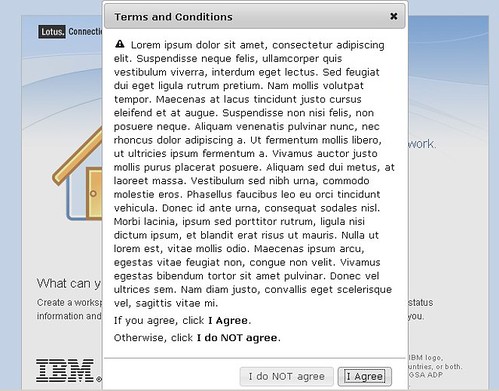
Recently, I was working with a customer who wanted to ensure that their users agree to some terms and conditions before being able to log on to Lotus Connections. It turns out that this customization is not too bad. I had heard from Mitch Cohen that jQuery was a nice library to do this.

I did some searching online to see if someone had done something similar. I found this awesome article: Modal Confirmation Dialog on Form Submit: Javascript, jQuery, and Thickbox. It basically shows you how to do the same thing in 3 different ways. I chose to use jQuery for this little project.


Here's step-by-step how I did it:

  1. Download the jQuery libraries. This link did it for me: http://jqueryui.com/download/jquery-ui-1.7.2.custom.zip
  2. Extract the files to a directory in your HTTP server. I put them in a directory called jq in: C:\IBM\HTTPServer\htdocs\en_US
  3. Go to <WAS_PROFILE_ROOT>\installedApps\<cellName>\Homepage.ear\dboard.war\auth
  4. Save a copy of login.jsp
  5. Open login.jsp with your favorite text editor
  6. Add the following before the closing </HEAD> element

     <!-- Include jQuery -->
    <link rel="stylesheet" type="text/css" href="/jq/jquery-ui-1.7.2.custom.css">
    <script type="text/javascript" src="/jq/jquery-1.3.2.min.js"></script>
    <script type="text/javascript" src="/jq/jquery-ui-1.7.2.custom.min.js"></script>
    <script type="text/javascript">
    $(function(){
            // jQuery UI Dialog    
    
            $('#dialog').dialog({
                autoOpen: false,
                width: 400,
                modal: true,
                resizable: false,
                buttons: {
                    "I Agree": function() {
                        document.lotusLoginForm.submit();
                    },
                    "I do NOT agree": function() {
                        $(this).dialog("close");
                    }
                }
            });
    
            $('form#lotusLoginForm').submit(function(){
                $('#dialog').dialog('open');
                return false;
            });
    });
    
    </script>
    

  7. Now go on to the end of the file.
  8. Just before the </BODY> element, insert the following code:

    <div id="dialog" title="Terms and Conditions">
      <p>
      <span class="ui-icon ui-icon-alert" style="float:left; margin:0 7px 0 0;"></span>
    
    <p>Lorem ipsum,blah blah blah</p>
    <p>If you agree, click <b>I Agree</b> below.</p>
    <p>Otherwise, click <b>I do NOT agree</b>.<p>
    </div>