I always like to highlight when developers and partners extend our IBM Connections Cloud platform.
Today I wanted to highlight VideoBio who have built a very nice solution to allow users to quickly share video messages with others.
So how does it work? First, you can go to your profile, or someone else's profile and click on the VideoBio button.
After recording the demo, it's automatically shared with your IBM Connections network and you can optionally choose to share via Facebook, LinkedIn, Twitter and more.!
One of the great things of IBM Connect is all the great content that's shared. I remember going to my first conference and readily absorbing as much content as possible and putting it into practice. Of course, with so much content, sometimes you can't attend all sessions. It's all good, however, when speakers choose to share their content in platforms such as Slideshare.
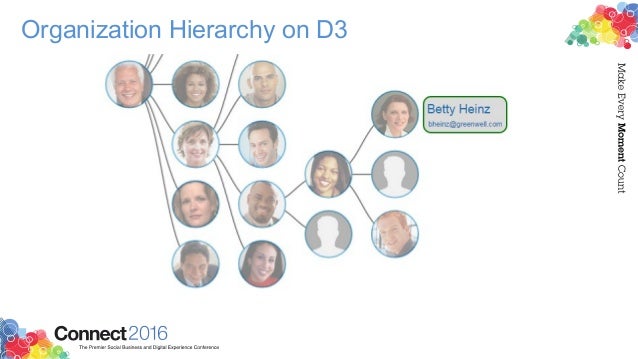
I recently ran into this deck that Matt Milza shared and figured I would re-share as it's a great example of what can be done with the IBM Connections APIs. In the presentation, Matt provides a background on the APIs, examples on how to interact with them, and then shows a practical implementation of something he did for a customer.
Using the social data stored within the system, Matt created this simple visualization of the report-to chain for an organization.
Yesterday I posted a recap of the IBM ConnectED 2015 OGS. Today, I wanted to focus on the What's New in IBM Connections session that I presented at after the keynote. The intent of the session was to recap our deliveries in 2014 (which were a lot!) and then give you a glimpse at what's coming next.
There were two things that I called out to the audience. First, for those of you who are running IBM Connections on-premises, you should definitely be looking at what we are doing in the cloud. We are going to continue our cloud first model where every several weeks there will be new features showing up in the cloud. Then at some point in 2015, we'll take what's in the cloud and ship it to our on-premises customers.
Second, the product management and development teams continue to monitor the ideas and feature requests that YOU are giving us. In fact, everything that's coming in 2015 and everything that we showed in the session comes directly from the ideas submitted by our users. If you would like to see the ideas that others are submitting and vote on them, or better yet, submit your very own feature request, go here.
For those of you who couldn't make it to IBM ConnectED 2015, I've posted a copy of the deck online here:
Here's a recap of the tweets during the session. The session repeated twice on Monday (and yes, my brain was about to explode!) so you may see tweets out of order here.
It's hard to believe that just a week ago was the keynote (aka OGS ... aka the Opening General Session) at IBM ConnectED . This year I again had the opportunity to demo during the keynote and present IBM Connections Next, the next iteration of our market leading enterprise social collaboration platform.
Prior to the demos, some interesting stats were shared. The one that caught my attention the most is that the IBM Verse announcement gathered more impressions than any other IBM announcement, including Watson, the IBM + Apple partnership and the IBM + Twitter partnership. That's HUGE!
The onto the demos. This year, Scott Souder focused on IBM Verse and I focused exclusively on IBM Connections. I wanted the audience to take a way a few things: 1) our focus on design, 2) our focus on helping people understand what's important so you can work on what matters, and 3) our focus on reducing interruptions.
Updated 11/Feb/2015: Here's a recording of the OGS (and you can skip to 37:30 for the IBM Connections demo):
For another perspective, one of the attendees in the first row captured the keynote and made it available in YouTube. Enjoy the keynote here (and you can skip to 54:00 for the IBM Connections demo):
And here's a sampling of the tweets during the OGS:
Beyond IBM Connections Next, there was also an announcement for a new IBM Connections offering that's just for Files. This will be the lead offering to compete in the Enterprise File Sync and Share space. This is in response to many users loving our file sync capabilities, and in some cases asking for just that (without the other collaboration aspects from Connections such as Communities, Wikis, Blogs, etc). Analysts have also already highly rated IBM as a leader in the Enterprise File Sync and Share space.
This new offering will give you Files only, along with expertise search, social analytics and access to our desktop and mobile apps. Users will have the option to buy upgrade to other cloud offerings such as Chat, IBM Verse, Web Meetings, IBM Docs, etc. The offering will be available as part of our March 2015 deployment.
Additionally, customers looking for compliance will be able to start using the Actiance Vantage offering with IBM Connections Cloud soon.
From the OGS, I headed over to the Dolphin for the What's New and Coming in IBM Connections and IBM Connections Mobile. I'll cover that in the next post.
Here's one way to start the week on a high note. Over the weekend, we enabled the latest features for our Q3 (or fall release) of IBM Connections Social Cloud, which, as you can tell off the bat, features a new name and tons of goodies. Mitch and Chris had already shared the news about the new name, which we made public back in January of this year at IBM Connect 2014.
You may have already seen the blog from last week from Rebecca Buisan which previewed some of the things that we turned on this past weekend. Let me take the opportunity to go into a bit more detail.
First, you'll notice that we have a brand new site over at http://ibmcloud.com/social as you can see above. We want to make it easy to find what you need and direct your attention to what matters. As you may remember, last month we turned on video chat. This month, we've added features to make it easier to find experts, synchronize your files to the desktop, and increased engagement capabilities by using @mentions in more content areas (for example, forums, to-do's and more). I'm not fond of text, so check out this presentation for all the details of what's new:
How's that for a release ? But wait...! There's more!
Developers.. we haven't forgotten about you!! We are launching a new site just for you over at http://developer.ibm.com/social (screenshot above) very soon. We are going to be doing some continuous updates to this page so expect to see more changes soon. Additionally, we've created a schedule to continuously share content with you via the team blog. This will get you more content from more people and gives a hand to the super awesome Niklas Heidloff. If you haven't subscribed to that one, do it now.
This is one of those cases were timing couldn't have been better. Just a few days ago someone was asking me about the possibility to integrate Cisco'sJabber and WebEx with the market leading social collaboration platform IBM Connections.
Anyway, then as I was catching up with my feeds I ran into a new presentation from Jabborate. Don't you just love it when knowledge comes to you instead of you having to go out and search for it?
So here's the deal. There are 3 types of integration into IBM Connections provided by Jabborate:
Jabborate - Adds presence, instant messaging, audio and video calls to IBM Connections via Cisco's Jabber
Jabborate WebEx - Adds virtual meetings and conference call management to IBM Connections via Cisco's WebEx
Jabborate Exchange - Adds a calendar and scheduling app to integrate IBM Connections with Microsoft Exchange
Here's a deck that describes in more detail what's possible:
I've talked about integration of IBM Connections with Confluence in the past. Communardo has created 3 new integration points to bring together IBM Connections and Atlassian's Confluence. These integration points are important for organizations that may be using both products and want to provide more synergy between them. This is yet another example of IBM Connections as a social layer, where you can embed Connections into other business apps allowing you to bring social to the end users.
The integration points are:
Surface IBM Connections' person card within Confluence ( this is available as a plug-in from Atlassian's Marketplace) allowing profile data to be kept in just one system (IBM Connections)
Use the IBM Connections Activity Stream to connect the decentralized Confluence wikis to save time finding information and avoid switching back-and-forth between systems.
Confluence work rooms will surface within the list of Communities in the IBM Connections interface to surface previously hidden work laces.
To see it in action, check out the 5 minute demo below:
Alright, let's move on to the next piece shown at the OGS. If you want to know what this is, I would suggest you catch up with Part 1 and Part 2.
The next part I got ready for the keynote was people search. But I wanted to move away from the typical search results list. I wanted something more visual and easier to digest. I wanted results to be more visual, maybe like a slideshow of people cards that I could flip through.
After doing a bit of searching, I landed on another jQuery plugin, this time the Baraja plugin and it got me something like this:
So what's the magic here? Let's walk through the parts:
<script>
var $el = $( '#baraja-el' ),
baraja = $el.baraja();
baraja.add( searchResults ) );
baraja.fan( {
speed : 500,
easing : 'ease-out',
range : 100,
direction : 'right',
origin : { x : 50, y : 200 },
center : true
} );
</script>
The missing piece here is the call to the People Search API of IBM Connections to generate searchResults. I'll leave that as an exercise to the reader. Once I gathered all the data, I created a searchResult which would look like this (so that it matches the CSS I shared above):
In conjunction with the new IBM Notes 9.0 release today, we have also just released the latest IBM Connections plug-ins for the best email client available delivering the world's first social email experience to the market.
The new plug-in adds support for:
IBM Notes 9.0
IBM Connections 4.5
Mac OS X 10.8
Windows 8
Additionally, the Connections business card has now been redesigned and the plug-in now provides a single installer to enable all the integration points to Connections: microblogging, file sharing, and tasks. As you probably know the plug-in allows you to:
Attach a file to a status update
Like / unlike a status update
Activity stream integration allows to monitor updates for all Connections services
Search by people and communities
Post status letting your colleagues know what you are doing
View status for people in your network
Comment on status updates
Delete your status or associated comments
Forward an update by email
View or post updates from the icon in the system tray when you are not working in the Notes client
Keep up with updates for people you follow
Lock/unlock files
Upload files for your own use or to share with others
Drag and drop an attached file or a file from your desktop to Files
Drag and drop or copy and paste a file from Files to your desktop
Send an HTML link to a file
Search for people or communities
Sort files for easier browsing
Detach the Files window from the Notes sidebar
So if you are upgrading to IBM Notes 9.0 and/or IBM Connections 4.5 you must get this plug-in today! To learn more about IBM Notes 9, check out this 90 second video from Ed Brill:
And for a demo of these features check out:
To download the new plug-in, you can get it from our app catalog over here.
I'm pleased to announce that we have just released the latest IBM Connections 4.0 plug-ins for Notes. Unlike previous releases, we've now combined all of the Notes plug-ins into a single install.
Here's a highlight of some of the new and enhanced features:
NEW: attach a file to a status update
NEW: like / unlike a status update
NEW: Activity stream integration allows to monitor updates for all Connections services
NEW: search by people and communities
NEW: Lock/unlock files
NEW: Connections 4.0 style UI (improved formatting and layout, enlarged images, additional content including like and comment counts).
View status updates for your colleagues, communities or organization (support for "Discover" view).
View your board or someone else's board.
NEW: Microblogging within a community
NEW: Post a file as attachment along with posting a Status Update.
Support for Linux desktops
I believe that these plug-ins are extremely important in helping drive the adoption of the IBM Social Business platform. A lot of customers have been re-iterating how powerful these plug-ins are since they bring the power of social to the end user, instead of forcing the user to learn a new interface and collaborate in a different context.
If you haven't seen the plug-in in action yet, I'll be posting a demo movie later. For now, here's a screenshot that I took last year and will be sharing more later this week:
You can download the plug-ins from our App Catalog as usual here.
Today is my 2nd year anniversary as one of the Product Managers in IBM's Social Software team and have some great news to share. Analysts at Gartner have positioned IBM in the Leaders Quadrant of the 2012 Magic Quadrant for Social Software in the Workplace. IBM’s placement is based on its ability to execute and completeness of vision. Just a few weeks ago, IBM released IBM Connections 4.0 the core of the IBM Social Business Platform.
I'm extremely proud to be part of the IBM Connections team! If you want to learn more about IBM Connections, check out this quick 3 minute video created by my colleagueSuzanne Livingston:
Check out the other 9 videos that Suzanne has created. These are great "shorts" you can easily share with your colleagues and even embed directly in Connections to show users what's new in IBM Connections 4.0 and they cover the different components of Connections including Mobile.
IBM today released a new update for the IBM Connections App for Android mobile devices. Back in August 2011, the first version of this app was released to the Android Marketplace and now today the latest update for this app is now available for download from Google Play.
Looking at the reviews for the app, so far the uptake has been tremendously positive. And I'm sure that with this update more and more people will enjoy using this app.
This update has a massive list of new features and improvements:
New and improved user experience
New getting started tutorial
New interface for Profiles
Native integration of Profiles with device (e.g. save contact in device for access offline, share contact, click-to-call, etc)
Generate QR codes for contacts
New search capabilities, including type-ahead search!
New cached views for faster response times
Support for multiple IBM Connections accounts (e.g. inside/outside firewall)
Support to access files offline (and encrypted) on the device
Ability to share files with communities
Save pictures locally (offline)
Ability for administrators to control branding/look-n-feel from server
Ability for administrators to add additional menu items from server
Ability for administrators to add a custom end user agreement
Ability for administrator to customize the login form
App provisioning via email
Support for Single Sign On solutions such as WebSEAL/TAM, Siteminder, and SPNEGO
As you can see, this is a massive release, so make sure you go out to Google Play right now and download the latest update. And if you haven't installed it, go ahead and give it a try. The app is pre-configured for Greenhouse, so simply enter your credentials and off you go.
Check out this demo that I recorded recently giving you a brief preview of some of the features included in the app:
To download the IBM Connections Mobile App for Android for free, click here. (By the way, if you are interested in the iOS app for iPhone/iPad/iPod Touch devices, click here)
Enjoy! (in the meantime, we'll keep working on the next release!)
IBM today released the latest update of the IBM Connections Mobile app for iOS ( iPhone, iPad and iPod Touch). The universal app for IBM Connections was initially released late last year. This release delivers on the roadmap shown at earlier this year at Lotusphere 2012 and is the Spring 2012 release. Check out this long list of new features in this:
New and improved user experience
New getting started tutorial
New interface for Profiles
Native integration of Profiles with device (e.g. save contact in device for access offline, share contact, click-to-call, etc)
New search capabilities, including type-ahead search!
New cached views for faster response times
Support for multiple IBM Connections accounts (e.g. inside/outside firewall)
Support to access files offline (and encrypted) on the device
Ability to share files with communities
Save pictures locally (offline)
App provisioning by email
Ability for administrators to control branding/look-n-feel from server
Ability for administrators to add additional menu items from server
Ability for administrators to add a custom end user agreement
Ability for administrator to customize the login form
Support for Single Sign On solutions such as WebSEAL/TAM, Siteminder, and SPNEGO
As you can see, this is a massive release, so make sure you go out to the iTunes App Store right now and download the latest update. And if you haven't installed it, go ahead and give it a try. The app is pre-configured for Greenhouse, so simply enter your credentials and off you go.
I've captured a demo showing these latest updates which you can see below:
Get the IBM Connections app for iPad now for free from here!
Enjoy! (in the meantime, we'll keep working on the next release!)
All credit here goes to Mitch Cohen for the idea. As I've been updating my demo server this week to record a video on it, it turns out that Mitch asked how to add an attribute to IBM Connections Profiles so that it would be a clickable link to a user's web meeting (whether it's SmartCloud Meetings, VSee, WebEx, etc).
The process for adding a custom attribute to Profiles is documented here, but let me just show you how to do it specifically for web meetings. In the example below, I'm going to focus on SmartCloud Meetings, but if you want to do it for WebEx, for example, it should be very straightforward to modify the configuration that I present below:
Check out profiles-config.xml
Open profiles-config.xml with your favorite text editor
Add the following line under the <profileDataModel> - <profileExtensionAttributes> section:
Now scroll down to the <profileLayout> - <jobLayout> section (or to the <contactInformation> section depending on where you want to add it) and add the following line:
If you want, you can also add it to the businessCard section so that it appears every time a business card is shown.
Save and close the file
Check it back in
Restart Connections
Once you restart the server, you'll see something like this show up for people who have defined their Meeting ID by going into Edit My Profile.
Now if I were to pull up Jasmine's profile, I'll always be a click away to her virtual meeting room. Clicking on the link immediately launches the web meeting and I don't have to do anything else. Very easy!
Bunchball, who shipped the first gamification solution 5 years ago has recently added support for IBM Connections. Leveraging Connections' extensibility points via widgets, Bunchball plugs into IBM Connections to promote end-user adoption and engagement. So far, Bunchball's platform, called Nitro, has handled 125 million users and tracked over 15 billion actions !
Gamification can used in various ways to help drive usage of a new system. For example, you can offer rewards or badges once a user completes his profile, creates a wiki, uploads and shares files, etc. The tricky part, of course, is to not only use gamification just during the initial adoption phase, but to keep users consistently engaged.
This is possible with Nitro's admin console where customers can very easily create an infinite number of missions, determine point economies, and establish rewards (or whatever works best to keep users engaged).
Here's a screenshot that shows Nitro for IBM Connections in action:
One of the cool features that Level Up adds to IBM Connections is real-time feedback on awards and missions completed. To see this integration in action, check out this quick 5 minute demo of gamification with IBM Connections with Bunchball.:
Happy New Year to everyone! As I catch up with emails and get ready for Lotusphere 2012 #ls12 I saw an interesting "card" from a business partner in Spain.
They loaded profiles for Santa Claus and the Three Wise Men. The card is of course in Spanish, but you'll probably get a kick out of it as well.
IBM Business Partner Intravision has created a great integration point between OnTime Group Calendar and IBM Connections. If you haven't heard or used OnTime before I suggest you check them out. They provide an awesome add on with a powerful and very slick group calendar interface.
OnTime also allows you to work with group calendars even when you are on the go by providing mobile access from your favorite mobile device.
The new integration point brings the power of OnTime Group Scheduling into communities in IBM Connections. The following video shows a demo of the integration. It shows a community being created in IBM Connections for team collaboration. One of the challenges of building a team is finding the people with the right skills at the right time. IBM Connections already makes it super easy to find people based on skills. This integration point, allows you to see someone's availability right on their Profile page within IBM Connections.
Once you have everyone in the community, you can quickly see everyone's availability today by just hovering over the names of team members, or you can even see a nice graphical representation for everyone's availability any date/time.
Finally, the Social Scheduling widget allows you to find people from various departments that are available at any given time. Very cool!!! Check out the quick video below:
This is a great example of the extensibility of IBM Connections via widgets. If you are interested in learning more about this, go to http://ontimesuite.com/ . And congratulations to the team for being nominated for a Lotusphere 2012 #ls12 award in the "Enabling Business Innovation through Social Collaboration".
This is another posting from my colleague Romain Lienard. The first posting that I shared from him was a quick post that explained how to add a "Follow This Community" button to an email which helps accelerate adoption. In this post, Romain shares how to simply add a button to your email signature, for example, so that others can click it and invite you to be part of their network. This is another great example of using LotusScript with the IBM Connections API. And given I like to share a bunch of how-to's, I figured I would help spread the word on this one.
In the same spirit, I wanted to do a button that let people invite me into their network in a simple click, because it can be a good way to drive adoption of Connections.
Here again, all you have to do is :
1 - create a button in your mail, via Create>Hotspot>Button.
2 - Specify a label for your button, select LotusScript instead of Formula
3 - Copy & paste this code, after changing the YOUR_EMAIL with your email :
Sub Click(Source As Button) Dim objHttp Set objHttp = CreateObject("Microsoft.XMLHTTP") url = |https://w3-connections.ibm.com/profiles/atom/connections.do?email=YOUR_EMAIL&connectionType=colleague| req = |<?xml version="1.0" encoding="UTF-8"?> <entry xmlns="http://www.w3.org/2005/Atom" xmlns:snx="http://www.ibm.com/xmlns/prod/sn"> <category term="connection" scheme="http://www.ibm.com/xmlns/prod/sn/type" /> <category term="colleague" scheme="http://www.ibm.com/xmlns/prod/sn/connection/type" /> <category term="pending" scheme="http://www.ibm.com/xmlns/prod/sn/status" /> <content type="html"> Please accept this invitation to be in my network of Connections colleagues (sent from Lotus Notes). </content> </entry>| objHttp.open "POST", url, False, "", "" objHttp.setRequestHeader "Content-type", "text/xml" objHttp.send(req) Msgbox "Invitation has been sent !" End Sub
Save your document, click on the button, and voila ! (note : you'll be prompted for your intranet password)
If you want to use this button every day, there is unfortunately no way to put it on the signature file BUT (thanks to Herbert Hilhorst for the tip) you can copy & paste your signature and the button you put on it from the current mail to the signature richtext editor (More...>Preferences>Signature). In this way, the button will be copied too. Don't forget to select Rich Text instead of HTML or file.


 There were two things that I called out to the audience. First, for those of you who are running


 The new plug-in adds support for:


