If you watched the last demo of IBM Watson Workspace for Marketing this will be part two of that series. This demo is focused on the day of the life of sellers and how IBM Watson Workspace can make their life better. If you missed the breakout session hosted by Rob Ingram, Rishi Vaish and Alan Lepofsky at World of Watson, this is a good way to catch up.
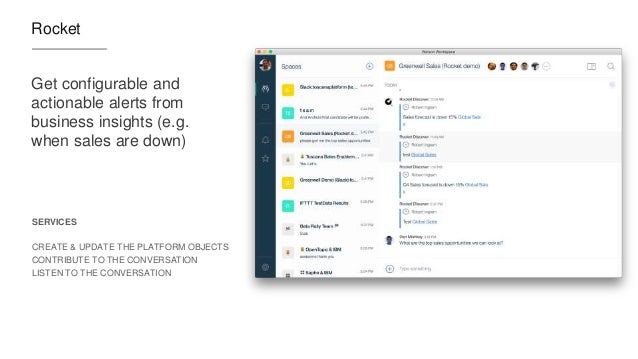
The video demonstrates how IBM Watson Workspace uses its cognitive capabilities to get you the information you need in context without having to jump back and forth between multiple tools. In the scenario example, we show a sales manager asking his team for the top sales opportunities. Watson Workspace understands this question and knows where to go and get the information: Salesforce. The latest opportunities and their status are then brought directly in context. Then it's time to sign the contract. The goal for this demo (and the previous one) is that it shows all integrations that have been built with the APIs that exist today.
As things settle from the IBM World of Watson conference two weeks ago, today I wanted to take the opportunity to share one of the demos that was shown in a breakout session hosted by Rob Ingram, Rishi Vaish and Alan Lepofsky.
The video that demonstrates how IBM Watson Workspace can improve your life as someone who works in marketing. It makes team collaboration easy and saves you time by bringing everything together and summarizing it for you (using some cool Watson services) so you can take action on what really matters.
Yesterday, IBM unveiled a new category called IBM Watson Work and two offerings available to all IBM World of Watson conference attendees: IBM Watson Work Services and IBM Watson Workspace.
If you've been following me for a while, you know I'm a big fan of integrations, app dev, and platforms. Well, today I'm happy to share the news that IBM Watson Workspace works with IFTTT. In fact, it's the first IBM app to be part of the IFTTT ecosystem. If you are not familiar with IFTTT (that is IF This Then That), they make it super easy to connect the apps that you love together and configure what they call recipes. In other words, when something happens in one app, then do something in another app. IFTTT currently has 370+ apps in the catalog, so chances are that you can integrate with what you want (e.g. Box, Gmail, your car, you smart home devices and more!)
To start creating your own integration with IFTTT, head out to: ifttt.com/workspace . Fist bump to the IFTTT team for helping share the news:
We are just one week away and I've been getting some questions on the live streaming schedule for IBM World of Watson 2016 (WoW). I'm happy to share that the most important keynotes will be live streamed via IBMGo.
Of course, one you can't miss is on Tuesday @ 4pm PT. Inhi Cho Suhwill be sharing some cool updates on what's going on with Project Toscana (among other announcements related to the Future of Work). Here's the details as quoted from Marco Tempest, who will be joining us for the keynote:
IBM Connections allows customer to choose how they want to run and get values from the platform. For example, there are organizations that would choose to run in cloud for a "hands-free" environment. No need to worry about outages, upgrades, etc.
Other organizations would need the flexibility and customizability that an on-premises deployment would provide. For those of you who have decided to run IBM Connections on-premises you might want to check out this partner offering.
GSX for IBM Connections provides a powerful way to monitor critical components of the platform. Some of the capabilities you'll have:
Proactive notifications to get instantly alerted based on pre-defined thresholds
End-to-end performance monitoring include databases, application servers and more
Responsive time of end user experience
One real-time dashboard to see at a glance the status of all services and performance metrics
Here's a quick 3 minute demo to give you a better idea of what the solution can do at a glance:
The app combines IBM Connections Cloud, IBM Watson Analytics and IBM Bluemix. The idea is that the app allows you to upload images and then uses IBM Watson (the Visual Recognition Service) to help with automatic classification of the files. Based on the image that has been uploaded, Watson will then suggest some tags to use with the file.
If you missed IBM Connect 2016, well, you missed a great show! I'll share some more content from the conference in upcoming posts so stay tuned to those. For now, I quickly wanted to get this out and then work on my IBM InterConnect 2016 sessions.
Now that we are back in business in the new year I wanted to take the time to share a bit more on IBM Docs 2.0 beyond the announcement last year. In a very short time, I've already started to hear very good positive feedback on the release which is great !
One of the things that I wanted to share is the latest demo video that we posted over the holidays. The video covers all the basics and you can see how simple it is to take advantage of this capability to create files together with your team members anytime, anywhere!
Check out the 3 minute video below:
As we get ready for IBM Connect 2016 (you are going, right?) you'll also want to reserve time to learn more about IBM Docs. Check out the IBM Connect 2016 Session Preview Tool and add the IBM Docs sessions to your agenda.
The new IBM Connections Editor is a companion application the to the IBM Connections Mobile application for iOS and Android devices. The IBM Connections Editor is a full-featured mobile editor, which will allow you to take files directly from IBM Connections Files and easily view or edit those files on your mobile device. You can edit any Microsoft PowerPoint presentation, Excel spreadsheet and Word document from your Connections Files with the new editor. You can also create new presentations, spreadsheets or documents in the editor and save them directly into IBM Connections Files.
Full Featured Editor:
The IBM Connections Editor provides full-featured capabilities on the mobile device. You can edit or create a PowerPoint presentation. The editor allows you to add or remove slides, add images or video, add charts or shapes and provides a large option on fonts and colors. You can present the slides directly from your mobile device as well as view animations and add notes to each slide.
You have the same robust capabilities when editing or creating a document as you do with presentations. In addition to all those features you can also add or edit headers, footers, endnotes and footnotes.
When using the editor to edit or create a spreadsheet you have over 300 formulas for Arithmetic, finance, Date/Time, Statistical, Database, Look ups and much more. You can also add charts and shapes directly into the spreadsheet.
Seamless and Secure
The seamless integration between the two mobile applications makes it easy to use and secure. You can open any supported files in IBM Connections Files and select to edit that file, once you have selected Edit the document will automatically open in the IBM Connections Editor. Once you have completed your updated in the editor simple select to save the document back into IBM Connections. The file will save back to the exact place that you opened it from giving the option to add new tags and version description, this instance on the file will be saved as a new version. The applications share a common storage therefore the documents always maintain their security settings. The file remains secure during the entire round trip editing experience. The IBM Connections Editor also provides MDM support for those vendors supported by the IBM Connections Mobile application.
The IBM Connections Editor is available today for download at no additional cost at the Apple App Store or Google Play
In just a few weeks, the 9th Social Connections will kick off and it has one of the best agendas ever. If I counted correctly, there's 70 sessions over two days so I'm sure what whatever content you are looking for, it'll be there. With a focus on IBM Connections and Social Business, this is a first-class event for the user community. If you are working with, using, or what to learn more about IBM Connections, you need to make every effort to attend!
It's hard to believe that just a week ago was the keynote (aka OGS ... aka the Opening General Session) at IBM ConnectED . This year I again had the opportunity to demo during the keynote and present IBM Connections Next, the next iteration of our market leading enterprise social collaboration platform.
Prior to the demos, some interesting stats were shared. The one that caught my attention the most is that the IBM Verse announcement gathered more impressions than any other IBM announcement, including Watson, the IBM + Apple partnership and the IBM + Twitter partnership. That's HUGE!
The onto the demos. This year, Scott Souder focused on IBM Verse and I focused exclusively on IBM Connections. I wanted the audience to take a way a few things: 1) our focus on design, 2) our focus on helping people understand what's important so you can work on what matters, and 3) our focus on reducing interruptions.
Updated 11/Feb/2015: Here's a recording of the OGS (and you can skip to 37:30 for the IBM Connections demo):
For another perspective, one of the attendees in the first row captured the keynote and made it available in YouTube. Enjoy the keynote here (and you can skip to 54:00 for the IBM Connections demo):
And here's a sampling of the tweets during the OGS:
Beyond IBM Connections Next, there was also an announcement for a new IBM Connections offering that's just for Files. This will be the lead offering to compete in the Enterprise File Sync and Share space. This is in response to many users loving our file sync capabilities, and in some cases asking for just that (without the other collaboration aspects from Connections such as Communities, Wikis, Blogs, etc). Analysts have also already highly rated IBM as a leader in the Enterprise File Sync and Share space.
This new offering will give you Files only, along with expertise search, social analytics and access to our desktop and mobile apps. Users will have the option to buy upgrade to other cloud offerings such as Chat, IBM Verse, Web Meetings, IBM Docs, etc. The offering will be available as part of our March 2015 deployment.
Additionally, customers looking for compliance will be able to start using the Actiance Vantage offering with IBM Connections Cloud soon.
From the OGS, I headed over to the Dolphin for the What's New and Coming in IBM Connections and IBM Connections Mobile. I'll cover that in the next post.
Over the weekend, IBM rolled out new features to IBM Connections Social Cloud, the market-leading enterprise social collaboration platform.
In this month's release (if you are wondering, we'll skip updates in December because of the holidays so the next release will be in January), you'll find capabilities that the community has been asking for in the IBM Connections ideation area.
Our team put together a presentation so that you can see the new capabilities (see below) and here are some highlights I wanted to call out:
User Experience
With the announcement of #IBMVerse last week, we've enabled a new theme to match the visuals found in that product. Admins can choose to use this new theme. We'll keep updating this one, though don't hesitate to let us know what you think about this one.
As I get ready to go to IBM Insight next week it occurred to me that it's good timing to talk about a question that I've gotten recently. Specifically, some colleagues have been asking about a way to take notes while traveling for a customer meeting or industry conference.
The way I do it is with the IBM Connections iPad app. In the demo below, you'll see how to start creating a note from scratch. One of my favorite capabilities is that you can co-edit with multiple people at the same time.
So imagine going to a conference and you and other colleagues at all taking notes in the same place without overwriting each other. Perhaps one of you is taking pictures during the keynote and adding them to the note, while the other is writing down key bullet points.
Once you are done, you can publish the note and make it available to other colleagues in the organization that perhaps couldn't travel to your meeting.
Because this is all done inside the Connections app, the document security is kept and you don't need to take it out to another editor, and then bring it back.
So what do you need to make this happen? Whether you are a cloud or on-prem customer all you need is the latest version of our free iPad mobile app plus the IBM Docs add-on.
As you may know, we are now releasing new updates to the desktop plug-ins on a monthly basis. This month's release brings some cool new features to those of you working with Microsoft Office Desktop apps (even if you use the desktop apps with Office 365).
For some time now, we've had integration into Microsoft Office (Word, PowerPoint, Excel, and Outlook) via the ribbon. Today, we've added new functionality to the ribbon.
With the new features, you can now do the following directly from Microsoft Office:
Lock a file to prevent others from editing while you make changes
Share the file and add others as readers or editors
View version history
View download history/audit log
Like, pin, and follow
Check out this quick 2 minute demo that I created to show some of the new functionality:
To download the latest plug-in you can get it from Apps - Downloads on your cloud deployment, or from our app catalog here.
By now, I'm sure that you are aware of TemboSocial. They have been adding value to IBM Connections, the market leading enterprise social collaboration platform, and it's some great work and I've talked about them in the past.
The first add-on they created was a bit over 2 years ago when they first introduced The Hive for IBM Connections, a social recognition module.
Now, TemboSocial has introduced TemboSocial Ideas for IBM Connections. This new add-on plugs directly into a team site within IBM Connections and takes ideation to the next level.
With this add-on, you can crowdsource and gather ideas, surface the best ideas and comments, and the experts and moderators can curate the best contributions and provide updates on the idea (e.g. "In Progress", "Under Review", "Closed", etc). Additionally, it includes detailed real-time reports to determine sentiment, where the best ideas are coming from (e.g. by geography, role, workgroup, etc) and you can filter by time to measure the impact of your campaigns and see the results of your promotions.
Update 2:30pm ET: Tembosocial Ideas is front and center at the customer IBM Webinar "Innovation Starts with Social: How IBM Connections Social Software can Transform your Organization - Tuesday August 26th"
"Join ICS NA Executive Sales Leader Laura Wolf and Tembosocial president and founder Steven Green on Tuesday August 26th. It's the "Aha" moment for LOB how to best get value from, Social (on-prem or cloud), how existing Social organizations can make Social more strategic, and where first time Social organizations can effectively start. "
If you've been out for a while, it's time to catch up.
First, take a look at our new Social page at IBM.com: http://ibm.com/social . It got a makeover last week to find the right solution based on your needs
Additionally, I've been collecting news clippings about the stories and coverage so far on the IBM Connections 5.0 release. I haven't captured everything but here's some highlights for you to check out. Maybe there's some that you haven't seen so you can use these to share within your organization as well.
In the press:
CMSWire: IBM Social Software Update Features File Sync On Premises - http://bit.ly/1pJNtjY
So back to File Sync. As you can see from the screenshot in the right, when you install the latest IBM Connections Desktop Plug-Ins (which will be available for download in a couple of days) a new Sync folder will be created under Favorites.
There you can save files directly to IBM Connections and use Connections as your personal backup drive where everything is sync'ed automatically (including of course edits that you make offline).
Another added benefit and differentiator is that right from within your desktop you can right click on a file and act upon it. In other words, you can comment on it, tag it, like it, lock it (to prevent others from editing while you are offline) and even share it with other colleagues without ever having to open a browser. By default, all files are marked as private and only you have access to them. From there you can choose to share with individuals, groups, or communities.
On the mobile side, you can use our native apps for Android and iOS and sync files to your favorite mobile device/tablet. On each device you can manually specify which files you want to have available there. For example, you may want some key presentations on your iPhone, while you have documents, spreadsheets and other assets available in your iPad.
Here's a quick 5 minute demo that shows the enterprise file sharing and sync capabilities of IBM Connections 5.0.
If you are an on-prem customer, get ready to download the code next week! Stay tuned for other new features in the coming days.
At the May 21st event, you'll hear from various speakers such as Steve Mullen, the Director of IT for DAI, Elizabeth O'Brien, Global Sponsorship Manager for IBM and Jeff Schick, Vice President for Social Software at IBM. Of course, you'll also get to see demos!! And of course, you'll be able to ask questions.
Following the May 21st event, you'll have a chance to participate in a Live Q&A with Suzanne Livingston, one of my peers in the product management team, and myself, on May 22nd. So how is it going to work? It's going to be like office hours where we'll go through all the posted questions and answer to the best of our abilities.
In less than a month, IBM will be introducing the newest, latest, and greatest release of IBM Connections. Some of the latest capabilities were shown during the keynote demo at IBM Connect 2014.
Now, it's time to unveil everything that we've been working on for the past year or so and bring it to you. The official unveiling will happen on May 21st so mark your calendars !
As we've done in other years, we'll host a virtual web conference and walk you through the new business challenges that IBM Connections can help solve for you.
At this point, I can't say too much about the new release besides what you may already know from IBM Connect 2014.
Having said that, I thought it would be good to give you a sneak peek at what we'll be announcing in less than 1 month. Check out this preview that I created:
If you liked that, feel free to take the video above and embed in your own IBM Connections blogs, wikis, forums, etc. Spread the word!
To learn more and register for the event, click here.
Work is quickly ramping up as the product management team is working on the go to market activities for IBM Connections "Next". For example, yesterday I was working on updating the current IBM Connections Reviewer's Guide with information about the new release. I also submitted two abstracts for the upcoming Social Connections VI user group meeting, which I hope get selected, but more on that later!
In case you don't know by now, my background is in app development and I wanted to take an opportunity to share a couple of new items in the IBM Connections SDK.
Use the IBM Connections Banner in Custom Apps - One of the key aspects of building a custom app is integrating with the look and feel of the overall platform. IBM Connections in the Cloud provides a simple way to incorporate the main navigation into your own app giving end users a single, integrated end user experience and all you need to do is include a couple of lines of code!
Extending the User Interface of IBM Connections - IBM Connections in the cloud provides various extensions to make it super easy to extend the user experience. For example, let's say that you want to add a "Send a Thank You Award" button in someone's profile. A couple of clicks and voilá.
Build a Hello World App for IBM Connections in Less than 5 minutes - This video walks through setting up your development environment and build a sample Hello World app to integrate with our cloud environment using the IBM Connections SDK. In this case, it explains how to set up the Eclipse development environment, setting up Tomcat, get the right OAuth keys and go! Check it out below:
A couple of hours ago, IBM Connections 4.5 CR4 was made available. This new cumulative release introduces various new features, two of which specifically for mobile that I would like to focus on.
It's worth noting that these features are already available to our cloud customers so we are just wrapping these up and giving them to our on prem customers.
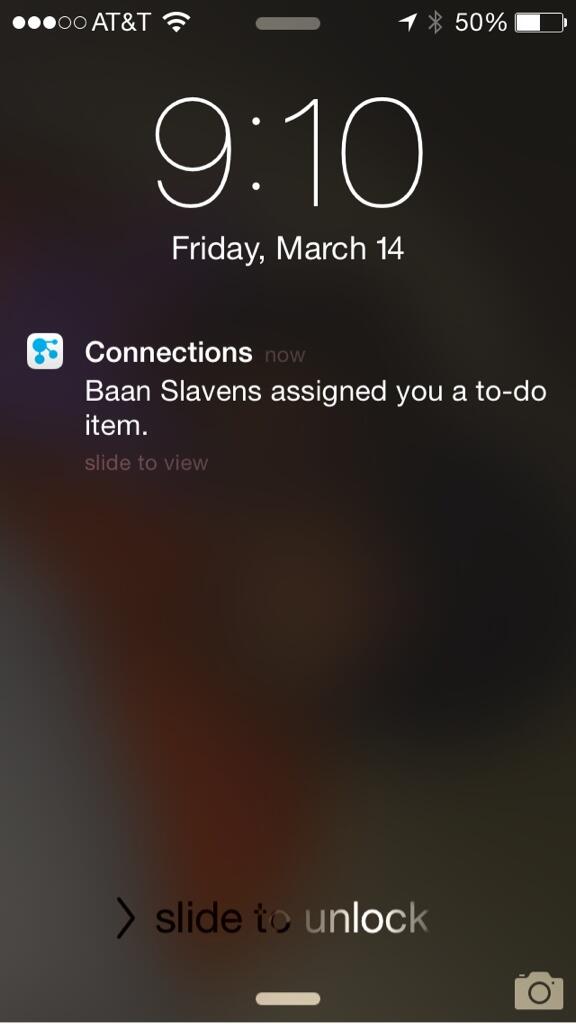
First, push notifications alert you when you have a new to-do (as seen below in the image), when someone asks to join one of your communities, or someone invites you to join their network.
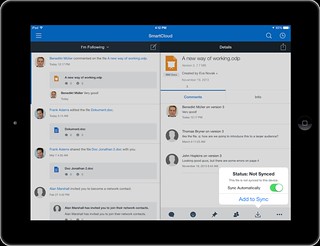
Additionally, you can now select individual files to sync and work while you are offline. When syncing, the server will do a differential sync. That way if one of your co-workers updates only 1 slide in a 50MB presentation, only the particular slide that was changed will be sync, saving you time, battery, and bandwidth. If you don't have unlimited 3G/4G/LTE plan, you can also choose to sync only while connected to wifi.
Finally, you can also pick and choose which files to sync to which device. For example, you may only want 2-3 key presentations on your Android phone (or iPhone) while having 20-30 documents on your iPad where you can more easily edit the files.
Check out this 4 minute demo so you can see File Sync working in Mobile:
To see what else is new in IBM Connections 4.5 CR4, go here. To configure File Sync and push notifications, see the documentation here.