Pages

Showing posts with label security. Show all posts

Wednesday, June 22, 2016

Announcing IBM Connections Premier and IBM Connections Compliance -- Now Available

View Comments
As announced in the IBM Social Software blog, yesterday IBM released IBM Connections Premier, the latest offering built on top of IBM Connections, the leading business social collaboration platform.  IBM Connections Premier combines engaging employee collaboration applications and compliance discovery solutions, including granular policy controls for content inspection, logging and archiving of social and instant messaging communications. With IBM Connections Premier integrated collaboration and compliance discovery solutions, your organization can protect your brand and reputation, meeting corporate, legal or governance requirements, and engage and enable your entire workforce.


IBM Connections Premier offers:
  • Ability to enforce acceptable use policies that lets your organization define policies at global, group or user levels. Monitor for and address the use of inappropriate or abusive language and objectionable actions.
  • Protection of your brand and reputation with near real-time monitoring and alerts. Detect, flag and block IMs and file transfers based on key words, phrases and regular expressions.
  • Reduction of legal costs through fast and simple content review and retrieval.
  • Enhanced return on investment (ROI) by extending the life of existing archive and e-discovery investments. Tag, export and archive content in its original format to e-discovery or enterprise content management platforms.
Check out this video which walks through a scenario to highlight the importance of secure collaboration and empowering confidence throughout the organization to accelerate innovation while keeping information safe:


To learn more, check out the announcement letter.

Tuesday, November 17, 2015

How To Enable Nested LDAP Groups in IBM Connections

View Comments
The other day I was asked how to take advantage of LDAP / Active Directory (AD) groups within IBM Connections, specially if those groups contain nested groups.  So I went to our internal brain (IBM Connections) and a quick search turned out a post from Antonio Aleandri and with his permission, I'm re-posting here:

-=-=-=-=-

By default, nested groups (nested LDAP groups) are not enabled in IBM Connections. What this means, for example, is that if you add the parent group as member of a restricted community, users belonging to children groups are not automatically Community members.

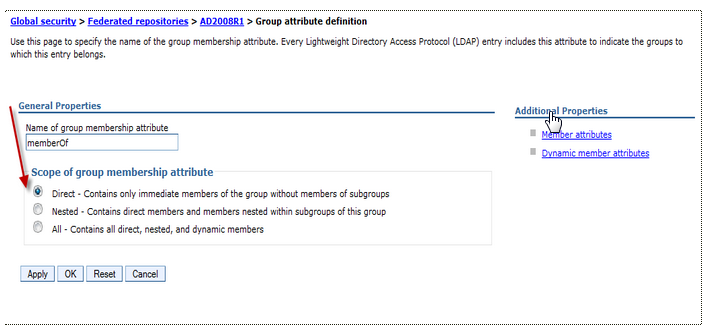
To enable the nested group you have to customize the scope of member attributes of Group attribute definition in your federated repository.

There are some small differences depending on the type of LDAP repository used:

Active Directory

Change only the scope of member attribute="member" to nested as shown below:


Tivoli Directory Server and Domino 

Customize the name of group membership attributes in Person record (ibm-allgroups for TDS and dominoAccessGroups for Domino) and set the scope to nested:


Check the right Object Class used for member attributes (groupOfUniqueNames for TDS and DominoGroup for Domino)


Save the configuration and restart all components!

Monday, August 31, 2015

Save The Date: Enterprise File Sync and Share is Just the Beginning of a New Way To Work

View Comments
Save the date. In less than a month, we'll be hosting a webinar to take you through the latest capabilities available in our IBM Connections Files offering, the IBM solution for organizations that are looking for enterprise file sync and share (EFSS) capabilities in the cloud.


IBM Connections Files on Cloud is designed for today’s mobile worker, providing a secure, easy-to-use, collaboration and file management environment for all size businesses. This cost-effective, secure file sharing solution is easy to implement using software-as-a-service (SaaS) on our cloud (or you can run it on-prem too). A user centric design allows anyone to confidently share files with their network of customers and partners, as well as sync online files to their favorite mobile devices and tablets (supports both Android and iOS mobile devices). Here's a quick video I had shared earlier of the IBM Connections for Mac app:


Ready to learn more? One of the Product Managers for IBM Connections, Jim Puckett, will be hosting a webcast. Check out the details below:

Date: September 24, 2015
Time: 1-2pm Eastern Time
Registration:  To register for the event, click here.

See you there!


Thursday, October 16, 2014

IBM Connections 5.0 CR1 Is Now Available

View Comments
Today, we are updating IBM Connections, the market-leading enterprise social collaboration platform.  Specifically, today we are releasing IBM Connections 5.0 CR1 for on premises customers.

This release includes a roll up of fixes that we've been releasing for the past couple of months.  Additionally, it also adds some new features.


New features in IBM Connections 5.0 CR1 (but not limited to):
  • Updated file preview design in stream
  • Play uploaded movies in the stream
  • View full file from thumbnail
  • New option to repeat events on a monthly basis
  • Copy/Paste images in the rich text editor for Activities
  • @mentions in CCM
  • Reporting metrics for CCM
  • Added support for IBM i , Power 8, and Siteminder 12.5.1

The full list of new features is here.  The full fix list can be found here.   

Enjoy!

Thursday, September 4, 2014

Brand Image and Security Concerns – All the More Reason to Become a Social Business

View Comments
To get the full benefit of social business, you must inject it into your key business processes for stronger customer engagement and workforce collaboration. But many enterprises are afraid to fully embrace social business, with 30 percent of them citing security concerns and perceived risk as major adoption barriers, according to IBM's 2014 Business Tech Trends report.

image But these fearful enterprises need to realize the true nature of social business. At its core, social business is a grassroots movement. Your customers have already embraced social. They’re online, on multiple channels, multiple platforms, talking about your business and reviewing your products and solutions. In other words, there’s no such thing as ‘opting out’ of social business.

In fact, the real risks of security and brand perception are increased when you don’t engage in social business. If you're struggling to integrate social into the core of your business internally and externally, IBM can help.

For example, IBM Connections can help you reorganize, restructure and transform your enterprise into an effective social business with social guidelines and policies set into place to optimize both customer engagement and your internal workforce communication.

When social business is done right, the possibilities are endless. In fact, Pacesetters engaging in social business have reported an 87 percent stronger competitive advantage in their respective markets.

To read the full IBM 2014 Business Tech Trends report, click here.

To watch the webcast replay of the Business Tech Trends announcement, click here.

After you’ve read the report, join us for a Bluemix app JAM! Simply download the report's data in an IBM Bluemix app and start discovering new insights! Share with us and IBM will highlight our favorites!

Monday, July 14, 2014

Press Coverage on the IBM Connections 5.0 Release

View Comments
If you've been out for a while, it's time to catch up.

First, take a look at our new Social page at IBM.com:  http://ibm.com/social . It got a makeover last week to find the right solution based on your needs


Additionally, I've been collecting news clippings about the stories and coverage so far on the IBM Connections 5.0 release.  I haven't captured everything but here's some highlights for you to check out. Maybe there's some that you haven't seen so you can use these to share within your organization as well.

In the press:
Finally, last week Suzanne Livingston posted a new video showcasing the new external collaboration features of IBM Connections 5.0. Check it out:


Wednesday, January 8, 2014

OpenQ Announces SafeGuard for IBM Connections - Risk Management for Social Business

View Comments
With IBM Connect 2014 less than 3 weeks away, we are getting to the time where we start seeing many announcements coming out from IBM and its partners.

Today, I wanted to share the announcement that OpenQ made a few days ago. OpenQ now offers SafeGuard for IBM Connections,  IBM's enterprise social network. The solution can analyze content, and archive/quarantine alongside with content coming from other social networks like Facebook, Twitter, LinkedIn, etc.

According to their announcement, the SafeGuard connector for IBM Connections provides:

  • comprehensive monitoring and risk management
  • quarantine of high risk content
  • content archiving - available for search, e-discovery and subject to retention policies
  • out of the box compliance policies to get going from day 1

Check out the 7 minute video below:


If compliance and risk management was holding you back, there are no excuses anymore!

To learn more, visit OpenQ at their booth at IBM Connect 2014.

Thursday, April 25, 2013

Demo: Deep Dive of IBM Connections Content Manager 4.5

View Comments

The Information Development team has created this video to take a deep dive into IBM Connections Content Manager 4.5 which was released a little over a month ago.

Earlier I had shared a high level demo of IBM Connections 4.5 so if you missed that, or you are looking for more details specifically around Connections Content Manager (CCM), then this is the demo for you. Here are the features you will see:

  • Upload and sharing files
  • Configuring library settings like draft approvals, document types and metadata, etc
  • Saving files as drafts
  • Configuring access to files
  • Searching by document types
  • Refine search by custom metadata
  • Tagging, liking, commenting on files
  • Approving / rejecting a document

Check out the 6 minute video below:

Enjoy!

Friday, May 15, 2009

Oh Yeah! Update Your Lotus Connections Status From Ping.FM

View Comments

Twitter drives innovation...

If you are actively using social networks, you've probably heard of ping.fm. Ping.fm allows users to update their status in the following services from any of the following clients:

From: To:
  • Skype
  • SMS
  • E-mail
  • AOL Instant Messenger
  • Yahoo Messenger
  • MSN Messenger
  • GTalk
  • etc
  • Twitter
  • Facebook
  • LinkedIn
  • Identi.ca
  • Flickr
  • FriendFeed
  • etc...

So from a single place you can update all of your statuses. And you can do this from different places. You are NOT forced to go to ping.fm's website to update your status. Ping.fm can receive status updates from various sources and then send them to your sites.

Pretty cool, huh? Well, I saw a tweet suggesting that updating your Lotus Connections status from ping.fm would be valuable too. Wouldn't it be cool if we could update Lotus Connections status from SMS, Skype, AOL, and other !?! I agreed and took the challenge upon myself.

The code gets done...

The code was actually pretty simple to code up and test (~3 hrs). So how did I do this? Here's the flow:

  1. Configured Ping.fm to add a custom URL (i.e. http://my.ip.address:8080/PingFMLotusConn/ping.fm)
  2. From any ping.fm client, I send a status update
  3. Ping.fm sends an HTTP POST request to the above URL (I had to open a port in my firewall for this to work)
  4. My custom web application, in turn, uses the Lotus Connections Atom API to update my status

I tested this and it works like a charm!! That's right.. you can now microblog in Lotus Connections from ping.fm!

Open questions / challenges...

Before releasing the code, I still have one challenge that I have to address. Since ping.fm will send the status update request in behalf of the user, ping.fm needs access to the URL defined above. Therefore, a customer would have to put it in the DMZ or poke a hole in their FW for this to work. The challenge, however, is how do I know the user who's posting the message since ping.fm doesn't send any user information. The ping.fm API is not very detailed and basically they only give me a message, but nothing else.

Let's secure it!

I thought of asking people to hardcode their credentials in the URL, for example: http://my.ip.address:8080/PingFMLotusConn/ping.fm?username=...&password=... (instead of:http://my.ip.address:8080/PingFMLotusConn/ping.fm). However, this is not very secure because you are giving your credentials to ping.fm AND ping.fm would transmit those over the wire in clear text.

My thought right now is to create a Trust Association Interceptor (i.e. lazy man's SSO). This would require that the user include their email address only, not their password, as part of the URL. This has a security hole because anybody could then assume someone else's identity. For example, I can give ping.fm this URL and update Mac Guidera's status: http://my.ip.address:8080/PingFMLotusConn/ping.fm?username=mac_guidera@us.ibm.com. Not very secure.

So I'm thinking that I need to create a widget on the Profiles page that gets deployed by Lotus Connections Admins. This widget would generate a user specific URL (e.g. http://my.ip.address:8080/PingFMLotusConn/ping.fm?authToken=...) where authToken is an encrypted token that uniquely identifies the user (that way users can't assume the identity of others).

If you've read this far... thoughts ?

Wednesday, October 15, 2008

How to change the logout URL for Lotus Connections

View Comments

The other day, a customer asked me how to change the logout URL for Lotus Connections. They wanted to configure Lotus Connections so that when a user clicked on 'Log out' they would be redirected to the company's intranet home page.

I couldn't find any documentation out there, so I put on my hacker hat. After a couple of minutes (ok, maybe 30 minutes), I was able to figure it out. I decided to capture my changes and share it with you. You'll notice that while the process may look long, it's really only changing 1 line of code in 6 different files... so it's really easy!

Activities and Home page:

  1. Go to <WAS_PROFILE_ROOT>\installedApps\<CELL_NAME>\Activities.ear\oawebui.war\WEB-INF\jsps\html_prototype\fragments\mainpage
  2. Save a backup of banner.jsp
  3. Open banner.jsp with your favorite text editor
  4. Look for the following lines:

    <form method="post" action="ibm_security_logout" name="logout" id="logoutForm" style="display: none;" >
    <input type="hidden" name="logoutExitPage" value="/service/html/mainpage">
    <input type="submit" name="logout" value="Logout">
    </form>

  5. Change the logoutExitPage parameter as shown below:

    <form method="post" action="ibm_security_logout" name="logout" id="logoutForm" style="display: none;" >
    <input type="hidden" name="logoutExitPage" value="http://w3.acme.com/home">
    <input type="submit" name="logout" value="Logout">
    </form>

  6. Save the file
  7. Repeat steps 1-6 for the following file:
    • <WAS_PROFILE_ROOT>\installedApps\<CELL_NAME>\Homepage.ear\dboard.war\web\jsp\pageheader.jspf (touch main.jsp afterwards to force recompilations of the JSP fragment)

Blogs:

  1. Go to <WAS_PROFILE_ROOT>\installedApps\<CELL_NAME>\Blogs.ear\blogs.war\roller-ui
  2. Save a backup of logout-redirect.jsp
  3. Open logout-redirect.jsp with your favorite text editor
  4. Look for the following line:

    response.sendRedirect(request.getContextPath() + "/ibm_security_logout?logoutExitPage=" + "/");
    

  5. Change the logoutExitPage parameter as shown below:

    response.sendRedirect(request.getContextPath() 
    + "/ibm_security_logout?logoutExitPage=" + "http://w3.acme.com/home");

  6. Save the file

Communities:

  1. Go to <WAS_PROFILE_ROOT>\installedApps\<CELL_NAME>\Communities.ear\tango.web.ui.war\WEB-INF\jsps\html\scenes\dashboard
  2. Save a backup of banner.jsp
  3. Open banner.jsp with your favorite text editor
  4. Look for the following line:

    logoutSection.innerHTML ='<html:link page="/service/html/logout"><fmt:message key="link.logout" /></html:link>';
    

  5. Change the page parameter as shown below:

    logoutSection.innerHTML ='<html:link page="/ibm_security_logout?logoutExitPage=http://w3.acme.com/home"><fmt:message key="link.logout" /></html:link>';
    

  6. Save the file

Dogear:

  1. Go to <WAS_PROFILE_ROOT>\installedApps\<CELL_NAME>\Dogear.ear\dogear.webui.war\h3\jsp\main
  2. Save a backup of pageHeader.jspf
  3. Open pageHeader.jspf with your favorite text editor
  4. Look for the following line:

    logoutSection.innerHTML =<jscript:string><a title="<fmt:message key="jspf.menu.logout.title"/>" href="<c:url value="/logout" />"><fmt:message key = "jspf.menu.settings.logout"/></a></jscript:string>;
    

  5. Change the value parameter as shown below:

    logoutSection.innerHTML =<jscript:string><a title="<fmt:message key="jspf.menu.logout.title"/>" href="<c:url value="/ibm_security_logout?logoutExitPage=http://w3.acme.com/home />"><fmt:message key = "jspf.menu.settings.logout"/></a></jscript:string>;

  6. Save the file
  7. Touch h3.jsp (to force recompilation of the JSP fragment)

Profiles:

  1. Go to <WAS_PROFILE_ROOT>\installedApps\<CELL_NAME>\Profiles.ear\peoplepages.war\WEB-INF\jsps\ajax
  2. Save a backup of loginInfo.jspf
  3. Open loginInfo.jspf with your favorite text editor
  4. Look for the following line:

    <html:link page="/ibm_security_logout?logoutExitPage=/index.jsp" styleId="logoutLink">
    

  5. Change the logoutExitPage parameter as shown below:

    <html:link page="/ibm_security_logout?logoutExitPage=http://w3.acme.com/home" styleId="logoutLink">
    

  6. Save the file

Hope this is useful to you.

Thursday, October 9, 2008

How to customize the login page for Lotus Connections

View Comments

I was at a recent customer site, where they wanted to provide a single login screen for all the Lotus Connections modules. Here's the steps that you need to take to customize the login screen.

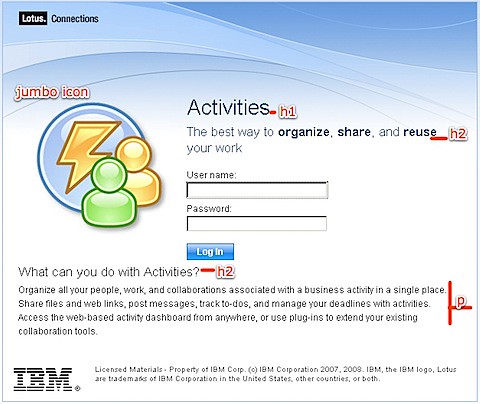
First, let's review how a typical login page looks like:


200810081758.jpg

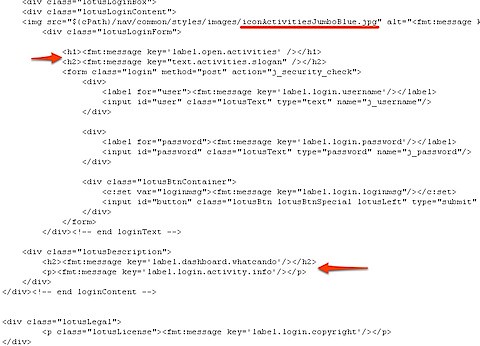
And now, let's take a quick peek at how this looks in code:

200810081800.jpg

The highlighted areas were the ones that I changed. Notice how the system relies on the <fmt:message> tag to translate the text into the different languages. If you are supporting a multi-lingual deployment, you'll have to take the extra step to add/modify the appropriate text in the .properties files.

Here's the location for the files you'll want to change:

  • <WAS_PROFILE_ROOT>\installedApps\<CELL_NAME>\Activities.ear\oawebui.war\auth\login.jsp
  • <WAS_PROFILE_ROOT>\installedApps\<CELL_NAME>\Blogs.ear\blogs.war\roller-ui\security\wslogin.jsp
  • <WAS_PROFILE_ROOT>\installedApps\<CELL_NAME>\Communities.ear\tango.web.ui.war\WEB-INF\jsps\html\scenes\login\login.jsp
  • <WAS_PROFILE_ROOT>\installedApps\<CELL_NAME>\Dogear.ear\dogear.webui.war\auth\login.jsp
  • <WAS_PROFILE_ROOT>\installedApps\<CELL_NAME>\Homepage.ear\dboard.war\auth\login.jsp
  • <WAS_PROFILE_ROOT>\installedApps\<CELL_NAME>\Profiles.ear\peoplepages.war\WEB-INF\jsps\html\scenes\login\login.jsp

Go crazy!

Monday, May 12, 2008

Control 'who can do what' in Lotus Connections

View Comments
So I've been getting that question from most of my customers.  Ok.   Probably all of my customers.  And sure, we can debate whether or not that question really applies to Lotus Connections, or any other social software for that matter (it doesn't apply!! We don't want to build another KM system... what you want is something OPEN with NO controls!!!).  Anyway.  They keep claiming that they want to protect their information.  But, since 99.999% of all customers are asking for it, I guess we really can't fight it (and believe me, I have tried!!).

So how do I handle this question when I get it from customers ?

First, I need to understand whether they want to control Authentication (who can log in) or Authorization (once logged in, who can do what).  So far, it's a 50-50 mix.  So, the good news is that Lotus Connections v2 adds support to specify which LDAP users or LDAP groups can log on to the application! Yay!!

For authorization, only Communities has very granular controls where you can specify who can do what.  And in some cases that's all the customers want to control (who can create and join communities).  And for those who do want granular controls on the other 4 Connections services ?

I position a companion product for Lotus Connections:  IBM Tivoli Access Manager (TAM) for e-business.  Since all of the Lotus Connections URLs are RESTful it should be pretty easy to configure WebSEAL/TAM to control who has access to which URLs.