Pages

Showing posts with label dogear. Show all posts

Tuesday, March 11, 2014

Tip: How To Share Links Using The IBM Connections Mobile App

View Comments
Various users have reached out to me asking how they can share links / pages as they surf the web from their mobile device with their network in IBM Connections.

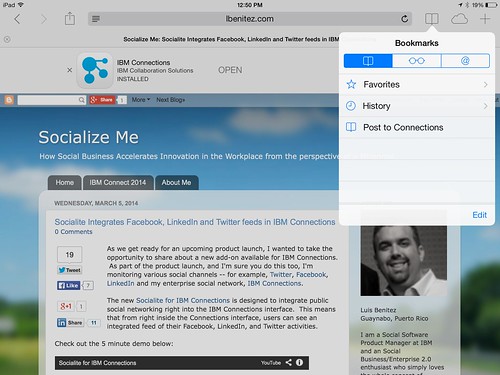
The trick is to use what's called bookmarklets. Follow these instructions to add the two bookmark lets to your browser and then you'll be able to quickly share links from your mobile browser to the IBM Connections Mobile app. I've written these instructions for Safari on iPad so these might vary based on your browser and/or mobile device.

  1. Open Safari on your iPad
  2. Add this page as a bookmark (click on the "Share" button in the top left)
  3. Find the bookmarklet below that you want. Select and copy the Javascript in the text field.

    To post a link as a status update:

    javascript:window.location='ibmscp://com.ibm.connections/updates?action=post&message='+encodeURIComponent(window.location.href)+''

    To save the link as a Bookmark in Connections

    javascript:window.location='ibmscp://com.ibm.connections/bookmarks?url='+encodeURIComponent(window.location.href)+'&title='+encodeURIComponent(document.title)+'&action=create'
  4. Go to your bookmarks (the book icon in the top right) and tap "Edit" in the bottom right. 
  5. Tap the new bookmark you just made of this page.
  6. Edit the name (e.g. Share in Connections) and in the URL field paste the Javascript you copied on step 3 above.
  7. Now to do the actual share, go to any web page, go to your bookmarks and tap the bookmarklet you want to use.


Voilá.

If you want to create your own bookmark lets for other things, check out this documentation on opening links to start the IBM Connections Mobile app. And if you are interested in other Bookmarklets (e.g. for Digg, Reddit, Pinterest, etc) check out this page.

Enjoy! 

Friday, November 12, 2010

The Lotus Connections 3.0 Reviewer's Guide is Ready for Download

View Comments

With the impending release of Lotus Connections 3.0, there are tons of educational materials being released. Yesterday, I showed you all the new videos that have been made available. These videos are geared towards the end user and those are what they are going to see the first time they enter the platform.

Also this week, as you may have seen in the Connections Blog and Synch.rono.us, the Lotus Connections 3.0 Reviewer's Guide was released. This Reviewer's Guide provides an extensive overview of Lotus Connections 3.0 and its nine modules: Home, Profiles, Activities, Blogs, Bookmarks, Communities, Files, Forums, and Wikis. In addition, this guide explains how to extend the features and functions of Lotus Connections to your existing applications (for example Microsoft SharePoint, Microsoft Office, Microsoft Outlook, etc). If you ever have a question about how a particular feature works, you can find the answer here.

You can read it here, download, print, or even view it in full screen!

Lotus Connections 3 Reviewers Guide

Enjoy!

Thursday, May 27, 2010

Getting the Lotus Connections Portlet to work with WebSEAL

View Comments

Last week, I spent a day at a customer up in New Jersey. They are currently deploying a pilot of Lotus Connections 2.5. One of the most important things for them is to be able to mash up Lotus Connections with their existing intranet applications via their portal (powered by WebSphere Portal, of course).

To simplify sign on for all their employees, they use WebSEAL and SPNEGO to provide single sign on for all web applications. This way, an employee logs on to their workstation in the morning, and they are never prompted to log on again to other web applications.

As we deployed the Lotus Connections 2.5 Portlet, we ran into an issue. The portlet wasn't built to support an SSO solution in the middle (it mostly depends on WebSphere SSO which is based on something called LTPA token). At this point, I had to figure out how to change the portlet to support WebSEAL, so I went on and downloaded the source code for the portlet (isn't it nice when they make the source code available?)

It turns out, that it wasn't that hard; I was able to do it in less than 30 minutes. Here's what I did:

  1. Import the code into WebSphere Portlet Factory
  2. Edit WEB-INF/models/lcaccelerator/services/BlogProvider
  3. Look for getAllBlogsRest
  4. Expand Advanced options
  5. Notice how there's HTTP Cookies and Forward HTTP Cookies. Given the developers are using HTTP Cookies to forward the LTPA cookie, let's go with that. As seen here:
  6. Now, let's create the actual method. What I did was copy/pasted the src/com/ibm/lconn/lcaccelerator/utils/LTPAUtil class and renamed it to WebSealUtil class.
  7. At the same time, I renamed getLtpaCookie to getWebSealCookie and I changed the implementation to:
  8. Note that I'm getting a cookie called PD-CC. Not sure if that's what it's always called in WebSEAL, but that was the name in this case.
  9. Re-packaging and sending to the portal server fixed the Blogs portlet. Then repeat the above steps for the Dogear and Activities provider

Enjoy!

Friday, February 19, 2010

Easily Search Lotus Connections from Google Chrome

View Comments

Lately, I've been using Google Chrome as my default browser to see if I can get used to it. I always considered myself very productive using Firefox, and I've heard so many good things about Chrome that I decided to give it a try. The features that I relied the most on Firefox were the Firebug plugin and searching Lotus Connections directly from the browser. Searching Lotus Connections directly from Firefox was possible thanks to OpenSearch which Lotus Connections supports since v2.5.

Google Chrome comes with a Firebug-like capability already built-in so that was easy. My next priority was setting up Chrome to search Lotus Connections instead of Google ( we all know at this point that Connections is a better search engine than Google, right?). Everywhere I looked, it said that Chrome supports OpenSearch. I couldn't, however, figure out how to add Lotus Connections to Chrome via OpenSearch.

Luckily, there's a way to do it manually (this is how I did it in my Mac. It may be a bit different in Windows):

  1. Open Chrome
  2. Go to Preferences...
  3. Under Basics, you'll see Default Search set to Google. Click on Manage
  4. Click on the + sign to add a new search engine
  5. Set the Name to Lotus Connections, the Keyword to lc and the URL to https://<hostname>/search/web/search?query=%s (for example: https://w3.ibm.com/connections/search/web/search?query=%s). It should look like this:


  6. Click Ok
  7. Optional: Select it and click on Make Default
  8. Close the Preferences panel.

If you didn't set Lotus Connections as your default search engine, here's what you do. Say you want to search for "enterprise2.0 software". In Chrome's omnibox, type "lc enterprise2.0 software" (w/out the quotes) and press Enter. And voilá, you've now searched Lotus Connections directly from the browser without needing to open Connections first and logging in.

Enjoy!

Wednesday, January 27, 2010

Bookmark simultaneously to Lotus Connections and del.icio.us

View Comments

Earlier today I received a ping from one of my favorite customers. He showed QuixApp a nice bookmarklet that basically lets you do whatever you want. He thought this would be a good idea, for example, to create a bookmarklet that would simultaneously bookmark a page both in Lotus Connections and in del.icio.us.

I immediately answered that this has been available for a while, internally at IBM. The following bookmarklet was created by Sacha Chua and if you are browsing an internal page (e.g. w3.ibm.com/....) then the page is only bookmarked in Lotus Connections. If you are browsing an extranet site (e.g. www.cnn.com... ) then the page will be tagged in both services (you don't want internal/confidential pages to be accidentally saved to del.icio.us, right?).

Before you can use it with your own Lotus Connections deployment, you'll have to customize it a bit. Once you look at the code, you'll see something like this:

if(!location.href.match('.ibm.com'))

The first step is to change that from .ibm.com to whatever your company's hostname is. Next, you'll want to change the Lotus Connections URL. In the code you'll see something like this:

var%20h='http://w3.ibm.com/connections/dogear';

Again, change that to match the deployment of your organization and voilá.

IBMers: Drag and drop it to your bookmarks bar: tag this

According to Sacha, the bookmarklet builder was very handy during the creation of this bookmarklet.

Wednesday, October 28, 2009

Opening bookmarks in a new window

View Comments

Today I got to enjoy Toronto again. I was here 3 weeks ago setting up an environment for a potential customer. Last time I was here, they didn't have a Notes 8.5.1 which was released just 16 days ago. It's interesting to see the customer's perception of Connections with Notes 8.5.1. They are completely loving the integrated suite of products all working together in harmony. The 4 hours that I was there, they just wouldn't stop congratulating me for the work that we've done integrating Notes, Sametime and Connections together.

I, of course, don't get any credit for this. All credit goes to the development team for their great work. Not sure if the development team will see this (they are probably heads down now getting ready for Lotusphere), but your work is appreciated.

Anyway, there was one customization that customer wanted: open bookmarks in a new window. Here's the customization that I made in case you would like to do the same in your environment.

  1. Go to the Lotus Connections server
  2. Go to the following directory: <WAS_PROFILE_ROOT>/installedApps\<cellname>\Dogear.ear\dogear.webui.war\h3\jsp\main
  3. Save a backup of bookmark.jspf, currentBookmark.jspf
  4. Open the files with your favorite text editor
  5. Look for this:
    <a id="bmlink_${link.id}" onmouseover....
    
  6. Add target="_blank" before id so that it looks like this:
    <a target="_blank"id="bmlink_${link.id}" onmouseover
    
  7. Save and close the files
  8. "Touch" h3.jsp
  9. Delete the directory: <WAS_PROFILE_ROOT>\temp\*
  10. Clear browser cache
  11. Reload Bookmarks

Enjoy!

Tuesday, August 25, 2009

Take your social bookmarks offline

View Comments

With Lotus Connections 2.5 only 3 days away and Apple trying to steal our thunder, I've learned some good news for mobile workers who depend very much on their bookmarks. The OpenNTF consortium has just published a new plugin for Lotus Connections Bookmarks created by Hanspeter Jochmann. The plugin allows Lotus Notes users to view their bookmarks directly from Notes and take them offline so that they are accessible while on the go! You can also create bookmarks later and synchronize them later (or just keep them local).

Here's a video that shows that functionality.


The plugin is available for free and can be downloaded from here.
Enjoy!

Thursday, May 14, 2009

Demo: Lotus Connections Plugin for Sharepoint

View Comments

Earlier this week, the Lotus development team released the beta version of the new Lotus Connections plugin for Microsoft Sharepoint. You may remember that I mentioned this was coming when I did my recap of Lotusphere ealier this year. If you've been reading this blog for a while, you are probably familiar with the integration capabilities of Lotus Connections into Microsoft Sharepoint.

As soon as the plugin was available, and I got some free time, I installed it into a test system to give it a test drive. The installation was pretty straightforward. Basically, you run a wizard that asks you for two parameters: 1) the URL for the Connections Profiles service, and 2) the URL for your Sharepoint site (which was automatically detected for me). Clicking Next a couple more times and 2-3 minutes later the plugin was installed!

The new plugin provides 3 capabilities out of the box:

  1. Adds the Lotus Connections person card EVERYWHERE a name appears
  2. Adds a tag cloud web part to surface the global Lotus Connections tag cloud in Sharepoint
  3. Adds Profiles search mechanism as an additional search engine in Sharepoint

To see these capabilities in action, check out this quick demo that I just recorded.

Content Requires Flash Player

Get Adobe Flash player

I'm sure this is going to make a lot of people happy. Connections and Sharepoint integration is a topic that comes up a lot with my customers. I'm also hoping that Mike Gotta, Industry Analyst with the Burton Group, will be happy as well since he was expecting more integration between Connections and Sharepoint earlier this year.

Monday, April 20, 2009

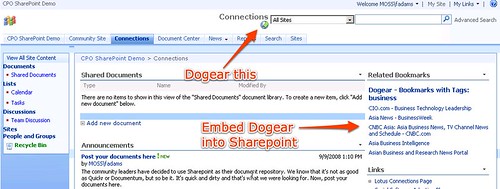
How To Add A 'Dogear This' Button To Sharepoint

View Comments

Today I had a wonderful all day session at a customer that wanted to know more about Lotus Connections and Sharepoint integration. They were wondering how the can make their Sharepoint environment (WSS v3.0) and Lotus Connections play nicer together. Ted Stanton and myself helped them brainstorm in several ways.

One of the ideas that I loved actually came from the customer: use the Homepage News API to add events that occur in other applications, specially Sharepoint. That way if a user creates an announcement in Sharepoint, for example, that event is reflected in the Lotus Connections Homepage. I thought that was a great idea!

One of the topics we discussed was adding a 'Dogear This' button to Sharepoint. That way their Sharepoint pages/sites would be more easily searchable (apparently this is one of their pain points). I've discussed how to add a 'dogear this' button to pages before, but figured I would update those instructions specifically for Sharepoint. Here you go:

  1. Go to C:\Program Files\Common Files\Microsoft Shared\web server extensions\12\TEMPLATE\GLOBAL
  2. Save a backup of default.master
  3. Open default.master with your favorite text editor
  4. In the <HEAD> section of the document, add the following line (specify the URL to your Dogear server):
    <script type="text/javascript" src="http://connections.lotus.com/dogear/tools/doglink.js"></script>
  5. Now, search for the following text:
    <td style="padding-top:8px;" valign=top>
    <asp:ContentPlaceHolder id="PlaceHolderSearchArea" runat="server">
    <SharePoint:DelegateControl runat="server" ControlId="SmallSearchInputBox" />
    </asp:ContentPlaceHolder>
    </td>
    
  6. Just before that code, insert the following:
    <td>
    <a class="dogpost" href="javascript:DogLink.post_to_dogear(location.href, document.title, '','');">
    <img border="0" src="http://connections.tap.ibm.com/dogear/favicon.ico" />Tag This!</a>
    </td>
    
  7. Save and close the file
  8. Reload Sharepoint
That's it! As a reminder, here's how it looks: Enjoy!

Monday, January 19, 2009

What's New In Lotus Connections v2.5

View Comments

As just announced at the Lotusphere Opening General Session, Lotus Connections v2.5 will be released in mid 2009. Lots of new features will be added. The Profiles, Communities, and Home page modules of Lotus Connections are the ones that are getting the bulk of the changes. Here you'll find a summary of the new features announced at the Opening General Session.

Communities

Communities gets the bulk of new features added in v2.5. Based on customer feedback, the communities component will be more customizable to meet each community's need.

  • Personalize the look-n-feel of your community by choosing one of the out-of-the-box theme templates or creating your own
  • Communities pages are now based on widgets. This means that it's easy to to drag-n-drop widgets around, add/remove widgets as needed, or add external widgets (e.g. Google Gadgets)
  • Re-designed Forums
    • Surfaces relevant statistics (e.g. top contributors)
    • Surfaces popular discussions
    • etc
  • Allow community members to upload, store, and share files
  • Define which tools will be available to members:
    • Wikis
    • Community Blogs
    • File Sharing
    • Bookmarks
    • Feeds
    • Discussion Forum
    • Activities, which include to-do's and events
  • View community members
  • Complements Lotus Connections' person-centric approach with this new community-centric approach


1024x768_blue_community

  1024x768_files_list


1024x768_files_detail


1024x768_files_detail

Wikis

This will be a brand new module of Lotus Connections! Yes, based on popular demand, Lotus Connections will now have a full-featured Wiki engine. As such you will be able to:

  • Forward-create new pages
  • Rich-text editor or wiki markup editor
  • Supports document uploads
  • Easily add new wiki pages and child pages and re-organize the hiearchy
  • Integrated seamlessly with Communities and the rest of the Lotus Connections suite
  • and a lot more!


Wiki

I'm pretty excited that this new Wiki capability has been added to Lotus Connections. Now, let's see what other new features have been added to the other modules.

Profiles

There are also many new features in Profiles. Many of the most successful features of our internal research project (Beehive) will be available in Lotus Connections v2.5. Here's a summary of what's in plan right now:

  • A tag cloud across all Profiles which would make searching easier (a feature that a lot of customers have asked for)
  • A new wall component so others can leave messages for you in your profile
  • A new status widget so you can specify what you are up to ( a la Twitter )
  • Recent updates are shown in the 'Recent Updates' section

The 'Buzz' and Status widgets:

Profile_Buzz

Home Page

The Home Page has been redesigned to include a stream of updates in addition to the widgets that are available in v2.0. The stream of news gives you a quick list of what's happened in and outside your network. Widgets allow end-users to customize their home page with content they want to see and add additional gadgets (perhaps one of the 45,000+ Google Gadgets). There is also search here which allows users to do a global search across the Connections components.

So here's a summary of what's new in Homepage:

  • Global search will also search across the new Wiki and Files component
  • News updates with a single stream of what's been happening around your social network (a la Facebook)
  • Ability to filter the news based on tags, people, and type
1024x768_homepage

Mobile

New mobile browser user interface for iPhone and a variety of other mobile devices. Additionally, RIM has announced an updated application for the BlackBerry!

Mobile Browser theme:

200901172007.jpg

Some BlackBerry Snapshots:

200901172008.jpg

200901172009.jpg

That's a lot, huh ? I've seen demos of the code internally and I'm pretty impressed that we were able to add so many new features in just 6 months (since the last major release in June '08).

P.S. These are the current product plans and this information is as of Lotusphere. The plans are always subject to change and the screenshots are not final designs.

Wednesday, January 14, 2009

How Social Tools Make Me More Productive, Efficient, and Innovative

View Comments

Just before 2008 ended, I had the chance to meet a colleague of mine for dinner while he was here in Puerto Rico. I originally met David as I was learning Tivoli Directory Integrator (TDI). Our conversation was mostly about the stuff that I do and the value that I get from social tools such as Twitter, Lotus Connections, LinkedIn, Facebook, etc. He asked me to send him an email with all the resources that I mentioned (feed readers, blog clients, twitter clients, etc). However, I figured that by sharing it through a blog post the entire community benefits, instead of just 1 person. I'll probably end up sending an email to David anyway, but I will only include a link to this blog entry (and maybe a 'Happy New Year').

Dear David,

So why (and how) do I blog ?

A while back I blogged about Why I Love Blogs and it's because of that true story that you may say that I'm addicted to blogs. Not only do I get to share my knowledge, but when people comment in my blogs it helps me think out of the box. It helps me see another perspective. It helps me have that human contact that I mostly lack since I work the majority of the time from home. And the best part ? I'm not only getting the perspective of my fellow Lotus peers, but I get to hear from any of the 300,000 other IBMers (and anyone else who reads my blog externally).

If you are pressed for time, take a peek at this 1 minute video created based on my story of the business value of blogs.

To make it easier on me and because I travel so much, I use ecto as my blog client. In this blog entry, I demonstrate how to configure ecto to work with Lotus Connections . There's a Windows, iPhone and Mac version of it. The great thing about ecto is that I can write a blog once, and cross post it internally and externally.

You may be afraid of sharing knowledge because "knowledge is power". I had this same fear as well. However, by sharing my knowledge others can consume freely and at their own pace and I believe this has significantly helped me reduce the number of emails that I get on a daily basis (~20-30 down from ~150!!!). Additionally, now I have more executive visibility throughout the organization, which (I hope) is good for career advancement.

So why do I use Dogear and Social Bookmarking?

Social Bookmarking is by far my favorite social tool. Why? Well, let me quickly tell you how I got hooked on it. I found the real business value of social bookmarking when I was desperate. As you read that blog entry, you'll see that my productivity was simply 0. Dogear changed all of that in seconds and made me productive again!!

I also realized that I had over 300 or so bookmarks in my browser. I had them all somewhat organized in folders, sub-folders, and sub-sub-folders. This presented 2 challenges:

  1. When I wanted to bookmark something, I had to find the best place for it, or create the right folder structure for it
  2. When I wanted to find a bookmark, it often took too long because my folder structure wasn't the best. Plus, I had so many that it was cumbersome trying to find it. Thus, I often found myself re-Googling for whatever it was that I needed.

Therefore, I figured, "if I'm always going to search for my answer, why not use Dogear to search my bookmarks instead of spending the effort re-Googling what I need??" ! As an added benefit, I was not only searching through my bookmarks, but I was searching across what other IBMers thought was the best of the best. I was searching through the content that they had selected as the best Google result for what I need. Consequently, the time I spent searching Google, got reduced from 30-50 mins/week to 2-3 mins/week. (especially now that I can search Google and Dogear at the same time).

Moreover, bookmarking (something that I do at least twice a day) takes about 3-5 clicks on your browser. It only takes 2 clicks to bookmark something in Dogear.

As if that wasn't enough, Dogear also solves the problem of accessing my bookmarks from different computers.

And I'm not done!!! I also use Dogear to adverstise myself. You see, I like to share. Not sure, why, but I like it. Anyway, before I found Dogear I had another challenge with knowledge sharing within IBM. As you know, there are dozens (if not hundreds or thousands) of 'databases' at IBM for people to share their intellectual capital. Again this presents 2 challenges:

  1. Where should I put my stuff so people can find it... ? (or put another way, where are people searching for information??) I often ended up putting my intellectual capital in multiple places hoping that people would find it and re-use it.
  2. Some databases required a formal process for submitting the intellectual capital (i.e. it must have an abstract, summary, intro, conclusion, approved by somebody, and properly categorized in the existing topic list -- and if your topic wasn't listed, you were doomed!!)

Now, with Dogear, I can post my file anywhere (an FTP server, a Quick place, a Quickr room, a Notes database, a Sharepoint site, anywhere!!) and just Dogear it. And/or I can blog about the intellectual capital that I just created, put a link to it, and Dogear my blog entry. That way people will not only find the intellectual capital, but also my story/context as to why I created it... perhaps my recommendations to enhancing it... etc.

So Dogear addressed 6 of my day-to-day challenges and has enabled me to be more productive. It also encourages me to generate even more intellectual capital than before. Therefore, IBM also wins!

So why (and how) do I Twitter?

Personally, I see Twitter as one big asynchoronous chat room. So what's the big deal ?

Just recently I blogged about how IBM gets more value from me using Twitter than I do personally. Definitely read that blog entry first because I think it definitely explains the why I use Twitter.

As I mentioned there, I use Twitter partly to subscribe to a feed of updates that talk about Lotus Connections. That way, I can monitor all Twitter users (regardless if I know them or not) and address any issues, FUD, or perhaps answer a question from a potential customer. (we'll talk more about feeds later). For TDI, you may want to subscribe to this feed of TDI search results.

So why (and how) do I Facebook?

Facebook is my personal social network. I only add people that I trust and mostly use it to connect with my high school and college buddies by sharing pictures, commenting on their wall, and planning events.

If you do start using Facebook, I recommend that you set your privacy settings. This is where you can control who can see your information. Be careful with selecting 'Your Networks' as that means that anyone in your network can see your information. So, for example, if you are part of the New York, NY network, 10 million people potentially have access to your information. The good thing about Facebook security-wise, in my opinion, is that you have very granular controls on security. You can specify, for example, that people in your network can see your name but not any other details about you.

Finally, if you plan to use Twitter more than 1-2 times a day, do not configure Twitter to update your Facebook status. I was doing that and my Facebook friends didn't like it. Instead, use a service like ping.fm when you want to update all sites at the same time.

So why (and how) do I use LinkedIn?

To be honest, I'm not a big LinkedIn user. So far, I've used LinkedIn solely for business purposes. I don't post anything personal there, except perhaps 1-2 status updates a month. I think one of the reasons that I don't use LinkedIn much is because it requires me (as far as I know) to use a web browser.

How do I stay up to date with all this stuff ?

Finally, we get to the most important tool: feed readers. Late last year, I blogged about my love-hate relationship with feed readers. However, I strongly suggest that you read my blog entry on how I effectively use 2 feed readers. In there, you will also discover which feed readers I use and what criteria I utilize to separate and/or classify my feeds.

In short, I use a feed reader installed locally on my Mac. The feeds that go there are the business critical feeds that I need to know about quickly and/or those that I want to have available offline. When I have some free time, then I would go into my web-based feed reader to see what other things are going on.

This should get you started...

And there you have it!! Hope this helps. Let me know if you found this information valuable!
Monday, December 22, 2008

Lotus Connections Mobility Video

View Comments

I was recently directed to this video which talks about the Lotus Strategy and its mobility capabilities. Mobile access to your applications is key, especially for social software. I, for one, use Twitter, Facebook, and Lotus Connections Dogear because I have free native applications that run on my BlackBerry. When I'm at a customer site and I'm stumped with a question, I turn to my trusty Dogear to find the answer. When I'm travelling to/from said customer, I like to see what's going on in my personal social network by turning to Facebook. Then, I like to see what's going on in my semi-personal/semi-professional network at Twitter.

By the way, my constant access to Twitter means I can be more responsive to my customers and business partners. And recently a light bulb went off in my head: IBM gets more value from me using Twitter, than I personally do. I think I need to expand on that in a future blog post.

Anyway, here's a quick video showing the different Lotus products in a mobile world. I like Kristen:

Feel free to share it!

Friday, December 12, 2008

Google OneBox: Integrate Lotus Connections with Google Search Appliance

View Comments

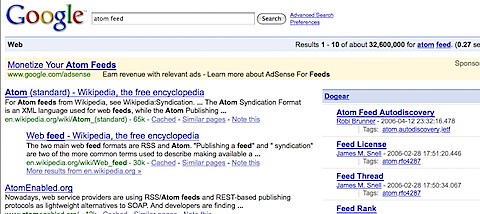
Lately, there's been a lot of buzz around Lotus Connections and Google integration. More specifically, around Dogear and Google and the integration that I did a while ago. Earlier this week, I announced that this integration won 2nd place in the Lotus HackDay contest under the 'Web Applications' category. Yesterday, it was announced that this integration won 1st place in the HackDay Global Connections category! If you want to see what all the hype is about and start using this integration, follow these instructions.

Now, stuff just keeps getting better. With great timing, a business partner, Persistent Systems, has just released Google OneBox, a connector that can be deployed to your Google Search Appliance to automatically index Lotus Connections data and show it embedded in the Google search results. No browser plug-in required!

These slides explain a bit more about the solution:

Lotus Connections One Box
View SlideShare presentation or Upload your own. (tags: lotus connections)

I believe integration with enterprise search is extremely important for successful social software adoption. At IBM, we have driven adoption of social software partly by integrating enterprise search results with Lotus Connections search results. In fact, there's a trend now were most IBMers end up clicking on the Lotus Connections search results that are embedded and shown side-by-side the enterprise search results. In fact, IBM did a case study and was able to calculate a yearly multi-million dollar savings thanks to social bookmarking and enterprise search integration.

If you want to learn more about this solution, see the Google OneBox for Lotus Connections page. (it's not yet part of the Lotus Connections Solutions Catalog, but it will be soon).

Monday, December 8, 2008

Dogear and Google Integration Gets 2nd Prize in Lotus HackDay

View Comments

Woo Hoo!!!!. That's right, late last week I got an email from Bob Picciano, Lotus' General Manager. In it, I was informed that Dogle (a.k.a. Google Dogeared) has won 2nd place in the Web Applications category of the Lotus HackDay contest. The price? Some cash which is very timely given the holiday season that's quickly approaching!

Dogle is a hack I did in which Google and Dogear results are shown side-by-side. It's a hack that I coded in a couple of hours. If you want to install it and give it a try, you can follow the instructions here.

For those of you, non-IBMers, HackDay is a one-day competition challenging IBMers to come up with the most interesting "Hack". "Hack", in this case refers to ability to come up with a solution to a problem or an interesting idea you've been thinking about.

200810072104.jpg

Thanks to all who took the time to vote for my hack and participate in this process.

Tuesday, November 4, 2008

Lotus Connections v2.0.1 is here!

View Comments

Each quarter, there's a new version of Lotus Connections out there. This quarter we shipped Lotus Connections 2.0.1 (on Halloween). I didn't post anything on Friday, 'cause I thought sharing some baby pictures in his costume was a tad more important. Also, the new version was very well covered by Stuart and Mitch.200811040533.jpg
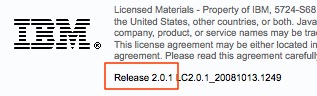
If you are upgrading, you can download it from IBM's Fix Central. One question that I'm continuously asked is: "what's new in Lotus Connections v2.0.1?". Well, here's a list of what I've gathered:

  • Quickr integration with Activities - Push-button publication from an Activity into one of your Quickr Places for permanent document storage
  • Quickr integration with Communities - Allows communities to use Quickr as their content repository and document collaboration platform.
  • Enhanced person card
  • E-mail is no longer a required attribute (great for external implementations)
  • New feeds inside of Communities
  • New feeds for forums
  • New APIs for Activities, Blogs, Communities, Homepage (federated search), Profiles
  • Hidden support for STLinks (more about this tomorrow)
  • User Interface and Usability enhancements, for example:
    • Can now save members as part of an activity template
    • Drag-n-drop activities entries
    • Uploading images to a blog is now easier
    • Improvements in the Activities widget
    • Easier way to work with multiple bookmarks
  • A couple of bug fixes

Wednesday, October 15, 2008

How to change the logout URL for Lotus Connections

View Comments

The other day, a customer asked me how to change the logout URL for Lotus Connections. They wanted to configure Lotus Connections so that when a user clicked on 'Log out' they would be redirected to the company's intranet home page.

I couldn't find any documentation out there, so I put on my hacker hat. After a couple of minutes (ok, maybe 30 minutes), I was able to figure it out. I decided to capture my changes and share it with you. You'll notice that while the process may look long, it's really only changing 1 line of code in 6 different files... so it's really easy!

Activities and Home page:

  1. Go to <WAS_PROFILE_ROOT>\installedApps\<CELL_NAME>\Activities.ear\oawebui.war\WEB-INF\jsps\html_prototype\fragments\mainpage
  2. Save a backup of banner.jsp
  3. Open banner.jsp with your favorite text editor
  4. Look for the following lines:

    <form method="post" action="ibm_security_logout" name="logout" id="logoutForm" style="display: none;" >
    <input type="hidden" name="logoutExitPage" value="/service/html/mainpage">
    <input type="submit" name="logout" value="Logout">
    </form>

  5. Change the logoutExitPage parameter as shown below:

    <form method="post" action="ibm_security_logout" name="logout" id="logoutForm" style="display: none;" >
    <input type="hidden" name="logoutExitPage" value="http://w3.acme.com/home">
    <input type="submit" name="logout" value="Logout">
    </form>

  6. Save the file
  7. Repeat steps 1-6 for the following file:
    • <WAS_PROFILE_ROOT>\installedApps\<CELL_NAME>\Homepage.ear\dboard.war\web\jsp\pageheader.jspf (touch main.jsp afterwards to force recompilations of the JSP fragment)

Blogs:

  1. Go to <WAS_PROFILE_ROOT>\installedApps\<CELL_NAME>\Blogs.ear\blogs.war\roller-ui
  2. Save a backup of logout-redirect.jsp
  3. Open logout-redirect.jsp with your favorite text editor
  4. Look for the following line:

    response.sendRedirect(request.getContextPath() + "/ibm_security_logout?logoutExitPage=" + "/");
    

  5. Change the logoutExitPage parameter as shown below:

    response.sendRedirect(request.getContextPath() 
    + "/ibm_security_logout?logoutExitPage=" + "http://w3.acme.com/home");

  6. Save the file

Communities:

  1. Go to <WAS_PROFILE_ROOT>\installedApps\<CELL_NAME>\Communities.ear\tango.web.ui.war\WEB-INF\jsps\html\scenes\dashboard
  2. Save a backup of banner.jsp
  3. Open banner.jsp with your favorite text editor
  4. Look for the following line:

    logoutSection.innerHTML ='<html:link page="/service/html/logout"><fmt:message key="link.logout" /></html:link>';
    

  5. Change the page parameter as shown below:

    logoutSection.innerHTML ='<html:link page="/ibm_security_logout?logoutExitPage=http://w3.acme.com/home"><fmt:message key="link.logout" /></html:link>';
    

  6. Save the file

Dogear:

  1. Go to <WAS_PROFILE_ROOT>\installedApps\<CELL_NAME>\Dogear.ear\dogear.webui.war\h3\jsp\main
  2. Save a backup of pageHeader.jspf
  3. Open pageHeader.jspf with your favorite text editor
  4. Look for the following line:

    logoutSection.innerHTML =<jscript:string><a title="<fmt:message key="jspf.menu.logout.title"/>" href="<c:url value="/logout" />"><fmt:message key = "jspf.menu.settings.logout"/></a></jscript:string>;
    

  5. Change the value parameter as shown below:

    logoutSection.innerHTML =<jscript:string><a title="<fmt:message key="jspf.menu.logout.title"/>" href="<c:url value="/ibm_security_logout?logoutExitPage=http://w3.acme.com/home />"><fmt:message key = "jspf.menu.settings.logout"/></a></jscript:string>;

  6. Save the file
  7. Touch h3.jsp (to force recompilation of the JSP fragment)

Profiles:

  1. Go to <WAS_PROFILE_ROOT>\installedApps\<CELL_NAME>\Profiles.ear\peoplepages.war\WEB-INF\jsps\ajax
  2. Save a backup of loginInfo.jspf
  3. Open loginInfo.jspf with your favorite text editor
  4. Look for the following line:

    <html:link page="/ibm_security_logout?logoutExitPage=/index.jsp" styleId="logoutLink">
    

  5. Change the logoutExitPage parameter as shown below:

    <html:link page="/ibm_security_logout?logoutExitPage=http://w3.acme.com/home" styleId="logoutLink">
    

  6. Save the file

Hope this is useful to you.

Wednesday, October 8, 2008

How to integrate Google and Dogear

View Comments

So here it is!!! I got some great feedback from users on my previous post which showed a demo of integrating Lotus Connections Dogear and Google search. If you want to get this running, follow this process:

200810072104.jpg

  1. Use Firefox (you are already using it, right ?)
  2. Install the Greasemonkey plugin (if you haven't already)
  3. Restart Firefox
  4. Install my Dogear script
    1. IBMers: Click this link to download and install the script
    2. Non-IBMers:
      1. Right-click this link and save it to your machine.
      2. Open the file with your favorite text editor
      3. Look for the these lines and put in the value for your deployment
        var profiles = 'http://profiles.tap.ibm.com/profiles';
        var dogear = 'http://dogear.tap.ibm.com';
      4. Save the file
      5. Open Firefox
      6. Go to File -> Open File...
      7. Browse to the file and it should be installed
  5. Restart Firefox
  6. Go to Google and do a search, any search!

Note to Hackers: you'll notice that I'm not using Atom, instead simple HTML. If you can modify this to parse the Atom feed and render the appropriate HTML, you get bonus points!

Friday, October 3, 2008

What's better at searching: Google or Dogear? -- Who cares!

View Comments

That's right... who cares if Dogear is better than Google? Sorry Google, but it's true. Dogear has become my primary search engine. But I understand that some people may still be infatuated with Google. That's ok, I won't judge you.

Why? Because you can have both side-by-side! Yup, that's right, since Lotus Connections Dogear is built following the SOA principles you can consume, embed, and use those services from anywhere. And here's the latest example: You can now embed Dogear into Google and have search results side-by-side!

Imagine having the best of both worlds right at your fingertips! Imagine how much faster adoption will happen! Imagine being able to find expertise from Google! Imagine being able to chat with those experts right from Google! Imagine being able to call those experts right from Google! Should I go on?

Can you tell how excited I am? Total work effort? ~3-4 hours with baby interruptions, dinner, and the Vice-Presidential debate last night!. Now, because of the aforementioned baby interruptions, the code is not pretty and I don't want you all to judge me on my bad code design.

Instead, I'm going to delay posting the code (for a little while) and would really like to hear from you. Do you think this is valuable at all? I certainly think so, but maybe I just have Dogearitis.

You want to see a demo? Fine, click here to see a demo in full screen. (sorry, I still haven't been able to figure out how to resize Flash videos recorded with Jing... )

Tuesday, September 30, 2008

Collaboration Matters Podcast - Episode 4 - My Journey From eLearning to Social Software

View Comments

I recently had the pleasure to join Neil Burston and Stuart McIntyre as part of their Collaboration Matters Podcast series! While I had already created several podcasts internally at IBM, I had never done one externally. Needless to say, I was very excited that they reached out to me in order to create my first external podcast.

If you are already following the Collaboration Matters blog, then you already know the news and probably even heard the podcast already! If you are not subscribed to the podcast, I would like to encourage you to do so. In Episode 3, Heidi Votaw and Suzanne Minassian talk about the latest and greatest in Lotus Connections 2.0.

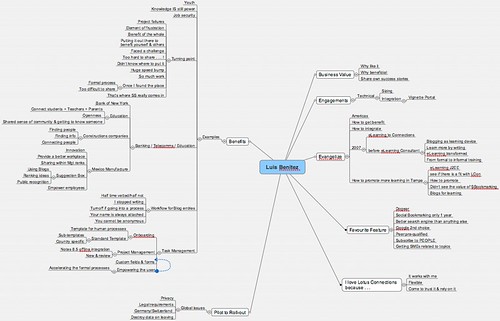
So what is this journey from eLearning to Social Software ? Well, as I've mentioned before, I used to be an eLearning developer and consultant before taking on my current role. Thus, Neil asks me how I got into this whole social software space and how I became so passionate about the subject. We also talk about some challenges that I've run into in the past 2 years. In fact, let me give you a quick overview of what the podcast is about:

  • 01:30 - Good morning to you - Buenas tardes desde aquí!
  • 02:00 - Collaboration Matters is running the Connectr event (see slides below) and Lotus Connections Blog
  • 02:20 - Luis, tell us about yourself, what you do, your role and how you got into this
  • 03:20 - My job as an eLearning consultant and my first transition to social software... a "expected" evolution/transition
  • 03:50 - How I learn by contributing content in the social software space
  • 04:30 - The beauty of living in Puerto Rico
  • 05:30 - My own, personal introduction to Lotus Connections
  • 06:40 - Evaluate social software as an eLearning approach / solution for a customer in Tampa. I had been blogging since early 2006 and was familiar with Social Bookmarking but was not an avid user. I had to make a case for how these technologies could help solve their elearning needs.
  • 07:55 - Results of the social software for eLearning pilot. Challenges that we encountered re: privacy in this multi-national environment
  • 09:30 - Legal blocks to social software deployments in Europe
  • 11:30 - My view, as a millenial, on the benefits of sharing knowledge with social software
  • 14:00 - Why it was so hard to share before social software
  • 16:20 - Which industries are using social software ?
  • 18:10 - What really blew me away... social software at construction companies!!!
  • 21:00 - How the product itself promotes adoption
  • 22:45 - Have you seen any downsides to not having any formal processes behind knowledge sharing?
  • 25:30 - How Lotus Connections, as an enterprise social software platform, promotes self-policing
  • 27:35 - Tell us about the usage of social task management and Lotus Connections Activities
  • 31:15 - The role of repeatable human processes and social software
  • 32:40 - What's your favorite feature of Lotus Connections ? Definitely, Dogear, the social bookmarking component of Lotus Connections
  • 35:00 - How feed readers help in my day-to-day job
  • 36:40 - Complete the following sentence: "I love Lotus Connections because..." - it works with me! It's always with me, I depend on it, I trust it
  • 38:00 - Closing comments...

2008-09-30_1149One success story (of many) behind all this, is that I met Neil and Stuart strictly through social software. More specifically via my blog and Twitter. By using social software we collaborated effectively even though there was an 8 hour difference between us!! (It was 7:30am my time when this was recorded).

Neil, also told me that he was able to capture our conversation as a MindMap. I didn't know what a MindMap was until today. But no worries, I downloaded MindManager for Mac and was able to look at it. Pretty cool!!! The tool looks really interesting and I'm going to start playing with it more to see how I can use and apply it to my daily life. If you have any suggestions, please let me know.

Here are the slides used at the Connectr #6 event:

Slides from the Connectr#6 event:

Connectr #6
View SlideShare presentation or Upload your own. (tags: connectr lotus)

Ready to start listening? Subscribe to the podcast or download the MP3 from here. I hope you like it!

Thursday, September 25, 2008

Using Lotus Connections from a Ruby Web App

View Comments

200809251003.jpg Continuing to demonstrate how easy it is to consume Lotus Connections content from other applications, the Top Story today at developerWorks is an article that explains how to build a Ruby on Rails (RoR) web application that consumes Lotus Connections content via the REST API.

The article, written by one of IBM's Portlet Factory architects (Thomas Beauvais), is very clear and concise. It walks you step-by-step on how to create a Ruby web application and configure it to use to use data retrieved via the REST APIs instead of a database. Thomas explains the code needed to call the Dogear REST APIs to get a person's bookmarks and tag cloud. To my surprise, there's very little code needed to get this going!

One of the things that I like about it is that it's a great tutorial for Ruby beginners (like myself) on how to create a Ruby web application. After reading the article, I feel like I can build any type of Ruby application. Hopefully, I'll get a chance to work on this with one of my customers!

Ready to read more? Check out the article here. And don't forget about the article that I co-authored which explains how to use Portlet Factory to create a portlet that consume Dogear via the REST APIs.

P.S. Is it just me or does the title open itself to a bad interpretation ?