Pages

Showing posts with label person-card. Show all posts

Tuesday, July 15, 2014

Jabborate Brings Jabber and WebEx into IBM Connections

View Comments
This is one of those cases were timing couldn't have been better.  Just a few days ago someone was asking me about the possibility to integrate Cisco's Jabber and WebEx with the market leading social collaboration platform IBM Connections.

Anyway, then as I was catching up with my feeds I ran into a new presentation from Jabborate.  Don't you just love it when knowledge comes to you instead of you having to go out and search for it?

So here's the deal.  There are 3 types of integration into IBM Connections provided by Jabborate:

  • Jabborate - Adds presence, instant messaging, audio and video calls to IBM Connections via Cisco's Jabber
  • Jabborate WebEx - Adds virtual meetings and conference call management to IBM Connections via Cisco's WebEx
  • Jabborate Exchange - Adds a calendar and scheduling app to integrate IBM Connections with Microsoft Exchange 

Here's a deck that describes in more detail what's possible:


For more information, check out Jabborate for IBM Connections. 

Tuesday, May 15, 2012

Announcing the IBM Connections Suite - Sweet !

View Comments

IBM has just announced its new social business offering: the IBM Connections Suite. The IBM Connections Suite provides the best of the best communications, content, and social capabilities in one package creating the ultimate social business offering.

How does a business become a social business? IBM has identified a foundational set of capabilities that—when implemented as a whole—can allow your business to become more social. To socially enable your workforce, improve customer care and insight, and enhance product and service innovation, an organization must consider how it will Reach, Engage, Discover, and Act as it becomes a social business. These are the 4 key services of a social business.

- Reach people where they live and work

- Enable people to engage productively in a business context

- Monitor and analyze social data to discover new business insights

- Act on insight for business advantage

The IBM Connections Suite delivers these 4 capabilities, and it's all in one package! What does it include? Everyhing you could want: profiles, communities, microblogging soft phone / VoIP, presence awareness, instant messaging, web meetings, video, forums, wikis, social analytics, blogs, media gallery, ideation, real-time collaboration with communities, peer to peer file sharing, document libraries, mobile apps, and more!

To demonstrate some of the capabilities provided by the IBM Connections Suite, I've created three demos. Each demo shows how the IBM Connections Suite delivers business value and helps companies achieve one of three outcomes: workforce optimization, improving customer care processes, and accelerate innovation.

Demo 1 - IBM Connections Suite for Workforce Optimization

Demo 2 - IBM Connections Suite for Customer Care

Demo 3 - IBM Connections Suite for Accelerating Innovation

Of course, it's hard to show the 300+ features that are in the IBM Connections Suite in a couple of 5 minutes videos, so I'll be interested in knowing what you would like me to show more of. Please let me know in the comments below.

The announcement letter with more details, can be found here.

Wednesday, April 7, 2010

Microsoft OCS in Lotus Connections 2.5

View Comments

Almost 3 years ago, I was working with a customer who wanted to add instant messaging to Lotus Connections, IBM's Enterprise 2.0 collaboration platform. As you may suspect, Lotus Connections is integrated out of the box with the IBM instant messaging client, Lotus Sametime. The challenge with the customer is that they were using the Microsoft solution, something called Office Communicator Server (OCS).

Then, I was able to successfully show presence information in Lotus Connections based on Microsoft OCS. And I even documented how to do it in this developerWorks article. One thing that I was never able to do was add the presence information in the business card (the little widget that pops up next to a name).

I'm happy to inform that Epilio has actually done this and has even created a YouTube video (sans audio) to demonstrate the functionality:

Very cool, huh? Update: You can find the source code and the documentation here.

Enjoy!

Thursday, May 14, 2009

Demo: Lotus Connections Plugin for Sharepoint

View Comments

Earlier this week, the Lotus development team released the beta version of the new Lotus Connections plugin for Microsoft Sharepoint. You may remember that I mentioned this was coming when I did my recap of Lotusphere ealier this year. If you've been reading this blog for a while, you are probably familiar with the integration capabilities of Lotus Connections into Microsoft Sharepoint.

As soon as the plugin was available, and I got some free time, I installed it into a test system to give it a test drive. The installation was pretty straightforward. Basically, you run a wizard that asks you for two parameters: 1) the URL for the Connections Profiles service, and 2) the URL for your Sharepoint site (which was automatically detected for me). Clicking Next a couple more times and 2-3 minutes later the plugin was installed!

The new plugin provides 3 capabilities out of the box:

  1. Adds the Lotus Connections person card EVERYWHERE a name appears
  2. Adds a tag cloud web part to surface the global Lotus Connections tag cloud in Sharepoint
  3. Adds Profiles search mechanism as an additional search engine in Sharepoint

To see these capabilities in action, check out this quick demo that I just recorded.

Content Requires Flash Player

Get Adobe Flash player

I'm sure this is going to make a lot of people happy. Connections and Sharepoint integration is a topic that comes up a lot with my customers. I'm also hoping that Mike Gotta, Industry Analyst with the Burton Group, will be happy as well since he was expecting more integration between Connections and Sharepoint earlier this year.

Monday, April 27, 2009

How To Add The Lotus Connections Person Card to Confluence Wikis

View Comments

Last week, I posted an article to the Lotus Connections Wiki. I typically like to share How-To's here in my blog, but I thought this one would be better served in a community place because I'm expecting that it would need changes as time goes by.

Anyway, you may recall that a couple of posts back I showed you a demo of the Lotus Connections person card running in Socialtext wikis. Well, thanks to a customer who brought it up, I noticed that I never shared the code on how to add the person card to Confluence wikis. Last year, I shared with you some screenshots of the person card in Confluence, but not the code. Shame on me!


Anyway, if you interested in on how to add the Lotus Connections person card to Confluence wikis, check out the wiki entry now. And if there are changes needed to the document, feel free to edit it!

Wednesday, March 25, 2009

Lotus Connections Person Card in Socialtext Wiki

View Comments

Recently, I was asked if we could add the Lotus Connections Person Card to a Socialtext Wiki. Socialtext is one of our partners and Lotus Connections Communities integrate with their wiki service out of the box. My initial reaction was "of course, you can integrate the Lotus Connections person card into everything". But like everything else, I wanted to prove it by myself.

Alan Lepofsky, Director of Marketing at Socialtext, kindly put together a test wiki site for me to play around. Here you'll see a demo of the Lotus Connections person card working directly inside a wiki created and hosted by Socialtext. Tip: Click the 'Full Screen' button to get a better view.

Content Requires Flash Player

Get Adobe Flash player

Enjoy!

Monday, February 9, 2009

How To Enable the Lotus Connections Person Card in Notes 8.5

View Comments

Friday, was a VERY long day. I'm going to quickly summarize what I've been up to and why I've been seemingly disconnected from Twitter. The good thing is that there are lessons learned that I would like to capture here for various reasons:

  1. So that I don't make the same mistake again
  2. So that others can benefit from my mistakes

Let's start with the fun stuff first. A customer wanted to know how to enable the Lotus Connections person card in Notes 8.5. Not sure why, but for some reason this capability is disabled out of the box. To enable, follow these steps:

  1. Go to C:\Notes\framework\shared\eclipse\plugins\com.ibm.openactivities.client.common.service_3.5.0.20081211-1925
  2. Make a backup of plugin.properties
  3. Open plugin.properties with your favorite text editor
  4. Scroll to the bottom of the file and find this line:

    bizcard.show=false
    

  5. Replace it with

    bizcard.show=true
    

  6. Save the file
  7. Close and restart Notes

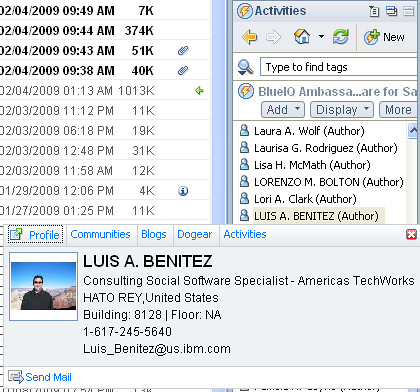
Now when you are in the Activities sidebar and look for people, simply hover over them, right click and the person card will show up as shown below!


Mac users: If you are using my hack, this should have already been done for you.

Enjoy!

Tuesday, November 4, 2008

Lotus Connections v2.0.1 is here!

View Comments

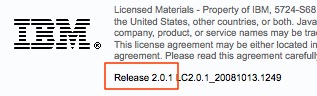
Each quarter, there's a new version of Lotus Connections out there. This quarter we shipped Lotus Connections 2.0.1 (on Halloween). I didn't post anything on Friday, 'cause I thought sharing some baby pictures in his costume was a tad more important. Also, the new version was very well covered by Stuart and Mitch.200811040533.jpg

If you are upgrading, you can download it from IBM's Fix Central. One question that I'm continuously asked is: "what's new in Lotus Connections v2.0.1?". Well, here's a list of what I've gathered:

  • Quickr integration with Activities - Push-button publication from an Activity into one of your Quickr Places for permanent document storage
  • Quickr integration with Communities - Allows communities to use Quickr as their content repository and document collaboration platform.
  • Enhanced person card
  • E-mail is no longer a required attribute (great for external implementations)
  • New feeds inside of Communities
  • New feeds for forums
  • New APIs for Activities, Blogs, Communities, Homepage (federated search), Profiles
  • Hidden support for STLinks (more about this tomorrow)
  • User Interface and Usability enhancements, for example:
    • Can now save members as part of an activity template
    • Drag-n-drop activities entries
    • Uploading images to a blog is now easier
    • Improvements in the Activities widget
    • Easier way to work with multiple bookmarks
  • A couple of bug fixes

Thursday, September 4, 2008

Hacking Notes 8.5 Public Beta 2 for the Mac

View Comments

Remember all those great Lotus Connections features on Notes v8.5 that I blogged about two days ago? Well, just like I hacked Public Beta 1, I have now hacked Public Beta 2 so that us Mac users can enjoy those cool new additions!

You know the drill. This is completely unsupported and is provided AS-IS. And you can't hold me responsible for anything! However, whether it works or not, please post a comment to this blog entry with the following information:

  • OS (e.g. Ubuntu, Mac OSX Leopard, etc)
  • What specifically didn't work

I'm hoping that most of the comments will be successes and that will put pressure on the development teams to ship this hack (which is really just copy/pasting a bunch of JARs from Windows to Mac) as part of the product later this year.

To get it, go and download Lotus Notes v8.5 Public Beta 2 from here. Once you have it:

Ready to get started ? Here's how to install:

  1. Uninstall the previous hack if you had it installed. (File > Application > Application Management)
  2. Go to File -> Application -> Install
  3. Select Search for new features to install and click Next >
  4. Click on Add Remote Location...
  5. Set the Name to Activities Sidebar
  6. Set the URL to http://kensethdewalt.servicesolution.com/luis/site.xml
  7. Click Ok and then Finish
  8. Follow the remaining steps and restart Notes for the changes to go into effect

Note: You will see several categories listed. Make sure you select the category named: Notes 8.5 Public Beta 2.

If you do NOT see the Install option on your Notes menu, make sure you follow these instructions.

Enjoy! I've been using it for 1.5 days and have only noticed one issue: Searching Lotus Connections doesn't work due to a ClassNotFoundException: org.apache.xerces.parser.DOMParser. . Oh, and I tried moving the Quickr plugins from Windows to Mac, but they have some Win32 specific things in them.

Wednesday, September 3, 2008

Lotus Connections and Microsoft Sharepoint Integration Demo

View Comments

Ever since I first integrated Lotus Connections and Microsoft Sharepoint (wow, over a year now), I get requests on a weekly basis to see a demo of this functionality. I even created and posted an article in developerWorks with step-by-step instructions. Demo requests, however, didn't stop and most people said that they would prefer to have a video (instead of screenshots) to demonstrate the capabilities.

Well, you asked for it, and here it is. (View in full screen).

Note: Removed the embedded video because it was created with Jing and it doesn't resize properly. Please click the link above to view in full screen.

Please take a peek at this 5 minute video and give me your feedback as to what you liked / didn't liked. Even let me know if there's anything specific you would like to see. And though I have .NET development experiences, don't ask me to develop a custom web part. That's just out of scope for now!

Friday, August 29, 2008

Old school applications go social!

View Comments

If you are following me on Twitter, you know that I just spent a whole week in Chicago presenting on Lotus Connections and social software. It was a great chance to see some of my fellow co-workers and finally meet in person those that I've met through my blog. Before I got going, I thought it would be a good experiment to see how many of the 80 people knew me (I would say that I knew about 10-15). Since there's a general user trend that not a lot of people comment on blogs, I figured some people may know me through my blog, but never took the extra step to comment.

Social Software works

To my surprise, when I asked the audience who knew me, about 90% of the audience raised their hands way up high! I was in shock! It kinda put more pressure on me. "This people know me, but I don't know them. I hope I don't let them down", I thought. I continued the experiment by asking who knew me through my blog and who knew me as the IBM community leader for the Lotus Social Software community. The results? Most people knew me through my blog.

I had the spotlight for 1.5 days and the idea was not only to train our resources on Lotus Connections, but to also give them the skills to:

  • Install and configure Lotus Connections against a customer's LDAP
  • Deploy Google Gadgets to the Lotus Connections Home page
  • Configure Blogs
  • Configure Profiles (reorder fields, change fields to editable, add fields, reorder widgets, etc)
  • Brand Lotus Connections (modify the header, footer, and changing the logo)

Additionally, I talked about REST, the Lotus Connections Atom APIs, and integration options, mostly using the content from this blog entry. Of course, I talked about the person card and how easy it is to add to existing applications.

Talk about immediate value add

Once I finished my session, I was approached by Erasmus, one of the session attendees. He wanted me to see something that he had done based on the presentation that I had just given. What I saw was simply amazing! You see, Erasmus is one of our experts with HATS (Host Access Transformation Services). At this point, all you need to know is that HATS is a framework that IBM provides so that organizations can web-ify Mainframe (i.e. green screen) applications.

So, what had he done? He added the Lotus Connections Profiles' Person Card to a sample mainframe application! "Whoa!!", I thought, since I was speechless. This scenario had never occurred to me. I mean, green screen applications are probably the most anti-social applications ever! And now, because the Profiles component of Lotus Connections provides this person card service that can pretty much be integrated into anything, we socialized a mainframe application.

And it gets better! Since the person card has instant messaging awareness embedded into it, we basically integrated Instant Messaging and a mainframe application!

And it gets better! Since the person card can provide links to Quickr and Sharepoint, we basically integrated Quickr/Sharepoint with a mainframe application!

When I was finally able to speak again, I asked him how long it had taken him to do this. He replied: "Oh, not even 5 minutes".

200808291244.jpg

Now that's very cool. I never thought mainframe applications would go social! Isn't SOA beautiful?? Erasmus will be presenting at the upcoming Portal Technical Conference, so stay tuned for details!

Tuesday, August 12, 2008

How to integrate Lotus Connections with Facebook and others

View Comments

I have to say that the power of SOA applications is simply, endless. As part of the Lotus Connections RedWiki, one of the authors has just documented how to integrate Lotus Connections Profiles with external social networking sites such as LinkedIn, Skype, and Facebook.

Oh and the best part? The integration just can't be any simpler. How simple? Well, all it takes is 1 line of code per service! That's right. All it takes to integrate Lotus Connections Profiles and LinkedIn, for example, is modify 1 file and add 1 line of code to 1 file. You have to agree with me that that's pretty darn cool!

But wait, it gets better!

We just added this integration to the person card, right? Now remember that the person card can be added to any web or rich client application regardless of which technology is being used: ASP, JSP, PHP, Java, .NET, C++, etc.. So think of al the places where a name appears and you most likely can add the person card. As an example, the person card already works (out of the box) with Microsoft Word, Excel, PowerPoint, WebSphere Portal, Lotus Notes, Sametime, Quickr, and Symphony.

Based on experience, most enterprises are deploying the person card with either Confluence Wikis, Microsoft Sharepoint, Quickr and/or WebSphere Portal. Therefore, by adding that 1 line of code from above, you are integrating all of Confluence Wikis, Microsoft Sharepoint, Quickr and WebSphere Portal to external social networking sites. Now that's value added!! If you remember, that's how Lotus Connections helped integrate Confluence Wikis and Microsoft Sharepoint at a customer a couple of months ago.

Take a look at the RedWiki instructions for other things you can do with the person card.

Thursday, July 24, 2008

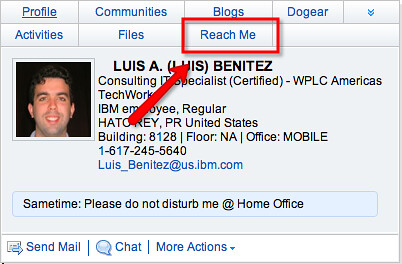
How to add Atlas 'Reach Me' link to Lotus Connections Person Card

View Comments

2008-07-24_1012This is a "repost" (is that the right term) of How to add a Microsoft Sharepoint MySites link to the Lotus Connections Person card, but for Atlas for Lotus Connections. Once you follow these instructions, you are going to integrate Atlas for Lotus Connections with whatever application renders the Peson Card: Lotus Connections, Confluence, SocialText, Quickr, Microsoft Sharepoint, SAP Portal, WebSphere Portal, and the list goes on and on.

Here's what you need to do: 1. Figure out the URL to a person's 'Reach Me' (usually something like: http://atlas.tap.ibm.com/reach.do?reachUser=luis_benitez@us.ibm.com) 2. Save a backup copy of: WAS_HOME>\profiles\<WAS_Profile>\config\cells\<Host_name>\LotusConnections-config \LotusConnections-config.xml 3. Open the file from #2 with your favorite text editor 4. Add the following line (it's 1 line, but it wraps):

<sloc:serviceReference serviceName="atlas" href="http://atlas.tap.watson.ibm.com" enabled="true" ssl_href="http://atlas.tap.ibm.com" ssl_enabled="false" person_card_service_url_pattern="/reach.do?reachUser={email}" person_card_service_name_js_eval="'Reach Me'"/>
5. Save and close the file 6. Save a backup copy of: WAS_HOME>\profiles\<WAS_Profile>\config\cells\<Host_name>\LotusConnections-config \service-location.xsd 7. Open the file from #6 with your favorite text editor 8. Add the following line (under <xsd:simpleType name="serviceNames"> --> <xsd:restriction base="xsd:string"> )
<xsd:enumeration value="atlas" />
9. Save and close the file 10. Restart Profiles That's it!! See, I told you!! All it took was TWO LINES OF XML!!! No coding!

Saturday, June 28, 2008

Lotus Connections -- it's just too easy to integrate!

View Comments

I'm writing this blog entry as a guest author to the Synch.rono.us blog. That blog is kept by Suzanne Minassian, who recently did an awesome job demonstrating that our product is better than Microsoft's, and two software developers: Joseph Russo and David Brooks. I personally think it's great that we can hear directly from the product development team and keep up to date with what's happening in their world.

While I generally prefer not to market Lotus Connections to IT, it's always helpful to help them understand how flexible and extensible our Lotus Connections platform is. I have already blogged about some of the cool things that you can do with Lotus Connections, but I wanted to summarize them here in an easy to find blog entry. Before we get started, you should know that Lotus Connections follows the SOA principles and it's mostly built on RESTful services and open standards. As such, you can re-use and leverage these services from pretty much anywhere!

Lotus Connections Plugins

Let's first start with how users will access Lotus Connections. Typically, users are forced to use a web browser to access a web application. Lotus Connections, however, is not your typical web application. As I mentioned above, it's built entirely on services and as such, these services can be accessed from anywhere. And the best part? There are already a lot of plug-ins out there available for FREE on our Connections catalog. Here's a sampling:
  • Lotus Connections Plug-In for Sametime
  • Multi-Service Portlet for WebSphere Portal
  • Lotus Connections Plug-In for Lotus Notes v7+
  • Lotus Connections Plug-In for Microsoft Office
  • Lotus Connections Plug-In for Microsoft Outlook
  • Lotus Connections Plug-In for Windows Explorer
  • BlackBerry Client for Lotus Connections

So where do you do your day-to-day work? In Sametime? Mobile with your BlackBerry? In Microsoft Office? In Microsoft Outlook? From any of those, you can download and install a free plug-in and access your social data instantly! And with Lotus Notes v8.5, you will be able to take Lotus Connections Activities offline! All of these are just examples of what can be done with the Lotus Connections Atom APIs!

Lotus Connections Home Page

The landing page of Lotus Connections can be easily extended by IT. An administrator has total control of which widgets can be deployed to the page. An end-user has total control of which widgets they want to see and the layout of these widgets. Currently, I'm working with a colleague on publishing an article to developerWorks which will describe how to create your own widgets. Therefore, stay tuned to the Lotus Connections page on developerWorks.

In the meantime, you should know that one of the easiest ways to get started with widgets, is by using existing ones. I recently worked with a customer where we added Google Gadgets to the Lotus Connections Home Page. And we did this in a matter of minutes!!! Thinks about this for a second... and envision the vast variety of Google Gadgets out there. How cool is it that you can get one of these loaded into Lotus Connections in a matter of minutes??? Awesome, huh??!!

Other widgets that we have developed internally are:

  • Twitter feed display
  • Quickr Entry files - view the most recently posted files
  • Atlas Search - Easily view how you are connected to other employees

While you can build widgets on your own, Lotus is also coming out with a widget building tool. With the Lotus Widget Factory, IT will be able to create their own widgets very easily!

Lotus Connections Profiles

Our best-of-breed Profile component is easily customizable without writing a single line of code! The Profiles page, like the Homepage, is also a Mashup of widgets. As such, an IT administrator can easily change the layout of the screen or even add their own widgets created with the Lotus Widget Factory.

Check out some of the other things you can do today!
  • Field names (e.g. Change 'Department Name' to 'Business Unit Name')
  • You can add up to 99 extra fields
  • You can change the order in which the fields are displayed / edited
  • You can change which fields are editable and which aren't
  • You can specify which fields are synchronized back to the data source and which aren't
  • You can specify which fields show up in the business card
  • You can add extra links in the pop-up business card
  • You can change the layout of the screen
  • Branding
Oh and Profiles also has the concept of Profile Types! This means that you can define different types for your organization, for example: Legal, IT, Executive, Non-Exempt, and so forth. With each profile type, an IT administrator can control which personal fields are displayed for users that have that profile type. The request that I hear the most from my customers is the need to hide email address for some employees. With profile types, this can be configured in minutes!!
Of course, we can't leave out the person card.
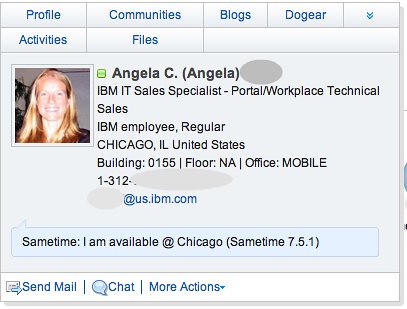
The person card is one of the biggest value adds for Profiles. With a single line of JavaScript (which, of course, we give to you) you can enable the person card around someone's name. Think about this for a second. Think about all the pages you have in your intranet where a name appears. Wouldn't it be nice if you could immediately get information on who they are and access to their social data ? Of course it would!! Oh, and did I mention that the person card includes presence awareness ? So again, with a single line of JavaScript you can add the person card to any web application, regardless if it's J2EE, .NET, php, plain HTML, etc.!!!!!

Say what? Your users live more in rich-client applications than in web applications? No problem!! You can also get the person card in rich client applications!!! As an example, we've added the person card to Microsoft Word, Microsoft Excel, Microsoft PowerPoint, Microsoft Outlook, Lotus Notes, and Lotus Sametime!

Lotus Connections Dogear

Have you seen those buttons out there in the web that say "digg this" or "Post to del.icio.us" ? Wish you could do the same for your Dogear implementation? Well, you can and it's super easy to do!! And no, you do NOT need to know anything about AJAX, XML, or Java.

First, add this line to your HTML's HEAD element:
<script type="text/javascript" src="http://www.acme.com/dogear/tools/doglink.js"></script>

Then, add this line to the <BODY> element of your web page (right now it's a DIV but you could make it a button if you wanted to...):

<div onclick="javascript:DogLink.makePost(location.href, document.title, 'tag1 tag2', 'Description of this page');">dogear this</div>

That's it!! Nifty, eh?

Another great function of Dogear is the ability to add a list of 'Related Bookmarks' to your pages. Think of your intranet portal. Think of all the pages that are out there. Let's take for example a news item about how your company is expanding its business in Asia. Wouldn't it be nice to have a dynamic list of links related to business development in Asia ? And with Dogear, this is super simple! And again, you do NOT need to know anything about AJAX, XML, or Java. In fact, no coding is necessary at all!

All you have to do is, copy-n-paste. Simply open the Dogear page, do a search for "business development" and click on Add to Site in the bottom of the screen.
200806161310.jpg

Copy-n-paste the generated code into the page where you want to add it and voilá! You are done! That simple! A process that can not take more than 5 minutes. Cool, right?!?! I think so.

It simply can't get any easier than that! As a techie/developer, that's yet another reason to love Lotus Connections.

Lotus Connections Communities

Most customers ask me if group membership in Communities can be used in other applications. For example, can membership in a community control whether or not a user has access to a Quickr place ? In the next release, this will be done out-of-the-box. In the meantime, this can be easily accomplished by using the Communities API and retrieving the members for a particular community.

Do-It-Yourself

So is there anything that you would still like to do and I haven't covered it? I doubt it . Kidding aside, there may be cases where you need to do your own custom development to integrate Lotus Connections into other environments. To prove that you can really integrate Lotus Connections into any environment, IBM ran an internal challenge called "50 ways to leave your bookmark". In it, 11 developers posted samples on using the APIs with Java, PHP (with cURL), Ruby, JavaScript, Perl, ActionScript, Shell Script, wget, Message Broker, AppleScript, ColdFusion, and the list goes on and on! Check out the article for all the great samples.

In addition, here's a sampling of what else has been done with the Lotus Connections APIs:

Really. The possibilities are endless. I even worked closely with a customer who decided not to use the User Interface that ships out-of-the-box and completely create a brand new user interface leveraging the existing services!

Summary

The great value of Lotus Connections is its flexibility to be customized mostly through configuration. There's very little that needs to be done with actual code. This helps increase the adoption rate because end-users feel comfortable using an environment that fits in their day-to-day lives. Additionally, IT has a LOT of power and control over the environment mostly through configuration!!! Moreover, the application has been designed from the beginning to be embedded into existing applications. And because Lotus Connections abides by the SOA concepts, this is easily done as shown here. The Lotus Connections APIs are so powerful that I'm sure I'm missing something.

Tuesday, May 13, 2008

Add SharePoint 'MySite' to Lotus Connections Profiles Person Card

View Comments
Last week, I promised you instructions on how to add a Microsoft Sharepoint MySites link to the Lotus Connections Person card.  Once you follow these instructions, you are going to integrate Microsoft Sharepoint to whatever application renders the Peson Card:  Lotus Connections, Confluence, SocialText, Quickr, SAP Portal, WebSphere Portal, and the list goes on and on.  Are we being too nice to Microsoft by making it easier to integrate their products into enterprise applications?  YOU BET!!!  That's one of our many value propositions!!!

Anyway, here's what you need to do:

1.  Figure out the URL to a person's MySite (usually something like:  http://mysites.acme.com/Person.aspx?accountname=lbenitez)
2.  Save a backup copy of:  WAS_HOME>\profiles\<WAS_Profile>\config\cells\<Host_name>\LotusConnections-config \LotusConnections-config.xml
3.  Open the file from #2 with your favorite text editor
4.  Add the following line (it's 1 line, but it wraps):
<sloc:serviceReference serviceName="mysites"
href="http://mysites.acme.com" enabled="true"
ssl_href="http://mysites.acme.com" ssl_enabled="false"
person_card_service_url_pattern="/Person.aspx?accountname={uid}"
person_card_service_name_js_eval="'My Site'"/>


5. Save and close the file
6. Save a backup copy of: WAS_HOME>\profiles\<WAS_Profile>\config\cells\<Host_name>\LotusConnections-config \service-location.xsd
7. Open the file from #6 with your favorite text editor
8. Add the following line (under <xsd:simpleType name="serviceNames"> --> <xsd:restriction base="xsd:string"> )
<xsd:enumeration value="mysites" />


9. Save and close the file
10.  Restart Profiles

That's it!!  See, I told you!! All it took was TWO LINES OF XML!!!  No coding! 

Thursday, May 8, 2008

Are you ready for this? Sharepoint 'My Site' in Connections Person Card!!

View Comments
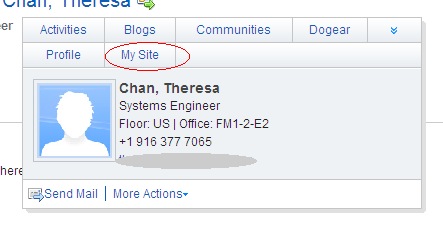
You already know that we can add the Lotus Connections Profiles Person Card into Sharepoint. However, how do people get to Sharepoint in the first place?  They could search under Communities to see if someone is advertising their Sharepoint site.  Several customers asked to have the person card extensible so we could add a pivot point to a person's "My Site".

Well, they asked for it, and we are delivering!!  With the advent of Profiles v2 (eGA expected in June 13), the development team has made it SUPER EASY to extend the person card.  By just adding two lines of code to an XML file, you can add a "My Site" link to each person's person card.  That's right, you do NOT need to know JSP, Java, or any other programming language.  This is purely a configuration change!!!!  Here's how it looks:


IntelBizCardMySiteZoom

So, what's the lesson learned ?  Connections and Sharepoint play nice together!  They do NOT compete.  In fact, Lotus Connections adds value to an organization's investment in Microsoft Sharepoint by allowing Sharepoint sites to be more easily discoverable. 

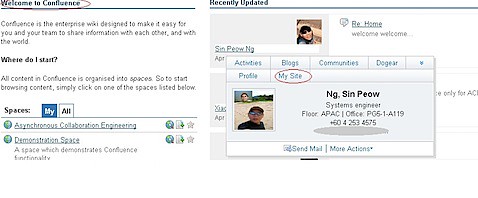
Oh and you know what?  We did a favor to the customer and we integrated their Confluence Wiki software with Microsoft Sharepoint.  How?  Well, we added the person card to Confluence.  So wherever you see a name in Confluence, you get that person's business card and in the business card we have a link to their 'My Site'!!!!  So, let me recap that:  We integrated Confluence Wikis with Microsoft Sharepoint via Lotus Connections!

And the best part?  This all took no more than 1 hour.  Here's how the person card looks in Confluence:


BizCardfromConfluence


What do you think ?  You like it?

Tuesday, March 11, 2008

Wow that's cool -- ST Awareness in Profiles Person Card!!!

View Comments

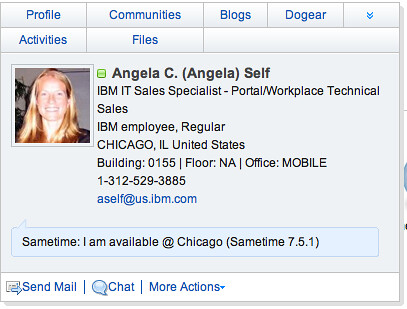
For the past couple of months I have been working at an all-Lotus POC (proof of concept) which includes Portal, Quickr, Sametime, Notes 8, and Lotus Connections for a multi-national insurance firm. One of the things that they've wanted to see is Sametime presence awareness in the Lotus Connections Profiles pop-up business card (aka. person tag). In fact, many customers have asked me about it!

I had heard from development that they were working on adding that for Lotus Connections R2 and had seen some screenshots. Today, I'm happy to announce that it's working in the TAP environment!!!

(picture updated on 6/6/2008)
STPresenceR2
You must know, however, that this only works if:
  1. You have the Sametime v7.5.1 (and above) client installed on your computer, and
  2. You are signed on to the Sametime server, and
  3. You install the WebLinks plugin

I'm sure by now you are using a feed reader and subscribing to my Dogears. Therefore, you already have a link with instructions on how to get this working on your computer. Enjoy and happy demoing!!!!!

Friday, February 29, 2008

A couple of new features added to Profiles 2.0

View Comments
Just wanted to bring to your attention a couple of new features and changes which will be available in Lotus Connections Profiles v2.0.  However, since we are cool people, we get to see a sneak peek of these features in TAP.

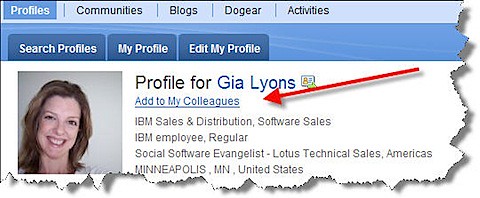
Today, I noticed the addition of 'Add to my colleagues' when you are viewing someone's profile:

profilescolleagues

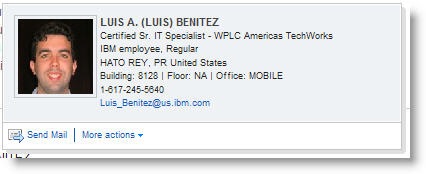
When you click on that link, you can enter a message which will be sent via email to the person you are trying to 'friend'.  Not only that, but we have an updated Person card:

newbusinesscard
Now, anywhere you see a name you can send that person an email.  Additionally, if you expand 'More actions' you can add that person as a colleague!!!  Now, imagine yourself browsing a document library, or browsing Dogears.  You find this person who has a lot of interesting materials and you want to add them immediately to your list of Colleagues!!  There's no need whatsoever to stop what you are doing, go find them in Profiles and then add as a colleague.. you can do it from anywhere the pop-up business card shows up!! Let me repeat that.. you can do that from ANYWHERE the pop-up business card shows up -- including non-Lotus Connections applications (e.g your intranet portal, your document repository, your rich client applications, etc...)

Very cool!!!!!

Ohh.. and don't forget that in 2.0 you have total control on the links that appear in the pop-up business card!

Thursday, February 28, 2008

Lotus Connections and Sharepoint Capabilities

View Comments
I've gotten te same question from two customers,so it's time to blog about it.  Mainly, they want to know what is possible today with Lotus Connections and Microsoft Sharepoint.  Let me clarify, though, that there's no  integration out of the box with Connections and Sharepoint.  The following are all capabilities that are available leveraging the Lotus Connections APIs:

  • Expose Dogears in Sharepoint 
  • Expose Blogs in Sharepoint 
  • Expose PersonCard in Sharepoint (documented in my article)
  • Link to Profiles (instead of the Sharepoint user info page) when clicking on a user's name in Sharepoint (documented in developwerWorks my article)
  • Use Communities as an access control into Sharepoint sites
  • Adding a 'Dogear this' button to Sharepoint pages
  • Add a widget to the Lotus Connections Homepage with 'My Sharepoint Sites' (similar to the Quickr porlet: My Places) 
  • Add 'My Sites' as a link in the PersonCard which takes someone to a user's list of Sharepoint
Note: Updated 8/29/2008 to include link to 'My Site' integration in Person Card.

Friday, December 14, 2007

Customizing the Profiles Person Card Part II

View Comments
I forgot to post the before and after on Wednesday's post.  Here's how the person card looks before the modifications:

PersonCardBefore

And here's how it looks after (notice that the email and phone number changed)

PersonCardAfter

If you would like to see other examples of what can be changed on the Person tag, let me know!