Pages

Showing posts with label activities. Show all posts

Thursday, April 23, 2015

What's New in the April 2015 Release of IBM Connections Social Cloud

View Comments
As we run our final checklist to turn on the new features, I wanted to give you a heads up as to what to expect next week.  I had the opportunity to give a preview of these to the audience at Social Connections, the independent IBM Connections user group, last week in Boston.

The conference was great as usual.  It was completely sold out as usual was great. I had the opportunity to meet with developers (check out this related post) as well as customers/users.  I learned about how they are driving the culture shift and increasing the adoption of Connections within the organization.  So much insight! The next Social Connections has been announced for October 2015 in Stuttgart, Germany (Oktoberfest anyone?)

So on to next week, here's a few things that you can expect:

  • New custom layouts for communities so that you can tailor your communications to your team
  • Drag-n-drop apps between columns in a single step
  • Responsive apps so that they adjust to the right column width
  • Type-ahead search for recently visited content to get back to where you've been faster
  • Access Activities via the mobile device

Here's a sample of a community with apps moved around:
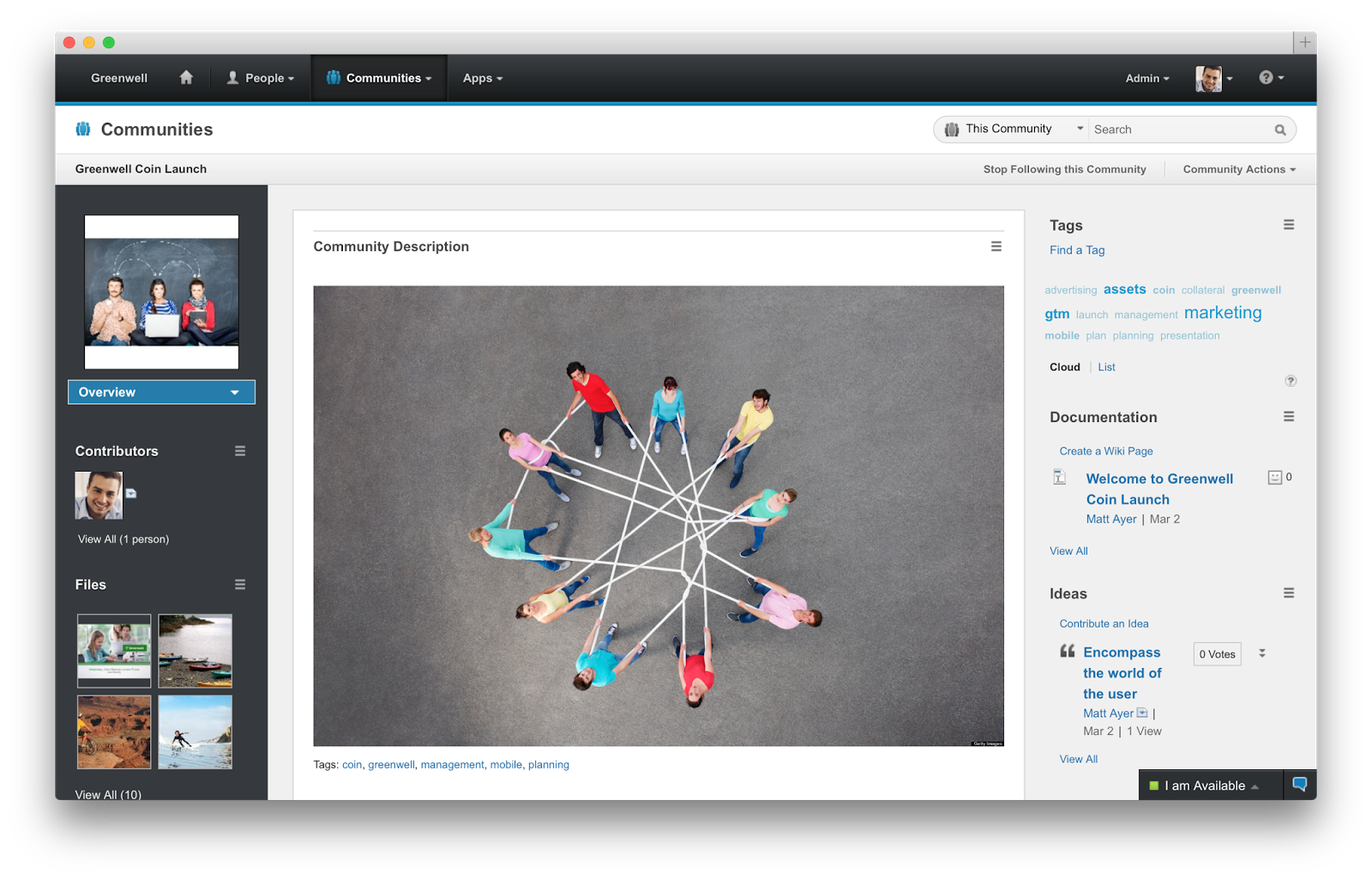

To give you a visual idea of what to expect, check out these couple of slides:


And for those of you who couldn't make it to Social Connections 8, here's the presentation that I delivered:


Enjoy!

Thursday, October 16, 2014

IBM Connections 5.0 CR1 Is Now Available

View Comments
Today, we are updating IBM Connections, the market-leading enterprise social collaboration platform.  Specifically, today we are releasing IBM Connections 5.0 CR1 for on premises customers.

This release includes a roll up of fixes that we've been releasing for the past couple of months.  Additionally, it also adds some new features.


New features in IBM Connections 5.0 CR1 (but not limited to):
  • Updated file preview design in stream
  • Play uploaded movies in the stream
  • View full file from thumbnail
  • New option to repeat events on a monthly basis
  • Copy/Paste images in the rich text editor for Activities
  • @mentions in CCM
  • Reporting metrics for CCM
  • Added support for IBM i , Power 8, and Siteminder 12.5.1

The full list of new features is here.  The full fix list can be found here.   

Enjoy!

Wednesday, January 22, 2014

ISW Takes IBM Connections Activities to the Next Level

View Comments
The countdown to IBM Connect 2014 is almost over -- just 3 more days! I'm at the airport now just about to board my plane to Orlando.

Before I do, I wanted to share the latest announcement from ISW: Kudos Boards. Kudos Boards provide a brand new experience to interact with IBM Connections Activities. If you are an active user of Activities you'll definitely want to check this out as it gives you another way to manage and organize your projects.

The new experience makes it easier to manage very large and complicated projects.

Here's a screenshot of how it looks:


With Kudos Boards you also get a new view of To-do's to give you a better sense of what's critical for you to focus on right now. You can also create your own custom lists of items to work on giving you the power to personalize the experience for you helping you see the right information at the right time.

This is a great example of using IBM Connections as a social layer as Kudos Boards is built entirely on top of the API's so everything is available through the mobile interface and other plug-ins available and each user picks the experience they want to leverage.

To see the magic, you have to check out the demo below:


ISW is going to be at IBM Connect 2014, so definitely stop by their booth to learn more.

Thursday, March 21, 2013

New IBM Connections Plug-Ins for IBM Notes 9 Now Available

View Comments

In conjunction with the new IBM Notes 9.0 release today, we have also just released the latest IBM Connections plug-ins for the best email client available delivering the world's first social email experience to the market.

The new plug-in adds support for:

  • IBM Notes 9.0
  • IBM Connections 4.5
  • Mac OS X 10.8
  • Windows 8

Additionally, the Connections business card has now been redesigned and the plug-in now provides a single installer to enable all the integration points to Connections: microblogging, file sharing, and tasks. As you probably know the plug-in allows you to:

  • Attach a file to a status update
  • Like / unlike a status update
  • Activity stream integration allows to monitor updates for all Connections services
  • Search by people and communities
  • Post status letting your colleagues know what you are doing
  • View status for people in your network
  • Comment on status updates
  • Delete your status or associated comments
  • Forward an update by email
  • View or post updates from the icon in the system tray when you are not working in the Notes client
  • Keep up with updates for people you follow
  • Lock/unlock files
  • Upload files for your own use or to share with others
  • Drag and drop an attached file or a file from your desktop to Files
  • Drag and drop or copy and paste a file from Files to your desktop
  • Send an HTML link to a file
  • Search for people or communities
  • Sort files for easier browsing
  • Detach the Files window from the Notes sidebar

So if you are upgrading to IBM Notes 9.0 and/or IBM Connections 4.5 you must get this plug-in today! To learn more about IBM Notes 9, check out this 90 second video from Ed Brill:

And for a demo of these features check out:

To download the new plug-in, you can get it from our app catalog over here.

Monday, September 24, 2012

Social Collaboration Tools Help Eliminate the Guesswork

View Comments

Today, I wanted to share another demo video of IBM Connections 4.0. I'm hoping that you can pick and choose different videos based on the applicable use case.

This video focuses on our mobile capabilities and how you can form Communities to help employees eliminate the guesswork. Communities in IBM Connections 4.0 are extremely powerful and can solve most team collaboration needs. There's even a full reporting capability with over 100 reports to help community managers understand what's valuable inside the community. With IBM Connections, IBM's social business solution, you can now create vibrant networks and communities with powerful social analytics and metrics.

Your organization can now:

  • Uncover insights from social analytics to deepen relationships.

  • Drive positive and productive adoption using powerful out-of-the-box and customizable reporting capabilities.

  • Discover and leverage top contributors and top content within your business communities and networks.

  • Keep customers, partners and employees engaged, contributing and valued.

Check out the video below:

For other IBM Connections 4.0 demo videos, check out:

Enjoy!

Monday, December 12, 2011

LotusLive Connections Upgraded This Weekend

View Comments
Over this past weekend, we finalized some upgrades to LotusLive Connections, our multi-tenant IBM Connections solution in the cloud. This update adds some great new capabilities to Communities, Files, Activities, and Profiles. Here's a couple of my new favorite features:
  • Community business owner can give ownership to another person
  • Community file folders for communities that you belong to are now shown under 'Folders shared with Me'
  • Easily link to Files from Activities
  • Parity with IBM Connections Files (which means, for example, new drag-n-drop capabilities!)
  • Instant messaging presence information in the business card
  • Limit scope of a community to an organization only
  • ProjExec has been integrated into LotusLive. ProjExec Live enables project managers to create, plan, execute and track projects using a professional Gantt editor that synchronizes with Microsoft Project. Invite other LotusLive users as project members and collaborate securely using a multi-project activity stream called the Project Wall. ProjExec Live is an intuitive, mobile-friendly solution to effectively manage and deliver projects of any size. More information is available in the wiki page for ProjExec. If you haven't seen ProjExec yet, here's a demo.
I'm so excited to have this release out. The team has worked tremendously to get this out, so congratulations to everyone!! For more information on What's New in this release, go here.

Wednesday, October 12, 2011

Social Business ROI ? Here's Yet Another Example!

View Comments
As you know, I'm one of the product managers for IBM Connections and one of my responsibilities is for our solution running in the cloud. I truly believe that one of the best ways to help organizations understand the value of becoming a Social Business is to learn from the successes of others. And at IBM we are actively documenting and highlighting the success stories of our customers.

One recent example is Newly Weds Foods, a Chicago based, global leader in food technology, needed an effective collaboration tool to bring its geographically dispersed team together, without the capital expense and staff needed to run an in-house solution.

With 27 plants all over the world, including the Philippines, China and Thailand, moving to the cloud made perfect sense. Newly Weds Foods chose IBM's LotusLive social collaboration cloud services to enable its culinary team to share information and ideas quickly and easily regardless of the time or location.

Culinary chefs use Profiles from IBM Connections to find and connect with other chefs around the world. They use Files and Communities within IBM Connections to share information from recipes to demos. They use Web meetings to share presentations and ideas with colleagues and clients, who range from retail stores, to mom and pop eateries to large national chain account restaurants.

The result? They are now saving 4-5 days per month in travel time, approximately 10% on airfare and travel expenses and they have sped communication response rate from days to hours. Working in different time zones is no longer a barrier to productivity and LotusLive's unique "guest account" model provides no cost access to clients so they can collaborate more easily on recipe ideas.

I truly believe that one of our differentiators is the "guest account" model and it's definitely something that our customers love. Who doesn't love free access ?

Check out this video with more information:


What are you waiting for ! Are you on your road to become a social business ?

Wednesday, May 25, 2011

New Portlets Available for Connections 3.0.1

View Comments

Because Mac Guidera is out of the office and is probably not able to share these great news (he's the Product Manager for the awesome Connections plugins), I figured I would do so. Today we made available new portlets for Connections 3.0.1. As I mentioned earlier, we had 9 portlets for: Wikis, Activities, Profiles, Bookmarks, Tag Cloud, and Blogs.

Today, we've released new portlets that support Ideation blogs and add support for 3rd party authentication providers (TAM / Siteminder).

Even though the portlets are called Connections 3.0.1 Portlets, they support:

  • IBM Lotus Connections 2.5
  • IBM Lotus Connections 3.0
  • IBM Connections 3.0.1
  • IBM WebSphere Portal Server 6.1.5.2*
  • IBM WebSphere Portal Server 7.0.0.1*
  • Microsoft Windows XP SP3
  • Microsoft Windows 7 SP1 (32-bit, 64-bit toleration)
  • Mac OS X 10.4, 10.5
  • Microsoft Internet Explorer 6, 7, 8
  • Mozilla Firefox 3.5, 3.6
  • Apple Safari 4

You can download the portlets, for free as usual, from the Lotus App Catalog here: https://greenhouse.lotus.com/plugins/plugincatalog.nsf/assetDetails.xsp?action=editDocument&documentId=511C128045FCD5D1852577B60055AD81

Thanks to the plugin team for making this available!

Friday, November 12, 2010

The Lotus Connections 3.0 Reviewer's Guide is Ready for Download

View Comments

With the impending release of Lotus Connections 3.0, there are tons of educational materials being released. Yesterday, I showed you all the new videos that have been made available. These videos are geared towards the end user and those are what they are going to see the first time they enter the platform.

Also this week, as you may have seen in the Connections Blog and Synch.rono.us, the Lotus Connections 3.0 Reviewer's Guide was released. This Reviewer's Guide provides an extensive overview of Lotus Connections 3.0 and its nine modules: Home, Profiles, Activities, Blogs, Bookmarks, Communities, Files, Forums, and Wikis. In addition, this guide explains how to extend the features and functions of Lotus Connections to your existing applications (for example Microsoft SharePoint, Microsoft Office, Microsoft Outlook, etc). If you ever have a question about how a particular feature works, you can find the answer here.

You can read it here, download, print, or even view it in full screen!

Lotus Connections 3 Reviewers Guide

Enjoy!

Monday, November 8, 2010

Lotus Connections 3.0 Announced - Are You Ready?

View Comments
In time for today's kick-off for the Enterprise 2.0 conference in Santa Clara, CA, IBM today officially announced Lotus Connections 3.0. The announcement letter also contains the Hardware and Software Requirements so you can start planning your upgrade and/or installation of Lotus Connections 3.0.

Additionally, IBM social collaboration has a new homepage: http://www-01.ibm.com/software/lotus/socialcollaboration/ . Within this homepage, you'll find the list of What's New in Lotus Connections 3.0. You'll find a huge list of new capabilities that are coming, and I must warn you, it's not a complete list! We just didn't have space to fit all the new things that we added.

Now, if we compare that page to what the team actually promised at Lotusphere 2010, you'll see a HUGE difference. Not only did the team deliver on all of its promises, it delivered even more!

Here's a video recorded by my colleague Suzanne Livingston so you can take a peek at what's coming in an awesome demo she put together (and recorded on a Mac!):


Here's a collection of links from those who have picked up today's news:


Many of my team members are going to be at the Enterprise 2.0 conference in Santa Clara, so feel free to reach out and ask for more information.

What do you think?

Tuesday, October 26, 2010

Business Analytics & Insights Go Social Thanks to Cognos 10

View Comments

IBM is making everything go social these days. Yesterday, IBM released and demoed Cognos 10 to a huge audience at the Information On Demand Conference in Las Vegas.

One of the big announcements of Cognos 10 is that it is now bundled and integrated out of the box with the leading Enterprise 2.0 platform: IBM Connections. That's right, the entire Lotus Connections suite is included for free with Cognos 10! This was received by great fanfare as evidenced in the Twitter stream:

SOakleyIBM: Here's a shot of the new Lotus Connections collaboration integration. Very cool. http://ow.ly/i/4ToZ #baforum #iodgc #cognos10

pjtec: Fully integrated Lotus Connections out of the box with Cognos 10. What about non-Lotus social platforms? #cognos10 #iodgc

sharkpac: IBM #Cognos10 launch. Ships with Lotus Connections. The collaboration capabilities look VERY interesting.

jocoutuer: #iodgc #cognos10 wisdom prevails! Reuse The Lotus connections capabilities for bi groupware mode collaboration and search...

MCsomerville: Ok..this Lotus connections in #Cognos10 is exciting. Also, annotations at a cell level

dmenningervr: Ashe: Bsuiness #analytics has become a team game; will ship Lotus Connections in the #COGNOS10 box #IODGC #BAFORUM one of my faves

rwang0: Cognos10 ships w/ #lotus #connections out of the box #cognos10 #ibm #iodgc #analytics

rwang0: MyPOV: My favorite features are the BI workspaces and collaboration features with Lotus Connections #cognos10 #ibm #iodgc #analytics

Greg_Tydak: #Cognos10 - Social media intehration, seamless upgrade, up to 80% improvement in performance (for #TM1) AND iPad functionality? Sweet.

chrisprocter: Liking the collaborative/social aspects of #cognos10!

cedricdevroey: The team is impressed by the new social features in #cognos10 @Numius

As you'll see, some people had questions about what this means for non-Lotus shops. In my opinion, I don't think this matters for various reasons: 1) Lotus Connections doesn't run on Domino and does not require any Lotus specific technology at all; and 2) Lotus Connections integrates completely into the Microsoft stack. The story has also been picked up by various media channels:

Additionally, you can leverage Cognos' awesome reporting tools to visualize and measure the adoption of Lotus Connections within your enterprise. Here are some sample reports that my co-worker George Brichacek did:


Here's a quick movie-trailer-style video of the Cognos 10 release to pump you up.


Enjoy!

Monday, September 20, 2010

Download Now: Lotus Connections iPhone App

View Comments
Update 23/Jul/2014: The latest iOS app for IBM Connections is available in the App Store here.
-=-=-=

Last Wednesday IBM released its first native iPhone app for the Lotus Connections instance of myDeveloperWorks. And there's tons of things you can do in it. I haven't been able to figure out how to effectively capture a movie/demo from my iPhone, so here's what you can do today with this iPhone app:
  • View the public and your personal activity stream
  • View your activity stream which includes:
    • New blog entries
    • New blog comments
    • New Downloads
    • Profile updates
    • Forum posts
    • Wiki updates
    • Shared files
    • Group/Community activity
    • Board updates
  • The activity stream can be filtered by module (e.g. only show updates from Wikis).
  • Navigate someone's profile view their status updates and interest/skills
  • Search for people, content
  • Search using name, keyword, tags
  • Edit your Profile
  • View saved items
  • View your status
  • View your network
I would say that this is a pretty nice v1 release. It's been out in the wild for 5 days and I'm hearing some very positive feedback!

To download the free application (which is supported on iPod Touch, iPhone, and iPad), click here and to stay up-to-date with all news around myDeveloperWorks subscribe to Bob Leah's blog (The Social Strategist) here.
Enjoy!

Thursday, May 27, 2010

Getting the Lotus Connections Portlet to work with WebSEAL

View Comments

Last week, I spent a day at a customer up in New Jersey. They are currently deploying a pilot of Lotus Connections 2.5. One of the most important things for them is to be able to mash up Lotus Connections with their existing intranet applications via their portal (powered by WebSphere Portal, of course).

To simplify sign on for all their employees, they use WebSEAL and SPNEGO to provide single sign on for all web applications. This way, an employee logs on to their workstation in the morning, and they are never prompted to log on again to other web applications.

As we deployed the Lotus Connections 2.5 Portlet, we ran into an issue. The portlet wasn't built to support an SSO solution in the middle (it mostly depends on WebSphere SSO which is based on something called LTPA token). At this point, I had to figure out how to change the portlet to support WebSEAL, so I went on and downloaded the source code for the portlet (isn't it nice when they make the source code available?)

It turns out, that it wasn't that hard; I was able to do it in less than 30 minutes. Here's what I did:

  1. Import the code into WebSphere Portlet Factory
  2. Edit WEB-INF/models/lcaccelerator/services/BlogProvider
  3. Look for getAllBlogsRest
  4. Expand Advanced options
  5. Notice how there's HTTP Cookies and Forward HTTP Cookies. Given the developers are using HTTP Cookies to forward the LTPA cookie, let's go with that. As seen here:
  6. Now, let's create the actual method. What I did was copy/pasted the src/com/ibm/lconn/lcaccelerator/utils/LTPAUtil class and renamed it to WebSealUtil class.
  7. At the same time, I renamed getLtpaCookie to getWebSealCookie and I changed the implementation to:
  8. Note that I'm getting a cookie called PD-CC. Not sure if that's what it's always called in WebSEAL, but that was the name in this case.
  9. Re-packaging and sending to the portal server fixed the Blogs portlet. Then repeat the above steps for the Dogear and Activities provider

Enjoy!

Monday, March 30, 2009

Lotus Connections in the iPhone

View Comments

Here's a quick demo I recorded that shows the new mobile interface that's going to be included in Lotus Connections v2.5.

Content Requires Flash Player

Get Adobe Flash player

Enjoy!

Monday, February 9, 2009

How To Enable the Lotus Connections Person Card in Notes 8.5

View Comments

Friday, was a VERY long day. I'm going to quickly summarize what I've been up to and why I've been seemingly disconnected from Twitter. The good thing is that there are lessons learned that I would like to capture here for various reasons:

  1. So that I don't make the same mistake again
  2. So that others can benefit from my mistakes

Let's start with the fun stuff first. A customer wanted to know how to enable the Lotus Connections person card in Notes 8.5. Not sure why, but for some reason this capability is disabled out of the box. To enable, follow these steps:

  1. Go to C:\Notes\framework\shared\eclipse\plugins\com.ibm.openactivities.client.common.service_3.5.0.20081211-1925
  2. Make a backup of plugin.properties
  3. Open plugin.properties with your favorite text editor
  4. Scroll to the bottom of the file and find this line:

    bizcard.show=false
    

  5. Replace it with

    bizcard.show=true
    

  6. Save the file
  7. Close and restart Notes

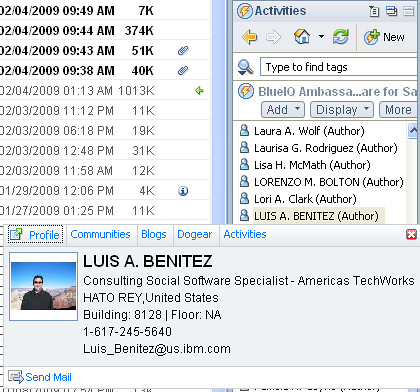
Now when you are in the Activities sidebar and look for people, simply hover over them, right click and the person card will show up as shown below!


Mac users: If you are using my hack, this should have already been done for you.

Enjoy!

Tuesday, January 6, 2009

Lotus Notes v8.5 released at MacWorld!

View Comments

As you may have heard already, Lotus Notes v8.5 has been officially released! AND it was released at Apple's last MacWorld conference. Customers and business partners can start downloading the Notes v8.5 client NOW! I'm glad to say that I already have it installed on my Mac OSX (Leopard).

Additionally, for the first time in many years, IBM has a kiosk there showing all of their software that works on Mac. I am lucky enough to have an Exhibitor Pass to MacWorld and will be here at the MacWorld Expo until Friday night! I'm also surprised that there are several IBM software brands will be at MacWorld: Lotus, IM, and Informix.
As a Lotus on Mac user, I'm thrilled that Lotus decided to announce Notes v8.5 today instead of waiting two more weeks for Lotusphere! With this announcement "out of the way" (so to speak), this leaves room for even bigger announcements at Lotusphere less than two weeks from today! Honestly, when Ed Brill announced they were going to wait after the Christmas holiday to ship Lotus Notes v8.5, I thought he meant they were going to wait until Lotusphere!

Here are some of the new features that I like the most:

  • Includes Lotus Symphony 1.2.1 beta for Mac embedded
  • Ability to add Calendars from Lotus Connections Activities, Google Calendar, and iCal feeds
  • Ability to take Lotus Connections Activities offline!
  • Ability to bookmark any document, database, and/or view in Lotus Connections Dogear
  • Includes Sametime v8.0.1 with the WebAPI plug-in (important to show ST awareness in web applications such as Lotus Connections)
  • Drag-n-drop emails into Sametime to add contacts to your Sametime list
  • Photos/Screenshots embedded into emails are automatically compressed when sending
  • File attachments are now shown at the top of each email (so that they are easier to find)
  • New support for LiveText on the Mac
  • Performance! Lotus Notes v8.5 on my Mac starts about 70% faster than Public Beta 2

Now, I know that you are wondering... "When can I get the Lotus Connections Activities sidebar to work on my Mac?" Well, the wait is over! Just like I hacked Public Beta 1 and Public Beta 2 to add the Activities sidebar to Notes v8.5 on the Mac, I've hacked the Gold release of Notes v8.5 so that you can add the Activities sidebar to your Notes v8.5 whether you are on Linux or Mac!!!

Once you download and install Notes v8.5 on your Mac, follow these instructions to add the Activities sidebar to it:

  1. Uninstall the previous hack if you had it installed. (File > Application > Application Management)
  2. Go to File -> Application -> Install
  3. Select Search for new features to install and click Next >
  4. Click on Add Remote Location...
  5. Set the Name to Activities Sidebar
  6. Set the URL to http://blog.lbenitez.com/updateSite/site.xml (Note: New URL)
  7. Click Ok and then Finish
  8. Follow the remaining steps and restart Notes for the changes to go into effect

Note: You will see several categories listed. Make sure you select the category named: Notes 8.5 Gold.

Enjoy!!

Thursday, December 11, 2008

Lotus Quickr and Connections Connector Is Now Available

View Comments

Last month I discussed some of the new features in Lotus Connections v2.0.1. More specifically, you now have the following capabilities:

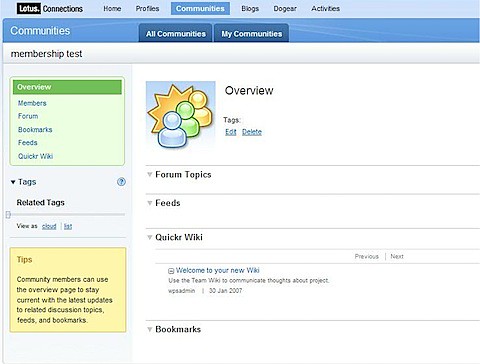
The IBM® Lotus® Connections Connector for Lotus® Quickr™ allows users to create associated Lotus Quickr team places for their Lotus Connections Communities. In Lotus Quickr, they can organize, share files, and collaborate on documents from a central location. When a new Connections Community is created, the associated Quickr team place is also created and the access control and membership of the Quickr place will be determined by the often fluctuating Connections Community membership. Communities associated with a team place in Lotus Quickr can aggregate updates in the community overview page, making it easier to stay current with projects and work collaboratively.

Here's a couple of screenshots of how that looks like:


200812111324.jpg


200812111325.jpg


200812111325.jpg

You can download this new connector from here. This connector works with Lotus Connections v2.0.1 and Quickr J2EE (a.k.a. Quickr Portal) v8.1.1 which I understand is already available for download.

Tuesday, November 4, 2008

Lotus Connections v2.0.1 is here!

View Comments

Each quarter, there's a new version of Lotus Connections out there. This quarter we shipped Lotus Connections 2.0.1 (on Halloween). I didn't post anything on Friday, 'cause I thought sharing some baby pictures in his costume was a tad more important. Also, the new version was very well covered by Stuart and Mitch.200811040533.jpg
If you are upgrading, you can download it from IBM's Fix Central. One question that I'm continuously asked is: "what's new in Lotus Connections v2.0.1?". Well, here's a list of what I've gathered:

  • Quickr integration with Activities - Push-button publication from an Activity into one of your Quickr Places for permanent document storage
  • Quickr integration with Communities - Allows communities to use Quickr as their content repository and document collaboration platform.
  • Enhanced person card
  • E-mail is no longer a required attribute (great for external implementations)
  • New feeds inside of Communities
  • New feeds for forums
  • New APIs for Activities, Blogs, Communities, Homepage (federated search), Profiles
  • Hidden support for STLinks (more about this tomorrow)
  • User Interface and Usability enhancements, for example:
    • Can now save members as part of an activity template
    • Drag-n-drop activities entries
    • Uploading images to a blog is now easier
    • Improvements in the Activities widget
    • Easier way to work with multiple bookmarks
  • A couple of bug fixes

Monday, November 3, 2008

What's Going on in My Network? A Recommendation From a Customer

View Comments

A potential customer sent me this on Friday so that I could share with the UX team. Since I know the Lotus Connections UI Designers follow this blog, I thought I would share this here instead of emailing them.

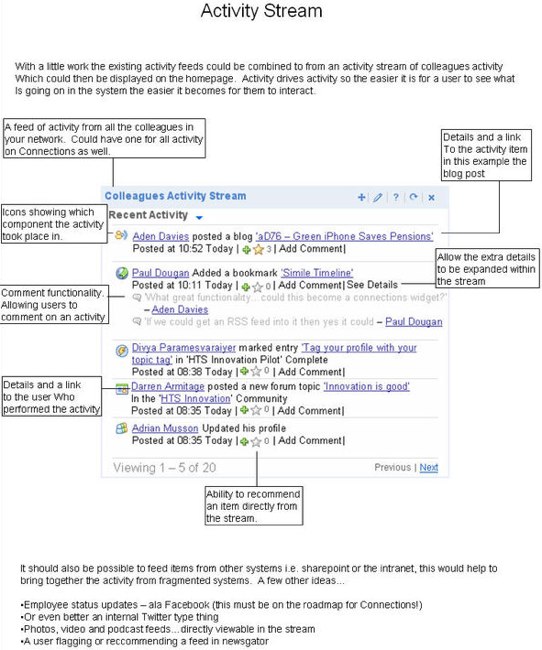
Aden Davies, who I met through Twitter and the Lotus Connections Twitter Feed, works as an "Innovation Technician at a large bank". We were talking about some of the new features in 2.0.1 and he shared his vision of a great addition to our widgets. He actually sat down and spent the time developing this mockup.

I actually liked this a lot. I even suggested something like this be added because it's very similar to the home page feed you would see in Facebook.

The idea is to provide a better feed as to what's going on around you.

I think this is also a great example of how Twitter can be used to improve collaboration with your customers and drive innovation into products faster!

Wednesday, October 15, 2008

How to change the logout URL for Lotus Connections

View Comments

The other day, a customer asked me how to change the logout URL for Lotus Connections. They wanted to configure Lotus Connections so that when a user clicked on 'Log out' they would be redirected to the company's intranet home page.

I couldn't find any documentation out there, so I put on my hacker hat. After a couple of minutes (ok, maybe 30 minutes), I was able to figure it out. I decided to capture my changes and share it with you. You'll notice that while the process may look long, it's really only changing 1 line of code in 6 different files... so it's really easy!

Activities and Home page:

  1. Go to <WAS_PROFILE_ROOT>\installedApps\<CELL_NAME>\Activities.ear\oawebui.war\WEB-INF\jsps\html_prototype\fragments\mainpage
  2. Save a backup of banner.jsp
  3. Open banner.jsp with your favorite text editor
  4. Look for the following lines:

    <form method="post" action="ibm_security_logout" name="logout" id="logoutForm" style="display: none;" >
    <input type="hidden" name="logoutExitPage" value="/service/html/mainpage">
    <input type="submit" name="logout" value="Logout">
    </form>

  5. Change the logoutExitPage parameter as shown below:

    <form method="post" action="ibm_security_logout" name="logout" id="logoutForm" style="display: none;" >
    <input type="hidden" name="logoutExitPage" value="http://w3.acme.com/home">
    <input type="submit" name="logout" value="Logout">
    </form>

  6. Save the file
  7. Repeat steps 1-6 for the following file:
    • <WAS_PROFILE_ROOT>\installedApps\<CELL_NAME>\Homepage.ear\dboard.war\web\jsp\pageheader.jspf (touch main.jsp afterwards to force recompilations of the JSP fragment)

Blogs:

  1. Go to <WAS_PROFILE_ROOT>\installedApps\<CELL_NAME>\Blogs.ear\blogs.war\roller-ui
  2. Save a backup of logout-redirect.jsp
  3. Open logout-redirect.jsp with your favorite text editor
  4. Look for the following line:

    response.sendRedirect(request.getContextPath() + "/ibm_security_logout?logoutExitPage=" + "/");
    

  5. Change the logoutExitPage parameter as shown below:

    response.sendRedirect(request.getContextPath() 
    + "/ibm_security_logout?logoutExitPage=" + "http://w3.acme.com/home");

  6. Save the file

Communities:

  1. Go to <WAS_PROFILE_ROOT>\installedApps\<CELL_NAME>\Communities.ear\tango.web.ui.war\WEB-INF\jsps\html\scenes\dashboard
  2. Save a backup of banner.jsp
  3. Open banner.jsp with your favorite text editor
  4. Look for the following line:

    logoutSection.innerHTML ='<html:link page="/service/html/logout"><fmt:message key="link.logout" /></html:link>';
    

  5. Change the page parameter as shown below:

    logoutSection.innerHTML ='<html:link page="/ibm_security_logout?logoutExitPage=http://w3.acme.com/home"><fmt:message key="link.logout" /></html:link>';
    

  6. Save the file

Dogear:

  1. Go to <WAS_PROFILE_ROOT>\installedApps\<CELL_NAME>\Dogear.ear\dogear.webui.war\h3\jsp\main
  2. Save a backup of pageHeader.jspf
  3. Open pageHeader.jspf with your favorite text editor
  4. Look for the following line:

    logoutSection.innerHTML =<jscript:string><a title="<fmt:message key="jspf.menu.logout.title"/>" href="<c:url value="/logout" />"><fmt:message key = "jspf.menu.settings.logout"/></a></jscript:string>;
    

  5. Change the value parameter as shown below:

    logoutSection.innerHTML =<jscript:string><a title="<fmt:message key="jspf.menu.logout.title"/>" href="<c:url value="/ibm_security_logout?logoutExitPage=http://w3.acme.com/home />"><fmt:message key = "jspf.menu.settings.logout"/></a></jscript:string>;

  6. Save the file
  7. Touch h3.jsp (to force recompilation of the JSP fragment)

Profiles:

  1. Go to <WAS_PROFILE_ROOT>\installedApps\<CELL_NAME>\Profiles.ear\peoplepages.war\WEB-INF\jsps\ajax
  2. Save a backup of loginInfo.jspf
  3. Open loginInfo.jspf with your favorite text editor
  4. Look for the following line:

    <html:link page="/ibm_security_logout?logoutExitPage=/index.jsp" styleId="logoutLink">
    

  5. Change the logoutExitPage parameter as shown below:

    <html:link page="/ibm_security_logout?logoutExitPage=http://w3.acme.com/home" styleId="logoutLink">
    

  6. Save the file

Hope this is useful to you.