IBM Connections allows customer to choose how they want to run and get values from the platform. For example, there are organizations that would choose to run in cloud for a "hands-free" environment. No need to worry about outages, upgrades, etc.
Other organizations would need the flexibility and customizability that an on-premises deployment would provide. For those of you who have decided to run IBM Connections on-premises you might want to check out this partner offering.
GSX for IBM Connections provides a powerful way to monitor critical components of the platform. Some of the capabilities you'll have:
Proactive notifications to get instantly alerted based on pre-defined thresholds
End-to-end performance monitoring include databases, application servers and more
Responsive time of end user experience
One real-time dashboard to see at a glance the status of all services and performance metrics
Here's a quick 3 minute demo to give you a better idea of what the solution can do at a glance:
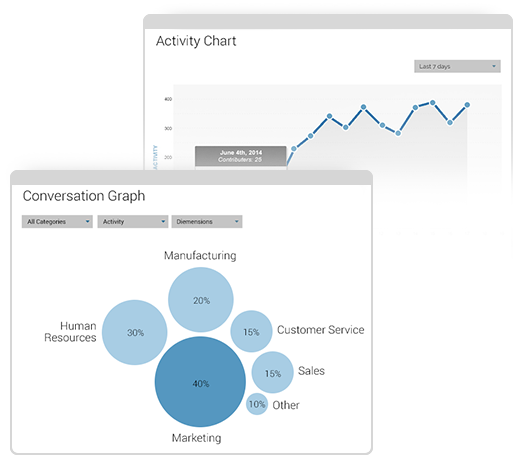
One of the important aspects of a social business platform such as IBM Connections Cloud is to monitor the health and usage of communities / team sites. IBM Connections provides a comprehensive set of quantitative and qualitative metrics that help measure the business value of IBM Connections in your organization.Metrics in IBM Connections allows community managers or System Admins view information on how users are participating on Connections, the content in Connections, and how people are visiting different portions of the product.
Community owners or managers need the ability to monitor the adoption and participation in their community. The Community Metrics component lets owners see metrics based on users, participation within the community, and content in the community. Additionally there are metrics for each application within a community under ‘All Metrics.
Here's a quick 3 minute demo that I created so you can see how it works.
Equivalent functionality is available for the org admins to see metrics at the global level across all communities deployed in the system.
To start off, community managers and administrators have access to even more metrics. If you are an organization administrator, you can easily see how your user base is getting business value out of IBM Connections. For example, you can track Connections Cloud events such as every time that a user reads a blog entry, creates a To do item in an Activity, updates a wiki page, or follows a Community. You can drill down on one application or a particular time period. You can set filters to track how many people viewed a blog in the Customer Support Community in the last seven days, last four weeks, last quarter, or last 12 months.
Community owners can also get metrics only on the communities that they own. Track who visits the community, information shared such as comments, and participation in such activities as downloading files.
In an upcoming release this quarter IBM is also going to be releasing some significant enhancements to search. Want to learn more and see what else is coming in the rest of Q2 for IBM Connections & IBM Docs? Then check out this deck:
And there's more that was released if you are using IBM Verse. Check out the full list of what's new in IBM Connections Cloud. IBM Connections is ready to transform your organization, anywhere in the world. And since today is Monday, I figured I would leave you with this.
If you still haven't seen IBM Connections, start your free trial here.
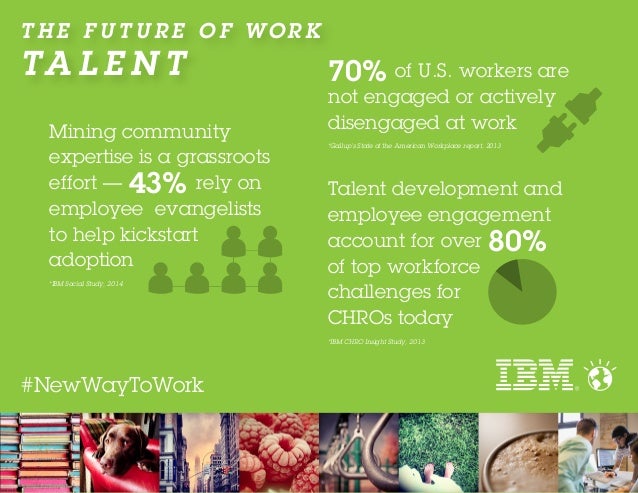
Today, studies estimate that there's a $500 billion lost in productivity and higher attrition since only 37% of global workers are considered to be engaged in the workplace.
IBM's #NewWayToWork Futurists Insights share that 74% of respondents to a survey define a "social" business as one that uses social technology to foster collaboration among, customers, employees and partners yet, only 45% of companies are using social to identify internal talent or key contributors.
IBM Connections is a great way to mine talent and engage your workforce. Teams can self-organize and come together to get work done faster; with less barriers.
On top of IBM Connections there are various solutions that can help further drive usage and adoption to accelerate the returns on investment. For example, the team over at Badgeville has created a solution called MotivationMetrics. Badgeville quotes that companies who successfully use gamification programs have seen an ROI of over 260% with a payback of less than 1 month!
By now, I'm sure that you are aware of TemboSocial. They have been adding value to IBM Connections, the market leading enterprise social collaboration platform, and it's some great work and I've talked about them in the past.
The first add-on they created was a bit over 2 years ago when they first introduced The Hive for IBM Connections, a social recognition module.
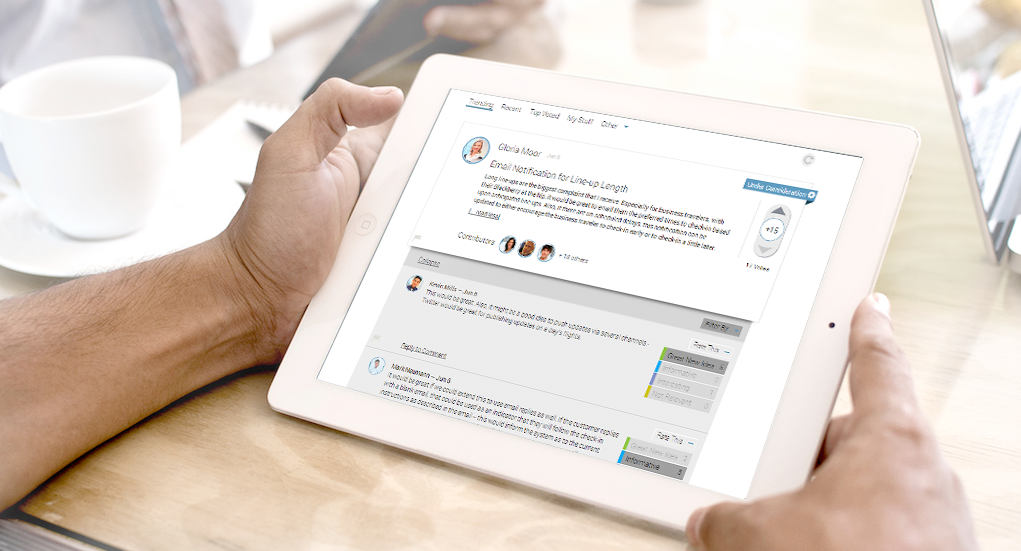
Now, TemboSocial has introduced TemboSocial Ideas for IBM Connections. This new add-on plugs directly into a team site within IBM Connections and takes ideation to the next level.
With this add-on, you can crowdsource and gather ideas, surface the best ideas and comments, and the experts and moderators can curate the best contributions and provide updates on the idea (e.g. "In Progress", "Under Review", "Closed", etc). Additionally, it includes detailed real-time reports to determine sentiment, where the best ideas are coming from (e.g. by geography, role, workgroup, etc) and you can filter by time to measure the impact of your campaigns and see the results of your promotions.
Update 2:30pm ET: Tembosocial Ideas is front and center at the customer IBM Webinar "Innovation Starts with Social: How IBM Connections Social Software can Transform your Organization - Tuesday August 26th"
"Join ICS NA Executive Sales Leader Laura Wolf and Tembosocial president and founder Steven Green on Tuesday August 26th. It's the "Aha" moment for LOB how to best get value from, Social (on-prem or cloud), how existing Social organizations can make Social more strategic, and where first time Social organizations can effectively start. "
We just posted to the catalog the latest IBM Connections Desktop Plug-Ins 4.5.1. The IBM Connections Desktop Plug-ins Microsoft Windows is intended for Microsoft Windows, Office, and Outlook users and brings the power of social collaboration to the applications that end users work in.
With IBM Connect 2014 just around the corner, I'm going to hold off talking about any roadmap items. Make sure that you register for IBM Connect today so that you can learn about all the great things that are coming.
This latest version adds the following:
Support for Windows 8
Support for Microsoft Office 2013 (Word, PowerPoint, Excel, and Outlook)
File downloads via the plug-ins are now accounted for in the Metrics
Based on customer demand: Now translated into Bulgarian, Croatian, Romanian and Slovak
Here's how the desktop plug-in looks like in Microsoft Word 2013:
Update 22/Nov/2013 - Here's how it looks in Windows 8:
Here's a demo I shared earlier this year:
To download, you know the drill.
Cloud customers can get it from the Apps -> Downloads section in the navigation bar as usual.
On premises customers can download from our catalog from here for the desktop plug-in and for the Microsoft Outlook sidebar plug-in, go here.
Yesterday, we made a video tutorial available to walk admins through the process of customizing the out of the box IBM Connections Reports.
Out of the box, IBM Connections provides over 100 reports for admins and community managers to monitor adoption and figure out the content that's working so they can focus their energies in the right place. The data in these reports can be aggregated in several formats such as by date, by geography, by department, etc.
Sometimes, there's data or dimensions that specific community managers want to see. When we built out the reporting mechanism, we had this in mind and made it extensible. It takes just a few steps to take the reports to the next level!
To see how you can customize the reports, check out the video below:
To learn more about customizing the IBM Connections reports, click here.
Updated on 12/Sept/2013 @ 12pm ET : - Also see the following presentation that Klaus shared in the comments:
IBM Connections 4.0 turns 2 weeks old today. Most likely, you have probably already upgraded your environment or are in the middle of planning the upgrade.
It's also very likely that by now you've checked out some of the great videos that have been made available in YouTube:
If you haven't seen those videos, definitely go and check them out. There's many more videos that I haven't shared yet, but will share them in the coming days. Today, I wanted to call your attention to a recent podcast where all 4 IBM Connections Product Managers share their favorite features of IBM Connections 4.0.
The podcast was led by the good folks at the Taking Notes podcast: Bruce Elgort and Julian Robicheaux. To listen to the podcast, go here.
Greenwell's marketing manager decided to leverage the IBM's Social Collaboration Platform and from that point on, the successes kept piling in.
Check out the success story:
The ROI of using IBM's Social Collaboration Platform is clear. Greenwell was able to:
Discover new opportunities
Rebuild brand recognition
Increase market share
Invigorate its customer base
Congrats to the team at Greenwell! (By the way, in case you didn't attend our conference earlier this year, Greenwell is a fictional company).
This is a great video that you can use to drive adoption and clearly understand the business value of using a Social Collaboration Platform powered by IBM Connections.
What do you think? If you are not using the IBM Social Collaboration Platform, you should start today!
Last week, I participated in the monthly community meeting for IBM Collaboration Solutions run by the famous Joyce Davis. In the webcast, I covered What's New in IBM Connections v4.0. For the most part, I tried to do a separate demo from the one that I shared on Wednesday of this week which was focused more on the highlights. For this webcast, I tried to get a bit more specific and show more of the new features and show them in action!
Here's the replay of the webcast in case you missed it or want to see it again:
And this is the slide deck that I was going to use but it was decided by webcast attendees to skip these and focus more on demo. 93% wanted a demo and only 7% wanted slides; go figure!
For instructions on how to download these slides, see below:
By now you have downloaded the IBM Connections 4.0 code and maybe even installed it over the weekend. The next step? It's time to show your users what's new in IBM Connections 4.0!
My colleague Fred Raguillat and myself have created this video to show an overview of IBM Connections 4.0. Notice that this video is not strictly focused on what's new and I also cover some features available in the platform. Therefore, this video can be used both as a What's New video and also a Top Features video.
To complement the video, if you are interested in the highlights of what is new in version 4.0, check out this page that I created and if you want the full list of 200+ features that are new in the release, then check this page out.
This is the same demo that I've been doing to current and prospective customers and have received some very positive feedback so far. One person told me I had to breathe more which was a luxury I couldn't take. There's just too much to cover and I wanted to keep it to about 6 minutes (let me know what you think in the comments) :
IBM is also announcing today new customers which continue to adopt IBM Connections. Today, more than 60 companies of the Fortune 100 have purchased IBM Connections. As part of today's announcements, Primerica is the latest organization to adopt IBM Connections and will deploy it to their 90,000 sales reps to engage with their 2.3 million policy owners. Primerica will also be leveraging our Actiance Vantage solution to ensure they remain compliant with local laws.
To learn more about IBM Connections 4.0, don't forget to register and attend for tomorrow's webcast From liking to Leading: The Success of your Business is Social (click the invite below to register):
Register now!
Bunchball, who shipped the first gamification solution 5 years ago has recently added support for IBM Connections. Leveraging Connections' extensibility points via widgets, Bunchball plugs into IBM Connections to promote end-user adoption and engagement. So far, Bunchball's platform, called Nitro, has handled 125 million users and tracked over 15 billion actions !
Gamification can used in various ways to help drive usage of a new system. For example, you can offer rewards or badges once a user completes his profile, creates a wiki, uploads and shares files, etc. The tricky part, of course, is to not only use gamification just during the initial adoption phase, but to keep users consistently engaged.
This is possible with Nitro's admin console where customers can very easily create an infinite number of missions, determine point economies, and establish rewards (or whatever works best to keep users engaged).
Here's a screenshot that shows Nitro for IBM Connections in action:
One of the cool features that Level Up adds to IBM Connections is real-time feedback on awards and missions completed. To see this integration in action, check out this quick 5 minute demo of gamification with IBM Connections with Bunchball.:
A while ago I got together with Steve Bystran from GSX who was here in Puerto Rico for vacation. Luckily, he was staying at a hotel that was very close to me and he offered to take an hour away from his vacation to meet with me. I had heard of GSX's monitoring solution for Quickr Domino at Lotusphere #ls12 but I hadn't seen it in person.
A couple of weeks ago I learned about SocialBro thanks to Mashable. SocialBro, made by developers based in Spain, promises to be an app to manage and analyze your Twitter following. At first glance, SocialBro delivers, especially if you are looking to use Twitter as part of your Social Business strategy. When you first launch the app, it asks you for your Twitter credentials and starts to download tons of metrics about your following. This is nice because it allows you to work with your data offline (perhaps while you are in a plane or without free access to wifi).
Once the data is downloaded you are taken to the Dashboard. In the dashboard you'll find things like Best time to Tweet, recent new followers, recent new unfollows, inactive followers, inactive friends, and much much more:
Some views are really useful to determine who to start following or who to stop following. Notice that each view also has a "share" capability. Clicking on Share triggers a tweet such as "I'm following 4 noisy friends: @xyz, @abc, @123, etc…". Overall, I think the view that I like the most is best time to tweet. SocialBro provides different visualizations to help you understand when a particular tweet will get maximum exposure. As you can see from the following screenshot, for me the best time to tweet is 4pm which is interesting because I mostly tweet in the morning.
On the left hand side of the dashboard, you'll find different search criteria and filters that can be applied to your followers and friends. Some of the filters are: time since last tweet, tweets per day, account age, etc.
SocialBro also provides insights into who your followers are, their timezones, their locations, the languages they speak, etc. SocialBro supports multiple Twitter accounts which is helpful for those that are managing multiple Twitter accounts.
Demo
SocialBro has created a demo and has shared it via vimeo. You can take a peek here:
SocialBro has announced that the following features are in the pipeline:
Analyze your competitors or other interesting profiles: copy their lists, follow their friends and followers, etc.
Analyze Twitter search results by users
Analyze any Twitter lists
Import any text list of users such as: conferences attendees, your app users, etc.
Add notes and reminders to the users
Tag users
Export to Excel (Export to PDF is already available)
Manage Twitter messaging campaigns
Get it now
If you are heavily dependent on Twitter or even if Twitter is part of your social business strategy, I think SocialBro is a must. SocialBro is built on Adobe Air so you can run it on your Mac, Linux, or Windows computer. To download, go here and sign up for the beta (it took me about 1-2 hours to get a beta invite).
Last week, I delivered a webinar that was hosted by InfoBOOM. In the webinar, I talk about some of the reasons why social media behind the firewall is beneficial to companies of all sizes. As an example, I reference the value that I personally get by using social media inside the firewall.
Here's the description that we used for the webinar invite.
Social media isn't limited to external communications. It can be a powerful force for productivity improvement and morale building inside the firewall.
The payoff: People are talking, and when that happens sources of expertise emerge from unexpected places. Social networks enable people to discover information, get questions answered and find new partners in collaboration. These tools are achieving the goals that early knowledge management systems set out to accomplish more than 20 years ago. The difference is that employees willingly contribute their expertise and enable the organization to capture their knowledge when it's in the cause of helping other people solve problems and get work done.
If you couldn't join the webinar and are interested in the business value of social media behind the firewall, you can watch the replay here. You'll notice that during the webinar a storm came in and knocked out power to my apartment so that provides for some laughs and entertainment as we try to adjust midway through.
Aside from business value, I also cover an important topic: the challenge of adoption. Once you deploy the technology, how do you actually get people to use it? I share some tips based on some lessons learned.
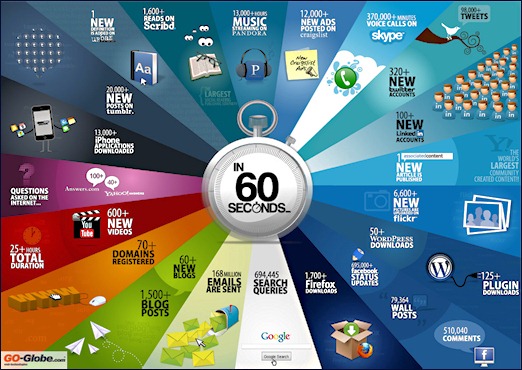
Earlier this year I blogged about an iPad app to get the latest Social Media statistics. And speaking about the iPad, one of my favorite apps to launch every day and discover content is Zite. Using Zite, I stumbled upon this info graphic (and you know how much I like info graphics!). This particular one captures what happens in the web in 1 minute.
Neville Hobsonblogged about it and suggests it might be good to include in a future presentation. I'll certainly try to include it in my next presentation and see what kind of feedback I get.
Here's a quick summary. In 1 minute there are...:
… more than 1,500 blog posts
… more than 600 new videos on YouTube
… more than 98,000 tweets
… more than 695,000 status updates on Facebook
… more than 168,000,000 emails sent
I noticed that Google+ is not there so maybe it's too new. The infographic makes me wonder… are there any stats on what percentage of those 168M emails are generated from social media sites like Facebook.
One of the podcasts that I like to listen to frequently is The Social Hour (previously known as net@night) with Sarah Lane and Amber MacArthur. It's a good show to keep up with some of the consumer oriented social media tools. To me, it's another way to keep visibility as to what's happening out there and hopefully get ideas on what we can add into our platform.
About two weeks ago, I was at the AT&T store getting my iPhone replaced (I could hear people, but they couldn't hear me) and as I waited I was watching episode 14. In it, one of the listeners asks for tips / resources on where to learn more about social media tools for the enterprise. The listener had heard of Chatter, but wanted to learn what else was out there. I felt compelled to reply.
Fast forward a couple of weeks and in last week's episode Sarah and Amber covered oneforty.com founded by Laura Fitton (aka @pistachio). For those of you who haven't seen it, oneforty.com is a great resource for companies who want to leverage Twitter as one of their channels for social media. They have a free e-Book on Twitter 101 and showcase various apps that you can use with Twitter for analytics, advertising, marketing, brand monitoring, productivity and more. They also have a community which builds and maintains toolkits. A toolkit is a way to group multiple Twitter apps together. For example, Mashable has its own toolkit which highlights all the apps they use in their newsroom.
Towards the end of the show, at about 48:10, Sarah and Amber read out my email that I had sent them. In the email I highlight some of the vendors in the enterprise social media world such as SocialText and Newsgator (I wanted to be as unbiased as possible). I also recommend to the listener to go out to the Enterprise 2.0 Conference website and check out all the information listed there so they can tell who the players are and who he may want to engage with.
Something that was not mentioned, however, is that another good way to learn more social media for enterprises is to follow the hashtags #e2conf and #socbiz in Twitter. Subscribe to those if you haven't yet.
I also gave a shout out to LuisSuarez who was interviewed by Amber back when it was net@night:
Needless to say, I'm excited that Connections got a mention in the show. Now I can tell my mom: "Hey, ma! Look, I'm on Twit!"
Last Wednesday, Business Insider last week featured a tremendous article where they named IBM the Future of Social Business "because they are willing to invest, test, fail and succeed in becoming a social business". The author of the article, Mark Fidelman, interviewed IBM's VP of Social Software, Jeff Schick. The article talks about IBM's road to become a social business. In the article, Schick highlights the importance of social analytics as we move forward and make it easier for more and more people to create content.
Building on that, InfoBOOM will be hosting free webinar on Social Media Inside the Firewall at IBM. You may remember that about a year ago I was asked to do a 15-minute presentation at Public Relations conference. At that conference, I chose to talk about Social Media Behind the Firewall and shared my presentation over at Slideshare:
For this week's webinar, I'll go through and update that presentation with the latest statistics, which coincidentally, were also highlighted in Business Insider's article last week (see below). I'll also be expanding a bit on why it's important to embrace social media behind the firewall.
As you can tell from those stats, social media tools are not just a fad at IBM, but they are actually part of our day-to-day processes! This is one of the lessons learned I'll be covering in the webinar.
If you are still on the fence on whether or not your organization can get value from social media tools inside the firewall, or if you simply want to learn more about how I use social media behind the firewall and why, I invite you to join the webinar. To register, click here.




 It's also very likely that by now you've checked out some of the great videos that have been made available in YouTube: