Pages

Showing posts with label office. Show all posts

Thursday, April 28, 2016

New IBM Connections Desktop Plug-Ins for Mac and Windows

View Comments
Today, we've released our monthly update to the IBM Connections Mac and Windows desktop plug-ins. I'll cover some of the updates here and will start with Mac since that's what I use.

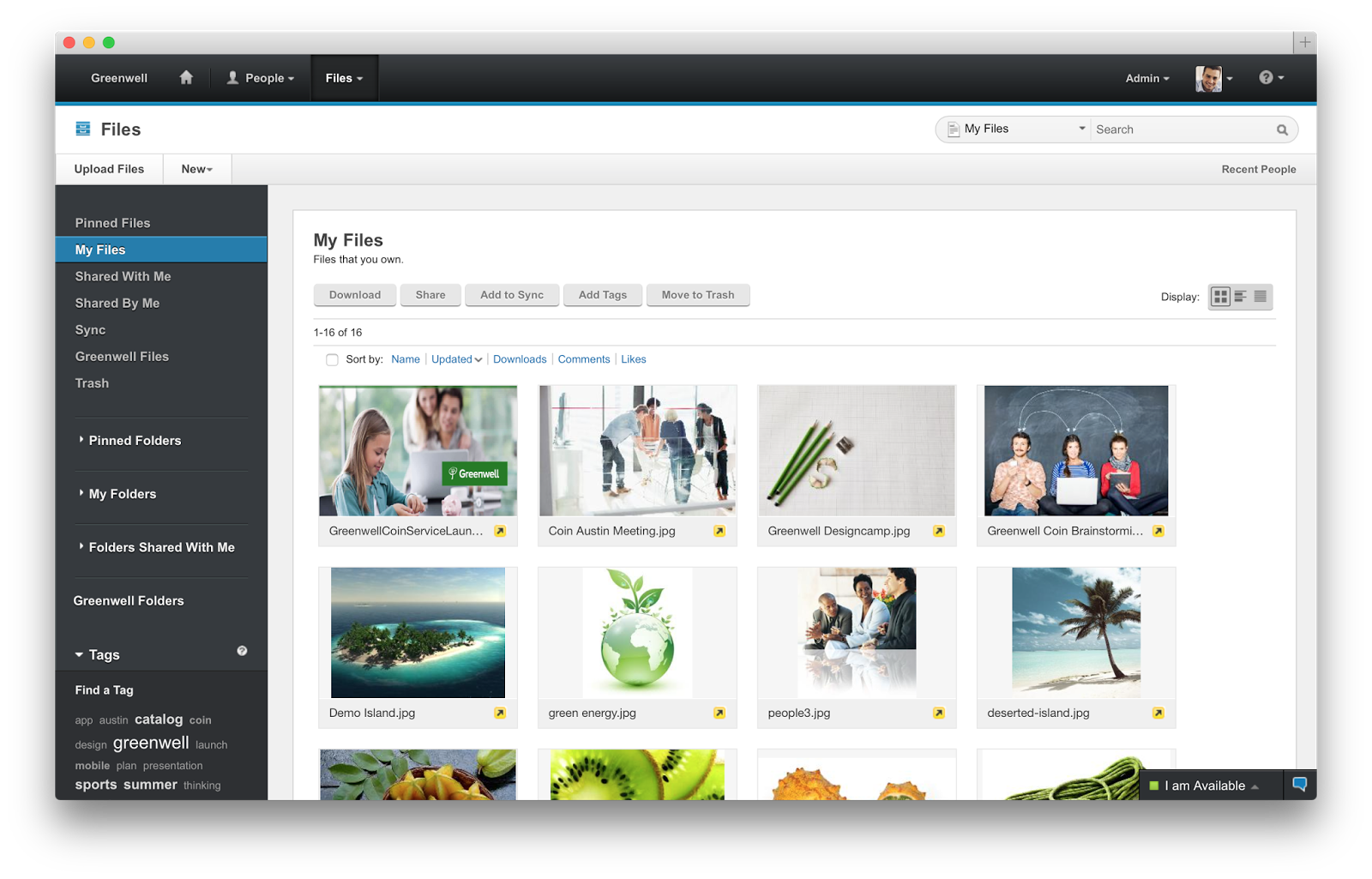
In this release, the context menu in Finder has been updated to streamline access to the IBM Connections actions. Now, when you right click on a synced file, you can see when it was last synced, share with individuals or groups, lock/unlock, modify metadata and more. Here's a snapshot of how it looks. 


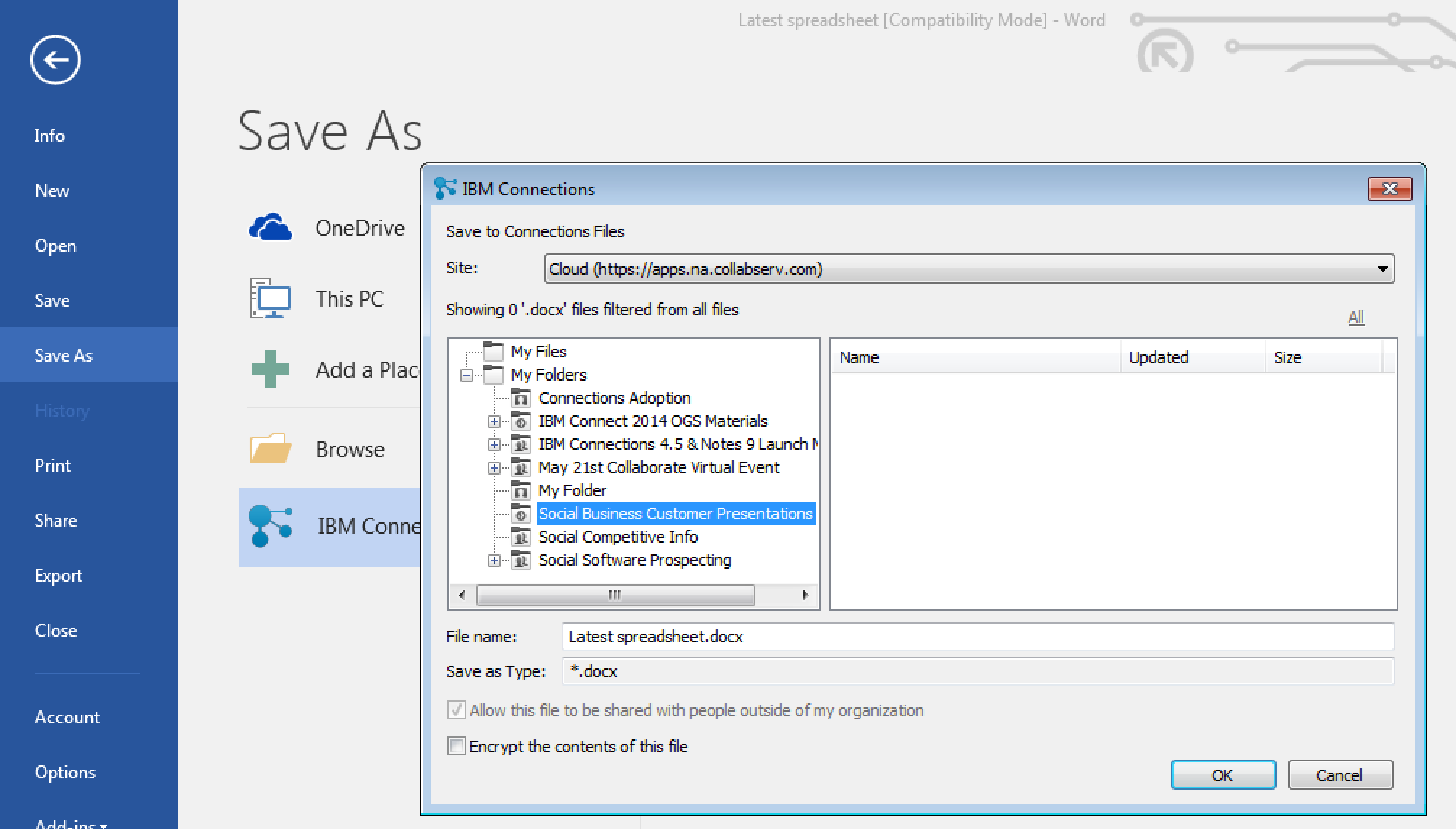
For those of you in Windows, we have improved the experience when saving files directly to IBM Connections from Microsoft Office. From the Save As menu within Microsoft Office (Word, PowerPoint, Excel) it'll be a lot easier to pick where specifically you want to store files (e.g. in what Folder, what Community, etc). See the screenshot below. And don't forget, when editing files, you can have round trip editing of files with IBM Docs when you are online or Microsoft Office when you are offline.

Windows 10 support has also been officially added. For those that like to live on the edge and have enabled preview features, you get some new stuff too. I'll leave that as an exercise for you to find it.

To get the plugins, go to Downloads and Setup in cloud, or if you are using on-premises, you can get the Windows plugin from our catalog here and the Mac plugin from here.
Tuesday, November 24, 2015

Using IBM Docs with IBM Content Navigator for Real-Time Co-Editing

View Comments
As we get ready for another major on-prem release of IBM Docs, IBM's collaborative editing solution, I wanted to share a bit of how IBM Docs integrates with other repositories beyond IBM Connections.

For example, if you are using IBM Content Navigator, you have the option to use IBM Docs on top of that.  With IBM Docs, you can edit Microsoft Office files in their native format directly in the browser, without having to do complicated download and re-upload steps. You can also create brand new spreadsheets, presentations, and documents directly within the browser which accelerates the content creation process.

Here's a quick presentation that one of my colleagues put together as a demo of IBM Docs inside IBM Content Navigator so you can walk through the experience end to end.


And here's a demo so you can see it in action:


And check out what one of our customers has to say. Kleber Bonadia, Director of IT at Flex Contact Center, talks about how they use IBM Connections Files to collaborate with their own customers to support their own rapid growth:


So if you are a using IBM Content Navigator, make sure you don't forget to use IBM Docs as well!

Tuesday, May 5, 2015

IBM Connections Adds Secure File Sync and Share Offering On-premises

View Comments
Following the release last quarter of our secure file sync and share offering in cloud, today we have just released the equivalent offering for those customers who would like to deploy this on premises. This new offering gives customers a new way to buy IBM Connections and get just the Files portion of the platform. This makes it easy to get started and customers can grow and buy the entire IBM Connections suite once they are ready to use other capabilities such as Communities, Forums, Ideation, etc.

The capabilities have already been highly praised by analysts such as Forrester and OVUM. In fact, check out this report from OVUM to find out why IBM Connections is a strong candidate to provide all the benefits and features an enterprise user might need from a file sync and share solution.

This offering includes:
  • Mobile apps for iOS and Android
  • Desktop plugins for Microsoft Windows and Mac (including integration into Microsoft Office 365 Desktop apps such as Word, PowerPoint, Outlook and Excel)
  • External file sharing (ie. share files with people outside of your organization)
  • Share files with individuals or groups
  • Lock files for editing to prevent conflicts
  • View files online without having to download
  • Control who can view/edit your files and who can re-share them 
  • View who has downloaded your files and which version they have
  • See how the file has been shared throughout your organization
  • and more... ! 
Available add-ons:
  • Compliance and Governance support 
  • Real-time co-editing of files without downloading 
Here's a demo of the plugins and mobile apps in action:


Enjoy!

Thursday, September 18, 2014

More IBM Connections Social Features Now Available Inside Microsoft Office

View Comments
As you may know, we are now releasing new updates to the desktop plug-ins on a monthly basis. This month's release brings some cool new features to those of you working with Microsoft Office Desktop apps (even if you use the desktop apps with Office 365).

For some time now, we've had integration into Microsoft Office (Word, PowerPoint, Excel, and Outlook) via the ribbon.  Today, we've added new functionality to the ribbon.


With the new features, you can now do the following directly from Microsoft Office:

  • Lock a file to prevent others from editing while you make changes
  • Share the file and add others as readers or editors
  • View version history
  • View download history/audit log
  • Like, pin, and follow

Check out this quick 2 minute demo that I created to show some of the new functionality:


To download the latest plug-in you can get it from Apps - Downloads on your cloud deployment, or from our app catalog here.

Thursday, November 21, 2013

IBM Connections Desktop Plug-Ins v4.5.1 Now Available

View Comments
We just posted to the catalog the latest IBM Connections Desktop Plug-Ins 4.5.1. The IBM Connections Desktop Plug-ins Microsoft Windows is intended for Microsoft Windows, Office, and Outlook users and brings the power of social collaboration to the applications that end users work in.

With IBM Connect 2014 just around the corner, I'm going to hold off talking about any roadmap items. Make sure that you register for IBM Connect today so that you can learn about all the great things that are coming.

This latest version adds the following:
  • Support for Windows 8
  • Support for Microsoft Office 2013 (Word, PowerPoint, Excel, and Outlook)
  • File downloads via the plug-ins are now accounted for in the Metrics
  • Based on customer demand: Now translated into Bulgarian, Croatian, Romanian and Slovak
Here's how the desktop plug-in looks like in Microsoft Word 2013:


Update 22/Nov/2013 - Here's how it looks in Windows 8:

Here's a demo I shared earlier this year:


To download, you know the drill.  
  • Cloud customers can get it from the Apps -> Downloads section in the navigation bar as usual. 
  • On premises customers can download from our catalog from here for the desktop plug-in and for the Microsoft Outlook sidebar plug-in, go here.


Thursday, October 10, 2013

Announcing the IBM FIle Viewer for IBM Connections

View Comments
Looking desperately for that important file? Don't want to download files unnecessarily just to see if it has the content that you need?

Today, that problem is gone. We have just made available a high-fidelity file viewer for all IBM Connections customers. As you may know, this was already available to Connections customers in the cloud and IBM Docs customers on premises. Today, all IBM Connections customers have access to a high-fidelity filer viewer.

The viewer allows you to see the entire contents of the file, present in full screen mode, and print without having to download to your desktop saving you time and space! The viewer will render PDFs, OpenOffice formats (odt, odp, and ods) and Microsoft Office formats (doc[x], xls[x] and ppt[x]).


Note: in the screenshot above you would only see the "Edit" button if you have purchased IBM Docs.

To get the viewer, you can get it from our app catalog, here.

Thursday, August 22, 2013

IBM Connections Plug-in For Apache OpenOffice 4.0 Now Available

View Comments

As promised a couple of weeks ago, with the release of Apache OpenOffice 4.0, we have now updated the plug-in for IBM Connections, IBM's Enterprise Social Network (ESN) and premier file sharing and team collaboration platform.

This new plug-in takes advantage of the new sidebar introduced in OpenOffice 4.0 to give you access to your files. From there, you open files directly without downloading, share them with others without having to open a browser, organize in a folder, search for intellectual capital and more.

Because OpenOffice can edit Microsoft Office documents too, this allows me to save money and be productive. And of course, if you want to edit OpenOffice files on your iPad, you can do that too!

For those of you using Macs, you'll be happy to know that this new update to the plugin also adds Mac support. Check out the screenshot below:


To download the plug-in go here. If you haven't upgraded to OpenOffice 4.0, do it today!

Tuesday, July 23, 2013

OpenOffice 4.0 is Available Now - Go and Download It!

View Comments
Today, OpenOffice 4.0 has become available ! Today, more than 58 million people have downloaded OpenOffice v3.4 since its release last year.

One of my favorite features in this release is the new sidebar which comes of course as part of the contributions from IBM's Symphony. The timing couldn't be better as we recently also introduced a document an awesome document editor in OpenOffice format for the iPad.


In today's press release, Kevin Cavanaugh (VP IBM Collaboration Solutions) was quoted as saying:
The time is right for wide scale enterprises adoption especially with the upcoming end of support for Microsoft Office 2003. By choosing Apache OpenOffice, enterprises will free up resources for their cloud and mobile infrastructure investments.
Additionally, as you are probably aware, we have a plug-in for that brings social to OpenOffice available today. In a couple of weeks, we'll also be releasing a new version of this IBM Connections Plug-In for OpenOffice which will surface in the new sidebar. I'll be sharing more about this plugin in the coming weeks as we approach the release date. Here's a screenshot just to give you a sense of how it's going to work:


For reference, the full list of What's New in this release is available here.

So don't wait!! To download, get it here: http://www.openoffice.org/download/ .

Thursday, April 4, 2013

Announcing the new Social Business Data Center in Germany

View Comments

Today, IBM is announcing the availability of a new data center for Social Business in Europe.

The new facility in Germany will serve the needs of customers in Europe interested in our cloud-based social business offering: SmartCloud Connections. Just like with our data centers in the US and Asia, customers would be able to use the latest and greatest, including IBM Docs.

The momentum towards the cloud continues to show signs of growth and with this new data center we'll be positioned to better serve customers in that region. All data will remain in the European Union (EU) which eliminates data privacy concerns and legal overhead since data is not transferred outside of the EU.

Here's a customer testimonial that was published earlier this week from Colleagues in Care and how they get value from IBM Docs and SmartCloud Connections:

And here's another customer testimonial:

For more information, check out the press release here: http://ibm.co/10xAfp2

Monday, January 21, 2013

Ephox Demonstrates Enhanced Rich Text Editor for IBM Connections

View Comments
Ephox has just released a new video demonstrating their EditLive! Rich Text Editor embedded within IBM Connections.

EditLive! for IBM Connections simplifies content creation within Connections’ Communities, Wikis, Blogs, Profiles, Activities and Forums. By upgrading the embedded rich text editor in Connections with EditLive! you add powerful tools that help users collaborate, address accessibility issues, edit images, check for errors, and produce great content.

Some of EditLive! for IBM Connections benefits include the ability to:
  • Create content compliant with accessibility standards.
  • Track changes and comment directly on their content.
  • Crop, resize, rotate and edit images seamlessly.
  • Copy and paste images and text from anywhere, including MS Office.
  • Avoid embarrassing mistakes with spell check as you type.
  • Create and edit tables easily with comprehensive table editing tools.
  • Build custom features and controls.
Check out the 5 minute demo below:

To learn more about Ephox Live! for IBM Connections, go to the IBM Connections App Catalog or directly here. Ephox will also be at #IBMConnect so make sure you go check them out.

Wednesday, January 9, 2013

Demo: Integrating Office365 into IBM Connections via Google App Engine

View Comments

Earlier this week I stumbled upon this video on YouTube that shows how you can integrate Microsoft Office365 into IBM Connections. IBM Connections continues to be the #1 social business platform according to IDC, so it makes sense that it's quickly becoming the go to collaboration platform for many businesses. Connections' support for the OpenSocial standard has opened the doors to reuse many existing integration points as well as reach out to a new breed of app developers. Feedback from developers has been tremendous in this area, especially because IBM also supports OpenSocial in its native apps for iOS and Android.

In the demo below, Michel from e-office demonstrates how you can use the Google App Engine to push events from Office365 into the IBM Connections activity stream. You can take a document and upload it to Office365, check-in, check-out etc and visualize from IBM Connections. You can even use the embedded experiences concept that IBM invented to interact with Office365 and preview files directly from IBM Connections.

I'll be sharing a couple of more examples as we lead up to #IBMConnect in 3 weeks, the premier social business conference.

Wednesday, September 26, 2012

Infographic: The ROI of Social Business with IBM Connections

View Comments

I stumbled upon this infographic on Twitter yesterday and since I'm a big fan of infographics, I wanted to share this one. Thanks to my colleague Pierre Fevrier for creating this one (and check out the others too!).

Make sure you also check out the other Infographics posted in Flickr: http://www.flickr.com/photos/ibmsocialbizeurope/with/7988127813/#photo_7988127813

Wednesday, September 19, 2012

New IBM Connections Desktop Plug-In Now Available

View Comments

With the release of IBM Connections 4.0, IBM is now updating its many extension points. Today, I wanted to share the news that the new IBM Connections Desktop Plug-Ins are now available for download. The plug-in, of course, remains free and is fully supported by IBM.

The Desktop plugin is a single install which brings IBM Connections into Microsoft Outlook, Word, PowerPoint, Excel and Windows Explorer (depending on what you have installed). Here's a list of some of the features you can use:

  • Upload local files to IBM Connections from Windows Explorer or from your desktop
  • Share uploaded files with people, communities, or folders in IBM Connections
  • Work on files locally and publish them to IBM Connections
  • View people's contact details and get in touch with them
  • Pin, follow, or like IBM Connections files and folders
  • View or contribute comments for a file
  • Lock a file when you are editing it to prevent file conflicts
  • View and restore files from IBM Connections Trash
  • Share folders with IBM Connections Communities

One of the things that really stands out is how all of the social features from IBM Connections Files are available directly from Windows Explorer. From Windows Explorer, I can like files, comment on them, share them and more without ever having to open a browser. How cool is that!!??!!

If you haven't seen this plug-in in action, then I recommend that you take a peek at the videos created by my colleague Ron Denham.

First, how it integrates with Microsoft Word, PowerPoint and Excel:

Next, how it integrates with Microsoft Outlook:

Finally, how it integrates directly into Windows Explorer to provide access to files whenever you want:

To download the free plug-in, download it from our App Catalog.

Wednesday, August 15, 2012

Office Space's TPS Reports (May) Go Social At SXSW 2013

View Comments
Earlier this week, Suzanne Livingston shared that SXSW voting is now open for the 2013 conference. I had a great time attending the SXSW 2012 conference and would love to speak again at the conference.

Suzanne and I have submitted our abstracts so let me tell you about them.

First, I think is one that is going to be loved by all fans of the movie Office Space. If you haven't seen the movie, I highly recommend that you check it out (it's in Netflix right now). A funny scene in the movie is when an employee is reprimanded when not formatting their "TPS" report properly. So at SXSW we want to talk about how you can make that TPS report social! You can watch the scene below:
Second, we are proposing a panel so attendees can learn how companies have transformed their cultures to create a more engaged workforce, accelerate innovation, and lead in social business. With only 8% of organizations leveraging social collaboration tools across the entire enterprise, I truly believe that we need to do more to get this going and starting by transforming the corporate culture is key.

Would you like these to be part of the SXSW 2013 agenda? So do I!!! So here's how you can help out.

Please comment and vote on the following two abstracts. (Note: to vote, you need to be signed in):
1) Yes, that TPS report can be social, too - http://panelpicker.sxsw.com/vote/582
2) Corporate Culture shock: when strategy isn't enough - http://panelpicker.sxsw.com/vote/575

Discussions on the abstracts are highly important, so don't forget to comment. Also, while you are in the PanelPicker site, you may want to check out the other sessions submitted by other IBMers:
Thanks for voting and commenting!

Thursday, May 10, 2012

New IBM Connections Plug-In for Symphony and OpenOffice Demo

View Comments
A while ago, I blogged about all the different plug-ins available for Symphony which brought the social capabilities of IBM Connections into Symphony. For those of you who don't know, Symphony is a free productivity suite based on OpenOffice, which coincidentally shipped a new release on Tuesday. And speaking of OpenOffice this same plugin has been released as an OpenOffice extension!!!

Of course, I'm pretty much a month late with these news, but there's now a new IBM Connections plug-in for Symphony, as Ed Brill announced earlier. The new plug-in adds the following capabilities:
  • Add a Lotus Symphony document to a IBM Connections activity, blog, or wiki.
  • Create a To Do item for an activity.
  • Add a Spreadsheet or Presentation document to an activity.
  • Add a URL as a IBM Connections bookmark.
  • Insert data from a IBM Connections profile into Lotus Symphony documents.
  • Open and share files in IBM Connections files.
And because it works inside of Symphony, it'll work in Linux, Mac, and Windows with any IBM Connections 2.5 server or above.

To me this is important because I believe in the power of bringing social to the end user to accelerate adoption of social business.

To show it off, I recorded this 9 minute demo which walks you through the features of this new plug-in plus the plug-in for the newsletter generator and a special one for those using the IBM Connections Content Edition.


For more details on this new plug-in available at no extra cost, check out the help document and to download & install it, go here (for Symphony) or here (for OpenOffice). The video above shows how to install it (hint: it's super easy!!).

Enjoy!

Tuesday, February 21, 2012

New Quickr Domino 8.5.1 FP Released - You'll Want This

View Comments
As promised at Lotusphere 2012 #ls12, we have now posted a new Quickr Domino fix pack for 8.5.1. You can find this fix pack in Fix Central or go directly here.

At Lotusphere, we announced that the fix pack would be ready in the first quarter of 2012, and I'm glad that we were able to get this out the door today. The IBM Lotus Quickr Fix Pack 8.5.1.25 for Domino release delivers several features highly requested by Quickr users:
  • Addition of the Folder Navigator for libraries with deep folder hierarchies and the Index
  • Improved preview for Microsoft Office file attachments and imported pages
  • Support for importing HTML
  • Display of an attachment's last modified date on Attachments tab
  • Simplified place creation process that eliminates the requirement of reauthentication
  • The ability for editors and authors to create folders in a place.
  • Support for Internet Site documents

To read what's new in this release in detail, check out What's Enhanced in Quickr Domino 8.5.1 FP 25. This fix pack includes all fix packs up to FP 13.

Now all hands on deck to finalize the next release for later this year.

Friday, September 2, 2011

How To Socialize Microsoft Office and SharePoint

View Comments

Earlier this week I re-emphasized the importance of a social everywhere strategy to accelerate adoption of social media in the workplace. I strongly believe that this is critical as I live this day in and day out. I've shared the story before that the main reason I use social software at work is because our platform adjusts to my needs and not the other way around. The tool simply integrates into my daily life and I don't have to do anything different to use it.

There have been many articles posted that highlight how to socialize the different Microsoft solutions such as SharePoint, and its Office stack. This is a stack that is very prominent at many organizations and many users are familiar with these tools. Therefore, as a business starts their transformation to become a social business, why should they focus on a new way of collaborating, or a building yet another silo of information. Instead, companies who want to become a social business should make their existing business apps social, not just deploy a new web site and move everything into that, essentially building another silo.

In the last week, IBM Connections has been positioned as a Leader in both the Forrester Wave and Gartner's Magic Quadrant. Today, 3 new videos showed up on YouTube highlighting how to socialize Microsoft Outlook, Microsoft Office and Microsoft SharePoint using IBM Connections. (it's really one video split into 3 because of YouTube's time limits). This should give everyone a good idea of what the social plugins do in the Microsoft stack. And the best part? The plugins are completely free and available for download from IBM's App Catalog.

What do you think?

Tuesday, August 2, 2011

Mac vs PC for College 2011

View Comments
So turns out that I've received a lot of questions around Mac vs PC from family and friends who have kids going to college this fall. I also interview students for the college I went to and this question comes up (specially after they see me using a MacBook Pro to do the interview). I figured I would capture some of the thoughts on the topic and provide my take in the matter. This by no means is meant to be a comprehensive look at the options that are out there. If you are interested, there are plenty of discussions out there.

Off the bat, I usually recommend the 11" MacBook Air and undoubtedly the first thing I get back is "but they are so expensive". I figured I would look at the numbers and see how it would pan out. The comparison is against an HP machine which is the cheapest I found in OfficeMax.

There's also the question of iPad (w/ bluetooth keyboard) vs full laptop. I believe students still benefit from a full laptop (I'm thinking about writing those 40 page papers and gamers). I'm willing to be proven wrong, though.

Here's what I came up with:
Feature MacBook Air 11" PC
Price $899 (typically there's a 10% discount for students) $399
Weight 2.38 pounds 5.5 pounds
Screen Size 11.6" 15.6"
Office Productivity
Suite (1)
$59.97 $149.95
Anti-Virus (2) Not needed $159.96 (you have to renew virus license every year)
Memory 2GB 4GB
Processor 1.6 GHz Dual Core 1.6 GHz Dual Core
Storage 64 GB (flash drive; up to 2x-4x faster) 500 GB
Backup $0 (Time Machine included) $80 (typically $20 / year)
OS Upgrade (3) $29 (at least the last 2) $119 (at least that's what it was for Win 7 Home Premium)
Battery Life Up to 5 hours (30 day standby) Up to 5 hours
Screen Resolution 1366 x 768 (up to 2560 x 1600 w/external monitor) 1366 x 768


Total $987.97 $907.91
(1) You could save by using the free versions of Office like Symphony or OpenOffice . I'm assuming students will need a word processor ($19.99 for Pages), spreadsheets ($19.99 for Numbers), and presentations ($19.99 for Keynote). If students only need a word processor, Pages is enough and it's ~ 1/8 the price of MS Office)
(2) Some colleges have a site license for anti-virus. Used Symantec Anti-Virus at $39.99 / yr. Update 3/Aug/2011: Apparently, Microsoft has a free solution for anti-virus. Not sure how good it is or how it compares to the paid ones.

(3) I'm assuming that in 4 years Apple will release another update to their OS and Microsoft will release one as well.
So the Mac is costing you about $80 more over a 4 year period. Yet, it's about 2 pounds lighter and it's up to 2x faster. Personally, I would recommend the 13" MacBook Air which would come up to about $1258 over 4 years (vs $907.91 for a PC). The 13" MacBook Air gives you 7 hours of battery, it's still under 3 pounds, a 128GB SSD of storage, and has a faster processor at 1.7 GHz.

Of course, cost is not the only consideration.  Some tools will only run on a Windows environment so it might be good to ask current students in the prospective major what they are using.  

There you have it. Hope this helps.

Monday, June 6, 2011

64-bit Quickr Connectors Are Here!

View Comments
That's right! The Quickr Connectors that you've been waiting for so long are finally here. And even before they were promised.
You may remember that we were targetting the second half of 2011. However, as Mac Guidera just announced the new Quickr Connectors are now available as of June 6th, 2011 so we were able to beat our commitments and that feels really good!

  Key features of HF7
  • Windows 7 64-bit support, including Windows 64-bit Explorer Connector
  • Microsoft Office 2010 64-bit Connectors
  • Microsoft Outlook 2010 64-bit Connector
Go out and get it:
Enjoy!

Tuesday, February 22, 2011

The Latest on the Quickr Connectors

View Comments

As Lotusphere #ls11 is now a dot in the rear view mirror, I'm still getting swamped with questions around the Quickr Connectors. For those of you who may not know, the connectors are a great way to get files in and out of team places. It integrates directly into your instant messaging client, email client (Notes and Outlook) and even to your Windows desktop. All of the actions available in the web UI are also available natively in the desktop (which really helps drive adoption).

In fact, I was surprised as I talked to customers from all over the world, their only interface with team places was through the connectors. Very few seem to use the Web UI. It was great to see how many people were leveraging this to improve their productivity. Here's a screenshot of how the integration looks in the desktop.


And because most people seem to rely more on the connectors than the web UI, I heard a lot of questions around future support. The top two questions?

  1. When will the Quickr Connectors support Windows Explorer on Windows 7 64-bit?
  2. When will the Quickr Connectors integrate natively (ribbon) into Microsoft Office 2010?

The questions were answered throughout various sessions at Lotupshere, including Ask The Product Managers which Mitch Cohen liveblogged (and you should go back and read if you haven't yet). In fact, in that session, Mac Guidera, the product manager for Quickr Connectors, announced that we have been working on it and should be available later this year.

As I mentioned before, post-Lotusphere I've also been swamped with these questions, so I figured I would recap the latest public information here and have something I can point others to very easily. If you want to know more details about the specifics and dates of when the Quickr Connectors will be updated, stay tuned to Mac's blog and this blog and you'll be the first to know.