Pages

Showing posts with label google. Show all posts

Monday, November 7, 2016

Demo: IBM Watson Workspace for Marketing

View Comments
As things settle from the IBM World of Watson conference two weeks ago, today I wanted to take the opportunity to share one of the demos that was shown in a breakout session hosted by Rob Ingram, Rishi Vaish and Alan Lepofsky.

The video that demonstrates how IBM Watson Workspace can improve your life as someone who works in marketing. It makes team collaboration easy and saves you time by bringing everything together and summarizing it for you (using some cool Watson services) so you can take action on what really matters.


Additionally the following integrations are shown (thanks to Sapho for building some of these):

  • Google Adwords
  • Marketo
  • SAP
  • Outlook Online (part of Office 365)
  • and more...
Check out the 3 min demo video below:


We'll soon post other videos so stay tuned!

Enjoy!

Wednesday, February 11, 2015

AppFusions brings Dropbox, Box, Office 365/OneDrive, and Google Drive to IBM Connections

View Comments
As we continue to wrap up from IBM ConnectED 2015 (and get ready for IBM InterConnect 2015), I wanted to highlight a new solution showcased at ConnectED 2015.  The solution comes from AppFusions and brings together many cloud file services such as Dropbox, Box, Google Drive and Microsoft OneDrive directly into IBM Connections.

For example, IBM Connections users to access, preview, edit, share, upload, and locally download OneDrive files directly from the IBM Connections platform.


Here are the features that AppFusions calls out (note: if you are not using Office 365 and instead you are using Google Drive or another cloud file service, you can pretty much substitute OneDrive below for your cloud file service.):
  • Natively authenticate, access and navigate your OneDrive/Box/Dropbox/Google Drive file directory, including sub directories, from IBM Connections
  • Preview files
  • Edit OneDrive files in Office365 from within IBM Connections, regardless of OS or Browser
  • Save back edits, direct to OneDrive/Box/Dropbox/Google Drive, from IBM Connections
  • Upload local files to OneDrive, from within IBM Connections
  • Download a copy of any OneDrive file, locally
  • Share OneDrive files (and identify share settings), from IBM Connections
  • Supports: Office365 native file formats, Adobe PDF files, Zip files, text files, etc.
Want to see it in action? Check out the quick 2 minute demo:


To learn more, check out the solution page in the AppFusions site for the integration that you are looking for:

AppFusions is offering a free 30 day trial so check out the links above for more details.

Thursday, June 26, 2014

IBM Connections 5.0 Is Ready for Download

View Comments
I just got confirmation that IBM Connections 5.0 is now ready for download ! This has been quite an exciting quarter as we've been building up to this day ever since I published the trailer back in April.

When I initially joined the product management team we were just launching IBM Connections 3.0.1.   I was then managing another component of the platform.

As time went by, I started to influence more of the platform and with this release, it was the first time that I was completely involved all the way from the first planning session to the release of the software. Of course, it's been quite an experience and it's what I've wanted to do for a long time.  I'm grateful for the opportunity that I've been given to bring this new product to market and for everything that I've learned in terms of what it takes to plan, build, and launch a product.

Here are some links you'll probably need:
I'll be updating those links as necessary.

I've also started collecting videos about IBM Connections 5.0 and will continue to update this playlist as they become available:


Now that you have the code, I'm anxious to know when you upgrade!! 

Wednesday, January 9, 2013

Demo: Integrating Office365 into IBM Connections via Google App Engine

View Comments

Earlier this week I stumbled upon this video on YouTube that shows how you can integrate Microsoft Office365 into IBM Connections. IBM Connections continues to be the #1 social business platform according to IDC, so it makes sense that it's quickly becoming the go to collaboration platform for many businesses. Connections' support for the OpenSocial standard has opened the doors to reuse many existing integration points as well as reach out to a new breed of app developers. Feedback from developers has been tremendous in this area, especially because IBM also supports OpenSocial in its native apps for iOS and Android.

In the demo below, Michel from e-office demonstrates how you can use the Google App Engine to push events from Office365 into the IBM Connections activity stream. You can take a document and upload it to Office365, check-in, check-out etc and visualize from IBM Connections. You can even use the embedded experiences concept that IBM invented to interact with Office365 and preview files directly from IBM Connections.

I'll be sharing a couple of more examples as we lead up to #IBMConnect in 3 weeks, the premier social business conference.

Thursday, April 12, 2012

How To Extend Search in IBM Connections

View Comments

I'm currently making modifications to my IBM Connections server to record a demo that I've been wanting to do for a week or so now. As I was making some changes, I realized that there was a new feature that was introduced in IBM Connections 3.0.1 that I may have not talked about.

Basically, the IBM Connections search box is extensible so that you can add 3rd party search providers. Say, for example, that you have deployed IBM Connections inside of the firewall and you want to give your users not only the ability to search within Connections, but perhaps integrate with your intranet search engine (e.g. Omnifind, Google Search Appliance, Fast, etc). Or maybe you have deployed Connections outside of the firewall and you want to integrate with your extranet search or provide the ability to do a Google search (or Bing, Yahoo, Quora, etc.).

Well, there's an extension for that and it's pretty easy to set up and no coding is required. Once you set it up, the additional search capability is made available to the end users and now from IBM Connections they can do searches that are handled by 3rd party providers. Very cool, huh?

Here's how it looks:


To set it up, simply follow the instructions here and off you go: http://www-10.lotus.com/ldd/lcwiki.nsf/dx/Adding_thirdparty_search_options_to_the_search_control_ic301 . In my demo environment, my intranet search is provided by Portal, so here's the URL format that I used to search Portal from IBM Connections: http://showcase1.demos.ibm.com/wps/myportal/SmarterPlanet/?uri=searchCenter%3Aquery&layoutNode=ibm.portal.Search%20Center%20Portlet%20Window&contentNode=ibm.portal.Search%20Center&query=social (of course, you'll have to update the URL based on your server name and address).

If you weren't aware of this, take advantage of it today!

Enjoy!

Tuesday, November 1, 2011

To Like or To Dislike: Is That The Question?

View Comments

A little over two years ago, I blogged about YouTube's decision to abandon their 5-star rating system and instead go for a Thumbs Up/Down approach. Yesterday, I blogged about Tom Raftery's keynote where he highlights IBM's use of binary recommendations in our blog engine. Then I stumbled on yet another article about Facebook prohibiting Dislike on their system from Mashable.

Mashable's Op-Ed highlights that developers were trying to use Facebook's new OpenGraph protocol to convert dislike into one of the possible options for users. However, trying to do that, gives this error to developers:


It seems most social networks today (Google +, Facebook, LinkedIn, Twitter, IBM Connections, Instagram, etc) use a binary system: either you like something or you don't. Of the ones that I use frequently, I think only YouTube has kept a system where you can pick one of three choices: do nothing, give a thumbs up, or give a thumbs down.

The Op-Ed makes a case as to why Facebook prevents dislikes in their system: it could hurt the advertising business and could lead to cyber-bullying. To me, this makes total sense, and makes me think it wouldn't be appropriate to have this sort of negativity in an organizations' social platform.

A common concern that I hear from various organizations in terms of privacy and controlling the content in a social platform. They are concerned about employees not using the right tone and perhaps falling into a trap where things might be misconstrued because they might have not been written in the right tone. When this comes up, I usually recommend instituting a set of Social Computing Guidelines and monitoring the conversations to avoid problems. Typically, I get a very positive reaction from a large number of customers who appreciate that there's no way to dislike content within Connections.

Recently, however, I've had a few people ask that we introduce a way to down vote ideas within IBM Connections. Currently, you can only "like" things within Connections (i.e. you can vote up on ideas, you can give blogs/files/wikis a star, etc). In other words, there's no way to express your discontent with something, unless you manually type it in as a comment.

So I'm hoping to hear from you. Is this a good thing? Should you be able to "dislike" a file that someone posts? Or a wiki that someone created? What implications would there be on adoption if negativity where to to become rampant (like it is in some parts of YouTube) within a business' social network? Should the ability to down votes, if introduced, be prohibited for certain users?

Wednesday, August 3, 2011

How To Deploy Google Gadgets to IBM Connections

View Comments

The concept of deploying Google Gadgets to Connections is not new. I've shown you how to do this several times (going back 3 years ago!!). There are even articles on that have been posted on IBM's webpage describing how to do this.

I recently stumbled upon an article written by Chuck Connell which describes how to very quickly develop widgets for IBM Connections. This is actually the approach that I usually take when creating my widgets. It's funny because when people ask me which IDE I use to code the widgets, I typically repy: Notepad.

Fast Development For IBM Connections Widgets

Chuck then takes that a step further and shares another approach on how to deploy Google Gadgets to IBM Connections. If you follow this process, you should be able to add a Google Gadget into Connections in 1-2 minutes.

Google Gadgets for IBM Connections

Enjoy!

Thursday, June 9, 2011

How to add Facebook Like, Twitter, and Google +1 Buttons to IBM Connections

View Comments

Last week I shared instructions on how to add the Google +1 button to Blogger. When I tweeted about it, I noticed that I had never shared instructions on how to add the Facebook Like, Twitter and Google +1 buttons to IBM Connections.

Once you follow the instructions below, you'll see the Twitter, Google, and Facebook buttons show up in the header as shown below. Of course, there are other places to put it in; this is just where I placed them. And once you do this, the users will have a very easy way to share a blog, wiki, discussion topic, etc with their favorite social network.


Here are the instructions on how to get started:

  1. If you haven't yet, copy footer.jsp to the customization directory. For example, copy <WAS_PROFILE_ROOT>/installedApps</cellName>/Activities.ear/oawebui.war/nav/templates/footer.jsp to <IC_INSTALL_ROOT>/data/shared/customization/common/nav/templates
  2. If you haven't yet, copy header.jsp to the customization directory. For example, copy <WAS_PROFILE_ROOT>/installedApps</cellName>/Activities.ear/oawebui.war/nav/templates/header.jsp to <IC_INSTALL_ROOT>/data/shared/customization/common/nav/templates
  3. Switch to the <IC_INSTALL_ROOT>/data/shared/customization/common/nav/templates directory
  4. Open header.jsp with your favorite text editor
  5. At the very end of the file, look for the last </div>. Just before that, add the following code:

    <div style="float: right;">
     <div style="float: left; clear: none; padding: 5px; padding-left: 5.5px; padding-right: 5.5px;">
      <a href="http://twitter.com/share" class="twitter-share-button" data-count="horizontal" data-via="lbenitez">Tweet</a>
     </div>
     <div style="float: left; clear: none; padding: 5px; padding-left: 5.5px; padding-right: 5.5px;">
      <g:plusone></g:plusone>
     </div>
     <div style="float: left; clear: none; padding: 5px; padding-left: 5.5px; padding-right: 5.5px;">
      <iframe src="http://www.facebook.com/plugins/like.php?app_id=166725596724792&amp;href=
    <%=request.getRequestURL()%>&amp;send=false&amp;layout=button_count&amp;width=75
    &amp;show_faces=false&amp;action=like&amp;colorscheme=light&amp;font&amp;height=21"
    scrolling="no" frameborder="0" style="border:none; overflow:hidden; width:75px; height:21px;" allowTransparency="true"></iframe> </div> </div>


  6. Save and close the file
  7. Open footer.jsp with your favorite text editor (Note: this is the same place where you would add the Google Analytics code or Coremetrics or any other web analytics tool you are using)
  8. Scroll to the very bottom of the file and add the following lines:

    <script type="text/javascript" src="http://apis.google.com/js/plusone.js"></script>
    <script type="text/javascript" src="http://platform.twitter.com/widgets.js"></script>
    

  9. Save and close the file

Enjoy!

Note: The Twitter button doesn't work over when using SSL (https) as mentioned in Twitter's FAQ. Therefore, if you have configured Connections to work over SSL you may want to get rid of the Twitter code and just leave the Facebook and Google buttons.

Note 2: The Facebook and Google buttons require that the URL that's being shared is accessible externally. Therefore, this code won't work in an internal version of Connections; only for those accessible externally.

Wednesday, June 1, 2011

How To Add Google +1 Button to Blogger

View Comments

I just caught the news about Google making available the new +1 Button.

If you want to understand the value of the Google +1 button, here's a quick video that Google put together:

As an end user, I'm still not sure about the value, but as a content publisher it might help my search rankings and make my content more discoverable so I figure I would add it to Connections and my Blogger blogs. (more on Connections in a follow-up post).

Adding the Google +1 button to Blogger is pretty easy. Once you follow these instructions, it'll show up on your page similar to this:


Here's how you get it done:

  1. Go to Blogger.com
  2. Log in with your account if you haven't yet
  3. On your Dashboard, click the Design link for your blog you want to modify
  4. Near the top of the page click on Edit HTML
  5. Now on top of the text box, click the Expand Widget Templates checkbox
  6. Find the line that contains </body>
  7. Just before that tag, add the following code:

    <script src='http://apis.google.com/js/plusone.js' type='text/javascript'/>
    

  8. Now search for post-body and you should find something like this:

    <div class='post-body entry-content'>
    

  9. Immediately after that line, add the following code:

    <div class='post_share social-media'>

    <div class='wdt_button'>

    <g:plusone expr:href='data:post.url'/>
    </div>

    </div>
  10. Now look for .footer-outer { and you should find something like this:

    .footer-outer {

    color:$(footer.text.color);

    background: $(footer.background);

    ...


  11. Just before that line add the following:

    /* Social share styles

    ----------------------------------------------- */

    .social-media {

    width: 90px;

    }

    .post_share {

    float:left;

    }

    .post_share .wdt_button {

    clear:left;

    margin:0;

    }

    .wdt_button {

    padding:5px;

    }


  12. Click Save Template and that should do it.

To see how to add the Twitter and Facebook Like buttons to your Blogger blog, see this post.

Enjoy!

Friday, February 19, 2010

Easily Search Lotus Connections from Google Chrome

View Comments

Lately, I've been using Google Chrome as my default browser to see if I can get used to it. I always considered myself very productive using Firefox, and I've heard so many good things about Chrome that I decided to give it a try. The features that I relied the most on Firefox were the Firebug plugin and searching Lotus Connections directly from the browser. Searching Lotus Connections directly from Firefox was possible thanks to OpenSearch which Lotus Connections supports since v2.5.

Google Chrome comes with a Firebug-like capability already built-in so that was easy. My next priority was setting up Chrome to search Lotus Connections instead of Google ( we all know at this point that Connections is a better search engine than Google, right?). Everywhere I looked, it said that Chrome supports OpenSearch. I couldn't, however, figure out how to add Lotus Connections to Chrome via OpenSearch.

Luckily, there's a way to do it manually (this is how I did it in my Mac. It may be a bit different in Windows):

  1. Open Chrome
  2. Go to Preferences...
  3. Under Basics, you'll see Default Search set to Google. Click on Manage
  4. Click on the + sign to add a new search engine
  5. Set the Name to Lotus Connections, the Keyword to lc and the URL to https://<hostname>/search/web/search?query=%s (for example: https://w3.ibm.com/connections/search/web/search?query=%s). It should look like this:


  6. Click Ok
  7. Optional: Select it and click on Make Default
  8. Close the Preferences panel.

If you didn't set Lotus Connections as your default search engine, here's what you do. Say you want to search for "enterprise2.0 software". In Chrome's omnibox, type "lc enterprise2.0 software" (w/out the quotes) and press Enter. And voilá, you've now searched Lotus Connections directly from the browser without needing to open Connections first and logging in.

Enjoy!

Tuesday, January 12, 2010

Track usage in Lotus Connections with Google Analytics

View Comments

Lately, I've been working with many customers that are deploying Lotus Connections in the extranet. One of their common interests is being able to see and report on usage, page views, unique users, etc.

One easy, and free, way to do this is by using Google Analytics. And, as it turns out, it's very easy to add Google Analytics tracking to Lotus Connections. To do so, follow these instructions:

  1. Open an account with Google Analytics
  2. Get the code to add to your site. Typically, it looks something like this:

    <script type="text/javascript">
    var gaJsHost = (("https:" == document.location.protocol) ? "https://ssl." : "http://www.");
    document.write(unescape("%3Cscript src='" + gaJsHost + "google-analytics.com/ga.js' type='text/javascript'%3E%3C/script%3E"));
    </script>
    <script type="text/javascript">
    try {
    var pageTracker = _gat._getTracker("XX-YYYYYYY-Z");
    pageTracker._trackPageview();
    } catch(err) {}</script>


  3. Create a common footer file as explained here: http://publib.boulder.ibm.com/infocenter/ltscnnct/v2r0/topic/com.ibm.connections.25.help/t_admin_common_add_footer_section.html
  4. In the footer.html, add the tracking code from step 2 above to the very bottom of the file. Make sure you replace the code in red with your own 'page id' that you get from Google Analytics
  5. Save footer.html
  6. Restart Connections.
That's it! Enjoy!

Friday, January 9, 2009

Update from MacWorld

View Comments

So now that people have digested this week's Apple KeyNote and Microsoft has tried to steal the thunder by announcing tomorrow's release of Windows 7 Beta, I wanted to give you an update to what I've been up to at MacWorld Expo.

First, let's start with the IBM booth. Just like Ed Brill had commented, the comments have varied a lot, and were mostly what we expected. Here are some of the comments that I've heard from customers that have stopped by:

  • Why is IBM here ?
  • I still don't see why IBM is here?
  • What kind of software does IBM make that's worthy of the Mac ? ( the sarcasm of this comment cracked me up.. )
  • Didn't Lotus go bankrupt 10 years ago ?
  • I can't believe Big Blue is here!!

Interestingly, some people have stopped more than once and have even brought their colleagues, friends, family to see what we've done with Lotus Notes v8. One of them was heavily impressed when I showed the Facebook Google Gadget inside of Notes!

I also got a chance to meet the Rational and Informix IBMers that were there and helped them get up and running with Notes 8.5 by recommending some must-have plug-ins!

Now on to the floor. I don't consider myself a Mac fanboy. I've been using a Mac for less than a year and must admit that so far I'm pretty impressed by what it can do. What I've really apprecciated is getting to know all the products and software that are available for the Mac and the iPhone.

Here are some of my favorites after visiting 50% of the Expo Hall:

Third, it was really cool being able to take a 3D Lenticular Imaging Photoshop Class with Russell Brown (Adobe's Creative Director). If only I could afford Adobe Photoshop CS4 Extended.

Fourth, I got to meet Michael Rowe in person, one of the co-hosts of the Dogear Nation podcast. He showed me some great apps and games for the iPhone. My favorite ? A flight simulator running in the iPhone!!! Last time I ran a flight simulator, my computer crashed cause I didn't have enough power to run the software!!! Yet, he can run a flight simulator in the iPhone?? Wow!!

Friday, December 12, 2008

Google OneBox: Integrate Lotus Connections with Google Search Appliance

View Comments

Lately, there's been a lot of buzz around Lotus Connections and Google integration. More specifically, around Dogear and Google and the integration that I did a while ago. Earlier this week, I announced that this integration won 2nd place in the Lotus HackDay contest under the 'Web Applications' category. Yesterday, it was announced that this integration won 1st place in the HackDay Global Connections category! If you want to see what all the hype is about and start using this integration, follow these instructions.

Now, stuff just keeps getting better. With great timing, a business partner, Persistent Systems, has just released Google OneBox, a connector that can be deployed to your Google Search Appliance to automatically index Lotus Connections data and show it embedded in the Google search results. No browser plug-in required!

These slides explain a bit more about the solution:

Lotus Connections One Box
View SlideShare presentation or Upload your own. (tags: lotus connections)

I believe integration with enterprise search is extremely important for successful social software adoption. At IBM, we have driven adoption of social software partly by integrating enterprise search results with Lotus Connections search results. In fact, there's a trend now were most IBMers end up clicking on the Lotus Connections search results that are embedded and shown side-by-side the enterprise search results. In fact, IBM did a case study and was able to calculate a yearly multi-million dollar savings thanks to social bookmarking and enterprise search integration.

If you want to learn more about this solution, see the Google OneBox for Lotus Connections page. (it's not yet part of the Lotus Connections Solutions Catalog, but it will be soon).

Monday, December 8, 2008

Dogear and Google Integration Gets 2nd Prize in Lotus HackDay

View Comments

Woo Hoo!!!!. That's right, late last week I got an email from Bob Picciano, Lotus' General Manager. In it, I was informed that Dogle (a.k.a. Google Dogeared) has won 2nd place in the Web Applications category of the Lotus HackDay contest. The price? Some cash which is very timely given the holiday season that's quickly approaching!

Dogle is a hack I did in which Google and Dogear results are shown side-by-side. It's a hack that I coded in a couple of hours. If you want to install it and give it a try, you can follow the instructions here.

For those of you, non-IBMers, HackDay is a one-day competition challenging IBMers to come up with the most interesting "Hack". "Hack", in this case refers to ability to come up with a solution to a problem or an interesting idea you've been thinking about.

200810072104.jpg

Thanks to all who took the time to vote for my hack and participate in this process.

Friday, October 10, 2008

How to integrate Lotus Connections and Facebook in less than 1 minute

View Comments

200810101325.jpgAs a techie and developer, one of the things that I really appreciate about Lotus Connections, is its ease of use and how fast someone can extend it.

Case in point, a customer recently asked me to add a Facebook widget to the Lotus Connections Home page. I knew there were several Google Gadgets out there for Facebook. Therefore, I followed the instructions on how to run a Google Gadget as a widget in Lotus Connections and created my own Facebook iWidget. Total work effort? 10 minutes.

iWidgets are powerful

Now, because Lotus Connections widgets can be hosted anywhere, I uploaded the widget to my domain. Since the widget has already been "developed" and "deployed", all you have to do is add it to your Connections' Home Page. To use the widget in your Lotus Connections deployment, simply add this widget:

This process literally takes 1 minute and is documented here.

Re-use is such a beautiful thing

Why reinvent the wheel? Why code something that already exists? While other vendors may have an extensible home page where you can add widgets, they force you to code the widget from scratch! You don't have to! Lotus Connections gives you the power to deploy any of the ~45,000 Google Gadgets, that somebody already coded for you!

Let me summarize: 10-15 minutes to wrap a Google Gadget into an iWidget. 1 more minute to deploy that iWidget into the home page. Total effort: ~16 minutes. No coding. No Java. No JSPs. No APIs to learn.Simply 1 XML with 2 lines of code and 1 HTML with 1 line of code.

A true social networking home page is born

By deploying existing gadgets into the home page, you are creating a true social home page. One that provides not only the recent updates from someone's internal social network, but also one that provides the most recent updates for someone's external social network! Now imagine what that's going to do to your adoption rates!! That's right, they are going to skyrocket!

Is Facebook not your favorite external social provider? You don't have 15 minutes to create the iWidget wrapper for the Google Gadgets?

No worries! All you really need is 1 minute! I have wrapped the following Google Gadgets into iWidgets for Lotus Connections:

updated 13/Apr/2009: Other widgets you may be interested on:

Enjoy!

Seeing is believing

Wait, what's that? You still don't believe me that it takes less than 1 minute? Let me show you!! Click here to see a full-screen demo!

What else would you like to see? Let me know and I can expand this Lotus Connections iWidget Catalog!

P.S. The devWorks article is a bit long, but the core of the article is this section. If you follow the instructions in that section, you can get your own Google Gadget up-and-running in 10-15 mins.


Friday, October 3, 2008

What's better at searching: Google or Dogear? -- Who cares!

View Comments

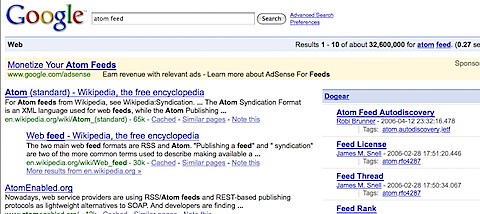
That's right... who cares if Dogear is better than Google? Sorry Google, but it's true. Dogear has become my primary search engine. But I understand that some people may still be infatuated with Google. That's ok, I won't judge you.

Why? Because you can have both side-by-side! Yup, that's right, since Lotus Connections Dogear is built following the SOA principles you can consume, embed, and use those services from anywhere. And here's the latest example: You can now embed Dogear into Google and have search results side-by-side!

Imagine having the best of both worlds right at your fingertips! Imagine how much faster adoption will happen! Imagine being able to find expertise from Google! Imagine being able to chat with those experts right from Google! Imagine being able to call those experts right from Google! Should I go on?

Can you tell how excited I am? Total work effort? ~3-4 hours with baby interruptions, dinner, and the Vice-Presidential debate last night!. Now, because of the aforementioned baby interruptions, the code is not pretty and I don't want you all to judge me on my bad code design.

Instead, I'm going to delay posting the code (for a little while) and would really like to hear from you. Do you think this is valuable at all? I certainly think so, but maybe I just have Dogearitis.

You want to see a demo? Fine, click here to see a demo in full screen. (sorry, I still haven't been able to figure out how to resize Flash videos recorded with Jing... )

Friday, July 18, 2008

Microsoft should buy Google

View Comments

You all know how Microsoft is trying to buy Yahoo for its search capabilities. Last night, I was looking at the traffic sources for my blog. The reporting engine tells me that 28% of my traffic for the given time period comes from search engines. As I expand the report to view more details, here's what I see.

Of that 28% of traffic, 99.26% comes from Google and only 0.50% comes from Yahoo. At first I thought, "Oh no, Google is indexing my content, but not Yahoo". So I went on to Yahoo, did a couple of searches (with the same keywords as those being used in Google) and my blog always came up as one of the top 10 results. "Phew!! Yahoo is indexing my blog.. "


While I was doing this analysis, I was also watching CNBC as they discussed all the earnings that were announced yesterday. The conversation got a bit off topic and they started talking about the Microsoft attempt to buy Yahoo, which got me thinking.. Given that Microsoft wants to buy Yahoo for its search capabilities, why spend so much money when it seems like only 0.50% of the population uses Yahoo? Shouldn't Microsoft go after Google? . Or perhaps this is another reflection on how socialites are more tech savvy?