Pages

Showing posts with label workspace. Show all posts

Monday, November 14, 2016

Demo: IBM Watson Workspace for Sales

View Comments
If you watched the last demo of IBM Watson Workspace for Marketing this will be part two of that series. This demo is focused on the day of the life of sellers and how IBM Watson Workspace can make their life better. If you missed the breakout session hosted by Rob Ingram, Rishi Vaish and Alan Lepofsky at World of Watson, this is a good way to catch up.


The video demonstrates how IBM Watson Workspace uses its cognitive capabilities to get you the information you need in context without having to jump back and forth between multiple tools. In the scenario example, we show a sales manager asking his team for the top sales opportunities. Watson Workspace understands this question and knows where to go and get the information: Salesforce. The latest opportunities and their status are then brought directly in context. Then it's time to sign the contract. The goal for this demo (and the previous one) is that it shows all integrations that have been built with the APIs that exist today.

The following integrations are shown:
  • Salesforce
  • DocuSign
  • Rocket Software
Check out the 2 min demo video below:


Missed the other videos? Check these out:
Enjoy!

Monday, November 7, 2016

Demo: IBM Watson Workspace for Marketing

View Comments
As things settle from the IBM World of Watson conference two weeks ago, today I wanted to take the opportunity to share one of the demos that was shown in a breakout session hosted by Rob Ingram, Rishi Vaish and Alan Lepofsky.

The video that demonstrates how IBM Watson Workspace can improve your life as someone who works in marketing. It makes team collaboration easy and saves you time by bringing everything together and summarizing it for you (using some cool Watson services) so you can take action on what really matters.


Additionally the following integrations are shown (thanks to Sapho for building some of these):

  • Google Adwords
  • Marketo
  • SAP
  • Outlook Online (part of Office 365)
  • and more...
Check out the 3 min demo video below:


We'll soon post other videos so stay tuned!

Enjoy!

Thursday, November 3, 2016

IBM Watson Workspace -- Code Talks So Here's The First Samples

View Comments
Time for the next post on IBM Watson Workspace. In this post I wanted to share some code samples that could help you get going in your development of apps for IBM Watson Workspace using the IBM Watson Work Services and APIs.

I know many developers, including myself, learn a lot from code samples (probably more than using actual API documentation). So to build on my post from earlier this week, we have published the first 5 code samples into the Watson Work org in Github and there should be more posted this week and next. My samples are the Twitter and Weather apps. I built these as fully functioning apps that you can deploy to a server and get up and going in a few minutes. And once they are running, feel free to hack away!

To make things simpler, I've also included a one-click button to deploy the app to Bluemix (which I thought was freaking cool how they make this possible). This, however, is not a required step. If you want to use with another cloud provider, by all means. Back to Bluemix, when you click the button, Bluemix pulls down the code from Github and magically gets it up and running.


One cool thing is that even before the samples were available, I already picked up a few blogs of developers using the APIs:
even one creating an Eclipse plug-in that was able to get something going in < 1 hour ( I love hearing those stories):


So quick tour of the Weather app. It uses the Weather Underground APIs to get current conditions based on a US zipcode. I use the node module to convert the zip code to city and state:
const cityState = zipcode.lookup(zc);

With that info, I now call the Weather Underground APIs to get the current conditions:

client.conditions(opts, function(err, data) {

Now with the data that I get back, I build a message to post back to IBM Watson Workspace and put it in the appropriate JSON construct:

const messageData = {
type: "appMessage",
version: 1.0,
annotations: [
{
type: "generic",
version: 1.0,
color: "#D5212B",
title: "Current weather conditions",
text: message
}
]
};

and then call the API to post it back:

request(sendMessageOptions, (err, response, body) => {

So that should give you an idea on how to listen to a conversation, act on it, and then respond back. I followed a similar flow to build the Twitter app and my hope is you can take it and hack it to build your own.  And if you are in the mood to help improve these samples, pull requests are welcome!

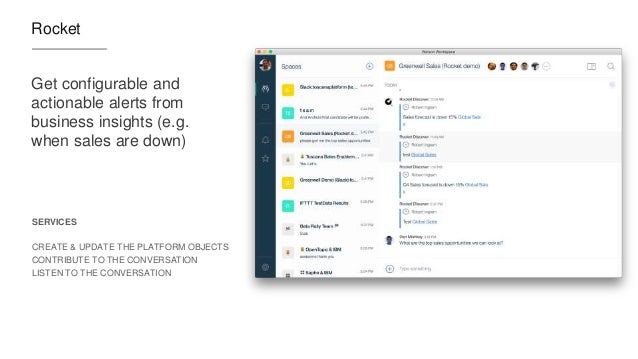
Now definitely check out what Redbooth, Rocket, OpenTopic, Sapho and others have done... VERY COOL! (and just to make it more enticing.. Sapho for example has Marketo and Google Adword integration... )

Wednesday, October 26, 2016

Let's talk Integrations with IBM Watson Workspace

View Comments
Yesterday, IBM unveiled a new category called IBM Watson Work and two offerings available to all IBM World of Watson conference attendees: IBM Watson Work Services and IBM Watson Workspace.

If you've been following me for a while, you know I'm a big fan of integrations, app dev, and platforms. Well, today I'm happy to share the news that IBM Watson Workspace works with IFTTT. In fact, it's the first IBM app to be part of the IFTTT ecosystem. If you are not familiar with IFTTT (that is IF This Then That), they make it super easy to connect the apps that you love together and configure what they call recipes. In other words, when something happens in one app, then do something in another app. IFTTT currently has 370+ apps in the catalog, so chances are that you can integrate with what you want (e.g. Box, Gmail, your car, you smart home devices and more!)

To start creating your own integration with IFTTT, head out to: ifttt.com/workspace . Fist bump to the IFTTT team for helping share the news:


If you missed the keynote yesterday or you want to review the announcements, you can catch the replay here:


And here's a recap of the key tweets!

Tuesday, October 25, 2016

IBM Announces a New Category: IBM Watson Work

View Comments
In today's press release, IBM announced a new category called IBM Watson Work. In that category there are two new offerings that will be available: IBM Watson Work Services and IBM Watson Workspace. IBM Watson Workspace uses cognitive analytics to help users communicate with their teams and focus on key business outcomes. Teams now have a single space to manage all their work conversations and avoid information overload with smart summaries that highlight the most relevant actions and decisions so team members stay aligned and prioritize daily tasks quicker. This is what you may heard before as Project Toscana.

IBM Watson Workspace is built on a platform that we call IBM Watson Work Services. Watson Work Services provides a set of APIs built to help developers build apps that understand conversations and interpret user needs and intent using natural methods of communication. Developers can use these to infuse Watson Work capabilities into existing work applications and products or accelerate differentiation when building new apps.

Here's an excerpt from the press release:
Businesses today need to apply cognitive-powered productivity applications and services to digital content, conversations, and workflows to empower their employees with the ability to find, connect and work with the right experts; speed access to relevant content and insights; and provide the time and space to work simply and together.
  • IBM Watson Workspace learns how an individual works and interacts, and consolidates multiple work conversations from various communications channels into a single space. Using Watson, the technology is able highlight the most urgent action items, point to the right content needed at the time, and automate everyday tasks so employees can focus on key business outcomes. 
  • IBM Watson Work Services are a set of cognitive APIs –Action Identification, Moment Identification, and Summarization – given to developers through the offering’s website so they can infuse cognitive capabilities into existing work products and applications such as IBM Watson Workspace, third party applications, and when building new applications. The technology uses natural language classifiers that are pre-trained to identify key ‘actions, questions, decisions, and commitments in a conversation. It can analyze and disambiguate context to facilitate fulfillment of the next action. For example, if someone says: "Great point –let's schedule a meeting to discuss further," the system can identify 'schedule a meeting' as an action, and help the person find the best time to continue the conversation.

One of the cognitive capabilities available today in the preview is called "Moments". You know how painful it is to catch up when you've been away from work on vacation, out for a meeting or just lunch. You come back to a mess of information, and the time you spend catching up, is time that you are falling behind. No more! With Moments, Watson gives you summaries of conversations (think of it like Cliff Notes!) and at a glance you can see what was talked about, who was engaged, the content that was shared, etc. In seconds, you are caught up and aligned with your team.


Today, Inhi Cho, GM for IBM Collaboration Solutions, takes the stage at 4pm PT to share more about this announcement and it will be live streamed! And I get the opportunity to walk the audience through the flow. If you want to watch the live stream today, head out at 4PM PT to: https://ibmgo.com/wow16/session/NhtQjL5BRJGM4FJqC


IBM Watson Workspace (aka WW aka "dubdub" as the cool kids would say) is currently invite-only.  All IBM World of Watson attendees have access to IBM Watson Workspace. They can just log in with their IBM ID/password that they used to register for the conference. Those attendees can invite as many people as they wish, and those in turn can also invite others. So if you don't have an invite yet, find someone that attended the conference so they can hook you up.