Pages

Showing posts with label api. Show all posts

Thursday, November 3, 2016

IBM Watson Workspace -- Code Talks So Here's The First Samples

View Comments
Time for the next post on IBM Watson Workspace. In this post I wanted to share some code samples that could help you get going in your development of apps for IBM Watson Workspace using the IBM Watson Work Services and APIs.

I know many developers, including myself, learn a lot from code samples (probably more than using actual API documentation). So to build on my post from earlier this week, we have published the first 5 code samples into the Watson Work org in Github and there should be more posted this week and next. My samples are the Twitter and Weather apps. I built these as fully functioning apps that you can deploy to a server and get up and going in a few minutes. And once they are running, feel free to hack away!

To make things simpler, I've also included a one-click button to deploy the app to Bluemix (which I thought was freaking cool how they make this possible). This, however, is not a required step. If you want to use with another cloud provider, by all means. Back to Bluemix, when you click the button, Bluemix pulls down the code from Github and magically gets it up and running.


One cool thing is that even before the samples were available, I already picked up a few blogs of developers using the APIs:
even one creating an Eclipse plug-in that was able to get something going in < 1 hour ( I love hearing those stories):


So quick tour of the Weather app. It uses the Weather Underground APIs to get current conditions based on a US zipcode. I use the node module to convert the zip code to city and state:
const cityState = zipcode.lookup(zc);

With that info, I now call the Weather Underground APIs to get the current conditions:

client.conditions(opts, function(err, data) {

Now with the data that I get back, I build a message to post back to IBM Watson Workspace and put it in the appropriate JSON construct:

const messageData = {
type: "appMessage",
version: 1.0,
annotations: [
{
type: "generic",
version: 1.0,
color: "#D5212B",
title: "Current weather conditions",
text: message
}
]
};

and then call the API to post it back:

request(sendMessageOptions, (err, response, body) => {

So that should give you an idea on how to listen to a conversation, act on it, and then respond back. I followed a similar flow to build the Twitter app and my hope is you can take it and hack it to build your own.  And if you are in the mood to help improve these samples, pull requests are welcome!

Now definitely check out what Redbooth, Rocket, OpenTopic, Sapho and others have done... VERY COOL! (and just to make it more enticing.. Sapho for example has Marketo and Google Adword integration... )

Tuesday, November 1, 2016

Building apps with IBM Watson Work Services

View Comments
Last week we launched IBM Watson Workspace and IBM Watson Work Services and one of the crtical aspects of this launch is the platform and extensibility provided by these offerings.

Miguel Estrada, Joe Russo, and myself had a session at IBM World of Watson 2016 to talk about the capabilities of the platform. To recap, the idea of IBM Watson Work Services is to provide a platform that understands conversations in context. IBM Watson Workspace is a great example of what you can do with that platform since it's, well, built on the platform! In fact, you use the platform services to extend the IBM Watson Workspace app.

As we worked towards the launch, we worked with various partners and developers who were interested in using these APIs. At the conference last week, we were able to show integration with Sapho, OpenTopic, Kenexa, DocuSign, Salesforce, Redbooth, Rocket, and more.

Here are our slides:


Now here's some good news.  I know a lot of developers learn from code samples and I'm happy to announce that our first code samples are now available on Github: http://github.com/watsonwork. Feel free to fork and contribute as well!

When you are ready to start creating apps, head out to https://workspace.ibm.com/developer/apps and you can start getting them registered there. Once you get them registered, go the settings for any space, and in the apps menu you'll be able to see your apps and add them to the space. It'll look something like this (those are 3 sample apps that I've built and will be sharing in the GitHub link above):

I also recorded a quick demo of the developer experience to get you going faster. Check it out here:


Now go on and start building your apps! I can't wait to see what you'll show at IBM Connect 2017. There are 111 days left - GO GO GO!

Wednesday, April 13, 2016

From IBM Connect: Visualizing the IBM Connections Profiles Data

View Comments
One of the great things of IBM Connect is all the great content that's shared. I remember going to my first conference and readily absorbing as much content as possible and putting it into practice. Of course, with so much content, sometimes you can't attend all sessions. It's all good, however, when speakers choose to share their content in platforms such as Slideshare.

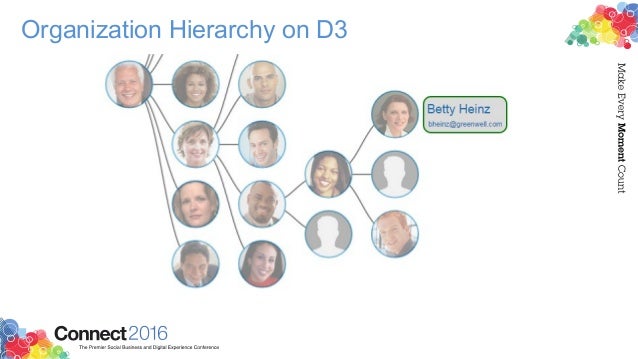
I recently ran into this deck that Matt Milza shared and figured I would re-share as it's a great example of what can be done with the IBM Connections APIs. In the presentation, Matt provides a background on the APIs, examples on how to interact with them, and then shows a practical implementation of something he did for a customer.

Using the social data stored within the system, Matt created this simple visualization of the report-to chain for an organization.


To walk through the process, check this out:


Want to learn more about building apps for IBM Connections? Check out: http://developer.ibm.com/social/

Tuesday, December 15, 2015

Announcing IBM Connections 5.5 & IBM Docs 2.0

View Comments
I'm happy to announce the upcoming availability of IBM Connections 5.5 and IBM Docs 2.0, our next major on-premises release.  As we've done with previous releases, plus,given we have a single code base for cloud and on-prem, we've taken a snapshot of our cloud, made a few adjustments here and there, and we are making that available to our on premises customers.


There's over 100 new features and there's just no way that I can cover all of this in this post.  However, if you look at all the cool things that we've delivered to our cloud offering since our last major on-prem release (ie. IBM Connections 5.0) then you'll know everything that's part of IBM Connections 5.5.

So when can you get it ? As per the announcement letter that was published minutes ago, the software will be available for download this Friday. 

Now, let me get things going and cover some of the highlights for these releases:

IBM Docs 2.0
  • Inline comments are preserved while files are being edited offline (e.g. while on a plane working on a file without connectivity, you can see and reply to comments and your changes will be sync'ed back automatically when you are back in the network)
  • New file viewer with high quality previews and the ability to interact with content in view mode (e.g. show/hide columns)
  • Auto-publish your file updates and make them available to readers instantly or save file as draft and work with other editors before making the changes available to readers
  • Support up to 20 simultaneous editors at the same time
  • New API so that you can bring the power of our real-time collaborative editing capabilities to 3rd party file repositories.
  • ... and more!

IBM Connections 5.5

  • Organize your documents, presentations and more into your own nested folder hierarchy in Personal and Community Files
  • Brand new file viewer experience which allows you to find the content that you need faster and review it quickly without having to download
  • Build powerful team sites specific for your team needs (e.g. HR, Sales, Marketing, etc) with new configuration capabilities such as:
    • New community layouts
    • Responsive apps so you can just drag-n-drop between columns in one motion
    • Rename apps based on your audience
    • A brand new Rich Content app which you can use for announcements or embedding content from the web 
    • and much more.. !
  • Smart type-ahead search to find what you need instantly
  • Enhancements to the rich text editor such as permanent pen, sort table data, and more
  • Real-time alerts on your desktop (for HTML5 browsers) to notify you when content needs your attention
  • ... and more!

We have a demo and a new Reviewer's Guide coming up so stay tuned for details. Want to learn more? Check out the webcast tomorrow where the product managers will take you through what is new in these releases. Want even more ? Then join us for the Ask the Product Managers session for Thursday and we'll take your questions.

So if you are using IBM Connections on-premises, get ready for an upgrade and let me know when you've upgraded!

Wednesday, July 2, 2014

IBM Connections is Now Available in the IBM Cloud marketplace

View Comments
As just communicated in the press release a few minutes ago, IBM Connections is now available in the IBM Cloud marketplace.  Here's the direct link in case you want to check it out.

The press release sums up the latest release of IBM Connections which is now available for download (in case you want to run it on premises) or in the cloud.
One of the highlights that we want to call out is the continued growth that we see in our ecosystem. For example, using our latest APIs and SDK, ISVs (independent software vendors) such as HootSuite, Bunchball, TemboSocial, ISW, among many, many others have created social apps on the IBM Connections Platform.

A key aspect of this release is secure external collaboration, where you can bring in external users (your customers, partners, suppliers, etc) into your IBM Connections deployment behind the firewall and still keep the right security boundaries to keep information safe. Jeff Schick, our VP for Social Software at IBM, calls out the importance of this:

When a workforce is out of synch or out of touch, the whole organization suffers from lost productivity, efficiency and innovation. With the open nature of today's business environment, organizations are looking to build new systems of people-centric engagement. The ability to bring key internal and external stakeholders into the conversation can facilitate a more collaborative, responsive and authentic way to work and deepen engagement.

Additionally, Superior Group's CIO, Tom DeClerck shares how IBM Connections has made the organization more agile by putting people back at the center of their business.  Speaking of Superior Group, here's a quick video that talks about the Superior Group's success on becoming a social business and the ROI they are achieving by using IBM Connections:


For more information, check out the entire press release.

Friday, April 25, 2014

Developers: Learn About Adding Social Features to Existing Apps with the IBM Connections SDK

View Comments
IBM yesterday announced that Polaris Financial Technology has selected IBM Connections to provide employees with a top notch digital experience to improve workforce productivity and accelerate business growth.

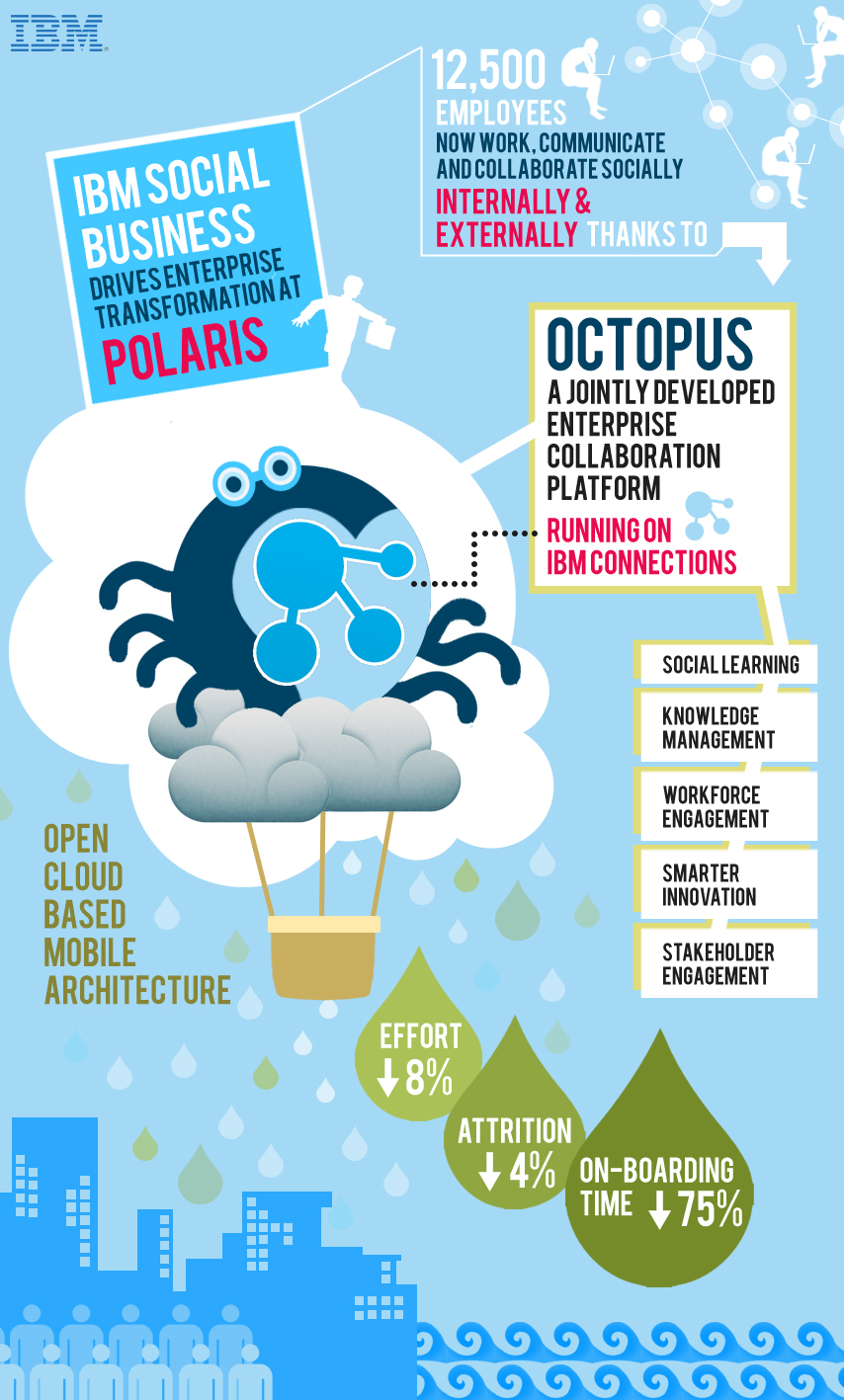
By adopting IBM’s leading enterprise social collaboration platform, Polaris FT is transforming how its 12,500 employees connect, communicate and collaborate to drive greater workforce productivity. Instead of relying solely on email to drive essential business tasks and project coordination, the new platform allows Polaris FT to leverage the collective knowledge of every employee to fuel new innovation, ideation and future business growth. This includes a significant reduction in the time it takes to on-board employees new to the company.                                                                                                      


So how did they do this? Working with IBM, Polaris designed and developed Octopus, an enterprise social platform that runs on IBM Connections and uses APIs provided in the IBM Social Business Toolkit. This application makes it easy for IBM partners and clients like Polaris to build an entirely new class of cloud-based social business applications for their businesses using the Connections foundation. With Octopus, Polaris is able to apply social networking, social learning, digital experiences and knowledge/content management tools based on an open cloud-based, mobile architecture.

If you are a developer and want to learn more about how to get started with the SDK, then add this to your agenda:
What: How to Add Social Features to Existing Applications with the IBM Social Business Toolkit
Date:  Apr 28, 2014
Time: 10:00 AM - 10:30 AM (Eastern Time)
This session will show you how to explore the Social API’s that are provided by IBM Connections. You will see the API’s running live in the Cloud. You will also learn about the building blocks that can be reused to add social features to your own applications. Finally you will see a demonstration of how an existing application has been extended to include social features.

To register for the developer webcast, click here.

And that's not all! IBM Connections Next is just around the corner so don't forget to register for the webcast on May 21 to learn more about what's coming in IBM Connections Next.

Monday, February 10, 2014

The Code Behind My IBM Connect 2014 Keynote Demo - Part 4

View Comments
And here we come. The 4th and final post on the code that I used during the IBM Connect 2014 keynote (the OGS!). If you need to catch up, here's Part 1, Part 2, and Part 3.

The next part of code that we created for the keynote demo was the file viewer.  It's worth noting that we first did this file viewer to render IBM SmartCloud Connections files inside our portal. In the end, we ended showing this directly in the community landing page (which is one of the new features we announced -- the ability for community managers to create their own custom landing page for their community).

Here's how it looked:


Basically, in our demo community, we had 5 files and we showed the details of the file, a file preview, and when clicked, we did an animation to let you share/download the file (as you can see in the 3rd file above).

So how did we do this? The majority of the work was done using the IBM Connections SDK.  In there, we went into the JavaScript Playground and found the code snippet to generate a list of files. Sweet!!

The other piece of magic was the Flippy plugin for jQuery which is the one that provided the animation to flip the file preview and offer options to share and download.

So here's how it all came together:

1) Include the right JavaScript:

<script src="http://ajax.googleapis.com/ajax/libs/dojo/1.8.0/dojo/dojo.js"></script>
<script src="jquery-1.9.1.min.js"></script>
<script src="jquery.flippy.min.js"></script>
<script src="/sbt.proxy/library?lib=dojo&amp;ver=1.8.0"></script>
<script src="http://netdna.bootstrapcdn.com/bootstrap/2.1.1/js/bootstrap.min.js"></script>


2) The CSS magic:

<style>

body {
font-family: "HelveticaNeue-Light", "Helvetica Neue Light", "Helvetica Neue", sans-serif;
font-weight: 300;
color: #444;
line-height: 1.2;
margin: auto;
width: 100%;
#background-color: #f0f0f0;
#background-image:url('cloud.jpg');
background-repeat: no-repeat;
-webkit-background-size: cover;
-moz-background-size: cover;
-o-background-size: cover;
background-size: cover;
}
a {
color: #1c8aae !important;
text-decoration: none !important;
}
.card {
background-image:none;
margin: 20px;
padding: 10px;
width: 150px;
background-color: #fff;
border-radius: 10px;
-webkit-border-radius: 10px;
-moz-border-radius: 10px;
border-color: #fff;
border-style: solid;
box-shadow: 0 0 4px rgba(0, 0, 0, .2);
-webkit-box-shadow: 0 0 4px rgba(0, 0, 0, .2);
-moz-box-shadow: 0 0 4px rgba(0, 0, 0, .2);
float: left;

}

.share{
background-image:none;
margin: 20px;
padding: 10px;
width: 150px;
background-color: #fff;
border-radius: 10px;
-webkit-border-radius: 10px;
-moz-border-radius: 10px;
border-color: #fff;
border-style: solid;
box-shadow: 0 0 4px rgba(0, 0, 0, .2);
-webkit-box-shadow: 0 0 4px rgba(0, 0, 0, .2);
-moz-box-shadow: 0 0 4px rgba(0, 0, 0, .2);
float: left;

}

.preview{

width: 128px;
height: 128px;
border-radius: 67px;
-webkit-border-radius: 67px;
-moz-border-radius: 67px;
border-color: #fff;
border-style: solid;
box-shadow: 0 0 3px rgba(0, 0, 0, .4);
-webkit-box-shadow: 0 0 3px rgba(0, 0, 0, .4);
-moz-box-shadow: 0 0 3px rgba(0, 0, 0, .4);

}
</style>

3.  The HTML placeholder where things will show up:

<body>
<div id="myGrid" class="myCommunity"></div>
...


4.  The template of how things will be rendered

<script type="text/template" id="fileRow">
<div id="share-${uid}" class="share" onmouseDown="removeDialog('${uid}');" >
<div id="fileCard-${uid}" onmouseDown="shareDialog('${uid}','${title}');">

<img class="preview" style="margin-top:20px;margin-bottom:20px" width="128" height="128" src="http://apps.na.collabservtest.lotus.com/viewer/app/lcfiles/${uid}/1/thumbnails/image.jpg" />
<br>
<a class="entry-title" rel="bookmark" target="_blank" title="${tooltip}" href="https://apps.na.collabservtest.lotus.com/communities/service/html/communityview?communityUuid=2cb8c1b5-bbd5-4379-b53d-de747b50be1a#fullpageWidgetId=W0b65f6404e4a_4c64_b0c8_ace24556bbab&file=${uid}" >${title}</a>

<div style="font-size:75%;color:#666">${authorName} ${_nls.created} ${createdLabel}</div>

<div style="font-size:75%;color:#666">${recommendationsCount} Likes &nbsp;&bull;&nbsp;${hitCount} ${_nls.downloads} &nbsp;&bull;&nbsp; ${commentsCount} ${_nls.comments}

</div>
</div>
</div>
</script>


5. Call the API!

<script>
require(["sbt/dom","sbt/lang", "sbt/connections/controls/files/FileGrid", "sbt/connections/controls/bootstrap/FileRendererMixin"], function(dom,lang, FileGrid,FileRendererMixin ) {
var grid = new FileGrid({
type : "communityFiles",
endpoint : "smartcloud",
hidePager: "true",
hideSorter: "true",
communityId : "2cb8c1b5-bbd5-4379-b53d-de747b50be1a"

});

// create custom action
grid.fileAction = {
getTooltip : function(item) {
return "Share with Non-Greenwell people";
},

execute : function(item,opts,event) {
//do something here

}
};

lang.mixin(grid.renderer, FileRendererMixin);
var domNode = dom.byId("fileRow");
var CustomFileRow = domNode.text || domNode.textContent;
grid.renderer.template = CustomFileRow;
dom.byId("myGrid").appendChild(grid.domNode);

grid.update();
});

</script>

And that's it! In the next few posts, I'll go deeper to cover the announcements from IBM Connect in regards to IBM Connections. Stay tuned !

Wednesday, January 22, 2014

ISW Takes IBM Connections Activities to the Next Level

View Comments
The countdown to IBM Connect 2014 is almost over -- just 3 more days! I'm at the airport now just about to board my plane to Orlando.

Before I do, I wanted to share the latest announcement from ISW: Kudos Boards. Kudos Boards provide a brand new experience to interact with IBM Connections Activities. If you are an active user of Activities you'll definitely want to check this out as it gives you another way to manage and organize your projects.

The new experience makes it easier to manage very large and complicated projects.

Here's a screenshot of how it looks:


With Kudos Boards you also get a new view of To-do's to give you a better sense of what's critical for you to focus on right now. You can also create your own custom lists of items to work on giving you the power to personalize the experience for you helping you see the right information at the right time.

This is a great example of using IBM Connections as a social layer as Kudos Boards is built entirely on top of the API's so everything is available through the mobile interface and other plug-ins available and each user picks the experience they want to leverage.

To see the magic, you have to check out the demo below:


ISW is going to be at IBM Connect 2014, so definitely stop by their booth to learn more.

Monday, December 16, 2013

How To Use OAuth to Call IBM Connections Cloud APIs

View Comments
Last week, two good assets were published to the social web that explain how to build a new user interface on top of our cloud IBM Connections deployment using the APIs and OAuth.

With IBM Connect 2014 just around the corner (6 more weeks!), that would be a great opportunity to showcase your work or your app integrated with our social platform.  Looking for ideas on where to start? Here's a couple of thoughts.

First, this presentation on SlideShare walks through building a customer support interface with workflow where they can ensure that the internal support team avoids having multiple people work on the same task/item.  It also separates internal discussions from external users.


The following video walks you step by step on setting up your app and registering it for OAuth access :


Ready to start coding? Start here: http://ibmdw.net/social

Wednesday, July 3, 2013

How to Extend IBM Connections in Less Than 100 Seconds

View Comments

Some time ago (5 years actually) I blogged about extending IBM Connections and integrating with Facebook in no time! My colleague Niklas Heidloff has now put together a series of videos of extending IBM Connections, IBM's enterprise social network (ESN), in less than 100 seconds.

In the video series, Niklas takes advantage of the IBM Social Business Toolkit and SDK to either add OpenSocial apps to Connections or use the API's to retrieve the information and aggregate feeds together. You will also want to follow their YouTube channel to stay informed when new videos are added.

The short videos do a great job demonstrating how quickly app developers can extend IBM Connections or build integrated apps on top of Connections.

So far, Niklas has published 5 videos which I've added to this playlist. I'll keep the playlist updated as new videos are added.

Enjoy!

Tuesday, December 18, 2012

IBM Connect: Just 6 Weeks Left!

View Comments

We are less than 6 weeks away to start IBM Connect 2013, the premier social business conference. Earlier this morning I completed the registration process. My level of excitement is extremely high!!!! I can't wait to start 2013.

Most of the sessions and speakers have been announced here in the IBM Connect Session Preview Tool. At the conference there are going to be over 150 sessions related to IBM Connections !

For the first time I'll get the opportunity to present the roadmap for IBM Connections and talk about what we are delivering on-premises and on the cloud. If you are interested in learning and seeing what's coming in the world wide market leading social business platform, you can NOT miss this session. I'll also be covering updates to our IBM Connections SDK which we announced last week.

This week I'm in Boston working with the IBM Connections developers. This is my last trip until I see them again at IBM Connect. This week, it's all about creating the content for the big unveil at IBM Connect. If you want to stay up-to-date with what's happening a #ibmconnect stay tuned to our Social Media Aggregator:

If you haven't registered for IBM Connect 2013, what are you waiting for? Register today!

Tuesday, September 25, 2012

Calling Developers - Build Apps For The Best Enterprise Social Platform

View Comments

A couple of weeks ago, Business Insider posted a story on how startups are ignoring a $500 Billion market. At the TechCrunch Disrupt conference Jim Goetz, a venture capitalist for Sequoia Capital was quoted as saying:

"It's shocking we don't see more engineers and entrepreneurs interested in enterprise,"

To that end, I'm happy to announce that IBM will be sponsoring a Social Business App Dev Workshop. The goal of the workshop is to get application developers, partners, and ISVs up to speed on how to develop apps for IBM's social business platform, currently the #1 in market share world wide.

I've shared before how to build apps for IBM Connections and with IBM now fully behind OpenSocial and ActivityStrea.ms we thought it would be a good idea to bring developers together and get them ramped up very quickly.  

We also published an article yesterday to help guide developers on how to create OpenSocial gadgets for IBM Connections 4.0. As a developer this presents a good opportunity as OpenSocial gadgets would run in multiple places, not just in IBM's OpenSocial container.

Here's a couple of highlights from the event:

  • Learn about the social platform using the common language of the web developer - HTML and JavaScript.
  • Hands-on lab exercises will cover such topics as IBM’s new SDK for web developers, ICS containers, and cloud integration.
  • Leave aware of how to tap the expertise of the community, and engage further to continue building skills with Social Application Development.
  • Learn how to build an embedded experience that integrates with IBM Connections 4 using OpenSocial gadgets.

So if you don't want to miss on a $500 Billion market, register for the workshop here.

Thursday, September 13, 2012

IBM Fully Behind OpenSocial and ActivityStrea.ms

View Comments
When OpenSocial 2.0 was shipped late last year it was declared ready for the enterprise and that's no surprise since a big push towards OpenSocial 2.0 was driven by companies such as IBM.

In the latest release of IBM's social collaboration platform, IBM Connections 4.0, IBM has included support for OpenSocial 2.0, OAuth2, and ActivityStrea.ms. The latest release also features something called "Embedded Experiences" which was a concept invented by IBM and donated to the open source community. IBM is also currently the lead editor of the ActivityStrea.ms standard and is the top code contributor to Apache Shindig, an open source reference implementation of an OpenSocial container.

With IBM and other social collaboration vendors adopting OpenSocial it presents a prime opportunity for developers who want to build apps on top of these platforms. They build once and they can use anywhere!


Earlier this year, Dion Hinchcliffe blogged about the need for Enterprise Social Networks to leverage Open Standards. He not only outlines the benefits of open standards for developers, but also to the enterprise. Specifically, Dion says (emphasis mine):
[…] the business value of social media is best achieved when it's centered in the work that we do, not off to the side. This can only be achieved by connecting our systems of engagement (social business tools and platforms) with our systems of record (CRM, ERP, HRM, etc.)
Updated 13/Sept/2012 @ 9:15a - I was alerted that Dion Hinchcliffe joined the OpenSocial board earlier this year.

And you can see IBM fully understands this as part of their launch video for IBM Connections 4.0 shows integration with SAP through an OpenSocial gadget.

ISW, an IBM Business Partner, has created a gamification solution for IBM Connections and it uses the OpenSocial standard meaning that their solution could work in other platforms as well. To see it in action, see the video below (skip to 13:03):


AppFusions is also taking advantage of this integration point and even blogged about this earlier this week.

OpenSocial is definitely now ready for the enterprise! Oh and if you want to learn more about IBM Connections, don't forget to register for today's webcast From liking to Leading: The Success of your Business is Social (click the invite below to register):


Register now!

Friday, April 20, 2012

How To Develop Apps for IBM Connections

View Comments

The last few weeks, especially after SXSW, have been crazy with partners and ISVs reaching out to me asking how to get started developing apps for IBM Connections. I've probably repeated the same information enough times now that it warrants a blog entry.


First, for all things social business development, the start page is here: http://www.ibm.com/developerworks/social/ . There you will find information on how to create apps either for our on-premises product or cloud-based product.

If you are looking to develop for our on-premises product, you can provision yourself an instance of IBM Connections which will run in our cloud. That way you can develop your app and you don't have to worry about installing Connections from the ground up. In just a few minutes, you'll have your own development environment up and going. The direct link to the instructions to provision the cloud instance of Connections (or direct link here: http://www-10.lotus.com/ldd/appdevwiki.nsf/dx/IBM_Collaboration_QuickStart_for_Social_Business_sbt ).

If you are looking to add your app as an widget (e.g. similar to how gamification was added to IBM Connections), then you'll want to look at the widget development guide for IBM Connections which is here: http://www-10.lotus.com/ldd/lcwiki.nsf/dx/development-guide

Now, if you are like me, you like to learn by example. So if that's the case, take a peek at this very simple widget made up of two files (this one and this one). It's built using pure HTML/Dojo, but you can use any technology you want as long as it ultimately creates HTML.

Next, to deploy this into Connections, I followed the instructions here: http://www-10.lotus.com/ldd/lcwiki.nsf/dx/Adding_custom_widgets_to_Communities_ic301 . Basically, what you do is edit the widgets-config.xml file and add this:

<widgetDef defId="TwitterSearch" url="http://blog.lbenitez.com/widgets/TwitterSearch/twitterSearchWidget.xml" modes="view edit" primaryWidget="false" iconUrl="http://www.twitter.com/favicon.ico" uniqueInstance="true" />


and restart Connections. Then you can just edit the XML and JS files independently without restarting Connections. Also, note that your widget can be hosted somewhere else. It doesn't have to be installed on the Connections server.

Finally, if you want to leverage the Connections API to retrieve data, add data, modify, or whatever, here's the full API (there's an API for pretty much everything). And again, if you like example code, here's a good set of example code on how to make calls from our API using whatever technology you want: http://www.ibm.com/developerworks/lotus/library/connections-social-authoring/

Enjoy! (and show me what you create!)

Wednesday, November 30, 2011

How To Add "Invite To Network" Button to an Email

View Comments

This is another posting from my colleague Romain Lienard. The first posting that I shared from him was a quick post that explained how to add a "Follow This Community" button to an email which helps accelerate adoption. In this post, Romain shares how to simply add a button to your email signature, for example, so that others can click it and invite you to be part of their network. This is another great example of using LotusScript with the IBM Connections API. And given I like to share a bunch of how-to's, I figured I would help spread the word on this one.

What follows is his entry:


This is the second part of my previous blog entry "Follow-this-community button"

In the same spirit, I wanted to do a button that let people invite me into their network in a simple click, because it can be a good way to drive adoption of Connections.


image


Here again, all you have to do is :

1 - create a button in your mail, via Create>Hotspot>Button.

2 - Specify a label for your button, select LotusScript instead of Formula


image


image


3 - Copy & paste this code, after changing the YOUR_EMAIL with your email :

Sub Click(Source As Button)
     Dim objHttp   
     Set objHttp = CreateObject("Microsoft.XMLHTTP")
     url = |https://w3-connections.ibm.com/profiles/atom/connections.do?email=YOUR_EMAIL&connectionType=colleague|
     req = |<?xml version="1.0" encoding="UTF-8"?>
<entry
  xmlns="http://www.w3.org/2005/Atom"
  xmlns:snx="http://www.ibm.com/xmlns/prod/sn">
   <category term="connection"
   scheme="http://www.ibm.com/xmlns/prod/sn/type" />
   <category term="colleague"
   scheme="http://www.ibm.com/xmlns/prod/sn/connection/type" />
   <category term="pending"
   scheme="http://www.ibm.com/xmlns/prod/sn/status" />
   <content type="html">
   Please accept this invitation to be in my network of Connections colleagues (sent from Lotus Notes).
   </content>
</entry>|
     objHttp.open "POST", url, False, "", ""
     objHttp.setRequestHeader "Content-type", "text/xml"
     objHttp.send(req)
     Msgbox "Invitation has been sent !"
End Sub


Save your document, click on the button, and voila ! (note : you'll be prompted for your intranet password)


image


If you want to use this button every day, there is unfortunately no way to put it on the signature file BUT (thanks to Herbert Hilhorst for the tip) you can copy & paste your signature and the button you put on it from the current mail to the signature richtext editor (More...>Preferences>Signature). In this way, the button will be copied too. Don't forget to select Rich Text instead of HTML or file.


This button is now in my default signature :)


Very cool, huh? Here's the original link to his blog entry so you can say "thank you" :).