Pages

Showing posts with label files. Show all posts

Wednesday, April 5, 2017

My first 100 days with Office 365

View Comments
For the past couple of months, I've been using Office 365 -- a big shift after leaving IBM back in December. At the new gig, one of my responsibilities is to drive the implementation and adoption of Office 365 -- one of the various initiatives in moving to the cloud.

I'm still in the process of collecting data and measuring the adoption within the organization. Thus, wanted to start with my own experience and document my growing pains so far. One of the first things that I noticed is the breakout of apps and getting used to when to use what. For example for chats, I could do 1:1 messages over Skype, Teams, Yammer, and of course email. To see what's going on across the organization, I could use Newsfeed, Yammer, or Delve.  To keep track of tasks, I could use Planner, Tasks, or OneNote. There's a 60-page white paper that explains when to use what, but this seems like a big area for Microsoft to look at consolidating.


So here's my experience so far with some of these apps.

Outlook

After using Notes/Verse for about 15 years, the transition to Outlook was "interesting". I do like the meeting forward feature. Makes it easy to get others added to an invite, instead of having to ask the meeting owner to add others. Of course, it's also happened where people I've invited to a meeting have forwarded the invite to others without my consent 😁. I also like scheduling Skype meeting directly from within Outlook.

Here's a few things I struggled with (in no particular order):
  • Getting used to tons of open windows - in Notes, emails opened within the same app by default and it didn't clutter your desktop. In Outlook (at least on Mac) there's windows everywhere!
  • Distribution lists - there doesn't seem to be a way to build my own public distribution lists. They have the concept of Groups, but emails sent to a Group doesn't come into the inbox, it goes to another separate inbox so people miss them. 
  • Delegation - I was used to easily delegating meetings to other people. Within Outlook, I need to forward an invitation, and then decline the invite so the person knows I'm not going.
  • Emojis - This may be a simple one, but for some reason the emojis seem to get lost when sending/receiving messages. A happy face, for example, is converted to J . It took me a while to figure out why people were putting J's in their emails. 😉
Skype

This is one that I've struggled with the most. At the end of the day, Skype for Business is the same Lync client, just re-branded so that's probably why the experience is not the best. I was expecting the actual consumer version of Skype. My pain points:

  • I have a million "conversations" with the same person (see above). This seems to be the biggest pain point that Skype for Business users are reporting. This is horrible as the conversation for some crazy reason is broken into multiple chats. Notice above how my conversation with Mara, which happened in a span of 20 minutes, is broken into 3 different conversations. Thus, when I'm trying to find what one person and I talked about, I have to dig through multiple conversations to find what I need. Ugh!!! Microsoft Teams 1:1 chat addresses this. Similarly, Sametime, a contact was just a contact and it was a lot simpler to browse the chat history. 
  • I can't paste images into a conversation - this seems to be a Mac limitation
  • Video calls are flaky - Microsoft Teams has been better in my experience so far
  • Missed conversations emails - An interesting feature that Skype has is that if you "miss" a conversation, you get an email alerting you. However, it's happened way too much that I'm online and connected and engaged, and yet somehow I get an email that I missed a conversation when I really didn't.
Teams

Teams is the latest app that Microsoft has added to Office 365. It competes with the likes of Slack IBM Watson Workspace. I decided to give Teams a try and get my team engaged in it. One of the capabilities that I like is the integrated Planner module where I've built kanban boards to keep track of high level project status. 


The integrated video meeting experience is really great as well, in fact, I like it a lot more than the Skype for Business experience. You can take a "typed" conversation to a "visual" conversation very easily and still remain in context.

Some improvements I would like to see:
  • Planner on mobile - Right now, the Teams mobile app for iOS doesn't allow me to see/manage tasks on mobile. Also, Planner on Teams doesn't work well with the standalone Planner app in Office 365. New tasks/boards created in Teams don't show up in the Planner hub forcing me to check two different places for a consolidated view.
  • Stability for the desktop app on Mac - The desktop app for Mac is built on Electron so at the end of the day it's just a web browser wrapped in a rich desktop app. For some reason, it's still very flaky. For example, when I switch to the Planner tab in a team, it seems to hang. Other times, the app doesn't start correctly and I've had to re-install several times. 
  • Native notifications - as notifications come in, Microsoft doesn't seem to be using native notifications on Mac OS X so if I step out and come back, I can't see what I missed within Notification Center
  • Threaded replies usability - We are still getting used to threaded replies. Right now, it seems very confusing as sometimes people reply to the thread and other times they just reply as a new message. At the same time, when a new reply comes in to a thread, it moves within the conversation and it breaks the flow of other conversations. 
  • Awareness usability - Notifications don't seem to be reliable at the moment as the team constantly reports that they miss out on new activity and since things move around in the conversation, it makes it hard to understand when someone will get notified of a new message. @mentions seem to be the best way to drive awareness of new content.
  • Single version of the truth - sharing a OneDrive file into a Team creates another copy of the file and saves it in the Team's file repository. This makes it complicated as now we have to manage two copies of the file and manually keep them in sync. Ideally, sharing a OneDrive file into the team, gives the team access to the file providing a single version of the truth.
I also like some of the top ideas requested by users for Teams.

OneDrive for Business

It looks like Microsoft has been improving their OneDrive client recently. I've been able to sync my personal OneDrive and SharePoint sites to my Mac seamlessly. Some things could still be improved:
  • Sharing files from desktop - I'm used to right-clicking on a file and being able to share a file with a colleague. With OneDrive, you are forced to open a browser, log in, find the file and then share it from there. IBM Connections, Box, and others have had this for a long time so Microsoft is behind on this one. 
  • Cloud file sync improvements - From within PowerPoint, Excel and Word, you can share a file with others, BUT not if you open the file directly from Finder. You need to again, open a browser, log in, find the file and choose "Edit in PowerPoint" (for example) so that the file opens from the cloud. It would be a lot better if PowerPoint detected that I'm opening a file from Finder that's being already synced to OneDrive/SharePoint.
  • Copy link to OneDrive files - This is another one that kills me... Sometimes I'm in a Skype or Teams chat and I want to paste a link to a file. I'm used to right-clicking on a file directly from Finder and getting a link to a file. With OneDrive, I need to open a browser, log in, find the file, then copy the link to the file. 
  • Finding files shared with me - There doesn't seem to be a view that shows me all files that I have access to. OneDrive has a "Shared with Me" view that only shows individual files where I've been explicitly added as a viewer/editor. However, if a file is in folder I have access to (and hence I have implicit access), those files don't show up there. This makes it hard to go back to a file that I know I have access to, but don't know where it is...
  • Commenting on files - Unless I'm doing something wrong, there doesn't seem to be a way where viewers can comment on files. Comments in OneDrive seem to be "inside the file" so therefore, you need to be editor to be able to edit the file and add comments inside the file. This is a flaw since I don't want people to edit files, just review and give me feedback. It would also be nice to have @mentions in file comments.
  • File update notifications - As my team works on files, I'm not notified when they make updates to their files or mine. We end up pinging each other or emailing each other to let each other know when a new file update is ready for review.
Surprisingly, none of these seem to be in the top ideas for OneDrive for Business...

---

I'll stop here since this is getting long and it's been quite a brain dump. I want to start playing more with Delve, SharePoint and others and will share more on those later! 

Monday, May 9, 2016

What's New and Coming in IBM Connections and IBM Docs for Q2 2016

View Comments
Hours ago, IBM just made another update to IBM Connections Cloud.

To start off, community managers and administrators have access to even more metrics.  If you are an organization administrator, you can easily see how your user base is getting business value out of IBM Connections. For example, you can track Connections Cloud events such as every time that a user reads a blog entry, creates a To do item in an Activity, updates a wiki page, or follows a Community. You can drill down on one application or a particular time period. You can set filters to track how many people viewed a blog in the Customer Support Community in the last seven days, last four weeks, last quarter, or last 12 months.


Community owners can also get metrics only on the communities that they own. Track who visits the community, information shared such as comments, and participation in such activities as downloading files.

In an upcoming release this quarter IBM is also going to be releasing some significant enhancements to search.  Want to learn more and see what else is coming in the rest of Q2 for IBM Connections & IBM Docs? Then check out this deck:


And there's more that was released if you are using IBM Verse. Check out the full list of what's new in IBM Connections Cloud. IBM Connections is ready to transform your organization, anywhere in the world. And since today is Monday, I figured I would leave you with this.


If you still haven't seen IBM Connections, start your free trial here.

Thursday, April 28, 2016

New IBM Connections Desktop Plug-Ins for Mac and Windows

View Comments
Today, we've released our monthly update to the IBM Connections Mac and Windows desktop plug-ins. I'll cover some of the updates here and will start with Mac since that's what I use.

In this release, the context menu in Finder has been updated to streamline access to the IBM Connections actions. Now, when you right click on a synced file, you can see when it was last synced, share with individuals or groups, lock/unlock, modify metadata and more. Here's a snapshot of how it looks. 


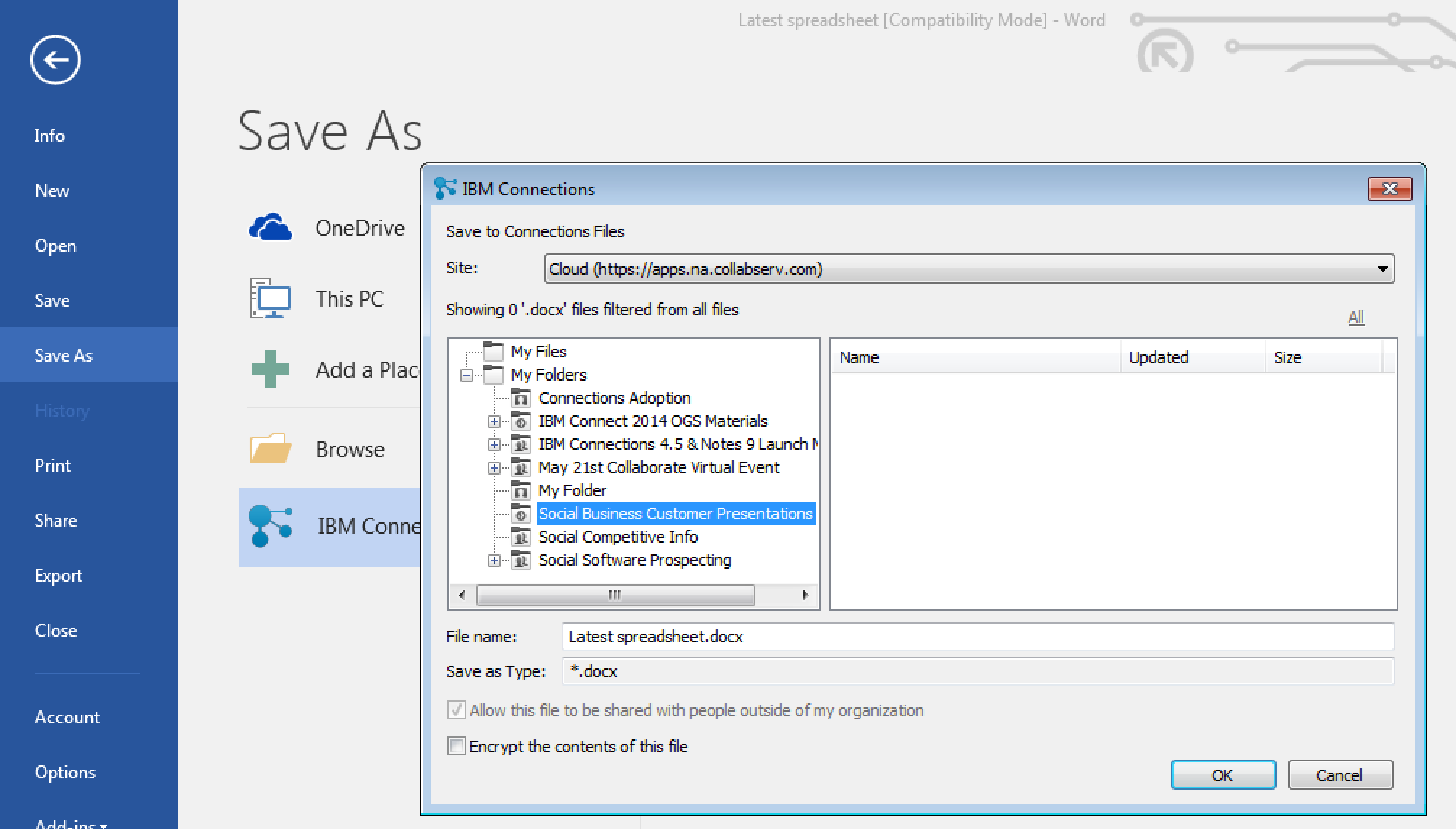
For those of you in Windows, we have improved the experience when saving files directly to IBM Connections from Microsoft Office. From the Save As menu within Microsoft Office (Word, PowerPoint, Excel) it'll be a lot easier to pick where specifically you want to store files (e.g. in what Folder, what Community, etc). See the screenshot below. And don't forget, when editing files, you can have round trip editing of files with IBM Docs when you are online or Microsoft Office when you are offline.


Windows 10 support has also been officially added. For those that like to live on the edge and have enabled preview features, you get some new stuff too. I'll leave that as an exercise for you to find it.

To get the plugins, go to Downloads and Setup in cloud, or if you are using on-premises, you can get the Windows plugin from our catalog here and the Mac plugin from here.

Monday, April 25, 2016

How To Edit Files in Sharepoint or Box with IBM Docs

View Comments
One of the capabilities that we highlighted as part of the IBM Docs 2.0 release was the new set of APIs to allow real-time co-editing of files in repositories other than IBM Connections (e.g. Alfresco, SharePoint, etc).

So first, what is IBM Docs ? The goal of IBM Docs is to make it easier for teams to create and allow for collaborative editing of word processing, spreadsheet and presentation documents in real time. This online editor provides key collaborative services such as coediting, file management and contextual commenting (so you can see who typed what).


At IBM Connect earlier this year, Jim Puckett, product manager for IBM Docs, shared an overview of IBM Docs which you can see here:


With the new set of APIs you can now build collaborative applications. So if you are an ISV looking for a way to embed co-editing, check out IBM Docs. Van Staub first shared how to integrate Docs with any app. Then he took it to the next level and describes how to edit files stored in SharePoint with IBM Docs.

Last week, IBM published a tech note that describes the process to set up IBM Docs to edit files stored in Box. This provides a common editing capabilities for files, irrespective of where they are stored.

Want to learn more ? Come to Social Connections 10 in Toronto in early June! Check out the full agenda that was just announced last week. Register today!

See you there!

Tuesday, April 5, 2016

Check Out What's New In IBM Connections Social Cloud - Q1 2016

View Comments
As we get rolling into the second quarter of the year, I'll be sharing soon what to expect in terms of deliveries for IBM Connections Cloud for this quarter. First, I wanted to take the time and summarize the deliveries that we did in Q1 and had been announced at IBM Connect 2016 (and did you see that we'll be at the Moscone Center next year on February 20 - 23, 2017 ? Sweet !)

So what became available in the first three months of the year ? Jim Puckett, one of the product managers for IBM Connections, put together this quick slide deck that walks through all the new enhancements.


Note: the mobile updates require a new mobile update so check the app stores for an update (at this point the target is next week).

As a reminder, you can always keep track of the enhancements (current and past) in this page. Still not on IBM Connections Cloud and want to learn more? Check out this video:


Also, don't forget to sign up for Social Connections 10 as that will be a great opportunity to meet with the Designers and Product Managers and check out what else is coming!

Monday, March 14, 2016

IBM Verse Integration with Box Is Now Available

View Comments
As part of the IBM + Box partnership, IBM today has released Box support for IBM Verse. This new integration allows IBM Verse users to easily send files stored in Box to others.  You might remember hearing about this as part of the keynote at IBM Connect 2016 earlier this year. If you missed the keynote and the demos, here's the replay.


IBM Verse users that have this feature will be able to bring in their Box files when composing a message.  In the file picker, they'll be able to browse all Box folders that they have access to, or upload a brand new file and store it in Box:


Additionally, notice that in the bottom left you'll be able to select the access type for the folder or file being shared. Users will be able to select to share the file/folder with anyone that has the link, everyone in their company, or just the people that have access to the respective folder. Once the file or folder has been picked, a link is added to the message and is ready to be sent!


Note: If you don't see this option, let your admin know so that they can turn this feature on for you. In the admin panel, they can go to Email & Calendar Options and from there turn on Box (and offline as well!!):


Wednesday, February 10, 2016

From IBM Connect 2016: XPages App Built on Bluemix Using Watson and IBM Connections Cloud

View Comments
Last week at IBM Connect 2016, Chris Crummey demoed a sample app built on the XPages runtime running on Bluemix.

The app combines IBM Connections Cloud, IBM Watson Analytics and IBM Bluemix. The idea is that the app allows you to upload images and then uses IBM Watson (the Visual Recognition Service) to help with automatic classification of the files. Based on the image that has been uploaded, Watson will then suggest some tags to use with the file.

Here's a recap of that demo:


Here's a photo from Daniel Brix on Twitter that showed it on the big screen:


If you missed IBM Connect 2016, well, you missed a great show!  I'll share some more content from the conference in upcoming posts so stay tuned to those. For now, I quickly wanted to get this out and then work on my IBM InterConnect 2016 sessions.

Monday, January 25, 2016

The IBM Connections Cloud January 2016 is Now Available

View Comments
Just in time for IBM Connect 2016, there are now more capabilities that have been added to IBM Connections Cloud.

Here's a snapshot of what's new this month:

Real-time alerts help you focus on items that need your attention
Stay up to date with things that require your attention and response. The new notification center in the navigation bar increases your awareness less disruptively. See alerts with a single click - no matter where you are in the service. Allows you stay on track or swiftly shift gears depending on what is required at the moment. Note: This is slowly rolling out to all customers. If you don't see it, you'll have it by end of the month.


Leverage 3rd party apps to maximize value of Communities

Community owners can add third-party apps to Communities. A new extension point opens up the possibilities for Independent Software Vendors (ISVs) to create apps for Communities. Developers can now write custom responsive apps that can be surfaced within Communities. Community owners don't have to do anything different from what they do today. As soon as a new third party app has been approved by the administrator, it'll be available for all community owners of that organization. AppFusions has already taken advantage of this integration and has created a Community app for OneDrive. Check out the demo below: 


Organize your files how you want to

Now you can create nested folders to organize your content in a familiar hierarchy. You can create sub-folders within folders to give your content a structure that makes it easier for you and other users to manage content. For both My Files and Community Files , you can build a hierarchy of folders with tree-navigation on the side of the Connections Files page.


Nested folders are also supported in the Connections Mobile app and in the IBM Connections Desktop Plugins for Microsoft Windows and the IBM Connections Plugin for Microsoft Outlook when syncing your offline files with Connections Files in the cloud.

Drag and drop support added on Microsoft Windows

Also new in January is the ability to drag and drop files from the Windows desktop directly to an IBM Connections folder in the IBM Connections Desktop Plugins for Microsoft Windows .

Improved user experience working with files

The sidebar is now resizable and labels have replaced the icons on the tabs making it easier to navigate and view information and comments.


To see what else is new, check out this page. Hope to see you next week at IBM Connect 2016!

Thursday, January 14, 2016

Check Out the Latest IBM Docs 2.0 Demo

View Comments
Happy New Year!

Now that we are back in business in the new year I wanted to take the time to share a bit more on IBM Docs 2.0 beyond the announcement last year. In a very short time, I've already started to hear very good positive feedback on the release which is great !


One of the things that I wanted to share is the latest demo video that we posted over the holidays. The video covers all the basics and you can see how simple it is to take advantage of this capability to create files together with your team members anytime, anywhere!

Check out the 3 minute video below:


As we get ready for IBM Connect 2016 (you are going, right?) you'll also want to reserve time to learn more about IBM Docs. Check out the IBM Connect 2016 Session Preview Tool and add the IBM Docs sessions to your agenda.

To learn more, check out the post from Jim Puckett, our IBM Docs Product Manager . See you at IBM Connect!

Friday, December 18, 2015

Available for Download: IBM Docs 2.0 and IBM Connections 5.5

View Comments
As promised earlier this week, the recently announced IBM Connections 5.5 and IBM Docs 2.0 are now available for download.

As part of the launch, on Wednesday the product managers hosted a webcast to take you through some of the highlights of that release. If you missed it, you can still watch the recording.  Then, yesterday the product managers hosted an "Ask the Product Managers" session. There were so many questions that came in and were answered in hour! That session was also recorded. I did get a suggestion about getting a transcript and posting that for consumption so will look into that.


Below you will also find a presentation similar to what was used at the webcast earlier this week with details on what's new in this release.


And if you want to see IBM Connections 5.5 in action, check out the demo below:


Go get it and happy installing ! (oh and happy holidays and happy new year!)

Tuesday, December 15, 2015

Announcing IBM Connections 5.5 & IBM Docs 2.0

View Comments
I'm happy to announce the upcoming availability of IBM Connections 5.5 and IBM Docs 2.0, our next major on-premises release.  As we've done with previous releases, plus,given we have a single code base for cloud and on-prem, we've taken a snapshot of our cloud, made a few adjustments here and there, and we are making that available to our on premises customers.


There's over 100 new features and there's just no way that I can cover all of this in this post.  However, if you look at all the cool things that we've delivered to our cloud offering since our last major on-prem release (ie. IBM Connections 5.0) then you'll know everything that's part of IBM Connections 5.5.

So when can you get it ? As per the announcement letter that was published minutes ago, the software will be available for download this Friday. 

Now, let me get things going and cover some of the highlights for these releases:

IBM Docs 2.0
  • Inline comments are preserved while files are being edited offline (e.g. while on a plane working on a file without connectivity, you can see and reply to comments and your changes will be sync'ed back automatically when you are back in the network)
  • New file viewer with high quality previews and the ability to interact with content in view mode (e.g. show/hide columns)
  • Auto-publish your file updates and make them available to readers instantly or save file as draft and work with other editors before making the changes available to readers
  • Support up to 20 simultaneous editors at the same time
  • New API so that you can bring the power of our real-time collaborative editing capabilities to 3rd party file repositories.
  • ... and more!

IBM Connections 5.5

  • Organize your documents, presentations and more into your own nested folder hierarchy in Personal and Community Files
  • Brand new file viewer experience which allows you to find the content that you need faster and review it quickly without having to download
  • Build powerful team sites specific for your team needs (e.g. HR, Sales, Marketing, etc) with new configuration capabilities such as:
    • New community layouts
    • Responsive apps so you can just drag-n-drop between columns in one motion
    • Rename apps based on your audience
    • A brand new Rich Content app which you can use for announcements or embedding content from the web 
    • and much more.. !
  • Smart type-ahead search to find what you need instantly
  • Enhancements to the rich text editor such as permanent pen, sort table data, and more
  • Real-time alerts on your desktop (for HTML5 browsers) to notify you when content needs your attention
  • ... and more!

We have a demo and a new Reviewer's Guide coming up so stay tuned for details. Want to learn more? Check out the webcast tomorrow where the product managers will take you through what is new in these releases. Want even more ? Then join us for the Ask the Product Managers session for Thursday and we'll take your questions.

So if you are using IBM Connections on-premises, get ready for an upgrade and let me know when you've upgraded!

Friday, December 11, 2015

Webcast: What's New in IBM Connections & IBM Docs (on-premises)

View Comments
As we wrap up the year, and given there are only 20 more days in the year, I can safely say that we are just days away from announcing the next major on-premises release of IBM Connections and IBM Docs. In fact, next week is going to be HUGE ! (if that's not a reveal, I don't know what is).


Next week we will be hosting two events that you'll definitely want to join to get up to speed with all the details around the release.  First, we'll host a webcast to talk about all the new capabilities for IBM Connections, including the always favorite demos!  Here are the details:
  • Title: What’s Coming in the Next Major Release of IBM Connections & IBM Docs (On-Premises)
  • Date: Wednesday, December 16, 2015
  • Time: 11:00 AM Eastern Standard Time
  • Registration link
Next, as a follow up to the webcast, the IBM Connections Product Managers will host a "Ask the Product Managers" session (it's a good opportunity to ask us what you want to know before IBM Connect 2016). Here are the details:
  • Title: Ask the IBM Connections Project Managers 
  • Date: Thursday, December 17, 2015
  • Time: 11:00 AM Eastern Standard Time
  • Registration link
Want to learn more about IBM Connections and Docs ? Check out this video and start a free trial today:


See you next week!

Wednesday, November 25, 2015

IBM Connections Cloud November 2015 Release is Now Live !

View Comments
It's a new month, so we have a new monthly release of our IBM Connections Cloud platform now available! This release focuses on improvements to files and our mobile capabilities. 

To start off, if you are using the Mac file sync plug-in, you now have more visibility to understand the status of sync for each file directly from the Mac Finder:


On the mobile side, we've now made it easier to respond and participate in polls & surveys created in Communities:

This will require a mobile app update which will be in the app stores soon!  

The other component that got many upgrades is IBM Docs. First off, the maximum number of co-editors in a co-editing session increased from 10 to 20. Of course, you can still share a file with as many editors as you want. Check out the updates to the different editors:

Documents editor
  • In co-editing, you can hover over an editor's underlined changes to display his or her name. 
  • Orphan and widow control in paragraph breaks, accessed from the Format > Paragraph Properties menu.

Presentations editor
  • The presentation file size limitation is increased from 30MB to 50MB.
  • In .pptx files, you can set line type and line weight for shapes. You can also set line endpoints for arrows and lines.
set line weight and type


Spreadsheets editor
  • You can create and edit data validation criteria.
  • You can copy images from external applications and then, in Firefox and Internet Explorer 11, paste them into the spreadsheets editor. 
  • A 3D reference formula is now available. 
  • You can drag images from the desktop and drop them into spreadsheets.

File Viewer
  • The presentation file size that can be viewed is increased from 30MB to 50MB.
  • A formula with a 3D reference can be correctly calculated in Viewer.
There's more new features that you can check out here.

Tuesday, November 24, 2015

Using IBM Docs with IBM Content Navigator for Real-Time Co-Editing

View Comments
As we get ready for another major on-prem release of IBM Docs, IBM's collaborative editing solution, I wanted to share a bit of how IBM Docs integrates with other repositories beyond IBM Connections.

For example, if you are using IBM Content Navigator, you have the option to use IBM Docs on top of that.  With IBM Docs, you can edit Microsoft Office files in their native format directly in the browser, without having to do complicated download and re-upload steps. You can also create brand new spreadsheets, presentations, and documents directly within the browser which accelerates the content creation process.

Here's a quick presentation that one of my colleagues put together as a demo of IBM Docs inside IBM Content Navigator so you can walk through the experience end to end.


And here's a demo so you can see it in action:


And check out what one of our customers has to say. Kleber Bonadia, Director of IT at Flex Contact Center, talks about how they use IBM Connections Files to collaborate with their own customers to support their own rapid growth:


So if you are a using IBM Content Navigator, make sure you don't forget to use IBM Docs as well!

Thursday, November 5, 2015

Gartner Recognizes IBM as a Leader in the 2015 Magic Quadrant for Social Software in the Workplace for IBM Connections

View Comments
Put it in the books! For the 7th year in a row, Gartner has placed IBM as a Leader in their recently released 2015 Magic Quadrant for Social Software in the Workplace* based on IBM Connections.

We are now getting ready for another major release of IBM Connections and organizations continue to report value from deploying a social collaboration platform such as IBM Connections.


If you haven't seen IBM Connections lately, check out this video that we recently published to showcase our secure file editing capabilities for iOS and Android.


So where do we go from here? And don't forget to register for IBM Connect on January 2016. We are also just coming back from IBM Insight 2015 and I shared some content so you can see what was presented there.

Update 16/Nov/2015: To download the report, you can access it from this page. And then start a free trial of IBM Connections!


*Gartner, Magic Quadrant for Social Software in the Workplace, Mike Gotta, Nikos Drakos, Jeffrey Mann, 26 October 2015


Gartner does not endorse any vendor, product or service depicted in its research publications, and does not advise technology users to select only those vendors with the highest ratings or other designation. Gartner research publications consist of the opinions of Gartner's research organization and should not be construed as statements of fact. Gartner disclaims all warranties, expressed or implied, with respect to this research, including any warranties of merchantability or fitness for a particular purpose.

Wednesday, November 4, 2015

IBM Insight 2015 - Check Out What You Missed

View Comments
Last week was a wild ride over at IBM Insight 2015. The IBM Verse and IBM Connections teams were there to share the latest about our products. It was a great opportunity to meet new customers, partners, and fellow IBMers.

One of the highlights of the conference, was the Super Session by my colleague Rob Koplowitz. He co-presented with Jason Silva, the host of the TV show Brain Games (catch it on Netflix). You can watch a replay of his session here:


I co-presented on 3 different sessions around Application Development on top of our cloud platform, Mobile Collaboration, and working with content with IBM's enterprise file sync and share (EFSS) offering, IBM Connections. A key capability here that I wanted to cover was the latest and greatest around IBM Docs. We actually have a major release of IBM Docs coming up here very soon. And given that IBM Docs seamlessly works with IBM Content Navigator it was really well received. If you have IBM Content Navigator, don't forget to take advantage of your entitlement to IBM Docs today!

I've uploaded the presentations so you can see the content that was shared.


So what's next ? You NEED to come to IBM Connect 2016 in January 2016. In fact, John Hernandez invites you personally:

Wednesday, October 14, 2015

Check Out This Demo of the New IBM Connections Editor

View Comments
image
The new IBM Connections Editor is a companion application the to the IBM Connections Mobile application for iOS and Android devices.  The IBM Connections Editor is a full-featured mobile editor, which will allow you to take files directly from IBM Connections Files and easily view or edit those files on your mobile device.  You can edit any Microsoft PowerPoint presentation, Excel spreadsheet and Word document from your Connections Files with the new editor.  You can also create new presentations, spreadsheets or documents in the editor and save them directly into IBM Connections Files. 

Full Featured Editor:

The IBM Connections Editor provides full-featured capabilities on the mobile device.  You can edit or create a PowerPoint presentation.  The editor allows you to add or remove slides, add images or video, add charts or shapes and provides a large option on fonts and colors.   You can present the slides directly from your mobile device as well as view animations and add notes to each slide.

You have the same robust capabilities when editing or creating a document as you do with presentations.  In addition to all those features you can also add or edit headers, footers, endnotes and footnotes.

When using the editor to edit or create a spreadsheet you have over 300 formulas for Arithmetic, finance, Date/Time, Statistical, Database, Look ups and much more.  You can also add charts and shapes directly into the spreadsheet.
image

Seamless and Secure

The seamless integration between the two mobile applications makes it easy to use and secure.  You can open any supported files in IBM Connections Files and select to edit that file, once you have selected Edit the document will automatically open in the IBM Connections Editor.  Once you have completed your updated in the editor simple select to save the document back into IBM Connections.  The file will save back to the exact place that you opened it from giving the option to add new tags and version description, this instance on the file will be saved as a new version.  The applications share a common storage therefore the documents always maintain their security settings.  The file remains secure during the entire round trip editing experience.  The IBM Connections Editor also provides MDM support for those vendors supported by the IBM Connections Mobile application.

The IBM Connections Editor is available today for download at no additional cost at the Apple App Store or Google Play

Check out the demo:

Tuesday, September 1, 2015

IBM Connections Files and Aspera: A Possible Integration

View Comments
Earlier this week I was asked what could be possible between Aspera, an IBM file transfer solution, and IBM Connections Files, IBM's offering for organizations looking for enterprise file sync and share (EFSS) capabilities.

First, let's clarify the differences between file transfer and file sharing and sync. In talking with some people in the Aspera organization, they told me to think of Aspera kind of like UPS.  UPS will take a package from point A to point B and they do not keep the package. Similarly, Aspera is all about getting files from point A to point B in the fastest way possible. In one example, they say that a 24GB file which could take ~26 hours via a traditional TCP/IP download, would only take 30 seconds using Aspera.


With that in mind, I came up with two ideas that you could do today with the Aspera APIs and the available extension points in IBM Connections

Transfer Existing Files

This idea is to create a new extension for Files as documented here. To do this, log in as the organization administrator and go to Admin - Organization Extensions. In there create a new extension as shown below:

And voilá. Once you code up the integration with your Aspera server this should get you a path to integrate. End users will now see this option when navigating to a file:


Upload and Transfer

The other thought is to create a new extension so that we intercept the file upload process. In this case, you navigate to the same Admin - Organization Extensions menu. In there, instead of creating a "File Menu" extension, you now create a "New File Menu" extension as shown below:


In any case, I strongly suggest you reach out to your partner or IBM services rep for further discussion.

I'm interested in your thoughts too. Any other use cases that come to mind ?


Monday, August 31, 2015

Save The Date: Enterprise File Sync and Share is Just the Beginning of a New Way To Work

View Comments
Save the date. In less than a month, we'll be hosting a webinar to take you through the latest capabilities available in our IBM Connections Files offering, the IBM solution for organizations that are looking for enterprise file sync and share (EFSS) capabilities in the cloud.


IBM Connections Files on Cloud is designed for today’s mobile worker, providing a secure, easy-to-use, collaboration and file management environment for all size businesses. This cost-effective, secure file sharing solution is easy to implement using software-as-a-service (SaaS) on our cloud (or you can run it on-prem too). A user centric design allows anyone to confidently share files with their network of customers and partners, as well as sync online files to their favorite mobile devices and tablets (supports both Android and iOS mobile devices). Here's a quick video I had shared earlier of the IBM Connections for Mac app:


Ready to learn more? One of the Product Managers for IBM Connections, Jim Puckett, will be hosting a webcast. Check out the details below:

Date: September 24, 2015
Time: 1-2pm Eastern Time
Registration:  To register for the event, click here.

See you there!


Monday, June 22, 2015

The IBM Connections Cloud June 2015 Release Is Now Live -- Check it out!

View Comments
Over the weekend we pushed out updates to our IBM Connections Cloud users (for those fathers out there, consider it a Happy Father's Day gift).

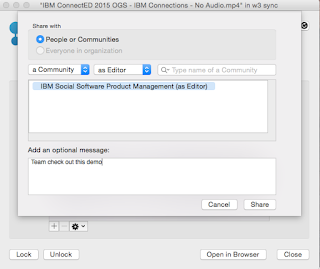
You will find updates throughout the experience both in the web and desktop.  For example, for Mac users you can now share files with Communities directly from Finder without ever needing to open a browser. Just right-click on the file, and voilá:


Another update this month was for developers.  Developers can now take advantage of the embedded experience extension point within the Activity Stream.  Each person and community has an activity stream (which follows the ActivityStrea.ms / OpenSocial 2.0 standard) which allows 3rd party apps to inject events into it (e.g. you could get alerts from an app telling you that an approval is required).

One of the first developers to take advantage of this in the cloud is AppFusions. They've now built connectors that are sure to please various roles within an organization. For example, if you want to get updates to files updates in Box, you can.  If you want to get updates when new code has been submitted to GitHub, you can. Or maybe you are a marketer and want to stay up to date with updates from Twitter.

Check out this video to see it in action!


The following slides summarize all the cool new things that are now available for IBM Connections cloud users.  Check these out to get an idea of what else is new:


And stay tuned for more news very very soon...