Pages

Showing posts with label windows. Show all posts

Thursday, April 28, 2016

New IBM Connections Desktop Plug-Ins for Mac and Windows

View Comments
Today, we've released our monthly update to the IBM Connections Mac and Windows desktop plug-ins. I'll cover some of the updates here and will start with Mac since that's what I use.

In this release, the context menu in Finder has been updated to streamline access to the IBM Connections actions. Now, when you right click on a synced file, you can see when it was last synced, share with individuals or groups, lock/unlock, modify metadata and more. Here's a snapshot of how it looks. 


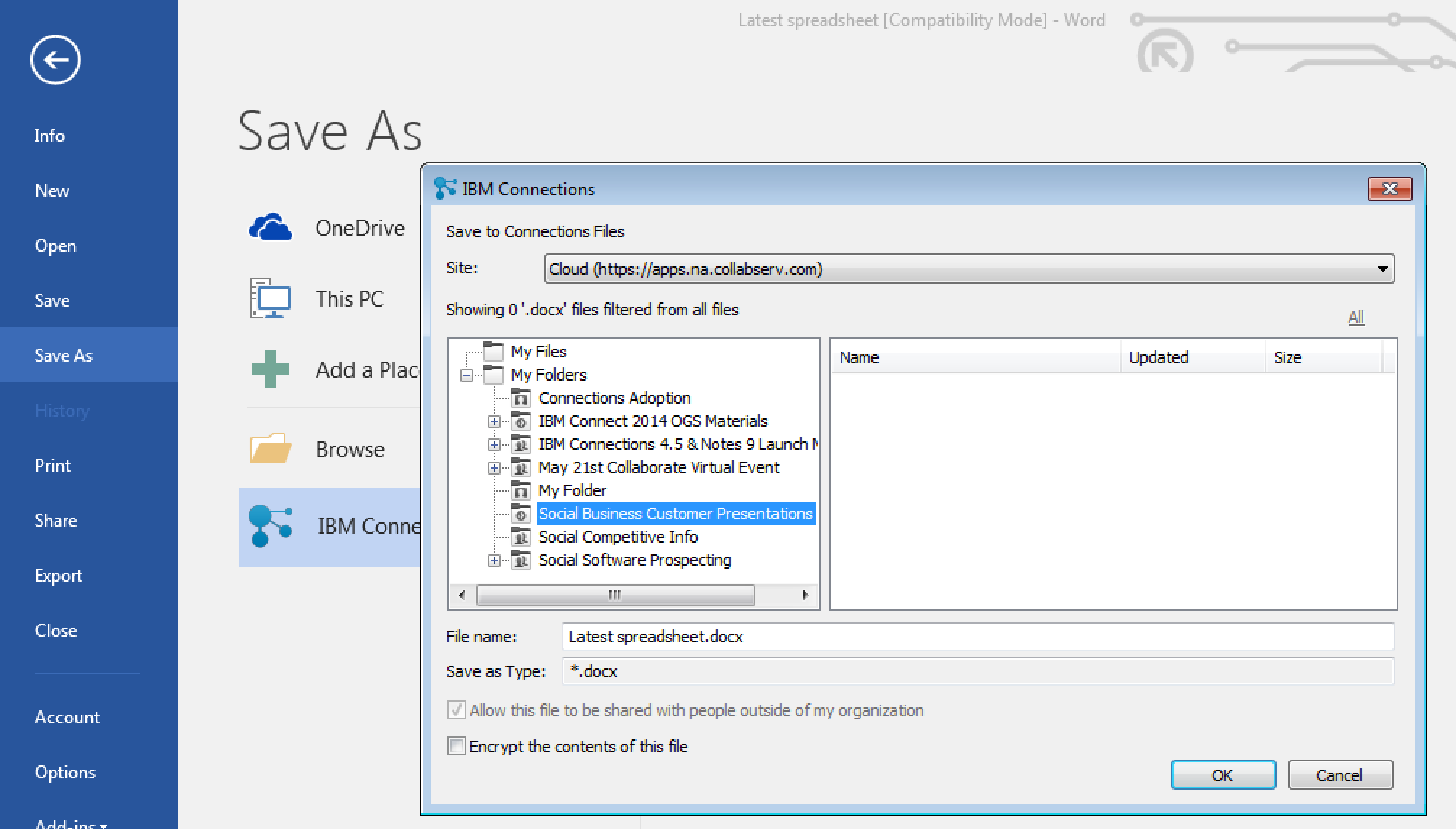
For those of you in Windows, we have improved the experience when saving files directly to IBM Connections from Microsoft Office. From the Save As menu within Microsoft Office (Word, PowerPoint, Excel) it'll be a lot easier to pick where specifically you want to store files (e.g. in what Folder, what Community, etc). See the screenshot below. And don't forget, when editing files, you can have round trip editing of files with IBM Docs when you are online or Microsoft Office when you are offline.

Windows 10 support has also been officially added. For those that like to live on the edge and have enabled preview features, you get some new stuff too. I'll leave that as an exercise for you to find it.

To get the plugins, go to Downloads and Setup in cloud, or if you are using on-premises, you can get the Windows plugin from our catalog here and the Mac plugin from here.

Thursday, March 12, 2015

Updated Desktop Plug-Ins Available Today and New Features Coming to IBM Connections Cloud Next Week

View Comments
As mentioned in a previous entry, we released a File Sync and Share only offering earlier this week. Today, I have some good news.  Today we have released the latest version of our desktop plugins for Mac and Windows in prep for the new feature that will start appearing in IBM Connections Cloud next week.

This month's release continues to focus on our file sharing and sync capabilities. This release also introduces new features to help teams better organize their communications. Here's a sampling of the new features:
  • Team sites and communications
    • Rename apps (e.g. rename Wikis to Documentation)
  • File sharing and sync
    • Drag-n-drop target to upload files
    • Add multiple files to sync at once
    • Mac plug-in: ability to specify file extensions to ignore, enable beta features (if you like living on the edge!), and turn on/off logging for troubleshooting purposes
    • Federated authentication support (SAML) for Mac/Windows (cloud only)
  • Mobile
    • IBM Docs support in iOS (view and co-edit documents). Watch out for an update to the app
    • Citrix support for iOS and Android
    • MobileIron support for Android.
  • Rich text editor
    • Ability to sort data in tables in the rich text editor
    • Permament Pen - those of you used to Verse or IBM Notes will recognize this feature. This allows you to set a custom style so that when you revise content (e.g. wikis) all your markup is done in a specific color/font/style
As mentioned above, you can now sort the data in tables within the rich text editor as you can see below:


I've also created a presentation that shows the new features in this release:


For more details on what's new in the March 2015 release, check out the documentation here.

If you've missed what we've released in previous months, check out the history of new features here.