Pages

Showing posts with label plug-ins. Show all posts

Thursday, April 28, 2016

New IBM Connections Desktop Plug-Ins for Mac and Windows

View Comments
Today, we've released our monthly update to the IBM Connections Mac and Windows desktop plug-ins. I'll cover some of the updates here and will start with Mac since that's what I use.

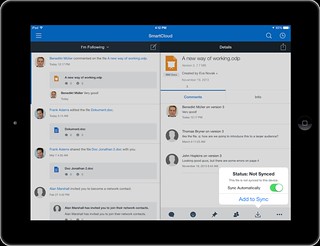
In this release, the context menu in Finder has been updated to streamline access to the IBM Connections actions. Now, when you right click on a synced file, you can see when it was last synced, share with individuals or groups, lock/unlock, modify metadata and more. Here's a snapshot of how it looks. 


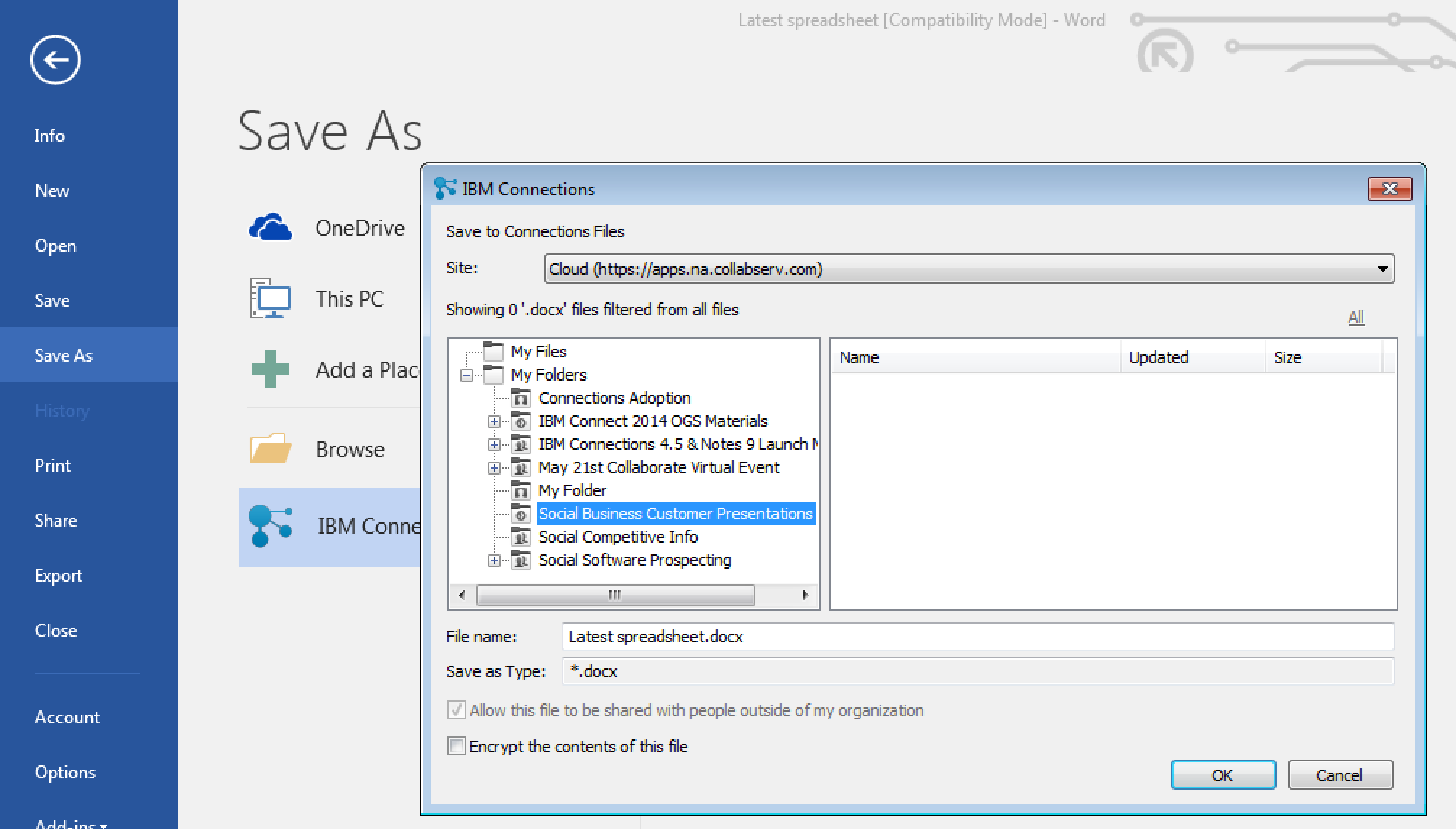
For those of you in Windows, we have improved the experience when saving files directly to IBM Connections from Microsoft Office. From the Save As menu within Microsoft Office (Word, PowerPoint, Excel) it'll be a lot easier to pick where specifically you want to store files (e.g. in what Folder, what Community, etc). See the screenshot below. And don't forget, when editing files, you can have round trip editing of files with IBM Docs when you are online or Microsoft Office when you are offline.

Windows 10 support has also been officially added. For those that like to live on the edge and have enabled preview features, you get some new stuff too. I'll leave that as an exercise for you to find it.

To get the plugins, go to Downloads and Setup in cloud, or if you are using on-premises, you can get the Windows plugin from our catalog here and the Mac plugin from here.

Monday, August 31, 2015

Save The Date: Enterprise File Sync and Share is Just the Beginning of a New Way To Work

View Comments
Save the date. In less than a month, we'll be hosting a webinar to take you through the latest capabilities available in our IBM Connections Files offering, the IBM solution for organizations that are looking for enterprise file sync and share (EFSS) capabilities in the cloud.


IBM Connections Files on Cloud is designed for today’s mobile worker, providing a secure, easy-to-use, collaboration and file management environment for all size businesses. This cost-effective, secure file sharing solution is easy to implement using software-as-a-service (SaaS) on our cloud (or you can run it on-prem too). A user centric design allows anyone to confidently share files with their network of customers and partners, as well as sync online files to their favorite mobile devices and tablets (supports both Android and iOS mobile devices). Here's a quick video I had shared earlier of the IBM Connections for Mac app:


Ready to learn more? One of the Product Managers for IBM Connections, Jim Puckett, will be hosting a webcast. Check out the details below:

Date: September 24, 2015
Time: 1-2pm Eastern Time
Registration:  To register for the event, click here.

See you there!


Thursday, March 12, 2015

Updated Desktop Plug-Ins Available Today and New Features Coming to IBM Connections Cloud Next Week

View Comments
As mentioned in a previous entry, we released a File Sync and Share only offering earlier this week. Today, I have some good news.  Today we have released the latest version of our desktop plugins for Mac and Windows in prep for the new feature that will start appearing in IBM Connections Cloud next week.

This month's release continues to focus on our file sharing and sync capabilities. This release also introduces new features to help teams better organize their communications. Here's a sampling of the new features:
  • Team sites and communications
    • Rename apps (e.g. rename Wikis to Documentation)
  • File sharing and sync
    • Drag-n-drop target to upload files
    • Add multiple files to sync at once
    • Mac plug-in: ability to specify file extensions to ignore, enable beta features (if you like living on the edge!), and turn on/off logging for troubleshooting purposes
    • Federated authentication support (SAML) for Mac/Windows (cloud only)
  • Mobile
    • IBM Docs support in iOS (view and co-edit documents). Watch out for an update to the app
    • Citrix support for iOS and Android
    • MobileIron support for Android.
  • Rich text editor
    • Ability to sort data in tables in the rich text editor
    • Permament Pen - those of you used to Verse or IBM Notes will recognize this feature. This allows you to set a custom style so that when you revise content (e.g. wikis) all your markup is done in a specific color/font/style
As mentioned above, you can now sort the data in tables within the rich text editor as you can see below:


I've also created a presentation that shows the new features in this release:


For more details on what's new in the March 2015 release, check out the documentation here.

If you've missed what we've released in previous months, check out the history of new features here.

Wednesday, October 8, 2014

5 Can't Miss Features of IBM Connections

View Comments
About two weeks ago, I was asked to present to a group of internal IBMers tips and tricks to get the most out of IBM Connections, our social collaboration platform.

I actually reached out to my internal network and asked for suggestions on a good topic. Quickly, I realized that everyone had their own favorite feature or aspect of the product.

That got me thinking that maybe it's worth me putting together a quick presentation that shows people how I get the most out of the product to improve my productivity.

Then it got hard. How could I pick just a handful of things where IBM Connections makes my life easier ?

I had to iterate a couple of times.  In the end I decided that a good way to format it would be to focus on 5 integration aspects that maximize the value I get out of the product.

Check out the slides that I took them through:


Do these match what you would've presented?

Thursday, September 18, 2014

More IBM Connections Social Features Now Available Inside Microsoft Office

View Comments
As you may know, we are now releasing new updates to the desktop plug-ins on a monthly basis. This month's release brings some cool new features to those of you working with Microsoft Office Desktop apps (even if you use the desktop apps with Office 365).

For some time now, we've had integration into Microsoft Office (Word, PowerPoint, Excel, and Outlook) via the ribbon.  Today, we've added new functionality to the ribbon.


With the new features, you can now do the following directly from Microsoft Office:

  • Lock a file to prevent others from editing while you make changes
  • Share the file and add others as readers or editors
  • View version history
  • View download history/audit log
  • Like, pin, and follow

Check out this quick 2 minute demo that I created to show some of the new functionality:


To download the latest plug-in you can get it from Apps - Downloads on your cloud deployment, or from our app catalog here.

Thursday, March 6, 2014

Communardo Further Integrates Confluence with IBM Connections

View Comments
I've talked about integration of IBM Connections with Confluence in the past. Communardo has created 3 new integration points to bring together IBM Connections and Atlassian's Confluence. These integration points are important for organizations that may be using both products and want to provide more synergy between them. This is yet another example of IBM Connections as a social layer, where you can embed Connections into other business apps allowing you to bring social to the end users.

The integration points are:
  • Surface IBM Connections' person card within Confluence ( this is available as a plug-in from Atlassian's Marketplace) allowing profile data to be kept in just one system (IBM Connections)
  • Use the IBM Connections Activity Stream to connect the decentralized Confluence wikis to save time finding information and avoid switching back-and-forth between systems.
  • Confluence work rooms will surface within the list of Communities in the IBM Connections interface to surface previously hidden work laces.
To see it in action, check out the 5 minute demo below:


To learn more, check out Communardo's product page.

Thursday, January 16, 2014

How to Interact with IBM Connections Files in iPad and Mac apps

View Comments
This is it! IBM Connect 2014 is now 10 days away and the news just keep coming in. If you haven't registered yet, what are you waiting for? Do it now!

Are you a mobile user that always needs access to your files ? Perhaps you are already using apps such as Goodreader, Notability, Pages, etc and now you want to interact with IBM Connections files directly from those apps?

File Jockey is your answer. This new integration adds some "magic" to IBM Connections (don't' worry, I'll spare you the details) so you can seamlessly interact with your files from your favorite mobile and desktop app. For example, on the Mac, you can use ForkLift to get to your files directly from Finder. On your iPad, you can use Goodreader to annotate PDF files, take meeting minutes, and manage your files. 

The trick is finding any app that supports something called WebDAV. If your favorite app supports WebDAV, then this is the solution for you. Another approach is to look for apps that support CMIS since that's the native protocol Connections supports as I discussed on this post from 2011.

Update 28/Jan/2016 with new video: Check out the demo below:


To learn more, check out their website and you can start using it today against one of our demo systems.

Thursday, November 21, 2013

IBM Connections Desktop Plug-Ins v4.5.1 Now Available

View Comments
We just posted to the catalog the latest IBM Connections Desktop Plug-Ins 4.5.1. The IBM Connections Desktop Plug-ins Microsoft Windows is intended for Microsoft Windows, Office, and Outlook users and brings the power of social collaboration to the applications that end users work in.

With IBM Connect 2014 just around the corner, I'm going to hold off talking about any roadmap items. Make sure that you register for IBM Connect today so that you can learn about all the great things that are coming.

This latest version adds the following:
  • Support for Windows 8
  • Support for Microsoft Office 2013 (Word, PowerPoint, Excel, and Outlook)
  • File downloads via the plug-ins are now accounted for in the Metrics
  • Based on customer demand: Now translated into Bulgarian, Croatian, Romanian and Slovak
Here's how the desktop plug-in looks like in Microsoft Word 2013:


Update 22/Nov/2013 - Here's how it looks in Windows 8:

Here's a demo I shared earlier this year:


To download, you know the drill.  
  • Cloud customers can get it from the Apps -> Downloads section in the navigation bar as usual. 
  • On premises customers can download from our catalog from here for the desktop plug-in and for the Microsoft Outlook sidebar plug-in, go here.


Thursday, September 19, 2013

How To Customize the Branding of the IBM Connections Desktop Plug-in

View Comments

Hot off the presses! One of the most popular plug-ins for IBM Connections, IBM's Enterprise Social Network, is the Desktop plug-in for Microsoft Windows. This plug-in gives you quick access to all your files directly from Windows Explorer and Microsoft Office.

To recap, the IBM Connections Desktop Plug-ins for Microsoft Windows provides the following features from Microsoft Windows Explorer:

  • Upload local files to IBM Connections from Windows Explorer or from your desktop
  • Share uploaded files with people, communities, or folders in IBM Connections
  • Work on files locally and publish them to IBM Connections
  • View people's contact details and get in touch with them
  • Pin, follow, or like IBM Connections files and folders
  • View or contribute comments for a file
  • Lock a file when you are editing it to prevent file conflicts
  • View and restore files from IBM Connections Trash
  • Share folders with IBM Connections Communities

In the latest release, of the plugin we've added the following new languages: Croatian, Romanian, Slovak, and Bulgarian. Additionally, we've also now enabled the plug-in so that administrators can customize the branding of it. For example, if you have deployed IBM Connections and you are calling it "ConnectTED" internally, you can now make sure that the plug-in obeys this branding.

If you haven't seen the plug-in yet, here's a demo that I recorded a couple of months ago:

To learn how to customize the plug-in for your users, check out the documentation here. To download the plug-in, go out and get it from the IBM Connections App Catalog here.

Tuesday, July 23, 2013

OpenOffice 4.0 is Available Now - Go and Download It!

View Comments
Today, OpenOffice 4.0 has become available ! Today, more than 58 million people have downloaded OpenOffice v3.4 since its release last year.

One of my favorite features in this release is the new sidebar which comes of course as part of the contributions from IBM's Symphony. The timing couldn't be better as we recently also introduced a document an awesome document editor in OpenOffice format for the iPad.


In today's press release, Kevin Cavanaugh (VP IBM Collaboration Solutions) was quoted as saying:
The time is right for wide scale enterprises adoption especially with the upcoming end of support for Microsoft Office 2003. By choosing Apache OpenOffice, enterprises will free up resources for their cloud and mobile infrastructure investments.
Additionally, as you are probably aware, we have a plug-in for that brings social to OpenOffice available today. In a couple of weeks, we'll also be releasing a new version of this IBM Connections Plug-In for OpenOffice which will surface in the new sidebar. I'll be sharing more about this plugin in the coming weeks as we approach the release date. Here's a screenshot just to give you a sense of how it's going to work:


For reference, the full list of What's New in this release is available here.

So don't wait!! To download, get it here: http://www.openoffice.org/download/ .