Pages

Showing posts with label activity-streams. Show all posts

Tuesday, May 10, 2016

VideoBio Adds Quick Video Sharing to IBM Connections

View Comments
I always like to highlight when developers and partners extend our IBM Connections Cloud platform.
Today I wanted to highlight VideoBio who have built a very nice solution to allow users to quickly share video messages with others.

So how does it work? First, you can go to your profile, or someone else's profile and click on the VideoBio button.


After recording the demo, it's automatically shared with your IBM Connections network and you can optionally choose to share via Facebook, LinkedIn, Twitter and more.!


Check out the demo:


To learn more, go here.

Monday, May 9, 2016

What's New and Coming in IBM Connections and IBM Docs for Q2 2016

View Comments
Hours ago, IBM just made another update to IBM Connections Cloud.

To start off, community managers and administrators have access to even more metrics.  If you are an organization administrator, you can easily see how your user base is getting business value out of IBM Connections. For example, you can track Connections Cloud events such as every time that a user reads a blog entry, creates a To do item in an Activity, updates a wiki page, or follows a Community. You can drill down on one application or a particular time period. You can set filters to track how many people viewed a blog in the Customer Support Community in the last seven days, last four weeks, last quarter, or last 12 months.


Community owners can also get metrics only on the communities that they own. Track who visits the community, information shared such as comments, and participation in such activities as downloading files.

In an upcoming release this quarter IBM is also going to be releasing some significant enhancements to search.  Want to learn more and see what else is coming in the rest of Q2 for IBM Connections & IBM Docs? Then check out this deck:


And there's more that was released if you are using IBM Verse. Check out the full list of what's new in IBM Connections Cloud. IBM Connections is ready to transform your organization, anywhere in the world. And since today is Monday, I figured I would leave you with this.


If you still haven't seen IBM Connections, start your free trial here.

Tuesday, December 15, 2015

Announcing IBM Connections 5.5 & IBM Docs 2.0

View Comments
I'm happy to announce the upcoming availability of IBM Connections 5.5 and IBM Docs 2.0, our next major on-premises release.  As we've done with previous releases, plus,given we have a single code base for cloud and on-prem, we've taken a snapshot of our cloud, made a few adjustments here and there, and we are making that available to our on premises customers.


There's over 100 new features and there's just no way that I can cover all of this in this post.  However, if you look at all the cool things that we've delivered to our cloud offering since our last major on-prem release (ie. IBM Connections 5.0) then you'll know everything that's part of IBM Connections 5.5.

So when can you get it ? As per the announcement letter that was published minutes ago, the software will be available for download this Friday. 

Now, let me get things going and cover some of the highlights for these releases:

IBM Docs 2.0
  • Inline comments are preserved while files are being edited offline (e.g. while on a plane working on a file without connectivity, you can see and reply to comments and your changes will be sync'ed back automatically when you are back in the network)
  • New file viewer with high quality previews and the ability to interact with content in view mode (e.g. show/hide columns)
  • Auto-publish your file updates and make them available to readers instantly or save file as draft and work with other editors before making the changes available to readers
  • Support up to 20 simultaneous editors at the same time
  • New API so that you can bring the power of our real-time collaborative editing capabilities to 3rd party file repositories.
  • ... and more!

IBM Connections 5.5

  • Organize your documents, presentations and more into your own nested folder hierarchy in Personal and Community Files
  • Brand new file viewer experience which allows you to find the content that you need faster and review it quickly without having to download
  • Build powerful team sites specific for your team needs (e.g. HR, Sales, Marketing, etc) with new configuration capabilities such as:
    • New community layouts
    • Responsive apps so you can just drag-n-drop between columns in one motion
    • Rename apps based on your audience
    • A brand new Rich Content app which you can use for announcements or embedding content from the web 
    • and much more.. !
  • Smart type-ahead search to find what you need instantly
  • Enhancements to the rich text editor such as permanent pen, sort table data, and more
  • Real-time alerts on your desktop (for HTML5 browsers) to notify you when content needs your attention
  • ... and more!

We have a demo and a new Reviewer's Guide coming up so stay tuned for details. Want to learn more? Check out the webcast tomorrow where the product managers will take you through what is new in these releases. Want even more ? Then join us for the Ask the Product Managers session for Thursday and we'll take your questions.

So if you are using IBM Connections on-premises, get ready for an upgrade and let me know when you've upgraded!

Thursday, October 16, 2014

IBM Connections 5.0 CR1 Is Now Available

View Comments
Today, we are updating IBM Connections, the market-leading enterprise social collaboration platform.  Specifically, today we are releasing IBM Connections 5.0 CR1 for on premises customers.

This release includes a roll up of fixes that we've been releasing for the past couple of months.  Additionally, it also adds some new features.


New features in IBM Connections 5.0 CR1 (but not limited to):
  • Updated file preview design in stream
  • Play uploaded movies in the stream
  • View full file from thumbnail
  • New option to repeat events on a monthly basis
  • Copy/Paste images in the rich text editor for Activities
  • @mentions in CCM
  • Reporting metrics for CCM
  • Added support for IBM i , Power 8, and Siteminder 12.5.1

The full list of new features is here.  The full fix list can be found here.   

Enjoy!

Tuesday, March 11, 2014

Tip: How To Share Links Using The IBM Connections Mobile App

View Comments
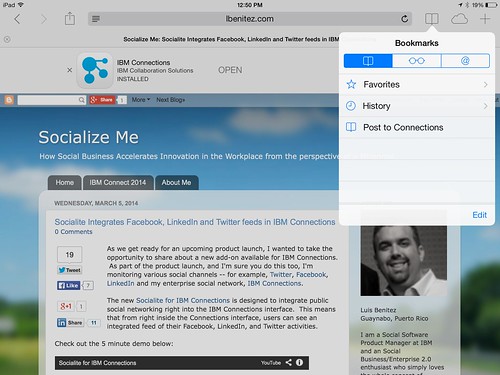
Various users have reached out to me asking how they can share links / pages as they surf the web from their mobile device with their network in IBM Connections.

The trick is to use what's called bookmarklets. Follow these instructions to add the two bookmark lets to your browser and then you'll be able to quickly share links from your mobile browser to the IBM Connections Mobile app. I've written these instructions for Safari on iPad so these might vary based on your browser and/or mobile device.

  1. Open Safari on your iPad
  2. Add this page as a bookmark (click on the "Share" button in the top left)
  3. Find the bookmarklet below that you want. Select and copy the Javascript in the text field.

    To post a link as a status update:

    javascript:window.location='ibmscp://com.ibm.connections/updates?action=post&message='+encodeURIComponent(window.location.href)+''

    To save the link as a Bookmark in Connections

    javascript:window.location='ibmscp://com.ibm.connections/bookmarks?url='+encodeURIComponent(window.location.href)+'&title='+encodeURIComponent(document.title)+'&action=create'
  4. Go to your bookmarks (the book icon in the top right) and tap "Edit" in the bottom right. 
  5. Tap the new bookmark you just made of this page.
  6. Edit the name (e.g. Share in Connections) and in the URL field paste the Javascript you copied on step 3 above.
  7. Now to do the actual share, go to any web page, go to your bookmarks and tap the bookmarklet you want to use.


Voilá.

If you want to create your own bookmark lets for other things, check out this documentation on opening links to start the IBM Connections Mobile app. And if you are interested in other Bookmarklets (e.g. for Digg, Reddit, Pinterest, etc) check out this page.

Enjoy! 

Thursday, March 6, 2014

Communardo Further Integrates Confluence with IBM Connections

View Comments
I've talked about integration of IBM Connections with Confluence in the past. Communardo has created 3 new integration points to bring together IBM Connections and Atlassian's Confluence. These integration points are important for organizations that may be using both products and want to provide more synergy between them. This is yet another example of IBM Connections as a social layer, where you can embed Connections into other business apps allowing you to bring social to the end users.

The integration points are:
  • Surface IBM Connections' person card within Confluence ( this is available as a plug-in from Atlassian's Marketplace) allowing profile data to be kept in just one system (IBM Connections)
  • Use the IBM Connections Activity Stream to connect the decentralized Confluence wikis to save time finding information and avoid switching back-and-forth between systems.
  • Confluence work rooms will surface within the list of Communities in the IBM Connections interface to surface previously hidden work laces.
To see it in action, check out the 5 minute demo below:


To learn more, check out Communardo's product page.

Monday, February 10, 2014

The Code Behind My IBM Connect 2014 Keynote Demo - Part 4

View Comments
And here we come. The 4th and final post on the code that I used during the IBM Connect 2014 keynote (the OGS!). If you need to catch up, here's Part 1, Part 2, and Part 3.

The next part of code that we created for the keynote demo was the file viewer.  It's worth noting that we first did this file viewer to render IBM SmartCloud Connections files inside our portal. In the end, we ended showing this directly in the community landing page (which is one of the new features we announced -- the ability for community managers to create their own custom landing page for their community).

Here's how it looked:


Basically, in our demo community, we had 5 files and we showed the details of the file, a file preview, and when clicked, we did an animation to let you share/download the file (as you can see in the 3rd file above).

So how did we do this? The majority of the work was done using the IBM Connections SDK.  In there, we went into the JavaScript Playground and found the code snippet to generate a list of files. Sweet!!

The other piece of magic was the Flippy plugin for jQuery which is the one that provided the animation to flip the file preview and offer options to share and download.

So here's how it all came together:

1) Include the right JavaScript:

<script src="http://ajax.googleapis.com/ajax/libs/dojo/1.8.0/dojo/dojo.js"></script>
<script src="jquery-1.9.1.min.js"></script>
<script src="jquery.flippy.min.js"></script>
<script src="/sbt.proxy/library?lib=dojo&amp;ver=1.8.0"></script>
<script src="http://netdna.bootstrapcdn.com/bootstrap/2.1.1/js/bootstrap.min.js"></script>


2) The CSS magic:

<style>

body {
font-family: "HelveticaNeue-Light", "Helvetica Neue Light", "Helvetica Neue", sans-serif;
font-weight: 300;
color: #444;
line-height: 1.2;
margin: auto;
width: 100%;
#background-color: #f0f0f0;
#background-image:url('cloud.jpg');
background-repeat: no-repeat;
-webkit-background-size: cover;
-moz-background-size: cover;
-o-background-size: cover;
background-size: cover;
}
a {
color: #1c8aae !important;
text-decoration: none !important;
}
.card {
background-image:none;
margin: 20px;
padding: 10px;
width: 150px;
background-color: #fff;
border-radius: 10px;
-webkit-border-radius: 10px;
-moz-border-radius: 10px;
border-color: #fff;
border-style: solid;
box-shadow: 0 0 4px rgba(0, 0, 0, .2);
-webkit-box-shadow: 0 0 4px rgba(0, 0, 0, .2);
-moz-box-shadow: 0 0 4px rgba(0, 0, 0, .2);
float: left;

}

.share{
background-image:none;
margin: 20px;
padding: 10px;
width: 150px;
background-color: #fff;
border-radius: 10px;
-webkit-border-radius: 10px;
-moz-border-radius: 10px;
border-color: #fff;
border-style: solid;
box-shadow: 0 0 4px rgba(0, 0, 0, .2);
-webkit-box-shadow: 0 0 4px rgba(0, 0, 0, .2);
-moz-box-shadow: 0 0 4px rgba(0, 0, 0, .2);
float: left;

}

.preview{

width: 128px;
height: 128px;
border-radius: 67px;
-webkit-border-radius: 67px;
-moz-border-radius: 67px;
border-color: #fff;
border-style: solid;
box-shadow: 0 0 3px rgba(0, 0, 0, .4);
-webkit-box-shadow: 0 0 3px rgba(0, 0, 0, .4);
-moz-box-shadow: 0 0 3px rgba(0, 0, 0, .4);

}
</style>

3.  The HTML placeholder where things will show up:

<body>
<div id="myGrid" class="myCommunity"></div>
...


4.  The template of how things will be rendered

<script type="text/template" id="fileRow">
<div id="share-${uid}" class="share" onmouseDown="removeDialog('${uid}');" >
<div id="fileCard-${uid}" onmouseDown="shareDialog('${uid}','${title}');">

<img class="preview" style="margin-top:20px;margin-bottom:20px" width="128" height="128" src="http://apps.na.collabservtest.lotus.com/viewer/app/lcfiles/${uid}/1/thumbnails/image.jpg" />
<br>
<a class="entry-title" rel="bookmark" target="_blank" title="${tooltip}" href="https://apps.na.collabservtest.lotus.com/communities/service/html/communityview?communityUuid=2cb8c1b5-bbd5-4379-b53d-de747b50be1a#fullpageWidgetId=W0b65f6404e4a_4c64_b0c8_ace24556bbab&file=${uid}" >${title}</a>

<div style="font-size:75%;color:#666">${authorName} ${_nls.created} ${createdLabel}</div>

<div style="font-size:75%;color:#666">${recommendationsCount} Likes &nbsp;&bull;&nbsp;${hitCount} ${_nls.downloads} &nbsp;&bull;&nbsp; ${commentsCount} ${_nls.comments}

</div>
</div>
</div>
</script>


5. Call the API!

<script>
require(["sbt/dom","sbt/lang", "sbt/connections/controls/files/FileGrid", "sbt/connections/controls/bootstrap/FileRendererMixin"], function(dom,lang, FileGrid,FileRendererMixin ) {
var grid = new FileGrid({
type : "communityFiles",
endpoint : "smartcloud",
hidePager: "true",
hideSorter: "true",
communityId : "2cb8c1b5-bbd5-4379-b53d-de747b50be1a"

});

// create custom action
grid.fileAction = {
getTooltip : function(item) {
return "Share with Non-Greenwell people";
},

execute : function(item,opts,event) {
//do something here

}
};

lang.mixin(grid.renderer, FileRendererMixin);
var domNode = dom.byId("fileRow");
var CustomFileRow = domNode.text || domNode.textContent;
grid.renderer.template = CustomFileRow;
dom.byId("myGrid").appendChild(grid.domNode);

grid.update();
});

</script>

And that's it! In the next few posts, I'll go deeper to cover the announcements from IBM Connect in regards to IBM Connections. Stay tuned !

Thursday, February 6, 2014

The Code Behind My IBM Connect 2014 Keynote Demo - Part 2

View Comments
Yesterday, I shared the initial piece of code that I got working in getting ready for the IBM Connect 2014 keynote demo. If you haven't seen that, take a look at that before going through this post.

As I explained yesterday, I wanted to get a Pinterest-like layout for the activity stream within the portal, and that's what I showed yesterday. I then wanted to take that example and also add that to the landing page of a community. That way, as a community manager I can not only see the latest updates  but I can also share and direct my team to the content I want them to see.  Here's a snapshot of the community landing page I showed:


Notice that in this layout, the stream shows up in a multi-column view, and the profile photo is under each card (instead of inside the card as in yesterday's post). 

The trick? Just some minor tweaks to the code from yesterday. I still used jQuery, the Waterfall plugin, and some CSS magic.  Here's the code:

1. Include the right JavaScript:

<script src="jquery-1.9.1.min.js"></script>
<script src="waterfall-master/demos/js/libs/handlebars/handlebars.js"></script>
<script src="waterfall-master/demos/js/waterfall.min.js"></script>
<script src="jquery.timeago.js" type="text/javascript"></script>
2. The CSS magic


<style type="text/css">
.homepage {
font-family: "HelveticaNeue-Light", "Helvetica Neue Light", "Helvetica Neue", sans-serif;
font-weight: 300;
color: #444;
line-height: 1.2;
margin: auto;
width: 740px;
background-color: #f0f0f0;

}

.newsfeed {
margin: auto;
width: 740px;
background-color: #f0f0f0;
padding-top: 20px;
}

.columnHeader {
font-family: "HelveticaNeue-Bold", "Helvetica Neue Bold","Helvetica Neue", sans-serif;
font-weight: 600;
font-size: 90%;
}

a {
color: #1c8aae !important;
text-decoration: none !important;
}

.date {
color: #d9d9d9 !important;
text-decoration: none !important;
}

.timeago {
color: gray !important;
border-bottom: none !important;
}

.card {
border: 2px solid #FAFAFA;
box-shadow: 0 1px 2px rgba(34, 25, 25, 0.4);
-webkit-column-break-inside: avoid;
-moz-column-break-inside: avoid;
column-break-inside: avoid;
padding: 5px;
background-color: #fff;
background: -webkit-linear-gradient(45deg, #FFF, #F9F9F9);
opacity: 1;
width: 330px;

-webkit-transition: all .2s ease;
-moz-transition: all .2s ease;
-o-transition: all .2s ease;
transition: all .2s ease;

}

.leftColumn {
float: left;
}
.rightColumn {
float: left;
padding-top:29px;
padding-left: 10px;
}

.photo {
width: 65px;
height: 65px;
border-radius: 35px;
-webkit-border-radius: 35px;
-moz-border-radius: 35px;
border-color: #fff;
border-style: solid;
box-shadow: 0 0 3px rgba(0, 0, 0, .4);
-webkit-box-shadow: 0 0 3px rgba(0, 0, 0, .4);
-moz-box-shadow: 0 0 3px rgba(0, 0, 0, .4);
}

.attachment {
max-width: 290px;
max-height: 290px;
}

.signature {
font-size: 75%;
color: gray;
padding-top: 10px;
}

.div {
float:left;
padding-top: 10px;
}

.asentry {
width: 345px;
}

.sharkfin {
margin-top:-13px;
margin-left:25px;
}

.message {
padding: 20px 10px 20px 10px;
}

.attachDiv {
width: 299px;
height: 299px;
}
</style>

3. Create the HTML placeholder where the content will be rendered asynchronously

<body style="margin: 0;">
<div class="homepage">

<div class="newsfeed">
<div id="container" class="container"></div>
</div>
</div>
....


4. The template for how the activity stream will be rendered:

<!-- This controls how the Activity stream is rendered -->
<script type="text/x-handlebars-template" id="waterfall-tpl">
{{#list}}
<div class="asentry">
<div class="card">
<div class="message">

{{{title}}} {{#if object.summary}} "<i>{{{object.summary}}}</i>" {{/if}}

<br/>
{{#each object.attachments}}
<div class="attachDiv">
<img class="attachment" src="{{this.url}}" >
</div>
{{/each}}
</div>
</div>
<img class="sharkfin" src="sharkfin-2.png">
<div class="signature">
<div class="leftColumn">
<img class="photo" src="{{photoId actor}}" />
</div>
<div class="rightColumn">
<a class="date" href="{{object.url}}">
<abbr class="timeago" title="{{published}}">{{makeDatePretty published}}</abbr>
</a>
&nbsp;&bull;&nbsp;<span class="action">Like ( {{object.likes.totalItems}} )</span>&nbsp;&bull;&nbsp;
<span class="action">Comment ( {{object.replies.totalItems}} )</span>
</div>
</div>
</div>
{{/list}}
</script>

5. Call the Waterfall plug-in

<script>
// Now call the activity stream API and load the stream
$('#container').waterfall({
itemCls: 'asentry',
colWidth: 345,
gutterWidth: 20,
gutterHeight: 20,
maxPage: 1,
isAnimated: true,
maxCol: 2,
isFadeIn: true,
debug: false,
checkImagesLoaded: false,
path: function(page) {
return 'http://connections.demolotus.com/connections/opensocial/basic/rest/activitystreams/urn:lsid:lconn.ibm.com:communities.community:' + params.communityId + '/@all/@all?rollup=true&shortStrings=true&&format=json&page=' + page;
}
});

</script>

And there you have it! You can now render the IBM Connections activity stream in a grid format with resizable cards.

The big changes between yesterday's post and today are mostly in step 2 (the CSS required for the rendering), step 4 (the template for the rendering of each activity stream entry) and step 5 (we now call the community stream API instead of the overall activity stream API).

Fun !!

Wednesday, February 5, 2014

The Code Behind My IBM Connect 2014 Keynote Demo

View Comments
This is probably going to be part 1 of a series. Now that IBM Connect 2014 is done, I wanted to recap and share with the community in more detail what I showed at the keynote (a.k.a OGS/Opening General Session).

First, I assume that you've seen the keynote by now. If you haven't, here's the full session. If you skip to about 1:12:00 that's where my part begins.


I divided my demo into 3 parts:
As I organized the demo, I wanted to focus on business value and encourage people to go to the breakout sessions to get all the gory details.  For some parts, I wrote some custom code (warning: when you have a product manager writing code, you could end up in weird places). Let me tackle one of the first things I got working for the demo: a Pinterest-like layout for the news feed/activity stream (as seen on the left below). This is something you can do today with IBM Connections 4.5 !

The trick to get that working was using the jQuery plugin Waterfall. Actually, this plug-in was the magic behind a lot of the things that I demo'ed: the community grid, people recommendations, notifications, etc.  (stop here if coding is not your thing)

To render the activity stream as shown above, I needed five parts:

1. Include the right JavaScript

<script src="jquery-1.9.1.min.js"></script>
<script src="waterfall-master/demos/js/libs/handlebars/handlebars.js"></script>
<script src="waterfall-master/demos/js/waterfall.min.js"></script>
<script src="jquery.timeago.js" type="text/javascript"></script>


2. Create the proper CSS for styling

<style type="text/css">
.homepage {
font-family: "HelveticaNeue-Light", "Helvetica Neue Light", "Helvetica Neue", sans-serif;
font-weight: 300;
color: #444;
line-height: 1.2;
background-color: #f0f0f0;
padding-left: 12px;
margin: 0 auto;
width: 1000px;
font-size: 14pt;
}

.columnHeader {
font-size: 150%;
padding-left: 13px;
}

a {
color: #1c8aae !important;
text-decoration: none !important;
}

.date {
color: #d9d9d9 !important;
text-decoration: none !important;
}

.timeago {
color: gray !important;
border-bottom: none !important;
}

.card {
border: 2px solid #FAFAFA;
box-shadow: 0 1px 2px rgba(34, 25, 25, 0.4);
-webkit-column-break-inside: avoid;
-moz-column-break-inside: avoid;
column-break-inside: avoid;
padding: 5px 5px 15px 5px;
background: -webkit-linear-gradient(45deg, #FFF, #F9F9F9);
background: -moz-linear-gradient(45deg, #FFF, #F9F9F9);
opacity: 1;
width: 415px;

-webkit-transition: all .2s ease;
-moz-transition: all .2s ease;
-o-transition: all .2s ease;
transition: all .2s ease;

}

.newsfeed {
//padding-left: 20px;
float: left;
width: 450px;
}

.leftColumn {
padding: 10px 20px 20px 20px ;
float: left;
}
.rightColumn {
float: left;
width: 325px;
padding-top: 10px;
}

.photo {
width: 50px;
height: 50px;
border-radius: 25px;
-webkit-border-radius: 25px;
-moz-border-radius: 25px;
box-shadow: 0 0 4px rgba(0, 0, 0, .2);
-webkit-box-shadow: 0 0 4px rgba(0, 0, 0, .2);
-moz-box-shadow: 0 0 4px rgba(0, 0, 0, .2);
}

.message {
font-size: 75%;
}

.attachment {
max-width: 320px;
max-height: 240px;
}

.attachDiv {
padding: 5px 0;
height: 240px;
}

.signature {
font-size: 90%;
color: #666 !important;
}

</style>


3. Create a placeholder for the HTML to be rendered asynchronously

<body style="background-color: #f0f0f0; margin: 0; overflow: scroll;">
<div class="homepage">

<div class="newsfeed">
<p class="columnHeader">News</p>
<div id="container" class="container"> <!-- activity stream will be rendered here --> </div>
</div>
</div>
....


4. Create a template for how I wanted it to look (that way the Waterfall plugin knows how to render the activity stream)

<script type="text/x-handlebars-template" id="waterfall-tpl">
{{#list}}
<div class="card">
<div class="message">
<div class="leftColumn">
<img class="photo" src="{{photoId actor}}" />
</div>
<div class="rightColumn">
{{{title}}} {{#if object.summary}} "<i>{{{object.summary}}}</i>" {{/if}}
<br/>
{{#each object.attachments}}
<div class="attachDiv">
<img class="attachment" src="{{this.url}}" />
</div>
{{/each}}
<br/>
<div class="signature">
<img style="vertical-align: middle;" src="{{generator.image.url}}"> <a class="date" href="{{object.url}}">
<abbr class="timeago" title="{{published}}">{{makeDatePretty published}}</abbr>
</a> &bull; {{object.likes.totalItems}} Likes &bull; {{object.replies.totalItems}} Comments &bull; Save This
</div>
</div>
</div>
</div>
{{/list}}
</script>


5. Call Waterfall against the Activity Stream API

<script>

$('#container').waterfall({
itemCls: 'card',
colWidth: 420,
gutterWidth: 20,
gutterHeight: 20,
maxPage: 1,
isAnimated: true,
isFadeIn: true,
debug: false,
checkImagesLoaded: false,
path: function(page) {
return 'http://connections.demolotus.com/connections/opensocial/basic/rest/activitystreams/@me/@all/@all?shortStrings=true&rollup=true&format=json&page=' + page;
}
});
</script>


And there you have it! This will give you the activity stream in a multi-column format with a rendering similar to what you see in Pinterest.  To change how it looks, you mostly have to look at steps 2 and 4 above and provide the layout/styling you want.

In the next few posts, I'll share the code for the other pages. But really it all came down to Waterfall! Once you learn that plug-in, there's tons you can do !!!

I hope this is helpful!

Tuesday, January 21, 2014

Softissimo Shows their Translation Solution for IBM Connections

View Comments
As we continue the countdown towards IBM Connect 2014 (if you are counting, we are now 5 days away!) , I wanted to share the latest plug-in for IBM Connections.  This one would be extremely valuable for worldwide organizations.

Today, IBM Connections is translated into 25 languages. This removes the barrier to collaboration as the interface is automatically translated into my preferred language. That's great that I can access the interface in Spanish, for example, but what happens when one of my colleagues posts a status update in German?

Reverso can solve that problem with their new plug-in for IBM Connections.  The plug-in can translate user created content into the language of my choice. Today, Reverso claims to have more than 200 customers with over 3 million users taking advantage of their translation services daily.

Check out how it works in the 3 minute demo below:

Reverso Translate for IBM Connections from Reverso on Vimeo.

To learn more, check out Reverso's corporate product page.

Thursday, December 5, 2013

HootSuite Announces New Integration with IBM Connections

View Comments
HootSuite has just announced the private Beta integration with IBM Connections platform. This is an incredible combination of two leaders:  HootSuite is the leading social media management system with nearly 7 million users. IBM Connections is the worldwide enterprise social software marketshare leader according to IDC for 4 years running.

Needless to say, I'm excited to see our eco system continue to grow with market leaders such as HootSuite integrating with IBM's social platform. This is just one of the many solutions we'll be talking about at IBM Connect 2014, so if you haven't registered yet, go do it now and take advantage of the early bird discount!

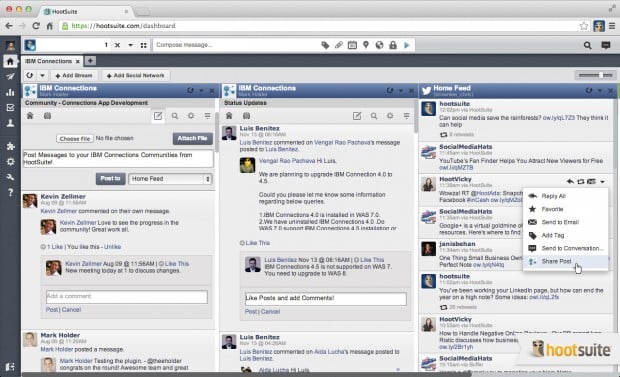
Hootsuite and IBM Connections users will be able to integrate content from IBM Connections into the HootSuite dashboard so it can be viewed and actioned alongside social media data from Facebook, Twitter, LinkedIn, and other social networks and applications. This IBM Connections integration is the first of its kind, no other platform brings your corporate social streams within IBM Connections and public social media together as efficiently.

IBM Connections customers will be able to manage their stream and:
  • Post and interact with status updates
  • Target status updates to groups, individuals, or make them public
  • Interact with files
  • Monitor feeds
  • Search the stream
  • Access user's profile information
  • and more! 
Check out how it looks below:

And here's a short demo that shows and describes how this works:

And here's a longer demo that shows and describes how this works:

If you are interested in learning more, check out HootSuite's blog for instructions on how to apply for beta access. This integration is available at no additional cost. 

Tuesday, July 2, 2013

Updated Mobile App for IBM Connections - Goodies for all

View Comments

Refresh your app stores, the latest monthly update is now available! A new mobile app update is ready for IBM Connections, IBM's enterprise social network (ESN) for collaboration. Last week, Chris Reckling did a great job summarizing the new features in the June 2013 release of native mobile apps.

My favorite feature is viewing events in the Action Required view of the activity stream. This view looks in the activity stream and can figure out which events require end user action. Thus, this view displays your latest to-do items from Activities, network and community invitations, requests to join moderated communities, and any third-party events requiring an action on your part.

For example, imagine an expense reporting application or a workflow application (e.g. IBM Business Process Manager ) where you are notified that you need to approve or reject something. You can do it directly from the activity stream, and now, directly from the mobile device!!! Mobile workers don't have to be a bottleneck anymore.

So if your App Store (or Google Play) icon looks like this:

it's time to update!!

Friday, June 14, 2013

Business Processes Go Social with IBM Business Process Manager 8.5 and IBM Connections

View Comments

Today, IBM released IBM Business Process Manager (BPM) 8.5, the latest in process management to optimize business processes and improve productivity. This has been a long expected release that Dave Hay talked about several weeks ago and was a big part of the IBM Impact conference a few weeks back as well.

In this release, the IBM Connections integration has been taken to the next level to socialize business processes. The marriage of traditional business processes with social collaboration is something that I've been looking forward to for a long time. In fact, for a while there's been talk of moving from systems of record to systems of engagement. My take has always been that to foster adoption it's better to combine systems of records with systems of engagement. My colleague Rawn Shah wrote a great piece on this as the outcome of the Enterprise 2.0 conference shared here late last year.


This is not the first time, however, that BPM has integrated with Connections. In IBM BPM 8.0, the IBM Connections business card could be surfaced within the BPM portal to raise awareness of experts within the system.

In today's release of IBM BPM 8.5, tasks and business processes, appear in the IBM Connections activity stream. Users can see that a new task or workflow has been assigned to them and take action directly within the stream. For example, if the task shouldn't be assigned to them they can re-assign it directly within Connections without having to switch context. If the task is for them, they can claim it and take action on it directly within Connections.

With the new integration via the activity stream you can enable scenarios where:

  • "Debbie" uses BPM to submit a requisition getting help from a subject matter expert, "Frank"
  • "Frank" uses IBM Connections as his collaboration platform allowing him to interact processes as part of his normal work in context of his other collaboration tasks
Check out the screenshot of the integration below:

Very exciting !

Tuesday, April 23, 2013

Demo: Mindmapping with IBM Connections

View Comments

Mindjet is a collaborative work management software for brainstorming ideas, organizing information and managing projects and tasks.

As you start working on a project, you may start working on it by creating a mind map. Once you've visually outlined the information and are ready to take action, Mindjet can help you start tracking tasks towards project completion.

Recently, Mindjet integrated with IBM's Social Business Platform, IBM Connections. As tasks are assigned and the project is updated, the updates appear automatically in the activity stream.

This provides great benefit and business value to Connections users as it gives them a single place to track all their collaboration projects.

Check out the 3 minute demo below.

To learn more, check out Mindjet's page.

Tuesday, April 9, 2013

Activity Stream portlet for IBM Connections 4.5 Now Available

View Comments

The IBM Connections portlets for IBM WebSphere Portal have been updated and are now ready for download!

With this new release you can:

  • Bring the Activity Stream experience from IBM Connections into portal - this means you can surface the microblogging capability of IBM Connections in the portal, including @-mentions !
  • OpenSocial Embedded Experiences are now available in Portal
  • Enhancements to support ideation
  • Support for Portal 8.0.0.1 CF4
  • Support for IBM Connections 4.5

With this release, there are now 13 portlets that bring the power of social to the portal making it extremely easy to socialize an existing site.

Here's a screenshot of the new Activity Stream portlet in Portal:


To download, go out to our catalog and get it from here and the installation instructions are here.

Friday, March 29, 2013

IBM Connections 4.5 Is Ready for Download

View Comments
The day has come! IBM Connections 4.5 is ready for download!! Partners can get the software from PartnerWorld and customers from Passport Advantage.

Let me summarize give you a couple of pointers to help you get ready to deploy:
Next week, I'll share two new videos to show explicitly a demo of what's new in IBM Connections 4.5 and also a deep dive on the new IBM Connections Content Manager. So stay tuned for that. For now, check out this demo which shows an overview of IBM Connections 4.5:
Now, I'm curious to know who will be the first to go into Production with 4.5

Thursday, March 14, 2013

Demos of IBM Notes 9 and IBM Connections 4.5 Launch Now Available

View Comments

By now you know that this week we launched IBM Notes 9 and IBM Connections 4.5. On Wednesday, we had a webcast to launch these two products.

At the webcast we had Ray Wang, from Constellation Research, kick things off by talking about the 9 C's of collaboration.   

During the webcast, Scott Souder and myself did demos of our respective products. Those demos are now available online in case you missed it (or you want to see it over and over and over again! )

Here's the IBM Notes 9.0 demo:

Here's the IBM Connections 4.5 demo:


The full replay of the launch webcast is also available here.

Enjoy!!

Thursday, February 28, 2013

Questionmine Brings the Power of Surveys and Video to IBM Connections

View Comments

At the IBM Connect 2013 conference, Questionmine demonstrated their latest integration with IBM Connections.

Questionmine provides the ability to create interactive webinars with video surveys to engage the audience. This can help you generate real-time feedback and accelerate decisions.

Leveraging the activity stream and OpenSocial support within IBM Connections, Questionmine can quickly distribute videos to users. As the video plays and gets to a specific time, the question comes up and the user can respond instantly. After the response has been submitted, the video continues to play. To analyze all the data, Questionmine provides a dashboard for administrators to go in and get insights.

In the following demo, you can see a marketing manager at Pepsi creating questions and then sharing them as part of a video within IBM Connections and request feedback, specifically to see what others think about a new TV commercial that's going to go live soon.

To learn more, check out their website or if you are going to SXSW next week, check them out at stand 344.

Tuesday, February 5, 2013

IBM Connect 2013 Opening General Session Replay is Here

View Comments

The Opening General Session of IBM Connect 2013, aka the Keynote, aka the OGS, is now available for replay.

This year I had the opportunity to be one of the demo'ers during the keynote. Last year I was part of the demo team helping mostly backstage and making sure the servers were ready. This year was a completely different experience being front and center.

Doing one of the demos at the #IBMConnect keynote is one of those things that I've wanted to do for a while. When I first went to the conference back in 2008 I saw Suzanne Livingston up on stage and wondered if I could ever do that. When I got the call back in October I was extremely happy (and nervous!) to have such an opportunity.

The following 3 months were pretty hectic trying to figure out what to say, what to demo, the scenario to use, etc. It was an incredible experience and I learned a LOT, for example, how to say only what you need in the most concise way to get your point across (which was super helpful since my demos tend to be very long). At one point, I had 15 minutes of demo which I had to trim to 10 minutes and it was extremely tough to decide what to cut. Looking at the script, I showed 35 features in 10 minutes which, if I'm doing my math correctly, comes out to about 1 feature every 20 second!

After Connect, I took a couple of days off to fully disconnect and recharge for what promises to be an amazing 2013. If you missed the OGS, you can watch it here:

Watch live streaming video from ibmsoftware at livestream.com

If you are interested in the 5 minute highlights, then check out this video:

Watch live streaming video from ibmsoftware at livestream.com

I'll be sharing more about IBM Connect in future posts as I go back and catch up with my regular day job!

Tuesday, January 22, 2013

OpenSocial Quickly Grows In The Enterprise and the IBM Connections App Ecosystem

View Comments
Many app developers have taken advantage of the new support for OpenSocial 2.0 for IBM Connections to build apps for the worldwide market leading social business platform.

TemboSocial, for example, has added peer recognition to IBM Connections and integrates into the activity stream and provides OpenSocial embedded apps . ISW who has built a gamification layer for IBM Connections has also taken advantage of the OpenSocial integration points. AppFusions has also used OpenSocial to integrate Atlassian's JIRA, Confluence and Stash with IBM Connections as shown in the demo below.


And there's plenty plenty more! In fact there's over 200 partners attending the Ready for Social Business Showcase at the IBM Connect reference.

With the #IBMConnect conference just a few days away, it's likely more app developers will start taking advantage of this as well. At the conference, there will be an App Dev Throwdown where 14 companies will showcase their new solutions. The winner will be featured during Wednesday morning's keynote.

The conference is also a great opportunity to get even more app developers on board. At the IBM Connect conference, app developers can learn in the following sessions how to use OpenSocial within the enterprise. Here's a list of all the App Dev and/or OpenSocial related sessions at the conference. Make sure you add them to your calendar:
  • AD101: Social Applications Made Easy with the New Social Business Toolkit SDK
  • AD103 : Social Standards Across IBM Connections, IBM Notes, IBM iNotes and IBM Domino
  • AD104: IBM Connections Activity Stream Integration with OpenSocial
  • AD206 : IBM Lotus Domino XPages: Embrace, Extend, Integrate
  • AD212 : Whats New in IBM Lotus Notes Widgets and LiveText: Linking Your Data to the World!
  • AD405: Empower your Social Business with SAP Processes in the Activity Stream
  • AD407: Qualifying Round for App Dev Throwdown I
  • AD408: Qualifying Round for App Dev Throwdown II
  • BP209 : In The Land of Social Apps, the API is King
  • CUST108: How 3M Integrated SAP into the Activity Stream Using OpenSocial
  • ID101 : What's New in IBM iNotes 9.0 Social Edition
  • INV110: App Dev Strategy: Coding Social Business Applications
  • INV211 : The New Social Business Paradigm with OpenSocial
  • INV213: The Roadmap for Enterprise Social: From Social Email to Universal Activity Streams
  • JMP102 : Extending Your App Arsenal With OpenSocial
  • JMP202: Extending IBM Connection to Build an Exceptional Social Learning Platform
  • SHOW301: Becoming a Connections Developer: Lessons from the Field
As you can see, with IBM's backing of OpenSocial 2.0, OpenSocial continues to take over the enterprise!

Posted in OpenSocial.org.