Pages

Showing posts with label installation. Show all posts

Thursday, June 26, 2014

IBM Connections 5.0 Is Ready for Download

View Comments
I just got confirmation that IBM Connections 5.0 is now ready for download ! This has been quite an exciting quarter as we've been building up to this day ever since I published the trailer back in April.

When I initially joined the product management team we were just launching IBM Connections 3.0.1.   I was then managing another component of the platform.

As time went by, I started to influence more of the platform and with this release, it was the first time that I was completely involved all the way from the first planning session to the release of the software. Of course, it's been quite an experience and it's what I've wanted to do for a long time.  I'm grateful for the opportunity that I've been given to bring this new product to market and for everything that I've learned in terms of what it takes to plan, build, and launch a product.

Here are some links you'll probably need:
I'll be updating those links as necessary.

I've also started collecting videos about IBM Connections 5.0 and will continue to update this playlist as they become available:


Now that you have the code, I'm anxious to know when you upgrade!! 

Friday, March 29, 2013

IBM Connections 4.5 Is Ready for Download

View Comments
The day has come! IBM Connections 4.5 is ready for download!! Partners can get the software from PartnerWorld and customers from Passport Advantage.

Let me summarize give you a couple of pointers to help you get ready to deploy:
Next week, I'll share two new videos to show explicitly a demo of what's new in IBM Connections 4.5 and also a deep dive on the new IBM Connections Content Manager. So stay tuned for that. For now, check out this demo which shows an overview of IBM Connections 4.5:
Now, I'm curious to know who will be the first to go into Production with 4.5

Tuesday, December 11, 2012

Announcing IBM Connections Hypervisor Edition

View Comments

Today, IBM announced the availability of IBM Connections on PureSystems. PureSystems allow Ability to maintain and update through a single console with zero downtime. The same capability was released for WebSphere Portal earlier in the year (to learn more click here ).

A social business recognizes that people do business with people and optimizes how people interact to accomplish organizational goals. IBM Connections empowers people to easily connect with employees, partners, and customers, helping businesses, government agencies, educational institutions, to optimize collaboration. The new IBM Connections pattern for use with PureSystems allow organizations to focus critical resources on value add activities by significantly reducing installation and configuration times.

If you are not familiar with PureSystems, check out this video to learn more:


WebSphere Portal has also been available for PureSystem since earlier this year. In this demo you can see how easy and fast it is to deploy Portal and now you have the same capability for IBM Connections:

Using IBM Connections Hypervisor Edition 4 can help enable better utilization of hardware and faster response to demands for newly deployed systems. This can help to reduce both hardware and software operation costs, and maintenance costs. By deploying virtual images, businesses can also leverage a known, stable, and tested configuration, which can help reduce the potential for errors and reduce time to deployment of a working system, whether for development, test, or production. By making the deployment easier, organizations can focus their investment on social business adoption.

Tuesday, October 4, 2011

Notes Customers Now Entitled to IBM Connections Profiles and Files

View Comments
As you may have seen by now in Ed Brill's blog, today IBM is announcing a new entitlement option for existing Notes customers. With Notes 8.5.3, customers are now entitled to use IBM Connections Profiles and Files.

Seems like most people are excited with this announcement, as they should be! To me, the biggest benefit will be seen by the Notes users who will now be able to leverage Connections directly from their Notes client thanks to all the awesome (free!!) Connections plugins we have in our app catalog. For example, Notes users that didn't have Connections before, now will have the ability to:
Of course, there are other plugins for Notes (e.g. for Activities and Bookmarks) so when a customer trades-up to the full IBM Connections offering, they'll even get more value from their Notes client. I've seen several questions come up as to how to install Connections (for those that have never done it). A tech note has been published which explains how to install only Profiles and Files with Notes 8.5.3.

As the entitlement states, Homepage is not entitled so here's how you would disable Homepage once everything has been installed:

1) Check out the LotusConnections-config.xml with the command LCConfigService.checkOutConfig("C:/temp","foo01Cell01") as documented here: http://www-10.lotus.com/ldd/lcwiki.nsf/dx/Editing_configuration_files_ic301

2) Open the file with your favorite text editor

3) Find the text listed below (it'll be similar to this):


/homepage


3) Set the enabled and ssl_enabled parameters to false, for example:

enabled="false" serviceName="homepage" ssl_enabled="false">

/homepage


4) Check the file back in

5) Restart IBM Connections.

Homepage is now hidden from end users. I'm anxious to see even more users on Connections now with this entitlement!

Wednesday, August 17, 2011

New Connections Usability Study - Help Us Improve the Product!

View Comments

The IBM Connections Information Development team is piloting the addition of filters to our installation documentation, so that you receive information that pertains to your specific database and operating system environment at the right time. This pilot is a direct response to customer requests and depending on your feedback, we may introduce filtered documentation in a future release of IBM Connections.

Currently, the installation documentation includes information on all supported operating systems, application servers, database systems, LDAPs, and so on regardless of what you are actually using. The samples provided in this lab show how the documentation can be filtered based on your choice of operating system and database information.

We want to know what you think of the filtered documentation samples and get your input on what we can do to ensure the documentation is easy to read, useful, and effective.

How to Participate
Join the Filter Pilot community by clicking the Join Community button, review each sample topic, and create a reply to each topic to share your feedback.

Whether you have installed IBM Connections in the past, or are planning to do so in the near future, we want to hear from you!

Monday, January 24, 2011

Quickr Connector for Symphony 3.0 Now Available

View Comments

Back in October, I blogged about all the social plugins that are available for Symphony. In there, I had mentioned the availability of a Quickr plugin for Symphony. That plugin, however, was specifically for version 1.3 of IBM's free Office suite, Lotus Symphony. Last week, the connector was updated to work with version 3.0 of Lotus Symphony.

So if you use Quickr and Symphony, then you'll want to download the latest Quickr connector which is now available in the Symphony plugins catalog.

Here's a screenshot of the Quickr plugin for Symphony:


To download, click here and then drag-and-drop the widget directly into Symphony and the installation will start automatically!

Thursday, December 16, 2010

My Experience Installing Lotus Connections 3.0 for the First Time

View Comments

Yup. Believe it or not, yesterday was the first time I installed Lotus Connections 3.0. While I had the beta 1 and beta 2 code I never had the time to sit down and install it in my own image. In between my job role change, the new baby, planning two product launches and Lotusphere, it's been a crazy second half.

Things seem to be settling down and I'm getting used to my new workload. I did the install as I'm helping prepare a new super awesome demo environment with Quickr, Cognos, Sharepoint, Sametime, and Connections all integrated together ( I will soon release more details on it once it's ready).

I was pleasantly surprised with all the improvements that have been done in the installer of this new version. The install took about 6 hours to get everything up and running. A couple of notes:

  • I did this on a VMWare so in real hardware this time would definitely be less.
  • I also did this sequentially. If you did it all in parallel it would be ~3 hours.
  • Most of the time was spent just watching progress bars since the installation has been streamlined where I just click Next, Next, Next, Next, and so on.

Here's what I installed (and how long each step took me):

  • WebSphere 7 + fixpacks (~1.25 hrs)
  • TDI v7 + fixpacks (~30 mins)
  • DB 9.7 (~30 mins)
  • IBM HTTP Server v7 + fixpacks (~15 mins)
  • Lotus Connections v3.0 (~1.5 hrs)
  • Post-installation steps (~1.5 hrs)

To help me along, I followed the step-by-step instructions with screenshots provided in the wiki here. Those instructions were definitely key in helping me move along so fast. One of the things that I always like in documentation is screenshots and that document definitely fits the bill. I'm assuming that anyone who's doing a Show-N-Tell session at Lotusphere 2011 on how to install Connections will be able to just rip off the screenshots from there!


Anyway, congrats to the development team and the documentation for all the improvements that have been made in this area.

Friday, January 8, 2010

Connections Upgrade and Migration Webcast on Jan 13th, 2010

View Comments

Next week, I'm going to be one of the panelists at the Connections Upgrade and Migration Webcast on Jan 13th , 2010. The event is free and is open to everybody.

Here's some information on the event:

Abstract
IBM Development and Support are hosting a Tech Exchange webcast and call on the topic of "Upgrade and Migration From Lotus Connections V2.0 to V2.5". There is no charge for participating.

Details:

Title: Upgrade and Migration From Lotus Connections V2.0 to V2.5

Date: Wednesday, January 13th, 2010
Time: 9:00 am - 10:30 am eastern US time (2:00 pm GMT)
Webcast access: https://www.lotuslive.com/en/join?schedid=4419191
Audio by phone:
Toll free US: 866-803-2143
Toll call US: 210-795-1098      
Confirmation Code: CONNECTIONS
Please dial in 5-10 minutes early to allow time for registration of all participants before the presentation starts.

Open Mic calls are Question & Answer sessions with a panel of subject matter experts covering your questions without going thru a slide presentation.

The slides will be posted as a reply to this topic when they are ready.

You can submit your question in advance via this forum. Questions should be of general interest. Troubleshooting of specific problems should still be handled by Technical Support, not by Webcast calls. We will collect questions, which have been posted to the forum as a reply to this topic and address as many of them as possible on the call. We will also take questions not submitted in advance.

You will need to provide your name and company affiliation when dialing in. You will need a touch tone phone to be able to ask questions. The presentation will be recorded and (in potentially edited form) made available via a web page to be linked from the Tech Exchange page.

You can find an up-to-date schedule of upcoming Open Mic calls and Webcast calls, as well as links to slides and recordings from past calls, here:
http://www.ibm.com/support/docview.wss?rs=899&uid=swg27011126

For more information, see this post. See you there!

Friday, November 7, 2008

How to upgrade to Lotus Connections 2.0.1

View Comments

Well, I'm finally done. I'm sad to say that it took ~12 hours to upgrade from Lotus Connections 2.0.0.1 to 2.0.1. It seems that there are some problems with the Update Installer. Apparently, shipping a product on Halloween (like trying an underwater escape) is not a good idea. Or maybe one of our competitors hacked into our servers and broke it for us??

Anyway, here's the steps that I had to take to upgrade my Lotus Connections 2.0.0.1 server to 2.0.1:

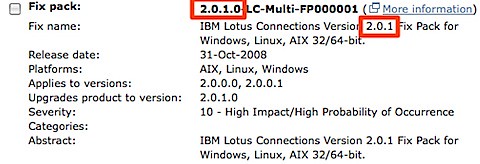
  1. Download the Lotus Connections 2.0.1 Fix Pack from Fix Central (select Lotus, Lotus Connections, 2.0.0.0, <your platform>) 200811061420.jpg
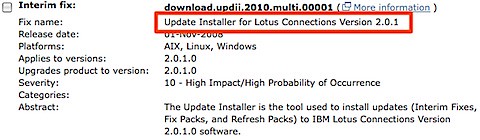
  2. Download the 2.0.1 Update Installer from Fix Central (select Lotus, Lotus Connections, 2.0.1.0, <your platform>)200811061422.jpg
  3. Download the Lotus Connections 2.0.1 Database Wizards from Passport Advantage
  4. Stop the Lotus Connections server
  5. Upgrade the DB silently (you can use the wizard, but then you will have to upgrade the Blogs DB manually)
  6. Upgrade the product from 2.0.0.1 to 2.0.1 silently (the wizard didn't work for me). I used the following command:
    updateLC.bat -installDir c:\ibm\WebSphere\LotusConnections -fixpack -install -fixpackDir c:\ibm\WebSphere\LotusConnections\update\fixpacks -fixpackID LC201_Fixpack -wasUserid lcadmin -wasPassword passw0rd
    
  7. Perform step 10 as listed here. (It's listed as an Optional step, but it's really a Required step)
  8. Start the Lotus Connections server
  9. Run the following wsadmin command
    1. Start the wsadmin interface
    2. Type the following command: execfile("blogsAdmin.py")
    3. Type the following command: BlogsMigrationService.populateLoginNames()
    4. Type exit to quit the wsadmin interface
  10. Stop the Lotus Connections server
  11. Download the latest fixes from the page where you downloaded the 2.0.1 Fixpack (see step 1 above)
  12. Install the iFixes silently. I used this command:
    updateLC.bat -fix -installDir "C:\ibm\websphere\lotusconnections" -fixdir "c:\ibm\websphere\lotusconnections\update\fixes" -install -fixes LO34540 LO34604 LO34631 LO34638 LO34665 LO34676 -wasUserId lcadmin -wasPassword passw0rd
    
  13. Re-do your changes to the <WAS_PROFILE_ROOT>/config/cells/<cellname>/LotusConnections-Config/*.xml files
  14. Delete your Dogear index
  15. Start your Lotus Connections server!

And there you have it. I'm giving this to the documentation folks so they can fix the InfoCenter.

Note: Updated on Nov 11, 2008 to fix the order of the steps.

Thursday, October 16, 2008

Social Software as SaaS helps adoption!

View Comments

Ready to start with social software but don't want to wait to order servers, configure them, set them up, customize the environment, and add your theme/branding to it ? Perhaps you are not ready to learn about WebSphere ? Perhaps your IT department is overloaded resolving some other fires issues at this time.

That's ok. IBM Premier Business Partner Connectria has just announced their new offering. They are offering Lotus Connections as Software as a Service (SaaS). Along with their existing Lotus Hosting services, they can now host and operate your web 2.0 and social networking environment while giving you the peace of mind of a 24/7 monitored system. And yes, they can do both a pilot and production environment!

Let them worry about all the techie stuff and let's focus on the adoption strategy for your organization. To find out more, check out the IBM Lotus Connections Hosting page on the Connectria site.

By the way, in case you are wondering, yes, I have recently posted several entries on solutions created by business partners. In fact, if my math is right, in the past month, the Lotus Connections Solution Catalog has grown ~40%! I think it's a great testament that so many 3rd party vendors see the power and the value of Lotus Connections that they want to provide their solutions on top of the Lotus Connections Social Networking Platform!

And there a couple more solutions coming down the pipeline, but I can't talk about them yet. So stay tuned!

Update 10/16/2008 @ 10:26pm: I was just informed that another business partner is offering hosting solutions for Lotus Connections. In this case it's Prominic.NET and their solution was just added to the catalog. Or you can go directly to Prominic's site and view their services here.

Tuesday, October 14, 2008

Oh, SSL, why are you so hard ?

View Comments

This is a summary email that was sent to me by a colleague after fixing a SSL issue he was having in his deployment. I'm capturing it here so I can refer to it later, and in case it helps you as well.


This is a different certificate problem than the one you folks encountered back in May of this year. That one produced an "Internal Server Error" in the browser when attempting a redirected login and had a corresponding "GSK_ERROR_BAD_CERT(gsk rc = 414)" message in the log. That was a case of a new certificate that didn't have a trusted signer. This particular problem resulted from a certificate that had a trusted signer, but recently expired and produced different symptoms.

Symptoms:

When passing from a logged-in user's Portal page to a Connections page (ie. Portal kicking off a new browser window to open, say, Activites using SSO), the notorious "Page can not be displayed" message appeared.

In the log, C:\IBM\HTTPServer\logs\error.log ,you see this error message:
"SSL0221E: SSL Handshake Failed, Invalid date."

In hindsight, this one's easy to figure out but it took an inexperienced person like me a while to track and confirm it. It means there is an expired certificate in use ... dates in a certificate are no longer valid.

Cause: Expired certificates

Using the key management utility (IKEYMAN), open the Key Database file C:\IBM\HTTPServer\bin\key.kdb and view the default Personal Certificate called "demoibm". It expired on June 26, 2008. Similarly when you look at Signer Certificates and open up "WebSphere Extracted Cert", you will find that also expired on June 25, 2008.

Solution

1.) Since the one and only certificate being used in the key database was now expired, it seemed to me that generating new certificates and continuing to manage an additional KDB was pointless, so I chose to use the already valid keys in this key database already in use by the web server:

C:\IBM\HTTPServer\Plugins\config\webserver1\plugin-key.kdb .

I redirected to that plugin-key.kdb by changing C:\IBM\HTTPServer\conf\httpd.conf as follows:

#Enable SSL for Lotus Connections
LoadModule ibm_ssl_module modules/mod_ibm_ssl.so
LoadModule rewrite_module modules/mod_rewrite.so
#KeyFile "C:\IBM\HTTPServer\bin\key.kdb"<---- this was the old reference that I commented out
Keyfile "C:\IBM\HTTPServer\Plugins\config\webserver1\plugin-key.kdb"
SSLStashFile "C:\IBM\HTTPServer\Plugins\config\webserver1\plugin-key.sth"
Listen 0.0.0.0:443
<VirtualHost *:443>
ServerName connections.demoibm.com
SSLEnable
SSLProxyEngine on
RewriteEngine on
# Keep website (/html) on http for perf
RewriteRule ^/dogear/html(.*) http://connections.demoibm.com/dogear/html$1 [noescape,L,R]
#Put everything but login and api back to http
RewriteCond %{REQUEST_URI} !^/blogs/services/atom(.*)
RewriteCond %{REQUEST_URI} !^/blogs/roller-ui/login.do
RewriteCond %{REQUEST_URI} !^/blogs/j_security_check
RewriteRule ^/blogs/(.*) http://connections.demoibm.com/blogs/$1 [noescape,L,R]
</VirtualHost>
SSLDisable

2.) Along with changing the HTTPD.CONF file, I did the certificate insertions into the signer certificates of the CMSKeyStore as described in the technote from that other GSK problem: GSK_ERROR_BAD_CERT error configuring SSL between Plug-in and Application Server V6.1 I simply exported all three "default_x" personal certificates then imported (added) them to the signer certificates of the CMSKeyStore. (Before executing the instructions in that technote, see the note below about disabling security so you can use the WAS Integrated Solutions Console.)

2a.) Important note: Because authentication does not work due to the expired certificate, you can not successfully log into the WAS Integrated Solutions Console until you manually disable security. To do that, modify this file C:\IBM\WebSphere\AppServer\profiles\AppSrv01\config\cells\connectionsNode01Cell\security.xml. Look for the following text at about the fifth or so line down and change "enabled" to be "false" as shown in blue below.

useLocalSecurityServer="true" useDomainQualifiedUserNames="false" enabled="false" cacheTimeout="600"

After saving and closing security.xml, you will need to restart the Connections server. Upon return, start the Integrated Solutions Console with the URL "https://connections.demoibm.com:9043/ibm/console/logon.jsp" and just click the Log in button without entering user credentials.

3.) Upon completion of the work needed to be done in the Integrated Solutions Console, don't forget to go back and modify the security.xml and set "enabled=true" and restart the Connections server so security is properly invoked.

Final Note: Aside from the ISC admin console, directly logging into the Connections sever did not seem to work. Redirecting to it from a logged-in Portal page as described in the "Symptom" section above gets you to Connections authenticated via SSO. This behavior was observed even before the certificate expiration problem arose. Going through this exercise only restores it to it's pre-expiration condition which means you still can not directly login.

Lastly, I know much of this is in different pieces of the doc but I personally found the info in this posting in the Lotus Connections Forum to be useful as a newbie.

Wednesday, September 24, 2008

How to disable SSL in Lotus Connections

View Comments

I've gotten this question several times so I figured it was time to blog about it. While I don't recommend this for a production environment, some customers have asked for instructions on how to disable SSL for Lotus Connections. This can be more convenient than using a self-signed certificate which may cause some annoying pop-ups.

Here's the simple procedure:

  1. Disable SSL in the config file
    1. Go to <WAS_ROOT>/profiles/AppSrv01/config/cells/<cellName>/LotusConnections-Config
    2. Save a copy of LotusConnections-Config.xml
    3. Open LotusConnections-Config.xml with your favorite text editor
    4. Set all the SSL_ENABLED flags to false
    5. Save and close the file
  2. Modify the login page to go over port 80 (HTTP) instead of 443 (HTTPS)
    1. Go to <WAS_ROOT>/profiles/AppSrv01/config/cells/<cellName>/applications/<featureEAR>/deployments/<featureName>/<featureWAR>/WEB-INF
    2. Save a copy of web.xml
    3. Open web.xml with your favorite text editor
    4. Look for the following section:

      <user-data-constraint>
      <transport-guarantee>CONFIDENTIAL</transport-guarantee>
      </user-data-constraint>


    5. Change the transport-guarantee from CONFIDENTIAL to NONE
    6. Save and close the file

That's it! Now, if you are wondering what <featureEAR>, <featureName>, and <featureWAR> mean, take a look at the table below.

Note: You are at your own risk here

FeatureEAR Feature Name FeatureWAR
Activities.ear Activities oawebui.war
Blogs.ear Blogs Blogs.war
Communities.ear Communities tango.web.ui.war
Dogear.ear Dogear dogear.webui.war
Homepage.ear Homepage dboard.war
Profiles.ear Profiles peoplepages.war

Enjoy!

Tuesday, July 15, 2008

How to install Lotus Connections FixPack 1

View Comments

Yesterday, it was widely announced the availability of Lotus Connections v2 Fix Pack 1 on FixCentral. Unfortunately, the Fix Pack was released before the instructions (oops! ) .

In any case, here's how to install the fixpack. First, since this is a fix pack and not a fix (don't ask me!), you can't use the wizard that comes with the Lotus Connections Update Installer. Instead, you must install the fix pack via the following command:

updateLC -fixpack -installDir E:\IBM\WebSphere\LotusConnections -fixpackDir E:\IBM\WebSphere\LotusConnections\update\fixpacks -install -fixpackID LC2001_Fixpack -wasUserID wasmgr -wasPassword pa55w0rd

Make sure you plugin the right path locations and values for userid and password. Enjoy the new fix pack!