Pages

Showing posts with label deployment. Show all posts

Tuesday, November 17, 2015

How To Enable Nested LDAP Groups in IBM Connections

View Comments
The other day I was asked how to take advantage of LDAP / Active Directory (AD) groups within IBM Connections, specially if those groups contain nested groups.  So I went to our internal brain (IBM Connections) and a quick search turned out a post from Antonio Aleandri and with his permission, I'm re-posting here:

-=-=-=-=-

By default, nested groups (nested LDAP groups) are not enabled in IBM Connections. What this means, for example, is that if you add the parent group as member of a restricted community, users belonging to children groups are not automatically Community members.

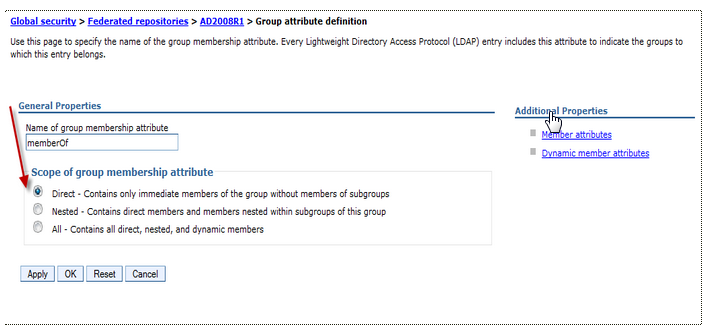
To enable the nested group you have to customize the scope of member attributes of Group attribute definition in your federated repository.

There are some small differences depending on the type of LDAP repository used:

Active Directory

Change only the scope of member attribute="member" to nested as shown below:


Tivoli Directory Server and Domino 

Customize the name of group membership attributes in Person record (ibm-allgroups for TDS and dominoAccessGroups for Domino) and set the scope to nested:


Check the right Object Class used for member attributes (groupOfUniqueNames for TDS and DominoGroup for Domino)


Save the configuration and restart all components!

Tuesday, December 9, 2014

New IBM Connections Pattern for IBM PureSystems Now Available

View Comments
On December 9, IBM announced an updated PureSystems Pattern for IBM Connections 5.0 as well as a brand new pattern for IBM Connections Content Manager 5.0. Both patterns have been built to reduce the installation and configuration time down to a couple of hours by deploying a pre-configured system into a PureSystems environment. IBM PureSystems combine the flexibility of a general purpose system, the elasticity of cloud and the simplicity of an appliance. Learn more about IBM PureSystems here.


Both patterns are based on the latest versions of IBM Connections and IBM Connections Content Manager and while the IBM Connections Content Manager Pattern is a brand new offering, IBM Connections 5 Pattern is a replacement for the previous IBM Connections Hypervisor Edition 4.0. Customers with entitlement to the Hypervisor pattern will be entitled to an upgrade to the new IBM Connections Pattern 5.0.


For more information on IBM Connections, IBM Connections Content Manager and the new patterns click here.

Thursday, September 4, 2014

Brand Image and Security Concerns – All the More Reason to Become a Social Business

View Comments
To get the full benefit of social business, you must inject it into your key business processes for stronger customer engagement and workforce collaboration. But many enterprises are afraid to fully embrace social business, with 30 percent of them citing security concerns and perceived risk as major adoption barriers, according to IBM's 2014 Business Tech Trends report.

image But these fearful enterprises need to realize the true nature of social business. At its core, social business is a grassroots movement. Your customers have already embraced social. They’re online, on multiple channels, multiple platforms, talking about your business and reviewing your products and solutions. In other words, there’s no such thing as ‘opting out’ of social business.

In fact, the real risks of security and brand perception are increased when you don’t engage in social business. If you're struggling to integrate social into the core of your business internally and externally, IBM can help.

For example, IBM Connections can help you reorganize, restructure and transform your enterprise into an effective social business with social guidelines and policies set into place to optimize both customer engagement and your internal workforce communication.

When social business is done right, the possibilities are endless. In fact, Pacesetters engaging in social business have reported an 87 percent stronger competitive advantage in their respective markets.

To read the full IBM 2014 Business Tech Trends report, click here.

To watch the webcast replay of the Business Tech Trends announcement, click here.

After you’ve read the report, join us for a Bluemix app JAM! Simply download the report's data in an IBM Bluemix app and start discovering new insights! Share with us and IBM will highlight our favorites!

Wednesday, July 3, 2013

New Theme Available for IBM Connections

View Comments
I'm happy to announce that we just made a new theme available for IBM Connections, IBM's enterprise social network (ESN). This theme was first shown at IBM Connect earlier this year and has been used by our cloud customers for a while now.

The feedback from our cloud customers has been extremely positive so far. I've also been getting a lot of requests from our on-premises customers that they would like to use this new theme. The good news for them is that the theme is available today and it's ready for download!

Here's how Connections looks with the new theme (Updated 10/Jul/2013 with new screenshot):


You can download the theme from our catalog here. Deploying the theme takes just a few minutes so go on and get it!

Note: Please read the read me ( hey, it's a good reminder! ) for system requirements and installation instructions.

Enjoy!

Thursday, January 24, 2013

Infoware Announces New IBM Connections Admin Tool

View Comments

With 3 days to go for the start of #IBMConnect, Infoware has announced a new web-based IBM Connections administration tool called DomainPatrol Social.

This tool has many capabilities such as:

  • merge communities together
  • move content in and out of communities
  • manage user access to the applications

Check out this 2 minute demo that shows how an administrator can easily merge two IBM Connections communities together.

To learn more, check out their offering in the IBM Connections app catalog, here. Infoware is going to be at IBM Connect in booth #C26 so make sure you go check them out to see the solution live!

Tuesday, December 11, 2012

Announcing IBM Connections Hypervisor Edition

View Comments

Today, IBM announced the availability of IBM Connections on PureSystems. PureSystems allow Ability to maintain and update through a single console with zero downtime. The same capability was released for WebSphere Portal earlier in the year (to learn more click here ).

A social business recognizes that people do business with people and optimizes how people interact to accomplish organizational goals. IBM Connections empowers people to easily connect with employees, partners, and customers, helping businesses, government agencies, educational institutions, to optimize collaboration. The new IBM Connections pattern for use with PureSystems allow organizations to focus critical resources on value add activities by significantly reducing installation and configuration times.

If you are not familiar with PureSystems, check out this video to learn more:


WebSphere Portal has also been available for PureSystem since earlier this year. In this demo you can see how easy and fast it is to deploy Portal and now you have the same capability for IBM Connections:

Using IBM Connections Hypervisor Edition 4 can help enable better utilization of hardware and faster response to demands for newly deployed systems. This can help to reduce both hardware and software operation costs, and maintenance costs. By deploying virtual images, businesses can also leverage a known, stable, and tested configuration, which can help reduce the potential for errors and reduce time to deployment of a working system, whether for development, test, or production. By making the deployment easier, organizations can focus their investment on social business adoption.

Wednesday, June 27, 2012

How To Get Users on the IBM Connections Mobile Apps Fast!

View Comments

By now, you are aware of the new IBM Connections mobile apps for iOS and Android that were released a couple of weeks ago.

The feedback so far has been amazing! The ratings and comments in the app store have been fantastic.

Today, I wanted to share a quick tip with you so you can help everyone in your organization get started with the mobile app. In fact, I highlighted this in my original blog post and I've received several questions already on how to do this.

The new mobile apps now support app provisioning via a link. This means that you can post a link in Connections or send it via email and when users click on it from their mobile device, the app is immediately launched and pre-configured for your server.

To do this, simply build a URL similar to the one below:

ibmscp://com.ibm.connections/launch?accountserver=https%3A%2F%2Fwww.bleedyellow.com%2Fmobile&accountuser=luis_benitez%40us.ibm.com&accountname=BleedYellow

and then send an email to your users and ask them to click on the link, for example:

Click this link to get started!

Notice that the URL contains the user ID of the person and the values are URL encoded. The URL above would be my unique URL to configure the app with BleedYellow.

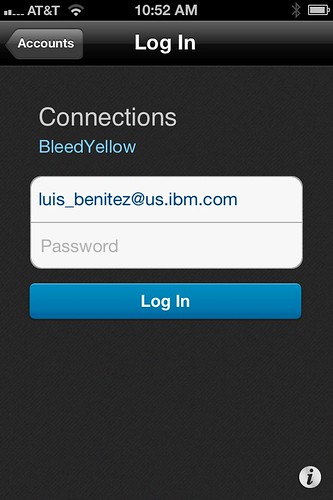
When the user clicks on that link, they are immediately brought over to the IBM Connections Mobile app and this is what they see:


Notice that everything is pretty much configured. The end user doesn't have to figure out what the URL is to their server. At this point all the user has to do is enter their password and off they go! Pretty cool, huh? The same URL will work both for the Android and iOS apps.

Enjoy!

Friday, February 4, 2011

Lotusphere 2011 Day 4: My First BOF (Part 2)

View Comments

In the previous blog entry, I shared my recap of what happened the first part of Day 4, Wednesday, of Lotusphere. I wanted to share a bit of what happened towards the end of the day. At 5:45p I had the chance to deliver my first Birds of Feather (BOF) titled Lotus Connections: Lessons Learned from the Field. I had participated in a BOF before with Stuart McIntyre, but only as a guest speaker.

This time, however, Stuart was scheduled for a BOF at the same time as me. I had to do something to draw a crowd . I figured if I could get a celebrity in the room, that would help. Therefore, I invited Rawn Shah to come in. He couldn't make it so he instead donated 3 autographed copies of his book: Social Networking for Business (which Steve Bell reviewed here). Three lucky attendees left with a copy of the book.

The purpose of the BOF was to concentrate on bad / best practices for social software adoption inside of the firewall. I wanted to generate a discussion between customers in the room to share what was and wasn't working in their organizations as they tried to become a social business. I didn't want to touch on technical stuff because, well, because there had been plenty of technical sessions throughout the conference. As I walked towards the room I ran into Sacha Chua and invited her to come along. She agreed and even volunteered to scribe the session. I've always been a big fan of her hand drawings.

Here's what we talked about in the "words" of Sacha:

I heard from the attendees that the session was valuable so hopefully we'll repeat it next year.

One thing I would like to do different next year is set up the chairs in a circle. The chairs were organized as if I was going to do a presentation and I think a circle arrangement would've allowed customers to more easily see each other.

After the BOF was done, #ls11 attendees headed out to Islands of Adventure to check out the new Harry Potter attractions.

Wednesday, January 26, 2011

The Real Story: The High Cost of Microsoft SharePoint

View Comments
As I was checking my feeds I stumbled upon an interesting bit of news.  I've actually known this for a long time and I'm glad that this is surfacing via other channels.

When I went to the Enterprise 2.0 Conference in Boston in 2010, I attended a session by Tony Byrne where he stated that for every $1 spent on a SharePoint license $6-$9 additional dollars would need to be spent on services/customization/etc (because SharePoint doesn't do anything out of the box).  That's huge!  In fact, Microsoft is proud of this fact.

The Real Story Group, where Tony now works, recently posted an article called: The high cost of Microsoft SharePoint.  In it, the stats are now updated:

Microsoft estimates that you the customer will spend a total of $6.2 Billion on services related to SharePoint in 2011.  According to my rough estimate, you can add $1.7 Billion in 2011 SharePoint license revenue on top. This for a product that many sales folk continue to tout as low cost, and sometimes even as free.
So again, businesses will pay ~$5-$6 on services for every $1 spent on licenses!  Whoah! Can businesses really afford to pay so much in these economic times?  My guess is that customers don't know they are paying so much because Microsoft does a good job deceiving them and hiding the costs.  The Real Story Group puts this number into perspective by saying that 50 countries in the world have a GDP less than what the world spends on SharePoint (i.e. $9 billion)!

In fact, another blog entry caught my attention this week where Vaughan Rivett talks about how companies in New Zealand are picking IBM Lotus Quickr over Microsoft SharePoint.  The two reasons why companies are picking IBM over Microsoft?  According to Vaughan:

  1. Quickr is ready to go straight out of the box without too many customizations
  2. Customers are complaining about the hidden costs in deploying SharePoint, plus the additional services and $$$ required to make it ready for collaboration

So are you still considering SharePoint? Make sure that you read this so that you are aware how much you are going to spend (and make sure you have a lot of cash in that wallet).

Tuesday, January 18, 2011

Lotus Connections 3.0 Performance Tuning Guide Now Available

View Comments

The Lotus Connections 3.0 Performance Tuning Guide is now available from the Lotus Connections Wiki. This document provides recommendations for performance tuning of IBM® Lotus® Connections 3.30 based on the experience of the IBM Collaboration Solutions Performance team. However, the optimal tuning and the resulting system capacity can be affected by many factors, including the characteristics of the load on the system and the hardware used, including servers, disk subsystems, network topology, and more. Therefore the recommendations in this document should not be considered the optimal values for every situation, but rather a recommended starting point for tuning a Connections deployment.

If you are a business partner, or someone responsible for deploying Lotus Connections, you need to read this:

To download the full version, click here.

Tuesday, September 7, 2010

Moving Lotus Connections to New Hardware

View Comments

Recently, I was asked what it would take to move a Lotus Connections deployment to new hardware. Not sure if this is valuable to anyone else, but I figured I would document it here just in case anyone else needs it.

Note: The awesome people at ISSL put this together, and with their permission, I'm including here.

The estimated duration will depend on several factors. Regardless, you will have to perform a full install of an empty system in the new environment to prepare for the migration. Other estimates are dependent on how the different environments are configured:

Pilot Version to Production Version: If the source environment is Lotus Connections Pilot Version, you will need to follow the detailed instructions in the information center to perform the data migration: http://publib.boulder.ibm.com/infocenter/ltscnnct/v2r0/topic/com.ibm.connections.25.help/c_pilot_migrate_overview.html

I have done this migration with one customer - it took about a day or two to complete, then there were a couple of days of setting up administration/product configuration specific to the new environment

Production Version to Production Version, same DB type, same LDAP: This is the simplest migration possible, which basically involved copying the shared file system and performing a native DB restore of the Connections databases, which should take a few hours. if there are any administrative or product configuration differences, they may take a couple of days to complete.

Production Version to Production Version, different DB type, same LDAP: A bit of a blend of the two migrations listed above - instead of using native database restored, you would either use the DB Wizard or manual scripts and migration utilities to move from the source DB type (ex.: Oracle) to the destination DB type (ex.: DB2). This type of database migration ay add a couple of days to the overall effort - and you have to be especially careful to validate that the scripts/utilities complete successfully

Production Version to Production Version, same DB type, different LDAP: This is a very complex migration if there is pre-existing data. There is no supported way to migrate data from one LDAP type to another and retain all of the non-Profiles user data. If they want to take this approach, it could take several weeks to design, develop and test the raw SQL scripts to perform the data conversion

Tuesday, March 9, 2010

The Red Cross Launches their Social Network with Lotus Connections

View Comments

Today, the Spanish Red Cross announced their go live of World Red Cross (Mundo Cruz Roja in spanish), their social networking site powered by Lotus Connections.


The Red Cross is all about communities helping communities. As such, they felt that a social networking solution would be appropriate for them. After comparing with various vendors, they picked IBM's solution and went live today. The idea is that each community will serve different purposes, but they all have one thing in common: the need to share information amongst its members.

I like how they even created a community so their members can support each other as they learn to use this new social networking site. I think this is a great idea because that way you can reduce your IT and Help Desk support costs. The site has been enabled in 26 languages so pretty much anybody in the world can use it.

Go check it out: http://www.mundocruzroja.org

Monday, January 18, 2010

What's next with Lotus Connections ?

View Comments

This week, IBM is holding its annual collaboration conference called Lotusphere and is typically known for setting the vision for the collaboration strategy for the rest of the year. Today, at the opening keynote, IBM announced its plans for continuing to drive its Enterprise 2.0 platform, Lotus Connections, forward.

Lotus Connections, IBM's flagship Enterprise 2.0 platform, will be incorporating numerous new features in the coming months. There are several new capabilities, however, that are worth noting.

During the keynote, IBM reviewed the new features that were added into the latest offering of IBM Lotus Connections v2.5. It also reminded the audience about how it scored a big win with Panasonic dumping Microsoft and moving its 300,000 employees to the IBM-hosted collaboration solution LotusLive. Some of the features that wow'ed the audience were the new iPhone access, the new personal file sharing service, and the new capabilities in community spaces that provide for more targeted collaboration.

Enterprise 2.0 where your eyes are

IBM believes that it's essential to bring Enterprise 2.0 capabilities to the users instead of trying to bring users to new Enterprise 2.0 platforms. For that reason, IBM architected Lotus Connections around the SOA principles and has created free plug-ins so that its Lotus Connections platform is accessible from: Microsoft Sharepoint, Microsoft Outlook, Microsoft Word, Microsoft Excel, Microsoft Powerpoint, Windows Explorer, Lotus Notes, Lotus Sametime, WebSphere Portal, RIM's Blackberry, Apple's iPhone, and Nokia's S60.

The recent integration of Lotus Connections and Alfresco's Open Source Enterprise Content Management solution was also mentioned. This integration is important because it's economical, scalable and an open platform which allows flexible access for programmers. In addition, this integration brings features to Lotus software not available through Microsoft SharePoint, including 5015.2 certified records management capabilities, and content services for Lotus collaboration in the cloud.

Looking forward

At the keynote, IBM set forth its vision for what's next. First, it is going to make it easier for end-users to find and invite colleagues to join their network. Additionally, it's going to continue building deeper integration with other enterprise applications such as Microsoft Sharepoint. A pain point that has been echoed by many Sharepoint users is that Sharepoint creates silos and doesn't do a good job in promoting knowledge re-use. IBM's platform fills this gap and will continue to create deeper links between Connections and Sharepoint to break down those silos and create a unified knowledge source. This means that users browsing Sharepoint will have seamless access to Lotus Connections data (experts, communities, bookmarks, wikis, microblogging, etc). Similarly, as those users are browsing Lotus Connections they'll be able to access data in Sharepoint such as file repositories.

Second, IBM also announced that it'll create even more links into WebSphere Portal. Most organizations that deploy a Portal spend time and effort making it a destination for its employees. By 'socializing' the portal, organizations will have a sure way of attracting users and keeping them engaged. At the same time, the end user benefits because they only have a single user interface to learn and use. They will no longer be required to jump back and forth between disparate application to effectively collaborate.

Mobile continues to improve

Another welcomed announcement was the brand new native Blackberry applications to provide native access to Lotus Connections and Lotus Quickr. Mobile access to an Enterprise 2.0 platform is key for end-user adoption according to IBM. What's interesting too is that the applications were built entirely by RIM and since RIM hasn't done this for any other Enterprise 2.0 platform, it validates IBM as a leader in this field.

And speaking of links, IBM also re-iterated the importance of not only engaging employees for internal collaboration, but involving external users as well. Therefore, IBM will be adding some features to create safe social customer communities which increase loyalty and revenue. This will allow IBM to compete more strongly in the B2C segment, which is growing faster than the B2E segment. And work has already started in this aspect. Last quarter, IBM's WebSphere Commerce v7 was released and it includes many social commerce features such as enabling online stores to support product ratings and reviews and all powered by Lotus Connections.
Friday, January 8, 2010

Connections Upgrade and Migration Webcast on Jan 13th, 2010

View Comments

Next week, I'm going to be one of the panelists at the Connections Upgrade and Migration Webcast on Jan 13th , 2010. The event is free and is open to everybody.

Here's some information on the event:

Abstract
IBM Development and Support are hosting a Tech Exchange webcast and call on the topic of "Upgrade and Migration From Lotus Connections V2.0 to V2.5". There is no charge for participating.

Details:

Title: Upgrade and Migration From Lotus Connections V2.0 to V2.5

Date: Wednesday, January 13th, 2010
Time: 9:00 am - 10:30 am eastern US time (2:00 pm GMT)
Webcast access: https://www.lotuslive.com/en/join?schedid=4419191
Audio by phone:
Toll free US: 866-803-2143
Toll call US: 210-795-1098      
Confirmation Code: CONNECTIONS
Please dial in 5-10 minutes early to allow time for registration of all participants before the presentation starts.

Open Mic calls are Question & Answer sessions with a panel of subject matter experts covering your questions without going thru a slide presentation.

The slides will be posted as a reply to this topic when they are ready.

You can submit your question in advance via this forum. Questions should be of general interest. Troubleshooting of specific problems should still be handled by Technical Support, not by Webcast calls. We will collect questions, which have been posted to the forum as a reply to this topic and address as many of them as possible on the call. We will also take questions not submitted in advance.

You will need to provide your name and company affiliation when dialing in. You will need a touch tone phone to be able to ask questions. The presentation will be recorded and (in potentially edited form) made available via a web page to be linked from the Tech Exchange page.

You can find an up-to-date schedule of upcoming Open Mic calls and Webcast calls, as well as links to slides and recordings from past calls, here:
http://www.ibm.com/support/docview.wss?rs=899&uid=swg27011126

For more information, see this post. See you there!

Sunday, October 11, 2009

Pre-Order: Planning and Implementing Social Software for your Enterprise with Lotus Connections 2.5

View Comments

Amazon has just posted the 2nd edition to the Lotus Connections 2.5 book. You can pre-order it today from Amazon.


Table of contents:

  • Assessing the potential value of social networking to your business
  • Building dynamic networks of coworkers, partners, and customers that promote innovation and business agility
  • Understanding the core services Lotus Connections 2.5 provides and the unique way in which they integrate
  • Leveraging Lotus Connections’ consistent multitiered architecture
  • Successfully planning for technical infrastructure and organizational change
  • Walking through a best-practice installation and configuration process
  • Building effective communities for employees with shared interests
  • Using blogs to improve communications and overcome organizational silos or time zone differences
  • Helping individuals and groups organize their work through Activities
  • Performing administrative tasks such as customizing look-and-feel, collecting statistics, and troubleshooting
  • Using plug-ins to integrate with Lotus Notes®, Microsoft® Office®, Outlook®, Windows® Explorer, Lotus Sametime®, and WebSphere® Portal
  • Displaying useful, up-to-the-minute information with prebuilt widgets
  • Utilizing Lotus Connections’ REST-based API to create new integration points and build custom applications

Enjoy!

Friday, September 4, 2009

Great Week with Lotus Connections 2.5

View Comments

This week I had the pleasure to set up 3 different Lotus Connections 2.5 environments, and assist in a migration of a 4th.

The most interesting install was at a customer site where they wanted to integrate Windows Authentication with Lotus Connections (a.k.a SPNEGO/Kerberos). The idea is that each morning an employee logs on to their Windows desktop and authenticates against an NT domain. Then a user launches Connections and magically they are automatically signed on!

I hadn't done a SPNEGO / Lotus Connections installation in a while, but read the documentation and it seemed pretty straightforward. To enable SPNEGO authentication with Lotus Connections, I followed the steps documented in the Lotus Connections InfoCenter.

The actual setup is not that bad. One part must be done by the Active Directory administrator and another part is just some WebSphere configuration. The WebSphere configuration took about 10-15 minutes. One thing I wished the InfoCenter had was screenshots. However, as we were getting ready to do this deployment, we used Lotus Connections internally to find an expert in this topic. And we found Purvi Tivedi who wrote this awesome article, step-by-step & complete with screenshots. Of course, now I have tagged Purvi and bookmarked her document so I can find them later.

After restarting the server, SPNEGO didn't work. We actually spent 2-3 hours troubleshooting it. We noticed that there were a couple of technotes on the topic, but they didn't seem to apply. Finally, the light bulb went on. Our setup was against the customer's QAACME domain, and the user had logged on to their desktop under the ACME NT domain. We logged out the user, logged back in under the right Windows NT domain, opened a browser to Connections and it worked!

Friday, February 27, 2009

How To Change The Login ID For Lotus Connections

View Comments

Yesterday, I worked with a client to configure Lotus Connections to use a different ID for authentication. By default, Lotus Connections authenticates with either the user's email address or the user id.

Typically this involves a two step process:

  1. Configure WebSphere to use a different LDAP attribute for authentication
  2. Re-populate the Lotus Connections Profiles database to put in a new value for PROF_UID

We didn't want to do this because we wanted to minimize impact to the existing environment. Additionally, we had the challenge that the attribute that the customer wanted to use for authentication was a non-standard attribute (something called aintsouserid). Therefore, I suggested we use a new feature in Lotus Connections v2. In v2, the developers were kind of enough to add an extra column to the Profiles table: PROF_LOGIN. Whatever you put in there, can be used by Lotus Connections for authentication.

So here's what we did to configure Lotus Connections to authenticate using a new value without doing too much work:

  1. Followed the details on specifying a custom LDAP ID for Lotus Connections in the Lotus Connections InfoCenter. (we only followed steps 1-4). We followed these steps so WebSphere could recognize what aintsouserid was.
  2. Modified the WebSphere configuration to use aintsouserid as the attribute for login. (basically, step 9 from this article).
  3. Modified the TDI configuration (map_dbrepos_from_source.properties) to map PROF_LOGIN to aintsouserid
  4. Re-ran TDI to populate the PROF_LOGIN data for all users

And voilá. Hope this helps!

Tuesday, February 24, 2009

My First Experience with Lotus Foundations

View Comments

Lotus Foundations was announced last year at Lotusphere 2008. At the time, I didn't pay too much attention to it because, honestly, I didn't understand it. At this year's Lotusphere, I had the chance to attend a session and also meet one of the biggest evangelizers for it: Bilal Jaffery.

The Lotus Foundations promise ? Get up and running with a server that has a web server, FTP, email, firewall, anti-spam, anti-virus, scheduled backups, automated maintenance, and (optionally) Domino in less than 30 minutes! Well, it took me a bit more than 30 minutes, but the blame is on me for not reading the instructions!

You see, if you don't get the appliance, you get a CD that you put into your server. I had a spare computer in my house, so decided to burn the 100MB CD (that's pretty small for everything it can do!!) and put it into this old Windows XP box. After 2-3 minutes, the computer started and showed a couple of red boxes with some instructions (these are the ones that I didn't read!!). I closed those boxes and then was sent to a status console. I couldn't do much. I thought..."where's that nice, easy to use graphical user interface I saw at Lotusphere?"

Since I couldn't figure it out, I restarted the box and then chose 'Diagnostics' from the start up menu. I ran through all the diagnostics and everything was fine. The last 'test' was a "Burn-In Test". I'm not really sure what it is, but it was a BIG mistake to select it. After 24 hours, it was still running! I was definitely missing something, so I canceled that test and decided to reboot.

This time, I chose Lotus Foundations and read the instructions! The instructions in the red box told me to open a browser to http://<ip address>:8043 where <ip address> was the IP listed right there in front of me. I opened a browser from my Mac in the network and lo and behold, I got to the Foundations setup screen.

I added one user for myself under 'User Setup', configured the web server, the email server, and set the DNS server to dynamic (since I have a dynamic IP). This must've taken probably about 10 minutes!

Next, I configured my Mail application in the Mac to send / receive emails. I could receive but I could not send. Then, the final step was to open my home router to forward all requests to ports 25 (smtp), 80 (web) and 110 (pop) to my new Lotus Foundations server. Oh, and I had to change the nameservers for my domain to point over to dyndns1.ivivanet.com (this server will automatically update my domain's IP when my IP is changed by my cable modem provider).

When I first sent a test email to my Gmail account, the email bounced because I didn't have a static IP address (see above) and Gmail rejects those types of emails to reduce spam. I did a search over the Lotus Foundations documentation and found the solution to the problem. After implementing the qmail approach (don't ask me what qmail is), I was able to send emails to Gmail!

Overall, it's definitely very easy to set up. If I would've read the instructions, I would've been done in less than 15 minutes. Therefore, I wish the initial instructions were a bit more clearer (for people like me who don't read instructions :) ). Also, the setup instructions on the web site are ok (like everything else). I think they need to be a little bit more detailed though. I definitely recommend Lotus Foundations for small and medium businesses, and even for those of you who want to run your own domain from your home.

Wednesday, February 4, 2009

Batch Import Data Into Lotus Connections

View Comments

One request that I've heard a couple of times from customers is how to migrate content into Lotus Connections. My common answer is to use the included IBM Tivoli Directory Integrator (a.k.a. TDI) to migrate data into the Lotus Connections databases. While this approach works, it's probably not the best in a production environment. Why? Well, it's never good to circumvent the application and modify its database. Instead, it would be nice if we could use the Lotus Connections APIs to batch import data into the system.

Up until today, this was a bit difficult because TDI did not include an Atom connector and it just so happens that the Lotus Connections APIs are Atom-based. A connector is nothing more than a plug-in into TDI which simplifies data exchanges. In TDI, there's already an HTTP connector, but the Atom layer is missing and time consuming to code. Well, not anymore!

Today, a great article was published on developerWorks which explains how to use an AtomConnector to read and write data to Lotus Connections. And, it even includes an AtomConnector you can use in your own assembly lines. The article focuses on how to read and write data from the Lotus Connections Blogs component, but it can be extended to any of the other components.


For more information, you can find the article here: Integrating Tivoli Directory Integrator and Lotus Connections. Oh and if you are interested in learning more about TDI, check out my two quick demos on How To Load Users from a Spreadsheet and How To Load Photos from LDAP.

Friday, October 24, 2008

How To Load Users From a Spreadsheet

View Comments

2008-10-21_2252Seems like this week is all about TDI (Tivoli Directory Integrator). On Tuesday, I blogged about how to load photos from LDAP into Lotus Connections. Today, I want to show you how to load data from an existing spreadsheet into Lotus Connections. And, of course, with no coding whatsoever!

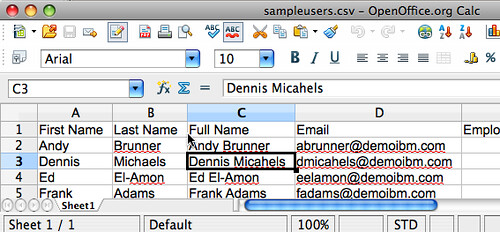
This post is also motivated by another question asked in the Lotus Connections Forum. In it, a customer explains how he was planning to export some data from an existing database into a CSV file and from there was wondering how to get the data into the system. I actually had recorded a video on how to do this and posted it internally (since it contained some sensitive data). That video is one of the most downloaded files that I have. Therefore, I decided to re-record the demo and post it here for you guys.

Ready? I've heard that pictures (or in this case, a video) speak louder than words, so go ahead and take a peek at this video.

Want to learn more about TDI? Check out the TDI Users page, which is what I first used when I wanted to learn more about TDI. Hope you found this valuable.