Pages

Showing posts with label sso. Show all posts

Tuesday, July 31, 2012

How To Customize the IBM Connections Mobile App for iOS, Android & BlackBerry

View Comments

Today IBM has published documentation on how to customize the mobile apps for IBM Connections. To customize the mobile apps, you need to have IBM Connections 3.0.1.1 CR2 installed (which you can get from here). As the IT admin, you have the control on the following settings:

  • Allow iTunes Sharing - whether iOS users can transfer files to the app via iTunes
  • Allow Web Sharing - whether uses accessing Connections via a browser should be re-directed to download the native app
  • Remember Password - whether to allow end users to store their passwords in their device
  • The ability to enable/disable different components of Connections (e.g. enable Files but disable Wikis)
  • For Files, there's a set of additional configuration options:
    • Encryption - whether downloaded files should be encrypted
    • Allow Upload/Download
    • Allow Export - whether downloaded files can be shared with other apps/folders
  • The name of the app and module can be fully configured
  • SSO authentication options (Siteminder, SPNEGO, etc)
  • Ability to add new applications to the app

If you haven't seen them yet, I've recorded a demo showing the latest Android and iOS apps. Here they are again.

iOS (iPad):

Android:

To access the documentation, click here http://www-01.ibm.com/support/docview.wss?uid=swg21606189

Monday, March 19, 2012

IBM Connections 3.0.1.1 Now Available

View Comments

Over the weekend IBM released IBM Connections 3.0.1.1. I don't intend to cover all the new stuff here, but I figured I would highlight a few things.

First, the release adds new support for Internet Explorer 9 and Firefox 9. Second, there's now integration with IBM Sametime 8.5.2 for presence awareness. Just as before with Sametime 8.5.1, users can see who is online in Connections without installing any additional software on their desktops. This is very cool because it rapidly speeds adoption and eliminates barriers to collaboration. If you are looking for the instructions on how to do that, you can find it here.

Third, administrators who like to run their servers on the latest release of RedHat, they'll be happy to know that RedHat EL 6.1 is now supported as well.

There's also several new controls available to specify how to sort and filter forums (e.g. by answered status), who can respond to community forums (e.g. members-only or everyone), and the ability to specify the default view for forums. I don't intend to cover all the new stuff here, but you can find the fix list for this release is here.

Ready to get started? Good! Here are the installation instructions to upgrade and you can download the actual fix pack from here.

Tuesday, February 21, 2012

New Quickr Domino 8.5.1 FP Released - You'll Want This

View Comments
As promised at Lotusphere 2012 #ls12, we have now posted a new Quickr Domino fix pack for 8.5.1. You can find this fix pack in Fix Central or go directly here.

At Lotusphere, we announced that the fix pack would be ready in the first quarter of 2012, and I'm glad that we were able to get this out the door today. The IBM Lotus Quickr Fix Pack 8.5.1.25 for Domino release delivers several features highly requested by Quickr users:
  • Addition of the Folder Navigator for libraries with deep folder hierarchies and the Index
  • Improved preview for Microsoft Office file attachments and imported pages
  • Support for importing HTML
  • Display of an attachment's last modified date on Attachments tab
  • Simplified place creation process that eliminates the requirement of reauthentication
  • The ability for editors and authors to create folders in a place.
  • Support for Internet Site documents

To read what's new in this release in detail, check out What's Enhanced in Quickr Domino 8.5.1 FP 25. This fix pack includes all fix packs up to FP 13.

Now all hands on deck to finalize the next release for later this year.

Wednesday, May 25, 2011

New Portlets Available for Connections 3.0.1

View Comments

Because Mac Guidera is out of the office and is probably not able to share these great news (he's the Product Manager for the awesome Connections plugins), I figured I would do so. Today we made available new portlets for Connections 3.0.1. As I mentioned earlier, we had 9 portlets for: Wikis, Activities, Profiles, Bookmarks, Tag Cloud, and Blogs.

Today, we've released new portlets that support Ideation blogs and add support for 3rd party authentication providers (TAM / Siteminder).

Even though the portlets are called Connections 3.0.1 Portlets, they support:

  • IBM Lotus Connections 2.5
  • IBM Lotus Connections 3.0
  • IBM Connections 3.0.1
  • IBM WebSphere Portal Server 6.1.5.2*
  • IBM WebSphere Portal Server 7.0.0.1*
  • Microsoft Windows XP SP3
  • Microsoft Windows 7 SP1 (32-bit, 64-bit toleration)
  • Mac OS X 10.4, 10.5
  • Microsoft Internet Explorer 6, 7, 8
  • Mozilla Firefox 3.5, 3.6
  • Apple Safari 4

You can download the portlets, for free as usual, from the Lotus App Catalog here: https://greenhouse.lotus.com/plugins/plugincatalog.nsf/assetDetails.xsp?action=editDocument&documentId=511C128045FCD5D1852577B60055AD81

Thanks to the plugin team for making this available!

Thursday, February 3, 2011

Lotusphere 2011 Day 3: Finally My First Session

View Comments

Day 3, Tuesday, of Lotusphere 2011 or #ls11 for those of you following in Twitter, was a fun one for me. A big part of the day was spent talking to customers and hearing their thoughts on the direction we should take for our products. That's always fun, especially when they validate what you are thinking of doing.

As it happens every day, the day started with a keynote. The keynote was titled: "Becoming a Social Business". One of the guest speakers was Jon Iwata, Senior VP Marketing Officer for IBM, . I live blogged the session along with Mitch Cohen. Jon had some very interesting quotes throughout the session:

  • People are afraid of social business, just like they were afraid of giving Internet to the employees
  • Is there risk in social business? Sure! Is there risk when doing business in emerging markets? Sure! But will you pass on the growth opportunities ?

Really makes you think, huh? A customer panel was also available where Cemex and State St told their stories. Definitely go check out the live blog for all the commentary, and if you want to see a replay of the session, you can see it here:

In between customer meetings, I got a chance to tour the Product Showcase. I saw some really cool solutions from our partners, but I'm not going to give them justice here. I'll blog more about those later.

Then towards the middle of the day I had a chance to finally deliver my first session at Lotusphere. Because Jay Boyd and I were tag teaming (and he was really going to dive into the technical details), I asked the audience to live tweet questions and I would answer them as a backchannel. I got some really good feedback from the audience on this approach and I thought it kept the audience engaged and that way they didn't have to wait until the end to ask questions. You can see the tweets here.

And here's the slides:

I closed the day at a customer reception and then an impromptu team dinner. More to come.

Thursday, May 27, 2010

Getting the Lotus Connections Portlet to work with WebSEAL

View Comments

Last week, I spent a day at a customer up in New Jersey. They are currently deploying a pilot of Lotus Connections 2.5. One of the most important things for them is to be able to mash up Lotus Connections with their existing intranet applications via their portal (powered by WebSphere Portal, of course).

To simplify sign on for all their employees, they use WebSEAL and SPNEGO to provide single sign on for all web applications. This way, an employee logs on to their workstation in the morning, and they are never prompted to log on again to other web applications.

As we deployed the Lotus Connections 2.5 Portlet, we ran into an issue. The portlet wasn't built to support an SSO solution in the middle (it mostly depends on WebSphere SSO which is based on something called LTPA token). At this point, I had to figure out how to change the portlet to support WebSEAL, so I went on and downloaded the source code for the portlet (isn't it nice when they make the source code available?)

It turns out, that it wasn't that hard; I was able to do it in less than 30 minutes. Here's what I did:

  1. Import the code into WebSphere Portlet Factory
  2. Edit WEB-INF/models/lcaccelerator/services/BlogProvider
  3. Look for getAllBlogsRest
  4. Expand Advanced options
  5. Notice how there's HTTP Cookies and Forward HTTP Cookies. Given the developers are using HTTP Cookies to forward the LTPA cookie, let's go with that. As seen here:
  6. Now, let's create the actual method. What I did was copy/pasted the src/com/ibm/lconn/lcaccelerator/utils/LTPAUtil class and renamed it to WebSealUtil class.
  7. At the same time, I renamed getLtpaCookie to getWebSealCookie and I changed the implementation to:
  8. Note that I'm getting a cookie called PD-CC. Not sure if that's what it's always called in WebSEAL, but that was the name in this case.
  9. Re-packaging and sending to the portal server fixed the Blogs portlet. Then repeat the above steps for the Dogear and Activities provider

Enjoy!

Friday, September 4, 2009

Great Week with Lotus Connections 2.5

View Comments

This week I had the pleasure to set up 3 different Lotus Connections 2.5 environments, and assist in a migration of a 4th.

The most interesting install was at a customer site where they wanted to integrate Windows Authentication with Lotus Connections (a.k.a SPNEGO/Kerberos). The idea is that each morning an employee logs on to their Windows desktop and authenticates against an NT domain. Then a user launches Connections and magically they are automatically signed on!

I hadn't done a SPNEGO / Lotus Connections installation in a while, but read the documentation and it seemed pretty straightforward. To enable SPNEGO authentication with Lotus Connections, I followed the steps documented in the Lotus Connections InfoCenter.

The actual setup is not that bad. One part must be done by the Active Directory administrator and another part is just some WebSphere configuration. The WebSphere configuration took about 10-15 minutes. One thing I wished the InfoCenter had was screenshots. However, as we were getting ready to do this deployment, we used Lotus Connections internally to find an expert in this topic. And we found Purvi Tivedi who wrote this awesome article, step-by-step & complete with screenshots. Of course, now I have tagged Purvi and bookmarked her document so I can find them later.

After restarting the server, SPNEGO didn't work. We actually spent 2-3 hours troubleshooting it. We noticed that there were a couple of technotes on the topic, but they didn't seem to apply. Finally, the light bulb went on. Our setup was against the customer's QAACME domain, and the user had logged on to their desktop under the ACME NT domain. We logged out the user, logged back in under the right Windows NT domain, opened a browser to Connections and it worked!

Monday, February 9, 2009

Lesson Learned And Addendum to InfoCenter

View Comments

As I said on my previous post, Friday was a VERY long day. Early in the morning I was told that there was a CritSit at a customer. The situation had been escalated all the way up to Jeff Schick (VP of Social Software). Since it's never good to have a VP associate a CritSit to your name, I had to get this resolved (and quickly) to make sure the blame would not come my way .

And it starts...

The week before, I had upgraded this customer up to Lotus Connections v2.0.1. At first, the environment was working ok, but then on Wednesday they ran into some issues:

  • users couldn't log in
  • forums in private communities were not working
  • widgets in the profiles page weren't working properly

In summary, it was a mess!

Troubleshooting

The first step was to resolve the login issue. To do this, we enabled several traces (see below) in the WAS admin console to see what was going on with WALTZ (the component that fetches users for Lotus Connections). After carefully reviewing the trace log, we noticed that the mapping for GUID (the system's globally unique id) was being re-mapped from 'dominoUNID' to 'DistinguishedName'.

com.ibm.directory.profile.*=all:com.ibm.connections.directory.services.*=all:
com.ibm.websphere.wim.*=all:com.ibm.ws.wim.*=all

For some time we couldn't figure this out. By default, the default mapping for GUID (a.k.a ExtId) is dominoUNID when the LDAP server is Domino (which was the case for the customer). Then one of the developers on the call, spotted this warning in the internal Wiki:

200902081935.jpg Warning

If Domino R8 & beyond is in need and the binding credential, which is used in setting up LDAP repositories on WAS, do not have administrators' privilege to query for Domino LDAP schema, then this manual procedure is a MUST-HAVE to configure 'dominoUNID' as the VMM (external) ID!

Success! The user that we are using to bind to the Domino LDAP is not an administrator and our Domino server is R8. This warning is not in the InfoCenter, so we never did this manual procedure. Now the question was: why did it work before and broke after the upgrade?
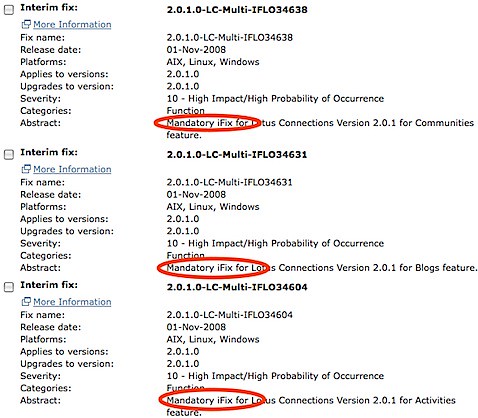
200902081653.jpgWell, turns out that apparently there are some broken iFixes. When I did the upgrade, I went ahead and installed all 32 of the available iFixes. I was questioned by one of the developers as to why I did this since iFixes should not be installed unless mandated by support. Turns out that I didn't know that and when I started looking at the iFix list chronologically, most of them said 'Mandatory' so I proceeded to install.

We were told by development to remove iFixes 36025 and 36482. I can't remember what those were for, but today I noticed that the iFix page has 26 fixes instead of 32. Therefore, I'm assuming some other iFixes were not working properly. Anywho, we uninstalled those two iFixes and users were able to log in again!

The final problem was fixing the forums in private communities. This was quite easy to find: the SSO domain for the LTPA token was misconfigured.

Lesson Learned

So, lesson learned:only install iFixes when mandated by support, unless they are clearly marked as 'Mandatory'. And if you are deploying Lotus Connections with a Domino R8+ LDAP and the bind user is not an administrator, you must manually map ExtId to dominoUNID.

Friday, January 18, 2008

Did you know...?

View Comments
I had a ping earlier today from a co-worker asking about Single Sign On for Lotus Connections with the Windows Desktop.  That means that a user logs on to their Windows machine, opens a browser and then goes to Lotus Connections and... VOILÁ!  They are automatically logged on!

How can this be done?  We use a technology referred to as SPNEGO (Simple and Protected GSS-API Negotiation).  In the old WebSphere v5 days, you had to purchase TAM/WebSEAL because it had the add-on that could parse the SPNEGO token (similar to the more commonly known LTPA token) and automatically sign you on.

Well, WebSphere v6.1 already includes this SPNEGO parser/connector/plug-in out-of-the-box, for free!  Therefore, all you need to do is configure it and off you go!  Here's how it works:


So another tidbit you can use to up the value of Lotus Connections (or any other application that runs on top of WebSphere v6.1) -- free SSO with the Windows Desktop!  (though I would still recommend some services to configure this...)

Wednesday, August 22, 2007

More on SSO between Sharepoint and Connections

View Comments
Here are the tree options that we came up with, thanks to the help of a co-worker Martin Lansche.

3 options:
1)  SPNEGO (2-4 weeks; most of the effort is having computers join the Active Directory domain)
    Pros:
        Full SSO between the desktop and the web applications.  Only one sign-on to the user's PC and they are logged on to all the web applications!!
        No extra coding (out-of-the-box functionality - in WAS v6.1)
        Bi-directional

    Cons:
        Need all user computers to join the Active Directory domain (will the customer let us?)

2)  HTTP Headers (1-2 week)
    Pros: 
        No need for computers to join a domain

    Cons:
        Needs to go to Sharepoint first
        Needs customization to Sharepoint
        Only works one way:  Sharepoint to WebSphere (users need to sign on to Sharepoint, then go to Connections)
        It's a hack - not secure... not how it would be done in production
   
3)  URL attributes  (1-2 week)
    Pros: 
        No need for computers to join a domain

    Cons:
        Needs to go to Sharepoint first
        Needs customization to Sharepoint
        Needs to develop code on the WAS side (custom TAI adapter)
        Only works one way:  Sharepoint to WebSphere (users need to sign on to Sharepoint, then go to Connections)
        It's a hack - not secure... not how it would be done in production
 
We are currently leaning on option #1.  Stay tuned...

Tuesday, August 21, 2007

SSO between Connections and Sharepoint

View Comments
Continuing on this subject of single sign on, the customer has now requested SSO between Microsoft Sharepoint and Lotus Connections.  There are several ways to do this:
  1. Use a product such as TAM/WebSEAL, which can be tricky to implement but the cool thing is that it not only allows SSO between web applications, it can also be used for SSO between the desktop and Lotus Connections.
  2. Develop a custom Trust Association Interceptor (TAI) for WebSphere.  This minimizes the cost, but requires a Java Developer to know WebSphere's TAI API in order to do this.  If you haven't heard of,or don't know what TAI is, it's awesome!!! It's really "easy" to use.  The disadvantage is that it only works if one web application links to another and can pass the username of the current user as part of the URL or in the HTTP headers.
  3. Use TAM eSSO, a client-based utility which stores passwords.  The problem with this is that it's not really SSO.  Users will still be prompted for a username/password, but it will be automatically entered by this utility that must be installed into each user's PC.

We are currently going to pursue #2 and see how far we can get.  We are a little bit strapped for hours, so we may not be able to finish this, and as I said before, I need to figure out whether Sharepoint can create URLs to Connections and embed the username in the links.