As I said on my previous post, Friday was a VERY long day. Early in the morning I was told that there was a CritSit at a customer. The situation had been escalated all the way up to Jeff Schick (VP of Social Software). Since it's never good to have a VP associate a CritSit to your name, I had to get this resolved (and quickly) to make sure the blame would not come my way  .
And it starts...
The week before, I had upgraded this customer up to Lotus Connections v2.0.1. At first, the environment was working ok, but then on Wednesday they ran into some issues:
- users couldn't log in
- forums in private communities were not working
- widgets in the profiles page weren't working properly
In summary, it was a mess!
Troubleshooting
The first step was to resolve the login issue. To do this, we enabled several traces (see below) in the WAS admin console to see what was going on with WALTZ (the component that fetches users for Lotus Connections). After carefully reviewing the trace log, we noticed that the mapping for GUID (the system's globally unique id) was being re-mapped from 'dominoUNID' to 'DistinguishedName'.
com.ibm.directory.profile.*=all:com.ibm.connections.directory.services.*=all:
com.ibm.websphere.wim.*=all:com.ibm.ws.wim.*=all
|
For some time we couldn't figure this out. By default, the default mapping for GUID (a.k.a ExtId) is dominoUNID when the LDAP server is Domino (which was the case for the customer). Then one of the developers on the call, spotted this warning in the internal Wiki:
 |
Warning
If Domino R8 & beyond is in need and the binding credential, which is used in setting up LDAP repositories on WAS, do not have administrators' privilege to query for Domino LDAP schema, then this manual procedure is a MUST-HAVE to configure 'dominoUNID' as the VMM (external) ID!
|
Success! The user that we are using to bind to the Domino LDAP is not an administrator and our Domino server is R8. This warning is not in the InfoCenter, so we never did this manual procedure. Now the question was: why did it work before and broke after the upgrade?
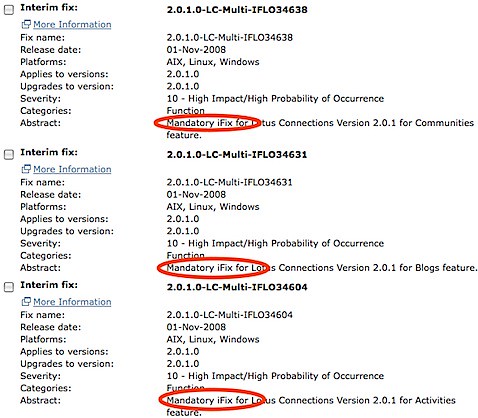 Well, turns out that apparently there are some broken iFixes. When I did the upgrade, I went ahead and installed all 32 of the available iFixes. I was questioned by one of the developers as to why I did this since iFixes should not be installed unless mandated by support. Turns out that I didn't know that and when I started looking at the iFix list chronologically, most of them said 'Mandatory' so I proceeded to install.
We were told by development to remove iFixes 36025 and 36482. I can't remember what those were for, but today I noticed that the iFix page has 26 fixes instead of 32. Therefore, I'm assuming some other iFixes were not working properly. Anywho, we uninstalled those two iFixes and users were able to log in again!
The final problem was fixing the forums in private communities. This was quite easy to find: the SSO domain for the LTPA token was misconfigured.
Lesson Learned
So, lesson learned:only install iFixes when mandated by support, unless they are clearly marked as 'Mandatory'. And if you are deploying Lotus Connections with a Domino R8+ LDAP and the bind user is not an administrator, you must manually map ExtId to dominoUNID.
 The other day I discovered

