Pages

Showing posts with label tdi. Show all posts

Friday, May 27, 2011

Let's Get Techie: Deep Dive into Connections coding and TDI

View Comments

The Connections development team have put together a great series of videos over at YouTube that take you through a deep dive on some of the administrative aspects of Connections.

The intended audience for these videos are IT administrators who run or are about to run IBM Connections in their infrastructure or ISV's / Business Partners interested in developing applications on top of Connections.

The latest video, which was posted on Wednesday, is a deep dive on the Profiles API:

Another video that I recommend is this one from Judy Piper. Everything I learned about coding for Connections, I learned from Judy Piper, specially thanks to her tutorials and sample code. If it wasn't for Judy's tutorials, I don't think I would've been able to create the some of the plugins that I have coded and have made available in the Lotus App Catalog.

One that a lot of people may like (based on the number of questions that I've received about this) is how to load photos into Profiles from LDAP using TDI (Tivoli Directory Integrator):

Enjoy!

Thursday, February 3, 2011

Lotusphere 2011 Day 3: Finally My First Session

View Comments

Day 3, Tuesday, of Lotusphere 2011 or #ls11 for those of you following in Twitter, was a fun one for me. A big part of the day was spent talking to customers and hearing their thoughts on the direction we should take for our products. That's always fun, especially when they validate what you are thinking of doing.

As it happens every day, the day started with a keynote. The keynote was titled: "Becoming a Social Business". One of the guest speakers was Jon Iwata, Senior VP Marketing Officer for IBM, . I live blogged the session along with Mitch Cohen. Jon had some very interesting quotes throughout the session:

  • People are afraid of social business, just like they were afraid of giving Internet to the employees
  • Is there risk in social business? Sure! Is there risk when doing business in emerging markets? Sure! But will you pass on the growth opportunities ?

Really makes you think, huh? A customer panel was also available where Cemex and State St told their stories. Definitely go check out the live blog for all the commentary, and if you want to see a replay of the session, you can see it here:

In between customer meetings, I got a chance to tour the Product Showcase. I saw some really cool solutions from our partners, but I'm not going to give them justice here. I'll blog more about those later.

Then towards the middle of the day I had a chance to finally deliver my first session at Lotusphere. Because Jay Boyd and I were tag teaming (and he was really going to dive into the technical details), I asked the audience to live tweet questions and I would answer them as a backchannel. I got some really good feedback from the audience on this approach and I thought it kept the audience engaged and that way they didn't have to wait until the end to ask questions. You can see the tweets here.

And here's the slides:

I closed the day at a customer reception and then an impromptu team dinner. More to come.

Wednesday, November 11, 2009

Tri-State LUG: Extending Lotus Connections to Domino with TDI

View Comments

As I mentioned last week, on Monday I participated in my first LUG: Lotus User Group. I was cordially invited to participate in the Tri-State Lotus User Group meeting. I could only stay for the morning. I got to enjoy Bob Picciano's keynote before my session. You can find a summary of Bob's keynote in Chris' blog.

My presentation was about using Tivoli Directory Integrator (TDI) with Lotus Connections and Domino. TDI is a free piece of software that's included with both Lotus Connections and Domino v8+. It's a great toolkit to easily move data from/to Domino to/from Lotus Connections. I used the following presentation to introduce my demo.

While I don't have a formal recording, I do have other blog entries with recordings that show how to use TDI to quickly import data to Lotus Connections. The videos are: How To Load Users from a Spreadsheet and How To Load Photos from LDAP.

To the first person who asked me a question, I gave away a copy of Web 2.0 and Social Networking for the Enterprise, Joey Bernal's new book which includes a foreword by Jeff Schick, VP of Social Software at IBM. I was one of the technical editors so got two copies and decided to give away my extra one .


Enjoy!

Friday, October 30, 2009

Live in NY, NJ, or CT ? Join us on Nov 9th for the Tri-State LUG

View Comments

On November 9th, I'lll be in New York visiting one of our customers and will also get a chance to speak at the Tri-State Lotus User Group (LUG). I've never been to the a LUG before, let alone speak at one. Needless to say, I'm a bit nervous about the event.

The keynote speaker for the event is Bob Picciano and my session is right after his, which of course adds to the pressure. Looking at the agenda, I noticed that my time slot also puts me going head-to-head against John Head. Luckily, I'm going to Enterprise 2.0 in San Francisco next week so I hope to pick up some good tips on new stuff (and perhaps how to present).

My session is going to be about extending Lotus Connections with Tivoli Directory Integrator (TDI) by importing data from existing Domino databases. This is actually something that I had to do for the customer that I visited this week in Toronto. I'm going to give a brief introduction of what TDI is and what a powerful tool it is. Then walk through the process of creating an 'assembly line' to connect to Domino, retrieve some data, and import it to Connections.

To register for the event on the 9th, fill out this registration form (and space is limited so register today)!  See you there!

Wednesday, February 4, 2009

Batch Import Data Into Lotus Connections

View Comments

One request that I've heard a couple of times from customers is how to migrate content into Lotus Connections. My common answer is to use the included IBM Tivoli Directory Integrator (a.k.a. TDI) to migrate data into the Lotus Connections databases. While this approach works, it's probably not the best in a production environment. Why? Well, it's never good to circumvent the application and modify its database. Instead, it would be nice if we could use the Lotus Connections APIs to batch import data into the system.

Up until today, this was a bit difficult because TDI did not include an Atom connector and it just so happens that the Lotus Connections APIs are Atom-based. A connector is nothing more than a plug-in into TDI which simplifies data exchanges. In TDI, there's already an HTTP connector, but the Atom layer is missing and time consuming to code. Well, not anymore!

Today, a great article was published on developerWorks which explains how to use an AtomConnector to read and write data to Lotus Connections. And, it even includes an AtomConnector you can use in your own assembly lines. The article focuses on how to read and write data from the Lotus Connections Blogs component, but it can be extended to any of the other components.


For more information, you can find the article here: Integrating Tivoli Directory Integrator and Lotus Connections. Oh and if you are interested in learning more about TDI, check out my two quick demos on How To Load Users from a Spreadsheet and How To Load Photos from LDAP.

Wednesday, January 14, 2009

How Social Tools Make Me More Productive, Efficient, and Innovative

View Comments

Just before 2008 ended, I had the chance to meet a colleague of mine for dinner while he was here in Puerto Rico. I originally met David as I was learning Tivoli Directory Integrator (TDI). Our conversation was mostly about the stuff that I do and the value that I get from social tools such as Twitter, Lotus Connections, LinkedIn, Facebook, etc. He asked me to send him an email with all the resources that I mentioned (feed readers, blog clients, twitter clients, etc). However, I figured that by sharing it through a blog post the entire community benefits, instead of just 1 person. I'll probably end up sending an email to David anyway, but I will only include a link to this blog entry (and maybe a 'Happy New Year').

Dear David,

So why (and how) do I blog ?

A while back I blogged about Why I Love Blogs and it's because of that true story that you may say that I'm addicted to blogs. Not only do I get to share my knowledge, but when people comment in my blogs it helps me think out of the box. It helps me see another perspective. It helps me have that human contact that I mostly lack since I work the majority of the time from home. And the best part ? I'm not only getting the perspective of my fellow Lotus peers, but I get to hear from any of the 300,000 other IBMers (and anyone else who reads my blog externally).

If you are pressed for time, take a peek at this 1 minute video created based on my story of the business value of blogs.

To make it easier on me and because I travel so much, I use ecto as my blog client. In this blog entry, I demonstrate how to configure ecto to work with Lotus Connections . There's a Windows, iPhone and Mac version of it. The great thing about ecto is that I can write a blog once, and cross post it internally and externally.

You may be afraid of sharing knowledge because "knowledge is power". I had this same fear as well. However, by sharing my knowledge others can consume freely and at their own pace and I believe this has significantly helped me reduce the number of emails that I get on a daily basis (~20-30 down from ~150!!!). Additionally, now I have more executive visibility throughout the organization, which (I hope) is good for career advancement.

So why do I use Dogear and Social Bookmarking?

Social Bookmarking is by far my favorite social tool. Why? Well, let me quickly tell you how I got hooked on it. I found the real business value of social bookmarking when I was desperate. As you read that blog entry, you'll see that my productivity was simply 0. Dogear changed all of that in seconds and made me productive again!!

I also realized that I had over 300 or so bookmarks in my browser. I had them all somewhat organized in folders, sub-folders, and sub-sub-folders. This presented 2 challenges:

  1. When I wanted to bookmark something, I had to find the best place for it, or create the right folder structure for it
  2. When I wanted to find a bookmark, it often took too long because my folder structure wasn't the best. Plus, I had so many that it was cumbersome trying to find it. Thus, I often found myself re-Googling for whatever it was that I needed.

Therefore, I figured, "if I'm always going to search for my answer, why not use Dogear to search my bookmarks instead of spending the effort re-Googling what I need??" ! As an added benefit, I was not only searching through my bookmarks, but I was searching across what other IBMers thought was the best of the best. I was searching through the content that they had selected as the best Google result for what I need. Consequently, the time I spent searching Google, got reduced from 30-50 mins/week to 2-3 mins/week. (especially now that I can search Google and Dogear at the same time).

Moreover, bookmarking (something that I do at least twice a day) takes about 3-5 clicks on your browser. It only takes 2 clicks to bookmark something in Dogear.

As if that wasn't enough, Dogear also solves the problem of accessing my bookmarks from different computers.

And I'm not done!!! I also use Dogear to adverstise myself. You see, I like to share. Not sure, why, but I like it. Anyway, before I found Dogear I had another challenge with knowledge sharing within IBM. As you know, there are dozens (if not hundreds or thousands) of 'databases' at IBM for people to share their intellectual capital. Again this presents 2 challenges:

  1. Where should I put my stuff so people can find it... ? (or put another way, where are people searching for information??) I often ended up putting my intellectual capital in multiple places hoping that people would find it and re-use it.
  2. Some databases required a formal process for submitting the intellectual capital (i.e. it must have an abstract, summary, intro, conclusion, approved by somebody, and properly categorized in the existing topic list -- and if your topic wasn't listed, you were doomed!!)

Now, with Dogear, I can post my file anywhere (an FTP server, a Quick place, a Quickr room, a Notes database, a Sharepoint site, anywhere!!) and just Dogear it. And/or I can blog about the intellectual capital that I just created, put a link to it, and Dogear my blog entry. That way people will not only find the intellectual capital, but also my story/context as to why I created it... perhaps my recommendations to enhancing it... etc.

So Dogear addressed 6 of my day-to-day challenges and has enabled me to be more productive. It also encourages me to generate even more intellectual capital than before. Therefore, IBM also wins!

So why (and how) do I Twitter?

Personally, I see Twitter as one big asynchoronous chat room. So what's the big deal ?

Just recently I blogged about how IBM gets more value from me using Twitter than I do personally. Definitely read that blog entry first because I think it definitely explains the why I use Twitter.

As I mentioned there, I use Twitter partly to subscribe to a feed of updates that talk about Lotus Connections. That way, I can monitor all Twitter users (regardless if I know them or not) and address any issues, FUD, or perhaps answer a question from a potential customer. (we'll talk more about feeds later). For TDI, you may want to subscribe to this feed of TDI search results.

So why (and how) do I Facebook?

Facebook is my personal social network. I only add people that I trust and mostly use it to connect with my high school and college buddies by sharing pictures, commenting on their wall, and planning events.

If you do start using Facebook, I recommend that you set your privacy settings. This is where you can control who can see your information. Be careful with selecting 'Your Networks' as that means that anyone in your network can see your information. So, for example, if you are part of the New York, NY network, 10 million people potentially have access to your information. The good thing about Facebook security-wise, in my opinion, is that you have very granular controls on security. You can specify, for example, that people in your network can see your name but not any other details about you.

Finally, if you plan to use Twitter more than 1-2 times a day, do not configure Twitter to update your Facebook status. I was doing that and my Facebook friends didn't like it. Instead, use a service like ping.fm when you want to update all sites at the same time.

So why (and how) do I use LinkedIn?

To be honest, I'm not a big LinkedIn user. So far, I've used LinkedIn solely for business purposes. I don't post anything personal there, except perhaps 1-2 status updates a month. I think one of the reasons that I don't use LinkedIn much is because it requires me (as far as I know) to use a web browser.

How do I stay up to date with all this stuff ?

Finally, we get to the most important tool: feed readers. Late last year, I blogged about my love-hate relationship with feed readers. However, I strongly suggest that you read my blog entry on how I effectively use 2 feed readers. In there, you will also discover which feed readers I use and what criteria I utilize to separate and/or classify my feeds.

In short, I use a feed reader installed locally on my Mac. The feeds that go there are the business critical feeds that I need to know about quickly and/or those that I want to have available offline. When I have some free time, then I would go into my web-based feed reader to see what other things are going on.

This should get you started...

And there you have it!! Hope this helps. Let me know if you found this information valuable!

Friday, October 24, 2008

How To Load Users From a Spreadsheet

View Comments

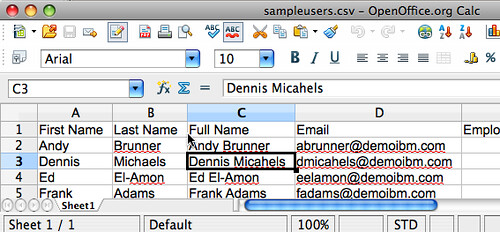
2008-10-21_2252Seems like this week is all about TDI (Tivoli Directory Integrator). On Tuesday, I blogged about how to load photos from LDAP into Lotus Connections. Today, I want to show you how to load data from an existing spreadsheet into Lotus Connections. And, of course, with no coding whatsoever!

This post is also motivated by another question asked in the Lotus Connections Forum. In it, a customer explains how he was planning to export some data from an existing database into a CSV file and from there was wondering how to get the data into the system. I actually had recorded a video on how to do this and posted it internally (since it contained some sensitive data). That video is one of the most downloaded files that I have. Therefore, I decided to re-record the demo and post it here for you guys.

Ready? I've heard that pictures (or in this case, a video) speak louder than words, so go ahead and take a peek at this video.

Want to learn more about TDI? Check out the TDI Users page, which is what I first used when I wanted to learn more about TDI. Hope you found this valuable.

Tuesday, October 21, 2008

How To Load Existing Photos into Lotus Connections

View Comments

Recently, a friend asked a very interesting question in the Lotus Connections forum. In his question, he wondered if there was any way to load photos into Lotus Connections Profiles. More specifically, he wanted to know how to load existing photos stored in the LDAP (in the jpegPhoto attribute). Out of the box, you are given scripts to load photos from the file system, but not from the LDAP.

In my experience, about half of our customers already have photos for their employees in some kind of system. Perhaps in their LDAP... Or in their HR Badge System... Or in some other in-house application. Therefore, I often find myself helping our customers create a custom "script" that fits their needs.

In an effort to spread the "wealth", I thought this was a great opportunity to show you how powerful Tivoli Directory Integrator (TDI) really is and teach you how to use it to the max. TDI is an ETL tool, which lets you extract information from pretty much any data source, transform it (if needed), and load it into Lotus Connections. And best of all, you don't have to do any coding! Since TDI is included for free as part of your Lotus Connections, I believe this is one of the key added value features of Lotus Connections.

Anyway, now, perhaps you are thinking "I don't have any skills in TDI, how am I ever going to figure this out?" Don't worry, I'm including a video here. It shows you how to load photos from your LDAP and, best of all, this takes less than 5 minutes!

If you would like detailed instructions on how to do this, follow the steps in my answer in the forum.