I'm on my way to San Francisco, but I couldn't wait to share some fantastic news. For some time now there have been some hints of new things coming to Lynda.
Bruce and I collaborated on this, well, he actually did all the work, I just gave him a server to record on.
For those of you who haven't heard about Lynda.com, they are an online learning company that helps anyone learn business, software, technology and creative skills to achieve personal and professional goals. Through individual, corporate, academic and government subscriptions, members have access to the lynda.com video library of engaging, top-quality courses taught by recognized industry experts.
Not yet a Lynda.com subscriber? Try it out free for seven days. To see the course description, outline and get a quick intro (and a few free sections), click here.
One aspect to keep in mind is that as you embark on your social business transformation, you are ready to drive a transformation shift in your enterprise. After all, it's people who create value for your business, and without them, you won't be able to reap all the benefits.
One way to do that is via storyboards where you can paint a typical business scenario and clearly highlight how things are jus so much better when using a social platform, such as IBM Connections.
I've embedded the first two chapters below. If you like them, you should do the same and embed these two presentations in your IBM Connections deployment to share with the rest of the organization. Here's chapter 1:
It's here! The Top 4 Ways to use IBM Connections based on tips from IBMers and IBM Champions. If you've ever been asked by peers how they can use IBM Connections, this is great resource for them.
The way the page has been structured is that it provides an overview first of what is Connections and then ways in which IBM Connections, as a social collaboration platform, can make you and your peers more effective and productive.
I really like the visual layout of the page and I hope you do too. The page also has links to download the free mobile apps for IBM Connections as well as all the desktop plug-ins (e.g. Microsoft Outlook, Word, PowerPoint, and much more)!
So what are the Top 4 Ways to use IBM Connections? You'll have to check out this new page to find out!.
Let me know what you think about the page in the comments.
Oh and if you want to learn more about IBM Connections, don't forget to register and attend for the webcast From liking to Leading: The Success of your Business is Social (click the invite below to register):
So turns out that I've received a lot of questions around Mac vs PC from family and friends who have kids going to college this fall. I also interview students for the college I went to and this question comes up (specially after they see me using a MacBook Pro to do the interview). I figured I would capture some of the thoughts on the topic and provide my take in the matter. This by no means is meant to be a comprehensive look at the options that are out there. If you are interested, there are plenty of discussions out there.
Off the bat, I usually recommend the 11" MacBook Air and undoubtedly the first thing I get back is "but they are so expensive". I figured I would look at the numbers and see how it would pan out. The comparison is against an HP machine which is the cheapest I found in OfficeMax.
There's also the question of iPad (w/ bluetooth keyboard) vs full laptop. I believe students still benefit from a full laptop (I'm thinking about writing those 40 page papers and gamers). I'm willing to be proven wrong, though.
Here's what I came up with:
Feature
MacBook Air 11"
PC
Price
$899 (typically there's a 10% discount for students)
$399
Weight
2.38 pounds
5.5 pounds
Screen Size
11.6"
15.6"
Office Productivity
Suite (1)
$59.97
$149.95
Anti-Virus (2)
Not needed
$159.96 (you have to renew virus license every year)
Memory
2GB
4GB
Processor
1.6 GHz Dual Core
1.6 GHz Dual Core
Storage
64 GB (flash drive; up to 2x-4x faster)
500 GB
Backup
$0 (Time Machine included)
$80 (typically $20 / year)
OS Upgrade (3)
$29 (at least the last 2)
$119 (at least that's what it was for Win 7 Home Premium)
Battery Life
Up to 5 hours (30 day standby)
Up to 5 hours
Screen Resolution
1366 x 768 (up to 2560 x 1600 w/external monitor)
1366 x 768
Total
$987.97
$907.91
(1) You could save by using the free versions of Office like Symphony or OpenOffice . I'm assuming students will need a word processor ($19.99 for Pages), spreadsheets ($19.99 for Numbers), and presentations ($19.99 for Keynote). If students only need a word processor, Pages is enough and it's ~ 1/8 the price of MS Office)
(2) Some colleges have a site license for anti-virus. Used Symantec Anti-Virus at $39.99 / yr. Update 3/Aug/2011: Apparently, Microsoft has a free solution for anti-virus. Not sure how good it is or how it compares to the paid ones.
(3) I'm assuming that in 4 years Apple will release another update to their OS and Microsoft will release one as well.
So the Mac is costing you about $80 more over a 4 year period. Yet, it's about 2 pounds lighter and it's up to 2x faster. Personally, I would recommend the 13" MacBook Air which would come up to about $1258 over 4 years (vs $907.91 for a PC). The 13" MacBook Air gives you 7 hours of battery, it's still under 3 pounds, a 128GB SSD of storage, and has a faster processor at 1.7 GHz.
Of course, cost is not the only consideration. Some tools will only run on a Windows environment so it might be good to ask current students in the prospective major what they are using.
Today I have something new that's available that I wanted to make you aware. Lately I feel like all I'm sharing is news around releases and new software that is available. I do have to admit that It's very exciting to see all these new things happening around IBM Connections and Quickr. I think everyone gets excited when there's such momentum around something, no?
The ibm.com pages have been recently updated to announce a new program for the Quickr 8.5 Multimedia Library. So for those of you who haven't heard about the Multimedia Library... what is it?
The Multimedia Library quickly teaches end-users essential skills, productivity tips and much more to be successful using IBM Lotus Software. The latest addition to the Multimedia Library training solution is Quickr 8.5 - enabling users to work faster, smarter, Quickr. The Multimedia Library for Quickr teaches individuals how to create, upload, send and share documents and information with team members, as well as more advanced features on how to integrate Quickr with IBM Sametime, Connections and Lotus Notes.
For all those new customers that are getting started on Quickr and also all those customers upgrading from a previous release, this is a great resource to drive end-user adoption. Quickr 8.5 has many new enhancements for end-users, such as; a better browser-based rich text editor, ability to view entire threads in a discussion form and better version management. The Multimedia Library for Quickr 8.5 will show you instantly how to use these new feature and more.
The great thing about the new Try & Buy program is that you can get access to the full version of the Multimedia Library for free for 60 days. If you are not convinced that the Multimedia Library is for you after 60 days, simply uninstall it.
IBM Lotus Education is excited to offer you a Free 60-Day Trial of the NEW Multimedia Library for Quickr 8.5 (English edition). Try & Buy gives you the ability to download the full version of the NEW Quickr 8.5 training tool for your organization. It gives you access to courses, lessons and hundreds of video tutorials showing users how to realize the full value of Quickr team collaboration software.
Simply click "Try and Buy", register and submit your request for a Free 60-Day Trial.
Soon after you've registered for the Try & Buy program, you'll receive an email with product download and installation instructions for loading the Multimedia Library for Quickr 8.5 onto a standard web server. Your organization will then have the ability to use the product for productive use during the 60 day period. The MML product can be used for training any end users in your organization during the "Try and Buy" period.
The Multimedia Library for Lotus Software is a just-in-time training tool in use by nearly 5 million Lotus software users. Contact an Education Delivery Manager in your region or your IBM Sales representative if you have additional questions about this offer or any Lotus Education offerings.
The Connections development team have put together a great series of videos over at YouTube that take you through a deep dive on some of the administrative aspects of Connections.
The intended audience for these videos are IT administrators who run or are about to run IBM Connections in their infrastructure or ISV's / Business Partners interested in developing applications on top of Connections.
The latest video, which was posted on Wednesday, is a deep dive on the Profiles API:
Another video that I recommend is this one from Judy Piper. Everything I learned about coding for Connections, I learned from Judy Piper, specially thanks to her tutorials and sample code. If it wasn't for Judy's tutorials, I don't think I would've been able to create the some of the plugins that I have coded and have made available in the Lotus App Catalog.
One that a lot of people may like (based on the number of questions that I've received about this) is how to load photos into Profiles from LDAP using TDI (Tivoli Directory Integrator):
I'm glad to see all these solutions become available for Quickr. Yesterday, I was made aware of a new course made available by wareSource called "Quickr 8.5.1 User Essentials".
Here's the description:
Social networking tools provide a way for people to communicate and interact online. Lotus Quickr is a key element of IBM’s “Social Business” initiative that provides a new competitive advantage with an integrated set of social networking tools.
During this course you will learn how to use Lotus Quickr to share all types of content with your colleagues down the hall or around the globe using online libraries, blogs, wikis, discussions, and shared calendars and task lists.
You will learn how to create and secure new Places while serving as a Place Owner and Manager, add content using a variety of Item types as an Author, and serve as an Editor to validate and revise content.
You will also install and use the Quickr Connectors to share and work on files directly from other desktop applications.
To get the full list of topics covered and view a free sample go here. The licensing for the course is by user so take a peek. This may be a great way to get your users up to speed with all the new great things in Quickr 8.5 for an affordable price.
I've been anxiously waiting for this. We are just days away from the grandevent where IBM's supercomputer (a.k.a. Watson) will take on previous Jeopardy! champions head on. Last month, there was a practice round between Watson and the former champions, and Watson won. I can't wait to see who wins the the real competition for $1 million.
On Wednesday of this week, PBS aired a special called NOVA: Smartest Computer on Earth. If you missed it, check out the live blog replay. One of the interesting comments was a question from the NOVA show to the IBM Researchers who created Watson. The question was about if they were scared about how Watson learns (SkyNet anyone?). The researchers said they are not too worried about it because they know how it learns and that Watson can only do what it was programmed to do.
IBM's Researchers in Conjunctions with Universities
Earlier today, IBM's press release announced that Watson was created in part with IBM's awesome research team but in partnership with several universities such as: MIT, Carnegie-Mellon, RPI, and UMass among others. I'm a big fan of MIT and artificial intelligence so when I read that MIT was involved my interest peaked even more.
A team of researchers from Massachusetts Institute of Technology, led by Boris Katz, principal research scientist at MIT's Computer Science and Artificial Intelligence Laboratory, pioneered an online natural language question answering system called START, which has the ability to answer questions with high precision using information from semi-structured and structured information repositories. The underlying contribution to the Watson system is the ability to break down the question into simple sub-questions for responses to be quickly collected and then fused back together to come up with an answer. The Watson system architecture also took advantage of the object-property-value data model pioneered by MIT, which enables the information in semi-structured data sources to be effectively retrieved in response to natural language questions.
Learning More From MIT
I was lucky enough to get a chance and "sit down" with Boris Katz last night. As we kicked off the call we found that we have tons of things in common. Turns out that I used his technology as part of my thesis work at MIT. It also turns out that Ask Jeeves has licensed his patent, and Ask Jeeves was also the company the acquired the start-up I worked at shortly before joining IBM. So we are pretty sure that we at least worked in the same building at one point at MIT.
So this brought up the question, when did START (SynTactic Analysis using Reversible Transformations) go live? I learned that START went online in 1993 about the time the web started. Mr. Katz said that he immediately got value out of it as people from all over the world were using it and he was getting valuable research data for free (crowdsourcing at its best 18 years ago!!). As I got ready to interview Mr. Katz, I played with START to see how it worked. Here's what I asked and the responses from the computer:
Q: Who is better the Red Sox or the Yankees?
A: Sorry - I don't know whether or not the Red Sox are better than the yankees.
Q; What is the weather for NYC this Saturday?
A: It gave me real-time info from weather.com
Q: Who is luis benitez?
A: I am sorry to say I don't know who Luis Benitez is. (notice that the name is capitalized. so it detected my name, but just didn't know who I was. I also detect some humor in its answers)
I asked Mr. Katz who approached whom when it came time to incorporate START into Watson. Turns out IBM approached him as IBM was trying to replicate results that other companies claimed they could do in the area of natural language processing. Since other companies weren't giving IBM their code, IBM in conjunction with other institutions and university decided to create the Open Advancement of Question Answering Initiative (OAQA). That's where Mr. Katz got involved giving talks and demos to IBM researchers and software engineer.
Clearly START provided some great intellectual capital to Watson so I asked Mr. Katz if he had to change some of the code to be integrated into Watson. Turns out that Mr. Katz didn't provide the code since, he says, IBM has far superior software engineers than undergraduates that barely work a couple of hours a week on it. (funny)
Looking Towards the Future
Watson and START sound like amazing technologies that could prove to be the next big search engine. Mr. Katz says that the technology is still in a "playground" phase. "It's important to society because it's going to bring new students to the field, but I think we are still very far from understanding language and answering questions or respond properly to any query", says Mr. Katz. And this is evidenced, according to him, when you see Watson give silly responses. There's still tons of work that needs to happen and he's evaluating how to make the system better either by giving it vision, touch, partnering with cognitive sciences, etc.
This brought me to my next question. I told him how some people were referencing Watson as the beginning of Skynet since Watson has some learning capabilities in it. Mr. Katz says that Watson uses Machine Learning technologies with history from the past 20 years of Jeopardy! It uses this history to pick the best answer from the up to 1000 candidate answers it sometimes generates. If you think about it, this is not how humans think. When you are asked a question, you don't evaluate 1000 past responses/alternatives and try to pick the best one. You just know. According to Mr. Katz, "the real question is, can we build a machine that can scratch the surface and be even as smart as a 3 year old? In some sense computers can do things faster than us like multiply two large numbers together. But 3 year olds can understand language and execute commands like no other machine. How long will it take to build a 3 year old? Frankly, I don't think anyone knows".
Mr. Katz says that he hopes that in 20 years this technology can be used to help society like drive cars, and do simple tasks. Some of this can be seen already today with devices that can recognize certain commands and execute them. IBM certainly has plans for this technology.
Where To Learn More
By the way, if you are like me and like videos, check out the video collection for more on how Watson works here. Watson, of course, has its own Facebook and Twitter accounts (though it's not clear if it's Watson himself responding or humans). Finally, Watson has its own social media aggregator which makes it very easy to see what everyone is saying about Watson in one page, including photos, videos, blogs, tweets, etc. If you want a single place to catch all Watson related news, the aggregator is for you.
What do you think? Is Watson going to win the 3-day competition? Where would you like to see Watson applied in real life?
On Tuesday, I did a guest blog entry in the Synch.rono.us blog (you are subscribed to that blog, aren't you?). In it, I interviewed the team behind the Learning Widget for Lotus Connections. In case you haven't heard of this widget before, the Lotus Connections Learning Widget allows you to view and filter learning materials on your Home page in Lotus Connections. You can use the widget to access demos, videos, tours, online courses, and reference cards related to Lotus Connections.
I think it's a great way to distribute learning content to your end users as you plan and continue to drive adoption to your new Enterprise 2.0 platform. Here's what you'll find inside the widget:
Demos, videos, and tours: Demos are short product simulations that show you how to complete a task in Lotus Connections. Videos and guided tours are longer product simulations that provide an overview of a Lotus Connections component, such as Using Blogs.
Online courses: Online courses are self-paced e-learning courses that are comparable to material covered in an instructor-led classroom-based course, but can be taken online at your own pace. Online courses can include conceptual information, task "how to" information, and sample files for completing exercises on your own.
Reference Cards: Reference cards are a printable quick deskside reference to quickly find how to perform the most common tasks in a product.
To install the widget, it shouldn't take more than 5 minutes. And, as mentioned in the blog entry over at Synch.rono.us, the widget will automatically update itself to display the new Lotus Connections 3.0 content once it's available. How's that for ease of use?
For instructions on how to download and install this widget, click here. Business partners and consultants: Make sure that you install this widget for all of your customers!
When I first joined IBM 8 years ago, I was a developer for the IBM Lotus Learning Management System (LMS). As part of IBM's Workplace strategy, the product matured into IBM Workplace Collaborative Learning. Shortly thereafter, I left the development division of IBM and became a consultant. At that point most of my customer engagements where about planning, architecting, designing, deploying and integrating our LMS product with our customers' enterprise applications.
Then Lotus Connections showed up. Initially, I started looking for ways in which we could integrate LMS with Lotus Connections to create Social Learning. At the time, I believed ( and I still do ) that our LMS product is great for formal training. Lotus Connections on the other hand, is fantastic for informal learning. I thought: "what if we could integrate both to create Social Learning?".
I quickly made a list of all the integration points I thought would be valuable. Today, IBM is reselling the Saba Learning System, so you could consider this a "how to integrate Saba with Lotus Connections" list:
Add the person card to wherever a name shows up in Saba
Add 'My Courses' as a widget in the Lotus Connections Profiles
Add 'Courses I'm Taking' as a widget in the Lotus Connections Profiles
Add 'Courses I Want to Take' as a widget in the Lotus Connections Profiles
Add 'Recommended Courses' as a widget in the Lotus Connections Profiles
Attach one course to a community so users have a place to interact and talk to each other
Add 'tag this' capability (via Dogear) to LMS so students can tag pages/courses in Saba
Use Lotus Connections to generate a list of 'Related Courses' (based on tags) while browsing Saba courses
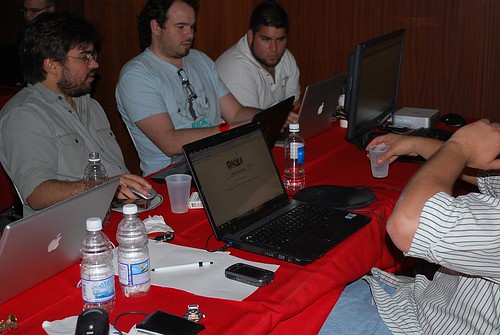
This past weekend was the first Puerto Rico Startup Weekend. You may have caught my live tweets from the event. I had never been to one of those events before and it was great to meet other forward thinkers from the area. I was actually impressed by the number of awesome programmers that turned out for the event. 4-5 ideas were generated from the event and I actually joined one of the teams.
The idea of Startup Weekend is to try and launch a company during the weekend. While I don't think any company decided to incorporate, the team I joined already has a website set up to help us gather some data. In fact, now that you are reading this we are looking for fluent English and/or Spanish speakers to help us rate some words. I would really appreciate it if you could spend some time rating some words once you are finished here. I can't tell you much yet about the purpose of it, but you'll know soon (and no, it's nothing that competes against IBM ).
One of my biggest challenges was getting up to speed with the code. All the developers were PHP/MySQL gurus. That's an area that I'm just learning. Being a huge Eclipse fan, I installed a plugin and set up my PHP development environment on Eclipse on the Mac (BTW, 75-80% of the computers at the event were Macs AND 50% of the PCs crashed at the event, while only 15% of the Macs crashed).
I also set up a MySQL development environment on my Mac following these instructions. The networking that I got to do at the event was great too. It's been a while since I've done some face-to-face "social networking". Oh, and I also got to talk about Lotus Connections and developing rich client applications on the Eclipse/Expeditor framework and get some people excited about that.
In my opinion, the event was great given that it was the first one here. Looking forward to next year's (and stay tuned here to learn more about what we are coding on our free time). More pictures from the event are here.
(This is a delayed post from a post I did internally to evangelize Lotus Connections 2.5 to IBMers -- posting here cause I think this is just way TOO cool.)
Our super awesome product designer posted in his status that he got first dibs into a "tool" developed by an IBMer that leveraged the new 2.5 APIs. That's right, within 24 hours of 2.5 being available internally, IBMers were already hacking away at creating new plugins for it! I, of course, wanted to check it out so I asked him for a link. Marty said that the tool was not his to give away... Bummer!
But not really, then I remembered our super awesome new tab in the Lotus Connections Homepage: Discover. After reading through the list, I quickly discovered the name of the IBMer who had developed the plugin. I installed the plugin on my Mac and WOW!! It's really amazing what came up in just 24 hours!!
So there you have it.. the Discover tab really does work!!! Testing complete!
But wait, it doesn't stop there. The next morning when I came in, I started to catch up with latest profile updates. Then I stumbled upon another interesting tid-bit.... Adrianadrian_spender@ie.ibm.com had loaded an IBM VPN client for his iPhone. Jokingly (cause I thought that was something super special that I didn't have access to), I asked him to send me a link for more info. Minutes later, he replied back with the link to join the pilot for theVPN client for the iPhone/iPod Touch!
With so much information discovery going on, I think I need to figure out how to make room in my brain. It's only been 48 hours since Lotus Connections v2.5 has been up and running and I feel like a robot that has 4GB of RAM but runs on a 32-bit operating system (not sure what that means, but that's how I feel).
You may remember that last week I blogged about how a university in Brazil is using social software to enhance both the formal and informal learning aspects of their education environment. You can go here to review that blog entry and see a video of the customer explaining why they chose Lotus Connections.
As you may have seen in mytweets, this week I was working on a local Learning 2.0 event that was hosted by Interamerican University. I was invited to speak on "Social Software for Higher Learning and Community Collaboration". Long title, huh ?
Challenges
By now, you know that when I first started at IBM, I worked as one of the developers for IBM's eLearning product. For 5 years, I concentrated on eLearning and had specific focus in the Education industry. For the past 2 years though, I've been working with social software across many industries. Therefore, I got myself up to speed with some of the references and success stories, such as the one that I blogged about last week.
But by far, the biggest challenge was getting ready to present in Spanish. While I deliver the Value of Social Software almost twice a day, it's always in English. Words such as 'leverage', 'enable', 'empower', 'key', 'deliver', 'pervasive', etc have become part of my lingo (even with my family!!), but that's because Spanglish is accepted in our household. Spanglish at an all-Spanish conference just looks unprofessional.
Luckily, my good friend and co-worker Laurisa had blogged about this same challenge internally. I referenced that blog and off I went!
Socializing and Presenting
I relied heavily on the Keynote speech at the Borough of Manhattan Community College's Tech Day when I created my presentation. My next challenge? Trying to fit a demo of all our offerings and talk about in 45 minutes!! I clearly wanted to showcase as much of our technology as possible, but at the same time give sufficient context to the CIOs, CTOs, and professors in the room.
As the attendees came in, I introduced myself and asked about their challenges and frustrations. One dean told me that his biggest frustration is that discussion in the classroom is null. He does use an online forum, and that's where all the "classroom" discussion happens. Interesting!!
Another professor shared his biggest pain: search. "Oh what I surprise I have for you..." (though Dogear doesn't translate well into Spanish).
Another dean expressed that usability was her biggest challenge. Today's students try an application once. If it doesn't work and it doesn't adapt to their needs, they won't use it again.
At first, I was planning for a 20 minute presentation and 25 minute demo. However, as I talked to the faculty in the room prior to my turn, it was clear that they understood today's students. They knew what the pains were. They knew they needed something to improve the learning experience. Therefore, I cut my presentation short to 15 minutes and spent 45 minutes demoing.
That's right, the interest was so big, that I overran my time for 15 minutes (with the permission of the audience).
Demo'ing
When demoing our social software solution, I used an integrated environment of Portal, Instant Messaging, Quickr, and Lotus Connections. I spent a considerable amount of time populating data that was specific to the audience, even using the names and pictures of the people in the audience! (I asked the registration desk to take a picture of each attendee and I loaded them up into Profiles while the other presentations were going on).
Next Steps
The event generated tons of interest and we have scheduled several follow-up meetings with deans and other faculty members. Woo Hoo!!!!
P.S. I was going to post the slides here. The presentation, however, is a new one that I created and it's mostly pictures and I didn't have time to add the speaker notes. When I get some time, do expect to see it here, though!
Even though I may be starting to develop a love-hate relationship with feed readers.. I still love 'em! Case in point, yesterday I found out about some new training offerings for Lotus Connections.
Heath McCarthy casually stumbled upon these offerings and blogged about it internally. There are four courses available:
I think the third course listed above would be really useful in helping you drive adoption. It serves as great introductory material that can be hosted either in your existing LMS (Learning Management System) or in your own intranet / portal.
For more information on the educational offerings for Lotus Connections, visit this page on ibm.com.
I recently had the pleasure to join Neil Burston and Stuart McIntyre as part of their Collaboration Matters Podcast series! While I had already created several podcasts internally at IBM, I had never done one externally. Needless to say, I was very excited that they reached out to me in order to create my first external podcast.
If you are already following the Collaboration Matters blog, then you already know the news and probably even heard the podcast already! If you are not subscribed to the podcast, I would like to encourage you to do so. In Episode 3, Heidi Votaw and Suzanne Minassian talk about the latest and greatest in Lotus Connections 2.0.
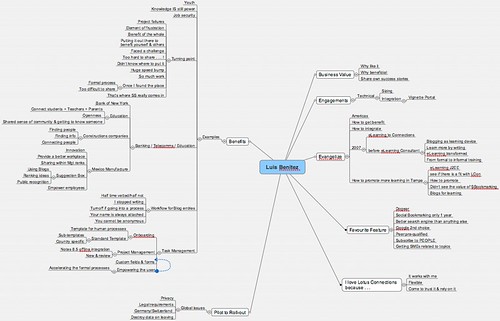
So what is this journey from eLearning to Social Software ? Well, as I've mentioned before, I used to be an eLearning developer and consultant before taking on my current role. Thus, Neil asks me how I got into this whole social software space and how I became so passionate about the subject. We also talk about some challenges that I've run into in the past 2 years. In fact, let me give you a quick overview of what the podcast is about:
01:30 - Good morning to you - Buenas tardes desde aquí!
02:20 - Luis, tell us about yourself, what you do, your role and how you got into this
03:20 - My job as an eLearning consultant and my first transition to social software... a "expected" evolution/transition
03:50 - How I learn by contributing content in the social software space
04:30 - The beauty of living in Puerto Rico
05:30 - My own, personal introduction to Lotus Connections
06:40 - Evaluate social software as an eLearning approach / solution for a customer in Tampa. I had been blogging since early 2006 and was familiar with Social Bookmarking but was not an avid user. I had to make a case for how these technologies could help solve their elearning needs.
07:55 - Results of the social software for eLearning pilot. Challenges that we encountered re: privacy in this multi-national environment
09:30 - Legal blocks to social software deployments in Europe
11:30 - My view, as a millenial, on the benefits of sharing knowledge with social software
14:00 - Why it was so hard to share before social software
16:20 - Which industries are using social software ?
18:10 - What really blew me away... social software at construction companies!!!
21:00 - How the product itself promotes adoption
22:45 - Have you seen any downsides to not having any formal processes behind knowledge sharing?
25:30 - How Lotus Connections, as an enterprise social software platform, promotes self-policing
27:35 - Tell us about the usage of social task management and Lotus Connections Activities
31:15 - The role of repeatable human processes and social software
32:40 - What's your favorite feature of Lotus Connections ? Definitely, Dogear, the social bookmarking component of Lotus Connections
35:00 - How feed readers help in my day-to-day job
36:40 - Complete the following sentence: "I love Lotus Connections because..." - it works with me! It's always with me, I depend on it, I trust it
38:00 - Closing comments...
One success story (of many) behind all this, is that I met Neil and Stuart strictly through social software. More specifically via my blog and Twitter. By using social software we collaborated effectively even though there was an 8 hour difference between us!! (It was 7:30am my time when this was recorded).
Neil, also told me that he was able to capture our conversation as a MindMap. I didn't know what a MindMap was until today. But no worries, I downloaded MindManager for Mac and was able to look at it. Pretty cool!!! The tool looks really interesting and I'm going to start playing with it more to see how I can use and apply it to my daily life. If you have any suggestions, please let me know.
Here are the slides used at the Connectr #6 event:
This week I'm down in Sao Paulo training some of the Tech Sales resources in South America on, what else, Lotus Connections. I stayed at the Hilton Sao Paulo and had the following great view of the Octavio Fritas de Oliveira bridge from my hotel room's window.
At the office, I got to meet one of the local tech sales resource who told me the story of how Lotus Connections has completely displaced an eLearning program that was set up at a university. At that point, I'm like "Are you kidding me?? I just blogged about this a couple of weeks ago!!"
Use Case: Lotus Connections at a University
So here's the situation. The local ministry of education allows technology courses to be 20% online. Thanks to this, a bachelor's degree can now be completed in 3 years and all homework submitted online. Last year, the university tried an eLearning solution, but it didn't work because it was designed for courses that were 100% online. At that point, the university decided to deploy Lotus Connections.
Professors have blogs which talk about the classes and give another perspective on a day's session. They also use it to follow up on questions from the student body that could not be answered during class. This also allows those students who weren't able to attend, to get course information through the blog. Some professors also use Dogear to link to related materials for a specific course.
Promoting adoption
Additionally, when students join the university they are highly encouraged to work in groups. At the end of the semester, they have to do a presentation based on what they've learned. This is purposely done to simulate the professional work environment. This group collaboration happens through Lotus Connections Communities. Each team created for a particular course has a corresponding community in Lotus Connections. However, there are also more generic communities for Java, PMI, etc.
Students also have to create a team blog for every student group to exchange information about their specific project. Professors are encouraged to participate in the blog by commenting, or perhaps by being a co-author to the blogs.
To help coordinate these efforts and facilitate adoption, the university has set up coordinators. These coordinators create an Activity Template with all the due dates for each individual project. Once the professors approve the Activity Template, student groups create an activity based on these templates. Students then post their documents and other collateral in the activity. Professors then review the material and can suggest corrections or grade them as needed.
Partnering with other universities
Finally, a partnership was reached with a college in Florida where students from both universities work on projects together. All information exchange must happen through Lotus Connections and follows the same model as above (i.e. team blogs, activities, and communities).
This university will soon be a reference for Lotus Connections. Once I have the "go" to publicize the names, I'll do so in this blog. Stay tuned!
If you are following me on Twitter, you know that I just spent a whole week in Chicago presenting on Lotus Connections and social software. It was a great chance to see some of my fellow co-workers and finally meet in person those that I've met through my blog. Before I got going, I thought it would be a good experiment to see how many of the 80 people knew me (I would say that I knew about 10-15). Since there's a general user trend that not a lot of people comment on blogs, I figured some people may know me through my blog, but never took the extra step to comment.
Social Software works
To my surprise, when I asked the audience who knew me, about 90% of the audience raised their hands way up high! I was in shock! It kinda put more pressure on me. "This people know me, but I don't know them. I hope I don't let them down", I thought. I continued the experiment by asking who knew me through my blog and who knew me as the IBM community leader for the Lotus Social Software community. The results? Most people knew me through my blog.
I had the spotlight for 1.5 days and the idea was not only to train our resources on Lotus Connections, but to also give them the skills to:
Install and configure Lotus Connections against a customer's LDAP
Brand Lotus Connections (modify the header, footer, and changing the logo)
Additionally, I talked about REST, the Lotus Connections Atom APIs, and integration options, mostly using the content from this blog entry. Of course, I talked about the person card and how easy it is to add to existing applications.
Talk about immediate value add
Once I finished my session, I was approached by Erasmus, one of the session attendees. He wanted me to see something that he had done based on the presentation that I had just given. What I saw was simply amazing! You see, Erasmus is one of our experts with HATS (Host Access Transformation Services). At this point, all you need to know is that HATS is a framework that IBM provides so that organizations can web-ify Mainframe (i.e. green screen) applications.
So, what had he done? He added the Lotus Connections Profiles' Person Card to a sample mainframe application! "Whoa!!", I thought, since I was speechless. This scenario had never occurred to me. I mean, green screen applications are probably the most anti-social applications ever! And now, because the Profiles component of Lotus Connections provides this person card service that can pretty much be integrated into anything, we socialized a mainframe application.
When I was finally able to speak again, I asked him how long it had taken him to do this. He replied: "Oh, not even 5 minutes".
Now that's very cool. I never thought mainframe applications would go social! Isn't SOA beautiful?? Erasmus will be presenting at the upcoming Portal Technical Conference, so stay tuned for details!
I've been wondering about this topic for a while now. And as I keep blogging, the more convinced I am that social software is replacing eLearning. When I joined IBM 6+ years ago, I came in as a software developer for the Lotus Learning Management System or LMS. That product was the first J2EE product launched by Lotus. Soon after that Lotus released other J2EE products such as Workplace Collaboration Services, Quickr and (my personal favorite) Lotus Connections.
Anyway, after developing the LMS, I moved into IBM's consulting division and soon started traveling all over the world to help customers implement and deploy our eLearning solution. Since I was one of the developers of the product, this job was really easy . I did eLearning within IBM for about 4.5 years and it was real good to me.
Early 2007
In January of 2007, I started to pick up Lotus Connections as a consultant (though I'd been blogging since mid-2006). I started to work with customers deploying and integrating Connections with existing applications. More importantly, I also helped customers figure out an adoption strategy and help them understand why viral adoption is simply not enough. Other consultants in my group followed suit: they started to leave behind eLearning (as it was also declining in popularity) and picking up social software and Lotus Connections.
As my blog gained popularity, the success stories wouldn't stop rolling in. At that point, I still had the perception that Blogs were all about sharing knowledge (authors) and gaining knowledge (readers). I was convinced that the only reasons bloggers, well, blogged was because:
They wanted to share knowledge as required by their job
They wanted to get known within the company
They wanted to get more recognition
Is eLearning Dead ?
I soon discovered how wrong I was!!! Through my blog I started to learn. "How?" you may ask. Well, as I blogged, people would leave their comments sometimes agreeing with me.. sometimes disagreeing. And that was the beauty of it!! By publicly sharing my concerns and/or challenges, people voluntarily shared their opinion with me, fostering "out of the box thinking". In some instances, I even blogged about my frustrations with Sharepoint and customer feature requests. Through my blog's comments, I got the answers that I needed, even though I wasn't, at first, looking for them. I was getting unsolicited knowledge! I honestly felt, and still feel, that I learn more as a blog author than a blog reader!
As I kept learning, success stories just kept piling up, and more and more people started to leave eLearning behind, the question kept coming up again and again: "Is eLearning dead?"
Social Software, of course, has the answer
I went over to my favorite search engine, Dogear (a social bookmarking site), and searched for "is social software replacing elearning". Interestingly, I'm not the only who shares this opinion. In fact, there were 1,225 search results on our internal deployment of Dogear!! Here's some resources that I found:
Based on this, it seems the industry is split. Some eLearning purists say that social software is a nice add-on to eLearning systems. Others say that social software is the next evolution of eLearning systems.
So, help me out. Is eLearning is dead ? Does that also apply to KM? Or is social software what some people call eLearning 2.0? I definitely think social software is KM 2.0, but eLearning...?
Have you ever wondered why IBM/Lotus created Lotus Connections? What's the actual business value to us as IBMers? And for our customers ?
Suzanne Minassianminassian@us.ibm.com, product manager for Lotus Connections, gets interviewed by a fellow IBMer, Douglas Spencerdwspence@us.ibm.com, to figure out why Lotus Connections was created. Suzanne discusses the roots of Lotus Connections, the research behind it, and how it was adopted internally at IBM
One of the key important points that I always talk with my customers is: integration. Integration is critical for user adoption!! Think about it! If you have a BlackBerry, do you use TwitterBerry or Facebook on it? Doesn't it make it easier to adopt those tools when it's pervasive in everything that you do? I think so!
Thus, I also like this video because Suzanne, also discusses the free integration capabilities that ship with Lotus Connections. The video finishes with some things that IBM is looking at beyond 2.0. Enjoy!


 It's here! The Top 4 Ways to use IBM Connections based on tips from IBMers and
 I really like the visual layout of the page and I hope you do too. The page also has links to download the free mobile apps for IBM Connections as well as all the desktop plug-ins (e.g. Microsoft Outlook, Word, PowerPoint, and much more)!



 The idea of Startup Weekend is to try and launch a company during the weekend. While I don't think any company decided to incorporate, the team I joined already has a website set up to help us gather some data. In fact, now that you are reading this we are looking for fluent English and/or Spanish speakers to help us rate some words. I would really appreciate it if you could spend some time
 ).


 One success story (of many) behind all this, is that I met Neil and Stuart strictly through social software. More specifically via
 This week I'm down in
 Professors have blogs which talk about the classes and give another perspective on a day's session. They also use it to follow up on questions from the student body that could not be answered during class. This also allows those students who weren't able to attend, to get course information through the blog. Some professors also use Dogear to link to related materials for a specific course.

 I've been wondering about this topic for a while now. And as I keep blogging, the more convinced I am that social software is replacing eLearning. When I joined IBM 6+ years ago, I came in as a software developer for the
 As my blog gained popularity, the