Pages

Showing posts with label adaptability. Show all posts

Wednesday, August 20, 2014

Continental AG Goes Full Out with IBM Connections To Get Things Done Faster

View Comments
Last week, I ran into this video posted by Continental AG, a company of 170,000 people, which talks about their business networking event for their 450 social business ambassadors.  Continental spoke at IBM Connect 2014 about their usage of IBM Connections.

Continental brought the participants from 37 different countries to Hamburg Germany to start the conversation around how to improve the culture of communication and how to give employees a helping hand.

To do this, Continental chose an open space, which they say it's similar to social media, where it's a big, empty and fluid environment.

The goal was to spend 2 days and officially become GUIDEs. Individual interviews mention how the goal is to break the barriers between countries to become agile, interact better with others by knowing them better, and getting things done faster and more efficiently.  For them, it was critical to exemplify their culture and core values like trust, freedom, solidarity and a winning mentality.

Check out the video below:


I really like this approach and reminds me of what IBM did initially with our Blue IQ Ambassadors, though I was extremely impressed with Continental's approach to bring all these people together in a room to together learn and launch their social business platform.

Well done!

Thursday, July 17, 2014

Social Connections: My Take on Making Social Business Critical [Video]

View Comments
Last month, I attended the IBM Connections User Group meeting in Prague.  Speaking of which, if you missed it, then don't worry! Social Connections VII has been announced and it's happening in November 13-14 in Stockholm.  Registration is available now so go and register now. Hey, you can probably even combine it with a weekend ski trip.


Now back to Prague. While I was there, I met with the local team to discuss social business and my recommendations on how to make social business critical.  For example, as a business, you don't want to deploy a social collaboration platform, such as the market leading IBM Connections product, just for the sake of social. You must have a purpose and I provide a strategy that can help you drive the engagement in the platform.

Other topics covered:

  • How my work has benefitted by taking advantage of social
  • My personal take aways
  • What I would like to see in the next 5 years
Here's the 3 minute interview:


What do you think ? Hey, and if you haven't noticed, you can go and check out IBM Connections 5.0 in Greenhouse today!

Thursday, February 3, 2011

Lotusphere 2011 Day 4: Andy McAfee and Sandy Carter (Part 1)

View Comments

So far I've recapped Days 1, 2 and 3 of Lotusphere 2011, or #ls11 if you are following in Twitter. Wednesday was the busiest day of them all. The day started with the morning keynote titled: The Future of Social Business. The guest speaker for the keynote was Andy McAfee which was a total surprise to me. I found out early in the morning and was excited to listen to him. Before I got to the keynote, though, I went to the Birds of a Feather (BOF) session on Get Up To Speed with XPages where I worked as "host" in a speedtesting game. It was tons of fun and I got a chance to meet David Leedy in person.

After the BOF was done, I headed over to the keynote. I'm so glad that we were able to get Andy on stage. For those of you who don't know Andy, he coined the term Enterprise 2.0 and is very passionate about the topic. He does research at MIT, right next to IBM's Center for Social Software.

As promised, Mitch Cohen and I live blogged the keynote. Since I'm a big fan of Andy, this day's keynote was my favorite (I also like Kevin Spacey). One of the reasons why I was so excited to hear him was to see what he would say on the whole Enterprise 2.0 vs Social Business conundrum. For those of you who couldn't make it, Lotusphere's theme this year was Get Social. Do Business.   

I thought Andy did a good job at addressing this early on. I also loved the examples he used to prove the value of the wisdom of the crowds and why businesses should Get Social. I strongly recommend you go through the live blog from the session. Additionally, you can also watch a replay here:

After the keynote, I headed over to Sandy Carter's session. Her session was titled Social Media: 10-minute update (although it lasted 1 hour ). As she started her session, I really liked what she did for an agenda slide:

Oops here's the agenda #ls11 on Twitpic

A quote that stuck out was "Business Process are the 'soul' of your company - to truly be a social business, you must embed social into your soul". I believe this is critical and is something that I preach to the customers I talk to. For me, one of the things that has driven my usage of social software is the fact that Connections is embedded into everything that I do and use (email, instant messaging, mobile, etc):

Business processes are the

Sandy closed with 11 things to do in 2011. Take this as a list of things to do this year, perhaps one thing every month of the year left:

And @sandy_carter closes with 11 hot trends for #ls11 . Check... on Twitpic

After that I was mostly in meetings all day with customers and partners brainstorming on the future of Quickr among other things. Once those were done, it was time for me to finally lead my first BOF. The BOF was titled Lotus Connections: Lessons Learned from the Field. I think I've been talking enough in this entry, so I'll leave that for another post.

Monday, December 6, 2010

3M Goes Social and Viral

View Comments

As I was catching up on the news over the weekend, I came onto this one that I thought was very cool!

Inspired by the Shorewood Lib Dub video (with over 1.4 million views), back in October 3M employees (3Mers) from all over the world published a video they created on their own time. The video spread virally internally and it was posted to YouTube yesterday.

What's really cool about this is that 3M, well, let me quote them:

We relied on internal social media tools, specifically Lotus Connections and an internally-developed video sharing tool called 3M DIY Video Library. Connections’ Communities allowed for private discussion and debate. Connections’ Wiki managed group documents for project plans, team pages, storyboards and music strategy. There was a private community blog for announcements, status updates and weekly newsletters. Teams uploaded drafts of their video segments for comment (and praise) from the other teams to the video library.

Most of the employees in the video had never created a video and had never used Connections in the past. They all did this on their spare time, sometimes over holidays or vacation. Here's the video that has delighted 3M employees and executives:

I also liked how they recruited volunteers, they sent an anonymous invitation with as little information as possible: "Will you join us?". 75 employees from US, Poland, Russia, Italy, Dubai, Singapore and other countries accepted. Most employees didn't know each other, have never met, and probably never will. Isn't that awesome!!??!! (Note: I was also happy that Puerto Rico was represented in the video :) )

Congratulations to the 3M team!

To read more about this project and see the whole story behind this, see this post.

Friday, April 3, 2009

Beneficios de Software Social para PYMES

View Comments

(I originally wrote this article for Sowre , a Lotus Connections business partner in Spain, and was posted originally here. I'll be translating to English in a future post).

Ya varias veces se me han acercado colegas y conocidos que quieren saber mas de lo que yo hago. Ellos saben que yo trabajo con software social y se preguntan que beneficio yo le saco. Usualmente, les cuento como se ha hecho super fácil encontrar expertos dentro de IBM, una compañía de mas de 350,000 empleados. Además, como individuo, me ha ayudado a resaltar ya que tengo mayor 'exposure' a todas los ejecutivos y divisiones de IBM. Es mas, recientemente fui promovido dentro de la compañía gracias a mis contribuciones que hice a través de software social (que en este caso es Lotus Connections).

Muchos de mis amigos trabajan en empresas pequeñas (<100 empleados) y me dicen... "Ok, veo como el software social puede ayudar a una empresa tan grande como IBM, pero como puede ayudar a las pequeñas empresas donde todos nos conocemos?" Esa es tremenda pregunta que me gustaría contestar en este post.

Bueno pues hay muchísimas maneras en las cuales una compañía pequeña puede usar software social, pero me voy a enfocar en las mas importantes.

  1. Reconocimiento

    Una de las cosas que el software social hace muy bien es ayudar a reconocer a las personas y entidades que lo usan. Por ejemplo, una pequeña empresa puede utilizar el software social (blogs, dogear, profiles) para darse a conocer en el mundo exterior. En el internet hay muchísimas personas y los blogs son bien eficientes en dar una voz a una compañía. Y mientras se vayan subscribiendo mas y mas personas, se convierte en una herramienta indispensable para mercadeo (anunciar nuevos productos, eventos, etc).

  2. Servicio al Cliente

    Hoy día, el servicio al cliente es importantísimo. Si una empresa hace algo malo, no solo se enteran 2-3 personas... sino que es probable que se enteren centenares y/o miles de personas a través de Facebook, Twitter, etc. Por ende, es importante proveer el mejor servicio al cliente. El módulo de comunidades de Lotus Connections con su capabilidad para forums es perfecto para esto. Los clientes se pueden registrar y colaborar entre ellos o con la misma empresa para resolver problemas. Además, esto provee otra ventaja para la empresa, reducción de costos de soporte.

  3. Proveer la solución completa

    Las empresas pequeñas suelen proveer un servicio. Por ejemplo, una empresa puede estar enfocada en calentadores solares. Pero cuando uno piensa en remodelar una casa, uno tiene que contactar a contratistas, alguien que haga los pisos, la cocina, los baños, etc. Las pequeñas empresas pueden usar el software social para crear redes de servicios complementarios atrayendo mas aún a los clientes.

Estas son algunas de las maneras que pequeñas empresas pueden utilizar el software social. En resumen, pequeñas empresas deben utilizar el software social para mejorar su presencia en la internet. Es mas, el cliente mas pequeño de Lotus Connections tiene solamente 5 empleados: The Film Foundation. Para aprender como ellos usan Lotus Connections, pueden ver este post.

Friday, March 27, 2009

Sametime Advanced is Pretty Cool - Specially with Lotus Connections

View Comments

I hate it when stuff like this happens. This week I discovered an AWESOME integration point between Lotus Connections and Sametime Advanced. You may already be familiar with how Lotus Connections and Sametime Advanced integrate through the Broadcast Chat feature (if not, check out the video below at 3:40). Basically, each community you belong to in Lotus Connections becomes a channel in your instant messaging client. That means that you can collaborate in real-time with the community!

You can send real-time surveys, announcements, chat requests, and questions to your Lotus Connections Community directly from your instant messaging client. You can download the plugin that Suzanne shows in the video above from here. Nifty, eh?

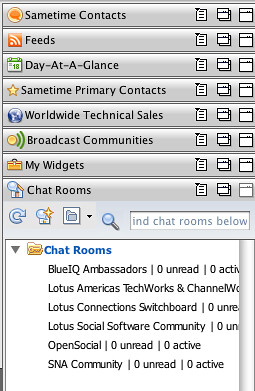
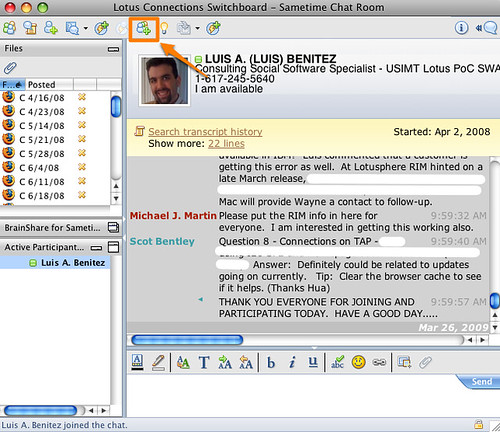
Well, it gets better. Sametime Advanced also provides persistent chat rooms. Up to now, I've been using these chat rooms through a web browser interface that Sametime Advanced provides. What I discovered this week is that you can access these chat rooms directly from your Notes or Sametime client!

So why is this useful, you are asking ? Well, for one you don't have to run a browser to use the chat room. The chat room just works from where you would expect it to: your instant messaging client.

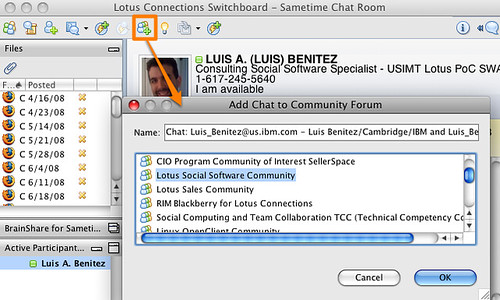
As a community leader, it provides another huge advantage. You see, I use the persistent chat room provided by Sametime Advanced as a backchannel during the weekly calls of the Lotus Social Software community. Since I have the Lotus Connections Sametime plugin, once the call is done, I can save the chat transcript directly to a forum posting in my Lotus Connections Community! Now THAT'S increasing my productivity.

Backchannel chat room:

Saving chat transcript to community:

So how do you get started? Two steps:

  1. Install the Lotus Connections plugin for Sametime
  2. Install the Sametime Advanced plugin on your Sametime client (ask your system adminitrator for details). IBMers, you can get it here.

Enjoy!

Wednesday, January 14, 2009

How Social Tools Make Me More Productive, Efficient, and Innovative

View Comments

Just before 2008 ended, I had the chance to meet a colleague of mine for dinner while he was here in Puerto Rico. I originally met David as I was learning Tivoli Directory Integrator (TDI). Our conversation was mostly about the stuff that I do and the value that I get from social tools such as Twitter, Lotus Connections, LinkedIn, Facebook, etc. He asked me to send him an email with all the resources that I mentioned (feed readers, blog clients, twitter clients, etc). However, I figured that by sharing it through a blog post the entire community benefits, instead of just 1 person. I'll probably end up sending an email to David anyway, but I will only include a link to this blog entry (and maybe a 'Happy New Year').

Dear David,

So why (and how) do I blog ?

A while back I blogged about Why I Love Blogs and it's because of that true story that you may say that I'm addicted to blogs. Not only do I get to share my knowledge, but when people comment in my blogs it helps me think out of the box. It helps me see another perspective. It helps me have that human contact that I mostly lack since I work the majority of the time from home. And the best part ? I'm not only getting the perspective of my fellow Lotus peers, but I get to hear from any of the 300,000 other IBMers (and anyone else who reads my blog externally).

If you are pressed for time, take a peek at this 1 minute video created based on my story of the business value of blogs.

To make it easier on me and because I travel so much, I use ecto as my blog client. In this blog entry, I demonstrate how to configure ecto to work with Lotus Connections . There's a Windows, iPhone and Mac version of it. The great thing about ecto is that I can write a blog once, and cross post it internally and externally.

You may be afraid of sharing knowledge because "knowledge is power". I had this same fear as well. However, by sharing my knowledge others can consume freely and at their own pace and I believe this has significantly helped me reduce the number of emails that I get on a daily basis (~20-30 down from ~150!!!). Additionally, now I have more executive visibility throughout the organization, which (I hope) is good for career advancement.

So why do I use Dogear and Social Bookmarking?

Social Bookmarking is by far my favorite social tool. Why? Well, let me quickly tell you how I got hooked on it. I found the real business value of social bookmarking when I was desperate. As you read that blog entry, you'll see that my productivity was simply 0. Dogear changed all of that in seconds and made me productive again!!

I also realized that I had over 300 or so bookmarks in my browser. I had them all somewhat organized in folders, sub-folders, and sub-sub-folders. This presented 2 challenges:

  1. When I wanted to bookmark something, I had to find the best place for it, or create the right folder structure for it
  2. When I wanted to find a bookmark, it often took too long because my folder structure wasn't the best. Plus, I had so many that it was cumbersome trying to find it. Thus, I often found myself re-Googling for whatever it was that I needed.

Therefore, I figured, "if I'm always going to search for my answer, why not use Dogear to search my bookmarks instead of spending the effort re-Googling what I need??" ! As an added benefit, I was not only searching through my bookmarks, but I was searching across what other IBMers thought was the best of the best. I was searching through the content that they had selected as the best Google result for what I need. Consequently, the time I spent searching Google, got reduced from 30-50 mins/week to 2-3 mins/week. (especially now that I can search Google and Dogear at the same time).

Moreover, bookmarking (something that I do at least twice a day) takes about 3-5 clicks on your browser. It only takes 2 clicks to bookmark something in Dogear.

As if that wasn't enough, Dogear also solves the problem of accessing my bookmarks from different computers.

And I'm not done!!! I also use Dogear to adverstise myself. You see, I like to share. Not sure, why, but I like it. Anyway, before I found Dogear I had another challenge with knowledge sharing within IBM. As you know, there are dozens (if not hundreds or thousands) of 'databases' at IBM for people to share their intellectual capital. Again this presents 2 challenges:

  1. Where should I put my stuff so people can find it... ? (or put another way, where are people searching for information??) I often ended up putting my intellectual capital in multiple places hoping that people would find it and re-use it.
  2. Some databases required a formal process for submitting the intellectual capital (i.e. it must have an abstract, summary, intro, conclusion, approved by somebody, and properly categorized in the existing topic list -- and if your topic wasn't listed, you were doomed!!)

Now, with Dogear, I can post my file anywhere (an FTP server, a Quick place, a Quickr room, a Notes database, a Sharepoint site, anywhere!!) and just Dogear it. And/or I can blog about the intellectual capital that I just created, put a link to it, and Dogear my blog entry. That way people will not only find the intellectual capital, but also my story/context as to why I created it... perhaps my recommendations to enhancing it... etc.

So Dogear addressed 6 of my day-to-day challenges and has enabled me to be more productive. It also encourages me to generate even more intellectual capital than before. Therefore, IBM also wins!

So why (and how) do I Twitter?

Personally, I see Twitter as one big asynchoronous chat room. So what's the big deal ?

Just recently I blogged about how IBM gets more value from me using Twitter than I do personally. Definitely read that blog entry first because I think it definitely explains the why I use Twitter.

As I mentioned there, I use Twitter partly to subscribe to a feed of updates that talk about Lotus Connections. That way, I can monitor all Twitter users (regardless if I know them or not) and address any issues, FUD, or perhaps answer a question from a potential customer. (we'll talk more about feeds later). For TDI, you may want to subscribe to this feed of TDI search results.

So why (and how) do I Facebook?

Facebook is my personal social network. I only add people that I trust and mostly use it to connect with my high school and college buddies by sharing pictures, commenting on their wall, and planning events.

If you do start using Facebook, I recommend that you set your privacy settings. This is where you can control who can see your information. Be careful with selecting 'Your Networks' as that means that anyone in your network can see your information. So, for example, if you are part of the New York, NY network, 10 million people potentially have access to your information. The good thing about Facebook security-wise, in my opinion, is that you have very granular controls on security. You can specify, for example, that people in your network can see your name but not any other details about you.

Finally, if you plan to use Twitter more than 1-2 times a day, do not configure Twitter to update your Facebook status. I was doing that and my Facebook friends didn't like it. Instead, use a service like ping.fm when you want to update all sites at the same time.

So why (and how) do I use LinkedIn?

To be honest, I'm not a big LinkedIn user. So far, I've used LinkedIn solely for business purposes. I don't post anything personal there, except perhaps 1-2 status updates a month. I think one of the reasons that I don't use LinkedIn much is because it requires me (as far as I know) to use a web browser.

How do I stay up to date with all this stuff ?

Finally, we get to the most important tool: feed readers. Late last year, I blogged about my love-hate relationship with feed readers. However, I strongly suggest that you read my blog entry on how I effectively use 2 feed readers. In there, you will also discover which feed readers I use and what criteria I utilize to separate and/or classify my feeds.

In short, I use a feed reader installed locally on my Mac. The feeds that go there are the business critical feeds that I need to know about quickly and/or those that I want to have available offline. When I have some free time, then I would go into my web-based feed reader to see what other things are going on.

This should get you started...

And there you have it!! Hope this helps. Let me know if you found this information valuable!

Wednesday, December 3, 2008

One-Way Adaptability is Key in Social Software

View Comments

I forget now how I got this link, but I was recently notified of a report published by Accenture. The report, "New-Generation Workers" Want Technology Their Way, was published last month. The report has already been reviewed widely in the blogsphere, for example, here. I, however, wanted to add my two cents because I think it summarizes and emphasizes what I evangelize the most: social software should adapt to your needs, and not the other way around!

Now, Accenture's survey wasn't social software specific. It was about technology in general. However, I would like to point out the needs of this new workforce. And attracting this new workforce is often one of the business needs I hear from my customers. And that's one of the business needs that drive them to look at social software.

The needs of the new workforce:

  • Millennials want to choose their technology
  • Younger employees insist on state-of-the-art technology
  • Organizations will need to provide new communication and collaboration channels. Millenials expect employers to provide communication channels such as online chat, instant messaging, mobile text messaging, and RSS feeds to communicate with their customers and clients.
  • Coming to the end of e-mail as we know it. [...] High school and young college students spend less than two hours a week e-mailing, instead preferring text, instant messaging, and communicating on social networking sites.

In my opinion, this new workforce has figured out ways to be productive. They have a system. They know how to collaborate. And, they expect their employers to provide these same collaboration tools. I guess it's like taking away email for those of you addicted to email. How will you ever collaborate ?

Here are the preferred communication methods of these Millenials (graphic from Social Computing Magazine):


I'm actually surprised that they prefer mobile text messages over RSS feeds. But that's why it's important that when you are reviewing and selecting social software, you choose a platform that adapts to a user's needs. That way, the end user decides how to use the software, how to better take advantage of it, how to make the best of it.

Adaptability is also the sum of Principle 5 and Principle 8 of the Principles of Social Software.

Monday, November 17, 2008

Social Software for Higher Learning: a second look!

View Comments

You may remember that last week I blogged about how a university in Brazil is using social software to enhance both the formal and informal learning aspects of their education environment. You can go here to review that blog entry and see a video of the customer explaining why they chose Lotus Connections.

As you may have seen in my tweets, this week I was working on a local Learning 2.0 event that was hosted by Interamerican University. I was invited to speak on "Social Software for Higher Learning and Community Collaboration". Long title, huh ?

Challenges

By now, you know that when I first started at IBM, I worked as one of the developers for IBM's eLearning product. For 5 years, I concentrated on eLearning and had specific focus in the Education industry. For the past 2 years though, I've been working with social software across many industries. Therefore, I got myself up to speed with some of the references and success stories, such as the one that I blogged about last week.

But by far, the biggest challenge was getting ready to present in Spanish. While I deliver the Value of Social Software almost twice a day, it's always in English. Words such as 'leverage', 'enable', 'empower', 'key', 'deliver', 'pervasive', etc have become part of my lingo (even with my family!!), but that's because Spanglish is accepted in our household. Spanglish at an all-Spanish conference just looks unprofessional.

Luckily, my good friend and co-worker Laurisa had blogged about this same challenge internally. I referenced that blog and off I went!

Socializing and Presenting

I relied heavily on the Keynote speech at the Borough of Manhattan Community College's Tech Day when I created my presentation. My next challenge? Trying to fit a demo of all our offerings and talk about in 45 minutes!! I clearly wanted to showcase as much of our technology as possible, but at the same time give sufficient context to the CIOs, CTOs, and professors in the room.

As the attendees came in, I introduced myself and asked about their challenges and frustrations. One dean told me that his biggest frustration is that discussion in the classroom is null. He does use an online forum, and that's where all the "classroom" discussion happens. Interesting!!

Another professor shared his biggest pain: search. "Oh what I surprise I have for you..." (though Dogear doesn't translate well into Spanish).

Another dean expressed that usability was her biggest challenge. Today's students try an application once. If it doesn't work and it doesn't adapt to their needs, they won't use it again.

At first, I was planning for a 20 minute presentation and 25 minute demo. However, as I talked to the faculty in the room prior to my turn, it was clear that they understood today's students. They knew what the pains were. They knew they needed something to improve the learning experience. Therefore, I cut my presentation short to 15 minutes and spent 45 minutes demoing.

That's right, the interest was so big, that I overran my time for 15 minutes (with the permission of the audience).

Demo'ing

When demoing our social software solution, I used an integrated environment of Portal, Instant Messaging, Quickr, and Lotus Connections. I spent a considerable amount of time populating data that was specific to the audience, even using the names and pictures of the people in the audience! (I asked the registration desk to take a picture of each attendee and I loaded them up into Profiles while the other presentations were going on).

Next Steps

The event generated tons of interest and we have scheduled several follow-up meetings with deans and other faculty members. Woo Hoo!!!!

P.S. I was going to post the slides here. The presentation, however, is a new one that I created and it's mostly pictures and I didn't have time to add the speaker notes. When I get some time, do expect to see it here, though!

Thursday, October 2, 2008

How social software can improve the Healthcare Industry

View Comments

Through the power of Dogear, I found the following video which shows Bob Picciano, General Manager of Lotus, presenting the collaborative suite of Lotus solutions.

The presentation starts talking about information overload and how our collaboration software addresses that problem. Here's a brief summary:

  • 05:40 - Bob starts by showing Atlas for Lotus Connections and how it allows you to visualize your network and where information may be getting lost.
  • 07:00 - Bob mentions the importance of having mobile access to your connections and how Lotus Connections
  • 10:50 - Ron Sebastian starts with a demo of Lotus Connections
  • 12:55 - Ron demonstrates the power of Lotus Connections' SOA architecture. He shows how a Line of Business application has been built. It's a Healthcare application that happens to be built on WebSphere Portal.
  • 13:15 - See how you can feature certain Dr's blogs and continue to see the person card everywhere
  • 13:40 - See how you can easily search for providers / doctors based on their expertise (i.e. sports injury)
  • 14:00 - Start chatting in real-time with a nurse (even via VoIP if Instant Messaging is not enough)!
  • 14:45 - Find out more about your potential provider by looking at his blog, learning from their patients, even form a community with others
  • 16:15 - See how you can access all this information from your BlackBerry

Here's the video:


As a bonus, at 22:30 you see how Boeing used Lotus Mashups to assist during the Katrina disaster. You'll see how easy it is to create widgets which can also run on Lotus Connections.

I hope this demo helps you see how the possibilities are endless with social software!

Wednesday, October 1, 2008

The problems of the aging workforce and social software

View Comments

Several days ago, I had an exchange over email about how to pitch Lotus Connections to a customer in the Energy Industry. This is a summary of the ideas that Ted Stanton, Laurisa Rodriguez, and myself came up with.200809231254.jpg

What seems to be a common thread in the Energy Industry is that it's facing an Aging Workforce. This is something that I first ran into when I met a customer in this same industry in Rio de Janeiro a couple of months ago. In this case, the pain points for customers are that they fear they will be affected by brain drain. How do you capture this knowledge before it's gone? Well, with social software, of course!

I consider myself a seeker and a contributor. I am always looking for an expert on something and I like to share my content. Before I adopted social software, however, I found myself turned off by the Knowledge Management (KM) solutions that existed within my enterprise. We had way too many databases. I kept asking myself: "Where should I post my content?" "Where are users searching for content?" "Why don't I have access to some databases?" "Why doesn't any of the existing databases have keywords/categories appropriate for my content?", etc. I'm sure these frustrations are shared by others as well.

How does social software, in particular, Lotus Connections help? Let's look at its capabilities:

  • Profiles - Can be extremely valuable even if users don't manually populate information as much of the data can be pulled from existing enterprise data sources. The ability to integrate profile searches from email clients is something any age group likes.200809231255.jpg
  • Communities - Owners of Communities can invite and recommend communities to other employees. Forums are extremely powerful and communities can become the place where people ask questions to a larger audience. Everyday people ask me questions, I advise them to check the forum and if you don't get what you need, create a post.
  • Blogs - It only takes 1 person on a team to share information. If you have a 10 person team and 9 of them don't blog (over 50 crowd), that's OK. It only takes 1 person to take the best practices and lessened learned from the team and share them across the enterprise. This is kind of informal mentoring.
  • Dogear - No brainier. Everyone has bookmarks. There is relatively no difference between bookmarking locally in a browser or through Dogear. Need to show users how easy it is to get started. Adding a "Dogear This" button to all internal web pages and integrating Dogear search results with the existing enterprise search engine starts viral adoption. When people ask me for links, I tell them to go search Dogear first.
  • Activities - While this may be tough for baby boomers to adopt, the key is to find advocates of all ages. Once these advocates understand the technology and how to collaborate effectively with it, inevitably others will follow as they get added to subsequent activities.

Finally, any social software solution that follows the 10 principles of social software architecture must be easy to use. This simplicity reduces the time that it takes to learn how to use social software, it gets users on board more rapidly, and increases adoption. Lotus Connections, for example, was designed with usability in mind. It's really easy to use!

Thursday, September 25, 2008

Using Lotus Connections from a Ruby Web App

View Comments

200809251003.jpg Continuing to demonstrate how easy it is to consume Lotus Connections content from other applications, the Top Story today at developerWorks is an article that explains how to build a Ruby on Rails (RoR) web application that consumes Lotus Connections content via the REST API.
The article, written by one of IBM's Portlet Factory architects (Thomas Beauvais), is very clear and concise. It walks you step-by-step on how to create a Ruby web application and configure it to use to use data retrieved via the REST APIs instead of a database. Thomas explains the code needed to call the Dogear REST APIs to get a person's bookmarks and tag cloud. To my surprise, there's very little code needed to get this going!

One of the things that I like about it is that it's a great tutorial for Ruby beginners (like myself) on how to create a Ruby web application. After reading the article, I feel like I can build any type of Ruby application. Hopefully, I'll get a chance to work on this with one of my customers!

Ready to read more? Check out the article here. And don't forget about the article that I co-authored which explains how to use Portlet Factory to create a portlet that consume Dogear via the REST APIs.

P.S. Is it just me or does the title open itself to a bad interpretation ?

Wednesday, August 6, 2008

A couple of changes here...

View Comments

2739478698_5754c26b8c.jpg?v=0Based on feedback from @ITSInsider and @elsua, I've gone ahead and started to create a brand for myself. Therefore, I'm now broadcasting from www.lbenitez.com. If you still go to the old address, you'll be re-directed to this new one. Unfortunately, it'll probably take Google a couple of days/weeks to replace the old address with the new one.

200808061415.jpgI also wanted to call your attention to a new feature in my blog. I wanted to make it easy for users to share blog entries with their friends. I also wanted to keep things simple. I've seen some blogs where all the icons for sharing a blog take about 10-30% of the screen!! I reached out to my network in Twitter and asked people what were their favorite social bookmarking engines to figure out which ones I should add.
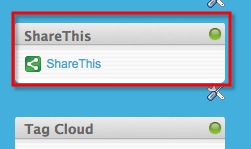
I was alerted to a nice solution by @curiousmitch. You'll notice that at the end of each blog entry, there's a ShareThis button. Also to the right of each page, you'll find the ShareThis widget.

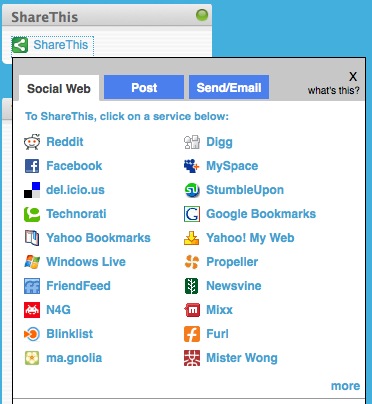
Clicking on the link brings up the following dialog:

200808061419.jpg

This has a couple of nice features:

  • You can do social bookmarking, post to Facebook, MySpace and others, or send via email (eeck!)
  • The sites are automatically sorted based on popularity
  • New sites are automatically added
  • If you don't see your favorite site here, you can click more on the lower right hand corner of the window
  • It doesn't take a lot of screen space, until expanded

See, I'm trying to adapt to your needs! Enjoy!

(oh and if you can update your links to point to www.lbenitez.com, I would appreciate it. Feed readers should be ok since they go through FeedBurner).


Thursday, July 17, 2008

What's the best way to use social software ?

View Comments

Right now, there's a heated debate going on internally at IBM over what's the best way to use one of the social features of Lotus Connections. I won't go into detail here, mainly because I don't want to distract you from the point that I want to make. Ready?

Don't you hate it when you get an email with an attachment that's 200TB? I think you will all agree and say yes. It's annoying. So how do we fix it? Easy, modify the mail client so that it allows attachments only up to 1MB. Right ?

WRONG!

Think about how inefficient that would make you, when you really need to send that financial presentation to your colleague in another town, city, state, country, world, universe, well you get the point.

How about instant messaging? Most IM clients have a feature where you can specify that you are 'Away'. And most IM clients also have a feature that automatically puts you 'Away' when the computer has been idle for 'x' number of minutes. Some people "forget" to change the status back to 'Available'. So how do we fix it? Easy, modify the IM client so that users can't put themselves 'Away' and it's only calculated by the computer's idleness. Right?

WRONG!

By now, you are probably picking up the point that I'm going to make: There's no right or wrong answer when it comes to using software.

Humans, by nature, are all unique. We all learn in different ways. We all do things in different ways (kinda like my sister who likes to brush her teeth before eating breakfast... WTF??). We all use software in different ways. And you can be darn sure that when it comes to social software per se, there is no right or wrong way to use it. And because each person is different, you need social software that adapts to those users' needs.

You need social software that works in the context in which users are already working. You need social software that can be molded into your existing processes. Facebook, for example, got a huge bump in daily traffic when they released their mobile application. In a matter of days, users were hooked to Facebook posting pictures on the go, updating their status every 5 minutes, etc.

Adaptability is they key when considering social software. And the more adaptable the software is, the higher the adoption rate. Adaptability is a key principle of web 2.0 and social software.

Now, there are some recommended practices to make your life easier, but that's another post ... Thoughts?