Pages

Showing posts with label upgrade. Show all posts

Thursday, June 26, 2014

IBM Connections 5.0 Is Ready for Download

View Comments
I just got confirmation that IBM Connections 5.0 is now ready for download ! This has been quite an exciting quarter as we've been building up to this day ever since I published the trailer back in April.

When I initially joined the product management team we were just launching IBM Connections 3.0.1.   I was then managing another component of the platform.

As time went by, I started to influence more of the platform and with this release, it was the first time that I was completely involved all the way from the first planning session to the release of the software. Of course, it's been quite an experience and it's what I've wanted to do for a long time.  I'm grateful for the opportunity that I've been given to bring this new product to market and for everything that I've learned in terms of what it takes to plan, build, and launch a product.

Here are some links you'll probably need:
I'll be updating those links as necessary.

I've also started collecting videos about IBM Connections 5.0 and will continue to update this playlist as they become available:


Now that you have the code, I'm anxious to know when you upgrade!! 

Monday, May 19, 2014

IBM Connections in the Cloud and Mobile Apps Have Been Updated

View Comments
This was an extremely busy for us for sure.  On Friday, my colleague, Baan Slavens announced the latest release of the IBM Connections Mobile app. And a few hours later our multi-tenant deployment of IBM Connections in the cloud was updated as well with the latest and greatest code.  The timing couldn't have been better!

And speaking of timing, we are just 2 days away from the May 21st webcast where we will be unveiling IBM Connections Next.  If you haven't registered yet, go ahead and register now and invite your friends, family, customers, partners, colleagues and everyone else.

So let's start with mobile.  I had given a quick preview of the new mobile app a couple of weeks ago in this teaser that I created.  The reaction over the weekend has been tremendous in the various social networks. I've captured a snapshot of the reactions below:


So go check out the new mobile app that's probably already updated in your device, or just go to the app stores and get it from there ( iOS or Android ).

And what did we do in our cloud? Well, you can see what's new in this presentation that I prepared below:


Now in the next couple of weeks, we'll take the code that's already in the cloud today, make a few adjustments and ship it to customers who would like to run this on-prem as IBM Connections Next.  See you on the May 21st webcast for IBM Connections Next!

Monday, November 4, 2013

IBM Connections November 2013 Release Available in the Cloud

View Comments
Over the weekend, we rolled out this quarter’s update to IBM Connections, IBM’s Enterprise Social Collaboration platform. this update comes just shy of 8 weeks since our last update which represented our biggest release ever.

In this release, you’ll notice the following updates and new capabilities:
  • New layout of the Homepage to consolidate information, make sharing easier, and help you focus on what’s important
  • Updated recommendations based on social analytics to more quickly find and discover content you may be interested in
  • Community polls and surveys
  • Community owners now can set a custom landing page for their members
  • @-mention in blogs and ideation to continue the conversation
  • More mobile push notifications to drive the engagement of mobile users
  • Community managers can recover communities that were accidentally removed
  • and more.. !
As before, I’ve updated the IBM SmartCloud Connections presentation with the latest features and you can see that here:

For the full list of all the new features, see this document.

Update 7/Nov/2013: Marty Lechleider, the Product Manager for Community Polls and Surveys, created this quick video as a tour:


To go and see the new features or to start your free trial, go to http://ibmcloud.com/social . As usual, customers on-premises will get these features in the next major on-premises release.

Tuesday, October 18, 2011

IBM Connections Trade Up Now Available

View Comments

Earlier today, IBM announced the availability of a new trade up for IBM Lotus Notes customers. You may remember that earlier this month IBM Lotus Notes 8.5.3 customers were entitled to IBM Connections Profiles and Files.


With this new trade up, customers that were entitled to only IBM Connections Profiles and Files are now able to upgrade to the entire Connections suite for a special price to obtain all the benefits of the platform such as:

  • Access from your mobile device
  • Manage your projects
  • Blogs
  • Wikis
  • Aggregated news feed
  • Bookmarks
  • Communities
  • Ideation
  • Media Gallery
  • and more… all from a single platform!

So for all those Notes 8.5.3 customers that are now starting to fall in love with IBM Connections, you have a great way to get all the other components of the platform!

For more information, you can read the announcement is here. Contact your IBM representative or business partner for more details.

Tuesday, February 8, 2011

Mark Your Calendars: Quickr Domino 8.5 Upgrade Webcast

View Comments

Tomorrow, Wednesday February 9th, we'll be hosting a webcast on upgrading your Quickr server to the latest version: 8.5. If you haven't upgraded to Quickr 8.5, you really have to. The latest release is amazing!


  • What? - IBM Support team members hosting a webcast on upgrading to Lotus Quickr Domino 8.5
  • When? - 9 / February / 2011 ; 10:00 a.m. Eastern Standard Time (15:00 GMT) (lasts 1 hour)
  • Why? - To provide all the necessary info you need for the upgrade and answer your questions
  • Where? - Webcast hosted here: https://www.lotuslive.com/en/join?schedid=4419191 . Worldwide conference number and passcode listed here.
If you can't make it, we'll be recording the webcast and will make it available later. However, I strongly encourage all of you to attend so that you can ask questions live to the experts on the call. And if you can't make it, I hope you have a good excuse like you are attending the IBM Social Business Jam.
If you have any questions that you would like the team to answer, please post them in advance here.

See you there tomorrow!

Wednesday, April 22, 2009

My Second 24 Hours With Lotus Connections 2.5

View Comments

(This is a delayed post from a post I did internally to evangelize Lotus Connections 2.5 to IBMers -- posting here cause I think this is just way TOO cool.)

Yesterday, I summarized My First 24 Hours With Lotus Connections 2.5. Never in my wildest dreams did I think that I was going to summarize the second 24 hours with Lotus Connections.

Our super awesome product designer posted in his status that he got first dibs into a "tool" developed by an IBMer that leveraged the new 2.5 APIs. That's right, within 24 hours of 2.5 being available internally, IBMers were already hacking away at creating new plugins for it! I, of course, wanted to check it out so I asked him for a link. Marty said that the tool was not his to give away... Bummer!

But not really, then I remembered our super awesome new tab in the Lotus Connections Homepage: Discover. After reading through the list, I quickly discovered the name of the IBMer who had developed the plugin. I installed the plugin on my Mac and WOW!! It's really amazing what came up in just 24 hours!!

So there you have it.. the Discover tab really does work!!! Testing complete!

But wait, it doesn't stop there. The next morning when I came in, I started to catch up with latest profile updates. Then I stumbled upon another interesting tid-bit.... Adrian had loaded an IBM VPN client for his iPhone. Jokingly (cause I thought that was something super special that I didn't have access to), I asked him to send me a link for more info. Minutes later, he replied back with the link to join the pilot for theVPN client for the iPhone/iPod Touch!

With so much information discovery going on, I think I need to figure out how to make room in my brain. It's only been 48 hours since Lotus Connections v2.5 has been up and running and I feel like a robot that has 4GB of RAM but runs on a 32-bit operating system (not sure what that means, but that's how I feel).

Monday, December 8, 2008

Sametime Unyte Has Been Upgraded

View Comments

Over this past weekend, Lotus Sametime Unyte has been upgraded to version 8.2b.

The enhancements that have been added are very timely. I was just going to post a blog entry on my "Sametime Unyte Wish List For The Holidays", but everything that I was going to ask for has already been added. Take a peek at some of the new features that have been added to Sametime Unyte:

  • Support of PDF & ODF (OpenOffice and Lotus Symphony) document formats in addition to Microsoft formats
  • Firefox 3.0 support
  • A waiting room for attendees who join a conference prior to the host
  • Performance acceleration for international customers so all attendees, regardless of location can count on consistent, fast response rates
  • Multi-language support so individuals can host and join conferences in their preferred G1 language.
  • One-click start of a Web conference from Lotus Sametime messaging service via a shelf

Are you ready to start hosting a meeting? It's easy, just head out to http://www.sametimeunyte.com and off you go!

Quick Tip: Want to send out an invite with a one-click meeting URL? Use this format: http://www.sametimeunyte.com/join/?schedid=xxxxxxx (and replace xxxxxx with your meeting's passcode).

Friday, November 7, 2008

How to upgrade to Lotus Connections 2.0.1

View Comments

Well, I'm finally done. I'm sad to say that it took ~12 hours to upgrade from Lotus Connections 2.0.0.1 to 2.0.1. It seems that there are some problems with the Update Installer. Apparently, shipping a product on Halloween (like trying an underwater escape) is not a good idea. Or maybe one of our competitors hacked into our servers and broke it for us??

Anyway, here's the steps that I had to take to upgrade my Lotus Connections 2.0.0.1 server to 2.0.1:

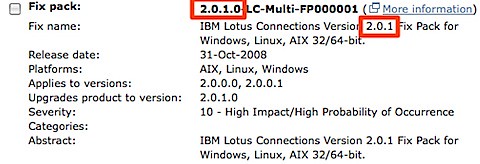
  1. Download the Lotus Connections 2.0.1 Fix Pack from Fix Central (select Lotus, Lotus Connections, 2.0.0.0, <your platform>) 200811061420.jpg
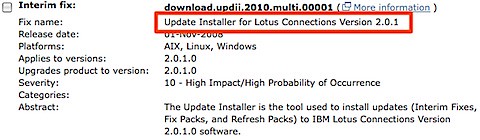
  2. Download the 2.0.1 Update Installer from Fix Central (select Lotus, Lotus Connections, 2.0.1.0, <your platform>)200811061422.jpg
  3. Download the Lotus Connections 2.0.1 Database Wizards from Passport Advantage
  4. Stop the Lotus Connections server
  5. Upgrade the DB silently (you can use the wizard, but then you will have to upgrade the Blogs DB manually)
  6. Upgrade the product from 2.0.0.1 to 2.0.1 silently (the wizard didn't work for me). I used the following command:
    updateLC.bat -installDir c:\ibm\WebSphere\LotusConnections -fixpack -install -fixpackDir c:\ibm\WebSphere\LotusConnections\update\fixpacks -fixpackID LC201_Fixpack -wasUserid lcadmin -wasPassword passw0rd
    
  7. Perform step 10 as listed here. (It's listed as an Optional step, but it's really a Required step)
  8. Start the Lotus Connections server
  9. Run the following wsadmin command
    1. Start the wsadmin interface
    2. Type the following command: execfile("blogsAdmin.py")
    3. Type the following command: BlogsMigrationService.populateLoginNames()
    4. Type exit to quit the wsadmin interface
  10. Stop the Lotus Connections server
  11. Download the latest fixes from the page where you downloaded the 2.0.1 Fixpack (see step 1 above)
  12. Install the iFixes silently. I used this command:
    updateLC.bat -fix -installDir "C:\ibm\websphere\lotusconnections" -fixdir "c:\ibm\websphere\lotusconnections\update\fixes" -install -fixes LO34540 LO34604 LO34631 LO34638 LO34665 LO34676 -wasUserId lcadmin -wasPassword passw0rd
    
  13. Re-do your changes to the <WAS_PROFILE_ROOT>/config/cells/<cellname>/LotusConnections-Config/*.xml files
  14. Delete your Dogear index
  15. Start your Lotus Connections server!

And there you have it. I'm giving this to the documentation folks so they can fix the InfoCenter.

Note: Updated on Nov 11, 2008 to fix the order of the steps.

Tuesday, July 15, 2008

How to install Lotus Connections FixPack 1

View Comments

Yesterday, it was widely announced the availability of Lotus Connections v2 Fix Pack 1 on FixCentral. Unfortunately, the Fix Pack was released before the instructions (oops! ) .

In any case, here's how to install the fixpack. First, since this is a fix pack and not a fix (don't ask me!), you can't use the wizard that comes with the Lotus Connections Update Installer. Instead, you must install the fix pack via the following command:

updateLC -fixpack -installDir E:\IBM\WebSphere\LotusConnections -fixpackDir E:\IBM\WebSphere\LotusConnections\update\fixpacks -install -fixpackID LC2001_Fixpack -wasUserID wasmgr -wasPassword pa55w0rd

Make sure you plugin the right path locations and values for userid and password. Enjoy the new fix pack!