Pages

Showing posts with label plugins. Show all posts

Thursday, April 28, 2016

New IBM Connections Desktop Plug-Ins for Mac and Windows

View Comments
Today, we've released our monthly update to the IBM Connections Mac and Windows desktop plug-ins. I'll cover some of the updates here and will start with Mac since that's what I use.

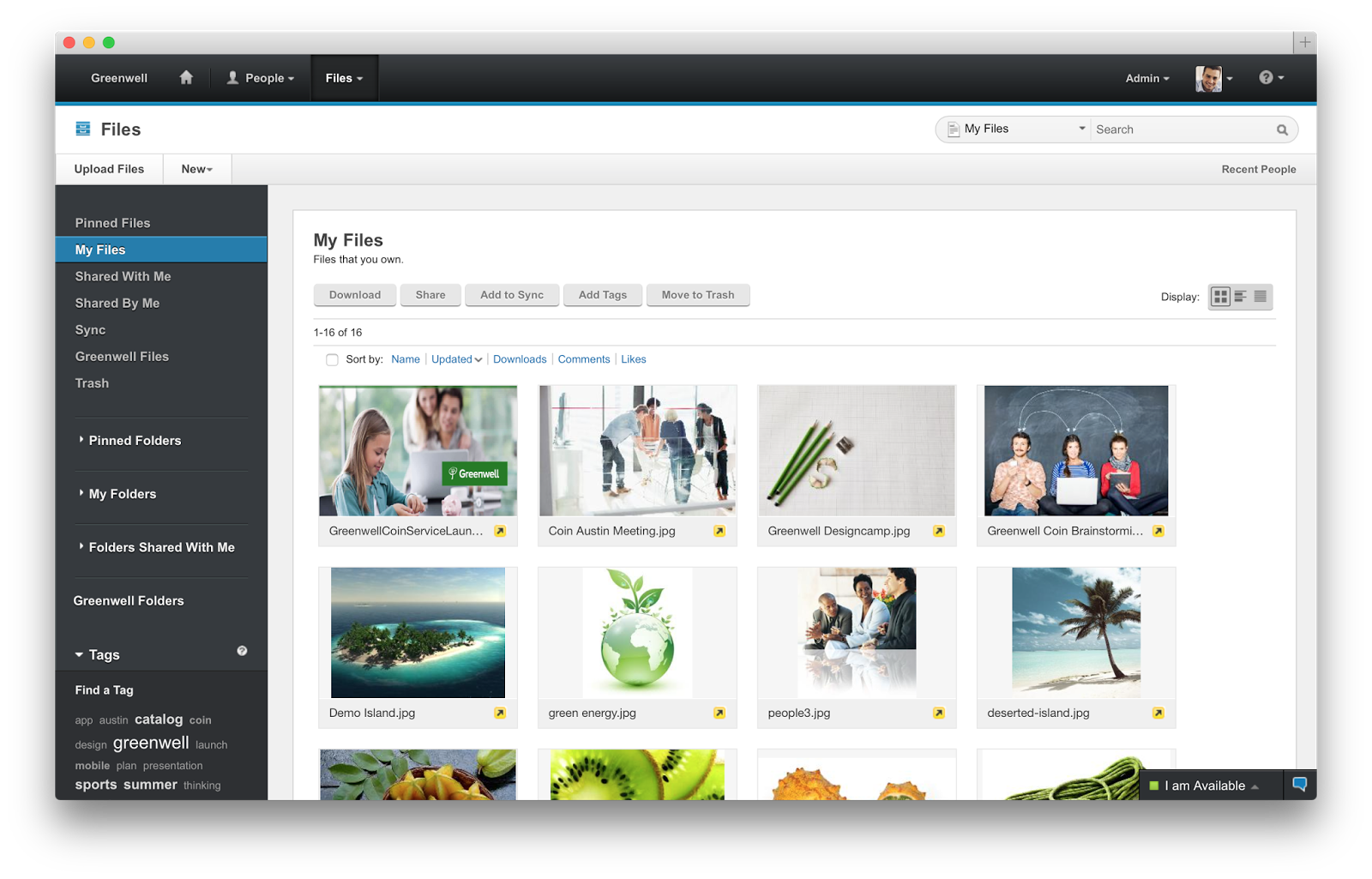
In this release, the context menu in Finder has been updated to streamline access to the IBM Connections actions. Now, when you right click on a synced file, you can see when it was last synced, share with individuals or groups, lock/unlock, modify metadata and more. Here's a snapshot of how it looks. 


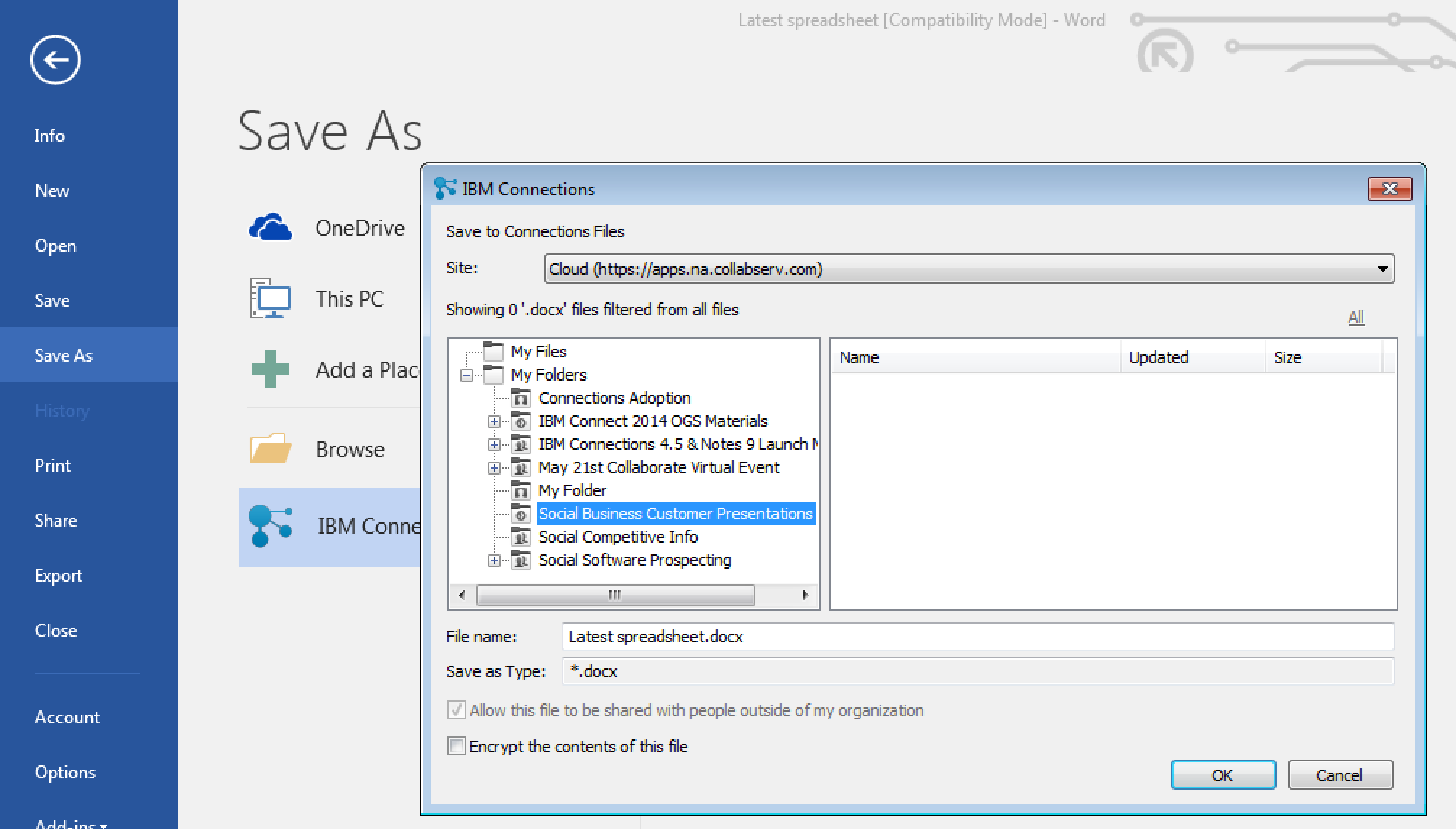
For those of you in Windows, we have improved the experience when saving files directly to IBM Connections from Microsoft Office. From the Save As menu within Microsoft Office (Word, PowerPoint, Excel) it'll be a lot easier to pick where specifically you want to store files (e.g. in what Folder, what Community, etc). See the screenshot below. And don't forget, when editing files, you can have round trip editing of files with IBM Docs when you are online or Microsoft Office when you are offline.

Windows 10 support has also been officially added. For those that like to live on the edge and have enabled preview features, you get some new stuff too. I'll leave that as an exercise for you to find it.

To get the plugins, go to Downloads and Setup in cloud, or if you are using on-premises, you can get the Windows plugin from our catalog here and the Mac plugin from here.

Monday, January 25, 2016

The IBM Connections Cloud January 2016 is Now Available

View Comments
Just in time for IBM Connect 2016, there are now more capabilities that have been added to IBM Connections Cloud.

Here's a snapshot of what's new this month:

Real-time alerts help you focus on items that need your attention
Stay up to date with things that require your attention and response. The new notification center in the navigation bar increases your awareness less disruptively. See alerts with a single click - no matter where you are in the service. Allows you stay on track or swiftly shift gears depending on what is required at the moment. Note: This is slowly rolling out to all customers. If you don't see it, you'll have it by end of the month.


Leverage 3rd party apps to maximize value of Communities

Community owners can add third-party apps to Communities. A new extension point opens up the possibilities for Independent Software Vendors (ISVs) to create apps for Communities. Developers can now write custom responsive apps that can be surfaced within Communities. Community owners don't have to do anything different from what they do today. As soon as a new third party app has been approved by the administrator, it'll be available for all community owners of that organization. AppFusions has already taken advantage of this integration and has created a Community app for OneDrive. Check out the demo below: 


Organize your files how you want to

Now you can create nested folders to organize your content in a familiar hierarchy. You can create sub-folders within folders to give your content a structure that makes it easier for you and other users to manage content. For both My Files and Community Files , you can build a hierarchy of folders with tree-navigation on the side of the Connections Files page.


Nested folders are also supported in the Connections Mobile app and in the IBM Connections Desktop Plugins for Microsoft Windows and the IBM Connections Plugin for Microsoft Outlook when syncing your offline files with Connections Files in the cloud.

Drag and drop support added on Microsoft Windows

Also new in January is the ability to drag and drop files from the Windows desktop directly to an IBM Connections folder in the IBM Connections Desktop Plugins for Microsoft Windows .

Improved user experience working with files

The sidebar is now resizable and labels have replaced the icons on the tabs making it easier to navigate and view information and comments.


To see what else is new, check out this page. Hope to see you next week at IBM Connect 2016!

Monday, August 31, 2015

Save The Date: Enterprise File Sync and Share is Just the Beginning of a New Way To Work

View Comments
Save the date. In less than a month, we'll be hosting a webinar to take you through the latest capabilities available in our IBM Connections Files offering, the IBM solution for organizations that are looking for enterprise file sync and share (EFSS) capabilities in the cloud.


IBM Connections Files on Cloud is designed for today’s mobile worker, providing a secure, easy-to-use, collaboration and file management environment for all size businesses. This cost-effective, secure file sharing solution is easy to implement using software-as-a-service (SaaS) on our cloud (or you can run it on-prem too). A user centric design allows anyone to confidently share files with their network of customers and partners, as well as sync online files to their favorite mobile devices and tablets (supports both Android and iOS mobile devices). Here's a quick video I had shared earlier of the IBM Connections for Mac app:


Ready to learn more? One of the Product Managers for IBM Connections, Jim Puckett, will be hosting a webcast. Check out the details below:

Date: September 24, 2015
Time: 1-2pm Eastern Time
Registration:  To register for the event, click here.

See you there!


Tuesday, May 5, 2015

IBM Connections Adds Secure File Sync and Share Offering On-premises

View Comments
Following the release last quarter of our secure file sync and share offering in cloud, today we have just released the equivalent offering for those customers who would like to deploy this on premises. This new offering gives customers a new way to buy IBM Connections and get just the Files portion of the platform. This makes it easy to get started and customers can grow and buy the entire IBM Connections suite once they are ready to use other capabilities such as Communities, Forums, Ideation, etc.

The capabilities have already been highly praised by analysts such as Forrester and OVUM. In fact, check out this report from OVUM to find out why IBM Connections is a strong candidate to provide all the benefits and features an enterprise user might need from a file sync and share solution.

This offering includes:
  • Mobile apps for iOS and Android
  • Desktop plugins for Microsoft Windows and Mac (including integration into Microsoft Office 365 Desktop apps such as Word, PowerPoint, Outlook and Excel)
  • External file sharing (ie. share files with people outside of your organization)
  • Share files with individuals or groups
  • Lock files for editing to prevent conflicts
  • View files online without having to download
  • Control who can view/edit your files and who can re-share them 
  • View who has downloaded your files and which version they have
  • See how the file has been shared throughout your organization
  • and more... ! 
Available add-ons:
  • Compliance and Governance support 
  • Real-time co-editing of files without downloading 
Here's a demo of the plugins and mobile apps in action:


Enjoy!

Tuesday, March 10, 2015

IBM Creates File Sharing and Sync only offering and it's available today

View Comments
Fresh off the presses! The IBM Connections Files cloud offering is now available in our cloud.  If you are already an IBM Connections customer there's nothing for you to do. However, if you've been thinking about starting with IBM Connections, this might be a good place to start as you get just the core file sharing and sync component of IBM Connections and then upgrade to full the IBM Connections suite as your team needs more capabilities.

IBM Connections Files Cloud is a new standalone cloud service that combines the ability to share files with internal and external users with the ability to synchronize users' files across their own devices. Small to medium businesses, line-of-business departments, or corporate IT can sign up easily and start using the service immediately. The familiar browser interface, desktop clients, and mobile applications provide simple ways to get to the most important files and keep them in sync with other users and devices. Each user gets 1TB of space and administrators can always get more as needed.

Check out Ovum's report on why IBM Connections file sync and share is a leader in this space.

IBM Connections Files on Cloud empowers organizations to increase productivity, make speedier business decisions and enhance innovation:

  1. One place for enterprise file storage, sharing, and syncing plus social – find experts, see profiles, post status updates, find content with tags and more.
  2. Securely access files anytime, anywhere, on any device.  Create, share, find, store, review, and even edit online and offline, all in a security rich environment, designed to meet IT needs
  3. Simple collaboration inside and outside your organization. Easily and instantaneously share files with colleagues, partners, clients and suppliers.
  4. Robust access control.  You decide who can read and edit files with role level access control.  The included Profiles capabilities allow you to find and connect with colleagues via their business card and contact information.
  5. More value for your money. You get market leading file sync and sharing capabilities PLUS the benefits of key social collaboration capabilities at a lower price than many other vendors.

Here's a demo I did recently that shows the IBM Connections file sync capabilities on a Mac:


To start a free trial, go to http://ibmcloud.com/social

Monday, February 9, 2015

How IBM Connections File Sync Saved Me Post IBM ConnectED 2015

View Comments
I'm finally back in the office after 2.5 weeks on the road: first for IBM ConnectED 2015, then on to Austin to meet with the IBM Design team and work on IBM Connections Next. In between all that, however, my Mac decided to have a meltdown.  Luckily, it was the Tuesday after the keynote at IBM ConnectED.  My big worry, though, was, since my Mac died on January 27th and I knew my last Time Machine backup was on January 21st... how much was I going to lose ?

So when Tuesday comes along, I opened my Mac and the screen was just blank.  So I did a hard power reset and it seem to then come back. It looked like I was able to log in, but then it would just get stuck on this screen:


I frantically started to search the forums and nothing that they suggested helped. Then all of a sudden... "did I just lose all my IBM ConnectED 2015 demos, presentations, content, etc???"

I open the IBM Connections mobile app on my iPad with slim hopes. To my surprise, however, all my content was there just fine because all my work was happening in the IBM Connection sync folder.  Success !


I ended taking it to the Apple Store last week while in Austin.  The Apple Genius ended up wiping my disk clean and resetting and said it was an issue with File Vault and Yosemite.  Once back home, I restored from Time Machine and did notice I lost 2 files that for some reason I hadn't stored in my IBM Connections sync folder. But that was a lesson learned... from now on, all my work is going to the IBM Connections sync folder, especially given I have 1 TB of space to store files in the cloud.

Thursday, November 20, 2014

IBM Connections File Sync Plug-In for the Mac Is Now Available

View Comments
While #IBMVerse 's ability to drive a #NewWayToWork has taken the spotlight this week, there's more goodies to talk about today.  First, we are in the midst of rolling out some cool new features to our cloud.

One of the biggest new capabilities being rolled out is that today, is the day that IBM Connections Social Cloud customers can start using file sharing and sync from their Mac desktops / laptops.  This was something I had announced was coming earlier in the year when I had a chance to participate in the Social Connections event in Prague.  Since then, we started a beta and the feedback has been very positive. Therefore, we've decided to make this generally available today. With this new plug-in you can:
  • Get notifications instantly on the desktop or mobile when there is a change to a file
  • Upload files from your Mac without having to open a browser
  • Share uploaded files with your colleagues
  • Work on files locally and save directly to Connections
  • Lock a file to prevent file conflicts

To see it in action, check out this quick 2 minute demo:


Next, very soon we'll publish the IBM Connections Desktop Plug-In for Microsoft Windows to streamline the install experience for cloud users. Additionally, IBM Connections Content Manager (CCM) users can now do round-trip editing. This means that while they are browsing for files in a Library, users can click on "Edit" in the browser and the file will open with the user's favorite local editor. For example, a Word document, will be opened with the desktop app of Office 365. When the user is done editing, they simply close the local app and the file is then automatically saved and uploaded back to server.

But wait... there's more!

And lastly, we've also updated the IBM Connections app for desktop version of Microsoft Outlook (even if you are using Office 365). This new release features:
  • IBM Connections 5.0 Support
  • Community Folders
  • Metrics - view usage data for file and folder view access
  • @mentions - Enter names preceeded by @ for lookup and display as rich links
  • Support for hashtags - Enter tags preceeded by # to display as rich links
  • Open an editor to view an IBM Docs file
  • View stream updates using additional filters
The plugins are now available in the app catalog and you can download them at no additional cost from the links above. 

Wednesday, October 8, 2014

5 Can't Miss Features of IBM Connections

View Comments
About two weeks ago, I was asked to present to a group of internal IBMers tips and tricks to get the most out of IBM Connections, our social collaboration platform.

I actually reached out to my internal network and asked for suggestions on a good topic. Quickly, I realized that everyone had their own favorite feature or aspect of the product.

That got me thinking that maybe it's worth me putting together a quick presentation that shows people how I get the most out of the product to improve my productivity.

Then it got hard. How could I pick just a handful of things where IBM Connections makes my life easier ?

I had to iterate a couple of times.  In the end I decided that a good way to format it would be to focus on 5 integration aspects that maximize the value I get out of the product.

Check out the slides that I took them through:


Do these match what you would've presented?

Thursday, September 18, 2014

More IBM Connections Social Features Now Available Inside Microsoft Office

View Comments
As you may know, we are now releasing new updates to the desktop plug-ins on a monthly basis. This month's release brings some cool new features to those of you working with Microsoft Office Desktop apps (even if you use the desktop apps with Office 365).

For some time now, we've had integration into Microsoft Office (Word, PowerPoint, Excel, and Outlook) via the ribbon.  Today, we've added new functionality to the ribbon.


With the new features, you can now do the following directly from Microsoft Office:

  • Lock a file to prevent others from editing while you make changes
  • Share the file and add others as readers or editors
  • View version history
  • View download history/audit log
  • Like, pin, and follow

Check out this quick 2 minute demo that I created to show some of the new functionality:


To download the latest plug-in you can get it from Apps - Downloads on your cloud deployment, or from our app catalog here.

Monday, August 4, 2014

The IBM Connections 5.0 Reviewer's Guide is Now Available in the iBook Store

View Comments
By now you are probably aware that the IBM Connections 5.0 Reviewer's Guide is available as shared by one of my teammates in the product management team, Albert Nichols.

For a while now, I've been wondering how we can make this more widely available and perhaps add even more value to this great asset.  Earlier in the year (if I remember correctly), I had heard that Apple had made iBooks Author a free app and decided to take that for a spin and see what I could do with it. And given the recent announcement of the Apple and IBM partnership, I figured why not!

To my surprise, it was very simple to take the work that Albert (and the rest of the PM team had done) and import it into iBooks Author and add some dynamic elements to it. As you may know, the Reviewer's Guide covers a lot of the functionality within IBM Connections, as well as our different integration points into ECM, Notes, Microsoft Outlook, SharePoint, mobile, etc. Therefore, I thought that a good way to make the guide more dynamic would be to incorporate all the various demos directly into the book.


My experience with iBooks Author was pretty positive. It only took a few minutes to convert the Reviewer's Guide into iBook format. Then, it took me about 5-6 hours to reorganize the content into iBook chapters, add the demos and interactive screenshots, and publish it to the iTunes store.  During the publishing process, I even discovered that iTunes Producer already integrates with Aspera, an IBM company for super fast file transfer.

Therefore, you now have a super easy way to get the Reviewer's Guide, access it offline, and even share with your peers. Go ahead and download the IBM Connections 5.0 Reviewer's Guide from the iBook Store and let me know what you think. I'm curious to know if this is valuable and if you would like to see more of these in the future.

PS.  There's 1 page that didn't come out correctly, but I'll let you find it.

Thursday, January 16, 2014

How to Interact with IBM Connections Files in iPad and Mac apps

View Comments
This is it! IBM Connect 2014 is now 10 days away and the news just keep coming in. If you haven't registered yet, what are you waiting for? Do it now!

Are you a mobile user that always needs access to your files ? Perhaps you are already using apps such as Goodreader, Notability, Pages, etc and now you want to interact with IBM Connections files directly from those apps?

File Jockey is your answer. This new integration adds some "magic" to IBM Connections (don't' worry, I'll spare you the details) so you can seamlessly interact with your files from your favorite mobile and desktop app. For example, on the Mac, you can use ForkLift to get to your files directly from Finder. On your iPad, you can use Goodreader to annotate PDF files, take meeting minutes, and manage your files. 

The trick is finding any app that supports something called WebDAV. If your favorite app supports WebDAV, then this is the solution for you. Another approach is to look for apps that support CMIS since that's the native protocol Connections supports as I discussed on this post from 2011.

Update 28/Jan/2016 with new video: Check out the demo below:


To learn more, check out their website and you can start using it today against one of our demo systems.

Thursday, November 21, 2013

IBM Connections Desktop Plug-Ins v4.5.1 Now Available

View Comments
We just posted to the catalog the latest IBM Connections Desktop Plug-Ins 4.5.1. The IBM Connections Desktop Plug-ins Microsoft Windows is intended for Microsoft Windows, Office, and Outlook users and brings the power of social collaboration to the applications that end users work in.

With IBM Connect 2014 just around the corner, I'm going to hold off talking about any roadmap items. Make sure that you register for IBM Connect today so that you can learn about all the great things that are coming.

This latest version adds the following:
  • Support for Windows 8
  • Support for Microsoft Office 2013 (Word, PowerPoint, Excel, and Outlook)
  • File downloads via the plug-ins are now accounted for in the Metrics
  • Based on customer demand: Now translated into Bulgarian, Croatian, Romanian and Slovak
Here's how the desktop plug-in looks like in Microsoft Word 2013:


Update 22/Nov/2013 - Here's how it looks in Windows 8:

Here's a demo I shared earlier this year:


To download, you know the drill.  
  • Cloud customers can get it from the Apps -> Downloads section in the navigation bar as usual. 
  • On premises customers can download from our catalog from here for the desktop plug-in and for the Microsoft Outlook sidebar plug-in, go here.


Thursday, September 19, 2013

How To Customize the Branding of the IBM Connections Desktop Plug-in

View Comments

Hot off the presses! One of the most popular plug-ins for IBM Connections, IBM's Enterprise Social Network, is the Desktop plug-in for Microsoft Windows. This plug-in gives you quick access to all your files directly from Windows Explorer and Microsoft Office.

To recap, the IBM Connections Desktop Plug-ins for Microsoft Windows provides the following features from Microsoft Windows Explorer:

  • Upload local files to IBM Connections from Windows Explorer or from your desktop
  • Share uploaded files with people, communities, or folders in IBM Connections
  • Work on files locally and publish them to IBM Connections
  • View people's contact details and get in touch with them
  • Pin, follow, or like IBM Connections files and folders
  • View or contribute comments for a file
  • Lock a file when you are editing it to prevent file conflicts
  • View and restore files from IBM Connections Trash
  • Share folders with IBM Connections Communities

In the latest release, of the plugin we've added the following new languages: Croatian, Romanian, Slovak, and Bulgarian. Additionally, we've also now enabled the plug-in so that administrators can customize the branding of it. For example, if you have deployed IBM Connections and you are calling it "ConnectTED" internally, you can now make sure that the plug-in obeys this branding.

If you haven't seen the plug-in yet, here's a demo that I recorded a couple of months ago:

To learn how to customize the plug-in for your users, check out the documentation here. To download the plug-in, go out and get it from the IBM Connections App Catalog here.

Thursday, August 22, 2013

IBM Connections Plug-in For Apache OpenOffice 4.0 Now Available

View Comments

As promised a couple of weeks ago, with the release of Apache OpenOffice 4.0, we have now updated the plug-in for IBM Connections, IBM's Enterprise Social Network (ESN) and premier file sharing and team collaboration platform.

This new plug-in takes advantage of the new sidebar introduced in OpenOffice 4.0 to give you access to your files. From there, you open files directly without downloading, share them with others without having to open a browser, organize in a folder, search for intellectual capital and more.

Because OpenOffice can edit Microsoft Office documents too, this allows me to save money and be productive. And of course, if you want to edit OpenOffice files on your iPad, you can do that too!

For those of you using Macs, you'll be happy to know that this new update to the plugin also adds Mac support. Check out the screenshot below:


To download the plug-in go here. If you haven't upgraded to OpenOffice 4.0, do it today!

Tuesday, July 2, 2013

Updated Mobile App for IBM Connections - Goodies for all

View Comments

Refresh your app stores, the latest monthly update is now available! A new mobile app update is ready for IBM Connections, IBM's enterprise social network (ESN) for collaboration. Last week, Chris Reckling did a great job summarizing the new features in the June 2013 release of native mobile apps.

My favorite feature is viewing events in the Action Required view of the activity stream. This view looks in the activity stream and can figure out which events require end user action. Thus, this view displays your latest to-do items from Activities, network and community invitations, requests to join moderated communities, and any third-party events requiring an action on your part.

For example, imagine an expense reporting application or a workflow application (e.g. IBM Business Process Manager ) where you are notified that you need to approve or reject something. You can do it directly from the activity stream, and now, directly from the mobile device!!! Mobile workers don't have to be a bottleneck anymore.

So if your App Store (or Google Play) icon looks like this:

it's time to update!!

Monday, July 1, 2013

Demo: IBM SmartCloud Connections Plug-In for Microsoft Windows

View Comments
As promised a few posts ago, I wanted to share a demo of the desktop plugin for IBM SmartCloud Connections, IBM's enterprise social network (ESN) offering in the cloud. Well, I was out last week when the plug-in was available so here it is! First, here's what you can expect to see and do from Windows Explorer, Word, PowerPoint, Excel and Outlook.

The IBM Connections Desktop Plug-ins for Microsoft Windows provides the following features from Microsoft Windows Explorer:
  • Upload local files to IBM Connections from Windows Explorer or from your desktop
  • Share uploaded files with people, communities, or folders in IBM Connections
  • Work on files locally and publish them to IBM Connections
  • View people's contact details and get in touch with them
  • Pin, follow, or like IBM Connections files and folders
  • View or contribute comments for a file
  • Lock a file when you are editing it to prevent file conflicts
  • View and restore files from IBM Connections Trash
  • Share folders with IBM Connections Communities
The IBM Connections Desktop Plug-ins for Microsoft Windows provides the following features from Microsoft Office (Word, PowerPoint, Excel):
Word:
  • Add a document to IBM Connections Files or Communities
  • Attach a document to an Activity or Wiki page
  • Publish a document to a Blog entry
  • Add someone's profile information from IBM Connections into a document
  • Add a bookmark from IBM Connections into a document
  • Add a URL from a document as a bookmark in IBM Connections
  • Search for content in IBM Connections
PowerPoint:
  • Add a presentation to IBM Connections Files or Communities
  • Attach a presentation to an Activity or Wiki page
  • Search for content in IBM Connections
Excel:
  • Add a spreadsheet to IBM Connections Files or Communities
  • Attach a spreadsheet to an Activity or Wiki page
  • Search for content in IBM Connections
The IBM Connections Desktop Plug-ins for Microsoft Windows provides the following features from Microsoft Outlook:
  • Add an email to IBM Connections Files or Communities
  • Attach an email to an activity or wiki page
  • Search for content in IBM Connections
  • View social activities for email recipients and people in your network
  • Invite people to your IBM Connections network
  • Outlook 2010: View IBM Connections business card for email senders and recipients
Check out the quick 3 minute demo below:

To download the plugin, you can get it from the Downloads page within SmartCloud. If you want to start a trial, go to http://ibmcloud.com/social

Thursday, May 9, 2013

LinguaSys Demonstrates Translation Plug-In for IBM Connections

View Comments

LinguaSys has just posted a new video that shows real-time translation of content within the latest release of IBM Connections. As companies continue to roll out social collaboration platforms to collaborate worldwide with customers and employees, there's been a trend to foster collaboration in the end user's native language.

Internally, at IBM, every time I log on in the morning I see a lot of updates in Chinese and Japanese and I wish I could read them. With this new plug-in, I now can!

The plug-in even translates the contents of emails in your Exchange or Domino server via IBM Connections Mail .

To showcase the functionality, LinguaSys has created the following 2 minute demo. Check it out:


To learn more, visit LinguaSys' page on translation.

Thursday, March 21, 2013

New IBM Connections Plug-Ins for IBM Notes 9 Now Available

View Comments

In conjunction with the new IBM Notes 9.0 release today, we have also just released the latest IBM Connections plug-ins for the best email client available delivering the world's first social email experience to the market.

The new plug-in adds support for:

  • IBM Notes 9.0
  • IBM Connections 4.5
  • Mac OS X 10.8
  • Windows 8

Additionally, the Connections business card has now been redesigned and the plug-in now provides a single installer to enable all the integration points to Connections: microblogging, file sharing, and tasks. As you probably know the plug-in allows you to:

  • Attach a file to a status update
  • Like / unlike a status update
  • Activity stream integration allows to monitor updates for all Connections services
  • Search by people and communities
  • Post status letting your colleagues know what you are doing
  • View status for people in your network
  • Comment on status updates
  • Delete your status or associated comments
  • Forward an update by email
  • View or post updates from the icon in the system tray when you are not working in the Notes client
  • Keep up with updates for people you follow
  • Lock/unlock files
  • Upload files for your own use or to share with others
  • Drag and drop an attached file or a file from your desktop to Files
  • Drag and drop or copy and paste a file from Files to your desktop
  • Send an HTML link to a file
  • Search for people or communities
  • Sort files for easier browsing
  • Detach the Files window from the Notes sidebar

So if you are upgrading to IBM Notes 9.0 and/or IBM Connections 4.5 you must get this plug-in today! To learn more about IBM Notes 9, check out this 90 second video from Ed Brill:

And for a demo of these features check out:

To download the new plug-in, you can get it from our app catalog over here.

Tuesday, November 6, 2012

Announcing the IBM Connections 4.0 Plug-ins for Notes

View Comments
I'm pleased to announce that we have just released the latest IBM Connections 4.0 plug-ins for Notes.  Unlike previous releases, we've now combined all of the Notes plug-ins into a single install.

Here's a highlight of some of the new and enhanced features:

  • NEW: attach a file to a status update
  • NEW: like / unlike a status update
  • NEW: Activity stream integration allows to monitor updates for all Connections services
  • NEW: search by people and communities
  • NEW: Lock/unlock files
  • NEW: Connections 4.0 style UI (improved formatting and layout, enlarged images, additional content including like and comment counts).
  • View status updates for your colleagues, communities or organization (support for "Discover" view).
  • View your board or someone else's board.
  • NEW:  Microblogging within a community
  • NEW:  Post a file as attachment along with posting a Status Update.
  • Support for Linux desktops

I believe that these plug-ins are extremely important in helping drive the adoption of the IBM Social Business platform.  A lot of customers have been re-iterating how powerful these plug-ins are since they bring the power of social to the end user, instead of forcing the user to learn a new interface and collaborate in a different context.

If you haven't seen the plug-in in action yet, I'll be posting a demo movie later. For now, here's a screenshot that I took last year and will be sharing more later this week:


You can download the plug-ins from our App Catalog as usual here.

Tuesday, September 25, 2012

Calling Developers - Build Apps For The Best Enterprise Social Platform

View Comments

A couple of weeks ago, Business Insider posted a story on how startups are ignoring a $500 Billion market. At the TechCrunch Disrupt conference Jim Goetz, a venture capitalist for Sequoia Capital was quoted as saying:

"It's shocking we don't see more engineers and entrepreneurs interested in enterprise,"

To that end, I'm happy to announce that IBM will be sponsoring a Social Business App Dev Workshop. The goal of the workshop is to get application developers, partners, and ISVs up to speed on how to develop apps for IBM's social business platform, currently the #1 in market share world wide.

I've shared before how to build apps for IBM Connections and with IBM now fully behind OpenSocial and ActivityStrea.ms we thought it would be a good idea to bring developers together and get them ramped up very quickly.  

We also published an article yesterday to help guide developers on how to create OpenSocial gadgets for IBM Connections 4.0. As a developer this presents a good opportunity as OpenSocial gadgets would run in multiple places, not just in IBM's OpenSocial container.

Here's a couple of highlights from the event:

  • Learn about the social platform using the common language of the web developer - HTML and JavaScript.
  • Hands-on lab exercises will cover such topics as IBM’s new SDK for web developers, ICS containers, and cloud integration.
  • Leave aware of how to tap the expertise of the community, and engage further to continue building skills with Social Application Development.
  • Learn how to build an embedded experience that integrates with IBM Connections 4 using OpenSocial gadgets.

So if you don't want to miss on a $500 Billion market, register for the workshop here.