Pages

Showing posts with label sharepoint. Show all posts

Monday, April 25, 2016

How To Edit Files in Sharepoint or Box with IBM Docs

View Comments
One of the capabilities that we highlighted as part of the IBM Docs 2.0 release was the new set of APIs to allow real-time co-editing of files in repositories other than IBM Connections (e.g. Alfresco, SharePoint, etc).

So first, what is IBM Docs ? The goal of IBM Docs is to make it easier for teams to create and allow for collaborative editing of word processing, spreadsheet and presentation documents in real time. This online editor provides key collaborative services such as coediting, file management and contextual commenting (so you can see who typed what).


At IBM Connect earlier this year, Jim Puckett, product manager for IBM Docs, shared an overview of IBM Docs which you can see here:


With the new set of APIs you can now build collaborative applications. So if you are an ISV looking for a way to embed co-editing, check out IBM Docs. Van Staub first shared how to integrate Docs with any app. Then he took it to the next level and describes how to edit files stored in SharePoint with IBM Docs.

Last week, IBM published a tech note that describes the process to set up IBM Docs to edit files stored in Box. This provides a common editing capabilities for files, irrespective of where they are stored.

Want to learn more ? Come to Social Connections 10 in Toronto in early June! Check out the full agenda that was just announced last week. Register today!

See you there!

Tuesday, August 19, 2014

Mobile Comparison of IBM Connections & Yammer

View Comments
I typically get questions about how collaboration platforms compare, especially in a post-PC, mobile first era. The term was made popular by Steve Jobs in 2007 (though first coined at MIT), and 3 months ago Microsoft CEO said the company had entered the post-PC era. So mobile.. a critical capability. Can't be without it. It's essential.

So here we are in 2014 -- a post-PC / Mobile First era, so let's take a look at comparing the mobile collaboration capabilities provided by IBM, with their market leading enterprise social collaboration platform called Connections, and Microsoft with a confusing story around SharePoint/Office 365/Yammer.

To that end, I wanted to share a video that one of my colleagues, Reynout van Adrichem Boogaert, put together. It's a bit long because it does an amazing job at taking an in-depth look at collaborating while on the go -- a must for today's workforce.

Of course, we can always look at app store ratings (Yammer has 3/5 stars in the app store, while the IBM Connections mobile app has 4.5/5 stars) which gives one angle, but let's get the full story.

The video starts with a description of what the Yammer app can do and can't do.


Now, what if you are in a situation where your company has made a decision to use some Microsoft technology?  Well, another one of my colleagues has you covered.  Omar Davison recently shared this video (you may have seen Suzanne Livingston's post last week) which tells the story of how you can use IBM Connections to enhance your Microsoft SharePoint and Microsoft Office tools.

Here's the 3 minute video:


Ready to get started? Don't wait, start a free trial now (no credit card required)!


Friday, September 2, 2011

How To Socialize Microsoft Office and SharePoint

View Comments

Earlier this week I re-emphasized the importance of a social everywhere strategy to accelerate adoption of social media in the workplace. I strongly believe that this is critical as I live this day in and day out. I've shared the story before that the main reason I use social software at work is because our platform adjusts to my needs and not the other way around. The tool simply integrates into my daily life and I don't have to do anything different to use it.

There have been many articles posted that highlight how to socialize the different Microsoft solutions such as SharePoint, and its Office stack. This is a stack that is very prominent at many organizations and many users are familiar with these tools. Therefore, as a business starts their transformation to become a social business, why should they focus on a new way of collaborating, or a building yet another silo of information. Instead, companies who want to become a social business should make their existing business apps social, not just deploy a new web site and move everything into that, essentially building another silo.

In the last week, IBM Connections has been positioned as a Leader in both the Forrester Wave and Gartner's Magic Quadrant. Today, 3 new videos showed up on YouTube highlighting how to socialize Microsoft Outlook, Microsoft Office and Microsoft SharePoint using IBM Connections. (it's really one video split into 3 because of YouTube's time limits). This should give everyone a good idea of what the social plugins do in the Microsoft stack. And the best part? The plugins are completely free and available for download from IBM's App Catalog.

What do you think?

Friday, June 24, 2011

Is SharePoint 2010 Ready for Social Business? Nope!

View Comments

Yesterday, I participated in the This Week in Lotus podcast along with Joyce Davis and the usual hosts: Stuart McIntyre and Darren Duke . Once the podcast is available, you'll learn a bit more about the IBM Champion selection process.

We also talk about a video posted by my colleagues recently. This video was posted in our internal Connections instance and it spread virally like crazy. It's the most downloaded and rated video in the last two weeks. It's a great video that compares Sharepoint to IBM Connections and really demonstrates how bad Sharepoint is.

What I liked about the video is that it makes an apples to apples comparison, specifically, it compares file sharing in Connections and file sharing in Sharepoint.

Here's what Brandon Seppa, the creator of the video, has to say:

The fact is that while SharePoint is widely deployed, Microsoft Sharepoint is woefully inadequate as a platform to support Social Business initiatives (HR Transformation, Knowledge Management, Enterprise 2.0, etc). Innovation on the internet has fundamentally changed the accepted usage paradigms for the tools we use to share what we know and discover other people and what they know, and Sharepoint has not kept pace. There will not be an opportunity for Microsoft to fix the many challenges Sharepoint introduces to such projects until the next major release of Sharepoint (in 2013?? 2014?? 2015??), and the inescapable reality is that an organization's Social Business initiatives are likely to succeed or fail long before then. Many Sharepoint customers have been using the platform for 10 years now! A DECADE has passed, and even though they have suffered with sub-standard capabilities, Sharepoint customers are not even ONE STEP closer to Social Business. It's time to move forward!

And again, this is just comparing file sharing. It doesn't even get to compare head-to-head Wikis, Blogs, Forums, Team places, Profiles/My Sites, Ideation (which Sharepoint doesn't have), and other capabilities that are in Connections but not in Sharepoint (microblogging!!)

Another proof point that SharePoint is not ready for Social Business? IDC didn't even include it (2 years in a row) in their social software marketshare report.

Take a peek (the video is 30 mins long but even if you can dedicate 15 mins you'll see how bad things really are in the SharePoint world):

What do you think? Thanks again to Brandon Seppa for putting this together.


Article first published as Is SharePoint 2010 Ready for Social Business? Nope! on Technorati.

Tuesday, June 21, 2011

IBM Once Again Leader In Social Software Platforms

View Comments

IDC, for the second year in a row, has named IBM the world wide leader in social software platforms based on market share. IBM was also the world wide leader in social software platforms in IDC's 2010 report.

The release of the report is very timely as the Enterprise 2.0 Boston Conference kicks off today. In this year's report, IDC looks at the social software market for the 2008-2010 period. In the report, you'll find revenue and market share for each of the vendors listed.

IDC reports that the worldwide revenue for social software platforms was more than $500 million in 2010. This represents an almost 32% growth from last year. IDC also mentions that they expect the market to grow to $2 billion worldwide by 2014.

It's also worth noting that Microsoft is not included in this year's list. Microsoft wasn't included in last year's list. This further validates that SharePoint is not an Enterprise 2.0 platform (unless of course you can find the budget to spend $6-$9 on services/customization for each $1 you spend on a SharePoint license).

You can learn more about what IBM is doing at the Enterprise 2.0 Conference in Boston here. The keynotes will also be broadcasted live today and tomorrow here.

Article first published as IDC Names IBM Worldwide Marketshare Leader in Social Software Platforms on Technorati.

Wednesday, January 26, 2011

The Real Story: The High Cost of Microsoft SharePoint

View Comments
As I was checking my feeds I stumbled upon an interesting bit of news.  I've actually known this for a long time and I'm glad that this is surfacing via other channels.

When I went to the Enterprise 2.0 Conference in Boston in 2010, I attended a session by Tony Byrne where he stated that for every $1 spent on a SharePoint license $6-$9 additional dollars would need to be spent on services/customization/etc (because SharePoint doesn't do anything out of the box).  That's huge!  In fact, Microsoft is proud of this fact.

The Real Story Group, where Tony now works, recently posted an article called: The high cost of Microsoft SharePoint.  In it, the stats are now updated:

Microsoft estimates that you the customer will spend a total of $6.2 Billion on services related to SharePoint in 2011.  According to my rough estimate, you can add $1.7 Billion in 2011 SharePoint license revenue on top. This for a product that many sales folk continue to tout as low cost, and sometimes even as free.
So again, businesses will pay ~$5-$6 on services for every $1 spent on licenses!  Whoah! Can businesses really afford to pay so much in these economic times?  My guess is that customers don't know they are paying so much because Microsoft does a good job deceiving them and hiding the costs.  The Real Story Group puts this number into perspective by saying that 50 countries in the world have a GDP less than what the world spends on SharePoint (i.e. $9 billion)!

In fact, another blog entry caught my attention this week where Vaughan Rivett talks about how companies in New Zealand are picking IBM Lotus Quickr over Microsoft SharePoint.  The two reasons why companies are picking IBM over Microsoft?  According to Vaughan:

  1. Quickr is ready to go straight out of the box without too many customizations
  2. Customers are complaining about the hidden costs in deploying SharePoint, plus the additional services and $$$ required to make it ready for collaboration

So are you still considering SharePoint? Make sure that you read this so that you are aware how much you are going to spend (and make sure you have a lot of cash in that wallet).

Tuesday, December 21, 2010

Sogeti Becomes a Social Business with IBM Social Software

View Comments

Sogeti exemplifies one of the superb success stories of becoming a Social Business. You may remember that I talked about Sogeti last year as they went into production picking IBM Social Software over Microsoft SharePoint as their Enterprise 2.0 platform. Sogeti became a fully networked enterprise (to borrow the keyword from McKinsey) and achieved real business value from it.

For those who don't know, Sogeti is a wholly owned subsidiary of Capgemini. They employ 20,000 people in 15 countries and over 400 locations. Therefore, collaboration is mission critical for Sogeti.

Erik van Ommeren, Director of Innovation at Sogeti, talks about their choice of social business platform and why they chose IBM's social software platform in the following video. I found it interesting that when Eric was pitching this to senior management he chose to show them a sample of the microblogging activity that was occurring in the system. Senior management loved the transparency it created and how easy it was for them to get a pulse as to what was going on throughout the organization.

Sogeti got so much value from using Lotus Connections internally that they have now built a business around IBM's social business platform to help their customers, in turn, become a Social Business.

To learn more about Sogeti's social collaboration platform, what they call TeamPark, click here.

Thursday, December 16, 2010

My Experience Installing Lotus Connections 3.0 for the First Time

View Comments

Yup. Believe it or not, yesterday was the first time I installed Lotus Connections 3.0. While I had the beta 1 and beta 2 code I never had the time to sit down and install it in my own image. In between my job role change, the new baby, planning two product launches and Lotusphere, it's been a crazy second half.

Things seem to be settling down and I'm getting used to my new workload. I did the install as I'm helping prepare a new super awesome demo environment with Quickr, Cognos, Sharepoint, Sametime, and Connections all integrated together ( I will soon release more details on it once it's ready).

I was pleasantly surprised with all the improvements that have been done in the installer of this new version. The install took about 6 hours to get everything up and running. A couple of notes:

  • I did this on a VMWare so in real hardware this time would definitely be less.
  • I also did this sequentially. If you did it all in parallel it would be ~3 hours.
  • Most of the time was spent just watching progress bars since the installation has been streamlined where I just click Next, Next, Next, Next, and so on.

Here's what I installed (and how long each step took me):

  • WebSphere 7 + fixpacks (~1.25 hrs)
  • TDI v7 + fixpacks (~30 mins)
  • DB 9.7 (~30 mins)
  • IBM HTTP Server v7 + fixpacks (~15 mins)
  • Lotus Connections v3.0 (~1.5 hrs)
  • Post-installation steps (~1.5 hrs)

To help me along, I followed the step-by-step instructions with screenshots provided in the wiki here. Those instructions were definitely key in helping me move along so fast. One of the things that I always like in documentation is screenshots and that document definitely fits the bill. I'm assuming that anyone who's doing a Show-N-Tell session at Lotusphere 2011 on how to install Connections will be able to just rip off the screenshots from there!


Anyway, congrats to the development team and the documentation for all the improvements that have been made in this area.

Monday, November 29, 2010

New Lotus Connections 3.0 Plugins Are Now Available

View Comments

For all of you celebrating Thanksgiving, I hope you had a wonderful weekend. Personally, I ate a lot of stuffing, turkey, and pumpkin pie/flan (though the pie was my favorite). My two year old woke up on Friday, Saturday, and Sunday and the first thing he asked for each day was turkey. And he didn't even want it reheated. It had to be cold. Check out the picture here.

This week I'm in Littleton, MA getting to know the new team and working on the planning for next year's stuff. I'm excited to be here and even see some of my past teammates when I used to be a developer.

Anyway, I wanted to make you aware of the new plugins that are now freely available from our App Catalog for download:

There are also other plugins and widgets available, so make sure to visit the catalog often: http://catalog.lotus.com.

Monday, November 22, 2010

Download Now: Files Connector for Lotus Connections 3.0

View Comments

One of the new capabilities in Lotus Connections 3.0 is the support for CMIS (Content Management Interoperability Services). CMIS is a standard API for managing files and one of the cool things about adding this support is all the free plugins out there that already work with CMIS.

Thank to the CMIS support you can now interact with the Files capability from:

  • Android connector via this app (Added on 11/23/2010 7:30AM ET -- Thanks to Matt B for this new one!!)
  • Microsoft SharePoint via their connector
  • Firefox via this connector
  • Joomla as documented here
  • WordPress via this plugin

and many more as listed here. There's even a couple of iPhone applications that can do CMIS. I've tried them all and they don't seem to work. I get the impression that they have something hardcoded and that's why they don't work. But how cool would it be to have mobile access to your files if these iPhone developers could fix their apps?

Regardless, there's two desktop connectors (written on Adobe AIR) that I downloaded and tested and I'm happy to report that they do work very well with Lotus Connections.

In the following video I demonstrate both connectors and tell you which one is my favorite:

What did you think? Pretty cool, huh? The two connectors shown above were:

  • CMIS Explorer - Very raw, seems to be good at validating that the CMIS API works. Download here
  • CMIS Spaces - A lot prettier. Provides search, versioning, and offline support. Download here

To view the entire list of CMIS connectors, go here.

Enjoy!


Friday, November 12, 2010

The Lotus Connections 3.0 Reviewer's Guide is Ready for Download

View Comments

With the impending release of Lotus Connections 3.0, there are tons of educational materials being released. Yesterday, I showed you all the new videos that have been made available. These videos are geared towards the end user and those are what they are going to see the first time they enter the platform.

Also this week, as you may have seen in the Connections Blog and Synch.rono.us, the Lotus Connections 3.0 Reviewer's Guide was released. This Reviewer's Guide provides an extensive overview of Lotus Connections 3.0 and its nine modules: Home, Profiles, Activities, Blogs, Bookmarks, Communities, Files, Forums, and Wikis. In addition, this guide explains how to extend the features and functions of Lotus Connections to your existing applications (for example Microsoft SharePoint, Microsoft Office, Microsoft Outlook, etc). If you ever have a question about how a particular feature works, you can find the answer here.

You can read it here, download, print, or even view it in full screen!

Lotus Connections 3 Reviewers Guide

Enjoy!

Monday, October 11, 2010

Lotus Connections Can Increase Your Stock Price

View Comments

Last week IBM reached it's all-time high (and today we are breaking new records). Over the weekend I wondered how IBM and Microsoft compare as we are often pitted against each other in the Enterprise 2.0 space. Now I wanted to compare how the two companies have fared in the past years.

I'm assuming that Microsoft is using Sharepoint internally, although I couldn't find any information on it. I know, of course, for a fact that IBM is using Lotus Connections internally. But assuming Microsoft does use Sharepoint internally as their Enterprise 2.0 platform, can we look at the stock price of both companies and see what's better? I thought it would be an interesting exercise.

So I headed over to CNNMoney to get a comparative stock price chart and annotated it to approximate the releases of Lotus Connections (originally out in 2007) and Sharepoint. I had to approximate since the chart wasn't specific on the timeframes (ie. months are hard to determine).

Here's the result:

Now you may be wondering why I didn't start in 2007. CNNMoney only gave me an option for 3 year and 5 year. The 5 year comparison (starting from late 2006) is even more favorable towards IBM, putting IBM at almost up 60% while Microsoft is down 20% for the same time period!

I'm just saying...

Thursday, September 9, 2010

This Week In Lotus: IBM is Market Leader in Enterprise 2.0 Platforms

View Comments

Shortly before I left on paternity leave a great podcast kicked off for all things Lotus. I'm currently returning from a trip to New Jersey and catching up on this wonderful podcast: This Week In Lotus. One of the things that I've come to like about the podcast is the interaction from the participants **and** the actual participants. Each episode has representation from IBM, business partners and even customers for a complete 360 degree perspective.

I'm currently listening to episode 8, where the crew discusses the IDC report where IBM is named the Market Leader in Enterprise 2.0 Platforms. I highly recommend this episode to anyone interested in evaluating Enterprise 2.0 platforms and those interested in IBM's Enterprise 2.0 offerings. In this episode you will hear:

  • IBM's response to IDC's report
  • Lotus Connections vs Microsoft Sharepoint (which IDC doesn't consider a social platform)
  • Adoption of Lotus Connections
  • Business Partners offerings along Lotus Connections
  • A preview of new things to come in the next release of Lotus Connections

Another thing I like about this podcast is how each episode ends with a random tip from each of the participants.

For more information on this podcast click here and to subscribe in iTunes click here.

Wednesday, January 27, 2010

Lotus Connections Status Updates comes to Microsoft Sharepoint

View Comments

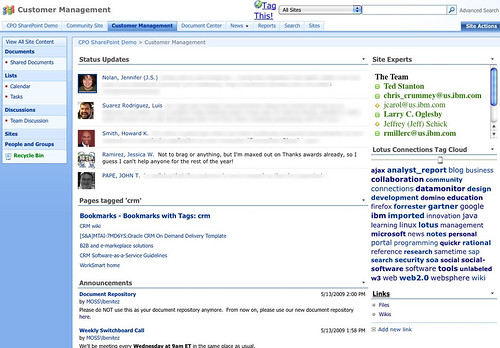
I'm currently preparing for a demo of Lotus Connections for a customer who uses Microsoft Sharepoint heavily. One of their requests is that they want to be able to access Lotus Connections data directly from Sharepoint so that users don't have to jump back and forth between the two applications. By now, you've probably seen my demo of the out of the box integration capabilities between Lotus Connections and Microsoft Sharepoint.

To add to that, I thought it would be interesting to see if I could bring Lotus Connections' microblogging capability to Sharepoint. Since Sharepoint has a web part that renders feeds, the first attempt was to use that web part and point it to the feed of status messages from Lotus Connections. While that was nice, it didn't look pretty at all!

Luckily, the web part allows you to customize the XSL so that the output looks nicer. (XSL defines the way to transform XML into HTML). So I took the original XSL and replaced it with a new one.

For the techies out there, you can download both and compare them. You'll see that I basically changed about 10-15 lines in the original file. For those that already own a Sharepoint site, go ahead and add the RSS web part (which has a bad name cause the web part can handle RSS, Atom, iTunes feeds, and other..), put in this new XSL, point it to the feed of status updates from Lotus Connections, and voilá.


There you have it! Now you can see the team's Lotus Connections status updates in Microsoft Sharepoint in less than 5 minutes.

Enjoy!

Monday, January 18, 2010

What's next with Lotus Connections ?

View Comments

This week, IBM is holding its annual collaboration conference called Lotusphere and is typically known for setting the vision for the collaboration strategy for the rest of the year. Today, at the opening keynote, IBM announced its plans for continuing to drive its Enterprise 2.0 platform, Lotus Connections, forward.

Lotus Connections, IBM's flagship Enterprise 2.0 platform, will be incorporating numerous new features in the coming months. There are several new capabilities, however, that are worth noting.

During the keynote, IBM reviewed the new features that were added into the latest offering of IBM Lotus Connections v2.5. It also reminded the audience about how it scored a big win with Panasonic dumping Microsoft and moving its 300,000 employees to the IBM-hosted collaboration solution LotusLive. Some of the features that wow'ed the audience were the new iPhone access, the new personal file sharing service, and the new capabilities in community spaces that provide for more targeted collaboration.

Enterprise 2.0 where your eyes are

IBM believes that it's essential to bring Enterprise 2.0 capabilities to the users instead of trying to bring users to new Enterprise 2.0 platforms. For that reason, IBM architected Lotus Connections around the SOA principles and has created free plug-ins so that its Lotus Connections platform is accessible from: Microsoft Sharepoint, Microsoft Outlook, Microsoft Word, Microsoft Excel, Microsoft Powerpoint, Windows Explorer, Lotus Notes, Lotus Sametime, WebSphere Portal, RIM's Blackberry, Apple's iPhone, and Nokia's S60.

The recent integration of Lotus Connections and Alfresco's Open Source Enterprise Content Management solution was also mentioned. This integration is important because it's economical, scalable and an open platform which allows flexible access for programmers. In addition, this integration brings features to Lotus software not available through Microsoft SharePoint, including 5015.2 certified records management capabilities, and content services for Lotus collaboration in the cloud.

Looking forward

At the keynote, IBM set forth its vision for what's next. First, it is going to make it easier for end-users to find and invite colleagues to join their network. Additionally, it's going to continue building deeper integration with other enterprise applications such as Microsoft Sharepoint. A pain point that has been echoed by many Sharepoint users is that Sharepoint creates silos and doesn't do a good job in promoting knowledge re-use. IBM's platform fills this gap and will continue to create deeper links between Connections and Sharepoint to break down those silos and create a unified knowledge source. This means that users browsing Sharepoint will have seamless access to Lotus Connections data (experts, communities, bookmarks, wikis, microblogging, etc). Similarly, as those users are browsing Lotus Connections they'll be able to access data in Sharepoint such as file repositories.

Second, IBM also announced that it'll create even more links into WebSphere Portal. Most organizations that deploy a Portal spend time and effort making it a destination for its employees. By 'socializing' the portal, organizations will have a sure way of attracting users and keeping them engaged. At the same time, the end user benefits because they only have a single user interface to learn and use. They will no longer be required to jump back and forth between disparate application to effectively collaborate.

Mobile continues to improve

Another welcomed announcement was the brand new native Blackberry applications to provide native access to Lotus Connections and Lotus Quickr. Mobile access to an Enterprise 2.0 platform is key for end-user adoption according to IBM. What's interesting too is that the applications were built entirely by RIM and since RIM hasn't done this for any other Enterprise 2.0 platform, it validates IBM as a leader in this field.

And speaking of links, IBM also re-iterated the importance of not only engaging employees for internal collaboration, but involving external users as well. Therefore, IBM will be adding some features to create safe social customer communities which increase loyalty and revenue. This will allow IBM to compete more strongly in the B2C segment, which is growing faster than the B2E segment. And work has already started in this aspect. Last quarter, IBM's WebSphere Commerce v7 was released and it includes many social commerce features such as enabling online stores to support product ratings and reviews and all powered by Lotus Connections.

Wednesday, September 30, 2009

New Lotus Connections 2.5 Plug-Ins Available for Free Download

View Comments

Today, new plug-ins were made available in the Lotus Connections Solution Catalog for Lotus Connections 2.5+. As just announced by Mac Guidera, some are updates to previous plugins, and some are new like the Sharepoint plugin. As before, they are free so go ahead and download them:

Enjoy!

Thursday, May 14, 2009

Demo: Lotus Connections Plugin for Sharepoint

View Comments

Earlier this week, the Lotus development team released the beta version of the new Lotus Connections plugin for Microsoft Sharepoint. You may remember that I mentioned this was coming when I did my recap of Lotusphere ealier this year. If you've been reading this blog for a while, you are probably familiar with the integration capabilities of Lotus Connections into Microsoft Sharepoint.

As soon as the plugin was available, and I got some free time, I installed it into a test system to give it a test drive. The installation was pretty straightforward. Basically, you run a wizard that asks you for two parameters: 1) the URL for the Connections Profiles service, and 2) the URL for your Sharepoint site (which was automatically detected for me). Clicking Next a couple more times and 2-3 minutes later the plugin was installed!

The new plugin provides 3 capabilities out of the box:

  1. Adds the Lotus Connections person card EVERYWHERE a name appears
  2. Adds a tag cloud web part to surface the global Lotus Connections tag cloud in Sharepoint
  3. Adds Profiles search mechanism as an additional search engine in Sharepoint

To see these capabilities in action, check out this quick demo that I just recorded.

Content Requires Flash Player

Get Adobe Flash player

I'm sure this is going to make a lot of people happy. Connections and Sharepoint integration is a topic that comes up a lot with my customers. I'm also hoping that Mike Gotta, Industry Analyst with the Burton Group, will be happy as well since he was expecting more integration between Connections and Sharepoint earlier this year.

Monday, April 20, 2009

How To Add A 'Dogear This' Button To Sharepoint

View Comments

Today I had a wonderful all day session at a customer that wanted to know more about Lotus Connections and Sharepoint integration. They were wondering how the can make their Sharepoint environment (WSS v3.0) and Lotus Connections play nicer together. Ted Stanton and myself helped them brainstorm in several ways.

One of the ideas that I loved actually came from the customer: use the Homepage News API to add events that occur in other applications, specially Sharepoint. That way if a user creates an announcement in Sharepoint, for example, that event is reflected in the Lotus Connections Homepage. I thought that was a great idea!

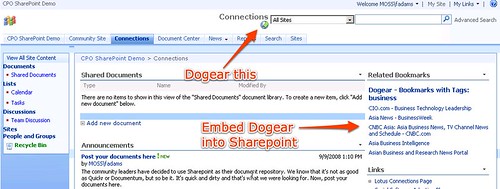
One of the topics we discussed was adding a 'Dogear This' button to Sharepoint. That way their Sharepoint pages/sites would be more easily searchable (apparently this is one of their pain points). I've discussed how to add a 'dogear this' button to pages before, but figured I would update those instructions specifically for Sharepoint. Here you go:

  1. Go to C:\Program Files\Common Files\Microsoft Shared\web server extensions\12\TEMPLATE\GLOBAL
  2. Save a backup of default.master
  3. Open default.master with your favorite text editor
  4. In the <HEAD> section of the document, add the following line (specify the URL to your Dogear server):
    <script type="text/javascript" src="http://connections.lotus.com/dogear/tools/doglink.js"></script>
  5. Now, search for the following text:
    <td style="padding-top:8px;" valign=top>
    <asp:ContentPlaceHolder id="PlaceHolderSearchArea" runat="server">
    <SharePoint:DelegateControl runat="server" ControlId="SmallSearchInputBox" />
    </asp:ContentPlaceHolder>
    </td>
    
  6. Just before that code, insert the following:
    <td>
    <a class="dogpost" href="javascript:DogLink.post_to_dogear(location.href, document.title, '','');">
    <img border="0" src="http://connections.tap.ibm.com/dogear/favicon.ico" />Tag This!</a>
    </td>
    
  7. Save and close the file
  8. Reload Sharepoint
That's it! As a reminder, here's how it looks: Enjoy!

Friday, January 16, 2009

Sharepoint iWidget for Lotus Connections

View Comments

Recently, I started working with the CorasWorks team to develop an iWidget for Lotus Connections that would display data from a Microsoft Sharepoint server. If the name CorasWorks sounds familiar, is because I blogged about them a couple months back. They are a Microsoft Gold Certified Business Partner and have created a solution to bring some of the Lotus Connections components into Sharepoint.

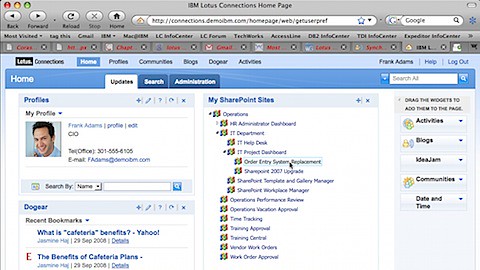
What we wanted to do was develop an iWidget for Lotus Connections so that we could surface SharePoint data within Lotus Connections. More specifically, we wanted to show all the sites that a user has access to. Since CorasWorks provides a very nice API on top of Sharepoint this was very easily done.

I think it's also worth noting how this mashup was created:

  • The iWidget is running on my domain: blog.lbenitez.com
  • Lotus Connections is running on connections.demoibm.com
  • Sharepoint is running on corasworks.net

Therefore, we are using 3 separate platforms and integrating these seamlessly! I think it really shows the power and flexibility of iWidgets and Lotus Connections. Here's a screenshot of how it looks:

200901062331.jpg

Enjoy!

Tuesday, September 23, 2008

Lotus Connections and Microsoft Sharepoint Integration v2

View Comments

First, I would like to thank all of you who responded to my request for feedback on my first Lotus Connections and Microsoft Sharepoint demo on both my internal and external blog. Now, some of you sent me your feedback via email. Next time feel free to post it as a comment to the blog . That way other people can build on your comment and further generate ideas.

Here's the overall flow of the demo:

Ready? Click here to view the demo in full screen.