Pages

Showing posts with label integration. Show all posts

Monday, November 14, 2016

Demo: IBM Watson Workspace for Sales

View Comments
If you watched the last demo of IBM Watson Workspace for Marketing this will be part two of that series. This demo is focused on the day of the life of sellers and how IBM Watson Workspace can make their life better. If you missed the breakout session hosted by Rob Ingram, Rishi Vaish and Alan Lepofsky at World of Watson, this is a good way to catch up.


The video demonstrates how IBM Watson Workspace uses its cognitive capabilities to get you the information you need in context without having to jump back and forth between multiple tools. In the scenario example, we show a sales manager asking his team for the top sales opportunities. Watson Workspace understands this question and knows where to go and get the information: Salesforce. The latest opportunities and their status are then brought directly in context. Then it's time to sign the contract. The goal for this demo (and the previous one) is that it shows all integrations that have been built with the APIs that exist today.

The following integrations are shown:
  • Salesforce
  • DocuSign
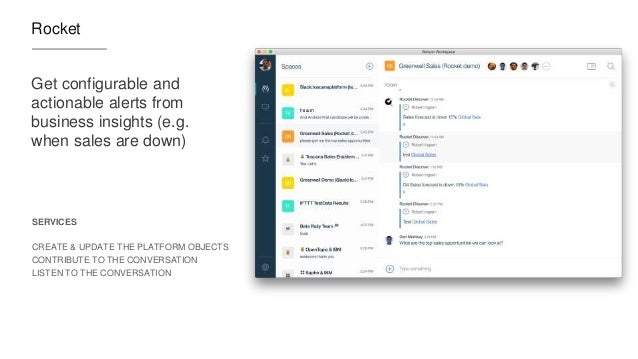
  • Rocket Software
Check out the 2 min demo video below:


Missed the other videos? Check these out:
Enjoy!

Monday, November 7, 2016

Demo: IBM Watson Workspace for Marketing

View Comments
As things settle from the IBM World of Watson conference two weeks ago, today I wanted to take the opportunity to share one of the demos that was shown in a breakout session hosted by Rob Ingram, Rishi Vaish and Alan Lepofsky.

The video that demonstrates how IBM Watson Workspace can improve your life as someone who works in marketing. It makes team collaboration easy and saves you time by bringing everything together and summarizing it for you (using some cool Watson services) so you can take action on what really matters.


Additionally the following integrations are shown (thanks to Sapho for building some of these):

  • Google Adwords
  • Marketo
  • SAP
  • Outlook Online (part of Office 365)
  • and more...
Check out the 3 min demo video below:


We'll soon post other videos so stay tuned!

Enjoy!

Thursday, November 3, 2016

IBM Watson Workspace -- Code Talks So Here's The First Samples

View Comments
Time for the next post on IBM Watson Workspace. In this post I wanted to share some code samples that could help you get going in your development of apps for IBM Watson Workspace using the IBM Watson Work Services and APIs.

I know many developers, including myself, learn a lot from code samples (probably more than using actual API documentation). So to build on my post from earlier this week, we have published the first 5 code samples into the Watson Work org in Github and there should be more posted this week and next. My samples are the Twitter and Weather apps. I built these as fully functioning apps that you can deploy to a server and get up and going in a few minutes. And once they are running, feel free to hack away!

To make things simpler, I've also included a one-click button to deploy the app to Bluemix (which I thought was freaking cool how they make this possible). This, however, is not a required step. If you want to use with another cloud provider, by all means. Back to Bluemix, when you click the button, Bluemix pulls down the code from Github and magically gets it up and running.


One cool thing is that even before the samples were available, I already picked up a few blogs of developers using the APIs:
even one creating an Eclipse plug-in that was able to get something going in < 1 hour ( I love hearing those stories):


So quick tour of the Weather app. It uses the Weather Underground APIs to get current conditions based on a US zipcode. I use the node module to convert the zip code to city and state:
const cityState = zipcode.lookup(zc);

With that info, I now call the Weather Underground APIs to get the current conditions:

client.conditions(opts, function(err, data) {

Now with the data that I get back, I build a message to post back to IBM Watson Workspace and put it in the appropriate JSON construct:

const messageData = {
type: "appMessage",
version: 1.0,
annotations: [
{
type: "generic",
version: 1.0,
color: "#D5212B",
title: "Current weather conditions",
text: message
}
]
};

and then call the API to post it back:

request(sendMessageOptions, (err, response, body) => {

So that should give you an idea on how to listen to a conversation, act on it, and then respond back. I followed a similar flow to build the Twitter app and my hope is you can take it and hack it to build your own.  And if you are in the mood to help improve these samples, pull requests are welcome!

Now definitely check out what Redbooth, Rocket, OpenTopic, Sapho and others have done... VERY COOL! (and just to make it more enticing.. Sapho for example has Marketo and Google Adword integration... )


Tuesday, November 1, 2016

Building apps with IBM Watson Work Services

View Comments
Last week we launched IBM Watson Workspace and IBM Watson Work Services and one of the crtical aspects of this launch is the platform and extensibility provided by these offerings.

Miguel Estrada, Joe Russo, and myself had a session at IBM World of Watson 2016 to talk about the capabilities of the platform. To recap, the idea of IBM Watson Work Services is to provide a platform that understands conversations in context. IBM Watson Workspace is a great example of what you can do with that platform since it's, well, built on the platform! In fact, you use the platform services to extend the IBM Watson Workspace app.

As we worked towards the launch, we worked with various partners and developers who were interested in using these APIs. At the conference last week, we were able to show integration with Sapho, OpenTopic, Kenexa, DocuSign, Salesforce, Redbooth, Rocket, and more.

Here are our slides:


Now here's some good news.  I know a lot of developers learn from code samples and I'm happy to announce that our first code samples are now available on Github: http://github.com/watsonwork. Feel free to fork and contribute as well!

When you are ready to start creating apps, head out to https://workspace.ibm.com/developer/apps and you can start getting them registered there. Once you get them registered, go the settings for any space, and in the apps menu you'll be able to see your apps and add them to the space. It'll look something like this (those are 3 sample apps that I've built and will be sharing in the GitHub link above):

I also recorded a quick demo of the developer experience to get you going faster. Check it out here:


Now go on and start building your apps! I can't wait to see what you'll show at IBM Connect 2017. There are 111 days left - GO GO GO!

Wednesday, October 26, 2016

Let's talk Integrations with IBM Watson Workspace

View Comments
Yesterday, IBM unveiled a new category called IBM Watson Work and two offerings available to all IBM World of Watson conference attendees: IBM Watson Work Services and IBM Watson Workspace.

If you've been following me for a while, you know I'm a big fan of integrations, app dev, and platforms. Well, today I'm happy to share the news that IBM Watson Workspace works with IFTTT. In fact, it's the first IBM app to be part of the IFTTT ecosystem. If you are not familiar with IFTTT (that is IF This Then That), they make it super easy to connect the apps that you love together and configure what they call recipes. In other words, when something happens in one app, then do something in another app. IFTTT currently has 370+ apps in the catalog, so chances are that you can integrate with what you want (e.g. Box, Gmail, your car, you smart home devices and more!)

To start creating your own integration with IFTTT, head out to: ifttt.com/workspace . Fist bump to the IFTTT team for helping share the news:


If you missed the keynote yesterday or you want to review the announcements, you can catch the replay here:


And here's a recap of the key tweets!

Tuesday, May 10, 2016

VideoBio Adds Quick Video Sharing to IBM Connections

View Comments
I always like to highlight when developers and partners extend our IBM Connections Cloud platform.
Today I wanted to highlight VideoBio who have built a very nice solution to allow users to quickly share video messages with others.

So how does it work? First, you can go to your profile, or someone else's profile and click on the VideoBio button.


After recording the demo, it's automatically shared with your IBM Connections network and you can optionally choose to share via Facebook, LinkedIn, Twitter and more.!


Check out the demo:


To learn more, go here.

Friday, May 6, 2016

ICYMI: The XPages Runtime is Now Available in IBM Bluemix

View Comments
Earlier this year, we had announced the availability of the XPages runtime as beta in IBM Bluemix. Then at IBM Connect, XPages on Bluemix was featured during the keynote where a quick app was built integrated with Watson to quickly tag / categorize images using the Watson Image Analyzer service.

So in case you missed it, earlier this week, the XPages runtime for IBM Bluemix went from Beta to full release, generally available.


This allows developers already familiar with the XPages framework to leverage the power of IBM Bluemix to quickly build powerful apps in the cloud, possibly integrated with other Bluemix services (like Watson). For added security, you can connect to your existing user directory for ID management.

It's now been a couple of days and it's been great to see the reaction over Twitter and other social channels.


If you still haven't seen XPages, To help get you up to speed on developing XPages applications on Bluemix, here is a list of videos we have published in the past.

Ready to get started? Check out how to build apps with XPages for Bluemix. Can't wait to see the apps that you build!

Thursday, April 28, 2016

New IBM Connections Desktop Plug-Ins for Mac and Windows

View Comments
Today, we've released our monthly update to the IBM Connections Mac and Windows desktop plug-ins. I'll cover some of the updates here and will start with Mac since that's what I use.

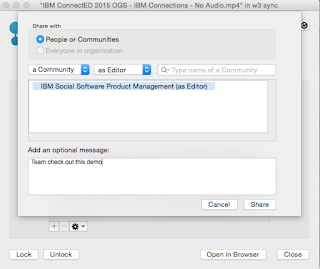
In this release, the context menu in Finder has been updated to streamline access to the IBM Connections actions. Now, when you right click on a synced file, you can see when it was last synced, share with individuals or groups, lock/unlock, modify metadata and more. Here's a snapshot of how it looks. 


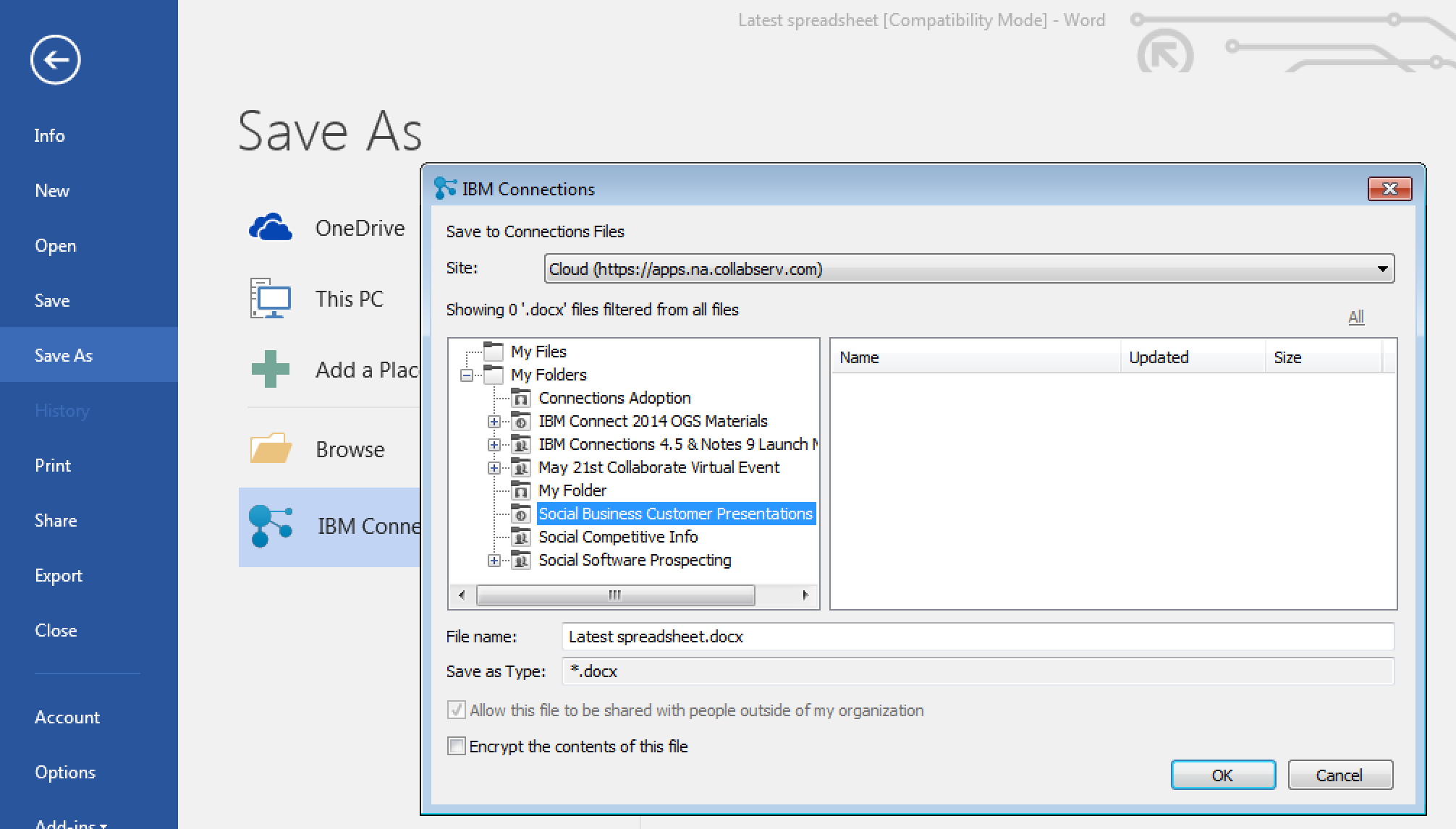
For those of you in Windows, we have improved the experience when saving files directly to IBM Connections from Microsoft Office. From the Save As menu within Microsoft Office (Word, PowerPoint, Excel) it'll be a lot easier to pick where specifically you want to store files (e.g. in what Folder, what Community, etc). See the screenshot below. And don't forget, when editing files, you can have round trip editing of files with IBM Docs when you are online or Microsoft Office when you are offline.


Windows 10 support has also been officially added. For those that like to live on the edge and have enabled preview features, you get some new stuff too. I'll leave that as an exercise for you to find it.

To get the plugins, go to Downloads and Setup in cloud, or if you are using on-premises, you can get the Windows plugin from our catalog here and the Mac plugin from here.

Monday, April 25, 2016

How To Edit Files in Sharepoint or Box with IBM Docs

View Comments
One of the capabilities that we highlighted as part of the IBM Docs 2.0 release was the new set of APIs to allow real-time co-editing of files in repositories other than IBM Connections (e.g. Alfresco, SharePoint, etc).

So first, what is IBM Docs ? The goal of IBM Docs is to make it easier for teams to create and allow for collaborative editing of word processing, spreadsheet and presentation documents in real time. This online editor provides key collaborative services such as coediting, file management and contextual commenting (so you can see who typed what).


At IBM Connect earlier this year, Jim Puckett, product manager for IBM Docs, shared an overview of IBM Docs which you can see here:


With the new set of APIs you can now build collaborative applications. So if you are an ISV looking for a way to embed co-editing, check out IBM Docs. Van Staub first shared how to integrate Docs with any app. Then he took it to the next level and describes how to edit files stored in SharePoint with IBM Docs.

Last week, IBM published a tech note that describes the process to set up IBM Docs to edit files stored in Box. This provides a common editing capabilities for files, irrespective of where they are stored.

Want to learn more ? Come to Social Connections 10 in Toronto in early June! Check out the full agenda that was just announced last week. Register today!

See you there!

Monday, March 21, 2016

TimeToAct Brings Custom Apps and Forms to IBM Connections

View Comments
TimeToAct recently announced new capabilities for IBM Connections Communities as part of their XCC Social Intranet solution.

If you are not familiar with XCC, it's a lightweight Web Content Management System that integrates into IBM Connections. It enhances IBM Connections with classic Web Content Management capabilities and thus integrates the two antipodes of an intranet, i.e. peer-to-peer collaboration with internal (top-down) communications.


For example, you can use the Atom/RSS Feed App, Clipping App, HTML App, and now the Forms Builder App. This app allows business users to quickly build simple apps to collect and report on information without having to code anything.

What's cool about this is that it opens up the possibilities for everyone in the organization to create simple apps. This in turn drives engagement and adoption which accelerates ROI.

In the video below, you'll see how easy you can build Forms to build an HR form to submit open positions or apply to open positions. The video also shows an example of building a media gallery (for example to have users post classifieds).


To learn more, visit http://connections-apps.com/product/xcc-web-content-custom-apps-for-ibm-connections/#contact 

Monday, March 14, 2016

IBM Verse Integration with Box Is Now Available

View Comments
As part of the IBM + Box partnership, IBM today has released Box support for IBM Verse. This new integration allows IBM Verse users to easily send files stored in Box to others.  You might remember hearing about this as part of the keynote at IBM Connect 2016 earlier this year. If you missed the keynote and the demos, here's the replay.


IBM Verse users that have this feature will be able to bring in their Box files when composing a message.  In the file picker, they'll be able to browse all Box folders that they have access to, or upload a brand new file and store it in Box:


Additionally, notice that in the bottom left you'll be able to select the access type for the folder or file being shared. Users will be able to select to share the file/folder with anyone that has the link, everyone in their company, or just the people that have access to the respective folder. Once the file or folder has been picked, a link is added to the message and is ready to be sent!


Note: If you don't see this option, let your admin know so that they can turn this feature on for you. In the admin panel, they can go to Email & Calendar Options and from there turn on Box (and offline as well!!):


Wednesday, February 10, 2016

From IBM Connect 2016: XPages App Built on Bluemix Using Watson and IBM Connections Cloud

View Comments
Last week at IBM Connect 2016, Chris Crummey demoed a sample app built on the XPages runtime running on Bluemix.

The app combines IBM Connections Cloud, IBM Watson Analytics and IBM Bluemix. The idea is that the app allows you to upload images and then uses IBM Watson (the Visual Recognition Service) to help with automatic classification of the files. Based on the image that has been uploaded, Watson will then suggest some tags to use with the file.

Here's a recap of that demo:


Here's a photo from Daniel Brix on Twitter that showed it on the big screen:


If you missed IBM Connect 2016, well, you missed a great show!  I'll share some more content from the conference in upcoming posts so stay tuned to those. For now, I quickly wanted to get this out and then work on my IBM InterConnect 2016 sessions.

Monday, January 25, 2016

The IBM Connections Cloud January 2016 is Now Available

View Comments
Just in time for IBM Connect 2016, there are now more capabilities that have been added to IBM Connections Cloud.

Here's a snapshot of what's new this month:

Real-time alerts help you focus on items that need your attention
Stay up to date with things that require your attention and response. The new notification center in the navigation bar increases your awareness less disruptively. See alerts with a single click - no matter where you are in the service. Allows you stay on track or swiftly shift gears depending on what is required at the moment. Note: This is slowly rolling out to all customers. If you don't see it, you'll have it by end of the month.


Leverage 3rd party apps to maximize value of Communities

Community owners can add third-party apps to Communities. A new extension point opens up the possibilities for Independent Software Vendors (ISVs) to create apps for Communities. Developers can now write custom responsive apps that can be surfaced within Communities. Community owners don't have to do anything different from what they do today. As soon as a new third party app has been approved by the administrator, it'll be available for all community owners of that organization. AppFusions has already taken advantage of this integration and has created a Community app for OneDrive. Check out the demo below: 


Organize your files how you want to

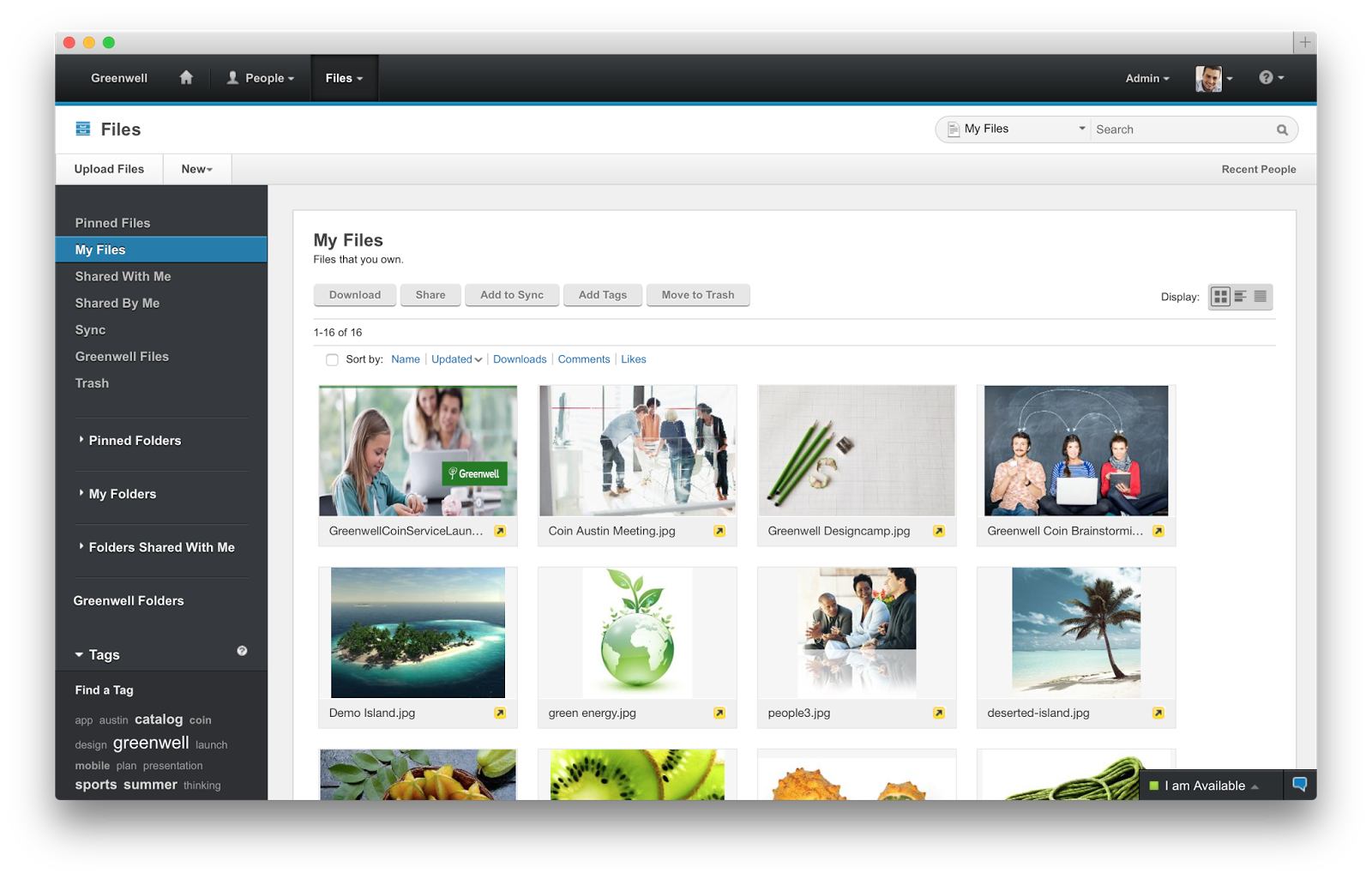
Now you can create nested folders to organize your content in a familiar hierarchy. You can create sub-folders within folders to give your content a structure that makes it easier for you and other users to manage content. For both My Files and Community Files , you can build a hierarchy of folders with tree-navigation on the side of the Connections Files page.


Nested folders are also supported in the Connections Mobile app and in the IBM Connections Desktop Plugins for Microsoft Windows and the IBM Connections Plugin for Microsoft Outlook when syncing your offline files with Connections Files in the cloud.

Drag and drop support added on Microsoft Windows

Also new in January is the ability to drag and drop files from the Windows desktop directly to an IBM Connections folder in the IBM Connections Desktop Plugins for Microsoft Windows .

Improved user experience working with files

The sidebar is now resizable and labels have replaced the icons on the tabs making it easier to navigate and view information and comments.


To see what else is new, check out this page. Hope to see you next week at IBM Connect 2016!

Wednesday, November 4, 2015

IBM Insight 2015 - Check Out What You Missed

View Comments
Last week was a wild ride over at IBM Insight 2015. The IBM Verse and IBM Connections teams were there to share the latest about our products. It was a great opportunity to meet new customers, partners, and fellow IBMers.

One of the highlights of the conference, was the Super Session by my colleague Rob Koplowitz. He co-presented with Jason Silva, the host of the TV show Brain Games (catch it on Netflix). You can watch a replay of his session here:


I co-presented on 3 different sessions around Application Development on top of our cloud platform, Mobile Collaboration, and working with content with IBM's enterprise file sync and share (EFSS) offering, IBM Connections. A key capability here that I wanted to cover was the latest and greatest around IBM Docs. We actually have a major release of IBM Docs coming up here very soon. And given that IBM Docs seamlessly works with IBM Content Navigator it was really well received. If you have IBM Content Navigator, don't forget to take advantage of your entitlement to IBM Docs today!

I've uploaded the presentations so you can see the content that was shared.


So what's next ? You NEED to come to IBM Connect 2016 in January 2016. In fact, John Hernandez invites you personally:

Tuesday, September 1, 2015

IBM Connections Files and Aspera: A Possible Integration

View Comments
Earlier this week I was asked what could be possible between Aspera, an IBM file transfer solution, and IBM Connections Files, IBM's offering for organizations looking for enterprise file sync and share (EFSS) capabilities.

First, let's clarify the differences between file transfer and file sharing and sync. In talking with some people in the Aspera organization, they told me to think of Aspera kind of like UPS.  UPS will take a package from point A to point B and they do not keep the package. Similarly, Aspera is all about getting files from point A to point B in the fastest way possible. In one example, they say that a 24GB file which could take ~26 hours via a traditional TCP/IP download, would only take 30 seconds using Aspera.


With that in mind, I came up with two ideas that you could do today with the Aspera APIs and the available extension points in IBM Connections

Transfer Existing Files

This idea is to create a new extension for Files as documented here. To do this, log in as the organization administrator and go to Admin - Organization Extensions. In there create a new extension as shown below:

And voilá. Once you code up the integration with your Aspera server this should get you a path to integrate. End users will now see this option when navigating to a file:


Upload and Transfer

The other thought is to create a new extension so that we intercept the file upload process. In this case, you navigate to the same Admin - Organization Extensions menu. In there, instead of creating a "File Menu" extension, you now create a "New File Menu" extension as shown below:


In any case, I strongly suggest you reach out to your partner or IBM services rep for further discussion.

I'm interested in your thoughts too. Any other use cases that come to mind ?

Monday, June 22, 2015

The IBM Connections Cloud June 2015 Release Is Now Live -- Check it out!

View Comments
Over the weekend we pushed out updates to our IBM Connections Cloud users (for those fathers out there, consider it a Happy Father's Day gift).

You will find updates throughout the experience both in the web and desktop.  For example, for Mac users you can now share files with Communities directly from Finder without ever needing to open a browser. Just right-click on the file, and voilá:


Another update this month was for developers.  Developers can now take advantage of the embedded experience extension point within the Activity Stream.  Each person and community has an activity stream (which follows the ActivityStrea.ms / OpenSocial 2.0 standard) which allows 3rd party apps to inject events into it (e.g. you could get alerts from an app telling you that an approval is required).

One of the first developers to take advantage of this in the cloud is AppFusions. They've now built connectors that are sure to please various roles within an organization. For example, if you want to get updates to files updates in Box, you can.  If you want to get updates when new code has been submitted to GitHub, you can. Or maybe you are a marketer and want to stay up to date with updates from Twitter.

Check out this video to see it in action!


The following slides summarize all the cool new things that are now available for IBM Connections cloud users.  Check these out to get an idea of what else is new:


And stay tuned for more news very very soon...

Tuesday, May 5, 2015

IBM Connections Adds Secure File Sync and Share Offering On-premises

View Comments
Following the release last quarter of our secure file sync and share offering in cloud, today we have just released the equivalent offering for those customers who would like to deploy this on premises. This new offering gives customers a new way to buy IBM Connections and get just the Files portion of the platform. This makes it easy to get started and customers can grow and buy the entire IBM Connections suite once they are ready to use other capabilities such as Communities, Forums, Ideation, etc.

The capabilities have already been highly praised by analysts such as Forrester and OVUM. In fact, check out this report from OVUM to find out why IBM Connections is a strong candidate to provide all the benefits and features an enterprise user might need from a file sync and share solution.

This offering includes:
  • Mobile apps for iOS and Android
  • Desktop plugins for Microsoft Windows and Mac (including integration into Microsoft Office 365 Desktop apps such as Word, PowerPoint, Outlook and Excel)
  • External file sharing (ie. share files with people outside of your organization)
  • Share files with individuals or groups
  • Lock files for editing to prevent conflicts
  • View files online without having to download
  • Control who can view/edit your files and who can re-share them 
  • View who has downloaded your files and which version they have
  • See how the file has been shared throughout your organization
  • and more... ! 
Available add-ons:
  • Compliance and Governance support 
  • Real-time co-editing of files without downloading 
Here's a demo of the plugins and mobile apps in action:


Enjoy!

Tuesday, April 21, 2015

How To Integrate Your App with IBM Connections Cloud with 2 Lines of Code

View Comments
Last week I was at the IBM Connections user group conference, called Social Connections, in Boston MA.  There, I got the opportunity to meet with many end users as well as developers interested in building apps for IBM Connections.

A particular session that I got great feedback from developers was the one titled Mastering the IBM Connections Developers Experience. Vijay Francis and Paul Bastide took the audience through the options to integrate with IBM Connections Cloud.  One of the samples was how to take an existing app and bring in our navigation components into it in less than 30 seconds!

So imagine you have an app like this:


Now let's take that and add the IBM Connections Cloud navigation to it.  Add a couple of lines of code and boom!


Now, you have an easy and consistent way for users to go back and forth between your app and the main Connections interface. So how did I do this? As easy as 1-2-3:

  1. Add the following before the closing body tag in your web app

    <script src="https://apps.na.collabserv.com/navbar/banner/partner/navBar?oneui=3" type="text/javascript"></script>
  2. Add the following to the head tag

    <link href="http://apps.na.collabserv.com/theming/theme/css/3" rel="stylesheet" type="text/css"></link>
  3. Add the following CSS classes to your opening body tag

    class="lotusui30 lotusui30_body lotusui30_fonts scloud3"
And if you look at the steps above, basically you are using 2 lines of code to do the integration. Easy!

For more information check out these links:

Thursday, March 12, 2015

Updated Desktop Plug-Ins Available Today and New Features Coming to IBM Connections Cloud Next Week

View Comments
As mentioned in a previous entry, we released a File Sync and Share only offering earlier this week. Today, I have some good news.  Today we have released the latest version of our desktop plugins for Mac and Windows in prep for the new feature that will start appearing in IBM Connections Cloud next week.

This month's release continues to focus on our file sharing and sync capabilities. This release also introduces new features to help teams better organize their communications. Here's a sampling of the new features:
  • Team sites and communications
    • Rename apps (e.g. rename Wikis to Documentation)
  • File sharing and sync
    • Drag-n-drop target to upload files
    • Add multiple files to sync at once
    • Mac plug-in: ability to specify file extensions to ignore, enable beta features (if you like living on the edge!), and turn on/off logging for troubleshooting purposes
    • Federated authentication support (SAML) for Mac/Windows (cloud only)
  • Mobile
    • IBM Docs support in iOS (view and co-edit documents). Watch out for an update to the app
    • Citrix support for iOS and Android
    • MobileIron support for Android.
  • Rich text editor
    • Ability to sort data in tables in the rich text editor
    • Permament Pen - those of you used to Verse or IBM Notes will recognize this feature. This allows you to set a custom style so that when you revise content (e.g. wikis) all your markup is done in a specific color/font/style
As mentioned above, you can now sort the data in tables within the rich text editor as you can see below:


I've also created a presentation that shows the new features in this release:


For more details on what's new in the March 2015 release, check out the documentation here.

If you've missed what we've released in previous months, check out the history of new features here.

Tuesday, March 10, 2015

IBM Creates File Sharing and Sync only offering and it's available today

View Comments
Fresh off the presses! The IBM Connections Files cloud offering is now available in our cloud.  If you are already an IBM Connections customer there's nothing for you to do. However, if you've been thinking about starting with IBM Connections, this might be a good place to start as you get just the core file sharing and sync component of IBM Connections and then upgrade to full the IBM Connections suite as your team needs more capabilities.

IBM Connections Files Cloud is a new standalone cloud service that combines the ability to share files with internal and external users with the ability to synchronize users' files across their own devices. Small to medium businesses, line-of-business departments, or corporate IT can sign up easily and start using the service immediately. The familiar browser interface, desktop clients, and mobile applications provide simple ways to get to the most important files and keep them in sync with other users and devices. Each user gets 1TB of space and administrators can always get more as needed.

Check out Ovum's report on why IBM Connections file sync and share is a leader in this space.

IBM Connections Files on Cloud empowers organizations to increase productivity, make speedier business decisions and enhance innovation:

  1. One place for enterprise file storage, sharing, and syncing plus social – find experts, see profiles, post status updates, find content with tags and more.
  2. Securely access files anytime, anywhere, on any device.  Create, share, find, store, review, and even edit online and offline, all in a security rich environment, designed to meet IT needs
  3. Simple collaboration inside and outside your organization. Easily and instantaneously share files with colleagues, partners, clients and suppliers.
  4. Robust access control.  You decide who can read and edit files with role level access control.  The included Profiles capabilities allow you to find and connect with colleagues via their business card and contact information.
  5. More value for your money. You get market leading file sync and sharing capabilities PLUS the benefits of key social collaboration capabilities at a lower price than many other vendors.

Here's a demo I did recently that shows the IBM Connections file sync capabilities on a Mac:


To start a free trial, go to http://ibmcloud.com/social