Pages

Showing posts with label homepage. Show all posts

Monday, January 25, 2016

The IBM Connections Cloud January 2016 is Now Available

View Comments
Just in time for IBM Connect 2016, there are now more capabilities that have been added to IBM Connections Cloud.

Here's a snapshot of what's new this month:

Real-time alerts help you focus on items that need your attention
Stay up to date with things that require your attention and response. The new notification center in the navigation bar increases your awareness less disruptively. See alerts with a single click - no matter where you are in the service. Allows you stay on track or swiftly shift gears depending on what is required at the moment. Note: This is slowly rolling out to all customers. If you don't see it, you'll have it by end of the month.


Leverage 3rd party apps to maximize value of Communities

Community owners can add third-party apps to Communities. A new extension point opens up the possibilities for Independent Software Vendors (ISVs) to create apps for Communities. Developers can now write custom responsive apps that can be surfaced within Communities. Community owners don't have to do anything different from what they do today. As soon as a new third party app has been approved by the administrator, it'll be available for all community owners of that organization. AppFusions has already taken advantage of this integration and has created a Community app for OneDrive. Check out the demo below: 


Organize your files how you want to

Now you can create nested folders to organize your content in a familiar hierarchy. You can create sub-folders within folders to give your content a structure that makes it easier for you and other users to manage content. For both My Files and Community Files , you can build a hierarchy of folders with tree-navigation on the side of the Connections Files page.


Nested folders are also supported in the Connections Mobile app and in the IBM Connections Desktop Plugins for Microsoft Windows and the IBM Connections Plugin for Microsoft Outlook when syncing your offline files with Connections Files in the cloud.

Drag and drop support added on Microsoft Windows

Also new in January is the ability to drag and drop files from the Windows desktop directly to an IBM Connections folder in the IBM Connections Desktop Plugins for Microsoft Windows .

Improved user experience working with files

The sidebar is now resizable and labels have replaced the icons on the tabs making it easier to navigate and view information and comments.


To see what else is new, check out this page. Hope to see you next week at IBM Connect 2016!

Tuesday, December 15, 2015

Announcing IBM Connections 5.5 & IBM Docs 2.0

View Comments
I'm happy to announce the upcoming availability of IBM Connections 5.5 and IBM Docs 2.0, our next major on-premises release.  As we've done with previous releases, plus,given we have a single code base for cloud and on-prem, we've taken a snapshot of our cloud, made a few adjustments here and there, and we are making that available to our on premises customers.


There's over 100 new features and there's just no way that I can cover all of this in this post.  However, if you look at all the cool things that we've delivered to our cloud offering since our last major on-prem release (ie. IBM Connections 5.0) then you'll know everything that's part of IBM Connections 5.5.

So when can you get it ? As per the announcement letter that was published minutes ago, the software will be available for download this Friday. 

Now, let me get things going and cover some of the highlights for these releases:

IBM Docs 2.0
  • Inline comments are preserved while files are being edited offline (e.g. while on a plane working on a file without connectivity, you can see and reply to comments and your changes will be sync'ed back automatically when you are back in the network)
  • New file viewer with high quality previews and the ability to interact with content in view mode (e.g. show/hide columns)
  • Auto-publish your file updates and make them available to readers instantly or save file as draft and work with other editors before making the changes available to readers
  • Support up to 20 simultaneous editors at the same time
  • New API so that you can bring the power of our real-time collaborative editing capabilities to 3rd party file repositories.
  • ... and more!

IBM Connections 5.5

  • Organize your documents, presentations and more into your own nested folder hierarchy in Personal and Community Files
  • Brand new file viewer experience which allows you to find the content that you need faster and review it quickly without having to download
  • Build powerful team sites specific for your team needs (e.g. HR, Sales, Marketing, etc) with new configuration capabilities such as:
    • New community layouts
    • Responsive apps so you can just drag-n-drop between columns in one motion
    • Rename apps based on your audience
    • A brand new Rich Content app which you can use for announcements or embedding content from the web 
    • and much more.. !
  • Smart type-ahead search to find what you need instantly
  • Enhancements to the rich text editor such as permanent pen, sort table data, and more
  • Real-time alerts on your desktop (for HTML5 browsers) to notify you when content needs your attention
  • ... and more!

We have a demo and a new Reviewer's Guide coming up so stay tuned for details. Want to learn more? Check out the webcast tomorrow where the product managers will take you through what is new in these releases. Want even more ? Then join us for the Ask the Product Managers session for Thursday and we'll take your questions.

So if you are using IBM Connections on-premises, get ready for an upgrade and let me know when you've upgraded!

Thursday, October 16, 2014

IBM Connections 5.0 CR1 Is Now Available

View Comments
Today, we are updating IBM Connections, the market-leading enterprise social collaboration platform.  Specifically, today we are releasing IBM Connections 5.0 CR1 for on premises customers.

This release includes a roll up of fixes that we've been releasing for the past couple of months.  Additionally, it also adds some new features.


New features in IBM Connections 5.0 CR1 (but not limited to):
  • Updated file preview design in stream
  • Play uploaded movies in the stream
  • View full file from thumbnail
  • New option to repeat events on a monthly basis
  • Copy/Paste images in the rich text editor for Activities
  • @mentions in CCM
  • Reporting metrics for CCM
  • Added support for IBM i , Power 8, and Siteminder 12.5.1

The full list of new features is here.  The full fix list can be found here.   

Enjoy!

Wednesday, July 3, 2013

New Theme Available for IBM Connections

View Comments
I'm happy to announce that we just made a new theme available for IBM Connections, IBM's enterprise social network (ESN). This theme was first shown at IBM Connect earlier this year and has been used by our cloud customers for a while now.

The feedback from our cloud customers has been extremely positive so far. I've also been getting a lot of requests from our on-premises customers that they would like to use this new theme. The good news for them is that the theme is available today and it's ready for download!

Here's how Connections looks with the new theme (Updated 10/Jul/2013 with new screenshot):


You can download the theme from our catalog here. Deploying the theme takes just a few minutes so go on and get it!

Note: Please read the read me ( hey, it's a good reminder! ) for system requirements and installation instructions.

Enjoy!

Tuesday, October 2, 2012

IBM positioned as a Leader in the 2012 Magic Quadrant for Social Software in the Workplace

View Comments

Today is my 2nd year anniversary as one of the Product Managers in IBM's Social Software team and have some great news to share. Analysts at Gartner have positioned IBM in the Leaders Quadrant of the 2012 Magic Quadrant for Social Software in the Workplace. IBM’s placement is based on its ability to execute and completeness of vision. Just a few weeks ago, IBM released IBM Connections 4.0 the core of the IBM Social Business Platform.

This new report adds to the recent analyst reports from Forrester and Aragon Research which also list IBM as a Leader in their respective research reports. IBM Connections has also been listed as the worldwide market share leader by IDC.

I'm extremely proud to be part of the IBM Connections team! If you want to learn more about IBM Connections, check out this quick 3 minute video created by my colleagueSuzanne Livingston:

Check out the other 9 videos that Suzanne has created. These are great "shorts" you can easily share with your colleagues and even embed directly in Connections to show users what's new in IBM Connections 4.0 and they cover the different components of Connections including Mobile.

Friday, September 21, 2012

IBM Connections Product Managers Join the Taking Notes Podcast

View Comments

IBM Connections 4.0 turns 2 weeks old today. Most likely, you have probably already upgraded your environment or are in the middle of planning the upgrade.

It's also very likely that by now you've checked out some of the great videos that have been made available in YouTube:

If you haven't seen those videos, definitely go and check them out. There's many more videos that I haven't shared yet, but will share them in the coming days. Today, I wanted to call your attention to a recent podcast where all 4 IBM Connections Product Managers share their favorite features of IBM Connections 4.0.

The podcast was led by the good folks at the Taking Notes podcast: Bruce Elgort and Julian Robicheaux. To listen to the podcast, go here.

Monday, September 17, 2012

Grow Revenue By Using the IBM Social Collaboration Platform [VIDEO]

View Comments
And the demo movies for IBM Connections v4.0 keep coming in.  Let me tell you a little about this one.

Before using IBM's Social Collaboration Platform, Greenwell's profits were not growing and they were losing market share.

Greenwell's marketing manager decided to leverage the IBM's Social Collaboration Platform and from that point on, the successes kept piling in.

Check out the success story:


The ROI of using IBM's Social Collaboration Platform is clear. Greenwell was able to:
  • Discover new opportunities
  • Rebuild brand recognition
  • Increase market share
  • Invigorate its customer base
Congrats to the team at Greenwell! (By the way, in case you didn't attend our conference earlier this year, Greenwell is a fictional company).

This is a great video that you can use to drive adoption and clearly understand the business value of using a Social Collaboration Platform powered by IBM Connections.

What do you think? If you are not using the IBM Social Collaboration Platform, you should start today!

Friday, September 14, 2012

Now Available - Replay of What is New In IBM Connections 4.0 Webcast

View Comments
Last week, I participated in the monthly community meeting for IBM Collaboration Solutions run by the famous Joyce Davis. In the webcast, I covered What's New in IBM Connections v4.0. For the most part, I tried to do a separate demo from the one that I shared on Wednesday of this week which was focused more on the highlights. For this webcast, I tried to get a bit more specific and show more of the new features and show them in action!

As Joyce mentioned in her blog entry earlier in the week, in the webcast Matt Tredinnick kicked things off by providing an overview of the IBM Social Business story and explained how IBM Connections fits into the strategy. Joyce tells me that this is one of the webcasts with highest turnouts!

Here's the replay of the webcast in case you missed it or want to see it again:


And this is the slide deck that I was going to use but it was decided by webcast attendees to skip these and focus more on demo. 93% wanted a demo and only 7% wanted slides; go figure!

For instructions on how to download these slides, see below:


Here's some additional links you might be interested in:
  • Download the slides from here (feel free to use these with your users)
  • Download the audio-only (mp3) replay from here
  • Q&A during the webcast can be seen here
Enjoy!!

Thursday, September 13, 2012

IBM Fully Behind OpenSocial and ActivityStrea.ms

View Comments
When OpenSocial 2.0 was shipped late last year it was declared ready for the enterprise and that's no surprise since a big push towards OpenSocial 2.0 was driven by companies such as IBM.

In the latest release of IBM's social collaboration platform, IBM Connections 4.0, IBM has included support for OpenSocial 2.0, OAuth2, and ActivityStrea.ms. The latest release also features something called "Embedded Experiences" which was a concept invented by IBM and donated to the open source community. IBM is also currently the lead editor of the ActivityStrea.ms standard and is the top code contributor to Apache Shindig, an open source reference implementation of an OpenSocial container.

With IBM and other social collaboration vendors adopting OpenSocial it presents a prime opportunity for developers who want to build apps on top of these platforms. They build once and they can use anywhere!


Earlier this year, Dion Hinchcliffe blogged about the need for Enterprise Social Networks to leverage Open Standards. He not only outlines the benefits of open standards for developers, but also to the enterprise. Specifically, Dion says (emphasis mine):
[…] the business value of social media is best achieved when it's centered in the work that we do, not off to the side. This can only be achieved by connecting our systems of engagement (social business tools and platforms) with our systems of record (CRM, ERP, HRM, etc.)
Updated 13/Sept/2012 @ 9:15a - I was alerted that Dion Hinchcliffe joined the OpenSocial board earlier this year.

And you can see IBM fully understands this as part of their launch video for IBM Connections 4.0 shows integration with SAP through an OpenSocial gadget.

ISW, an IBM Business Partner, has created a gamification solution for IBM Connections and it uses the OpenSocial standard meaning that their solution could work in other platforms as well. To see it in action, see the video below (skip to 13:03):


AppFusions is also taking advantage of this integration point and even blogged about this earlier this week.

OpenSocial is definitely now ready for the enterprise! Oh and if you want to learn more about IBM Connections, don't forget to register for today's webcast From liking to Leading: The Success of your Business is Social (click the invite below to register):


Register now!

Wednesday, September 12, 2012

IBM Connections 4.0 Overview and Demo [VIDEO]

View Comments
By now you have downloaded the IBM Connections 4.0 code and maybe even installed it over the weekend. The next step? It's time to show your users what's new in IBM Connections 4.0!

My colleague Fred Raguillat and myself have created this video to show an overview of IBM Connections 4.0. Notice that this video is not strictly focused on what's new and I also cover some features available in the platform. Therefore, this video can be used both as a What's New video and also a Top Features video.

To complement the video, if you are interested in the highlights of what is new in version 4.0, check out this page that I created and if you want the full list of 200+ features that are new in the release, then check this page out.

This is the same demo that I've been doing to current and prospective customers and have received some very positive feedback so far. One person told me I had to breathe more which was a luxury I couldn't take. There's just too much to cover and I wanted to keep it to about 6 minutes (let me know what you think in the comments) :


IBM is also announcing today new customers which continue to adopt IBM Connections. Today, more than 60 companies of the Fortune 100 have purchased IBM Connections.  As part of today's announcements, Primerica is the latest organization to adopt IBM Connections and will deploy it to their 90,000 sales reps to engage with their 2.3 million policy owners. Primerica will also be leveraging our Actiance Vantage solution to ensure they remain compliant with local laws.

To learn more about IBM Connections 4.0, don't forget to register and attend for tomorrow's webcast From liking to Leading: The Success of your Business is Social (click the invite below to register):

Register now!

Tuesday, September 11, 2012

Introducing the Top 4 Ways to use IBM Connections

View Comments

It's here! The Top 4 Ways to use IBM Connections based on tips from IBMers and IBM Champions. If you've ever been asked by peers how they can use IBM Connections, this is great resource for them.

The way the page has been structured is that it provides an overview first of what is Connections and then ways in which IBM Connections, as a social collaboration platform, can make you and your peers more effective and productive.

Quotes from two IBM Champions, Lisa Duke and Femke Goedhart, and two IBMers, Suzanne Livingston and Luis Suarez, show real examples of people who use Connections on a daily basis to make their job easier.

I really like the visual layout of the page and I hope you do too. The page also has links to download the free mobile apps for IBM Connections as well as all the desktop plug-ins (e.g. Microsoft Outlook, Word, PowerPoint, and much more)!
So what are the Top 4 Ways to use IBM Connections? You'll have to check out this new page to find out!.

Let me know what you think about the page in the comments.

Oh and if you want to learn more about IBM Connections, don't forget to register and attend for the webcast From liking to Leading: The Success of your Business is Social (click the invite below to register):


Register today!

Thursday, January 14, 2010

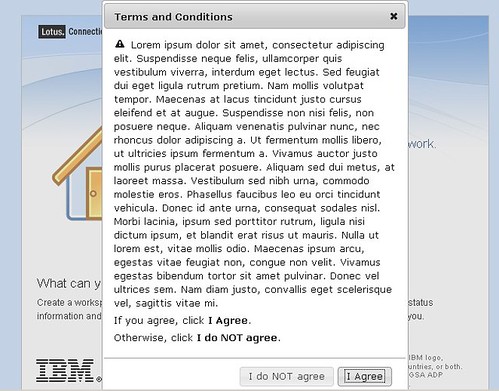
Terms & Conditions for Lotus Connections Login page

View Comments

Recently, I was working with a customer who wanted to ensure that their users agree to some terms and conditions before being able to log on to Lotus Connections. It turns out that this customization is not too bad. I had heard from Mitch Cohen that jQuery was a nice library to do this.

I did some searching online to see if someone had done something similar. I found this awesome article: Modal Confirmation Dialog on Form Submit: Javascript, jQuery, and Thickbox. It basically shows you how to do the same thing in 3 different ways. I chose to use jQuery for this little project.


Here's step-by-step how I did it:

  1. Download the jQuery libraries. This link did it for me: http://jqueryui.com/download/jquery-ui-1.7.2.custom.zip
  2. Extract the files to a directory in your HTTP server. I put them in a directory called jq in: C:\IBM\HTTPServer\htdocs\en_US
  3. Go to <WAS_PROFILE_ROOT>\installedApps\<cellName>\Homepage.ear\dboard.war\auth
  4. Save a copy of login.jsp
  5. Open login.jsp with your favorite text editor
  6. Add the following before the closing </HEAD> element

     <!-- Include jQuery -->
    <link rel="stylesheet" type="text/css" href="/jq/jquery-ui-1.7.2.custom.css">
    <script type="text/javascript" src="/jq/jquery-1.3.2.min.js"></script>
    <script type="text/javascript" src="/jq/jquery-ui-1.7.2.custom.min.js"></script>
    <script type="text/javascript">
    $(function(){
            // jQuery UI Dialog    
    
            $('#dialog').dialog({
                autoOpen: false,
                width: 400,
                modal: true,
                resizable: false,
                buttons: {
                    "I Agree": function() {
                        document.lotusLoginForm.submit();
                    },
                    "I do NOT agree": function() {
                        $(this).dialog("close");
                    }
                }
            });
    
            $('form#lotusLoginForm').submit(function(){
                $('#dialog').dialog('open');
                return false;
            });
    });
    
    </script>
    

  7. Now go on to the end of the file.
  8. Just before the </BODY> element, insert the following code:

    <div id="dialog" title="Terms and Conditions">
      <p>
      <span class="ui-icon ui-icon-alert" style="float:left; margin:0 7px 0 0;"></span>
    
    <p>Lorem ipsum,blah blah blah</p>
    <p>If you agree, click <b>I Agree</b> below.</p>
    <p>Otherwise, click <b>I do NOT agree</b>.<p>
    </div>


Monday, January 11, 2010

Change the default login page in Lotus Connections Homepage

View Comments

Today is a short blog post to share a cool customization that I've been asked about a lot recently.

One of the most common questions that I get these days is how to configure Lotus Connections so that the default page after login is the 'My Page' tab of the Homepage instead of the 'Updates' tab. The 'My Page' tab is the one that contains the widgets and that was the default in the v2.0.x days. In v2.5, the development team added activity streams and that's what's shown immediately after login.

Luckily, this has already been documented by my friend and co-worker Gerard Muecke. To see how this is done, check out Gerard's blog post: Changing the landing page after login in Lotus Connections 2.5.   

Enjoy!

Wednesday, July 8, 2009

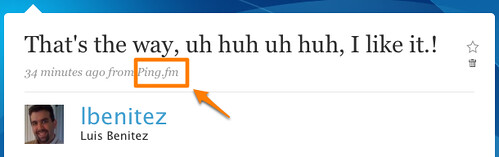
Update your status in Twitter/Facebook/LinkedIn and others from Lotus Connections via ping.fm

View Comments

Back in May, I told you about how I had created a custom plugin to update your Lotus Connections status from ping.fm. After reading your comments and the ones left in my internal blog, I decided there had to be a different approach. That's when I modified an existing Adobe AIR application to microblog both in Twitter and Lotus Connections from the same place. That microblogging application has taken off inside IBM and I can see a LOT of IBMers are using it.. (I can tell because I see RT's from Twitter in Lotus Connections and vice versa).

Talking to one of my favorite customers, they still had a need to just update their status in multiple sites from a single place. Brainstorming some more with them we agreed that a good approach would be create a widget that simply pushes the status update to Lotus Connections and ping.fm at the same time.

So off I went and created a new iWidget for Lotus Connections.


When placed in the Lotus Connections homepage (or wherever an iWidget can live), end users can very easily update their status in Lotus Connections and in ping.fm, which would in turn update the status in Twitter, Facebook, LinkedIn, and all the other sites that the end user has configured.


Very cool, huh? The widget can be installed just like any other widget. The only extra step that you need to do is configure the AJAX proxy:

  1. Go to: <WAS_PROFILE_ROOT>/config\cells\<cellname>\LotusConnections-config
  2. Save a copy of proxy-config.tpl
  3. Open proxy-config.tpl with your favorite text editor
  4. Look for the following line: <!-- BEGIN CUSTOMIZATIONS HERE -->
  5. Just after that line insert the following code

    <proxy:policy url="http://api.ping.fm/*" acf="none">
     <proxy:actions>
      <proxy:method>GET</proxy:method>
      <proxy:method>POST</proxy:method>
     </proxy:actions>
     <proxy:headers>
      <proxy:header>User-Agent</proxy:header>
      <proxy:header>Accept.*</proxy:header>
      <proxy:header>Content.*</proxy:header>
      <proxy:header>Authorization.*</proxy:header>
     </proxy:headers>
     <proxy:cookies>
      <proxy:cookie>JSESSIONID</proxy:cookie>
     </proxy:cookies>
    </proxy:policy>


  6. Save and close the file
  7. Restart the Lotus Connections homepage

And that's it! The widget URL is http://blog.lbenitez.com/widgets/ping.fm/pingFmWidget.xml or if you want to download it and host it locally on your server, you can do so from here.

Enjoy!
PS. I've only tested the widget in the Lotus Connections 2.5 homepage.

Wednesday, May 6, 2009

More Lotus Connections Widgets Available

View Comments

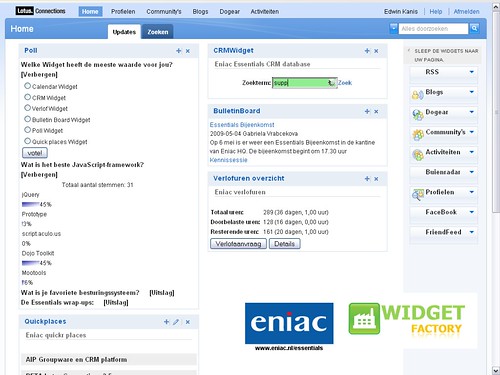
I'm often asked what our customers are doing in terms of adding widgets to the Lotus Connections Homepage. By now, you are probably familiar with the Lotus Connections widget catalog that I'm hosting. That catalog should give you a pretty good idea of what kind of integration our customers are doing. And as you'll see the possibilities are endless.

Today, I got notice that one of the Lotus Connections v2.5 Beta Partners, Eniac, has also done some work in developing their own widget catalog. As you can see in the screenshot below, Eniac created the following widgets:

  • Poll/Survey widget
  • CRM Search widget
  • My Quickplaces widget
  • Bulletin Board (News) widget
  • Calendar widget
  • etc


Another great thing is that these widgets work cross-platform (i.e. on Portal v6+, Notes v8+, etc). Glad to see others developing around the Lotus Connections platform!

Wednesday, April 22, 2009

My Second 24 Hours With Lotus Connections 2.5

View Comments

(This is a delayed post from a post I did internally to evangelize Lotus Connections 2.5 to IBMers -- posting here cause I think this is just way TOO cool.)

Yesterday, I summarized My First 24 Hours With Lotus Connections 2.5. Never in my wildest dreams did I think that I was going to summarize the second 24 hours with Lotus Connections.

Our super awesome product designer posted in his status that he got first dibs into a "tool" developed by an IBMer that leveraged the new 2.5 APIs. That's right, within 24 hours of 2.5 being available internally, IBMers were already hacking away at creating new plugins for it! I, of course, wanted to check it out so I asked him for a link. Marty said that the tool was not his to give away... Bummer!

But not really, then I remembered our super awesome new tab in the Lotus Connections Homepage: Discover. After reading through the list, I quickly discovered the name of the IBMer who had developed the plugin. I installed the plugin on my Mac and WOW!! It's really amazing what came up in just 24 hours!!

So there you have it.. the Discover tab really does work!!! Testing complete!

But wait, it doesn't stop there. The next morning when I came in, I started to catch up with latest profile updates. Then I stumbled upon another interesting tid-bit.... Adrian had loaded an IBM VPN client for his iPhone. Jokingly (cause I thought that was something super special that I didn't have access to), I asked him to send me a link for more info. Minutes later, he replied back with the link to join the pilot for theVPN client for the iPhone/iPod Touch!

With so much information discovery going on, I think I need to figure out how to make room in my brain. It's only been 48 hours since Lotus Connections v2.5 has been up and running and I feel like a robot that has 4GB of RAM but runs on a 32-bit operating system (not sure what that means, but that's how I feel).

Tuesday, April 21, 2009

My First 24 Hours With Lotus Connections 2.5

View Comments

(This is a delayed post from a post I did internally to evangelize Lotus Connections 2.5 to IBMers -- posting here cause I think this is just way TOO cool.)

My first 24 hours with Lotus Connections 2.5 inside IBM were AMAZING. Ok, I know you all think that I'm biased.. but I'm not.. ok maybe I am.

I woke up Thursday at 4am for some reason. I initially thought it was a bathroom break, but when I went back to bed, I couldn't sleep. I decided to check whether the environment had been upgraded to 2.5.

To my surprise it was, so I started updating my status. At around 6 am, I already started getting value out of it. Yes, two hours after the system was up, its new features were already allowing me to discover information!
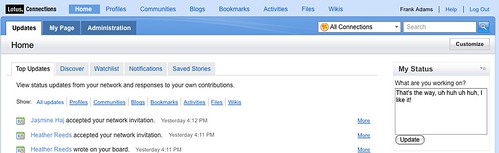
At that time, Heath McCarthy had just uploaded some new presentations documenting new ways to customize and integrate Lotus Connections. Awesome!

30 minutes later, I posted a question related to one of the new features. Within 20 minutes, the product designer responded that it's high but that he's looking for feedback!

At 10:45am (four hours later), it was my turn to present at Lotusphere Comes To You in Des Moines. When it came time to demo Profiles, I pointed to how useful it is to ask questions to my network and get immediate answers. But even better, how the product designer was able to get feedback from a wide array of users.

By the end of the day, there had been 19 responses from all over IBM... How would have this conversation happened before? Yes, you are right.. via email!!! You would have had 19 emails going back and forth!! Another advantage? Since this was an open discussion, anybody within IBM could have participated! Everyone has a voice, and the more people participate, the more information the product designer has to make an informed decision. It's a WIN - WIN all around.

The crowd agreed. They were all nodding their heads. Some had their eyes wide opened in amazement. I then re-emphasized that at this point, the system had only been live for 6 hours!

Throughout the day, I was flooded by new invitations (I got about 20 new invitations) from people asking to join their network. Where they discovering me somehow?

Finally, I uploaded some files into the new Files module. [Some time ago] I noticed that those files already have 40+ downloads. The 'Discover' tab in the home page is sweet!

Believe it or not, I still haven't been able to play with all the new features of Lotus Connections... but I wanted to quickly share with you my first success stories of the first 24 hours. More success stories are just down the road...

Monday, April 20, 2009

How To Add A 'Dogear This' Button To Sharepoint

View Comments

Today I had a wonderful all day session at a customer that wanted to know more about Lotus Connections and Sharepoint integration. They were wondering how the can make their Sharepoint environment (WSS v3.0) and Lotus Connections play nicer together. Ted Stanton and myself helped them brainstorm in several ways.

One of the ideas that I loved actually came from the customer: use the Homepage News API to add events that occur in other applications, specially Sharepoint. That way if a user creates an announcement in Sharepoint, for example, that event is reflected in the Lotus Connections Homepage. I thought that was a great idea!

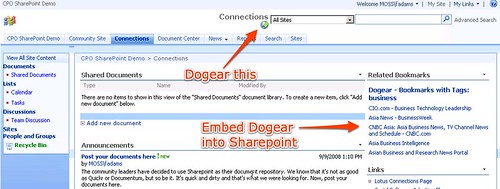
One of the topics we discussed was adding a 'Dogear This' button to Sharepoint. That way their Sharepoint pages/sites would be more easily searchable (apparently this is one of their pain points). I've discussed how to add a 'dogear this' button to pages before, but figured I would update those instructions specifically for Sharepoint. Here you go:

  1. Go to C:\Program Files\Common Files\Microsoft Shared\web server extensions\12\TEMPLATE\GLOBAL
  2. Save a backup of default.master
  3. Open default.master with your favorite text editor
  4. In the <HEAD> section of the document, add the following line (specify the URL to your Dogear server):
    <script type="text/javascript" src="http://connections.lotus.com/dogear/tools/doglink.js"></script>
  5. Now, search for the following text:
    <td style="padding-top:8px;" valign=top>
    <asp:ContentPlaceHolder id="PlaceHolderSearchArea" runat="server">
    <SharePoint:DelegateControl runat="server" ControlId="SmallSearchInputBox" />
    </asp:ContentPlaceHolder>
    </td>
    
  6. Just before that code, insert the following:
    <td>
    <a class="dogpost" href="javascript:DogLink.post_to_dogear(location.href, document.title, '','');">
    <img border="0" src="http://connections.tap.ibm.com/dogear/favicon.ico" />Tag This!</a>
    </td>
    
  7. Save and close the file
  8. Reload Sharepoint
That's it! As a reminder, here's how it looks: Enjoy!

Friday, March 13, 2009

iNotes iWidget for Lotus Connections

View Comments

Honestly, I don't know who it was, but a while ago I learned an interesting behavior from a colleague. I thought it was an interesting behavior and it has really helped. Anyway, the behavior is that if I get the same question asked 3 times (be it via email, instant message, Twitter, face-to-face, or any other means), it's time to blog about it.

With that in mind, I created an iNotes iWidget for the Lotus Connections Homepage. This came up last night, and I swear it took me no more than 45 seconds to do it (ok, I was using hardcoded URLs so it was easy ). The actual coding without hardcoded URLs took me about 30 minutes.

Anyway, after I upgraded my MacBook Pro to 6GB of memory, I started Notes just to see what, if any, were the improvements. (By the way, if you are wondering, startup time didn't improve much, but switching tabs is now significantly faster!!!). Since I have my Notes client configured to check email on startup, it checked mail, and it pulled an email from a colleague in Canada.

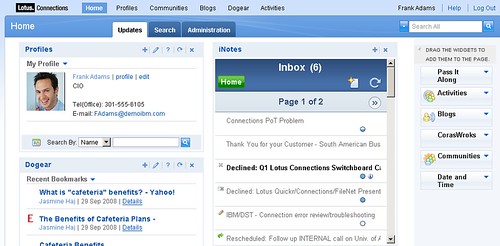
She was wondering if we could somehow create an iWidget so users could view their emails from the Lotus Connections Homepage. This was the third time that I'd received this question, so it's time to blog it.

I knew the answer was yes, but I wanted to prove that it was doable and how easy it was. Well, as mentioned above, it was extremely easy. I basically took an existing iWidget, modified 4 lines of code in the XML and voilá! Here's a screenshot of it:


You can download the iWidget from here.

Enjoy!

Thursday, March 12, 2009

XSLT iWidget for the Lotus Connections Homepage

View Comments

XSL who ? Well, let me give you some background. Some time ago, I blogged about a SharePoint iWidget that I created that would list all the SharePoint sites that I'm a member of. There is a lot of interest from both external and internal users. You see some time ago, I was contacted to see if I could help develop an iWidget that would parse an Atom feed and convert that to HTML.

Turns out that that's pretty much what the SharePoint iWidget did... it took an XML file and using XSL, it converted the XML into HTML for rendering within an iWidget in the Lotus Connections Homepage. Therefore, all I had to do was to 'harden' the iWidget and make it more generic so that it works with any XML file and any XSL file. I call it the XSLTWidget, where XSLT stands for XSL Transformation.

The cool thing about this iWidget is that it works with any XML source:

  • output from a web services call
  • an Atom document
  • an Atom feed
  • an RSS feed
  • an HTML page
  • the output of a batch job
  • etc..

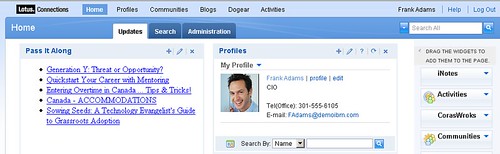
Therefore, with this simple iWidget the possibilities are now endless! Using this new iWidget, I was able to create a very simple widget for Pass It Along. I specified the XML URL as the URL to one of the Atom endpoints, and specified the XSL URL as the URL to an XSL file that Sacha Chua created for me. Easy. Simple. In minutes!

The widget even supports specifying a username/password (for those cases where the XML data source requires authentication).

You can download the iWidget from here (including documentation).

Enjoy!