Pages

Showing posts with label cognitive. Show all posts

Wednesday, May 31, 2017

Measuring Twitter Sentiment with Watson Natural Language Understanding

View Comments
It's been a couple of months now since my last project on Node.js . The other day I wanted to set up an example of a dashboard with sentiment coming from Twitter around a keyword.

To keep things simple, I used IFTTT to export tweets to a CSV file. With that I could then use  Watson's libraries to measure sentiment. To start, I created a new trial account on BlueMix. Once there, go to Services - Watson - Create Watson service. Once there pick Natural Language Understanding and it will create an instance of the service. This Watson service helps to make sense out of pretty much any text.

The screen should look like this:


With the tweets now in a CSV and Watson at the ready, it was time to put the pieces together with node.js. I took advantage of the following node.js libraries: csv-parser, csv-write-stream, watson-developer-cloud.

Let me walk through the code (which I'll put on Github soon). First, import and setup the libraries (you get the Watson credentials directly from Bluemix and my preference is to store them as environment variables):


Next, read the CSV, parse it, measure it and write a new CSV out all with this one line of code:


The function sentimentFromWatson is key above. That function takes advantage of the Watson library already available. Here's what that function looks like:


And that's it! In total, you have a quick sample in 20-30 lines of code to measure sentiment from Twitter. Below is the graphic that I created. In a span of a weekend, the keyword that I was monitoring had some positive tweets and others that were negative. Overall, that weekend was pretty neutral.


(Note: the free plan for Watson Natural Language Understanding gives you 1,000 calls / day. If you expect more than 1,000 tweets / day you'll need a paid plan).

Overall, this took me about 30 minutes to put together and a bit of troubleshooting. If you haven't played with Node.js and Watson yet, go for it!
Monday, November 14, 2016

Demo: IBM Watson Workspace for Sales

View Comments
If you watched the last demo of IBM Watson Workspace for Marketing this will be part two of that series. This demo is focused on the day of the life of sellers and how IBM Watson Workspace can make their life better. If you missed the breakout session hosted by Rob Ingram, Rishi Vaish and Alan Lepofsky at World of Watson, this is a good way to catch up.


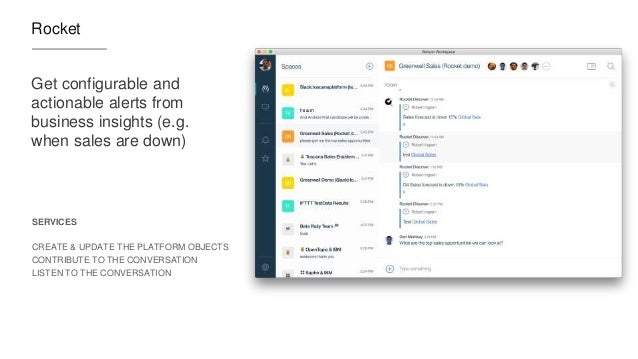
The video demonstrates how IBM Watson Workspace uses its cognitive capabilities to get you the information you need in context without having to jump back and forth between multiple tools. In the scenario example, we show a sales manager asking his team for the top sales opportunities. Watson Workspace understands this question and knows where to go and get the information: Salesforce. The latest opportunities and their status are then brought directly in context. Then it's time to sign the contract. The goal for this demo (and the previous one) is that it shows all integrations that have been built with the APIs that exist today.

The following integrations are shown:
  • Salesforce
  • DocuSign
  • Rocket Software
Check out the 2 min demo video below:


Missed the other videos? Check these out:
Enjoy!

Tuesday, November 1, 2016

Building apps with IBM Watson Work Services

View Comments
Last week we launched IBM Watson Workspace and IBM Watson Work Services and one of the crtical aspects of this launch is the platform and extensibility provided by these offerings.

Miguel Estrada, Joe Russo, and myself had a session at IBM World of Watson 2016 to talk about the capabilities of the platform. To recap, the idea of IBM Watson Work Services is to provide a platform that understands conversations in context. IBM Watson Workspace is a great example of what you can do with that platform since it's, well, built on the platform! In fact, you use the platform services to extend the IBM Watson Workspace app.

As we worked towards the launch, we worked with various partners and developers who were interested in using these APIs. At the conference last week, we were able to show integration with Sapho, OpenTopic, Kenexa, DocuSign, Salesforce, Redbooth, Rocket, and more.

Here are our slides:


Now here's some good news.  I know a lot of developers learn from code samples and I'm happy to announce that our first code samples are now available on Github: http://github.com/watsonwork. Feel free to fork and contribute as well!

When you are ready to start creating apps, head out to https://workspace.ibm.com/developer/apps and you can start getting them registered there. Once you get them registered, go the settings for any space, and in the apps menu you'll be able to see your apps and add them to the space. It'll look something like this (those are 3 sample apps that I've built and will be sharing in the GitHub link above):

I also recorded a quick demo of the developer experience to get you going faster. Check it out here:


Now go on and start building your apps! I can't wait to see what you'll show at IBM Connect 2017. There are 111 days left - GO GO GO!

Tuesday, October 25, 2016

IBM Announces a New Category: IBM Watson Work

View Comments
In today's press release, IBM announced a new category called IBM Watson Work. In that category there are two new offerings that will be available: IBM Watson Work Services and IBM Watson Workspace. IBM Watson Workspace uses cognitive analytics to help users communicate with their teams and focus on key business outcomes. Teams now have a single space to manage all their work conversations and avoid information overload with smart summaries that highlight the most relevant actions and decisions so team members stay aligned and prioritize daily tasks quicker. This is what you may heard before as Project Toscana.

IBM Watson Workspace is built on a platform that we call IBM Watson Work Services. Watson Work Services provides a set of APIs built to help developers build apps that understand conversations and interpret user needs and intent using natural methods of communication. Developers can use these to infuse Watson Work capabilities into existing work applications and products or accelerate differentiation when building new apps.

Here's an excerpt from the press release:
Businesses today need to apply cognitive-powered productivity applications and services to digital content, conversations, and workflows to empower their employees with the ability to find, connect and work with the right experts; speed access to relevant content and insights; and provide the time and space to work simply and together.
  • IBM Watson Workspace learns how an individual works and interacts, and consolidates multiple work conversations from various communications channels into a single space. Using Watson, the technology is able highlight the most urgent action items, point to the right content needed at the time, and automate everyday tasks so employees can focus on key business outcomes. 
  • IBM Watson Work Services are a set of cognitive APIs –Action Identification, Moment Identification, and Summarization – given to developers through the offering’s website so they can infuse cognitive capabilities into existing work products and applications such as IBM Watson Workspace, third party applications, and when building new applications. The technology uses natural language classifiers that are pre-trained to identify key ‘actions, questions, decisions, and commitments in a conversation. It can analyze and disambiguate context to facilitate fulfillment of the next action. For example, if someone says: "Great point –let's schedule a meeting to discuss further," the system can identify 'schedule a meeting' as an action, and help the person find the best time to continue the conversation.

One of the cognitive capabilities available today in the preview is called "Moments". You know how painful it is to catch up when you've been away from work on vacation, out for a meeting or just lunch. You come back to a mess of information, and the time you spend catching up, is time that you are falling behind. No more! With Moments, Watson gives you summaries of conversations (think of it like Cliff Notes!) and at a glance you can see what was talked about, who was engaged, the content that was shared, etc. In seconds, you are caught up and aligned with your team.


Today, Inhi Cho, GM for IBM Collaboration Solutions, takes the stage at 4pm PT to share more about this announcement and it will be live streamed! And I get the opportunity to walk the audience through the flow. If you want to watch the live stream today, head out at 4PM PT to: https://ibmgo.com/wow16/session/NhtQjL5BRJGM4FJqC


IBM Watson Workspace (aka WW aka "dubdub" as the cool kids would say) is currently invite-only.  All IBM World of Watson attendees have access to IBM Watson Workspace. They can just log in with their IBM ID/password that they used to register for the conference. Those attendees can invite as many people as they wish, and those in turn can also invite others. So if you don't have an invite yet, find someone that attended the conference so they can hook you up.


Thursday, September 22, 2016

World of Watson 2016 is Just Around the Corner

View Comments
We are now 31 days away from World of Watson!

So what's going to happen at World of Watson? First, let's start with Imagine Dragons! Grammy award-winning rockers and Las Vegas hometown heroes Imagine Dragons will perform exclusively for World of Watson attendees. Following their multi-platinum debut album ‘Night Visions,’ the alt-rock group has been playing sold out arenas all over the world. Their sophomore album ‘Smoke + Mirrors’ debuted at #1 on the Billboard 200, and their music videos have amassed over 1 billion views on YouTube.


Next, of course, there's the sessions. A can't miss session will be on Wednesday with IBM CEO, Ginni Rometty.


I've put together a list so you can see what's being covered by the IBM Collaboration Solutions team. One that stands out to me is the title for Inhi's keynote on Tuesday at 1p.  She's promising magic and I'm not going to miss it!

We will also be sharing an update on Project Toscana. The teams are all heads down and hard at work on Project Toscana. As you can see below, I'll be leading a session on the Platform and APIs and will be sharing how you can start using them right at the conference. Rishi Vaish and Rob Ingram will also be sharing the latest with Project Toscana.


Speaker
Date/Time
Location
The Value of Cognitive SaaS Solutions
Lou Sassano, Bob McCandless
Mon @ 11a
Breakers F
Teaming in the Cognitive Era
Rob Ingram, Luis Benitez
Mon @ 11a
Theater
Collaborative Analytics: The Next Frontier for Social and Collaboration Systems
Marie Wallace, Kevin Lawrence
Mon @ 1p
Breakers E
Find Content Experts Using Cognitive Collaboration
Scott Rogers, Francois Nasser
Mon @ 3p
Breakers F
Watson at Work: Trends and Directions
Inhi Cho
Tues @ 1p
Keynote
Work Smart, Play More: Teaming in the Cognitive Era
Rishi Vaish, Rob Ingram
Tues @ 3p
Breakers E
The Future of Work with Watson: Build Tomorrow’s Workplace Today with the Magic of Cognitive
Inhi Cho
Tues @ 4p
South Seas Ballroom
Work Smart with IBM and Box: Cognitive Content at Work
René Schimmer, Nisha Phatak (Box)
Weds @ 8a
Breakers E
The Cognitive Way: Business Communication and Engagement with IBM and Cisco
Ed Brill, Chris Crummey
Weds @ 11a
Breakers E
Dev@: Cognitive Team Collaboration with IBM "Toscana" APIs and SDK
Luis Benitez, Miguel Estrada, Joe Russo
Weds @ 4p
Breakers E
Work Smart with IBM and Actiance: Cognitive Content Governance at Work
René Schimmer, Heidi Ambler
Thurs @ 9a
Breakers F


Haven't registered yet? You still have time. Go register here. See you there!

Wednesday, November 4, 2015

IBM Insight 2015 - Check Out What You Missed

View Comments
Last week was a wild ride over at IBM Insight 2015. The IBM Verse and IBM Connections teams were there to share the latest about our products. It was a great opportunity to meet new customers, partners, and fellow IBMers.

One of the highlights of the conference, was the Super Session by my colleague Rob Koplowitz. He co-presented with Jason Silva, the host of the TV show Brain Games (catch it on Netflix). You can watch a replay of his session here:


I co-presented on 3 different sessions around Application Development on top of our cloud platform, Mobile Collaboration, and working with content with IBM's enterprise file sync and share (EFSS) offering, IBM Connections. A key capability here that I wanted to cover was the latest and greatest around IBM Docs. We actually have a major release of IBM Docs coming up here very soon. And given that IBM Docs seamlessly works with IBM Content Navigator it was really well received. If you have IBM Content Navigator, don't forget to take advantage of your entitlement to IBM Docs today!

I've uploaded the presentations so you can see the content that was shared.


So what's next ? You NEED to come to IBM Connect 2016 in January 2016. In fact, John Hernandez invites you personally: