If you watched the last demo of IBM Watson Workspace for Marketing this will be part two of that series. This demo is focused on the day of the life of sellers and how IBM Watson Workspace can make their life better. If you missed the breakout session hosted by Rob Ingram, Rishi Vaish and Alan Lepofsky at World of Watson, this is a good way to catch up.
The video demonstrates how IBM Watson Workspace uses its cognitive capabilities to get you the information you need in context without having to jump back and forth between multiple tools. In the scenario example, we show a sales manager asking his team for the top sales opportunities. Watson Workspace understands this question and knows where to go and get the information: Salesforce. The latest opportunities and their status are then brought directly in context. Then it's time to sign the contract. The goal for this demo (and the previous one) is that it shows all integrations that have been built with the APIs that exist today.
As things settle from the IBM World of Watson conference two weeks ago, today I wanted to take the opportunity to share one of the demos that was shown in a breakout session hosted by Rob Ingram, Rishi Vaish and Alan Lepofsky.
The video that demonstrates how IBM Watson Workspace can improve your life as someone who works in marketing. It makes team collaboration easy and saves you time by bringing everything together and summarizing it for you (using some cool Watson services) so you can take action on what really matters.
Time for the next post on IBM Watson Workspace. In this post I wanted to share some code samples that could help you get going in your development of apps for IBM Watson Workspace using the IBM Watson Work Services and APIs.
I know many developers, including myself, learn a lot from code samples (probably more than using actual API documentation). So to build on my post from earlier this week, we have published the first 5 code samples into the Watson Work org in Github and there should be more posted this week and next. My samples are the Twitter and Weather apps. I built these as fully functioning apps that you can deploy to a server and get up and going in a few minutes. And once they are running, feel free to hack away!
To make things simpler, I've also included a one-click button to deploy the app to Bluemix (which I thought was freaking cool how they make this possible). This, however, is not a required step. If you want to use with another cloud provider, by all means. Back to Bluemix, when you click the button, Bluemix pulls down the code from Github and magically gets it up and running.
One cool thing is that even before the samples were available, I already picked up a few blogs of developers using the APIs:
So that should give you an idea on how to listen to a conversation, act on it, and then respond back. I followed a similar flow to build the Twitter app and my hope is you can take it and hack it to build your own. And if you are in the mood to help improve these samples, pull requests are welcome!
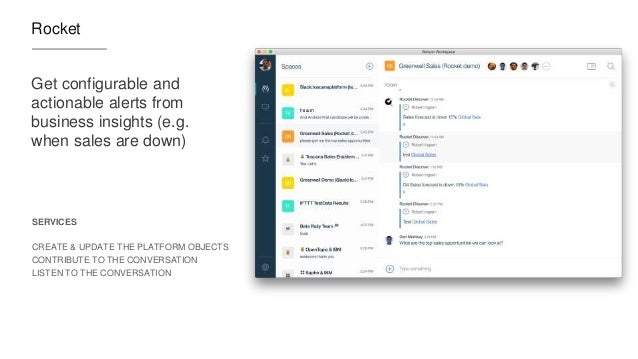
Now definitely check out what Redbooth, Rocket, OpenTopic, Sapho and others have done... VERY COOL! (and just to make it more enticing.. Sapho for example has Marketo and Google Adword integration... )
Last week we launched IBM Watson Workspace and IBM Watson Work Services and one of the crtical aspects of this launch is the platform and extensibility provided by these offerings.
Miguel Estrada, Joe Russo, and myself had a session at IBM World of Watson 2016 to talk about the capabilities of the platform. To recap, the idea of IBM Watson Work Services is to provide a platform that understands conversations in context. IBM Watson Workspace is a great example of what you can do with that platform since it's, well, built on the platform! In fact, you use the platform services to extend the IBM Watson Workspace app.
As we worked towards the launch, we worked with various partners and developers who were interested in using these APIs. At the conference last week, we were able to show integration with Sapho, OpenTopic, Kenexa, DocuSign, Salesforce, Redbooth, Rocket, and more.
Now here's some good news. I know a lot of developers learn from code samples and I'm happy to announce that our first code samples are now available on Github: http://github.com/watsonwork. Feel free to fork and contribute as well!
When you are ready to start creating apps, head out to https://workspace.ibm.com/developer/apps and you can start getting them registered there. Once you get them registered, go the settings for any space, and in the apps menu you'll be able to see your apps and add them to the space. It'll look something like this (those are 3 sample apps that I've built and will be sharing in the GitHub link above):
I also recorded a quick demo of the developer experience to get you going faster. Check it out here:
Now go on and start building your apps! I can't wait to see what you'll show at IBM Connect 2017. There are 111 days left - GO GO GO!
The workplace is changing. Although the physical office can still be a place of productivity and collaboration, companies are empowering the individual worker by providing all the tools necessary to be a valuable member of the organization from any corner of the globe. Today’s workforce is becoming increasingly flexible, mobile, and even global in nature — virtual collaboration is at the center of the workplace and shaping the way businesses operate now and for the foreseeable future.
The strong influence mobility has had on the workplace can be found at the epicenter of this shift. As smartphones and tablets have become rooted in our personal lives, workers have found these devices to be beneficial in facilitating their work responsibilities as well. As a result, many employers have embraced the Bring Your Own Device (BYOD) trend to foster collaboration among employees outside the office. The introduction of mobile devices in the workplace has deeply affected the way people work as they increasingly rely on their personal smartphone and tablet for email, note-taking, and video conferencing. Since BYOD policies have allowed workers the flexibility to conduct regular business from even the most far-reaching areas around the world, the need to confine work between the four walls of an office has decreased, depending on the company, driving further adoption among telecommuters.
The same factors that are driving companies to downsize their physical office spaces has resulted in the rise of temporary contractors as an alternative to full-time employees, thereby creating the need for secure collaboration apps with functionality spanning across corporate firewalls. Advances in mobility and Internet-based technologies have enabled employers to connect with individuals willing to work on a short-term basis without needing to be located within the same time zone. By breaking down the geographic boundaries that have historically limited organizations to a select pool of qualified candidates, mobile devices and collaboration apps now allow independent employees to hit the ground running and remain connected to their working groups from anywhere in the world. The opportunity for employers and hiring managers is compelling, as the potential size of talent pools multiplies significantly. In fact, a recent study surveying more than 33,000 workers in 26 countries found that contractors are more engaged and more innovative than regular employees.
In the office of the future, the evolution of technology allows the workplace to become increasingly virtualized. Within a virtualized environment, cloud is the most important ingredient to help businesses automate processes, simplify content, and facilitate workflows by providing a centralized, secure infrastructure for collaborative solutions. In addition, in past years there were only a select few enterprise-ready devices with applications for business collaboration – most notably, BlackBerry devices. Now, there are a wide array of devices offering improved functionalities to drive productivity and reduce the need for multiple machines.
With cloud becoming a key enabler of the virtual office and open to all organizations, small-and medium-sized businesses (SMBs) have benefited greatly from cloud by operating with the same top-notch software as their larger peers. In the early 2000s, collaboration tools were catered to companies running software on-premises, namely large organizations with significant IT budgets and footprints. Now, in large part because of the prevalence of the cloud, SMBs are getting more value from cloud-based vendors. In fact, Jim Deters, founder of Galvanize, famously said, “Two guys in a Starbucks can have access to the same computing power as a Fortune 500 company.” As more collaboration apps have evolved to cater towards the burgeoning cloud-first mentality among corporates, SMBs now are back in the game and able to leverage the same apps that enterprises are utilizing to drive their own process efficiencies. Since SMBs can procure first-class collaboration, the IT playing field continues to equalize across the size spectrum, thereby allowing smaller organizations to focus on their core competencies. As a result, large enterprises are forced to find new ways to innovate and remain nimble to thwart off potential competitive threats from smaller and more agile businesses.
Cognitive computing also offers a significant advantage that many have not yet tapped. Collaboration apps such as instant messaging are fundamental in helping employees sync up with each other but can also have a downside: creating too many interruptions.
Can cognitive help reduce the interruptions? Today’s workers are interrupted every three minutes on average, and it takes about 23 minutes to refocus, causing a potentially endless loop of being unproductive. To address this pain point, for example, IBM is facilitating the development of information-empowered workforces by infusing cognitive into its collaboration tools to help people work together in more intuitive ways. One of the ways to achieve this is to streamline and collapse all the apps into one collaboration solution so workers can address the action items that matter in an efficient manner.
A frequently overlooked source of interruption is unnecessary noise arising from workers’ email inboxes. Take a practical example: end users often receive multiple emails a day containing the same question. Adopting a system that can understand the question and offer the same answer to the same question automatically would reduce the amount of time a worker would spend on addressing redundant messages so they can focus on the important tasks. With society producing vast amounts of data – too much for the human brain to handle – the key to harnessing its full potential is to build cognitive-infused tools. A growing consortium of businesses recognizing the potential of untapped data has driven a major increase in the use of analytics within the workplace. Widely used to predict everything from supply chain cycles to customer buying habits, analytics are even powering tools and apps to help workers understand priorities of their tasks by reducing noise. Automation, however, when abused, can actually make workers counterproductive by creating excessive noise. As more and more capabilities become automated, there is a surge in the quantum of notifications. Automation needs to be properly managed; therefore, we need to think about it as a form of machine intelligence to keep the information moving seamlessly.
In truth, the virtualized workspace is not a one-size fits all solution. Employers need to customize environments and policies for their teams by leveraging free trials and capabilities to assess what does and what does not work for their organization. Another thing to keep in mind is resisting the urge to adopt too many apps, which may end up making employees counterproductive and create too many silos of information. A good rule of thumb in choosing a beneficial collaboration solution is to keep in mind and evaluate how one app mixes the collaboration ingredients, or the “Cs”: context, content, conversation, colleagues, and commitments.
There is a lot of promise in the concept of information-driven workforces. Companies that are able to leverage analytics are one step closer to successfully building a more collaborative and informed workforce. We are in the midst of great advances in making our workforce more connected, and collaboration tools have been at the core of this technological and cultural transformation. The next step is bringing analytics to the table to serve a dual purpose: help free up individual workers to dedicate time to more pressing and demanding work streams, as well as drive enhanced productivity within the team by identifying optimal division of labor and assessing project status and improvements. All the data is there – it is simply a matter of being able to leverage it.
Tomorrow, I'll be joining my colleagues Suzanne Livingston and Mac Guidera at the Tweetchat hosted by Bryan Kramer to talk about Collaboration and Innovation. We'll talk about the importance of harnessing technology to empower employees towards greater collaboration. Then, we'll discuss the challenges organizations face as they embark upon such transformation and how they can create a workplace culture in which collaboration via digital solutions is valued and practiced. This is a chat that is important for anyone interested in the transformational impact of technology on the workplace.
It all starts at 3pm ET ! We'll be using the #H2HChat hashtag in case you want to join us.
To reserve a seat go here and to follow the conversation live tomorrow check out this page.
KangoGift continues to expand their integration options with IBM Connections, this time, bringing their employee recognition module to the IBM Connections Cloud. Once enabled organizations could allow their employees to recognize each other and perhaps include a recognition certificate (maybe a $25 gift card for Amazon). This is one way to encourage the use and adoption of IBM Connections.
Some key capabilities provided in this release are:
Analytics highlight employee performance
Increase engagement with a fun way to give praise via recognition certificates
Support peer or manager programs
Manager reports summarize contributions
Tie recognition with other HR initiatives
View and give recognition from profiles
Share recognition via activity streams including mobile
Ensure budget compliance
Enable users to give spot awards according to business rules
Check out the quick 30 second video for an overview below:
Put it in the books! For the 6th year in a row, Gartner has placed IBM Connections as a Leader in their recently released 2014 Magic Quadrant for Social Software in the Workplace.
This year, I had the opportunity to engage in the entire process from beginning to end. The whole process started back in May of this year. There's a lot of things that happen during the evaluation process such as coordinating customer references, filling out feature surveys, showing the solution and more.
If you haven't seen IBM Connections lately, check out this video that we recently published (and if you are reading today, yes, our mobile app is ready for iOS 8 support! )
So where do we go from here? We have a release coming to the cloud in several days which I'll share more details on soon. And don't forget to submit your abstract for IBM ConnectED on January 2015.
To download the report, you can access it from Gartner's page here.
Today, when you log in to IBM Connections in the cloud you should notice a nice little surprise: you can now engage with your peers via audio and/or video chat. While you've always been able to instant message with your colleagues within IBM Connections, sometimes typing is just not fast enough. And with communication being roughly 70% non-verbal, video becomes an excellent capability to get business done... NOW!
Now, you can go from a post in IBM Connection and escalate to a voice call or a video call at no extra cost.
This is now available to Connections customers in the cloud. Plans start at $6/user/month so if you haven't started using this platform, you can start today with a 60-day free trial.
Of course, I had to test this out to check out how it looks. So reached out to Albert, and got him over video in just 2 seconds!
But wait... there's another surprise! Up until now you've been able to share files through Chat from your computer. Now you can now share files with a chat partner from your IBM Connections Files. Let's say that you get a question from the field asking for the latest roadmap for your product (you know this happens a lot right?). Now I can take a file from Connections, and when I do this, the recipient automatically gets reader access to the file! Magic!
Last week, I ran into this video posted by Continental AG, a company of 170,000 people, which talks about their business networking event for their 450 social business ambassadors. Continental spoke at IBM Connect 2014 about their usage of IBM Connections.
Continental brought the participants from 37 different countries to Hamburg Germany to start the conversation around how to improve the culture of communication and how to give employees a helping hand.
To do this, Continental chose an open space, which they say it's similar to social media, where it's a big, empty and fluid environment.
The goal was to spend 2 days and officially become GUIDEs. Individual interviews mention how the goal is to break the barriers between countries to become agile, interact better with others by knowing them better, and getting things done faster and more efficiently. For them, it was critical to exemplify their culture and core values like trust, freedom, solidarity and a winning mentality.
Check out the video below:
I really like this approach and reminds me of what IBM did initially with our Blue IQ Ambassadors, though I was extremely impressed with Continental's approach to bring all these people together in a room to together learn and launch their social business platform.
The press release sums up the latest release of IBM Connections which is now available for download (in case you want to run it on premises) or in the cloud.
One of the highlights that we want to call out is the continued growth that we see in our ecosystem. For example, using our latest APIs and SDK, ISVs (independent software vendors) such as HootSuite, Bunchball, TemboSocial, ISW, among many, many others have created social apps on the IBM Connections Platform.
A key aspect of this release is secure external collaboration, where you can bring in external users (your customers, partners, suppliers, etc) into your IBM Connections deployment behind the firewall and still keep the right security boundaries to keep information safe. Jeff Schick, our VP for Social Software at IBM, calls out the importance of this:
When a workforce is out of synch or out of touch, the whole organization suffers from lost productivity, efficiency and innovation. With the open nature of today's business environment, organizations are looking to build new systems of people-centric engagement. The ability to bring key internal and external stakeholders into the conversation can facilitate a more collaborative, responsive and authentic way to work and deepen engagement.
Additionally, Superior Group's CIO, Tom DeClerck shares how IBM Connections has made the organization more agile by putting people back at the center of their business. Speaking of Superior Group, here's a quick video that talks about the Superior Group's success on becoming a social business and the ROI they are achieving by using IBM Connections:
For more information, check out the entire press release.
Still on the fence on whether or not you should embrace Social Business? Well, here's a webcast you can't miss!
LIVE FROM SUGARCON! How Can Social Business Increase Your Sales?
Date: Apr 24, 2012
Time: 10:00 AM - 11:00 AM (Eastern Time)
Social Business is real and it's about to change the world of sales as you know it. According to a new Nucleus Research report based on interviews with more than 220 Customer Relationship Management (CRM) decision makers, adding social features and mobile access to CRM applications boosted the productivity of sales people by 26.4 percent. In this webcast, Larry Bowden, VP of Web Experience Software with IBM, and Chuck Coulson, VP of Business Development at SugarCRM will provide an exclusive introduction live from SugarCon!
Then Chris Lamb, Program Director for Social CRM Software at IBM will show you a day in the life of a sales person in a social business -- what it could look like and how it changes their performance. Then he will walk you through the financial analysis and impact of optimizing your sales team The analysis will help you understand what a team of top performers could mean to your bottom line.
What You'll learn:
- How sentiment analysis will help you understand your customers better than the competition
- How you can take the guess work out of decision-making with predictive analytics
- How you can make your sales teams smarter and close business faster
To register, click here . And if you would like to follow the IBM Collaboration Solutions community, check them out here.
Last year, it was officially signed on IBM paper that I would be moving to the IBM Social Softwareproduct management team (even though the move was actually back in September 2010). Thus, I figured I would share a bit about the last year and what I'm looking forward to see in the next year.
The past year has been a tremendously fun one. Travel has been significantly reduced (so I can spend more time with the family) and I've learned a lot about how the IBM business runs. When I joined the team, I took the reins for IBM Lotus Quickr Domino and today I also co-manage LotusLive Connections and IBM Connections (Files and Wikis).
During the past year I've had a lot of opportunities, such as:
Working on the abstract selection process for Lotusphere 2011 (and presented there for the first time ever!!)
Started planning for the next releases of Quickr Domino (more about this below) and worked to improve the documentation to make it easier to find information.
Participated in the selection process for the new IBM Champions
Worked towards closure of the LotusLive Connections winter release and have started planning next year's release
Worked towards closure of the IBM Connections 4.0 plan and have started thinking about the next release
Started blogging on Technorati to take the IBM message to a larger audience
Started the Social Media Club in Puerto Rico (ok, not officially related to IBM, but a way to keep spreading the social business message)
This week I'm presenting the latest roadmap for Quickr Domino and I'll talk about the next two releases of the product. The roadmap will be presented to our internal sales folks as well as to our business partners at the same time. Once this happens, I'm expecting they'll start helping me spread the word with all of our current and prospective customers. Additionally, I'll be flying to New York to talk about some of the new announcements that will come out this week (more on that later this week)
Next week, I'll be participating at the IBM Leadership Alliance conference (something I didn't get a chance to participate on last year since I joined the team at about the same time). Looking forward to talk to some of our key customers and get even more content ready for Lotusphere 2012.
I'm now about 8 months into my new job and figured it would be a good time and just write down some of the things that I've been working on.
For the past month, I've been heads down working with analysts on their new evaluations of social software platforms. It's definitely been a lot of fun to learn how analysts review Connections and how they compare us against our competitors. Both of the analyst firms first gave us a long list of questions to answer where they were looking for answers on which capability we had, which one we didn't and which one could be done via a customization. One of the analyst firms invited us for a 4 hour demo of our platform. Given that was my first exposure to an analyst in such an important review, I have to admit I was a bit jealous.
I was working very closely with Suzanne Livingston, who is already an expert at these things. Needless to say, I learned a LOT from her. Now it's all done so we just have to wait until the reports come out.
I've also been working with the developers as we continue to plan towards Connections Next and Quickr Next. In particular, I'm looking at what's coming in Communities, Files, and Wikis Next.
Something that I'm very excited about, but can't share a lot about right now, is a new capability that we are working with our sales team to better compete against the other vendors in the space.
My plan now is to catch up with some of the things that have been published recently, such as:
1) Rawn Shah's presentation at the Dachis Social Business Summit:
Boy am I glad that 2010 is over. 2010 sure had its ups but it had many downs too. For instance, I had to go to the hospital 9 times. Yuck! One of those visits forced me to bail on Lotusphere 2010. However, one of those visits was a very joyous event as my family and I welcomed to the world Gabriela. Hands down, my favorite moment in 2010 was when 2 year old Alejandro got to meet his 1 day old sister for the very first time:
I also lost American Executive Platinum status as I traveled less this year (sort of bitter-sweet there). And that's mostly due to another positive event in 2010: I got a new job!
I'm about 4 months into the job at IBM and I'm loving it. One of the things that I've noticed is how my work pattern has changed a bit. My email traffic seems to have doubled since I took the job. I think part of it is that I'm now working with a whole bunch of new peers and they may not be aware of my instant message-before-email preference . Another factor is that I get to work now with a lot more confidential data which makes email and Quickr the tools of choice.
Blog wise, readership is up about 2% from last year including the big hiatus I took between February - July (102 posts vs 162 posts before). Traffic spiked significantly around the time Connections 3.0 was announced.
Looking ahead towards 2011, I'm excited to bring to market my first product update in my new role as Product Manager. When and what that is will be talked about at Lotusphere 2011. It's been fascinating learning what it takes to plan and drive a product in coordination with all the right entities: developers, marketing, legal, customers, business partners, etc. I really like being able to quickly poll the community either via Twitter or via the Skype channel Stuart created.
I also want to continue participating and growing the Puerto Rico Lotus User Group and drive more local business and reduce the market share of the competition.
By now you are probably aware that I'm taking a new position which becomes official on IBM's paper on October 1st. Yay, just several more days! I can't wait! Can you tell how excited I am!?
So the title of this blog post may be a bit confusing. I woke up today at 3am after my 2 year old woke me up in an attempt to take him to visit his grandparents. I told him that it was way too early to visit his grandparents and try as I might, I couldn't put him to sleep. Therefore, I'm a bit tired.
Anyway, once my new position was announced, Suzanne Livingston (one of the existing Product Managers for Social Software at IBM and pictured above) interviewed me and posted the transcript in the team's Synch.rono.us blog. Thus, that was my first interview in my new job.
Luckily, Suzanne wasn't too harsh on me . I know a lot of you have been asking me what some of my new responsibilities are going to be. You'll be happy to see that that's one of the questions Suzanne asked me.
Last Friday, I was invited to join the super awesome Taking Notes Podcast for the first time. To say the least, I was very excited to join this podcast for the first time. The podcast is hosted by Bruce Elgort and Julian Robichaux.
In this podcast, I join my colleague Sacha Chua and we bounce ideas and discuss what it takes to be an Enterprise 2.0 Evangelist and talk about our own experiences in promoting social software behind IBM's firewall. At one point during the podcast (I won't give it away to keep you all in suspense) Sacha and I also talk to about the ROI of social media behind the firewall. I think you'll like the outcome.
Sacha and I also chat about some of the work that we've done together and that I shared with you recently. It's worth noting that while Sacha and I collaborate together a lot, it wouldn't be possible without social software behind the firewall. That's how we met, and that's what we use to collaborate (especially since she's based out of Toronto and I'm in Puerto Rico).
To listen to the podcast and/or subscribe via iTunes, click here. The episode runs a bit less than 40 minutes and it's very easy to listen to. Thanks again Bruce and Julian for hosting me!
For the past year, I've really enjoyed microblogginginside the firewall. Novel concept, huh? While many people may microblog outside of the firewall using Twitter and Facebook's status updates, I really like doing it inside the firewall.
Let me quickly define microblogging, or better yet, offer Wikipedia's current definition:
Microblogging is a passive broadcast medium in the form of blogging. A microblog differs from a traditional blog in that its content is typically much smaller, in both actual size and aggregate file size. A microblog entry could consist of nothing but a short sentence fragment, an image or embedded video.
Twitter does microblogging very well. In fact, I would say it's all it does. Facebook also allows for some sort of microblogging through its status update feature where users can share what they are doing, and get responses from their friends.
If you have used any of these systems, you probably have seen a bit part of its value: instantly reaching out to your network and getting recommendations for everything from nannies, barbershops, restaurants, wines, parks, schools, things to do with your children, etc.
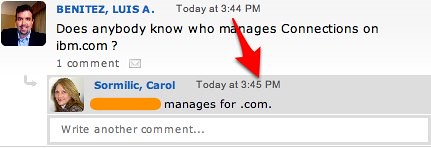
Now take that power and apply it to the business. Imagine if you could instantly get your answer to any question you have in order to get your job done. That's what happened to me yesterday. I was collaborating with a customer and was asked who manages Lotus Connections on ibm.com. I didn't know so I reached out:
That's right! ONE MINUTE to get my answer! An answer that I didn't have an idea who had or where even to begin looking for it. One minute was all it took. And not only did I get an answer from a colleague, I got an answer form an IBM VP. A Vice President who I've never worked with and had no idea she would know the answer! How long would this have taken me otherwise? Who knows! Maybe 1/2 day? A whole day? 2-3 days? Nope! ONE MINUTE.
You have to admit, that's pretty amazing!
I'm grateful that we have these tools available internally. Don't have microblogging yet inside your organization? What are you waiting for, start today!


 The same factors that are driving companies to downsize their physical office spaces has resulted in the rise of temporary contractors as an alternative to full-time employees, thereby creating the need for secure collaboration apps with functionality spanning across corporate firewalls. Advances in mobility and Internet-based technologies have enabled employers to connect with individuals willing to work on a short-term basis without needing to be located within the same time zone. By breaking down the geographic boundaries that have historically limited organizations to a select pool of qualified candidates, mobile devices and collaboration apps now allow independent employees to hit the ground running and remain connected to their working groups from anywhere in the world. The opportunity for employers and hiring managers is compelling, as the potential size of talent pools multiplies significantly. In fact, a recent study surveying more than 33,000 workers in 26 countries found that contractors are more engaged and more innovative than regular employees.
.jpg?format=750w)


 The press release sums up the latest release of IBM Connections which is
  Still on the fence on whether or not you should embrace Social Business? Well, here's a webcast you can't miss!
 . However, one of those visits was a very joyous event as my family and I
  . Another factor is that I get to work now with a lot more confidential data which makes email and
  By now you are probably aware that I'm
  . I know a lot of you have been asking me what some of my new responsibilities are going to be. You'll be happy to see that that's one of the questions Suzanne asked me.
 Last Friday, I was invited to join the super awesome