Pages

Showing posts with label presence-awareness. Show all posts

Tuesday, August 26, 2014

IBM Connections in Cloud Now Features Real-Time Audio and Video Chat

View Comments
Today, when you log in to IBM Connections in the cloud you should notice a nice little surprise:  you can now engage with your peers via audio and/or video chat. While you've always been able to instant message with your colleagues within IBM Connections, sometimes typing is just not fast enough. And with communication being roughly 70% non-verbal, video becomes an excellent capability to get business done... NOW!

Now, you can go from a post in IBM Connection and escalate to a voice call or a video call at no extra cost.

This is now available to Connections customers in the cloud. Plans start at $6/user/month so if you haven't started using this platform, you can start today with a 60-day free trial.

Of course, I had to test this out to check out how it looks. So reached out to Albert, and got him over video in just 2 seconds!


But wait... there's another surprise! Up until now you've been able to share files through Chat from your computer. Now you can now share files with a chat partner from your IBM Connections Files. Let's say that you get a question from the field asking for the latest roadmap for your product (you know this happens a lot right?).  Now I can take a file from Connections, and when I do this, the recipient automatically gets reader access to the file!  Magic!

Here's how that looks:


Enjoy your new capabilities !

Monday, March 18, 2013

Replay of the IBM Connections 4.5 Launch Webcast Now Available

View Comments

Last week was a busy one with the launch of IBM Connections 4.5, and the enhanced IBM Connections plug-in for Microsoft Outlook. To kick off the launch, we had a webcast to showcase the business value of IBM Connections 4.5 and IBM Notes 9 called: From Liking to Leading - Transforming your Business with a Next Generation Platform for Social Business.


If you missed the webcast, or you want to watch it again, you can do so here (even if you hadn't registered for the original webcast). In the replay you also have the option to download the broadcast presentation from the “Resources” widget of the broadcast replay. I had fun getting ready for the launch and creating the demo of IBM Connections 4.5 where I focused on the importance of mobile and real-time collaboration.

Also a quick reminder that if you are looking for the two demos that were shown during the webcast, you can access those quickly here.

Here's a storify that summarizes the webcast:

Enjoy!

Wednesday, November 7, 2012

VSee Releases New Real-Time Integration for IBM Connections

View Comments

VSee has just released new integration where they have brought their real-time collaboration capabilities into IBM Connections.

The integration allows companies that already use VSee to:

  • See a list of community members along with presence awareness
  • Click-to-chat
  • Instant video chat with community members
  • Instant screen share with community members

Check out a quick demo below:

For more information and to access this integration, you can access it from the IBM Connections App Catalog here. And for those of you who are using IBM Sametime, of course you can do the same things with IBM Sametime as described here.

Wednesday, October 12, 2011

Social Business ROI ? Here's Yet Another Example!

View Comments
As you know, I'm one of the product managers for IBM Connections and one of my responsibilities is for our solution running in the cloud. I truly believe that one of the best ways to help organizations understand the value of becoming a Social Business is to learn from the successes of others. And at IBM we are actively documenting and highlighting the success stories of our customers.

One recent example is Newly Weds Foods, a Chicago based, global leader in food technology, needed an effective collaboration tool to bring its geographically dispersed team together, without the capital expense and staff needed to run an in-house solution.

With 27 plants all over the world, including the Philippines, China and Thailand, moving to the cloud made perfect sense. Newly Weds Foods chose IBM's LotusLive social collaboration cloud services to enable its culinary team to share information and ideas quickly and easily regardless of the time or location.

Culinary chefs use Profiles from IBM Connections to find and connect with other chefs around the world. They use Files and Communities within IBM Connections to share information from recipes to demos. They use Web meetings to share presentations and ideas with colleagues and clients, who range from retail stores, to mom and pop eateries to large national chain account restaurants.

The result? They are now saving 4-5 days per month in travel time, approximately 10% on airfare and travel expenses and they have sped communication response rate from days to hours. Working in different time zones is no longer a barrier to productivity and LotusLive's unique "guest account" model provides no cost access to clients so they can collaborate more easily on recipe ideas.

I truly believe that one of our differentiators is the "guest account" model and it's definitely something that our customers love. Who doesn't love free access ?

Check out this video with more information:


What are you waiting for ! Are you on your road to become a social business ?

Friday, November 12, 2010

The Lotus Connections 3.0 Reviewer's Guide is Ready for Download

View Comments

With the impending release of Lotus Connections 3.0, there are tons of educational materials being released. Yesterday, I showed you all the new videos that have been made available. These videos are geared towards the end user and those are what they are going to see the first time they enter the platform.

Also this week, as you may have seen in the Connections Blog and Synch.rono.us, the Lotus Connections 3.0 Reviewer's Guide was released. This Reviewer's Guide provides an extensive overview of Lotus Connections 3.0 and its nine modules: Home, Profiles, Activities, Blogs, Bookmarks, Communities, Files, Forums, and Wikis. In addition, this guide explains how to extend the features and functions of Lotus Connections to your existing applications (for example Microsoft SharePoint, Microsoft Office, Microsoft Outlook, etc). If you ever have a question about how a particular feature works, you can find the answer here.

You can read it here, download, print, or even view it in full screen!

Lotus Connections 3 Reviewers Guide

Enjoy!

Thursday, September 23, 2010

Why IBM Could Be Bigger than Facebook in Social Media

View Comments

I know I'm late to this party, but there have been so many good news this week, that I'm just getting to this one. Turns out that on Monday Fast Company published an article: Why IBM Could Be Bigger than Facebook in Social Media.

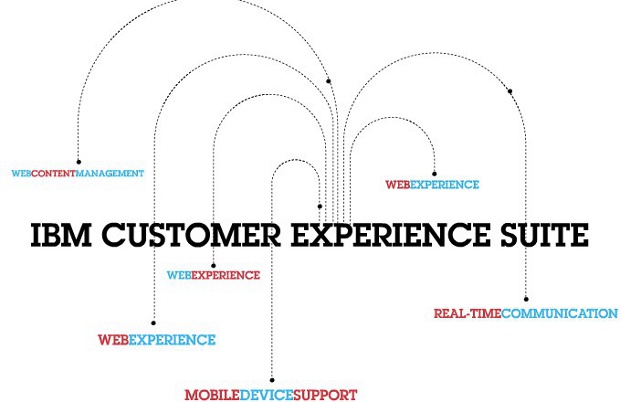
As you may be aware, IBM announced the release of the IBM Customer Experience Suite, an integrated and configurable offering to provide highly engaging and personalized web experiences which combine mobile, social, commerce, real-time communication, and web content management capabilities. Of course, media and analyst representatives were invited to the event. You can catch all the commentary following the #ibmexperience tag in Twitter.


Fast Company got a chance to sit down with IBM's VP of Social Software, Jeff Schick (and my new 2nd line manager) to talk about what IBM is doing in the social space. I think the article does a good job, though I may be biased, in telling IBM's story in its adventure into social media, especially behind the firewall (a.k.a Enterprise 2.0). IBM has been using some sort of social software inside the firewall for more than a decade and has a consistently over millions of search and visits.

The article also ends with a big bang!

Regardless of your business size, IBM's big move into social software should be a clear indication that every business needs a broad-reaching social strategy not just a Facebook fan page! This strategy needs to address the needs of your customers and your employees, ensuring optimal collaboration between them anytime and anywhere.

To read the full article, click here.

Thursday, April 8, 2010

Microsoft OCS iWidget for Lotus Connections and WebSphere Portal

View Comments

Yesterday I told you how Epilio was able to get the Microsoft OCS presence awareness information in the Lotus Connections person card. Well, it turns out that the same company has also created an iWidget which can be deployed to Lotus Connections. That way, directly from the Lotus Connections Homepage, users will be able to communicate with others via Microsoft OCS, even if they don't have the Microsoft OCS client installed!

This integration is very timely because this is something that customers often ask me about. The nice thing about this widget is that since it complies to the iWidget standard, it can also be easily deployed to WebSphere Portal.

Epilio, an IBM Business Partner, has put together another nice video (sans audio) to demonstrate this capability:

You can find the source code and the documentation for this iWidget here.

Enjoy!

Wednesday, April 7, 2010

Microsoft OCS in Lotus Connections 2.5

View Comments

Almost 3 years ago, I was working with a customer who wanted to add instant messaging to Lotus Connections, IBM's Enterprise 2.0 collaboration platform. As you may suspect, Lotus Connections is integrated out of the box with the IBM instant messaging client, Lotus Sametime. The challenge with the customer is that they were using the Microsoft solution, something called Office Communicator Server (OCS).

Then, I was able to successfully show presence information in Lotus Connections based on Microsoft OCS. And I even documented how to do it in this developerWorks article. One thing that I was never able to do was add the presence information in the business card (the little widget that pops up next to a name).

I'm happy to inform that Epilio has actually done this and has even created a YouTube video (sans audio) to demonstrate the functionality:

Very cool, huh? Update: You can find the source code and the documentation here.

Enjoy!

Tuesday, January 6, 2009

Lotus Notes v8.5 released at MacWorld!

View Comments

As you may have heard already, Lotus Notes v8.5 has been officially released! AND it was released at Apple's last MacWorld conference. Customers and business partners can start downloading the Notes v8.5 client NOW! I'm glad to say that I already have it installed on my Mac OSX (Leopard).

Additionally, for the first time in many years, IBM has a kiosk there showing all of their software that works on Mac. I am lucky enough to have an Exhibitor Pass to MacWorld and will be here at the MacWorld Expo until Friday night! I'm also surprised that there are several IBM software brands will be at MacWorld: Lotus, IM, and Informix.
As a Lotus on Mac user, I'm thrilled that Lotus decided to announce Notes v8.5 today instead of waiting two more weeks for Lotusphere! With this announcement "out of the way" (so to speak), this leaves room for even bigger announcements at Lotusphere less than two weeks from today! Honestly, when Ed Brill announced they were going to wait after the Christmas holiday to ship Lotus Notes v8.5, I thought he meant they were going to wait until Lotusphere!

Here are some of the new features that I like the most:

  • Includes Lotus Symphony 1.2.1 beta for Mac embedded
  • Ability to add Calendars from Lotus Connections Activities, Google Calendar, and iCal feeds
  • Ability to take Lotus Connections Activities offline!
  • Ability to bookmark any document, database, and/or view in Lotus Connections Dogear
  • Includes Sametime v8.0.1 with the WebAPI plug-in (important to show ST awareness in web applications such as Lotus Connections)
  • Drag-n-drop emails into Sametime to add contacts to your Sametime list
  • Photos/Screenshots embedded into emails are automatically compressed when sending
  • File attachments are now shown at the top of each email (so that they are easier to find)
  • New support for LiveText on the Mac
  • Performance! Lotus Notes v8.5 on my Mac starts about 70% faster than Public Beta 2

Now, I know that you are wondering... "When can I get the Lotus Connections Activities sidebar to work on my Mac?" Well, the wait is over! Just like I hacked Public Beta 1 and Public Beta 2 to add the Activities sidebar to Notes v8.5 on the Mac, I've hacked the Gold release of Notes v8.5 so that you can add the Activities sidebar to your Notes v8.5 whether you are on Linux or Mac!!!

Once you download and install Notes v8.5 on your Mac, follow these instructions to add the Activities sidebar to it:

  1. Uninstall the previous hack if you had it installed. (File > Application > Application Management)
  2. Go to File -> Application -> Install
  3. Select Search for new features to install and click Next >
  4. Click on Add Remote Location...
  5. Set the Name to Activities Sidebar
  6. Set the URL to http://blog.lbenitez.com/updateSite/site.xml (Note: New URL)
  7. Click Ok and then Finish
  8. Follow the remaining steps and restart Notes for the changes to go into effect

Note: You will see several categories listed. Make sure you select the category named: Notes 8.5 Gold.

Enjoy!!

Tuesday, November 18, 2008

How to enable STLinks in Lotus Connections v2

View Comments

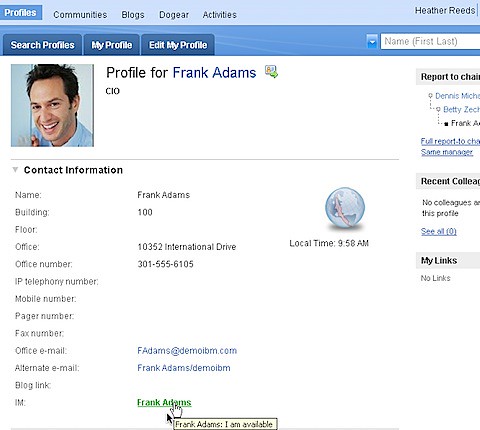
200811171102.jpgThis is a question that I often get: "How do I enable STLinks in Lotus Connections v2"? In fact, it's one of the most discussed questions in the Lotus Connections Forum.
This functionaity works in v2 just like it did in v1. Therefore, to enable this in v2, it's as simple as following the instructions in the v1 InfoCenter.

I'm not sure why the instructions haven't been copied to the v2 InfoCenter, but maye they'll do it now ! In any case, I wanted to make sure that this would work on a Lotus Connection v2.0.1 environment before blogging about this. Therefore, I successfully tested the v1 instructions on my own 2.0.1 environment.

But a little background first. In my test environment, I have two servers:

  1. Connections and DB2 (http://connections.demoibm.com)
  2. Sametime and Domino LDAP (http://collab.demoibm.com)

So here's what I did:

  1. Enabled SSO between Sametime and Connections
  2. Copied the contents of c:/lotus/domino/data/domino/html/sametime/stlinks (from the Sametime server) to c:/ibm/httpserver/htdocs/en_US (in the Connections server)
  3. Modified LotusConnections-config.xml to specify the STLinks URL (http://collab.demoibm.com/sametime/stlinks) as documented in the InfoCenter
  4. Restarted the server
  5. Voilá

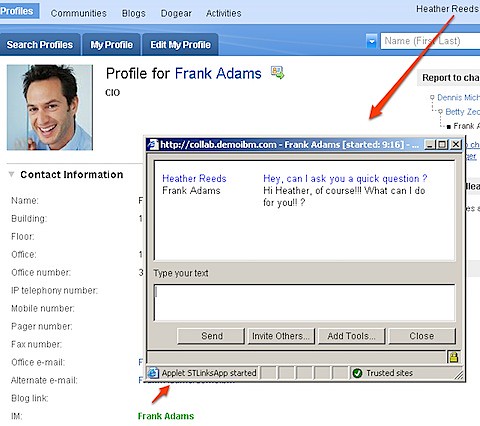
After restarting the server, here's how it looks when I click on someone's name that's connected at this moment:


200811171121.jpg

The beauty of this is that it does not require Notes v8.5 or Sametime Client v8.0.2 to be installed and running on someone's machine. As long as the browser supports JavaScript, it works!

Note: While this works, it is not officially supported by IBM

Enjoy!

Wednesday, November 12, 2008

Lotus Connections and Sametime Awareness on UID

View Comments

I know I've been a bit quiet lately. Yes, I know I haven't published anything since Friday. Here's the thing, tomorrow I'm presenting on "Social Software for Higher Learning" at a Learning 2.0 event that's happening here. CIO's and CTO's from all the different colleges and universities on the island are going to be at the event. But I'll blog more about that later.

Today, I just want to share a quick tip with you. Recently, we were working on a customer to enable Instant Messaging within Lotus Connections with Sametime. By now, you already know that the integration works seamlessly if you have Notes 8.5 or Sametime 8.0.2. You can also get it to work with Sametime v7.5+ and Notes v8+ by installing a special plugin.

By default, the awareness lookup happens via the user's email address. However, at this particular customer, Sametime was configured to only allow lookups via uid and not email. The usual solution to this is to configure Sametime to do lookups via email. This, however, was not an option for this customer.

Therefore, we had to customize Lotus Connections to do lookups via uid. With the help of super awesome Firebug, we were able to figure this out. Here are the steps we followed:

  1. Go to <WAS_PROFILE_ROOT>/installedApps/<cellName>/Profiles.ear/peoplepages.war/js_build/dojo
  2. Save a copy of profiles.js and profiles.js.uncompress.js
  3. Open profiles.js with your favorite text editor
  4. Search for the following text:

    getstatus/";url+=profilesData.displayedUser.email+"?jsonp=lconn.profiles


    and replace it with this text:

    getstatus/";url+=profilesData.displayedUser.uid+"?jsonp=lconn.profiles


  5. Save profiles.js
  6. Open profiles.js.uncompress.js with your favorite text editor
  7. Search for the following text:

    url += profilesData.displayedUser.email + "?jsonp=lconn.profiles.PersonTag.loadIMStatusCallBack&time=" + new Date().getTime();


    and replace it with this text:

    url += profilesData.displayedUser.uid + "?jsonp=lconn.profiles.PersonTag.loadIMStatusCallBack&time=" + new Date().getTime();


  8. Save profiles.js.uncompress.js
  9. Restart the HTTP server and the Lotus Connections server
Enjoy!

Thursday, May 8, 2008

Are you ready for this? Sharepoint 'My Site' in Connections Person Card!!

View Comments
You already know that we can add the Lotus Connections Profiles Person Card into Sharepoint. However, how do people get to Sharepoint in the first place?  They could search under Communities to see if someone is advertising their Sharepoint site.  Several customers asked to have the person card extensible so we could add a pivot point to a person's "My Site".

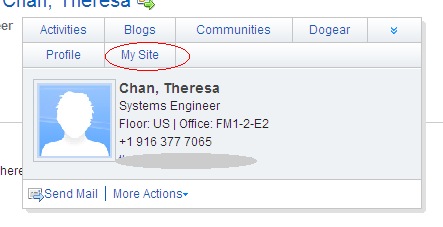
Well, they asked for it, and we are delivering!!  With the advent of Profiles v2 (eGA expected in June 13), the development team has made it SUPER EASY to extend the person card.  By just adding two lines of code to an XML file, you can add a "My Site" link to each person's person card.  That's right, you do NOT need to know JSP, Java, or any other programming language.  This is purely a configuration change!!!!  Here's how it looks:


IntelBizCardMySiteZoom

So, what's the lesson learned ?  Connections and Sharepoint play nice together!  They do NOT compete.  In fact, Lotus Connections adds value to an organization's investment in Microsoft Sharepoint by allowing Sharepoint sites to be more easily discoverable. 

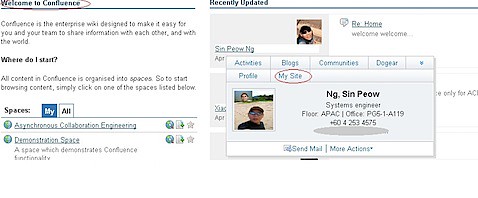
Oh and you know what?  We did a favor to the customer and we integrated their Confluence Wiki software with Microsoft Sharepoint.  How?  Well, we added the person card to Confluence.  So wherever you see a name in Confluence, you get that person's business card and in the business card we have a link to their 'My Site'!!!!  So, let me recap that:  We integrated Confluence Wikis with Microsoft Sharepoint via Lotus Connections!

And the best part?  This all took no more than 1 hour.  Here's how the person card looks in Confluence:


BizCardfromConfluence


What do you think ?  You like it?

Tuesday, March 11, 2008

Wow that's cool -- ST Awareness in Profiles Person Card!!!

View Comments

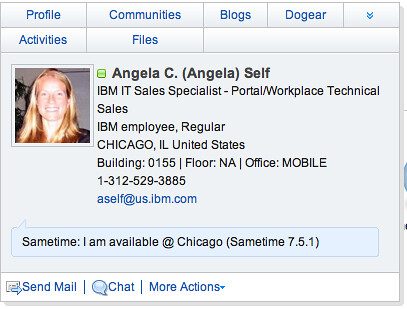
For the past couple of months I have been working at an all-Lotus POC (proof of concept) which includes Portal, Quickr, Sametime, Notes 8, and Lotus Connections for a multi-national insurance firm. One of the things that they've wanted to see is Sametime presence awareness in the Lotus Connections Profiles pop-up business card (aka. person tag). In fact, many customers have asked me about it!

I had heard from development that they were working on adding that for Lotus Connections R2 and had seen some screenshots. Today, I'm happy to announce that it's working in the TAP environment!!!

(picture updated on 6/6/2008)
STPresenceR2
You must know, however, that this only works if:
  1. You have the Sametime v7.5.1 (and above) client installed on your computer, and
  2. You are signed on to the Sametime server, and
  3. You install the WebLinks plugin

I'm sure by now you are using a feed reader and subscribing to my Dogears. Therefore, you already have a link with instructions on how to get this working on your computer. Enjoy and happy demoing!!!!!

Friday, February 29, 2008

A couple of new features added to Profiles 2.0

View Comments
Just wanted to bring to your attention a couple of new features and changes which will be available in Lotus Connections Profiles v2.0.  However, since we are cool people, we get to see a sneak peek of these features in TAP.

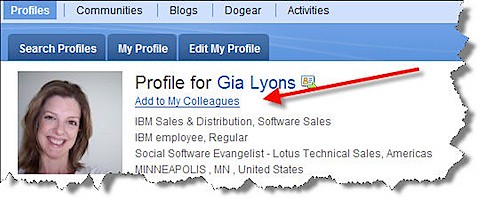
Today, I noticed the addition of 'Add to my colleagues' when you are viewing someone's profile:

profilescolleagues

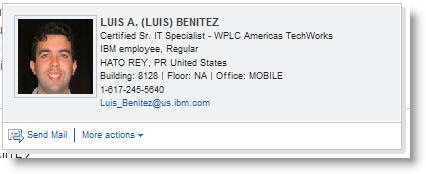
When you click on that link, you can enter a message which will be sent via email to the person you are trying to 'friend'.  Not only that, but we have an updated Person card:

newbusinesscard
Now, anywhere you see a name you can send that person an email.  Additionally, if you expand 'More actions' you can add that person as a colleague!!!  Now, imagine yourself browsing a document library, or browsing Dogears.  You find this person who has a lot of interesting materials and you want to add them immediately to your list of Colleagues!!  There's no need whatsoever to stop what you are doing, go find them in Profiles and then add as a colleague.. you can do it from anywhere the pop-up business card shows up!! Let me repeat that.. you can do that from ANYWHERE the pop-up business card shows up -- including non-Lotus Connections applications (e.g your intranet portal, your document repository, your rich client applications, etc...)

Very cool!!!!!

Ohh.. and don't forget that in 2.0 you have total control on the links that appear in the pop-up business card!

Thursday, August 2, 2007

Yeah Baby!! I added presence awareness to Connections with LCS

View Comments
Oh yeah!!! So I finally did it.  I was able to get presence awareness into Profiles using Microsoft Live Communication Server, instead of Sametime.  Now, as you know from a previous post, I was planning on using the AJAX API that Microsoft provides.  However, due to my somewhat limited knowledge of AJAX and limited bandwidth on this project, I wasn't able to do that.

Instead, I'm using what Microsoft calls as the 'Persona Controls'.  This makes integration VERY EASY... but with that 'easiness' comes some caveats:
  • Integration only works on IE
  • Integration only works on those computers where the Microsoft Office Communicator 2005 client has been installed and configured

Since this is for a demo/POC environment, we are getting away with it.  It's not the prettiest, but it's there.  Check out what it looks like in these screenshots:


Wednesday, June 20, 2007

Presence awareness with Microsoft Live Communication Server and Lotus Connections

View Comments

I’ve been investigating ways to add presence awareness to Lotus Connections using Microsoft’s Live Communication Server instead of Lotus Sametime. I’ve been using Dogear and Google to find resources on this topic. Below is a result so far of my research. There are two high-level ways to approach this:


  1. Use the Microsoft Office Communicator 2005 SDK


  2. Use the Microsoft Communicator Web Access AJAX SDK


Option 1

- Relies on DLLs installed on a user’s workstation to enable presence awareness in applications such web.

Pros:

* Very little code to write

Cons:

* Only works on Windows workstations

* Requires a DLL to be installed (or Microsoft Office 2003 installed and configured to talk to the Live Communication Server)

* Can’t customize the user interface (provided by the DLL / ActiveX object)


Option 2

- Relies on AJAX and JSON calls to access Microsoft Communicator Web Access (CWA). This SDK allows developers to write their own IM client.

Pros:

* OS-independent

* Browser-independent

* Customizable UI

* Already used in other parts of GM

Cons:

* Requires more code than option 1 — I believe it can be generalized though…


Based on this, it’s looking as option 2 is the preferred route. I’m going to develop some sample code and test it out today and see if it works. I’ll keep you posted!