Pages

Showing posts with label email. Show all posts

Friday, November 7, 2014

Get Ready For An Extreme Mail Makeover and see IBM Mail Next

View Comments
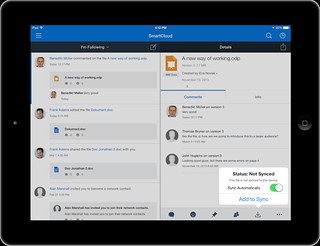
Earlier this year, I had the opportunity to be part of the unveiling of IBM Mail Next at IBM Connect 2014. Now it's time to get your hands on it!  Below is a copy of the webcast invite so you can check out the latest details on how to be an early adopter and all the latest integration into IBM Connections, IBM's market-leading enterprise social collaboration platform. See you there!


Every day, emails flood our inbox: tasks are left undone, messages go unanswered, and meetings overwhelm us. Why does work have to be such hard work? The truth is, it doesn’t have to be. Join our live video panel discussion on Thursday, November 20, 2014 at 11:00 AM ET and hear how IBM’s latest solution offers an easy way to take back control of your day.

Using advanced design thinking, the latest in social analytics and delivered from the cloud to your mobile device or desktop, this new solution:
As an added bonus, watch for details on becoming part of the beta! Register now and get ready for an extreme mail makeover: re-imagined for the future of work. Register now!

Wednesday, October 8, 2014

5 Can't Miss Features of IBM Connections

View Comments
About two weeks ago, I was asked to present to a group of internal IBMers tips and tricks to get the most out of IBM Connections, our social collaboration platform.

I actually reached out to my internal network and asked for suggestions on a good topic. Quickly, I realized that everyone had their own favorite feature or aspect of the product.

That got me thinking that maybe it's worth me putting together a quick presentation that shows people how I get the most out of the product to improve my productivity.

Then it got hard. How could I pick just a handful of things where IBM Connections makes my life easier ?

I had to iterate a couple of times.  In the end I decided that a good way to format it would be to focus on 5 integration aspects that maximize the value I get out of the product.

Check out the slides that I took them through:


Do these match what you would've presented?

Friday, July 25, 2014

Announcing the latest IBM Connections Mail Plug-In

View Comments
Today, IBM Connections Mail gets an update. If you don't know what IBM Connections Mail, let's catch you up.  IBM Connections Mail provides a simple and compelling way to perform essential email and calendaring tasks right from IBM Connections.

This is particularly useful as you can process your inbox with minimal context switching.  According to McKinsey, when users switch from one task to another, it really affects productivity.

Therefore, by keeping context switching to a minimum, you increase productivity in your organization.  Additionally, sending attachments is a snap as they are sent as links via IBM Connections (a feature that our competitors have copied).

Of course, with the IBM Connections 5.0 release less than a month ago this new version of IBM Connections Mail now fully supports IBM Connections 5.0.  Here's the other new capabilities:
  • Accept/Decline calendar invites
  • Save messages as draft
  • Adds support for Domino encrypted mail
  • Adds direct access to the Microsoft Outlook Web App
  • Adds support for Microsoft Exchange 2013
Here's a screenshot of the save as draft and accept/decline screens:


Here's a demo that was recorded when this originally shipped. 


Go get it from our catalog using this direct link!


Thursday, May 9, 2013

LinguaSys Demonstrates Translation Plug-In for IBM Connections

View Comments

LinguaSys has just posted a new video that shows real-time translation of content within the latest release of IBM Connections. As companies continue to roll out social collaboration platforms to collaborate worldwide with customers and employees, there's been a trend to foster collaboration in the end user's native language.

Internally, at IBM, every time I log on in the morning I see a lot of updates in Chinese and Japanese and I wish I could read them. With this new plug-in, I now can!

The plug-in even translates the contents of emails in your Exchange or Domino server via IBM Connections Mail .

To showcase the functionality, LinguaSys has created the following 2 minute demo. Check it out:


To learn more, visit LinguaSys' page on translation.

Thursday, March 21, 2013

New IBM Connections Plug-Ins for IBM Notes 9 Now Available

View Comments

In conjunction with the new IBM Notes 9.0 release today, we have also just released the latest IBM Connections plug-ins for the best email client available delivering the world's first social email experience to the market.

The new plug-in adds support for:

  • IBM Notes 9.0
  • IBM Connections 4.5
  • Mac OS X 10.8
  • Windows 8

Additionally, the Connections business card has now been redesigned and the plug-in now provides a single installer to enable all the integration points to Connections: microblogging, file sharing, and tasks. As you probably know the plug-in allows you to:

  • Attach a file to a status update
  • Like / unlike a status update
  • Activity stream integration allows to monitor updates for all Connections services
  • Search by people and communities
  • Post status letting your colleagues know what you are doing
  • View status for people in your network
  • Comment on status updates
  • Delete your status or associated comments
  • Forward an update by email
  • View or post updates from the icon in the system tray when you are not working in the Notes client
  • Keep up with updates for people you follow
  • Lock/unlock files
  • Upload files for your own use or to share with others
  • Drag and drop an attached file or a file from your desktop to Files
  • Drag and drop or copy and paste a file from Files to your desktop
  • Send an HTML link to a file
  • Search for people or communities
  • Sort files for easier browsing
  • Detach the Files window from the Notes sidebar

So if you are upgrading to IBM Notes 9.0 and/or IBM Connections 4.5 you must get this plug-in today! To learn more about IBM Notes 9, check out this 90 second video from Ed Brill:

And for a demo of these features check out:

To download the new plug-in, you can get it from our app catalog over here.

Monday, March 18, 2013

Replay of the IBM Connections 4.5 Launch Webcast Now Available

View Comments

Last week was a busy one with the launch of IBM Connections 4.5, and the enhanced IBM Connections plug-in for Microsoft Outlook. To kick off the launch, we had a webcast to showcase the business value of IBM Connections 4.5 and IBM Notes 9 called: From Liking to Leading - Transforming your Business with a Next Generation Platform for Social Business.


If you missed the webcast, or you want to watch it again, you can do so here (even if you hadn't registered for the original webcast). In the replay you also have the option to download the broadcast presentation from the “Resources” widget of the broadcast replay. I had fun getting ready for the launch and creating the demo of IBM Connections 4.5 where I focused on the importance of mobile and real-time collaboration.

Also a quick reminder that if you are looking for the two demos that were shown during the webcast, you can access those quickly here.

Here's a storify that summarizes the webcast:

Enjoy!

Friday, March 15, 2013

Check out the new IBM Connections Plug-In for Microsoft Outlook

View Comments

We have just released the new IBM Connections Plug-in for Microsoft Outlook ! This enhances the existing integration that we provide via the native Outlook Social Connector capability. However, we found that Microsoft implemented this in a limited way since it only provided "read-only" access to the social network.

Therefore, we took the integration to the next level and added a brand new sidebar to Outlook to provide access to files, microblogging, communities and more. And you can interact with your social network all directly from Microsoft Outlook!

By bringing social to the end user, you can accelerate adoption, reduce time to value, and reduce training costs as users that live and die in Outlook don't have to learn anything new to interact with IBM Connections.

Here are some of the features:

  • Share files easily – send links instead of attachments.
  • Drag and drop email messages and attachments from Outlook to the IBM Connections sidebar application to upload them to IBM Connections.
  • Search Connections files directly from Outlook.
  • Search people by name, job title, organization, etc.
  • View complete Connections profiles.
  • Initiate a chat with a colleague directly from the sidebar application.
  • Receive live updates from your colleagues, communities you follow, and when changes are made in files you follow.
  • View community files and updates.

Here's a quick 5 minute demo showing this off:

To download the plug-in, go here or find it directly in our App Catalog .

Thursday, March 14, 2013

Demos of IBM Notes 9 and IBM Connections 4.5 Launch Now Available

View Comments

By now you know that this week we launched IBM Notes 9 and IBM Connections 4.5. On Wednesday, we had a webcast to launch these two products.

At the webcast we had Ray Wang, from Constellation Research, kick things off by talking about the 9 C's of collaboration.   

During the webcast, Scott Souder and myself did demos of our respective products. Those demos are now available online in case you missed it (or you want to see it over and over and over again! )

Here's the IBM Notes 9.0 demo:

Here's the IBM Connections 4.5 demo:


The full replay of the launch webcast is also available here.

Enjoy!!

Wednesday, November 14, 2012

Demo: Increasing Productivity with IBM Notes Social Edition

View Comments
Today, Ed Brill and team announced IBM Notes 9 Social Edition and the upcoming public beta to be released in a few weeks. If you missed it, check out Ed's blog for a link to the replay.

I've been using the internal beta for a few weeks now and really like the integration with IBM Connections, IBM's social collaboration platform.  Based on personal experience, IBM Connections makes everything social and improves the productivity of its users.  And the IBM Notes 9 Social Edition is a prime example of that.

The video below gives you a preview of some of the new integration points of IBM Connections, real-time communications powered by Sametime, and Notes all in one seamlessly integrated user experience.  The video also shows video conferencing both from Notes and from a community in IBM Connections.


I've already gotten some very good feedback on this video and I'm interested to know: What do you think about this video ?

Wednesday, September 19, 2012

New IBM Connections Desktop Plug-In Now Available

View Comments

With the release of IBM Connections 4.0, IBM is now updating its many extension points. Today, I wanted to share the news that the new IBM Connections Desktop Plug-Ins are now available for download. The plug-in, of course, remains free and is fully supported by IBM.

The Desktop plugin is a single install which brings IBM Connections into Microsoft Outlook, Word, PowerPoint, Excel and Windows Explorer (depending on what you have installed). Here's a list of some of the features you can use:

  • Upload local files to IBM Connections from Windows Explorer or from your desktop
  • Share uploaded files with people, communities, or folders in IBM Connections
  • Work on files locally and publish them to IBM Connections
  • View people's contact details and get in touch with them
  • Pin, follow, or like IBM Connections files and folders
  • View or contribute comments for a file
  • Lock a file when you are editing it to prevent file conflicts
  • View and restore files from IBM Connections Trash
  • Share folders with IBM Connections Communities

One of the things that really stands out is how all of the social features from IBM Connections Files are available directly from Windows Explorer. From Windows Explorer, I can like files, comment on them, share them and more without ever having to open a browser. How cool is that!!??!!

If you haven't seen this plug-in in action, then I recommend that you take a peek at the videos created by my colleague Ron Denham.

First, how it integrates with Microsoft Word, PowerPoint and Excel:

Next, how it integrates with Microsoft Outlook:

Finally, how it integrates directly into Windows Explorer to provide access to files whenever you want:

To download the free plug-in, download it from our App Catalog.

Wednesday, September 5, 2012

Introducing IBM Connections Mail

View Comments

With the upcoming availability of IBM Connections 4.0 I would like to talk a bit more about IBM Connections Mail, one of the many new features of v4.0 and one of my favorite ones.

IBM Connections Mail brings mail and calendar into your social context by integrating key messaging and calendar views and functions into your social environment. As email turns 30, we know email is not going away any time soon. Thus, we've now given end users the ability to easily access and manage their Mail and Calendar content directly from IBM Connections. This allows user to process emails quickly (e.g. reply, forward, etc) as well as obtain a quick glance of their calendar. This feature supports Lotus Domino and Microsoft Exchange environments.

I've been using IBM Connections Mail now for a couple of months and I like it a lot. I find that I spend more and more time within IBM Connections since I don't have to switch to another app to work with my email. IBM Connections Mail was featured as one of the MUST-HAVE features all Enterprise Social Networks need according to InformationWeek.

Here's a screenshot of how it looks:


My personal email and calendar is always accessible from the top navigation bar by simply hovering over the mail and calendar icons. The great thing is that I can quickly reply, forward, and delete emails and process my inbox. Of course, I can also use this capability to send private messages to other users.

When reading an email, the business card is available when hovering over people's name. When sending an email, the system is even smart enough to allow me to "attach" files that already exist in my personal file share within Connections. Extremely powerful, right?

By far, however, my favorite feature is the embedded experience provided directly in emails. For example, say that someone posts a question in one of my files. In a typical platform, this usually means that I have to click on a link the email, go out to the social platform, log on, respond to the question and then come back to delete the email. This multi-step process is reduced to a single step. In IBM Connections Mail, the email contains a live page where not only I can see the question posted in the file, I can reply to it directly from there and once I'm done, I can get rid of the notification.

Feedback from people that have seen this and our beta customers has been extremely positive on this feature. So as soon as you get your hands on the code, make sure you install this capability!

To learn more about IBM Connections 4.0, register for the September 13th webcast: From Liking to Leading - The Success of your Business is Social.

Updated 20/Sept/2012 - To download IBM Connections Mail, click here.

Wednesday, June 27, 2012

How To Get Users on the IBM Connections Mobile Apps Fast!

View Comments

By now, you are aware of the new IBM Connections mobile apps for iOS and Android that were released a couple of weeks ago.

The feedback so far has been amazing! The ratings and comments in the app store have been fantastic.

Today, I wanted to share a quick tip with you so you can help everyone in your organization get started with the mobile app. In fact, I highlighted this in my original blog post and I've received several questions already on how to do this.

The new mobile apps now support app provisioning via a link. This means that you can post a link in Connections or send it via email and when users click on it from their mobile device, the app is immediately launched and pre-configured for your server.

To do this, simply build a URL similar to the one below:

ibmscp://com.ibm.connections/launch?accountserver=https%3A%2F%2Fwww.bleedyellow.com%2Fmobile&accountuser=luis_benitez%40us.ibm.com&accountname=BleedYellow

and then send an email to your users and ask them to click on the link, for example:

Click this link to get started!

Notice that the URL contains the user ID of the person and the values are URL encoded. The URL above would be my unique URL to configure the app with BleedYellow.

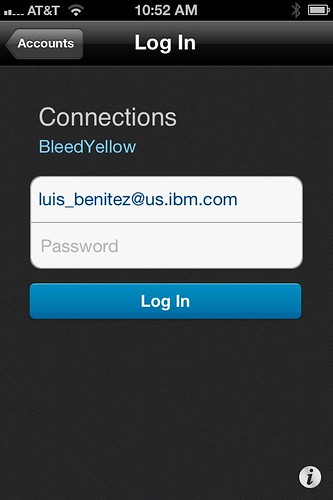
When the user clicks on that link, they are immediately brought over to the IBM Connections Mobile app and this is what they see:


Notice that everything is pretty much configured. The end user doesn't have to figure out what the URL is to their server. At this point all the user has to do is enter their password and off they go! Pretty cool, huh? The same URL will work both for the Android and iOS apps.

Enjoy!

Wednesday, November 30, 2011

How To Add a "Follow Community" button in an Email

View Comments

I saw this posted internally and just felt compelled to share. My colleague, Romain Lienard, He developed a way to quickly add a button to an email so that recipients can quickly follow an IBM Connections Community with a single click. I can see this being very very handy, specially when combined with the community email newsletter generator. This is a great example of using LotusScript and the IBM Connections API.

What follows is a copy of Romain's blog entry:


image


The IBM Connections API can be used with Lotus Notes and its LotusScript programming language in order to facilitate some tasks for end users.


So with some Notes support from Herbert Hilhorst, I wrote a piece of LotusScript that automatically follows a community with a simple click. The authentication is done directly in the Notes client


All you have to do is :

1 - create a button in your mail, via Create>Hotspot>Button.

2 - Specify a label for your button, select LotusScript instead of Formula

image


image


3 - Copy & paste this code, after changing the CommunityUID (here it's 5bf86449-cd87-4e02-bef5-a24f24408723) according to your needs :

Sub Click(Source As Button)
     
     Dim objHttp
     
     Set objHttp = CreateObject("Microsoft.XMLHTTP")
     url = |https://w3-connections.ibm.com/communities/follow/atom/resources?source=communities|
     req = |<entry>
<id>urn:lsid:ibm.com:follow:resource-5bf86449-cd87-4e02-bef5-a24f24408723</id>
<category term="resource-follow" scheme="http://www.ibm.com/xmlns/prod/sn/type"></category>
<category term="communities" scheme="http://www.ibm.com/xmlns/prod/sn/source"></category>
<category term="community" scheme="http://www.ibm.com/xmlns/prod/sn/resource-type"></category>
<category term="5bf86449-cd87-4e02-bef5-a24f24408723" scheme="http://www.ibm.com/xmlns/prod/sn/resource-id"></category>
</entry>|
     objHttp.open "POST", url, False, "", ""
     objHttp.setRequestHeader "Content-type", "text/xml"
     objHttp.send(req)
     Msgbox "You're now following the TEC-F community. Thank you !"
     
End Sub


Save your document, click on the button, and voila ! Here's the original blog entry so you can give thanks to Romain :).

image