Pages

Showing posts with label offline. Show all posts

Wednesday, June 18, 2014

A Little About IBM Connections 5.0 and File Sync

View Comments
Now that we have officially announced IBM Connections 5.0 I wanted to take some time and talk about one of the top new features in this release: enterprise file sync and share. Also, if you haven't seen it yet, check out Suzanne Livingston's blog from yesterday where she talks about the new external collaboration features of IBM Connections 5.0. This is a capability that we've had available in our cloud for a while and now we are making it available to our on-prem customers.

IBM Connections has already been cited by Forrester as a Leader in their Enterprise File Sync and Share Wave and IDC has stated that when it comes to marketshare, IBM Connections leads the way.

So back to File Sync.  As you can see from the screenshot in the right, when you install the latest IBM Connections Desktop Plug-Ins (which will be available for download in a couple of days) a new Sync folder will be created under Favorites.

There you can save files directly to IBM Connections and use Connections as your personal backup drive where everything is sync'ed automatically (including of course edits that you make offline).

Another added benefit and differentiator is that right from within your desktop you can right click on a file and act upon it. In other words, you can comment on it, tag it, like it, lock it (to prevent others from editing while you are offline) and even share it with other colleagues without ever having to open a browser.  By default, all files are marked as private and only you have access to them. From there you can choose to share with individuals, groups, or communities.

On the mobile side, you can use our native apps for Android and iOS and sync files to your favorite mobile device/tablet. On each device you can manually specify which files you want to have available there. For example, you may want some key presentations on your iPhone, while you have documents, spreadsheets and other assets available in your iPad.

Here's a quick 5 minute demo that shows the enterprise file sharing and sync capabilities of IBM Connections 5.0.


If you are an on-prem customer, get ready to download the code next week! Stay tuned for other new features in the coming days.

Sunday, October 14, 2012

IBM Brings Social to Users with Updated IBM Connections Mobile Apps - Includes iPhone 5 Support

View Comments

Over the weekend, IBM updated the mobile apps for its social collaboration platform IBM Connections. The apps for Android and iOS mark the 4th release this year showing IBM's commitment and understanding of the importance of mobile in social collaboration. IBM Connections customers can download the update free of charge.
These releases round up a big week for IBM in mobile as IBM also released a new version of their instant messaging app for Android tablets.

The IBM Connections app for the iPad has become a powerful tool for me. As a remote worker, it's an essential tool to be productive and effective irrespective of where I am.

You can see the full list of new features and enhancements for the iOS app here. Here's my take of my favorite new features:

  • Support for iOS 6
  • Support for iPhone 5 (tall screen support)
  • Infinite scrolling
  • Support for IBM Connections 4.0 activity streams
  • Launch third party OpenSocial gadgets
  • Attach photos or videos to a status update
  • Include geolocation information in a status update
  • Offline access to forums you have viewed
  • Offline access to Community files and forums you have viewed
  • Remotely Wipe Connections app data
  • Share profile information using QRCode
  • Mobile Links in IBM Connection update emails now open in the app

I've also created a demo of the iPad app to showcase some of the new features:

The Android app for IBM Connections was also updated. To see a demo of the Android app, go here.

Download the apps now! You can get the free Android app from here and the free iOS app from here. Oh and keep those reviews coming!

Tuesday, July 31, 2012

How To Customize the IBM Connections Mobile App for iOS, Android & BlackBerry

View Comments

Today IBM has published documentation on how to customize the mobile apps for IBM Connections. To customize the mobile apps, you need to have IBM Connections 3.0.1.1 CR2 installed (which you can get from here). As the IT admin, you have the control on the following settings:

  • Allow iTunes Sharing - whether iOS users can transfer files to the app via iTunes
  • Allow Web Sharing - whether uses accessing Connections via a browser should be re-directed to download the native app
  • Remember Password - whether to allow end users to store their passwords in their device
  • The ability to enable/disable different components of Connections (e.g. enable Files but disable Wikis)
  • For Files, there's a set of additional configuration options:
    • Encryption - whether downloaded files should be encrypted
    • Allow Upload/Download
    • Allow Export - whether downloaded files can be shared with other apps/folders
  • The name of the app and module can be fully configured
  • SSO authentication options (Siteminder, SPNEGO, etc)
  • Ability to add new applications to the app

If you haven't seen them yet, I've recorded a demo showing the latest Android and iOS apps. Here they are again.

iOS (iPad):

Android:

To access the documentation, click here http://www-01.ibm.com/support/docview.wss?uid=swg21606189

Wednesday, March 21, 2012

IBM Connections Plug-In for Windows Explorer Now Available

View Comments

Stop what you are doing immediately! If you've been heads down in the past 2 days, then you've probably missed some amazing news. First, over the weekend, IBM released IBM Connections 3.0.1.1. Immediately after on Monday, IBM released the brand new Desktop Plug-In for Microsoft Windows Explorer.

Check out everything that the plug-in can do:

  • Upload files for personal use or to share with others
  • Upload files to a community or attach them to an Activity
  • Share existing Connections files with other users or with a community
  • Drag and drop files from your desktop to Connections Files or to a community
  • View and manage versions of your files
  • Add comments to files or recommend files
  • Edit and publish local drafts to Connections
  • Pin or follow folders and files for easier tracking
  • View business cards for people and invite them to your network
  • Easily access all Connections features via browser links

This is huge!!! All of this, as usual, is available at no additional cost from the IBM Connections App Catalog.

As I've mentioned before, I believe that one of the things that helps rapidly gain adoption for a social business platform is bringing social to the end user. Just like in real-estate where location, location, location is critical, I believe that in social is all about integration, integration, integration. If you can bring social to the end user, they use it seamlessly and don't have to learn a new way to collaborate and don't even have to think about it. And, of course, this is all great especially when you can achieve all this integration for free.

Want to see it in action? Check out this video that I recorded (play it in full screen for HD viewing) (oh and yes, you have to watch the whole video as my favorite feature is towards the end of the video):

Download it today and enjoy!!

Monday, October 17, 2011

How To Access your IBM Connections Files Offline from your iOS Device

View Comments

Last week I attended a conference in Cambridge, MA where I got to see Andrew McAfee give the keynote. I never get tired of listening to Andy. He does a great job on stage keeping everyone engaged, he's funny, and definitely very passionate about this whole Enterprise 2.0 space (of course, since he coined the term! ).

Updated 24/Sept/2012: As of June 2012, the native IBM Connections mobile apps allow you to take files offline without depending on a 3rd party tool. For more info check this blog entry out.

That was my first trip in 9 weeks and it was a good reminder of how many people are still offline for most of their work days. Previous to my current role, I used to be part of the sales organization where I would only have access to the network about 20% of the time any given week.

While I was in one of my meetings I needed to access one of my files stored in IBM Connections and the connectivity was not that great. Luckily, I had an offline copy of the file which I could still use and show to my peers.

I figured this could be a tip I could share with many of the IBM Connections users out there so I created a quick video showing how to do this. The trick is to use a free app that you can find on the iTunes App Store called Fresh Docs. The app is made by Zia Consulting and works over CMIS (Content Management Interoperability Services). As you may remember, IBM Connections introduced support for CMIS back in 2010. And this opens the door for many providers to integrate with Connections, such as this free app:

Download the app and feel free to test it against our own test environment called Greenhouse. Here are the settings you'll need:

Hostname: greenhouse.lotus.com

HTTPS: On

Port: 443

Service Document: /files/basic/cmis/my/servicedoc

Company Home: On

That should do it! Enjoy!

Tuesday, August 25, 2009

Take your social bookmarks offline

View Comments

With Lotus Connections 2.5 only 3 days away and Apple trying to steal our thunder, I've learned some good news for mobile workers who depend very much on their bookmarks. The OpenNTF consortium has just published a new plugin for Lotus Connections Bookmarks created by Hanspeter Jochmann. The plugin allows Lotus Notes users to view their bookmarks directly from Notes and take them offline so that they are accessible while on the go! You can also create bookmarks later and synchronize them later (or just keep them local).

Here's a video that shows that functionality.


The plugin is available for free and can be downloaded from here.
Enjoy!

Thursday, March 26, 2009

Blogging Offline with Lotus Connections v2+ and ecto

View Comments

You may remember that I'm a big fan of offline blogging. It was recently brought to my attention, though, that I never shared instructions on how I configured ecto (my offline blogging client) to work with Lotus Connections Blogs.

You should be able to use ecto to write and publish the blog. You can also assign tags to your blog entry from the list of existing tags, or create your own tags directly from ecto. Woo Hoo!!!

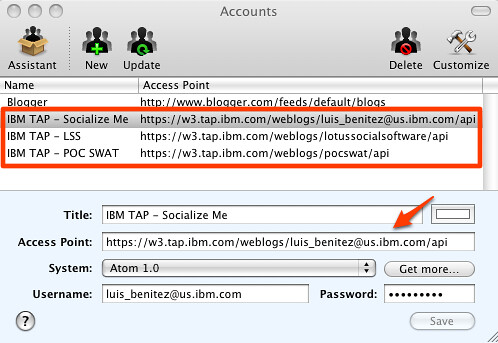
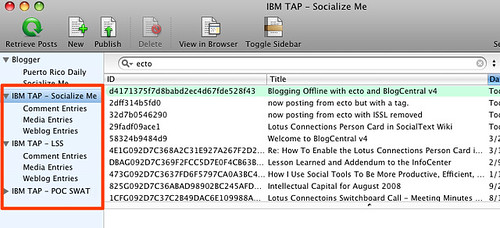
There's a caveat, though, ecto isn't very happy with bloggers that have multiple blogs on the same account. For example, I have this blog, but I'm a member of 2 other team blogs inside Lotus Connections. Therefore, here's what I had to do to properly configure ecto to work with all my Lotus Connections blogs.

  1. Launch ecto
  2. Go to Edit Accounts
  3. Enter the following information
    1. Title: IBM TAP
    2. Access Point: http://w3.tap.ibm.com/weblogs/<blog handle>/api (e.g. http://w3.tap.ibm.com/blogs/socialsoftware/api)
    3. System: Atom 1.0
    4. Username: Your Lotus Connections username
    5. Password: Your Lotus Connections password
  4. Click Save
  5. Repeat steps 3-4 for each blog you have and properly substitute in your blog handle.
Here's how my sidebar looks in ecto:

And here's my account panel:

. Happy Offline Blogging!

Tuesday, January 6, 2009

Lotus Notes v8.5 released at MacWorld!

View Comments

As you may have heard already, Lotus Notes v8.5 has been officially released! AND it was released at Apple's last MacWorld conference. Customers and business partners can start downloading the Notes v8.5 client NOW! I'm glad to say that I already have it installed on my Mac OSX (Leopard).

Additionally, for the first time in many years, IBM has a kiosk there showing all of their software that works on Mac. I am lucky enough to have an Exhibitor Pass to MacWorld and will be here at the MacWorld Expo until Friday night! I'm also surprised that there are several IBM software brands will be at MacWorld: Lotus, IM, and Informix.

As a Lotus on Mac user, I'm thrilled that Lotus decided to announce Notes v8.5 today instead of waiting two more weeks for Lotusphere! With this announcement "out of the way" (so to speak), this leaves room for even bigger announcements at Lotusphere less than two weeks from today! Honestly, when Ed Brill announced they were going to wait after the Christmas holiday to ship Lotus Notes v8.5, I thought he meant they were going to wait until Lotusphere!

Here are some of the new features that I like the most:

  • Includes Lotus Symphony 1.2.1 beta for Mac embedded
  • Ability to add Calendars from Lotus Connections Activities, Google Calendar, and iCal feeds
  • Ability to take Lotus Connections Activities offline!
  • Ability to bookmark any document, database, and/or view in Lotus Connections Dogear
  • Includes Sametime v8.0.1 with the WebAPI plug-in (important to show ST awareness in web applications such as Lotus Connections)
  • Drag-n-drop emails into Sametime to add contacts to your Sametime list
  • Photos/Screenshots embedded into emails are automatically compressed when sending
  • File attachments are now shown at the top of each email (so that they are easier to find)
  • New support for LiveText on the Mac
  • Performance! Lotus Notes v8.5 on my Mac starts about 70% faster than Public Beta 2

Now, I know that you are wondering... "When can I get the Lotus Connections Activities sidebar to work on my Mac?" Well, the wait is over! Just like I hacked Public Beta 1 and Public Beta 2 to add the Activities sidebar to Notes v8.5 on the Mac, I've hacked the Gold release of Notes v8.5 so that you can add the Activities sidebar to your Notes v8.5 whether you are on Linux or Mac!!!

Once you download and install Notes v8.5 on your Mac, follow these instructions to add the Activities sidebar to it:

  1. Uninstall the previous hack if you had it installed. (File > Application > Application Management)
  2. Go to File -> Application -> Install
  3. Select Search for new features to install and click Next >
  4. Click on Add Remote Location...
  5. Set the Name to Activities Sidebar
  6. Set the URL to http://blog.lbenitez.com/updateSite/site.xml (Note: New URL)
  7. Click Ok and then Finish
  8. Follow the remaining steps and restart Notes for the changes to go into effect

Note: You will see several categories listed. Make sure you select the category named: Notes 8.5 Gold.

Enjoy!!

Tuesday, October 28, 2008

I have a love-hate relationship with feed readers

View Comments

Feed readers are great. I've said it over and over again. But I'm beginning to develop a love-hate relationship with feed readers.

Great for mobile users

As you know by now, in this new job I get to travel to customers all over to discuss the business value of social software and best practices for social software adoption. And since I live in Puerto Rico, my flights are usually long, especially now that American Airlines has eliminated the hub in SJU.

With so much travel, what's one to do? Well, sometimes I use that time to catch up with what TiVo has recorded for me using TiVo Butler on my Mac. Often, though, I launch my feed reader and start digesting what's going on in the blogs and forums that I'm interested in or anything else that has been tagged with the topics that I'm interested in: "enterprise2.0", "web2.0", "social-computing", etc. The content that I find there ? More often than not, it's great content! Content that I want to comment on and discussions that I want to contribute back and questions that I know I can answer.

The Love turns to Love-Hate

This is where I get stuck. I would love to reply to discussion threads, blog entries and other stuff offline! Right now, I have to resort to marking the interesting items as Unread and hope that I remember to come back to it. While some forum technologies (like the forums used in developerWorks) already allow for offline replies to threads, this is not mainstream.

I know that each day we are moving closer to a pervasive online world. American Airlines is already piloting a product for in-flight internet. Still, this is still years away. A decade maybe.

Pervasiveness drives adoption

Based on my experience, one of the key factors for social software adoption is the ability to use those tools from anywhere. Lotus Connections , for example, does a good job at that because it can be used from Microsoft Word, Microsoft Excel, BlackBerry, Portal, Notes, Sametime, Windows Explorer, etc. You can even take the social task management component (Activities) and use it completely offline! And, of course, (like with 99% of blog engines), I can compose blog entries while offline.

The capability to reply to content offline would be huge and would contribute to social software adoption. I hope all Enterprise 2.0 vendors make an effort to provide and/or augment this capability in their products soon!