Pages

Showing posts with label feed-readers. Show all posts

Monday, September 10, 2012

CollaborationToday is now Live

View Comments

OpenNTF announced a few hours ago that it has now made CollaborationToday live.


As per OpenNTF:

The content you will find on Collaboration Today is a compilation of current and relevant news for IBM Collaboration Solutions professionals focussing on IBM products and technologies including IBM Connections, IBM Lotus Domino, IBM WebSphere Portal and IBM Sametime.

I'll be one of the moderators for content in CollaborationToday and will be adding content around social business (social collaboration tools, best practices, app dev, adoption strategies, etc) and IBM Connections as it becomes available.

There are various ways to subscribe to content so make sure you check it out today!

To learn more about IBM Connections 4.0, don't forget to register and attend for the webcast From liking to Leading: The Success of your Business is Social (click the invite below to register):


Register today!

Tuesday, November 16, 2010

How To Get Push Notifications for Lotus Connections Status Updates on your iPhone

View Comments

I'm a big fan of status updates and being alerted when something around me happens. Case in point, I created a plugin that will alert you anytime one of your colleagues does something in Lotus Connections. The plugin is also available for download from our app store/catalog site. From my external social network, I also wanted to get notifications. Luckily, the Twitter client that I use, Nambu, gives me notifications every time I get a mention or a direct message.

And these solutions are great, but only when I'm at my desk. What about when I'm mobile? Well, about 3-4 months ago I discovered Boxcar. Boxcar gives you Push Notifications on your iOS device (iPod Touch, iPhone, iPad). This was a great discovery because until then I would only get text messages only when someone wrote a direct message to me on Twitter. cool, because every time I was mobile I would be notified when someone re-tweeted my messages, mentioned me, favorited one of my messages, etc.

So where am I going with this? The iPhone app for Lotus Connections doesn't have push notifications yet. On the other hand, It turns out that yesterday Boxcar updated their application to support much more than just Twitter. You can now get push notifications from Google Buzz, Facebook (which the Facebook app already does, so not sure what the value is here), Twitter Lists, Google Voice, App Recommendations, and RSS/Atom Feeds. Now that I could point to any Atom feed, it was time to put it to the test.

I went on to BleedYellow (from my iPhone) and got my feed for status updates from my network (it's the feed that shows up in the bottom of the screen) and added it to the Boxcar app.


Then I got Cali to update her status and a couple of seconds later here's what I saw:


and when I unlocked:


Pretty cool, huh? This should work with any Lotus Connections server. I think, however, that the feed retrieval happens from the Boxcar servers per se (not from the mobile device). Therefore, if your Lotus Connections server is behind the firewall, I don't think the Boxcar servers will be able to retrieve the feed. You should be able to make it work with Greenhouse, ibm.com, myDevWorks, etc. Here are the feeds for those (you'll need to replace with your key):

https://www-950.ibm.com/profiles/atom/mv/theboard/entries/related.do?key=6bf09e5d-d022-4ee5-b079-ff6f61ccf619&messageTypes=status&comments=all&sortBy=lastMod&sortOrder=desc&lang=en

https://www.ibm.com/developerworks/mydeveloperworks/profiles/atom/mv/theboard/entries/related.do?key=cf0bf955-848f-4daa-a35f-fcddd434d9a9&messageTypes=status&comments=all&sortBy=lastMod&sortOrder=desc&lang=en

https://greenhouse.lotus.com/profiles/atom/mv/theboard/entries/related.do?key=5a428441-dcac-4278-916e-aa28d5323eca&messageTypes=status&comments=all&sortBy=lastMod&sortOrder=desc&lang=en

I do see an option, however, to have your Growl notifications pushed over to your iPhone, but I haven't been able to play with this. This could be a way to get push notifications from internal status updates.

You also don't get to see who posted the status update, but I'm playing around to see if there's another feed that provides that info. I'll let you know if I find it.

You can download Boxcar from here.

Enjoy!

Monday, June 7, 2010

Creating a Lotus Connections Plug-In for Sametime

View Comments

Last week I posted about a new plug-in I created for Sametime, the Lotus Connections Notifications Plug-In. The plug-in is basically a feed reader of all the things that your colleagues are working on inside Lotus Connections, but it's a lot easier to use for the big majority of users. And because it brings Lotus Connections to the desktop, it drives adoption.

One of the comments left on my blog asked some technical details on which APIs I used to create the plug-in. I briefly mentioned that I used the Notifications API, but I wanted to expand on that. Thus, warning, the following is very geeky!

When I first started, I looked at the sample plug-ins included with the Sametime SDK, specifically the com.ibm.collaboration.realtime.sample.snippets sample. If you want to learn more about how alerts work, I recommend taking a peek at the sample code provided in that simple plug-in.

I think that the best way to explain this is go through the flow of the plug-in and mention the classes being used:

  1. First, the plug-in is activated during startup because one of its classes implements org.eclipse.ui.IStartup

  2. At that point, the plug-in's Activator gets loaded and a job is created. This job is a custom class that extends org.eclipse.core.runtime.jobs.Job and overrides the run(IProgressMonitor monitor) method. This method runs in a separate thread and is scheduled to run every 60 seconds.

  3. Once the job is triggered, we make a query to Lotus Connections to retrieve this feed: https://connections.acme.com/news/atom/stories/public. This feed returns the same content shown in the Discover tab of the Lotus Connections Homepage.

  4. For each story retrieved, we check to see if it's from one of the user's colleagues. (you can retrieve the user's colleagues by querying https://connections.acme.com/profiles/atom/connections.do?connectionType=colleague&userid=....

  5. If a story is from one of our colleagues, we create a notification using the Sametime Notifications API. To do this, we create an instance of com.ibm.collaboration.realtime.messages.AlertUserMessage. Once instantiated, we set some options, and then call the post() method.

  6. Once the alert has been posted, the framework checks what type of alert it is. In plugin-xml, I've defined that this alert should be 'drawn' by a custom class I created called NewsUpdateWindow.

  7. NewsUpdateWindow is extends com.ibm.rcp.realtime.alerts.ui.DefaultAlertWndow and overrides the buildContents(Composite parent) method.

  8. In this method, we follow the basic RCP UI guidelines to build the UI of the alert.

  9. For my particular alert, I chose to use Sametime's embedded browser: com.ibm.collaboration.realtime.browser.Browser. The reason is that the atom feed returns an HTML version of the news feed. Therefore, the alert looks like what you would see if you were reading the stories directly in Lotus Connections via a regular browser ( and I don't need to do any extra parsing ).

  10. At this point, the alert is shown to the user, the job ends and we wait until the job is triggered again, 60 seconds later.

I've included the source code as part of the plug-in. Thus, as soon as the plug-in becomes available you'll be able to see the nitty gritty of how this plug-in works.

I hope this information is valuable to you. Please let me know if there's anything else you would like to know.

Wednesday, April 29, 2009

Easily Mash It Up with Lotus Mashups and Lotus Connections

View Comments

Last week I saw a very cool blog entry internally. It was from a colleague in the UK who had no development experience, yet wanted to create a mashup between data stored in a spreadsheet and Lotus Connections. The use case is where someone has a list of employees in a spreadsheet and would like to see an employee's Report-To Management Chain when that employee's row is selected. The Report-To Chain is easily available via the Lotus Connections APIs.

What caught my eye was how easy she made it sound (especially for someone who is "no developer"). I encouraged my colleague to share her success story in the Lotus Connections Wiki so others could benefit. Early in the morning yesterday, she went ahead and published the wiki article which you can find here.

Honestly, I haven't had a chance to play with Lotus Mashups. I took this as an opportunity to learn more about Mashups and confirm how easy it would be to create such a mashup. Based on my experience, I took the liberty to make a few edits and add some screenshots to the wiki article (which I've also included here):


The article now contains step-by-step instructions on how to link up a spreadsheet to Lotus Connections' Report-To API. Hope you get some value out of it!

Wednesday, January 14, 2009

How Social Tools Make Me More Productive, Efficient, and Innovative

View Comments

Just before 2008 ended, I had the chance to meet a colleague of mine for dinner while he was here in Puerto Rico. I originally met David as I was learning Tivoli Directory Integrator (TDI). Our conversation was mostly about the stuff that I do and the value that I get from social tools such as Twitter, Lotus Connections, LinkedIn, Facebook, etc. He asked me to send him an email with all the resources that I mentioned (feed readers, blog clients, twitter clients, etc). However, I figured that by sharing it through a blog post the entire community benefits, instead of just 1 person. I'll probably end up sending an email to David anyway, but I will only include a link to this blog entry (and maybe a 'Happy New Year').

Dear David,

So why (and how) do I blog ?

A while back I blogged about Why I Love Blogs and it's because of that true story that you may say that I'm addicted to blogs. Not only do I get to share my knowledge, but when people comment in my blogs it helps me think out of the box. It helps me see another perspective. It helps me have that human contact that I mostly lack since I work the majority of the time from home. And the best part ? I'm not only getting the perspective of my fellow Lotus peers, but I get to hear from any of the 300,000 other IBMers (and anyone else who reads my blog externally).

If you are pressed for time, take a peek at this 1 minute video created based on my story of the business value of blogs.

To make it easier on me and because I travel so much, I use ecto as my blog client. In this blog entry, I demonstrate how to configure ecto to work with Lotus Connections . There's a Windows, iPhone and Mac version of it. The great thing about ecto is that I can write a blog once, and cross post it internally and externally.

You may be afraid of sharing knowledge because "knowledge is power". I had this same fear as well. However, by sharing my knowledge others can consume freely and at their own pace and I believe this has significantly helped me reduce the number of emails that I get on a daily basis (~20-30 down from ~150!!!). Additionally, now I have more executive visibility throughout the organization, which (I hope) is good for career advancement.

So why do I use Dogear and Social Bookmarking?

Social Bookmarking is by far my favorite social tool. Why? Well, let me quickly tell you how I got hooked on it. I found the real business value of social bookmarking when I was desperate. As you read that blog entry, you'll see that my productivity was simply 0. Dogear changed all of that in seconds and made me productive again!!

I also realized that I had over 300 or so bookmarks in my browser. I had them all somewhat organized in folders, sub-folders, and sub-sub-folders. This presented 2 challenges:

  1. When I wanted to bookmark something, I had to find the best place for it, or create the right folder structure for it
  2. When I wanted to find a bookmark, it often took too long because my folder structure wasn't the best. Plus, I had so many that it was cumbersome trying to find it. Thus, I often found myself re-Googling for whatever it was that I needed.

Therefore, I figured, "if I'm always going to search for my answer, why not use Dogear to search my bookmarks instead of spending the effort re-Googling what I need??" ! As an added benefit, I was not only searching through my bookmarks, but I was searching across what other IBMers thought was the best of the best. I was searching through the content that they had selected as the best Google result for what I need. Consequently, the time I spent searching Google, got reduced from 30-50 mins/week to 2-3 mins/week. (especially now that I can search Google and Dogear at the same time).

Moreover, bookmarking (something that I do at least twice a day) takes about 3-5 clicks on your browser. It only takes 2 clicks to bookmark something in Dogear.

As if that wasn't enough, Dogear also solves the problem of accessing my bookmarks from different computers.

And I'm not done!!! I also use Dogear to adverstise myself. You see, I like to share. Not sure, why, but I like it. Anyway, before I found Dogear I had another challenge with knowledge sharing within IBM. As you know, there are dozens (if not hundreds or thousands) of 'databases' at IBM for people to share their intellectual capital. Again this presents 2 challenges:

  1. Where should I put my stuff so people can find it... ? (or put another way, where are people searching for information??) I often ended up putting my intellectual capital in multiple places hoping that people would find it and re-use it.
  2. Some databases required a formal process for submitting the intellectual capital (i.e. it must have an abstract, summary, intro, conclusion, approved by somebody, and properly categorized in the existing topic list -- and if your topic wasn't listed, you were doomed!!)

Now, with Dogear, I can post my file anywhere (an FTP server, a Quick place, a Quickr room, a Notes database, a Sharepoint site, anywhere!!) and just Dogear it. And/or I can blog about the intellectual capital that I just created, put a link to it, and Dogear my blog entry. That way people will not only find the intellectual capital, but also my story/context as to why I created it... perhaps my recommendations to enhancing it... etc.

So Dogear addressed 6 of my day-to-day challenges and has enabled me to be more productive. It also encourages me to generate even more intellectual capital than before. Therefore, IBM also wins!

So why (and how) do I Twitter?

Personally, I see Twitter as one big asynchoronous chat room. So what's the big deal ?

Just recently I blogged about how IBM gets more value from me using Twitter than I do personally. Definitely read that blog entry first because I think it definitely explains the why I use Twitter.

As I mentioned there, I use Twitter partly to subscribe to a feed of updates that talk about Lotus Connections. That way, I can monitor all Twitter users (regardless if I know them or not) and address any issues, FUD, or perhaps answer a question from a potential customer. (we'll talk more about feeds later). For TDI, you may want to subscribe to this feed of TDI search results.

So why (and how) do I Facebook?

Facebook is my personal social network. I only add people that I trust and mostly use it to connect with my high school and college buddies by sharing pictures, commenting on their wall, and planning events.

If you do start using Facebook, I recommend that you set your privacy settings. This is where you can control who can see your information. Be careful with selecting 'Your Networks' as that means that anyone in your network can see your information. So, for example, if you are part of the New York, NY network, 10 million people potentially have access to your information. The good thing about Facebook security-wise, in my opinion, is that you have very granular controls on security. You can specify, for example, that people in your network can see your name but not any other details about you.

Finally, if you plan to use Twitter more than 1-2 times a day, do not configure Twitter to update your Facebook status. I was doing that and my Facebook friends didn't like it. Instead, use a service like ping.fm when you want to update all sites at the same time.

So why (and how) do I use LinkedIn?

To be honest, I'm not a big LinkedIn user. So far, I've used LinkedIn solely for business purposes. I don't post anything personal there, except perhaps 1-2 status updates a month. I think one of the reasons that I don't use LinkedIn much is because it requires me (as far as I know) to use a web browser.

How do I stay up to date with all this stuff ?

Finally, we get to the most important tool: feed readers. Late last year, I blogged about my love-hate relationship with feed readers. However, I strongly suggest that you read my blog entry on how I effectively use 2 feed readers. In there, you will also discover which feed readers I use and what criteria I utilize to separate and/or classify my feeds.

In short, I use a feed reader installed locally on my Mac. The feeds that go there are the business critical feeds that I need to know about quickly and/or those that I want to have available offline. When I have some free time, then I would go into my web-based feed reader to see what other things are going on.

This should get you started...

And there you have it!! Hope this helps. Let me know if you found this information valuable!

Thursday, October 30, 2008

Lotus Connections shortlisted for Irish Software Associaton Awards

View Comments

200810291436.jpgMy feed reader has been keeping me busy lately. Yesterday, I found out that Lotus Connections has been shortlisted for the Irish Software Association Awards. To quote Mike Roche, Chief Architect for the Dublin Software Lab:

Lotus Connections 2.0 has been shortlisted for the Technical Innovation Award by the Irish Software Association. The Dublin lab has also been shortlisted for the Collaboration award for ongoing work with academic and industry partners and joint research programs across Ireland and Europe.

The other candidates for the awards are listed here. The winners will be announced next week on November 7th. Stay tuned!

Tuesday, October 28, 2008

I have a love-hate relationship with feed readers

View Comments

Feed readers are great. I've said it over and over again. But I'm beginning to develop a love-hate relationship with feed readers.

Great for mobile users

As you know by now, in this new job I get to travel to customers all over to discuss the business value of social software and best practices for social software adoption. And since I live in Puerto Rico, my flights are usually long, especially now that American Airlines has eliminated the hub in SJU.

With so much travel, what's one to do? Well, sometimes I use that time to catch up with what TiVo has recorded for me using TiVo Butler on my Mac. Often, though, I launch my feed reader and start digesting what's going on in the blogs and forums that I'm interested in or anything else that has been tagged with the topics that I'm interested in: "enterprise2.0", "web2.0", "social-computing", etc. The content that I find there ? More often than not, it's great content! Content that I want to comment on and discussions that I want to contribute back and questions that I know I can answer.

The Love turns to Love-Hate

This is where I get stuck. I would love to reply to discussion threads, blog entries and other stuff offline! Right now, I have to resort to marking the interesting items as Unread and hope that I remember to come back to it. While some forum technologies (like the forums used in developerWorks) already allow for offline replies to threads, this is not mainstream.

I know that each day we are moving closer to a pervasive online world. American Airlines is already piloting a product for in-flight internet. Still, this is still years away. A decade maybe.

Pervasiveness drives adoption

Based on my experience, one of the key factors for social software adoption is the ability to use those tools from anywhere. Lotus Connections , for example, does a good job at that because it can be used from Microsoft Word, Microsoft Excel, BlackBerry, Portal, Notes, Sametime, Windows Explorer, etc. You can even take the social task management component (Activities) and use it completely offline! And, of course, (like with 99% of blog engines), I can compose blog entries while offline.

The capability to reply to content offline would be huge and would contribute to social software adoption. I hope all Enterprise 2.0 vendors make an effort to provide and/or augment this capability in their products soon!

Tuesday, September 30, 2008

Collaboration Matters Podcast - Episode 4 - My Journey From eLearning to Social Software

View Comments

I recently had the pleasure to join Neil Burston and Stuart McIntyre as part of their Collaboration Matters Podcast series! While I had already created several podcasts internally at IBM, I had never done one externally. Needless to say, I was very excited that they reached out to me in order to create my first external podcast.

If you are already following the Collaboration Matters blog, then you already know the news and probably even heard the podcast already! If you are not subscribed to the podcast, I would like to encourage you to do so. In Episode 3, Heidi Votaw and Suzanne Minassian talk about the latest and greatest in Lotus Connections 2.0.

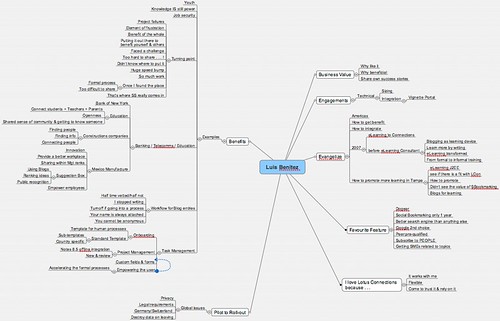
So what is this journey from eLearning to Social Software ? Well, as I've mentioned before, I used to be an eLearning developer and consultant before taking on my current role. Thus, Neil asks me how I got into this whole social software space and how I became so passionate about the subject. We also talk about some challenges that I've run into in the past 2 years. In fact, let me give you a quick overview of what the podcast is about:

  • 01:30 - Good morning to you - Buenas tardes desde aquí!
  • 02:00 - Collaboration Matters is running the Connectr event (see slides below) and Lotus Connections Blog
  • 02:20 - Luis, tell us about yourself, what you do, your role and how you got into this
  • 03:20 - My job as an eLearning consultant and my first transition to social software... a "expected" evolution/transition
  • 03:50 - How I learn by contributing content in the social software space
  • 04:30 - The beauty of living in Puerto Rico
  • 05:30 - My own, personal introduction to Lotus Connections
  • 06:40 - Evaluate social software as an eLearning approach / solution for a customer in Tampa. I had been blogging since early 2006 and was familiar with Social Bookmarking but was not an avid user. I had to make a case for how these technologies could help solve their elearning needs.
  • 07:55 - Results of the social software for eLearning pilot. Challenges that we encountered re: privacy in this multi-national environment
  • 09:30 - Legal blocks to social software deployments in Europe
  • 11:30 - My view, as a millenial, on the benefits of sharing knowledge with social software
  • 14:00 - Why it was so hard to share before social software
  • 16:20 - Which industries are using social software ?
  • 18:10 - What really blew me away... social software at construction companies!!!
  • 21:00 - How the product itself promotes adoption
  • 22:45 - Have you seen any downsides to not having any formal processes behind knowledge sharing?
  • 25:30 - How Lotus Connections, as an enterprise social software platform, promotes self-policing
  • 27:35 - Tell us about the usage of social task management and Lotus Connections Activities
  • 31:15 - The role of repeatable human processes and social software
  • 32:40 - What's your favorite feature of Lotus Connections ? Definitely, Dogear, the social bookmarking component of Lotus Connections
  • 35:00 - How feed readers help in my day-to-day job
  • 36:40 - Complete the following sentence: "I love Lotus Connections because..." - it works with me! It's always with me, I depend on it, I trust it
  • 38:00 - Closing comments...

2008-09-30_1149One success story (of many) behind all this, is that I met Neil and Stuart strictly through social software. More specifically via my blog and Twitter. By using social software we collaborated effectively even though there was an 8 hour difference between us!! (It was 7:30am my time when this was recorded).

Neil, also told me that he was able to capture our conversation as a MindMap. I didn't know what a MindMap was until today. But no worries, I downloaded MindManager for Mac and was able to look at it. Pretty cool!!! The tool looks really interesting and I'm going to start playing with it more to see how I can use and apply it to my daily life. If you have any suggestions, please let me know.

Here are the slides used at the Connectr #6 event:

Slides from the Connectr#6 event:

Connectr #6
View SlideShare presentation or Upload your own. (tags: connectr lotus)

Ready to start listening? Subscribe to the podcast or download the MP3 from here. I hope you like it!

Tuesday, August 26, 2008

Yes, I use 2 feed readers!

View Comments

20080826-k7m891jbhsx6166uxf218h15hd.jpgThis week I'm in Chicago enabling fellow co-workers on Lotus Connections. The goal is to discuss the following topics:

  • What's new in 2.0
  • Installation and Deployment
  • Loading data using Tivoli Directory Integrator
  • Integration and customization
  • Administration
  • etc

As part of hyping up Lotus Connections and our social software offerings, I mentioned how it has reduced my inbox clutter.

Social Software fits your lifestyle

As I was talking to one of my co-workers, he "discovered" that I use 2 feed readers! "Am I crazy??", you might think. Well, maybe, but I would like to think that I'm not. There's a method to this madness, I promise. Last month, I argued that there's no right or wrong way to implement and use social software. Instead, I argued that social software must adjust to your needs!

Now, as one of the Americas evangelists for Lotus Connections I need to stay in touch with various things: Twitter, internal blogs, competitor blogs, industry blogs, friends' blogs, local blogs, etc. At one point, I was subscribed to over 100 feeds. The problem ? I can't deal with unread marks!!!

Classify your feeds

20080826-dnytxxnc7877q3m34bafe7fkw9.jpgSince "some people" claim that your feed reader is your new inbox, I figured I could have two "inboxes" just like I have a business email and personal email. Therefore, I decided to divide the feeds between business critical and other. Business critical feeds are those that meet the majority of the following criteria:
  • Need to know the information ASAP (e.g. new features on our competitor's systems, press releases, information from product management, etc)
  • Need to be able to read the content offline
  • Internal / confidential blogs

Thus, I use NetNewsWire on my Mac for business critical feeds and Google Reader for the rest. In my local feed reader I subscribe to blogs by person and by keyword (e.g. 'web2.0').

So, are you going crazy managing your feeds ? Consider splitting your feeds between two feed readers. And there you have it! A perfect example of how social software adopts to my needs! And yes, that's how I become more productive following and managing all this "information overload". I hope this serves as a tip for those of you who are feeling overwhelmed with all those millions and billions of feeds that exist out there!

How about you? What do you do to manage all the feeds that you are following ?

Wednesday, August 6, 2008

A couple of changes here...

View Comments

2739478698_5754c26b8c.jpg?v=0Based on feedback from @ITSInsider and @elsua, I've gone ahead and started to create a brand for myself. Therefore, I'm now broadcasting from www.lbenitez.com. If you still go to the old address, you'll be re-directed to this new one. Unfortunately, it'll probably take Google a couple of days/weeks to replace the old address with the new one.

200808061415.jpgI also wanted to call your attention to a new feature in my blog. I wanted to make it easy for users to share blog entries with their friends. I also wanted to keep things simple. I've seen some blogs where all the icons for sharing a blog take about 10-30% of the screen!! I reached out to my network in Twitter and asked people what were their favorite social bookmarking engines to figure out which ones I should add.
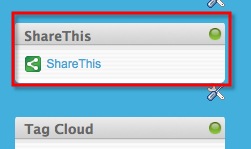
I was alerted to a nice solution by @curiousmitch. You'll notice that at the end of each blog entry, there's a ShareThis button. Also to the right of each page, you'll find the ShareThis widget.

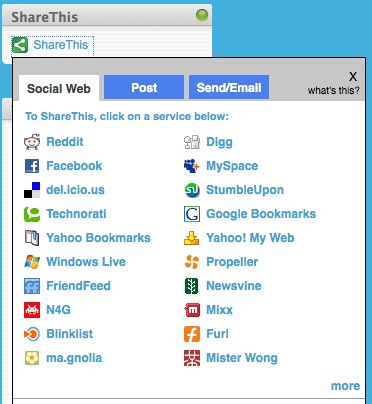
Clicking on the link brings up the following dialog:

200808061419.jpg

This has a couple of nice features:

  • You can do social bookmarking, post to Facebook, MySpace and others, or send via email (eeck!)
  • The sites are automatically sorted based on popularity
  • New sites are automatically added
  • If you don't see your favorite site here, you can click more on the lower right hand corner of the window
  • It doesn't take a lot of screen space, until expanded

See, I'm trying to adapt to your needs! Enjoy!

(oh and if you can update your links to point to www.lbenitez.com, I would appreciate it. Feed readers should be ok since they go through FeedBurner).


Friday, July 25, 2008

My "Why I love..." social software series

View Comments

I've realized that I have a lot of "Why I love..." entries as part of my social software series and it may be hard to find them (even though I'm trying my best to tag them consistently).

I intend to use this blog entry as the catch all for all of my success stories and plan to continuously update it as new stories come up. Enjoy:

And other "Why I love stories..."


Tuesday, July 8, 2008

Firefox makes subscribing to RSS feeds extremely easy!

View Comments

I don't know how I missed it. Not sure why it never ocurred to me. Maybe it was too obvious ? Too easy ? I don't know. The important thing is that I discovered it and I want all of you to be in on the fun!

So you all use Firefox, right ? (I think only my father in law uses IE, but perhaps that's another blog post). And since you are all fans of social software (or somewhat interested in it), then you must also know how important feed readers are to socializing! (At least you know I love feed readers)

So what's your typical approach today? Probably something like this:

  1. Go to a site, any site
  2. Notice the RSS icon on your browser's address bar
  3. Click on it
  4. You are re-directed to an XML page
  5. Copy the URL from the address bar
  6. Paste the URL into your feed reader
Tedious? Yes. Cumbersome? Yes. There must be an easier way, right ? Yes!!
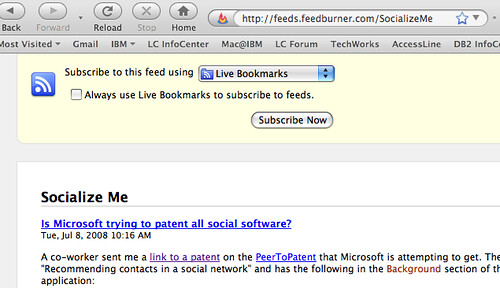
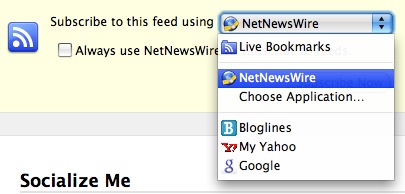
The trick is to actually click on the drop-down for the 'Subscribe Now' button!

200807081546.jpg
Since NetNewsWire is my feed reader I selected it, clicked on 'Always use NetNewsWire to subscribe to feeds.' and voilá! Now, this is what you need to do to subscribe to a feed:
  1. Go to a site, any site
  2. Notice the RSS icon on the browser's address bar
  3. Click on it

Beautiful, huh? (sorry, you can tell I'm still in awe that I didn't discover this sooner!)

And if your application doesn't show up in the drop-down, you can browse your computer for your favorite feed reader. Or you can even add it to Google Reader!

Thursday, April 3, 2008

I'm back -- 750 emails is the count

View Comments
I'm back from paternity leave and the final tally for emails to process for these 3 weeks is:  750!!!!  Luis (the other one that blogs a lot) will surely be disappointed at me. 

My feed reader, on the other hand, only reports 298 new entries. 

Additionally, I just got my new Mac which will replace my Thinkpad T60p as part of the Optional Workstation Refresh Program (only for Div 12 employees).

So here I am, with a big dilemma.  What do I do?  Do I set up my Mac first?  Then read all the new blog entries?  Then catch up on email? 

As is tradition, I think I'll start with email.  What if there's an email from my manager saying that I got promoted?? smile   That wouldn't be on a blog, right?  Yeah, I think that's right... Ok, email it is... Oh and if you sent me an email while I was out and you don't need a response anymore, don't send me an email saying so as that would just add to my queue smile.tiff.

For those of you who still want to see more baby pictures, you can find them here.

Thursday, March 6, 2008

Why I Love Feed Readers...

View Comments

(Editor's note: This could be part II of a "Why I love x" series. The original 'Why I love Dogear' became a presentation by Sacha Chua. Sacha, if you are out there, feel free to convert this blog post into a presentation as well)

I don't know what it is, but isn't it interesting when a topic doesn't come up for a while, and then comes up a LOT all of a sudden? On Monday, Laurisa Rodriguez and I were talking about how customers still don't see the value of Aggregators (aka feed reader, aka news reader, aka feed aggregator, etc...). In social software, I believe there's no way to keep up with everything without a feed reader. I mean you have Activities, Blogs, Dogear, Communities, Quickr places, etc. To the uninitiated, this can be overwhelming, and perhaps, a bit discouraging.

Yesterday, another co-worker and I were talking about this same thing. We were a bit concerned about all the great content that's out there. "People", however, may not be consuming this content since they don't have a feed reader. Today, I found out (using my Feed Reader) that yet another co-worker, Heath was running into a similar problem with customers.

In order to get you to start using a feed reader, let me tell you a quick story. (that's right, you don't have to install anything, since Notes 8 has a feed reader, and you already have Notes 8, right ?)

As you may know, you can pretty much subscribe to anything within Lotus Connections. I, particularly, subscribe to Gina Poole's bookmarks. Two weeks ago, she posted a bookmark to an article published by my alma mater, MIT. The article, Harnessing the Power of Social Applications, provides a great reference to the usefulness of social software! It tells several stories on how social software has made significant impact in companies like Dunkin' Donuts, AOL, Comcast etc.. However, this impact was caused by the customers of these companies, and not by their employees! I used this as an example with a customer last week. I was brought in to demo WebSphere Portal to this telco customer. At one point they brought up how they are not fond of social software and block it so that their employees don't waste time in places such as Facebook.

I took this opportunity to see if I could sell Lotus Connections. I suggested why they need to bring social software inside and make it available to their employees before they lose more revenue due to declining customer numbers! I cited some examples from the article above. The customer LOVED the examples and they went from not even considering Lotus Connections (or any other social software), to seriously start making plans and prepare an RFP for social software. Of course, I volunteered to help them create the RFP so that I can influence their requirementssmile.

I fully expect that we'll win this account soon. And I had to admit, I was going through hell trying to get this customer to see the value of social software. But because I was watching Gina through my feed reader, I was able to consume her knowledge, put it in the back of my brain and use it when I really needed it! This stored away knowledge helped me create a very solid opportunity for Lotus Connections when all I was trying to do was sell Portal.

Now look for this icon and click it!! That's the easiest way to subscribe to all the feeds that are out there!

P.S. I thought a comment made by Laurisa on another blog was awesome (and so true): "With a feed reader, I'm as smart as the person that I subscribe to, 10 minutes later!!"