Pages

Showing posts with label mac. Show all posts

Thursday, April 28, 2016

New IBM Connections Desktop Plug-Ins for Mac and Windows

View Comments
Today, we've released our monthly update to the IBM Connections Mac and Windows desktop plug-ins. I'll cover some of the updates here and will start with Mac since that's what I use.

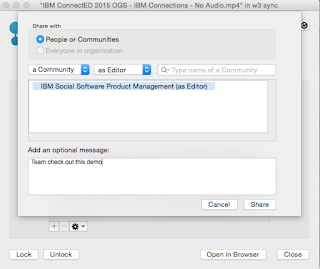
In this release, the context menu in Finder has been updated to streamline access to the IBM Connections actions. Now, when you right click on a synced file, you can see when it was last synced, share with individuals or groups, lock/unlock, modify metadata and more. Here's a snapshot of how it looks. 


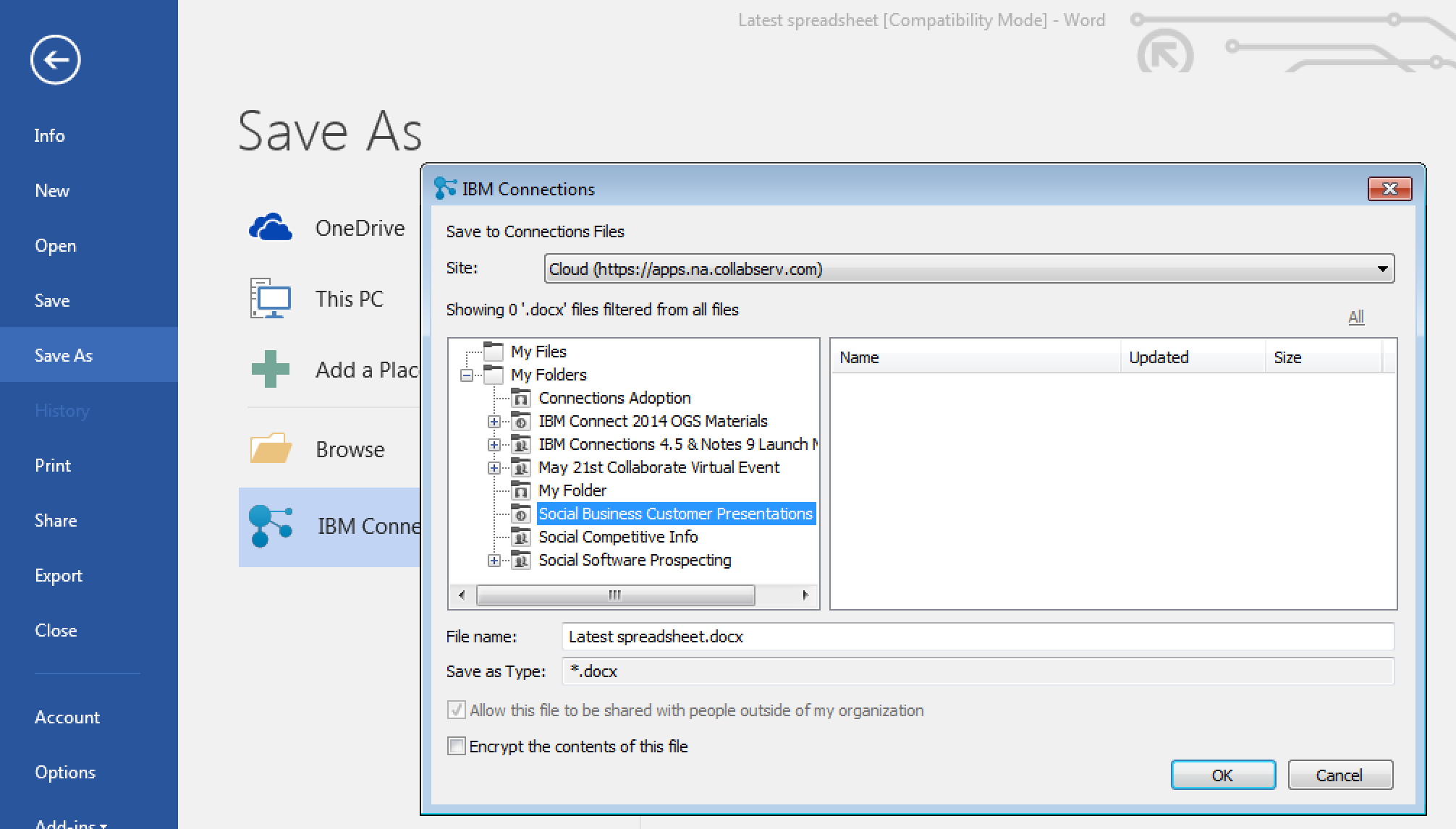
For those of you in Windows, we have improved the experience when saving files directly to IBM Connections from Microsoft Office. From the Save As menu within Microsoft Office (Word, PowerPoint, Excel) it'll be a lot easier to pick where specifically you want to store files (e.g. in what Folder, what Community, etc). See the screenshot below. And don't forget, when editing files, you can have round trip editing of files with IBM Docs when you are online or Microsoft Office when you are offline.

Windows 10 support has also been officially added. For those that like to live on the edge and have enabled preview features, you get some new stuff too. I'll leave that as an exercise for you to find it.

To get the plugins, go to Downloads and Setup in cloud, or if you are using on-premises, you can get the Windows plugin from our catalog here and the Mac plugin from here.

Friday, December 18, 2015

Available for Download: IBM Docs 2.0 and IBM Connections 5.5

View Comments
As promised earlier this week, the recently announced IBM Connections 5.5 and IBM Docs 2.0 are now available for download.

As part of the launch, on Wednesday the product managers hosted a webcast to take you through some of the highlights of that release. If you missed it, you can still watch the recording.  Then, yesterday the product managers hosted an "Ask the Product Managers" session. There were so many questions that came in and were answered in hour! That session was also recorded. I did get a suggestion about getting a transcript and posting that for consumption so will look into that.


Below you will also find a presentation similar to what was used at the webcast earlier this week with details on what's new in this release.


And if you want to see IBM Connections 5.5 in action, check out the demo below:


Go get it and happy installing ! (oh and happy holidays and happy new year!)

Wednesday, November 25, 2015

IBM Connections Cloud November 2015 Release is Now Live !

View Comments
It's a new month, so we have a new monthly release of our IBM Connections Cloud platform now available! This release focuses on improvements to files and our mobile capabilities. 

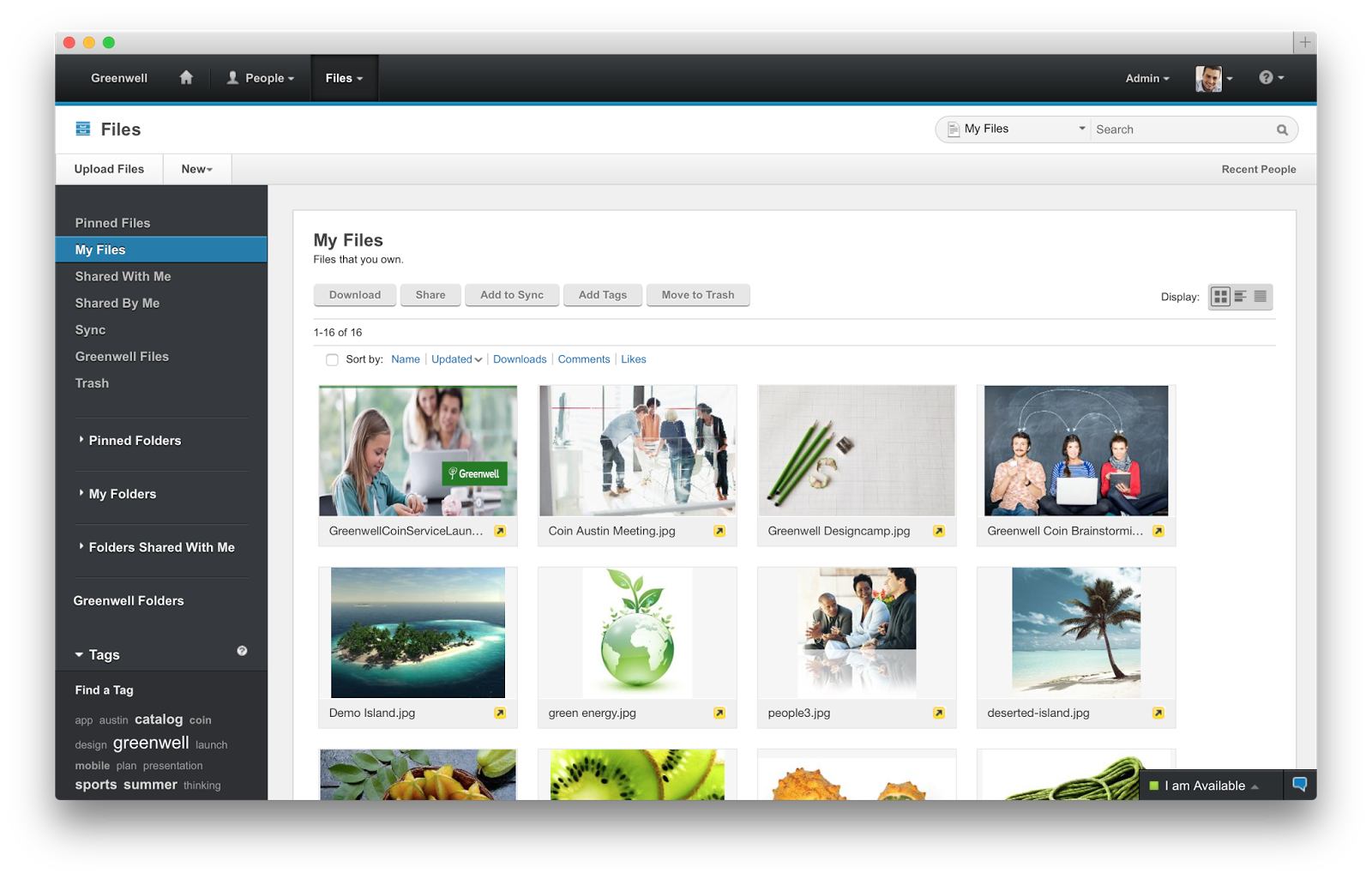
To start off, if you are using the Mac file sync plug-in, you now have more visibility to understand the status of sync for each file directly from the Mac Finder:


On the mobile side, we've now made it easier to respond and participate in polls & surveys created in Communities:

This will require a mobile app update which will be in the app stores soon!  

The other component that got many upgrades is IBM Docs. First off, the maximum number of co-editors in a co-editing session increased from 10 to 20. Of course, you can still share a file with as many editors as you want. Check out the updates to the different editors:

Documents editor
  • In co-editing, you can hover over an editor's underlined changes to display his or her name. 
  • Orphan and widow control in paragraph breaks, accessed from the Format > Paragraph Properties menu.

Presentations editor
  • The presentation file size limitation is increased from 30MB to 50MB.
  • In .pptx files, you can set line type and line weight for shapes. You can also set line endpoints for arrows and lines.
set line weight and type


Spreadsheets editor
  • You can create and edit data validation criteria.
  • You can copy images from external applications and then, in Firefox and Internet Explorer 11, paste them into the spreadsheets editor. 
  • A 3D reference formula is now available. 
  • You can drag images from the desktop and drop them into spreadsheets.

File Viewer
  • The presentation file size that can be viewed is increased from 30MB to 50MB.
  • A formula with a 3D reference can be correctly calculated in Viewer.
There's more new features that you can check out here.

Monday, June 22, 2015

The IBM Connections Cloud June 2015 Release Is Now Live -- Check it out!

View Comments
Over the weekend we pushed out updates to our IBM Connections Cloud users (for those fathers out there, consider it a Happy Father's Day gift).

You will find updates throughout the experience both in the web and desktop.  For example, for Mac users you can now share files with Communities directly from Finder without ever needing to open a browser. Just right-click on the file, and voilá:


Another update this month was for developers.  Developers can now take advantage of the embedded experience extension point within the Activity Stream.  Each person and community has an activity stream (which follows the ActivityStrea.ms / OpenSocial 2.0 standard) which allows 3rd party apps to inject events into it (e.g. you could get alerts from an app telling you that an approval is required).

One of the first developers to take advantage of this in the cloud is AppFusions. They've now built connectors that are sure to please various roles within an organization. For example, if you want to get updates to files updates in Box, you can.  If you want to get updates when new code has been submitted to GitHub, you can. Or maybe you are a marketer and want to stay up to date with updates from Twitter.

Check out this video to see it in action!


The following slides summarize all the cool new things that are now available for IBM Connections cloud users.  Check these out to get an idea of what else is new:


And stay tuned for more news very very soon...

Thursday, March 12, 2015

Updated Desktop Plug-Ins Available Today and New Features Coming to IBM Connections Cloud Next Week

View Comments
As mentioned in a previous entry, we released a File Sync and Share only offering earlier this week. Today, I have some good news.  Today we have released the latest version of our desktop plugins for Mac and Windows in prep for the new feature that will start appearing in IBM Connections Cloud next week.

This month's release continues to focus on our file sharing and sync capabilities. This release also introduces new features to help teams better organize their communications. Here's a sampling of the new features:
  • Team sites and communications
    • Rename apps (e.g. rename Wikis to Documentation)
  • File sharing and sync
    • Drag-n-drop target to upload files
    • Add multiple files to sync at once
    • Mac plug-in: ability to specify file extensions to ignore, enable beta features (if you like living on the edge!), and turn on/off logging for troubleshooting purposes
    • Federated authentication support (SAML) for Mac/Windows (cloud only)
  • Mobile
    • IBM Docs support in iOS (view and co-edit documents). Watch out for an update to the app
    • Citrix support for iOS and Android
    • MobileIron support for Android.
  • Rich text editor
    • Ability to sort data in tables in the rich text editor
    • Permament Pen - those of you used to Verse or IBM Notes will recognize this feature. This allows you to set a custom style so that when you revise content (e.g. wikis) all your markup is done in a specific color/font/style
As mentioned above, you can now sort the data in tables within the rich text editor as you can see below:


I've also created a presentation that shows the new features in this release:


For more details on what's new in the March 2015 release, check out the documentation here.

If you've missed what we've released in previous months, check out the history of new features here.

Tuesday, March 10, 2015

IBM Creates File Sharing and Sync only offering and it's available today

View Comments
Fresh off the presses! The IBM Connections Files cloud offering is now available in our cloud.  If you are already an IBM Connections customer there's nothing for you to do. However, if you've been thinking about starting with IBM Connections, this might be a good place to start as you get just the core file sharing and sync component of IBM Connections and then upgrade to full the IBM Connections suite as your team needs more capabilities.

IBM Connections Files Cloud is a new standalone cloud service that combines the ability to share files with internal and external users with the ability to synchronize users' files across their own devices. Small to medium businesses, line-of-business departments, or corporate IT can sign up easily and start using the service immediately. The familiar browser interface, desktop clients, and mobile applications provide simple ways to get to the most important files and keep them in sync with other users and devices. Each user gets 1TB of space and administrators can always get more as needed.

Check out Ovum's report on why IBM Connections file sync and share is a leader in this space.

IBM Connections Files on Cloud empowers organizations to increase productivity, make speedier business decisions and enhance innovation:

  1. One place for enterprise file storage, sharing, and syncing plus social – find experts, see profiles, post status updates, find content with tags and more.
  2. Securely access files anytime, anywhere, on any device.  Create, share, find, store, review, and even edit online and offline, all in a security rich environment, designed to meet IT needs
  3. Simple collaboration inside and outside your organization. Easily and instantaneously share files with colleagues, partners, clients and suppliers.
  4. Robust access control.  You decide who can read and edit files with role level access control.  The included Profiles capabilities allow you to find and connect with colleagues via their business card and contact information.
  5. More value for your money. You get market leading file sync and sharing capabilities PLUS the benefits of key social collaboration capabilities at a lower price than many other vendors.

Here's a demo I did recently that shows the IBM Connections file sync capabilities on a Mac:


To start a free trial, go to http://ibmcloud.com/social

Monday, February 9, 2015

How IBM Connections File Sync Saved Me Post IBM ConnectED 2015

View Comments
I'm finally back in the office after 2.5 weeks on the road: first for IBM ConnectED 2015, then on to Austin to meet with the IBM Design team and work on IBM Connections Next. In between all that, however, my Mac decided to have a meltdown.  Luckily, it was the Tuesday after the keynote at IBM ConnectED.  My big worry, though, was, since my Mac died on January 27th and I knew my last Time Machine backup was on January 21st... how much was I going to lose ?

So when Tuesday comes along, I opened my Mac and the screen was just blank.  So I did a hard power reset and it seem to then come back. It looked like I was able to log in, but then it would just get stuck on this screen:


I frantically started to search the forums and nothing that they suggested helped. Then all of a sudden... "did I just lose all my IBM ConnectED 2015 demos, presentations, content, etc???"

I open the IBM Connections mobile app on my iPad with slim hopes. To my surprise, however, all my content was there just fine because all my work was happening in the IBM Connection sync folder.  Success !


I ended taking it to the Apple Store last week while in Austin.  The Apple Genius ended up wiping my disk clean and resetting and said it was an issue with File Vault and Yosemite.  Once back home, I restored from Time Machine and did notice I lost 2 files that for some reason I hadn't stored in my IBM Connections sync folder. But that was a lesson learned... from now on, all my work is going to the IBM Connections sync folder, especially given I have 1 TB of space to store files in the cloud.

Thursday, November 20, 2014

IBM Connections File Sync Plug-In for the Mac Is Now Available

View Comments
While #IBMVerse 's ability to drive a #NewWayToWork has taken the spotlight this week, there's more goodies to talk about today.  First, we are in the midst of rolling out some cool new features to our cloud.

One of the biggest new capabilities being rolled out is that today, is the day that IBM Connections Social Cloud customers can start using file sharing and sync from their Mac desktops / laptops.  This was something I had announced was coming earlier in the year when I had a chance to participate in the Social Connections event in Prague.  Since then, we started a beta and the feedback has been very positive. Therefore, we've decided to make this generally available today. With this new plug-in you can:
  • Get notifications instantly on the desktop or mobile when there is a change to a file
  • Upload files from your Mac without having to open a browser
  • Share uploaded files with your colleagues
  • Work on files locally and save directly to Connections
  • Lock a file to prevent file conflicts

To see it in action, check out this quick 2 minute demo:


Next, very soon we'll publish the IBM Connections Desktop Plug-In for Microsoft Windows to streamline the install experience for cloud users. Additionally, IBM Connections Content Manager (CCM) users can now do round-trip editing. This means that while they are browsing for files in a Library, users can click on "Edit" in the browser and the file will open with the user's favorite local editor. For example, a Word document, will be opened with the desktop app of Office 365. When the user is done editing, they simply close the local app and the file is then automatically saved and uploaded back to server.

But wait... there's more!

And lastly, we've also updated the IBM Connections app for desktop version of Microsoft Outlook (even if you are using Office 365). This new release features:
  • IBM Connections 5.0 Support
  • Community Folders
  • Metrics - view usage data for file and folder view access
  • @mentions - Enter names preceeded by @ for lookup and display as rich links
  • Support for hashtags - Enter tags preceeded by # to display as rich links
  • Open an editor to view an IBM Docs file
  • View stream updates using additional filters
The plugins are now available in the app catalog and you can download them at no additional cost from the links above. 

Monday, August 4, 2014

The IBM Connections 5.0 Reviewer's Guide is Now Available in the iBook Store

View Comments
By now you are probably aware that the IBM Connections 5.0 Reviewer's Guide is available as shared by one of my teammates in the product management team, Albert Nichols.

For a while now, I've been wondering how we can make this more widely available and perhaps add even more value to this great asset.  Earlier in the year (if I remember correctly), I had heard that Apple had made iBooks Author a free app and decided to take that for a spin and see what I could do with it. And given the recent announcement of the Apple and IBM partnership, I figured why not!

To my surprise, it was very simple to take the work that Albert (and the rest of the PM team had done) and import it into iBooks Author and add some dynamic elements to it. As you may know, the Reviewer's Guide covers a lot of the functionality within IBM Connections, as well as our different integration points into ECM, Notes, Microsoft Outlook, SharePoint, mobile, etc. Therefore, I thought that a good way to make the guide more dynamic would be to incorporate all the various demos directly into the book.


My experience with iBooks Author was pretty positive. It only took a few minutes to convert the Reviewer's Guide into iBook format. Then, it took me about 5-6 hours to reorganize the content into iBook chapters, add the demos and interactive screenshots, and publish it to the iTunes store.  During the publishing process, I even discovered that iTunes Producer already integrates with Aspera, an IBM company for super fast file transfer.

Therefore, you now have a super easy way to get the Reviewer's Guide, access it offline, and even share with your peers. Go ahead and download the IBM Connections 5.0 Reviewer's Guide from the iBook Store and let me know what you think. I'm curious to know if this is valuable and if you would like to see more of these in the future.

PS.  There's 1 page that didn't come out correctly, but I'll let you find it.

Thursday, August 2, 2012

IBM Connections App Dev Contest Now In Progress

View Comments

Many developers are quickly ramping up and building solutions for social business platforms. Because IBM's social business platform is the one with the biggest market share worldwide, we are seeing a large amount of partners and ISVs building solutions for our platform.

Earlier this week, OpenNTF announced the 4th Development Contest and this time around it's focused on IBM Connections.

OpenNTF Chairman Bruce Elgort is quoted saying:

IBM Connections is now the platform of choice for companies embracing social business and I am extremely happy that this fourth development contest has a category specifically for it. I am eager to see what the awesome development community will development and submit to the contest.

Bruce also runs the Taking Notes Podcast and in the latest episode the podcast is focused solely on application development for IBM Connections. In the podcast, I cover an overview of the extension points and APIs available. The podcast also features Kudos, a gamification solution for IBM Connections and how it was built for that platform. To listen to the episode, check it out here.   

Additionally, if you haven't played with the Social Business Toolkit my colleague, Konrad Lagarde, has published a tutorial that explains how to use the toolkit to build apps for our cloud-based solution. As you'll see in the video below, Konrad uses the toolkit directly on his Mac. The toolkit is a simple-to-use wizard which guides the developer through a series of steps to create the building blocks for the app along with the OAuth dance. Here's that video:

So what are you waiting for? It's never been easier to build apps for IBM Connections!

Thursday, February 2, 2012

WebDAV for IBM Connections & Lotus Quickr

View Comments

One of the things that was very exciting about Lotusphere 2012 #ls12 is how the ecosystem for both IBM Connections and Lotus Quickr is growing. One of the business partners that introduced a solution is Lialis. They introduced a WebDAV add-on for IBM Connections.

So what is WebDAV? Let's not get into the technical details. Let's focus instead on what it enables. As per Lialis:

  • Downloading synchronizing content from/to IBM Connections Files
  • Deliver shared drives connected to IBM Connections to the users PC (OS independent)
  • Allow easy archiving of content stored in IBM Connections by coping the files from the file share
  • Readers apps supported: Goodreader, Readdledocs, Bitknex, WebDrive, readers for Android (*)
  • Download files from IBM Connections, upload files to IBM Connections via WebDAV
  • Delete files in IBM Connections via WebDAV
  • Create communities or profiles inside the IBM Connections via Webdav
  • Parallel user sessions supported

To me the most exciting feature is the ability to use IBM Connections as a mounted drive directly on your computer. For example, if have a Mac like me you could use this solution to mount all of your IBM Connections Files directly in Finder. Set up your Finder as described here in 3 steps and you are done! Very cool, right?

They have put together a quick video demonstrating the solution

To learn more, go here. And if you use Quickr, they also have a solution for you here: http://www.lialis.com/lotussolutionprovider.nsf/pages/quickrwebdav

Tuesday, August 2, 2011

Mac vs PC for College 2011

View Comments
So turns out that I've received a lot of questions around Mac vs PC from family and friends who have kids going to college this fall. I also interview students for the college I went to and this question comes up (specially after they see me using a MacBook Pro to do the interview). I figured I would capture some of the thoughts on the topic and provide my take in the matter. This by no means is meant to be a comprehensive look at the options that are out there. If you are interested, there are plenty of discussions out there.

Off the bat, I usually recommend the 11" MacBook Air and undoubtedly the first thing I get back is "but they are so expensive". I figured I would look at the numbers and see how it would pan out. The comparison is against an HP machine which is the cheapest I found in OfficeMax.

There's also the question of iPad (w/ bluetooth keyboard) vs full laptop. I believe students still benefit from a full laptop (I'm thinking about writing those 40 page papers and gamers). I'm willing to be proven wrong, though.

Here's what I came up with:
Feature MacBook Air 11" PC
Price $899 (typically there's a 10% discount for students) $399
Weight 2.38 pounds 5.5 pounds
Screen Size 11.6" 15.6"
Office Productivity
Suite (1)
$59.97 $149.95
Anti-Virus (2) Not needed $159.96 (you have to renew virus license every year)
Memory 2GB 4GB
Processor 1.6 GHz Dual Core 1.6 GHz Dual Core
Storage 64 GB (flash drive; up to 2x-4x faster) 500 GB
Backup $0 (Time Machine included) $80 (typically $20 / year)
OS Upgrade (3) $29 (at least the last 2) $119 (at least that's what it was for Win 7 Home Premium)
Battery Life Up to 5 hours (30 day standby) Up to 5 hours
Screen Resolution 1366 x 768 (up to 2560 x 1600 w/external monitor) 1366 x 768


Total $987.97 $907.91
(1) You could save by using the free versions of Office like Symphony or OpenOffice . I'm assuming students will need a word processor ($19.99 for Pages), spreadsheets ($19.99 for Numbers), and presentations ($19.99 for Keynote). If students only need a word processor, Pages is enough and it's ~ 1/8 the price of MS Office)
(2) Some colleges have a site license for anti-virus. Used Symantec Anti-Virus at $39.99 / yr. Update 3/Aug/2011: Apparently, Microsoft has a free solution for anti-virus. Not sure how good it is or how it compares to the paid ones.

(3) I'm assuming that in 4 years Apple will release another update to their OS and Microsoft will release one as well.
So the Mac is costing you about $80 more over a 4 year period. Yet, it's about 2 pounds lighter and it's up to 2x faster. Personally, I would recommend the 13" MacBook Air which would come up to about $1258 over 4 years (vs $907.91 for a PC). The 13" MacBook Air gives you 7 hours of battery, it's still under 3 pounds, a 128GB SSD of storage, and has a faster processor at 1.7 GHz.

Of course, cost is not the only consideration.  Some tools will only run on a Windows environment so it might be good to ask current students in the prospective major what they are using.  

There you have it. Hope this helps.

Friday, July 29, 2011

IBM Connections Files Plugins Now Supported on Mac

View Comments
Today, IBM released new plugins to make their social platform even more accessible for Mac users. Mac users now have one new plugin they can use directly from their desktop.

The first plugin is the Files plugin. The plugin allows you to access, share, and search all of your files. You can also view files that you have shared, files that have been shared with you, files that belong to a particular person, or all public files. Of course, having access to your files from your desktop is not a new capability per se. Users, including Mac users, have been able to use the free Adobe Drive software to access the files from Windows Explorer or Mac's Finder for quite some time.

Once you find the file you want, you can double-click to open the file or you can drag-n-drop the file into a new email message or instant message. IT will certainly love this feature since it will reduce the bandwidth required to constantly send files back and forth and it will also reduce storage needs. End-users will also like this feature because it'll help them save space and not hit their email quotas.

Here you can see the various views provided by the plugin.

One of the features that I really like is the ability to drag-n-drop files from my desktop directly into the plugin. When I do so, a dialog comes up asking if I want to upload the file to my personal file share, share with a one or more people, or simply make it private. I like this feature because I no longer have to manually open a browser, log on to the system, upload the file, etc. I can do it from a single drag-n-drop action and even notify users that I've uploaded a file.


The other plugin that was released was the microblogging or Status Updates plugin. The plugin integrates directly into my mail client and I can keep up with what's going on in my organization directly from the sidebar. Of course, applications like Connections Glue have existed for a while (which I **really** like), but I have to say that I like how it's nicely integrated into my email client.

As usual, the plugins are available for free and can be downloaded from the Lotus App Catalog. The direct link for the Files plugin is here and the direct link for the Status Updates plugin is here.

Article first published as IBM Releases New Mac OS Plugin for Connections on Technorati.

Thursday, June 18, 2009

This Is Why It's So Hard To Calculate Social Software ROI

View Comments

Captain's log... June 16th: It was a hot night outside in the Dallas/Fort Worth area; I was working diligently in my hotel room. I was doing a dry run for a very important demo that I had to do in 9 hours. I wanted to verify everything was set. As I prepared my laptop bag, I noticed the unthinkable. The VGA adapter that I need to use to project from my MacBook Pro was not there. I had left it at home, 2100 miles away.

I scrambled. I sent text messages, emails, and BlackBerry Instant Messages to some colleagues that lived in the area and I knew had Macs. Only 1 responded but didn't have the adapter with them. It was now 1am, and with no solution in sight, I renounced and just figured that the customer would have to gather around me and watch the demo in my laptop. Very unprofessional.

Because I was so nervous, I woke up at 5am, 4 hours before my demo. I took a chance and posted a new discussion thread in the Mac@IBM community to see whether anybody in the DFW area had a VGA adapter I could borrow. Here's the timeline:

  • 5am: Discussion topic posted in the Mac@IBM community's forum
  • 5:45am: IBMer working out in the local Y gets a notification in his BB (I didn't know this until after the fact)
  • 7:10am: I go down to get breakfast in hotel lobby -- heart pounding: "we are going to lose this deal because of me"
  • 7:18am: I get an email saying I have a response to my discussion topic. It's from a colleague who has the adapter and lives 4 miles away from the customer and gives me his cell phone number, and home address.
  • 7:20am: I leave the hotel to go to my colleague's house.
  • 7:48am: Arrive at colleague's house and pick up VGA adapter
  • 8:00am: Arrive at customer site
  • 9-11am: I successfully delivered my custom demo to the customer. Overwhelmingly positive feedback from customer.
  • 11:30am: I returned adapter to colleague
  • 12:00pm: Arrived DFW for my flight back to SJU

The great thing about this, was that this is a colleague that I had collaborated with in the past via email and instant messages. So we knew each other. Yet, we had never met in person and I had no idea that he (1) lived in the DFW area and (2) had a MacBook Pro.

Honestly, I'm still in awe. Social software came to the rescue even when all the other traditional methods had failed. If I hadn't posted that discussion topic, the 13 people that were in the conference room where I presented would have had to gather around my laptop to watch the demo.

When I told this story to my wife, all she said was: "You lucky ......".

How do you calculate the ROI of this scenario???

Friday, June 12, 2009

New Quickr Desktop Application for Windows/Linux/Mac

View Comments

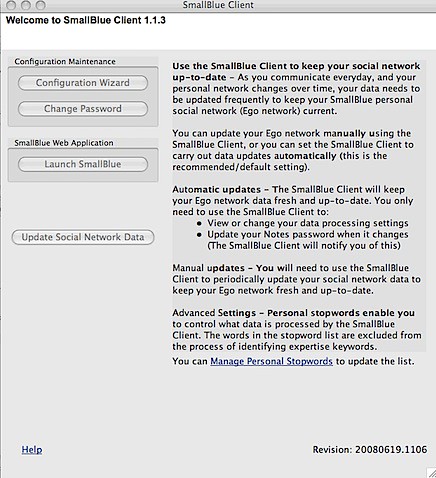
This is way cool! Rob Novak, aka Lotus Rock Star, just released a new Adobe AIR-based app for you to easily access all Quickr places from your desktop without ever needing to open a browser (well, except to download Rob's new app ). I've been using the app now for about a week and I really like it a lot (specially since I'm on a Mac and I didn't have a "Quickr connector" available to me).
And you know me.. anything that lets me use my applications without a browser, gets my love.

So go ahead and download your PandaBear now and accelerate your collaboration speed! Now I'm just hoping that this can be updated to work with the personal file sharing component of Lotus Connections. Have a great weekend!

Enjoy!

Monday, June 8, 2009

Puerto Rico Startup Weekend

View Comments

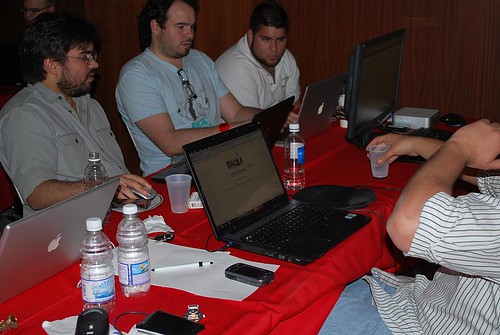
This past weekend was the first Puerto Rico Startup Weekend. You may have caught my live tweets from the event. I had never been to one of those events before and it was great to meet other forward thinkers from the area. I was actually impressed by the number of awesome programmers that turned out for the event. 4-5 ideas were generated from the event and I actually joined one of the teams.

The idea of Startup Weekend is to try and launch a company during the weekend. While I don't think any company decided to incorporate, the team I joined already has a website set up to help us gather some data. In fact, now that you are reading this we are looking for fluent English and/or Spanish speakers to help us rate some words. I would really appreciate it if you could spend some time rating some words once you are finished here. I can't tell you much yet about the purpose of it, but you'll know soon (and no, it's nothing that competes against IBM ).
One of my biggest challenges was getting up to speed with the code. All the developers were PHP/MySQL gurus. That's an area that I'm just learning. Being a huge Eclipse fan, I installed a plugin and set up my PHP development environment on Eclipse on the Mac (BTW, 75-80% of the computers at the event were Macs AND 50% of the PCs crashed at the event, while only 15% of the Macs crashed).

I also set up a MySQL development environment on my Mac following these instructions. The networking that I got to do at the event was great too. It's been a while since I've done some face-to-face "social networking". Oh, and I also got to talk about Lotus Connections and developing rich client applications on the Eclipse/Expeditor framework and get some people excited about that.

In my opinion, the event was great given that it was the first one here. Looking forward to next year's (and stay tuned here to learn more about what we are coding on our free time). More pictures from the event are here.

Thursday, March 26, 2009

Blogging Offline with Lotus Connections v2+ and ecto

View Comments

You may remember that I'm a big fan of offline blogging. It was recently brought to my attention, though, that I never shared instructions on how I configured ecto (my offline blogging client) to work with Lotus Connections Blogs.

You should be able to use ecto to write and publish the blog. You can also assign tags to your blog entry from the list of existing tags, or create your own tags directly from ecto. Woo Hoo!!!

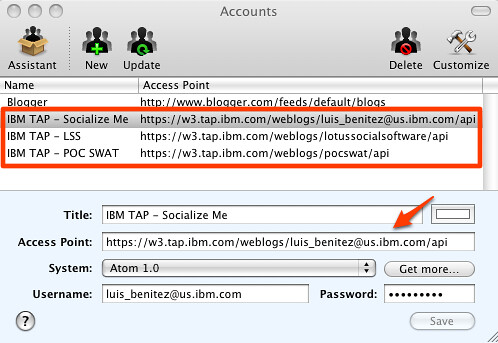
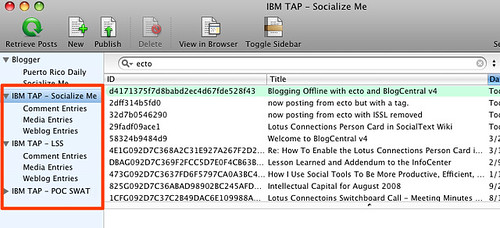
There's a caveat, though, ecto isn't very happy with bloggers that have multiple blogs on the same account. For example, I have this blog, but I'm a member of 2 other team blogs inside Lotus Connections. Therefore, here's what I had to do to properly configure ecto to work with all my Lotus Connections blogs.

  1. Launch ecto
  2. Go to Edit Accounts
  3. Enter the following information
    1. Title: IBM TAP
    2. Access Point: http://w3.tap.ibm.com/weblogs/<blog handle>/api (e.g. http://w3.tap.ibm.com/blogs/socialsoftware/api)
    3. System: Atom 1.0
    4. Username: Your Lotus Connections username
    5. Password: Your Lotus Connections password
  4. Click Save
  5. Repeat steps 3-4 for each blog you have and properly substitute in your blog handle.
Here's how my sidebar looks in ecto:

And here's my account panel:

. Happy Offline Blogging!

Thursday, February 19, 2009

Atlas for the Mac Is Here

View Comments

Who says blogging is a waste of time ? What a great example right here. You may remember that on Monday I blogged about my first Lotus Notes 8.5 application for the Mac. Now, I originally started this project last summer! That's right over 6 months ago. When I hit the roadblock that I documented on Monday, I quickly started to search the web. Nothing turned up an answer. Since Notes 8.5 was still in beta at that time, I decided to abandon the effort.

When Notes 8.5 shipped earlier in the year, I thought it would be a good idea to pick up the project again. I knew that if I hit a roadblock, I could get official support. Well, as I said earlier this week, I was stuck because I couldn't call the Notes API from my SWT Java program. At that point, I blogged about my status, and quickly summarized what I had done up until that point. I also noted that I had opened an IBM Support ticket and was waiting for assistance.

200902192136.jpgAnd then magic happened! 1 hour and 22 minutes after I posted the blog, the answer came to me!!! Karsten Lehmann, one of the developers for MindPlan, kindly posted a comment detailing that he had gone through the same issue. He suggested a couple of things, I responded back and voilá!
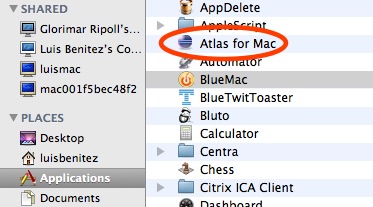
Here's how I configured Eclipse to run my SWT Java application for Notes in my Mac OSX Leopard:

  • Under Arguments, added the following VM Argument: -Djava.library.path=/Applications/Notes.app/Contents/MacOS
  • Under JRE I selected Java 1.5.0 (for some reason it wouldn't work with Java 1.6)
  • Under Environment I added 3 environment variables:
    • PATH -> /Applications/Notes.app/Contents/MacOS
    • LD_LIBRARY_PATH -> /Applications/Notes.app/Contents/MacOS
    • DYLD_LIBRARY_PATH -> /Applications/Notes.app/Contents/MacOS

At this point I could get my application running beautifully under Eclipse, but I couldn't run it as a stand-alone application. Time to do some more searching!! After a couple of days, I finally figured it out. First, Eclipse includes a really cool feature that lets you export your Java applications as Mac Bundles.

Next, because of the way Mac works, I had to set the DYLD_LIBRARY_PATH environment variable first, before running my application. Therefore, I had to create the file ~/.profile with the following line:

export DYLD_LIBRARY_PATH=/Applications/Notes.app/Contents/MacOS

And now, IBMers can use Atlas from their Mac computers!

Monday, February 16, 2009

Developing Java Applications for Lotus Notes on the Mac

View Comments

This week I've been working on creating my first Java application for Lotus Notes v8.5 on the Mac. Now you may be asking how this can be my first Java application for Notes on the Mac since I already hacked Lotus Notes to include the Activities sidebar. While that is a Java application, it's not one that I created and second it's really an Eclipse plugin that runs inside of Notes. What I'm trying to do is create a Java application that runs outside of Notes, yet queries Notes for information.

So what am I doing? Well, as a side project, I decided to port the code for Atlas to the Mac. The Atlas client is just a Java SWT application, so how hard could it be?

Deploying SWT applications in the Mac

The first step was to figure out how to actually get an SWT application running on the Mac. The folks at Eclipse have already documented this process and it's pretty straightforward. The key is to put in the SWT libraries for the applicable platform. Therefore, I removed the swt.jar and related DLLs from the Java application and put in the Mac OS X SWT.jar and libraries.


200902132207.jpg

Troubleshooting SWT applications in the Mac

Double-clicking the application, didn't do anything. Time to troubleshoot! I downloaded and installed Eclipse 3.4. Running the application from within the Eclipse environment shed some light on the problem: for some reason the Notes libraries could not be loaded by the Java Virtual Machine (JVM). I posted a question about my problem in the Lotus Notes 8.5 forum and hope someone can provide an answer. Additionally, I've opened a PMR to get official help from IBM.

How It Looks

To prove that it was just a Notes issue, I commented out all the code calling the Notes APIs. I recompiled, ran it and saw the following.


200902132221.jpg

So I'm almost there... as soon as I can figure out why I can't call the Notes APIs from my standalone Java application, I should be golden! Isn't Java great ?

Saturday, January 10, 2009

Final Update from MacWorld

View Comments

web.jpgMacWorld ended today. What a sad day! On the positive side, Lotusphere is just around the corner! I am currently stuck at San Francisco's airport where I tried to do standby for an earlier flight with no luck. Now, I have to wait 4 hrs before my plane leaves towards Miami, I have a 3 hr layover in Miami and make it home around 2:30pm tomorrow. But it was a great week overall!

Today, I covered the South Hall Expo. This was by far the best Hall! Based on the sizes of the booths and the vendors that were there, this was the main expo hall. I saw a LOT of cool apps for the iPhone and I'm so tempted to buy one! I also got to talk to the Intuit folks to see what's up with Quicken for Mac. Turns out that a new version is scheduled for this summer and they gave me a CD with the Beta (it's called Financial Life). It looks GREAT! Apple, of course, had tons of floor space there and I caught a very nice demo of iMovie '09! I can't wait for it to ship later this month.

The other Mac application that really caught my attention was Garage Sale. This tool lets you create eBay listings that are very pretty, easily!! And the iPhone that I thought was the best was Smule. If you want to see more pictures that I took at MacWorld, check out my MobileMe page.

This week wasn't all about MacWorld though. I also got a chance to meetup with a fellow Twitter follower and IBM colleague, @saradelekta. I visited a nearby customer to talk about Lotus Connections and social software adoption recommended practices.

Moreover, I participated in two IBM internal meetings. The first was on how to team effectively when positioning social software and the second was on best practices for Lotus Connections.

And just like before, I found out that working from the west coast is exhausting. I was up most days by 5:30am to handle calls with my east coast colleagues. I think next time I'm going to be more strict with myself and do not take calls before 8:00am!