It's been a couple of months now since my last project on Node.js . The other day I wanted to set up an example of a dashboard with sentiment coming from Twitter around a keyword.
To keep things simple, I used IFTTT to export tweets to a CSV file. With that I could then use Watson's libraries to measure sentiment. To start, I created a new trial account on BlueMix. Once there, go to Services - Watson - Create Watson service. Once there pick Natural Language Understanding and it will create an instance of the service. This Watson service helps to make sense out of pretty much any text.
The screen should look like this:
With the tweets now in a CSV and Watson at the ready, it was time to put the pieces together with node.js. I took advantage of the following node.js libraries: csv-parser, csv-write-stream, watson-developer-cloud.
Let me walk through the code (which I'll put on Github soon). First, import and setup the libraries (you get the Watson credentials directly from Bluemix and my preference is to store them as environment variables):
Next, read the CSV, parse it, measure it and write a new CSV out all with this one line of code:
The function sentimentFromWatson is key above. That function takes advantage of the Watson library already available. Here's what that function looks like:
And that's it! In total, you have a quick sample in 20-30 lines of code to measure sentiment from Twitter. Below is the graphic that I created. In a span of a weekend, the keyword that I was monitoring had some positive tweets and others that were negative. Overall, that weekend was pretty neutral.
(Note: the free plan for Watson Natural Language Understanding gives you 1,000 calls / day. If you expect more than 1,000 tweets / day you'll need a paid plan).
Overall, this took me about 30 minutes to put together and a bit of troubleshooting. If you haven't played with Node.js and Watson yet, go for it!
If you watched the last demo of IBM Watson Workspace for Marketing this will be part two of that series. This demo is focused on the day of the life of sellers and how IBM Watson Workspace can make their life better. If you missed the breakout session hosted by Rob Ingram, Rishi Vaish and Alan Lepofsky at World of Watson, this is a good way to catch up.
The video demonstrates how IBM Watson Workspace uses its cognitive capabilities to get you the information you need in context without having to jump back and forth between multiple tools. In the scenario example, we show a sales manager asking his team for the top sales opportunities. Watson Workspace understands this question and knows where to go and get the information: Salesforce. The latest opportunities and their status are then brought directly in context. Then it's time to sign the contract. The goal for this demo (and the previous one) is that it shows all integrations that have been built with the APIs that exist today.
As things settle from the IBM World of Watson conference two weeks ago, today I wanted to take the opportunity to share one of the demos that was shown in a breakout session hosted by Rob Ingram, Rishi Vaish and Alan Lepofsky.
The video that demonstrates how IBM Watson Workspace can improve your life as someone who works in marketing. It makes team collaboration easy and saves you time by bringing everything together and summarizing it for you (using some cool Watson services) so you can take action on what really matters.
Time for the next post on IBM Watson Workspace. In this post I wanted to share some code samples that could help you get going in your development of apps for IBM Watson Workspace using the IBM Watson Work Services and APIs.
I know many developers, including myself, learn a lot from code samples (probably more than using actual API documentation). So to build on my post from earlier this week, we have published the first 5 code samples into the Watson Work org in Github and there should be more posted this week and next. My samples are the Twitter and Weather apps. I built these as fully functioning apps that you can deploy to a server and get up and going in a few minutes. And once they are running, feel free to hack away!
To make things simpler, I've also included a one-click button to deploy the app to Bluemix (which I thought was freaking cool how they make this possible). This, however, is not a required step. If you want to use with another cloud provider, by all means. Back to Bluemix, when you click the button, Bluemix pulls down the code from Github and magically gets it up and running.
One cool thing is that even before the samples were available, I already picked up a few blogs of developers using the APIs:
So that should give you an idea on how to listen to a conversation, act on it, and then respond back. I followed a similar flow to build the Twitter app and my hope is you can take it and hack it to build your own. And if you are in the mood to help improve these samples, pull requests are welcome!
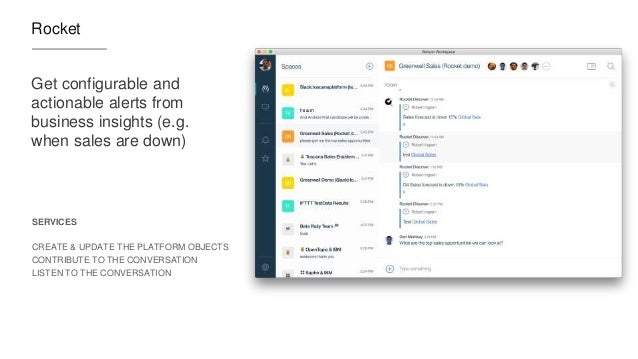
Now definitely check out what Redbooth, Rocket, OpenTopic, Sapho and others have done... VERY COOL! (and just to make it more enticing.. Sapho for example has Marketo and Google Adword integration... )
Last week we launched IBM Watson Workspace and IBM Watson Work Services and one of the crtical aspects of this launch is the platform and extensibility provided by these offerings.
Miguel Estrada, Joe Russo, and myself had a session at IBM World of Watson 2016 to talk about the capabilities of the platform. To recap, the idea of IBM Watson Work Services is to provide a platform that understands conversations in context. IBM Watson Workspace is a great example of what you can do with that platform since it's, well, built on the platform! In fact, you use the platform services to extend the IBM Watson Workspace app.
As we worked towards the launch, we worked with various partners and developers who were interested in using these APIs. At the conference last week, we were able to show integration with Sapho, OpenTopic, Kenexa, DocuSign, Salesforce, Redbooth, Rocket, and more.
Now here's some good news. I know a lot of developers learn from code samples and I'm happy to announce that our first code samples are now available on Github: http://github.com/watsonwork. Feel free to fork and contribute as well!
When you are ready to start creating apps, head out to https://workspace.ibm.com/developer/apps and you can start getting them registered there. Once you get them registered, go the settings for any space, and in the apps menu you'll be able to see your apps and add them to the space. It'll look something like this (those are 3 sample apps that I've built and will be sharing in the GitHub link above):
I also recorded a quick demo of the developer experience to get you going faster. Check it out here:
Now go on and start building your apps! I can't wait to see what you'll show at IBM Connect 2017. There are 111 days left - GO GO GO!
Yesterday, IBM unveiled a new category called IBM Watson Work and two offerings available to all IBM World of Watson conference attendees: IBM Watson Work Services and IBM Watson Workspace.
If you've been following me for a while, you know I'm a big fan of integrations, app dev, and platforms. Well, today I'm happy to share the news that IBM Watson Workspace works with IFTTT. In fact, it's the first IBM app to be part of the IFTTT ecosystem. If you are not familiar with IFTTT (that is IF This Then That), they make it super easy to connect the apps that you love together and configure what they call recipes. In other words, when something happens in one app, then do something in another app. IFTTT currently has 370+ apps in the catalog, so chances are that you can integrate with what you want (e.g. Box, Gmail, your car, you smart home devices and more!)
To start creating your own integration with IFTTT, head out to: ifttt.com/workspace . Fist bump to the IFTTT team for helping share the news:
In today's press release, IBM announced a new category called IBM Watson Work. In that category there are two new offerings that will be available: IBM Watson Work Services and IBM Watson Workspace. IBM Watson Workspace uses cognitive analytics to help users communicate with their teams and focus on key business outcomes. Teams now have a single space to manage all their work conversations and avoid information overload with smart summaries that highlight the most relevant actions and decisions so team members stay aligned and prioritize daily tasks quicker. This is what you may heard before as Project Toscana.
IBM Watson Workspace is built on a platform that we call IBM Watson Work Services. Watson Work Services provides a set of APIs built to help developers build apps that understand conversations and interpret user needs and intent using natural methods of communication. Developers can use these to infuse Watson Work capabilities into existing work applications and products or accelerate differentiation when building new apps.
Here's an excerpt from the press release:
Businesses today need to apply cognitive-powered productivity applications and services to digital content, conversations, and workflows to empower their employees with the ability to find, connect and work with the right experts; speed access to relevant content and insights; and provide the time and space to work simply and together.
IBM Watson Workspace learns how an individual works and interacts, and consolidates multiple work conversations from various communications channels into a single space. Using Watson, the technology is able highlight the most urgent action items, point to the right content needed at the time, and automate everyday tasks so employees can focus on key business outcomes.
IBM Watson Work Services are a set of cognitive APIs –Action Identification, Moment Identification, and Summarization – given to developers through the offering’swebsite so they can infuse cognitive capabilities into existing work products and applications such as IBM Watson Workspace, third party applications, and when building new applications. The technology uses natural language classifiers that are pre-trained to identify key ‘actions, questions, decisions, and commitments in a conversation. It can analyze and disambiguate context to facilitate fulfillment of the next action. For example, if someone says: "Great point –let's schedule a meeting to discuss further," the system can identify 'schedule a meeting' as an action, and help the person find the best time to continue the conversation.
One of the cognitive capabilities available today in the preview is called "Moments". You know how painful it is to catch up when you've been away from work on vacation, out for a meeting or just lunch. You come back to a mess of information, and the time you spend catching up, is time that you are falling behind. No more! With Moments, Watson gives you summaries of conversations (think of it like Cliff Notes!) and at a glance you can see what was talked about, who was engaged, the content that was shared, etc. In seconds, you are caught up and aligned with your team.
Today, Inhi Cho, GM for IBM Collaboration Solutions, takes the stage at 4pm PT to share more about this announcement and it will be live streamed! And I get the opportunity to walk the audience through the flow. If you want to watch the live stream today, head out at 4PM PT to: https://ibmgo.com/wow16/session/NhtQjL5BRJGM4FJqC
IBM Watson Workspace (aka WW aka "dubdub" as the cool kids would say) is currently invite-only. All IBM World of Watson attendees have access to IBM Watson Workspace. They can just log in with their IBM ID/password that they used to register for the conference. Those attendees can invite as many people as they wish, and those in turn can also invite others. So if you don't have an invite yet, find someone that attended the conference so they can hook you up.
We are just one week away and I've been getting some questions on the live streaming schedule for IBM World of Watson 2016 (WoW). I'm happy to share that the most important keynotes will be live streamed via IBMGo.
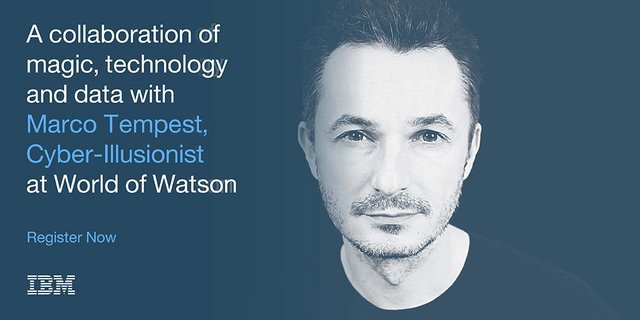
Of course, one you can't miss is on Tuesday @ 4pm PT. Inhi Cho Suhwill be sharing some cool updates on what's going on with Project Toscana (among other announcements related to the Future of Work). Here's the details as quoted from Marco Tempest, who will be joining us for the keynote:
So what's going to happen at World of Watson? First, let's start with Imagine Dragons! Grammy award-winning rockers and Las Vegas hometown heroes Imagine Dragons will perform exclusively for World of Watson attendees. Following their multi-platinum debut album ‘Night Visions,’ the alt-rock group has been playing sold out arenas all over the world. Their sophomore album ‘Smoke + Mirrors’ debuted at #1 on the Billboard 200, and their music videos have amassed over 1 billion views on YouTube.
Next, of course, there's the sessions. A can't miss session will be on Wednesday with IBM CEO, Ginni Rometty.
I've put together a list so you can see what's being covered by the IBM Collaboration Solutions team. One that stands out to me is the title for Inhi's keynote on Tuesday at 1p. She's promising magic and I'm not going to miss it!
We will also be sharing an update on Project Toscana. The teams are all heads down and hard at work on Project Toscana. As you can see below, I'll be leading a session on the Platform and APIs and will be sharing how you can start using them right at the conference. Rishi Vaish and Rob Ingram will also be sharing the latest with Project Toscana.
Speaker
Date/Time
Location
The Value of Cognitive SaaS
Solutions
Lou Sassano,
Bob McCandless
Mon
@ 11a
Breakers
F
Teaming in the Cognitive Era
RobIngram,
Luis Benitez
Mon
@ 11a
Theater
Collaborative Analytics: The
Next Frontier for Social and Collaboration Systems
Marie Wallace, Kevin Lawrence
Mon
@ 1p
Breakers E
Find Content Experts Using
Cognitive Collaboration
Scott Rogers, FrancoisNasser
Mon
@ 3p
Breakers
F
Watson at Work: TrendsandDirections
InhiCho
Tues
@ 1p
Keynote
Work Smart, Play More: Teaming
in the Cognitive Era
RishiVaish, RobIngram
Tues
@ 3p
Breakers
E
The Future of Work with Watson: Build Tomorrow’s Workplace Today with the Magic of Cognitive
InhiCho
Tues
@ 4p
South Seas Ballroom
Work Smart with IBM and Box:
Cognitive Content at Work
René Schimmer,
NishaPhatak
(Box)
Weds
@ 8a
Breakers
E
The Cognitive Way: Business
Communication and Engagement with IBM and Cisco
Ed Brill, Chris Crummey
Weds @ 11a
Breakers
E
Dev@: Cognitive Team
Collaboration with IBM "Toscana" APIs and SDK
Luis Benitez,
Miguel Estrada,JoeRusso
Weds
@ 4p
Breakers
E
Work Smart with IBM and Actiance: Cognitive Content Governance at Work
René Schimmer,
HeidiAmbler
Thurs
@ 9a
Breakers
F
Haven't registered yet? You still have time. Go register here. See you there!
The workplace is changing. Although the physical office can still be a place of productivity and collaboration, companies are empowering the individual worker by providing all the tools necessary to be a valuable member of the organization from any corner of the globe. Today’s workforce is becoming increasingly flexible, mobile, and even global in nature — virtual collaboration is at the center of the workplace and shaping the way businesses operate now and for the foreseeable future.
The strong influence mobility has had on the workplace can be found at the epicenter of this shift. As smartphones and tablets have become rooted in our personal lives, workers have found these devices to be beneficial in facilitating their work responsibilities as well. As a result, many employers have embraced the Bring Your Own Device (BYOD) trend to foster collaboration among employees outside the office. The introduction of mobile devices in the workplace has deeply affected the way people work as they increasingly rely on their personal smartphone and tablet for email, note-taking, and video conferencing. Since BYOD policies have allowed workers the flexibility to conduct regular business from even the most far-reaching areas around the world, the need to confine work between the four walls of an office has decreased, depending on the company, driving further adoption among telecommuters.
The same factors that are driving companies to downsize their physical office spaces has resulted in the rise of temporary contractors as an alternative to full-time employees, thereby creating the need for secure collaboration apps with functionality spanning across corporate firewalls. Advances in mobility and Internet-based technologies have enabled employers to connect with individuals willing to work on a short-term basis without needing to be located within the same time zone. By breaking down the geographic boundaries that have historically limited organizations to a select pool of qualified candidates, mobile devices and collaboration apps now allow independent employees to hit the ground running and remain connected to their working groups from anywhere in the world. The opportunity for employers and hiring managers is compelling, as the potential size of talent pools multiplies significantly. In fact, a recent study surveying more than 33,000 workers in 26 countries found that contractors are more engaged and more innovative than regular employees.
In the office of the future, the evolution of technology allows the workplace to become increasingly virtualized. Within a virtualized environment, cloud is the most important ingredient to help businesses automate processes, simplify content, and facilitate workflows by providing a centralized, secure infrastructure for collaborative solutions. In addition, in past years there were only a select few enterprise-ready devices with applications for business collaboration – most notably, BlackBerry devices. Now, there are a wide array of devices offering improved functionalities to drive productivity and reduce the need for multiple machines.
With cloud becoming a key enabler of the virtual office and open to all organizations, small-and medium-sized businesses (SMBs) have benefited greatly from cloud by operating with the same top-notch software as their larger peers. In the early 2000s, collaboration tools were catered to companies running software on-premises, namely large organizations with significant IT budgets and footprints. Now, in large part because of the prevalence of the cloud, SMBs are getting more value from cloud-based vendors. In fact, Jim Deters, founder of Galvanize, famously said, “Two guys in a Starbucks can have access to the same computing power as a Fortune 500 company.” As more collaboration apps have evolved to cater towards the burgeoning cloud-first mentality among corporates, SMBs now are back in the game and able to leverage the same apps that enterprises are utilizing to drive their own process efficiencies. Since SMBs can procure first-class collaboration, the IT playing field continues to equalize across the size spectrum, thereby allowing smaller organizations to focus on their core competencies. As a result, large enterprises are forced to find new ways to innovate and remain nimble to thwart off potential competitive threats from smaller and more agile businesses.
Cognitive computing also offers a significant advantage that many have not yet tapped. Collaboration apps such as instant messaging are fundamental in helping employees sync up with each other but can also have a downside: creating too many interruptions.
Can cognitive help reduce the interruptions? Today’s workers are interrupted every three minutes on average, and it takes about 23 minutes to refocus, causing a potentially endless loop of being unproductive. To address this pain point, for example, IBM is facilitating the development of information-empowered workforces by infusing cognitive into its collaboration tools to help people work together in more intuitive ways. One of the ways to achieve this is to streamline and collapse all the apps into one collaboration solution so workers can address the action items that matter in an efficient manner.
A frequently overlooked source of interruption is unnecessary noise arising from workers’ email inboxes. Take a practical example: end users often receive multiple emails a day containing the same question. Adopting a system that can understand the question and offer the same answer to the same question automatically would reduce the amount of time a worker would spend on addressing redundant messages so they can focus on the important tasks. With society producing vast amounts of data – too much for the human brain to handle – the key to harnessing its full potential is to build cognitive-infused tools. A growing consortium of businesses recognizing the potential of untapped data has driven a major increase in the use of analytics within the workplace. Widely used to predict everything from supply chain cycles to customer buying habits, analytics are even powering tools and apps to help workers understand priorities of their tasks by reducing noise. Automation, however, when abused, can actually make workers counterproductive by creating excessive noise. As more and more capabilities become automated, there is a surge in the quantum of notifications. Automation needs to be properly managed; therefore, we need to think about it as a form of machine intelligence to keep the information moving seamlessly.
In truth, the virtualized workspace is not a one-size fits all solution. Employers need to customize environments and policies for their teams by leveraging free trials and capabilities to assess what does and what does not work for their organization. Another thing to keep in mind is resisting the urge to adopt too many apps, which may end up making employees counterproductive and create too many silos of information. A good rule of thumb in choosing a beneficial collaboration solution is to keep in mind and evaluate how one app mixes the collaboration ingredients, or the “Cs”: context, content, conversation, colleagues, and commitments.
There is a lot of promise in the concept of information-driven workforces. Companies that are able to leverage analytics are one step closer to successfully building a more collaborative and informed workforce. We are in the midst of great advances in making our workforce more connected, and collaboration tools have been at the core of this technological and cultural transformation. The next step is bringing analytics to the table to serve a dual purpose: help free up individual workers to dedicate time to more pressing and demanding work streams, as well as drive enhanced productivity within the team by identifying optimal division of labor and assessing project status and improvements. All the data is there – it is simply a matter of being able to leverage it.
This allows developers already familiar with the XPages framework to leverage the power of IBM Bluemix to quickly build powerful apps in the cloud, possibly integrated with other Bluemix services (like Watson). For added security, you can connect to your existing user directory for ID management.
It's now been a couple of days and it's been great to see the reaction over Twitter and other social channels.
If you still haven't seen XPages, To help get you up to speed on developing XPages applications on Bluemix, here is a list of videos we have published in the past.
The app combines IBM Connections Cloud, IBM Watson Analytics and IBM Bluemix. The idea is that the app allows you to upload images and then uses IBM Watson (the Visual Recognition Service) to help with automatic classification of the files. Based on the image that has been uploaded, Watson will then suggest some tags to use with the file.
If you missed IBM Connect 2016, well, you missed a great show! I'll share some more content from the conference in upcoming posts so stay tuned to those. For now, I quickly wanted to get this out and then work on my IBM InterConnect 2016 sessions.
October is here so that means that IBM Insight 2015 is just around the corner (oh and lots of candy in Halloween)!
At the end of the month, I'll be heading over to Las Vegas for the annual IBM Insight conference. As usual, we'll be participating in various sessions. At this year's conference, Jason Silva, host of National Geographic's Brain Games (you are watching that show on Netflix, right?), will lead a conversation about the potential to extend collaboration with technologies like cognitive computing, increasing our potential as individuals and changing the way we work together. Rob Koplowitz from IBM will continue to the conversation to discuss how IBM is applying the power of Watson and other technologies to make teams and people more productive, and better connected to the insights, content and files they need to succeed at work.
The team has put together this handy guide so you can easily see sessions where the social business team will be participating. I'll be covering the latest in our mobile portfolio, application development and IBM Connections.






 The same factors that are driving companies to downsize their physical office spaces has resulted in the rise of temporary contractors as an alternative to full-time employees, thereby creating the need for secure collaboration apps with functionality spanning across corporate firewalls. Advances in mobility and Internet-based technologies have enabled employers to connect with individuals willing to work on a short-term basis without needing to be located within the same time zone. By breaking down the geographic boundaries that have historically limited organizations to a select pool of qualified candidates, mobile devices and collaboration apps now allow independent employees to hit the ground running and remain connected to their working groups from anywhere in the world. The opportunity for employers and hiring managers is compelling, as the potential size of talent pools multiplies significantly. In fact, a recent study surveying more than 33,000 workers in 26 countries found that contractors are more engaged and more innovative than regular employees.

