Pages

Showing posts with label dojo. Show all posts

Friday, May 6, 2016

ICYMI: The XPages Runtime is Now Available in IBM Bluemix

View Comments
Earlier this year, we had announced the availability of the XPages runtime as beta in IBM Bluemix. Then at IBM Connect, XPages on Bluemix was featured during the keynote where a quick app was built integrated with Watson to quickly tag / categorize images using the Watson Image Analyzer service.

So in case you missed it, earlier this week, the XPages runtime for IBM Bluemix went from Beta to full release, generally available.


This allows developers already familiar with the XPages framework to leverage the power of IBM Bluemix to quickly build powerful apps in the cloud, possibly integrated with other Bluemix services (like Watson). For added security, you can connect to your existing user directory for ID management.

It's now been a couple of days and it's been great to see the reaction over Twitter and other social channels.


If you still haven't seen XPages, To help get you up to speed on developing XPages applications on Bluemix, here is a list of videos we have published in the past.

Ready to get started? Check out how to build apps with XPages for Bluemix. Can't wait to see the apps that you build!
Wednesday, April 13, 2016

From IBM Connect: Visualizing the IBM Connections Profiles Data

View Comments
One of the great things of IBM Connect is all the great content that's shared. I remember going to my first conference and readily absorbing as much content as possible and putting it into practice. Of course, with so much content, sometimes you can't attend all sessions. It's all good, however, when speakers choose to share their content in platforms such as Slideshare.

I recently ran into this deck that Matt Milza shared and figured I would re-share as it's a great example of what can be done with the IBM Connections APIs. In the presentation, Matt provides a background on the APIs, examples on how to interact with them, and then shows a practical implementation of something he did for a customer.

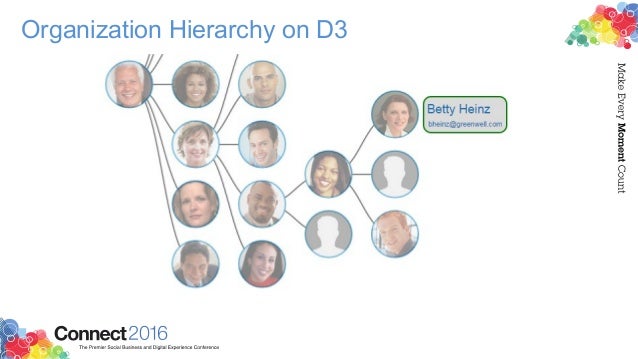
Using the social data stored within the system, Matt created this simple visualization of the report-to chain for an organization.


To walk through the process, check this out:


Want to learn more about building apps for IBM Connections? Check out: http://developer.ibm.com/social/

Tuesday, February 17, 2009

My First Dojo Widget

View Comments

If you are following me on Twitter, you know that I've been doing some Dojo development lately. While there's definitely a learning curve for Dojo (like with anything else) I'm now starting to appreciate its simplicity and power. This Dojo development is part of an internal BizTech project, for which i can't share too many details now.

When I first started designing the UI, my plan was to use iWidgets. iWidgets are pretty cool and they can pretty much run anywhere. The trick is to add the Lotus Mashup framework to your page (via 1-2 lines of JavaScript) and then you can run iWidgets on your homepage. This process is documented in the Lotus Mashup Wiki, and it looks like it's even easier in v1.1. Since I only have v1.0 available to me, I researched in a lot of place but still couldn't find how to add iWidgets to my page. Therefore, I discarded that approach and I'm going with pure Dojo widgets.

The idea of the Dojo widget is to give it a URL to a JSON output and have the widget render is data. I'm documenting the process here, at a high level, so I can reference it as I go forward with this project. I also hope it serves as a reference for other Dojo newbies (the Dojo documentation is not that great and I've been referring a lot to DojoCampus.org).

  1. Download and install the Dojo framework
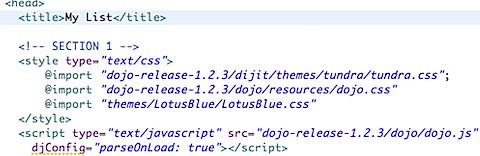
  2. Create a blank HTML page and in the <HEAD> section 200902141023.jpg
  3. After the above code, define which widgets and/or components you'll use200902141025.jpg
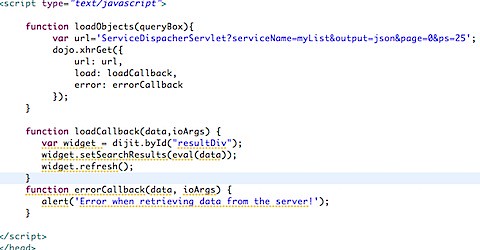
  4. After the code above, define the URL to the JSON output. Then tell Dojo to do the AJAX call for you. Dojo will ask you what function should be called after the asynchronous call to the JSON URL returns. Here's what I defined:200902141030.jpg
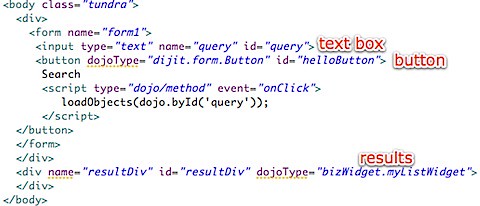
  5. In the code above, we tell Dojo to do a call to http://localhost/myapp/ServiceDispatcherServlet?... and tell it that once it receives the data to call loadCallback or if there was an error to call errorCallback. Finally, we close the HTML <HEAD> element. Still with me? Good! Now we define our main <BODY> code where the results will be shown:200902141129.jpg
  6. That's all you have to do in the HTML. Now you have to create the widget file (in this case myListWidget.js under the folder bizWidget)
  7. Just like Java, in the widget file, you define the 'class name' and the dependencies:200902141132.jpg
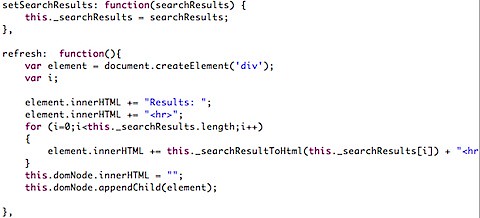
  8. Now notice that in step 4 there were 2 methods called: refresh() and setSearchResults(). Here's how they look:200902141133.jpg
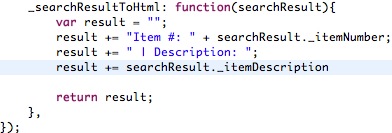
  9. And here's how the helper method _searchResultToHtml looks like:200902141135.jpg
  10. And there you have it! The very final step is to create a servlet that returns a list of items in JSON format. To do this, I basically created a java.util.List and the list elements were simple Java beans. I then used flexJSON to convert the Java List into a JSON formatted List and voilá

Enjoy!