Pages

Showing posts sorted by date for query productivity. Sort by relevance Show all posts

Thursday, November 3, 2016

IBM Watson Workspace -- Code Talks So Here's The First Samples

View Comments
Time for the next post on IBM Watson Workspace. In this post I wanted to share some code samples that could help you get going in your development of apps for IBM Watson Workspace using the IBM Watson Work Services and APIs.

I know many developers, including myself, learn a lot from code samples (probably more than using actual API documentation). So to build on my post from earlier this week, we have published the first 5 code samples into the Watson Work org in Github and there should be more posted this week and next. My samples are the Twitter and Weather apps. I built these as fully functioning apps that you can deploy to a server and get up and going in a few minutes. And once they are running, feel free to hack away!

To make things simpler, I've also included a one-click button to deploy the app to Bluemix (which I thought was freaking cool how they make this possible). This, however, is not a required step. If you want to use with another cloud provider, by all means. Back to Bluemix, when you click the button, Bluemix pulls down the code from Github and magically gets it up and running.


One cool thing is that even before the samples were available, I already picked up a few blogs of developers using the APIs:
even one creating an Eclipse plug-in that was able to get something going in < 1 hour ( I love hearing those stories):


So quick tour of the Weather app. It uses the Weather Underground APIs to get current conditions based on a US zipcode. I use the node module to convert the zip code to city and state:
const cityState = zipcode.lookup(zc);

With that info, I now call the Weather Underground APIs to get the current conditions:

client.conditions(opts, function(err, data) {

Now with the data that I get back, I build a message to post back to IBM Watson Workspace and put it in the appropriate JSON construct:

const messageData = {
type: "appMessage",
version: 1.0,
annotations: [
{
type: "generic",
version: 1.0,
color: "#D5212B",
title: "Current weather conditions",
text: message
}
]
};

and then call the API to post it back:

request(sendMessageOptions, (err, response, body) => {

So that should give you an idea on how to listen to a conversation, act on it, and then respond back. I followed a similar flow to build the Twitter app and my hope is you can take it and hack it to build your own.  And if you are in the mood to help improve these samples, pull requests are welcome!

Now definitely check out what Redbooth, Rocket, OpenTopic, Sapho and others have done... VERY COOL! (and just to make it more enticing.. Sapho for example has Marketo and Google Adword integration... )


Tuesday, October 25, 2016

IBM Announces a New Category: IBM Watson Work

View Comments
In today's press release, IBM announced a new category called IBM Watson Work. In that category there are two new offerings that will be available: IBM Watson Work Services and IBM Watson Workspace. IBM Watson Workspace uses cognitive analytics to help users communicate with their teams and focus on key business outcomes. Teams now have a single space to manage all their work conversations and avoid information overload with smart summaries that highlight the most relevant actions and decisions so team members stay aligned and prioritize daily tasks quicker. This is what you may heard before as Project Toscana.

IBM Watson Workspace is built on a platform that we call IBM Watson Work Services. Watson Work Services provides a set of APIs built to help developers build apps that understand conversations and interpret user needs and intent using natural methods of communication. Developers can use these to infuse Watson Work capabilities into existing work applications and products or accelerate differentiation when building new apps.

Here's an excerpt from the press release:
Businesses today need to apply cognitive-powered productivity applications and services to digital content, conversations, and workflows to empower their employees with the ability to find, connect and work with the right experts; speed access to relevant content and insights; and provide the time and space to work simply and together.
  • IBM Watson Workspace learns how an individual works and interacts, and consolidates multiple work conversations from various communications channels into a single space. Using Watson, the technology is able highlight the most urgent action items, point to the right content needed at the time, and automate everyday tasks so employees can focus on key business outcomes. 
  • IBM Watson Work Services are a set of cognitive APIs –Action Identification, Moment Identification, and Summarization – given to developers through the offering’s website so they can infuse cognitive capabilities into existing work products and applications such as IBM Watson Workspace, third party applications, and when building new applications. The technology uses natural language classifiers that are pre-trained to identify key ‘actions, questions, decisions, and commitments in a conversation. It can analyze and disambiguate context to facilitate fulfillment of the next action. For example, if someone says: "Great point –let's schedule a meeting to discuss further," the system can identify 'schedule a meeting' as an action, and help the person find the best time to continue the conversation.

One of the cognitive capabilities available today in the preview is called "Moments". You know how painful it is to catch up when you've been away from work on vacation, out for a meeting or just lunch. You come back to a mess of information, and the time you spend catching up, is time that you are falling behind. No more! With Moments, Watson gives you summaries of conversations (think of it like Cliff Notes!) and at a glance you can see what was talked about, who was engaged, the content that was shared, etc. In seconds, you are caught up and aligned with your team.


Today, Inhi Cho, GM for IBM Collaboration Solutions, takes the stage at 4pm PT to share more about this announcement and it will be live streamed! And I get the opportunity to walk the audience through the flow. If you want to watch the live stream today, head out at 4PM PT to: https://ibmgo.com/wow16/session/NhtQjL5BRJGM4FJqC


IBM Watson Workspace (aka WW aka "dubdub" as the cool kids would say) is currently invite-only.  All IBM World of Watson attendees have access to IBM Watson Workspace. They can just log in with their IBM ID/password that they used to register for the conference. Those attendees can invite as many people as they wish, and those in turn can also invite others. So if you don't have an invite yet, find someone that attended the conference so they can hook you up.


Thursday, September 8, 2016

The Office of the Future: Automation and Innovation in the Virtual Workplace

View Comments


The workplace is changing. Although the physical office can still be a place of productivity and collaboration, companies are empowering the individual worker by providing all the tools necessary to be a valuable member of the organization from any corner of the globe. Today’s workforce is becoming increasingly flexible, mobile, and even global in nature — virtual collaboration is at the center of the workplace and shaping the way businesses operate now and for the foreseeable future.

The strong influence mobility has had on the workplace can be found at the epicenter of this shift. As smartphones and tablets have become rooted in our personal lives, workers have found these devices to be beneficial in facilitating their work responsibilities as well. As a result, many employers have embraced the Bring Your Own Device (BYOD) trend to foster collaboration among employees outside the office. The introduction of mobile devices in the workplace has deeply affected the way people work as they increasingly rely on their personal smartphone and tablet for email, note-taking, and video conferencing. Since BYOD policies have allowed workers the flexibility to conduct regular business from even the most far-reaching areas around the world, the need to confine work between the four walls of an office has decreased, depending on the company, driving further adoption among telecommuters.

The same factors that are driving companies to downsize their physical office spaces has resulted in the rise of temporary contractors as an alternative to full-time employees, thereby creating the need for secure collaboration apps with functionality spanning across corporate firewalls. Advances in mobility and Internet-based technologies have enabled employers to connect with individuals willing to work on a short-term basis without needing to be located within the same time zone. By breaking down the geographic boundaries that have historically limited organizations to a select pool of qualified candidates, mobile devices and collaboration apps now allow independent employees to hit the ground running and remain connected to their working groups from anywhere in the world. The opportunity for employers and hiring managers is compelling, as the potential size of talent pools multiplies significantly. In fact, a recent study surveying more than 33,000 workers in 26 countries found that contractors are more engaged and more innovative than regular employees.
In the office of the future, the evolution of technology allows the workplace to become increasingly virtualized. Within a virtualized environment, cloud is the most important ingredient to help businesses automate processes, simplify content, and facilitate workflows by providing a centralized, secure infrastructure for collaborative solutions. In addition, in past years there were only a select few enterprise-ready devices with applications for business collaboration – most notably, BlackBerry devices. Now, there are a wide array of devices offering improved functionalities to drive productivity and reduce the need for multiple machines.

With cloud becoming a key enabler of the virtual office and open to all organizations, small-and medium-sized businesses (SMBs) have benefited greatly from cloud by operating with the same top-notch software as their larger peers. In the early 2000s, collaboration tools were catered to companies running software on-premises, namely large organizations with significant IT budgets and footprints. Now, in large part because of the prevalence of the cloud, SMBs are getting more value from cloud-based vendors. In fact, Jim Deters, founder of Galvanize, famously said, “Two guys in a Starbucks can have access to the same computing power as a Fortune 500 company.” As more collaboration apps have evolved to cater towards the burgeoning cloud-first mentality among corporates, SMBs now are back in the game and able to leverage the same apps that enterprises are utilizing to drive their own process efficiencies. Since SMBs can procure first-class collaboration, the IT playing field continues to equalize across the size spectrum, thereby allowing smaller organizations to focus on their core competencies. As a result, large enterprises are forced to find new ways to innovate and remain nimble to thwart off potential competitive threats from smaller and more agile businesses.

Cognitive computing also offers a significant advantage that many have not yet tapped. Collaboration apps such as instant messaging are fundamental in helping employees sync up with each other but can also have a downside: creating too many interruptions.

Can cognitive help reduce the interruptions? Today’s workers are interrupted every three minutes on average, and it takes about 23 minutes to refocus, causing a potentially endless loop of being unproductive. To address this pain point, for example, IBM is facilitating the development of information-empowered workforces by infusing cognitive into its collaboration tools to help people work together in more intuitive ways. One of the ways to achieve this is to streamline and collapse all the apps into one collaboration solution so workers can address the action items that matter in an efficient manner.

A frequently overlooked source of interruption is unnecessary noise arising from workers’ email inboxes. Take a practical example: end users often receive multiple emails a day containing the same question. Adopting a system that can understand the question and offer the same answer to the same question automatically would reduce the amount of time a worker would spend on addressing redundant messages so they can focus on the important tasks. With society producing vast amounts of data – too much for the human brain to handle – the key to harnessing its full potential is to build cognitive-infused tools. A growing consortium of businesses recognizing the potential of untapped data has driven a major increase in the use of analytics within the workplace. Widely used to predict everything from supply chain cycles to customer buying habits, analytics are even powering tools and apps to help workers understand priorities of their tasks by reducing noise. Automation, however, when abused, can actually make workers counterproductive by creating excessive noise. As more and more capabilities become automated, there is a surge in the quantum of notifications. Automation needs to be properly managed; therefore, we need to think about it as a form of machine intelligence to keep the information moving seamlessly.

In truth, the virtualized workspace is not a one-size fits all solution. Employers need to customize environments and policies for their teams by leveraging free trials and capabilities to assess what does and what does not work for their organization. Another thing to keep in mind is resisting the urge to adopt too many apps, which may end up making employees counterproductive and create too many silos of information. A good rule of thumb in choosing a beneficial collaboration solution is to keep in mind and evaluate how one app mixes the collaboration ingredients, or the “Cs”: context, content, conversation, colleagues, and commitments.


There is a lot of promise in the concept of information-driven workforces. Companies that are able to leverage analytics are one step closer to successfully building a more collaborative and informed workforce. We are in the midst of great advances in making our workforce more connected, and collaboration tools have been at the core of this technological and cultural transformation. The next step is bringing analytics to the table to serve a dual purpose: help free up individual workers to dedicate time to more pressing and demanding work streams, as well as drive enhanced productivity within the team by identifying optimal division of labor and assessing project status and improvements. All the data is there – it is simply a matter of being able to leverage it.  

Tuesday, March 15, 2016

Webinar: Addressing the Crisis in Employee Engagement

View Comments
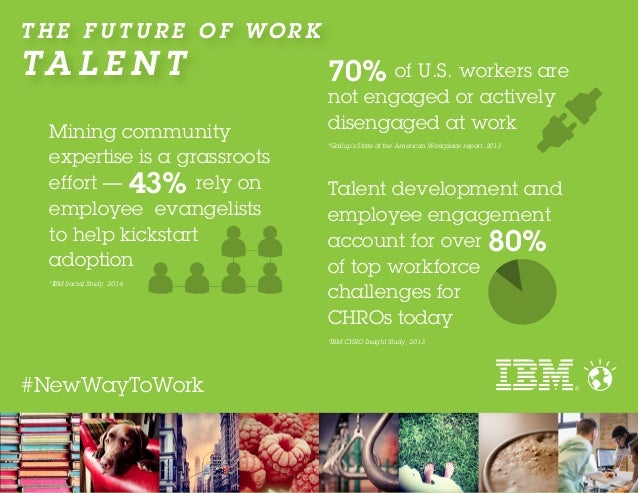
Today, studies estimate that there's a $500 billion lost in productivity and higher attrition since only 37% of global workers are considered to be engaged in the workplace.

IBM's #NewWayToWork Futurists Insights share that 74% of respondents to a survey define a "social" business as one that uses social technology to foster collaboration among, customers, employees and partners yet, only 45% of companies are using social to identify internal talent or key contributors.

IBM Connections is a great way to mine talent and engage your workforce. Teams can self-organize and come together to get work done faster; with less barriers.


On top of IBM Connections there are various solutions that can help further drive usage and adoption to accelerate the returns on investment. For example, the team over at Badgeville has created a solution called MotivationMetrics. Badgeville quotes that companies who successfully use gamification programs have seen an ROI of over 260% with a payback of less than 1 month!

If you are interested in learning more, on Thursday March 17th, 2016, I'll be co-hosting a webinar with the team over at Badgeville at 12pm  ET. To sign up, go to: http://info.badgeville.com/addressing-employee-engagement-crisis-webinar

Monday, September 28, 2015

The Heart of Business Tour Comes to Boston Next Week

View Comments

The Heart of Business is about … YOU! Join business leaders, IBM business partners, innovators, and thought leaders to connect and win. Learn how to use Social Business Solutions to accelerate innovation, improve collaboration, manage relationships, and deliver better metrics.

Enterprise social networks are becoming the heart of business productivity and engagement. Successful businesses today are using their enterprise software platforms to create an ecosystem of capabilities, which drive influential innovation, dynamic relationships, connected collaboration and integral outcomes.

Join us to learn, share, and socialize with IBM and our business partners, including HYPE, Kaltura, Hootsuite, panagenda, Riva CRM and TrustSphere. Creating valuable outcomes for your business. There will be a panel of Business Leaders and distinguished guests who will engage with the audience on ideas and success factors that can help one's business increase value in the new age of social technology and customer experience.

Next week, the #HeartofBusiness tour comes to Boston and I'm going to join the amazing list of speakers there. From there, it heads out to San Francisco and New York. Check out this video which describes what the event is all about:


If you are nearby, check out the agenda and register now.

See you there! 

Thursday, September 3, 2015

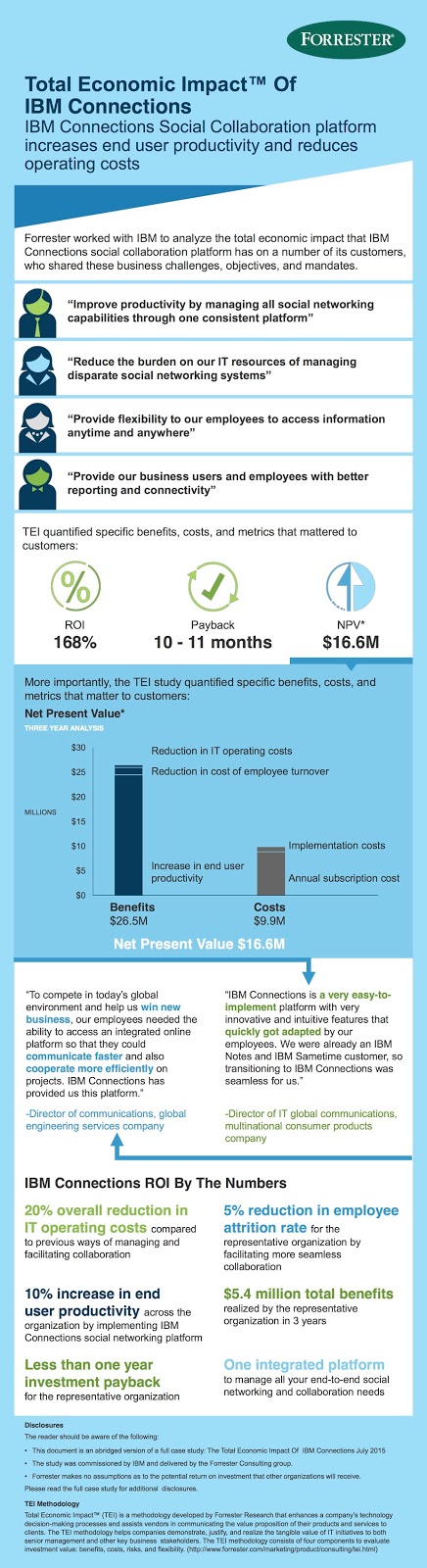
The Results Are In: IBM Connections Benefits $26.5 million over 3 years !

View Comments
A recent commissioned study conducted by Forrester Consulting on behalf of IBM titled The Total Economic Impact of IBM Connections analyzes the cost savings and business benefits of utilizing IBM Connections. The purpose of the study is to provide a framework to evaluate the potential financial impact of implementing the IBM Connections social collaboration platform within their organizations to improve internal processes to engage, empower, and inspire both employees and customers and unlock new opportunities.

To better understand the benefits, costs, and risks associated with an IBM Connections implementation, Forrester interviewed existing customers with multiple years of experience using both the IBM Connections cloud and on-premises collaboration platforms.

As one example, Forrester refers to a representative organization with about 35,000 employees and calculated benefits of about $26 million over a three year period. These come from increased productivity, reduced turnover, and reduced IT costs.

Here's an infographic with some of the highlights:


Here's a testimonial from one of our customers where Jacob Andersson, Corporate Systems Manager at Verisure, talks about his experience with IBM Connections.


You can download the study from here. To start a free trial of IBM Connections, go here: http://ibmcloud.com/social.

Thursday, May 14, 2015

Next Week: Join Me at the IBM Connections Files and Communities Webcast

View Comments
Next week, I'll be participating in a webcast to talk about all the new capabilities that we've added to IBM Connections Files and Communities. The webcast was put together by the team over at SocialBizUG.org.

David Brooks, the lead architect for the IBM Connections platform, will be joining me just like he did at IBM ConnectED earlier this year. Our goal is to give you an update of all the cool things that are now part of the product.


As a reminder, back in March, we introduced IBM Connections Files on Cloud, an easily accessible file sharing and sync offering.  We'll talk about this new offering and recent upgrades to Connections Communities that allow seamless team communication and collaboration beyond traditional boundaries.

Join this webcast to find out how these new capabilities allow users to:
  • Stay in sync across mobile devices (including both Android and iOS devices) using different personal settings
  • Leverage the new file sync and native mobile app capabilities to work anywhere and access content anytime
  • Securely collaborate with customers and business partners 
  • Improve productivity with content that is provided in context 
  • Stay connected with colleagues using profiles that provide business cards to their contacts
To register for the webcast, click here. See you next week! If you missed it, here's the recording.

Tuesday, March 10, 2015

IBM Creates File Sharing and Sync only offering and it's available today

View Comments
Fresh off the presses! The IBM Connections Files cloud offering is now available in our cloud.  If you are already an IBM Connections customer there's nothing for you to do. However, if you've been thinking about starting with IBM Connections, this might be a good place to start as you get just the core file sharing and sync component of IBM Connections and then upgrade to full the IBM Connections suite as your team needs more capabilities.

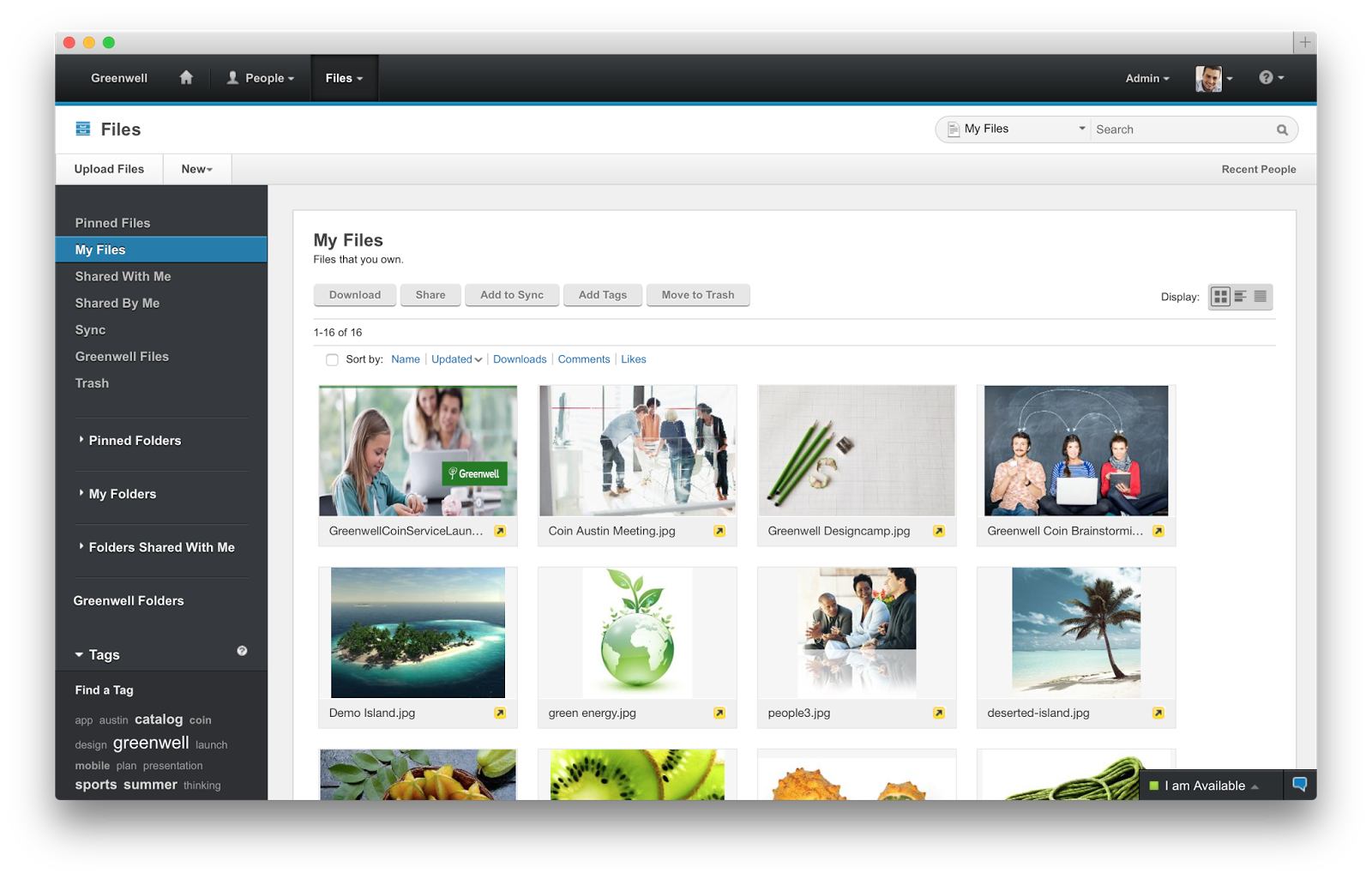
IBM Connections Files Cloud is a new standalone cloud service that combines the ability to share files with internal and external users with the ability to synchronize users' files across their own devices. Small to medium businesses, line-of-business departments, or corporate IT can sign up easily and start using the service immediately. The familiar browser interface, desktop clients, and mobile applications provide simple ways to get to the most important files and keep them in sync with other users and devices. Each user gets 1TB of space and administrators can always get more as needed.

Check out Ovum's report on why IBM Connections file sync and share is a leader in this space.

IBM Connections Files on Cloud empowers organizations to increase productivity, make speedier business decisions and enhance innovation:

  1. One place for enterprise file storage, sharing, and syncing plus social – find experts, see profiles, post status updates, find content with tags and more.
  2. Securely access files anytime, anywhere, on any device.  Create, share, find, store, review, and even edit online and offline, all in a security rich environment, designed to meet IT needs
  3. Simple collaboration inside and outside your organization. Easily and instantaneously share files with colleagues, partners, clients and suppliers.
  4. Robust access control.  You decide who can read and edit files with role level access control.  The included Profiles capabilities allow you to find and connect with colleagues via their business card and contact information.
  5. More value for your money. You get market leading file sync and sharing capabilities PLUS the benefits of key social collaboration capabilities at a lower price than many other vendors.

Here's a demo I did recently that shows the IBM Connections file sync capabilities on a Mac:


To start a free trial, go to http://ibmcloud.com/social

Wednesday, October 8, 2014

5 Can't Miss Features of IBM Connections

View Comments
About two weeks ago, I was asked to present to a group of internal IBMers tips and tricks to get the most out of IBM Connections, our social collaboration platform.

I actually reached out to my internal network and asked for suggestions on a good topic. Quickly, I realized that everyone had their own favorite feature or aspect of the product.

That got me thinking that maybe it's worth me putting together a quick presentation that shows people how I get the most out of the product to improve my productivity.

Then it got hard. How could I pick just a handful of things where IBM Connections makes my life easier ?

I had to iterate a couple of times.  In the end I decided that a good way to format it would be to focus on 5 integration aspects that maximize the value I get out of the product.

Check out the slides that I took them through:


Do these match what you would've presented?

Friday, July 25, 2014

Announcing the latest IBM Connections Mail Plug-In

View Comments
Today, IBM Connections Mail gets an update. If you don't know what IBM Connections Mail, let's catch you up.  IBM Connections Mail provides a simple and compelling way to perform essential email and calendaring tasks right from IBM Connections.

This is particularly useful as you can process your inbox with minimal context switching.  According to McKinsey, when users switch from one task to another, it really affects productivity.

Therefore, by keeping context switching to a minimum, you increase productivity in your organization.  Additionally, sending attachments is a snap as they are sent as links via IBM Connections (a feature that our competitors have copied).

Of course, with the IBM Connections 5.0 release less than a month ago this new version of IBM Connections Mail now fully supports IBM Connections 5.0.  Here's the other new capabilities:
  • Accept/Decline calendar invites
  • Save messages as draft
  • Adds support for Domino encrypted mail
  • Adds direct access to the Microsoft Outlook Web App
  • Adds support for Microsoft Exchange 2013
Here's a screenshot of the save as draft and accept/decline screens:


Here's a demo that was recorded when this originally shipped. 


Go get it from our catalog using this direct link!


Wednesday, July 2, 2014

IBM Connections is Now Available in the IBM Cloud marketplace

View Comments
As just communicated in the press release a few minutes ago, IBM Connections is now available in the IBM Cloud marketplace.  Here's the direct link in case you want to check it out.

The press release sums up the latest release of IBM Connections which is now available for download (in case you want to run it on premises) or in the cloud.
One of the highlights that we want to call out is the continued growth that we see in our ecosystem. For example, using our latest APIs and SDK, ISVs (independent software vendors) such as HootSuite, Bunchball, TemboSocial, ISW, among many, many others have created social apps on the IBM Connections Platform.

A key aspect of this release is secure external collaboration, where you can bring in external users (your customers, partners, suppliers, etc) into your IBM Connections deployment behind the firewall and still keep the right security boundaries to keep information safe. Jeff Schick, our VP for Social Software at IBM, calls out the importance of this:

When a workforce is out of synch or out of touch, the whole organization suffers from lost productivity, efficiency and innovation. With the open nature of today's business environment, organizations are looking to build new systems of people-centric engagement. The ability to bring key internal and external stakeholders into the conversation can facilitate a more collaborative, responsive and authentic way to work and deepen engagement.

Additionally, Superior Group's CIO, Tom DeClerck shares how IBM Connections has made the organization more agile by putting people back at the center of their business.  Speaking of Superior Group, here's a quick video that talks about the Superior Group's success on becoming a social business and the ROI they are achieving by using IBM Connections:


For more information, check out the entire press release.

Friday, April 25, 2014

Developers: Learn About Adding Social Features to Existing Apps with the IBM Connections SDK

View Comments
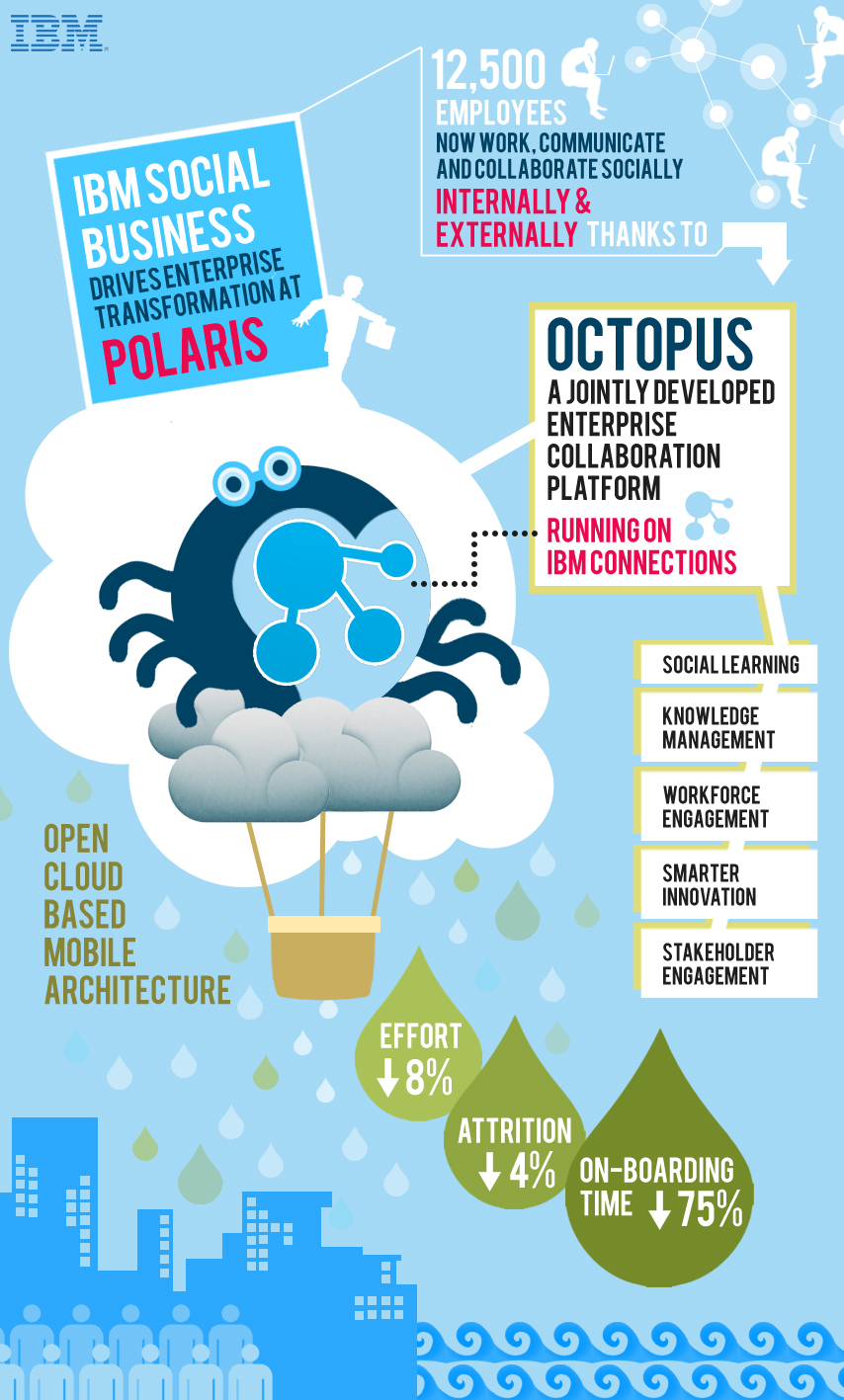
IBM yesterday announced that Polaris Financial Technology has selected IBM Connections to provide employees with a top notch digital experience to improve workforce productivity and accelerate business growth.

By adopting IBM’s leading enterprise social collaboration platform, Polaris FT is transforming how its 12,500 employees connect, communicate and collaborate to drive greater workforce productivity. Instead of relying solely on email to drive essential business tasks and project coordination, the new platform allows Polaris FT to leverage the collective knowledge of every employee to fuel new innovation, ideation and future business growth. This includes a significant reduction in the time it takes to on-board employees new to the company.                                                                                                      


So how did they do this? Working with IBM, Polaris designed and developed Octopus, an enterprise social platform that runs on IBM Connections and uses APIs provided in the IBM Social Business Toolkit. This application makes it easy for IBM partners and clients like Polaris to build an entirely new class of cloud-based social business applications for their businesses using the Connections foundation. With Octopus, Polaris is able to apply social networking, social learning, digital experiences and knowledge/content management tools based on an open cloud-based, mobile architecture.

If you are a developer and want to learn more about how to get started with the SDK, then add this to your agenda:
What: How to Add Social Features to Existing Applications with the IBM Social Business Toolkit
Date:  Apr 28, 2014
Time: 10:00 AM - 10:30 AM (Eastern Time)
This session will show you how to explore the Social API’s that are provided by IBM Connections. You will see the API’s running live in the Cloud. You will also learn about the building blocks that can be reused to add social features to your own applications. Finally you will see a demonstration of how an existing application has been extended to include social features.

To register for the developer webcast, click here.

And that's not all! IBM Connections Next is just around the corner so don't forget to register for the webcast on May 21 to learn more about what's coming in IBM Connections Next.

Thursday, April 24, 2014

Enterprise Social Software Market Hits $1B, IBM Leads for 5th Consecutive Year

View Comments
Hot off the press!

IBM today announced that for the fifth consecutive year, IDC ranked the company number one in worldwide market share for enterprise social software.

According to the press release, IDC's analysis of 2013 revenue, the worldwide market for enterprise social software applications grew from $968 million in 2012 to $1,242 million in 2013.

The press release quotes IDC's Vanessa Thompson:
Customers are increasingly assuming that all applications must be social.  IBM's focus on a core social networking platform to support application environments, such as Smarter Commerce and Smarter Workforce aligns well with this customer intent.
Here's a look at the key innovations in the past 5 years (click to see it full screen):

Achievements over the past 5 years for IBM Connections


The news comes in timely as we are getting ready to unveil IBM Connections Next on May 21st.  If you haven't yet, register for our virtual event Collaborate or be Left Behind: Leading the Digital Frontier.

IBM's Social Business portfolio, including its industry leading IBM Connections and Smarter Workforce technologies, allow organizations to integrate social solutions with critical business applications and people-centric processes that empower employees, increase workforce productivity and deliver exceptional customer service. Deployed on cloud or on premises, these solutions also enable business leaders like the Chief HR Officer (CHRO) to attract and retain top talent when combined with social workforce analytics that ensure the organization has the skills and expertise to meet emerging market demands.


The press release also quotes our General Manager, Craig Hayman:

The transparent nature of today's business environment, combined with the integration of social, cloud and analytic capabilities into everyday processes, has fueled the emergence of a Smarter Workforce.  We’re thrilled to be recognized by IDC as the market share leader for the fifth consecutive year as our clients continue to harness Social Business to accelerate innovation, increase agility and remove boundaries to collaboration.

Want to see what's coming in the latest release of IBM Connections? Then don't wait and register today and see you on May 21st.

Monday, April 14, 2014

As Seen in the Masters: Social Business is about Productivity, Innovation and Influence

View Comments
Over the weekend, IBM had a run of ads in print media and on TV with many different spots going throughout the Masters.

The spots were around IBM's 4 big areas: Social, Cloud, Mobile, and Big Data.  It was fun to hear from my friends and family who had seen the spots and mentioned how it was really hard to miss the IBM spots.

The spots highlight customers and scenarios that are being Made with IBM.  If you are not a golfer and want to watch the entire series, check out the IBM channel on YouTube.  Additionally, check out the Made with IBM site for more details and customer stories, such as this one on how Princess Cruises is optimizing their operations with social.

Below, I've included 4 videos that are specifically around social business, powered by IBM's enterprise social collaboration platform,  IBM Connections.

#8 - Workforce productivity


#28 - Crowdsourcing Innovation


#45 - Collaboration made with Social


#65 - Influence made with Social


Ready to get started? Start your free trial over at http://ibmcloud.com/social

Friday, February 14, 2014

Let's recap IBM Connections at IBM Connect 2014

View Comments
Things are finally settling down 2 weeks after the "amaze-balls" IBM Connect 2014:


So what I wanted to do now was take a break and recap what we said and showed about IBM Connections during the conference.

The Keynote

The keynote demo was mostly built on the November 2013 release of IBM Connections. Therefore, you got to see some new stuff such as:
  • New IBM Connections Mail capabilities to better integrate email and social (more details in Kramer's blog)
  • New look-n-feel and user experience to better guide users to tasks
  • Optimized activity stream experience to focus on attention management and helping you get your job done
  • A new getting started capability powered by Touchpoint, an ISSC asset
  • Expertise location powered by an intelligent Question & Answer system available as Social Q&A, another ISSC asset
  • Embedded real-time web meetings powered by Sametime 9
  • Collaborating with external users in a community
  • The latest on IBM Docs
  • The upcoming release of the updated IBM Connections Mobile app also focused on attention management and personalization
  • File Sync on desktop and mobile available in the cloud
  • An awesome Portal + Connections experience built on jQuery and the existing Connections APIs 

As you can see, most of what I showed at the keynote is already available!

The What's New Session

Like last year, this year I had the opportunity to share the 2014 roadmap. If you missed it, or want to see it again, here are the slides for our session (though the actual session was pretty much all demo):


As you can see, there are three focus areas for the next release: External Collaboration, Content Sharing from Desktop and Mobile, and a Personalized Experience. These three areas respond to trends in the market were organizations feel ready to start engaging more with their customers through their social collaboration platform. Additionally, it's meant to focus on end user productivity. As an end user, I'm looking for a platform that helps ME get my job done faster, better and more effectively... you can't forget ME in social MEdia ).

As usual, all new things will be delivered to the cloud first and then sometime in the middle of the year we will do a release which will take whatever is on the cloud and provide that for our on premises customers. And, in case you missed it, we've already started delivering on the 2014 roadmap!

Now, I'm going to take 10 days off and relax. See you on the other side!