Pages

Friday, May 6, 2016

ICYMI: The XPages Runtime is Now Available in IBM Bluemix

View Comments
Earlier this year, we had announced the availability of the XPages runtime as beta in IBM Bluemix. Then at IBM Connect, XPages on Bluemix was featured during the keynote where a quick app was built integrated with Watson to quickly tag / categorize images using the Watson Image Analyzer service.

So in case you missed it, earlier this week, the XPages runtime for IBM Bluemix went from Beta to full release, generally available.


This allows developers already familiar with the XPages framework to leverage the power of IBM Bluemix to quickly build powerful apps in the cloud, possibly integrated with other Bluemix services (like Watson). For added security, you can connect to your existing user directory for ID management.

It's now been a couple of days and it's been great to see the reaction over Twitter and other social channels.


If you still haven't seen XPages, To help get you up to speed on developing XPages applications on Bluemix, here is a list of videos we have published in the past.

Ready to get started? Check out how to build apps with XPages for Bluemix. Can't wait to see the apps that you build!

Thursday, April 28, 2016

New IBM Connections Desktop Plug-Ins for Mac and Windows

View Comments
Today, we've released our monthly update to the IBM Connections Mac and Windows desktop plug-ins. I'll cover some of the updates here and will start with Mac since that's what I use.

In this release, the context menu in Finder has been updated to streamline access to the IBM Connections actions. Now, when you right click on a synced file, you can see when it was last synced, share with individuals or groups, lock/unlock, modify metadata and more. Here's a snapshot of how it looks. 


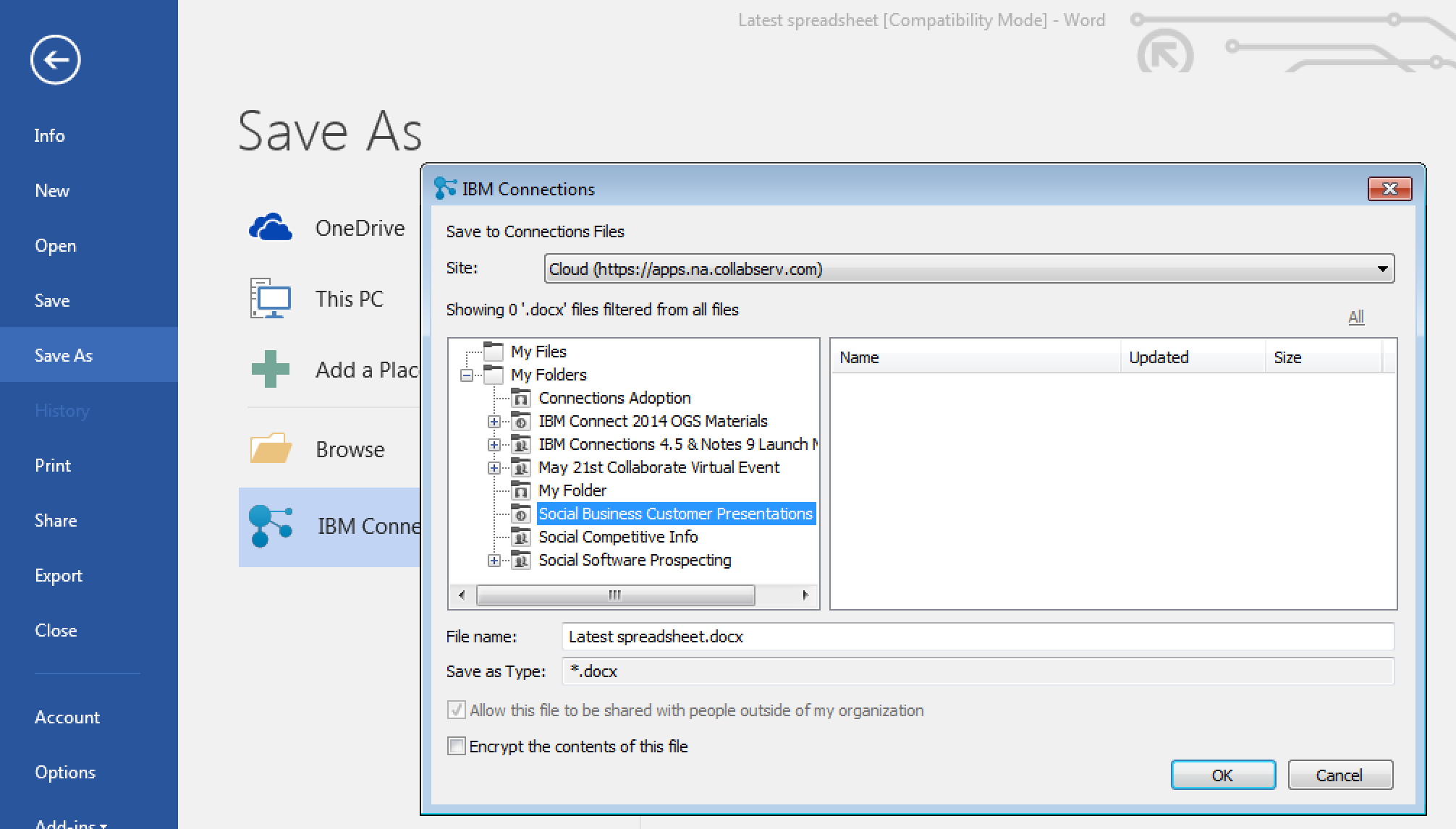
For those of you in Windows, we have improved the experience when saving files directly to IBM Connections from Microsoft Office. From the Save As menu within Microsoft Office (Word, PowerPoint, Excel) it'll be a lot easier to pick where specifically you want to store files (e.g. in what Folder, what Community, etc). See the screenshot below. And don't forget, when editing files, you can have round trip editing of files with IBM Docs when you are online or Microsoft Office when you are offline.


Windows 10 support has also been officially added. For those that like to live on the edge and have enabled preview features, you get some new stuff too. I'll leave that as an exercise for you to find it.

To get the plugins, go to Downloads and Setup in cloud, or if you are using on-premises, you can get the Windows plugin from our catalog here and the Mac plugin from here.

Monday, April 25, 2016

How To Edit Files in Sharepoint or Box with IBM Docs

View Comments
One of the capabilities that we highlighted as part of the IBM Docs 2.0 release was the new set of APIs to allow real-time co-editing of files in repositories other than IBM Connections (e.g. Alfresco, SharePoint, etc).

So first, what is IBM Docs ? The goal of IBM Docs is to make it easier for teams to create and allow for collaborative editing of word processing, spreadsheet and presentation documents in real time. This online editor provides key collaborative services such as coediting, file management and contextual commenting (so you can see who typed what).


At IBM Connect earlier this year, Jim Puckett, product manager for IBM Docs, shared an overview of IBM Docs which you can see here:


With the new set of APIs you can now build collaborative applications. So if you are an ISV looking for a way to embed co-editing, check out IBM Docs. Van Staub first shared how to integrate Docs with any app. Then he took it to the next level and describes how to edit files stored in SharePoint with IBM Docs.

Last week, IBM published a tech note that describes the process to set up IBM Docs to edit files stored in Box. This provides a common editing capabilities for files, irrespective of where they are stored.

Want to learn more ? Come to Social Connections 10 in Toronto in early June! Check out the full agenda that was just announced last week. Register today!

See you there!

Wednesday, April 13, 2016

From IBM Connect: Visualizing the IBM Connections Profiles Data

View Comments
One of the great things of IBM Connect is all the great content that's shared. I remember going to my first conference and readily absorbing as much content as possible and putting it into practice. Of course, with so much content, sometimes you can't attend all sessions. It's all good, however, when speakers choose to share their content in platforms such as Slideshare.

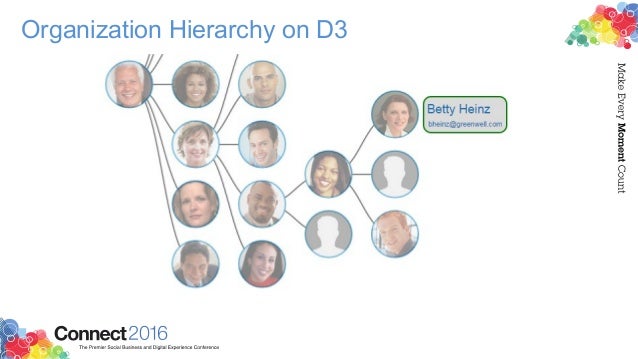
I recently ran into this deck that Matt Milza shared and figured I would re-share as it's a great example of what can be done with the IBM Connections APIs. In the presentation, Matt provides a background on the APIs, examples on how to interact with them, and then shows a practical implementation of something he did for a customer.

Using the social data stored within the system, Matt created this simple visualization of the report-to chain for an organization.


To walk through the process, check this out:


Want to learn more about building apps for IBM Connections? Check out: http://developer.ibm.com/social/

Tuesday, April 5, 2016

Check Out What's New In IBM Connections Social Cloud - Q1 2016

View Comments
As we get rolling into the second quarter of the year, I'll be sharing soon what to expect in terms of deliveries for IBM Connections Cloud for this quarter. First, I wanted to take the time and summarize the deliveries that we did in Q1 and had been announced at IBM Connect 2016 (and did you see that we'll be at the Moscone Center next year on February 20 - 23, 2017 ? Sweet !)

So what became available in the first three months of the year ? Jim Puckett, one of the product managers for IBM Connections, put together this quick slide deck that walks through all the new enhancements.


Note: the mobile updates require a new mobile update so check the app stores for an update (at this point the target is next week).

As a reminder, you can always keep track of the enhancements (current and past) in this page. Still not on IBM Connections Cloud and want to learn more? Check out this video:


Also, don't forget to sign up for Social Connections 10 as that will be a great opportunity to meet with the Designers and Product Managers and check out what else is coming!