Pages

Friday, August 5, 2011

Profile Completion Widget Now Available in App Catalog

View Comments

Two new widgets for IBM Connections are now available in the app catalog. The widgets are provided by JustNudge an IBM partner based out of the UK.

The first widget tracks the profile completion widget. This looks very similar to what LinkedIn provides. I believe this is great because I can see this as a way to push adoption of Connections. As people see that their profile is not populated, they also get hints as to what they can do to further populate their profile. Here's how JustNudge describes the widget:

Our profile progress widget provides visual feedback and tips to help the user populate their profile using a visual feedback mechanism similar to that provided on LinkedIn. This feedback allows the system to be populated according to the requirements of your organisation, for example, if there is a particular field within the profile that is valuable from an organisation perspective then the profile weighting can be adjusted to both advise and reward the user to populate that field.


The second widget is "Alternate reporting lines" widget. The widget aims to capture the informal relationships of a typical matrixes organization. The widget is self service and it lets the users build their own informal report-to chains. This is something that I've heard from customers in certain cases, so I'm glad that I can now direct them to the catalog where they can download and install this widget into Connections.


The profile completion widget is available here and the alternate reports to widget is available here.
Thursday, August 4, 2011

Why Should I Care About Social Media Behind the Firewall

View Comments

Last week, I delivered a webinar that was hosted by InfoBOOM. In the webinar, I talk about some of the reasons why social media behind the firewall is beneficial to companies of all sizes. As an example, I reference the value that I personally get by using social media inside the firewall.

Here's the description that we used for the webinar invite.

Social media isn't limited to external communications. It can be a powerful force for productivity improvement and morale building inside the firewall.

The payoff: People are talking, and when that happens sources of expertise emerge from unexpected places. Social networks enable people to discover information, get questions answered and find new partners in collaboration. These tools are achieving the goals that early knowledge management systems set out to accomplish more than 20 years ago. The difference is that employees willingly contribute their expertise and enable the organization to capture their knowledge when it's in the cause of helping other people solve problems and get work done.

If you couldn't join the webinar and are interested in the business value of social media behind the firewall, you can watch the replay here. You'll notice that during the webinar a storm came in and knocked out power to my apartment so that provides for some laughs and entertainment as we try to adjust midway through.

Aside from business value, I also cover an important topic: the challenge of adoption. Once you deploy the technology, how do you actually get people to use it? I share some tips based on some lessons learned.

Hope you enjoy it!

Wednesday, August 3, 2011

How To Deploy Google Gadgets to IBM Connections

View Comments

The concept of deploying Google Gadgets to Connections is not new. I've shown you how to do this several times (going back 3 years ago!!). There are even articles on that have been posted on IBM's webpage describing how to do this.

I recently stumbled upon an article written by Chuck Connell which describes how to very quickly develop widgets for IBM Connections. This is actually the approach that I usually take when creating my widgets. It's funny because when people ask me which IDE I use to code the widgets, I typically repy: Notepad.

Fast Development For IBM Connections Widgets

Chuck then takes that a step further and shares another approach on how to deploy Google Gadgets to IBM Connections. If you follow this process, you should be able to add a Google Gadget into Connections in 1-2 minutes.

Google Gadgets for IBM Connections

Enjoy!

Tuesday, August 2, 2011

Mac vs PC for College 2011

View Comments
So turns out that I've received a lot of questions around Mac vs PC from family and friends who have kids going to college this fall. I also interview students for the college I went to and this question comes up (specially after they see me using a MacBook Pro to do the interview). I figured I would capture some of the thoughts on the topic and provide my take in the matter. This by no means is meant to be a comprehensive look at the options that are out there. If you are interested, there are plenty of discussions out there.

Off the bat, I usually recommend the 11" MacBook Air and undoubtedly the first thing I get back is "but they are so expensive". I figured I would look at the numbers and see how it would pan out. The comparison is against an HP machine which is the cheapest I found in OfficeMax.

There's also the question of iPad (w/ bluetooth keyboard) vs full laptop. I believe students still benefit from a full laptop (I'm thinking about writing those 40 page papers and gamers). I'm willing to be proven wrong, though.

Here's what I came up with:
Feature MacBook Air 11" PC
Price $899 (typically there's a 10% discount for students) $399
Weight 2.38 pounds 5.5 pounds
Screen Size 11.6" 15.6"
Office Productivity
Suite (1)
$59.97 $149.95
Anti-Virus (2) Not needed $159.96 (you have to renew virus license every year)
Memory 2GB 4GB
Processor 1.6 GHz Dual Core 1.6 GHz Dual Core
Storage 64 GB (flash drive; up to 2x-4x faster) 500 GB
Backup $0 (Time Machine included) $80 (typically $20 / year)
OS Upgrade (3) $29 (at least the last 2) $119 (at least that's what it was for Win 7 Home Premium)
Battery Life Up to 5 hours (30 day standby) Up to 5 hours
Screen Resolution 1366 x 768 (up to 2560 x 1600 w/external monitor) 1366 x 768


Total $987.97 $907.91
(1) You could save by using the free versions of Office like Symphony or OpenOffice . I'm assuming students will need a word processor ($19.99 for Pages), spreadsheets ($19.99 for Numbers), and presentations ($19.99 for Keynote). If students only need a word processor, Pages is enough and it's ~ 1/8 the price of MS Office)
(2) Some colleges have a site license for anti-virus. Used Symantec Anti-Virus at $39.99 / yr. Update 3/Aug/2011: Apparently, Microsoft has a free solution for anti-virus. Not sure how good it is or how it compares to the paid ones.

(3) I'm assuming that in 4 years Apple will release another update to their OS and Microsoft will release one as well.
So the Mac is costing you about $80 more over a 4 year period. Yet, it's about 2 pounds lighter and it's up to 2x faster. Personally, I would recommend the 13" MacBook Air which would come up to about $1258 over 4 years (vs $907.91 for a PC). The 13" MacBook Air gives you 7 hours of battery, it's still under 3 pounds, a 128GB SSD of storage, and has a faster processor at 1.7 GHz.

Of course, cost is not the only consideration.  Some tools will only run on a Windows environment so it might be good to ask current students in the prospective major what they are using.  

There you have it. Hope this helps.

Monday, August 1, 2011

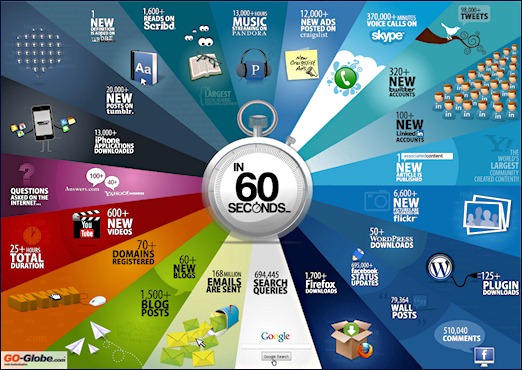
Infographic: What Happens In The Web in 1 Minute

View Comments

Earlier this year I blogged about an iPad app to get the latest Social Media statistics. And speaking about the iPad, one of my favorite apps to launch every day and discover content is Zite. Using Zite, I stumbled upon this info graphic (and you know how much I like info graphics!). This particular one captures what happens in the web in 1 minute.

Neville Hobson blogged about it and suggests it might be good to include in a future presentation. I'll certainly try to include it in my next presentation and see what kind of feedback I get.


Here's a quick summary. In 1 minute there are...:

  • … more than 1,500 blog posts
  • … more than 600 new videos on YouTube
  • … more than 98,000 tweets
  • … more than 695,000 status updates on Facebook
  • … more than 168,000,000 emails sent

I noticed that Google+ is not there so maybe it's too new. The infographic makes me wonder… are there any stats on what percentage of those 168M emails are generated from social media sites like Facebook.