Pages

Showing posts with label meetings. Show all posts

Tuesday, July 15, 2014

Jabborate Brings Jabber and WebEx into IBM Connections

View Comments
This is one of those cases were timing couldn't have been better.  Just a few days ago someone was asking me about the possibility to integrate Cisco's Jabber and WebEx with the market leading social collaboration platform IBM Connections.

Anyway, then as I was catching up with my feeds I ran into a new presentation from Jabborate.  Don't you just love it when knowledge comes to you instead of you having to go out and search for it?

So here's the deal.  There are 3 types of integration into IBM Connections provided by Jabborate:

  • Jabborate - Adds presence, instant messaging, audio and video calls to IBM Connections via Cisco's Jabber
  • Jabborate WebEx - Adds virtual meetings and conference call management to IBM Connections via Cisco's WebEx
  • Jabborate Exchange - Adds a calendar and scheduling app to integrate IBM Connections with Microsoft Exchange 

Here's a deck that describes in more detail what's possible:


For more information, check out Jabborate for IBM Connections

Tuesday, May 13, 2014

Give Us Your Toughest Social Business Questions for Pardon the Interruption

View Comments
This quarter is proving to be a busy one. First, we are about to unveil IBM Connections Next in a little over a week.  If you haven't yet, take 2 minutes to go ahead and register for the May 21st event so that you can get all the details around IBM Connections Next.

Then on May 22nd, join us on the Live Q&A to answer your product questions around IBM Connections Next.

And if that's not enough, in June I'm going to be going to Prague for the IBM Connections User Group meeting.  As part of that event, I'll be participating in a session that follows the popular Pardon the Interruption format.


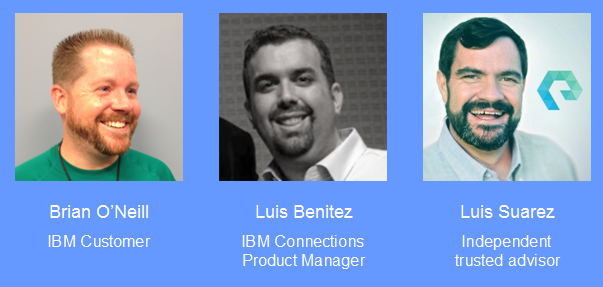
In this session, I will join the guy who fired himself from IBM and is now and independent and trusted social business consultant Luis Suarez.  Additionally, I'll join Brian O’Neill, an IBM Customer and IBM Champion to discuss your most difficult questions around social business (see below on how you can submit questions).

The concept is that we will have a lively, fast paced discussion on 12 to 14 IBM Connections and Social Business topics. We’ll have 3 minutes for each topic with 60 seconds for each one of us to answer. Stuart McIntyre will be the moderator for the discussion and yell at us if we go beyond our 60 seconds!
And the very best part of this session? To submit topics/ideas for us to discuss, tweet them using the #soccnxPTI hashtag. We’ll be monitoring this tag up to the week before the conference!

Tuesday, October 22, 2013

Announcing IBM Connections Suite 4.5.1 - It keeps getting sweeter!

View Comments
Today, I'm happing to announce the latest release of the IBM Connections Suite, IBM's social collaboration platform. The IBM Connections Suite provides a single offering that organizations can deploy to build a powerful intranet, become more agile and create competitive business value.

The latest update released today adds many more collaboration features to provide a top notch experience for users. For example, teammates can work together and align on business objectives in real time using instant messaging and web meetings deeply integrated as part of communities.

A rich content library allows members to securely manage their content and use approval routing to track the progress towards the validation of the document.

From ideation, to microblogging, to real-time team collaboration, to document management, the IBM Connections Suite 4.5.1 is the most secure and complete collaboration platform out there. Remember: content is only valuable when the right people can find it at the right time.

Here's just a preview of what's new:


Here's a demo so you can see it in action from our new Product Manager, Albert Nichols:

For more information, the announcement letter is here.

Thursday, March 14, 2013

IBM Connect 2013 and Product Demos Available

View Comments

Building on the launch of IBM Connections 4.5 and IBM Notes 9.0, the demos that were done during the IBM Connect 2013 keynote (aka OGS) (aka Opening General Session) are now available directly from the main IBM.com/social page.

From that page, there's a demo tab which then brings you to a page with individual product demos as well as the OGS demos from IBM Connect 2013.

And clicking on See Demo shows the following movie. Here you will see a little of IBM Connections 4.5. Additionally, I demo the new real-time collaboration capabilities provided by Sametime as well as some of the new features provided by IBM Notes 9.0. If you couldn't make it to yesterday's launch webcast a replay of that will be available soon, so for now, enjoy the following video:

As a reminder, IBM Connections 4.5 will be available on March 29th, 2013, so get ready!

Enjoy!

Friday, April 13, 2012

How To Add a Web Meeting Link to IBM Connections Profiles

View Comments

All credit here goes to Mitch Cohen for the idea. As I've been updating my demo server this week to record a video on it, it turns out that Mitch asked how to add an attribute to IBM Connections Profiles so that it would be a clickable link to a user's web meeting (whether it's SmartCloud Meetings, VSee, WebEx, etc).

The process for adding a custom attribute to Profiles is documented here, but let me just show you how to do it specifically for web meetings. In the example below, I'm going to focus on SmartCloud Meetings, but if you want to do it for WebEx, for example, it should be very straightforward to modify the configuration that I present below:

  1. Check out profiles-config.xml
  2. Open profiles-config.xml with your favorite text editor
  3. Add the following line under the <profileDataModel> - <profileExtensionAttributes> section:

    <simpleAttribute extensionId="meetingId" length="64" />


  4. Now scroll down to the <profileLayout> - <jobLayout> section (or to the <contactInformation> section depending on where you want to add it) and add the following line:

    <extensionAttribute showLabel="false" prependHtml="&lt;a href='http://apps.lotuslive.com/meetings/join?id=" appendHtml="'&gt;Join My Meeting&lt;/a&gt;&lt;br/&gt;" labelKey="label.contactInformation.extattr.meetingId" editable="true" bundleIdRef="myStrings" extensionIdRef="meetingId" />


  5. If you want, you can also add it to the businessCard section so that it appears every time a business card is shown.
  6. Save and close the file
  7. Check it back in
  8. Restart Connections

Once you restart the server, you'll see something like this show up for people who have defined their Meeting ID by going into Edit My Profile.


Now if I were to pull up Jasmine's profile, I'll always be a click away to her virtual meeting room. Clicking on the link immediately launches the web meeting and I don't have to do anything else. Very easy!

Enjoy!