Pages

Friday, February 27, 2009

How To Change The Login ID For Lotus Connections

View Comments

Yesterday, I worked with a client to configure Lotus Connections to use a different ID for authentication. By default, Lotus Connections authenticates with either the user's email address or the user id.

Typically this involves a two step process:

  1. Configure WebSphere to use a different LDAP attribute for authentication
  2. Re-populate the Lotus Connections Profiles database to put in a new value for PROF_UID

We didn't want to do this because we wanted to minimize impact to the existing environment. Additionally, we had the challenge that the attribute that the customer wanted to use for authentication was a non-standard attribute (something called aintsouserid). Therefore, I suggested we use a new feature in Lotus Connections v2. In v2, the developers were kind of enough to add an extra column to the Profiles table: PROF_LOGIN. Whatever you put in there, can be used by Lotus Connections for authentication.

So here's what we did to configure Lotus Connections to authenticate using a new value without doing too much work:

  1. Followed the details on specifying a custom LDAP ID for Lotus Connections in the Lotus Connections InfoCenter. (we only followed steps 1-4). We followed these steps so WebSphere could recognize what aintsouserid was.
  2. Modified the WebSphere configuration to use aintsouserid as the attribute for login. (basically, step 9 from this article).
  3. Modified the TDI configuration (map_dbrepos_from_source.properties) to map PROF_LOGIN to aintsouserid
  4. Re-ran TDI to populate the PROF_LOGIN data for all users

And voilá. Hope this helps!

Tuesday, February 24, 2009

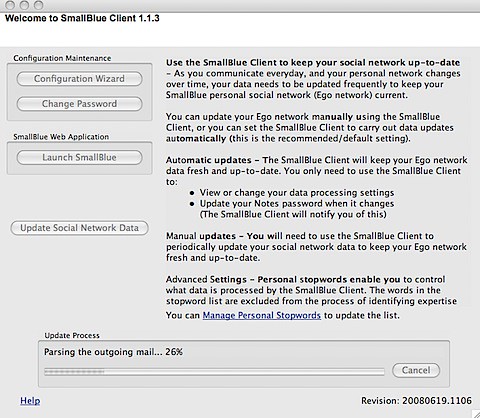
My First Experience with Lotus Foundations

View Comments

Lotus Foundations was announced last year at Lotusphere 2008. At the time, I didn't pay too much attention to it because, honestly, I didn't understand it. At this year's Lotusphere, I had the chance to attend a session and also meet one of the biggest evangelizers for it: Bilal Jaffery.

The Lotus Foundations promise ? Get up and running with a server that has a web server, FTP, email, firewall, anti-spam, anti-virus, scheduled backups, automated maintenance, and (optionally) Domino in less than 30 minutes! Well, it took me a bit more than 30 minutes, but the blame is on me for not reading the instructions!

You see, if you don't get the appliance, you get a CD that you put into your server. I had a spare computer in my house, so decided to burn the 100MB CD (that's pretty small for everything it can do!!) and put it into this old Windows XP box. After 2-3 minutes, the computer started and showed a couple of red boxes with some instructions (these are the ones that I didn't read!!). I closed those boxes and then was sent to a status console. I couldn't do much. I thought..."where's that nice, easy to use graphical user interface I saw at Lotusphere?"

Since I couldn't figure it out, I restarted the box and then chose 'Diagnostics' from the start up menu. I ran through all the diagnostics and everything was fine. The last 'test' was a "Burn-In Test". I'm not really sure what it is, but it was a BIG mistake to select it. After 24 hours, it was still running! I was definitely missing something, so I canceled that test and decided to reboot.

This time, I chose Lotus Foundations and read the instructions! The instructions in the red box told me to open a browser to http://<ip address>:8043 where <ip address> was the IP listed right there in front of me. I opened a browser from my Mac in the network and lo and behold, I got to the Foundations setup screen.

I added one user for myself under 'User Setup', configured the web server, the email server, and set the DNS server to dynamic (since I have a dynamic IP). This must've taken probably about 10 minutes!

Next, I configured my Mail application in the Mac to send / receive emails. I could receive but I could not send. Then, the final step was to open my home router to forward all requests to ports 25 (smtp), 80 (web) and 110 (pop) to my new Lotus Foundations server. Oh, and I had to change the nameservers for my domain to point over to dyndns1.ivivanet.com (this server will automatically update my domain's IP when my IP is changed by my cable modem provider).

When I first sent a test email to my Gmail account, the email bounced because I didn't have a static IP address (see above) and Gmail rejects those types of emails to reduce spam. I did a search over the Lotus Foundations documentation and found the solution to the problem. After implementing the qmail approach (don't ask me what qmail is), I was able to send emails to Gmail!

Overall, it's definitely very easy to set up. If I would've read the instructions, I would've been done in less than 15 minutes. Therefore, I wish the initial instructions were a bit more clearer (for people like me who don't read instructions :) ). Also, the setup instructions on the web site are ok (like everything else). I think they need to be a little bit more detailed though. I definitely recommend Lotus Foundations for small and medium businesses, and even for those of you who want to run your own domain from your home.
Monday, February 23, 2009

IBM Makes Money Off My Blog

View Comments

You may remember how a month ago, I blogged about When I Use Twitter, IBM Wins. That blog was based on my own perspective and my own theories as to how I thought IBM was benefitting from my use of social tools. I had no real data, however, to back that up.

Recently, I received a very exciting note from Randy Frink communicating that we had won a big opportunity at a customer site. I thought that was great, but I asked him "what's that got to do with me?" He said that they were able to close the sale thanks to my blog. I was ecstatic! I asked him to tell me more.

Later that night, he sent me a presentation (see below) with the story line describing how my blog helped close the sale. Here's what he said happened:

  1. Searched Lotus Connections for support of SPNEGO and Connections
  2. My blog entry on the subject was in the top 10 results
  3. Followed my blog to the step-by-step directions in the InfoCenter
  4. Randy did NOT contact me, went directly to an ISSL expert and Development (i.e. I was NOT the bottleneck!!)
  5. Connected the customer to the right expert to close the sale!

So there you have it! Thanks to a blog entry I wrote more than a year ago, IBM was able to make a very significant sale. I think we can even calculate the ROI on this:

Costs:

  • Time to write blog entry: 15 minutes
  • Cost per hour (assumption): $50
  • # of blog entries last year: 200
  • Total Cost: $2,500

Revenue:

  • Not sure how much the sale was, but let's assume $250k

ROI:

  • 100 times the cost!!!!

Enjoy!


Thursday, February 19, 2009

Atlas for the Mac Is Here

View Comments

Who says blogging is a waste of time ? What a great example right here. You may remember that on Monday I blogged about my first Lotus Notes 8.5 application for the Mac. Now, I originally started this project last summer! That's right over 6 months ago. When I hit the roadblock that I documented on Monday, I quickly started to search the web. Nothing turned up an answer. Since Notes 8.5 was still in beta at that time, I decided to abandon the effort.

When Notes 8.5 shipped earlier in the year, I thought it would be a good idea to pick up the project again. I knew that if I hit a roadblock, I could get official support. Well, as I said earlier this week, I was stuck because I couldn't call the Notes API from my SWT Java program. At that point, I blogged about my status, and quickly summarized what I had done up until that point. I also noted that I had opened an IBM Support ticket and was waiting for assistance.

200902192136.jpgAnd then magic happened! 1 hour and 22 minutes after I posted the blog, the answer came to me!!! Karsten Lehmann, one of the developers for MindPlan, kindly posted a comment detailing that he had gone through the same issue. He suggested a couple of things, I responded back and voilá!
Here's how I configured Eclipse to run my SWT Java application for Notes in my Mac OSX Leopard:

  • Under Arguments, added the following VM Argument: -Djava.library.path=/Applications/Notes.app/Contents/MacOS
  • Under JRE I selected Java 1.5.0 (for some reason it wouldn't work with Java 1.6)
  • Under Environment I added 3 environment variables:
    • PATH -> /Applications/Notes.app/Contents/MacOS
    • LD_LIBRARY_PATH -> /Applications/Notes.app/Contents/MacOS
    • DYLD_LIBRARY_PATH -> /Applications/Notes.app/Contents/MacOS

At this point I could get my application running beautifully under Eclipse, but I couldn't run it as a stand-alone application. Time to do some more searching!! After a couple of days, I finally figured it out. First, Eclipse includes a really cool feature that lets you export your Java applications as Mac Bundles.

Next, because of the way Mac works, I had to set the DYLD_LIBRARY_PATH environment variable first, before running my application. Therefore, I had to create the file ~/.profile with the following line:

export DYLD_LIBRARY_PATH=/Applications/Notes.app/Contents/MacOS

And now, IBMers can use Atlas from their Mac computers!

Tuesday, February 17, 2009

My First Dojo Widget

View Comments

If you are following me on Twitter, you know that I've been doing some Dojo development lately. While there's definitely a learning curve for Dojo (like with anything else) I'm now starting to appreciate its simplicity and power. This Dojo development is part of an internal BizTech project, for which i can't share too many details now.

When I first started designing the UI, my plan was to use iWidgets. iWidgets are pretty cool and they can pretty much run anywhere. The trick is to add the Lotus Mashup framework to your page (via 1-2 lines of JavaScript) and then you can run iWidgets on your homepage. This process is documented in the Lotus Mashup Wiki, and it looks like it's even easier in v1.1. Since I only have v1.0 available to me, I researched in a lot of place but still couldn't find how to add iWidgets to my page. Therefore, I discarded that approach and I'm going with pure Dojo widgets.

The idea of the Dojo widget is to give it a URL to a JSON output and have the widget render is data. I'm documenting the process here, at a high level, so I can reference it as I go forward with this project. I also hope it serves as a reference for other Dojo newbies (the Dojo documentation is not that great and I've been referring a lot to DojoCampus.org).

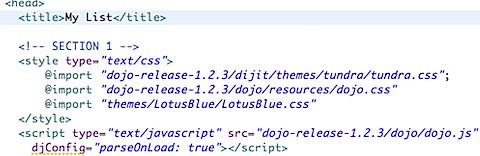
  1. Download and install the Dojo framework
  2. Create a blank HTML page and in the <HEAD> section 200902141023.jpg
  3. After the above code, define which widgets and/or components you'll use200902141025.jpg
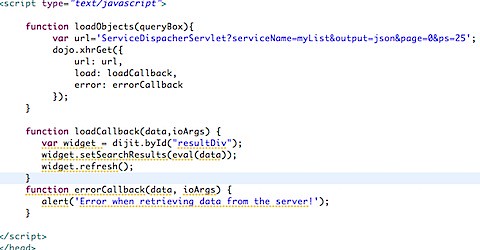
  4. After the code above, define the URL to the JSON output. Then tell Dojo to do the AJAX call for you. Dojo will ask you what function should be called after the asynchronous call to the JSON URL returns. Here's what I defined:200902141030.jpg
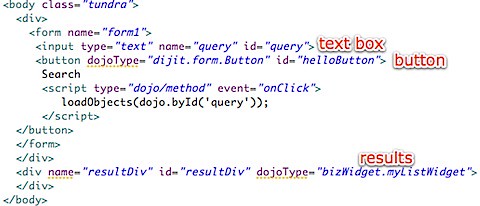
  5. In the code above, we tell Dojo to do a call to http://localhost/myapp/ServiceDispatcherServlet?... and tell it that once it receives the data to call loadCallback or if there was an error to call errorCallback. Finally, we close the HTML <HEAD> element. Still with me? Good! Now we define our main <BODY> code where the results will be shown:200902141129.jpg
  6. That's all you have to do in the HTML. Now you have to create the widget file (in this case myListWidget.js under the folder bizWidget)
  7. Just like Java, in the widget file, you define the 'class name' and the dependencies:200902141132.jpg
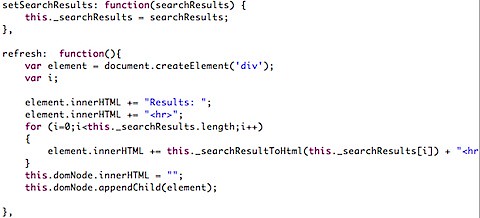
  8. Now notice that in step 4 there were 2 methods called: refresh() and setSearchResults(). Here's how they look:200902141133.jpg
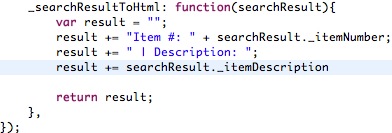
  9. And here's how the helper method _searchResultToHtml looks like:200902141135.jpg
  10. And there you have it! The very final step is to create a servlet that returns a list of items in JSON format. To do this, I basically created a java.util.List and the list elements were simple Java beans. I then used flexJSON to convert the Java List into a JSON formatted List and voilá

Enjoy!