Here's a quick demo I recorded that shows the new mobile interface that's going to be included in Lotus Connections v2.5.
Enjoy!
Here's a quick demo I recorded that shows the new mobile interface that's going to be included in Lotus Connections v2.5.
Enjoy!
I hate it when stuff like this happens. This week I discovered an AWESOME integration point between Lotus Connections and Sametime Advanced. You may already be familiar with how Lotus Connections and Sametime Advanced integrate through the Broadcast Chat feature (if not, check out the video below at 3:40). Basically, each community you belong to in Lotus Connections becomes a channel in your instant messaging client. That means that you can collaborate in real-time with the community!
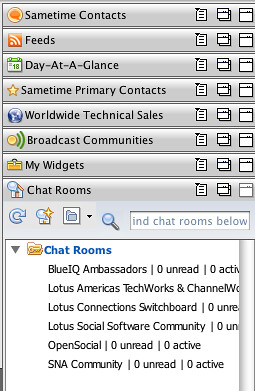 You can send real-time surveys, announcements, chat requests, and questions to your Lotus Connections Community directly from your instant messaging client. You can download the plugin that Suzanne shows in the video above from here. Nifty, eh?
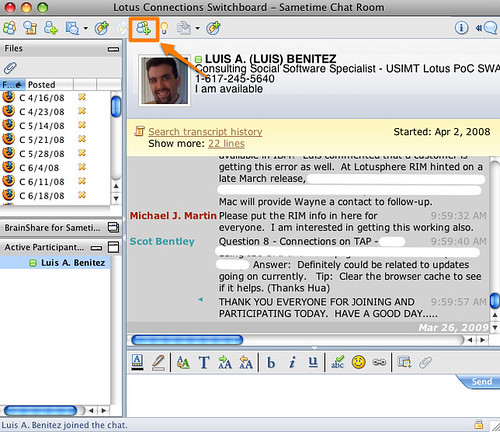
Well, it gets better. Sametime Advanced also provides persistent chat rooms. Up to now, I've been using these chat rooms through a web browser interface that Sametime Advanced provides. What I discovered this week is that you can access these chat rooms directly from your Notes or Sametime client!
So why is this useful, you are asking ? Well, for one you don't have to run a browser to use the chat room. The chat room just works from where you would expect it to: your instant messaging client.
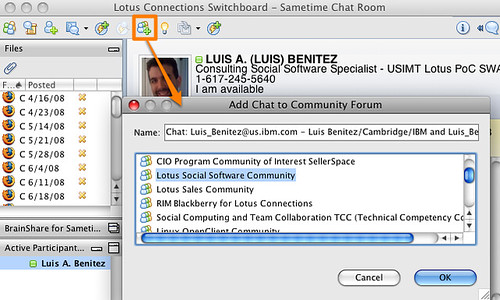
As a community leader, it provides another huge advantage. You see, I use the persistent chat room provided by Sametime Advanced as a backchannel during the weekly calls of the Lotus Social Software community. Since I have the Lotus Connections Sametime plugin, once the call is done, I can save the chat transcript directly to a forum posting in my Lotus Connections Community! Now THAT'S increasing my productivity.
Backchannel chat room:
Saving chat transcript to community:
So how do you get started? Two steps:
Enjoy!
You may remember that I'm a big fan of offline blogging. It was recently brought to my attention, though, that I never shared instructions on how I configured ecto (my offline blogging client) to work with Lotus Connections Blogs.
You should be able to use ecto to write and publish the blog. You can also assign tags to your blog entry from the list of existing tags, or create your own tags directly from ecto. Woo Hoo!!!
There's a caveat, though, ecto isn't very happy with bloggers that have multiple blogs on the same account. For example, I have this blog, but I'm a member of 2 other team blogs inside Lotus Connections. Therefore, here's what I had to do to properly configure ecto to work with all my Lotus Connections blogs.
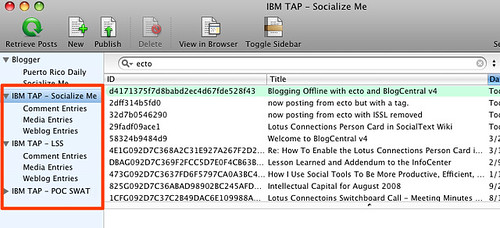
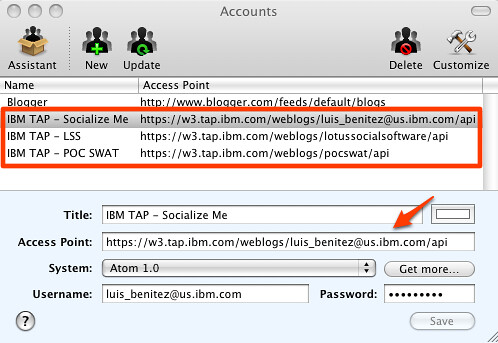
 . Happy Offline Blogging!
Recently, I was asked if we could add the Lotus Connections Person Card to a Socialtext Wiki. Socialtext is one of our partners and Lotus Connections Communities integrate with their wiki service out of the box. My initial reaction was "of course, you can integrate the Lotus Connections person card into everything". But like everything else, I wanted to prove it by myself.
Alan Lepofsky, Director of Marketing at Socialtext, kindly put together a test wiki site for me to play around. Here you'll see a demo of the Lotus Connections person card working directly inside a wiki created and hosted by Socialtext. Tip: Click the 'Full Screen' button to get a better view.
Enjoy!
Honestly, I don't know who it was, but a while ago I learned an interesting behavior from a colleague. I thought it was an interesting behavior and it has really helped. Anyway, the behavior is that if I get the same question asked 3 times (be it via email, instant message, Twitter, face-to-face, or any other means), it's time to blog about it.
With that in mind, I created an iNotes iWidget for the Lotus Connections Homepage. This came up last night, and I swear it took me no more than 45 seconds to do it (ok, I was using hardcoded URLs so it was easy ). The actual coding without hardcoded URLs took me about 30 minutes.
Anyway, after I upgraded my MacBook Pro to 6GB of memory, I started Notes just to see what, if any, were the improvements. (By the way, if you are wondering, startup time didn't improve much, but switching tabs is now significantly faster!!!). Since I have my Notes client configured to check email on startup, it checked mail, and it pulled an email from a colleague in Canada.
She was wondering if we could somehow create an iWidget so users could view their emails from the Lotus Connections Homepage. This was the third time that I'd received this question, so it's time to blog it.
I knew the answer was yes, but I wanted to prove that it was doable and how easy it was. Well, as mentioned above, it was extremely easy. I basically took an existing iWidget, modified 4 lines of code in the XML and voilá! Here's a screenshot of it:
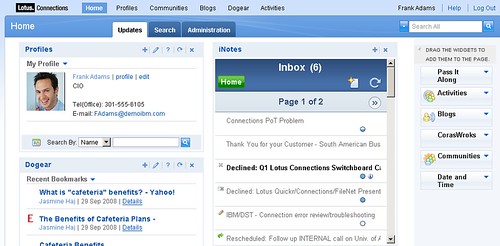
You can download the iWidget from here.
Enjoy!