Pages

Wednesday, January 27, 2010

Lotus Connections Status Updates comes to Microsoft Sharepoint

View Comments

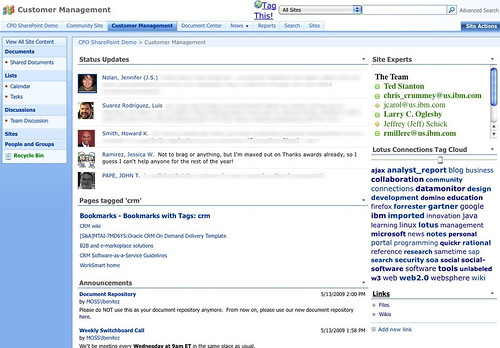
I'm currently preparing for a demo of Lotus Connections for a customer who uses Microsoft Sharepoint heavily. One of their requests is that they want to be able to access Lotus Connections data directly from Sharepoint so that users don't have to jump back and forth between the two applications. By now, you've probably seen my demo of the out of the box integration capabilities between Lotus Connections and Microsoft Sharepoint.

To add to that, I thought it would be interesting to see if I could bring Lotus Connections' microblogging capability to Sharepoint. Since Sharepoint has a web part that renders feeds, the first attempt was to use that web part and point it to the feed of status messages from Lotus Connections. While that was nice, it didn't look pretty at all!

Luckily, the web part allows you to customize the XSL so that the output looks nicer. (XSL defines the way to transform XML into HTML). So I took the original XSL and replaced it with a new one.

For the techies out there, you can download both and compare them. You'll see that I basically changed about 10-15 lines in the original file. For those that already own a Sharepoint site, go ahead and add the RSS web part (which has a bad name cause the web part can handle RSS, Atom, iTunes feeds, and other..), put in this new XSL, point it to the feed of status updates from Lotus Connections, and voilá.


There you have it! Now you can see the team's Lotus Connections status updates in Microsoft Sharepoint in less than 5 minutes.

Enjoy!

Bookmark simultaneously to Lotus Connections and del.icio.us

View Comments

Earlier today I received a ping from one of my favorite customers. He showed QuixApp a nice bookmarklet that basically lets you do whatever you want. He thought this would be a good idea, for example, to create a bookmarklet that would simultaneously bookmark a page both in Lotus Connections and in del.icio.us.

I immediately answered that this has been available for a while, internally at IBM. The following bookmarklet was created by Sacha Chua and if you are browsing an internal page (e.g. w3.ibm.com/....) then the page is only bookmarked in Lotus Connections. If you are browsing an extranet site (e.g. www.cnn.com... ) then the page will be tagged in both services (you don't want internal/confidential pages to be accidentally saved to del.icio.us, right?).

Before you can use it with your own Lotus Connections deployment, you'll have to customize it a bit. Once you look at the code, you'll see something like this:

if(!location.href.match('.ibm.com'))

The first step is to change that from .ibm.com to whatever your company's hostname is. Next, you'll want to change the Lotus Connections URL. In the code you'll see something like this:

var%20h='http://w3.ibm.com/connections/dogear';

Again, change that to match the deployment of your organization and voilá.

IBMers: Drag and drop it to your bookmarks bar: tag this

According to Sacha, the bookmarklet builder was very handy during the creation of this bookmarklet.

Monday, January 25, 2010

Demo: New BlackBerry Client for Lotus Connections

View Comments

Last month, there was a press release announcing the new version (2.0) of the BlackBerry Client for Lotus Connections. While the press release was a bit confusing, it announced that the new client would be available on May 8th. What wasn't clear is that it was only going to be available to select customers.

Earlier today, I stumbled upon this great demo by Fred Clarke which gives a tour of the new client capabilities.

One of the most distinctive changes in this new client is that we now have native applications for all of the Lotus Connections modules. In the 1.x version of the client, only Profiles and Dogear had native applications, the rest required you to launch the browser, which was, at times, slow.

From the looks of the demo, the interaction is extermely fast. I believe this new client will be very powerful for our customers and their mobile workforce. This is definitely going to enhance Enterprise2.0 for the mobile world, something that I haven't seen any other Enterprise2.0 vendors doing. And this is a nice complement to the new mobile interface for iPhone users.

Enjoy! (and thanks to RIM for doing this for us!)

Lotusphere 2010 Recap

View Comments

As you may have heard, I had to bail out on Lotusphere 2010 because my son was suddenly hospitalized. Shortly after the opening keynote on Monday, I boarded a plane back home. Therefore, this recap is pretty short.

One of the great things about the keynote is that I got a chance to see it from the "blogger's couch". That means that I witnessed the entire keynote up close and personal from the very first row. Here's a picture taken from my iPhone:

Share photos on twitter with Twitpic

As usual, one of my favorite things of going to Lotusphere is meeting with all my colleagues. On Sunday we had the Lotusphere Tweet-Up where I got to see friends such as @marciamarcia, @elsua, @sursinus, @vjburns, @idonotes, @bilaljaffery, @alanlepo, @olufsphere, and many many others. We all took a picture in front of the DeLorean. And while I don't have a picture of the tweet up, I do have one with my twin brother (can you guess who's who?):

Share photos on twitter with Twitpic

If you also missed Lotusphere, here's a quick recap by DJ Steve Porter:

Enjoy!

Monday, January 18, 2010

What's next with Lotus Connections ?

View Comments

This week, IBM is holding its annual collaboration conference called Lotusphere and is typically known for setting the vision for the collaboration strategy for the rest of the year. Today, at the opening keynote, IBM announced its plans for continuing to drive its Enterprise 2.0 platform, Lotus Connections, forward.

Lotus Connections, IBM's flagship Enterprise 2.0 platform, will be incorporating numerous new features in the coming months. There are several new capabilities, however, that are worth noting.

During the keynote, IBM reviewed the new features that were added into the latest offering of IBM Lotus Connections v2.5. It also reminded the audience about how it scored a big win with Panasonic dumping Microsoft and moving its 300,000 employees to the IBM-hosted collaboration solution LotusLive. Some of the features that wow'ed the audience were the new iPhone access, the new personal file sharing service, and the new capabilities in community spaces that provide for more targeted collaboration.

Enterprise 2.0 where your eyes are

IBM believes that it's essential to bring Enterprise 2.0 capabilities to the users instead of trying to bring users to new Enterprise 2.0 platforms. For that reason, IBM architected Lotus Connections around the SOA principles and has created free plug-ins so that its Lotus Connections platform is accessible from: Microsoft Sharepoint, Microsoft Outlook, Microsoft Word, Microsoft Excel, Microsoft Powerpoint, Windows Explorer, Lotus Notes, Lotus Sametime, WebSphere Portal, RIM's Blackberry, Apple's iPhone, and Nokia's S60.

The recent integration of Lotus Connections and Alfresco's Open Source Enterprise Content Management solution was also mentioned. This integration is important because it's economical, scalable and an open platform which allows flexible access for programmers. In addition, this integration brings features to Lotus software not available through Microsoft SharePoint, including 5015.2 certified records management capabilities, and content services for Lotus collaboration in the cloud.

Looking forward

At the keynote, IBM set forth its vision for what's next. First, it is going to make it easier for end-users to find and invite colleagues to join their network. Additionally, it's going to continue building deeper integration with other enterprise applications such as Microsoft Sharepoint. A pain point that has been echoed by many Sharepoint users is that Sharepoint creates silos and doesn't do a good job in promoting knowledge re-use. IBM's platform fills this gap and will continue to create deeper links between Connections and Sharepoint to break down those silos and create a unified knowledge source. This means that users browsing Sharepoint will have seamless access to Lotus Connections data (experts, communities, bookmarks, wikis, microblogging, etc). Similarly, as those users are browsing Lotus Connections they'll be able to access data in Sharepoint such as file repositories.

Second, IBM also announced that it'll create even more links into WebSphere Portal. Most organizations that deploy a Portal spend time and effort making it a destination for its employees. By 'socializing' the portal, organizations will have a sure way of attracting users and keeping them engaged. At the same time, the end user benefits because they only have a single user interface to learn and use. They will no longer be required to jump back and forth between disparate application to effectively collaborate.

Mobile continues to improve

Another welcomed announcement was the brand new native Blackberry applications to provide native access to Lotus Connections and Lotus Quickr. Mobile access to an Enterprise 2.0 platform is key for end-user adoption according to IBM. What's interesting too is that the applications were built entirely by RIM and since RIM hasn't done this for any other Enterprise 2.0 platform, it validates IBM as a leader in this field.

And speaking of links, IBM also re-iterated the importance of not only engaging employees for internal collaboration, but involving external users as well. Therefore, IBM will be adding some features to create safe social customer communities which increase loyalty and revenue. This will allow IBM to compete more strongly in the B2C segment, which is growing faster than the B2E segment. And work has already started in this aspect. Last quarter, IBM's WebSphere Commerce v7 was released and it includes many social commerce features such as enabling online stores to support product ratings and reviews and all powered by Lotus Connections.