Pages

Wednesday, December 24, 2008

Goodbye 2008

View Comments

And with this, I'll close this blog for 2008. I'll be back at work on January 2nd, 2009! At that time, I'll first go through my feed reader to see what has happened while I was away, and then I will go through my email to tackle the new year!

As I say my good bye to 2008, I wanted to recap my accomplishments. This will also help me summarize what I've done when I have my one-on-one with my manager later on to discuss my contributions to IBM.

  • Moved from Social Software Services (consulting) to a new job as Social Software Technical Evangelist for IBM
  • Attended Lotusphere for the first time ever!
  • Got Certified as an I/T Specialist by the IBM Certification Board
  • Switched to RedHat Linux from Windows XP for a couple of months as my primary workstation
  • Switched to Mac from Linux in April as my primary workstation
  • My wife had our first baby
  • I got promoted
  • I was (one of?) the first blogger to report on IBM's victory over Microsoft at the Enterprise 2.0 Conference face-off
  • Published an article in developerWorks
  • Started my first BizTech project about a social software project
  • Hacked Notes v8.5 for the Mac to add the Lotus Connections Activities sidebar
  • Served as stakeholder for the Lotus Connections RedWiki
  • Mentored 3 IBMers and helped them get published in developerWorks
  • Submitted my first HackDay entry and won 1st place in the Connections category!
  • Learned Dojo
  • Contibuted to a social software book via a Wiki
  • Was interviewed twice for a social software book
  • Met with over 70 customers to talk about the business value of social software
  • Served as a reviewer for two different books
  • Travelled to some cities for the first time: Seattle, Rio de Janeiro, Sao Paulo
  • Created various TDI videos that were also published in tdi-users.org
  • Got featured in IBM's home page (w3) twice this year!
  • Continued leading the WW Lotus Social Software Community
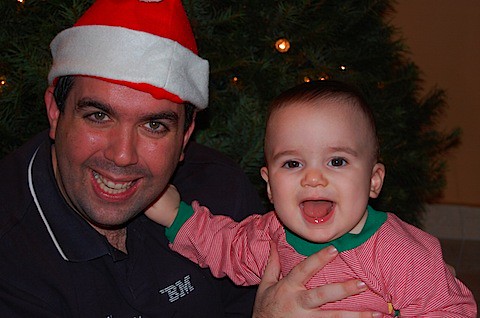

DSC_1382.JPG

I hope you have a very merry holiday season and a Happy New Year! Stay safe!

Tuesday, December 23, 2008

Register for Lotusphere Opening General Session Live Blog

View Comments

We are about 24 days away for Lotusphere 2009. At Lotusphere 2008 I live blogged the Lotusphere Opening General Session. I got some great feedback from people that were not attending that it was valuable for them to stay informed as to what was going on and what was being announced. At Lotusphere 2009, I plan to do the same thing.

This time, however, I'm going to use CoverItLive, a live blogging platform. What does this mean to you? Well, once you get to my blog, you won't have to refresh your screen every couple of minutes. It will just automatically refresh.

Interested? Well, enter your email address below, and a reminder will be sent to come back to this blog when the Opening General Sessions is about to start.


If you'll be live Tweeting, post a comment and let me know. I'll include your tweets as part of the live blog.

Alternatively, if you want to see what other people are saying, you can also use Twitter's search mechanism to view a feed of comments from the Lotusphere Opening General Session. If you want to use Twitter (It's free and you don't have to register), use these URLs:

IdeaJam iWidget for Lotus Connections

View Comments

Last night Bruce Elgort, from our friends over at Elguji, used Twitter to see if anyone could answer some questions he had about Lotus Connections and iWidgets. A couple of minutes later, I responded to Bruce offering my assistance. We used Twitter to coordinate whether we could speak over the phone (a.k.a Skype) and minutes later we were Skyping away! (Is "Skyping" that the right word?? I'm still new to Skype...)

Anyway, he wanted to know what the effort would be to create an IdeaJam iWidget for the Lotus Connections Homepage and what would be the easiest approach. I told him that if he could get me a very simple HTML page, I could do an iWidget that would call that HTML page via an IFRAME. We agreed that we would follow up today in the morning to see how much progress he'd made.

Turns out that about 1/2 hour later, he lets me know that his side is done. To say the least, I was very impressed! You see, IdeaJam is a Notes/Domino application. Therefore, all he had to do was create a new 'View' that provided just the data that he wanted and rendered that as HTML. (Don't ask me what a View is.. I know very little about Notes/Domino applications, but I'm sure Bruce will discuss more at his blog later today).

Now that he had his View rendering the data, I had to create the actual iWidget to be deployed onto Lotus Connections. This process took about 2-3 minutes! The iWidget is very simple and only has about 4 lines of XML in it. If you want to take a look at the iWidget XML, click here. I then went into the Lotus Connections Administration interface, added the iWidget to the Homepage (which I have already proven that it takes less than 30 seconds) and voilá!

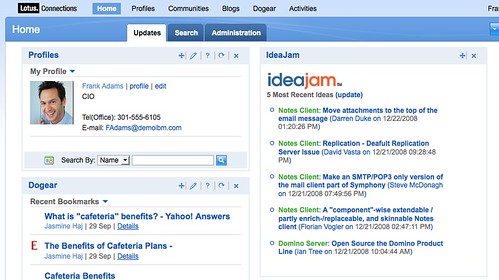
We then spent some time playing with the CSS to get the look-n-feel right and produced this:


The iWidget displays the 5 most recent ideas and the IdeaSpace they belong to. If you want to use this iWidget on your own Lotus Connections deployment, simply point to this URL: http://blog.lbenitez.com/widgets/IdeaJamWidget.xml

I think that what's also impressive about this story is that Twitter enabled this collaboration. I've only met Bruce (recently) via Twitter and had never collaborated with him before! Yet, we were able to get together and quickly create this nice piece of integration!

Very cool, right? What do you think ?

Monday, December 22, 2008

Lotus Connections Mobility Video

View Comments

I was recently directed to this video which talks about the Lotus Strategy and its mobility capabilities. Mobile access to your applications is key, especially for social software. I, for one, use Twitter, Facebook, and Lotus Connections Dogear because I have free native applications that run on my BlackBerry. When I'm at a customer site and I'm stumped with a question, I turn to my trusty Dogear to find the answer. When I'm travelling to/from said customer, I like to see what's going on in my personal social network by turning to Facebook. Then, I like to see what's going on in my semi-personal/semi-professional network at Twitter.

By the way, my constant access to Twitter means I can be more responsive to my customers and business partners. And recently a light bulb went off in my head: IBM gets more value from me using Twitter, than I personally do. I think I need to expand on that in a future blog post.

Anyway, here's a quick video showing the different Lotus products in a mobile world. I like Kristen:

Feel free to share it!

Thursday, December 18, 2008

How To Allow Anonymous Comments in Lotus Connections Blogs

View Comments

Well, sort of. A customer this week asked me how to modify the blog template so that anonymous users could click on the 'Add a Link' comment. By default, the link is completely disabled until the user clicks on 'Log In', authenticates, and returns back to the blog entry.

I took it upon myself to look at the blog theme and figure out how to make this change. Since the themes for blogs are created using Velocity (an open source template engine), I took a quick peek of the Apache site to learn some things about how Velocity works.

Below are the steps I followed to get this working:

  1. Go to <WAS_PROFILE_ROOT>/installedApps/<cell_name>/Blogs.ear/blogs.war/themes/<theme name>
  2. Save a backup of _header.vm and Weblog.vm
  3. Open _header.vm with your favorite text editor
  4. Find the following line

    #if($utils.isJapanese())
    <script type="text/javascript">
    <!--
    {
    var func = window.onload;
    window.onload = function() {
    if(func) {
    func();
    }
    document.body.className = document.body.className + " lotusJapanese";
    }
    }
    //-->
    </script>
    #end


    and replace it with:

    #if($utils.isJapanese())
    <script type="text/javascript">
    <!--
    {
    var func = window.onload;
    window.onload = function() {
        if(func) {
            func();
        }
        document.body.className = document.body.className + " lotusJapanese";
    }
    }
    //-->
    </script>
    #else
    <script type="text/javascript">
    <!--
    {
    var func = window.onload;
    window.onload = function() {
        if(func) {
            func();
        }
            
        var luisBlogsUser = getCookie("blogsUser");
        if (null != luisBlogsUser && luisBlogsUser != '') {
            hideAllActionForms();
            AddWeblogEntryCommentForm.toggle('show');
            Field.focus('commentContent');
        }
    }
    }
    //-->
    </script>
    #end


  5. Save _header.vm
  6. Open Weblog.vm with your favorite text editor
  7. Find the following line


    <a class="disabledLink" id="AddWeblogEntryCommentLink" title="$text.get('entryview.actionmenu.loginHint')">$text.get("entryview.actionmenu.add_a_comment")</a>


    and replace it with:


    <a class="lotusAction" id="AddWeblogEntryCommentLink" title="$text.get('entryview.actionmenu.loginHint')" href="$url.site/roller-ui/login-redirect.jsp?redirect=$entry.permalink">$text.get("entryview.actionmenu.add_a_comment")</a>


  8. Save Weblog.vm
  9. Restart the Blogs server and voilá

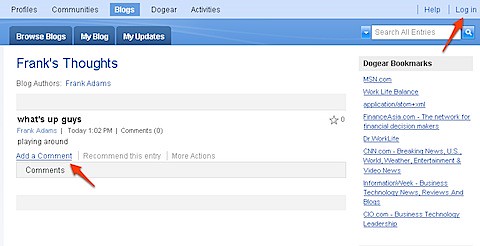
And here's how it looks.


200812172151.jpg

When you do this change, the 'Add a Comment' link appears for anonymous users. When they click the link, they will be sent to the login page. After successfully authenticating, they are re-directed back to the blog entry with the comment form automatically expanded.

Enjoy!