Pages

Tuesday, March 11, 2008

Wow that's cool -- ST Awareness in Profiles Person Card!!!

View Comments

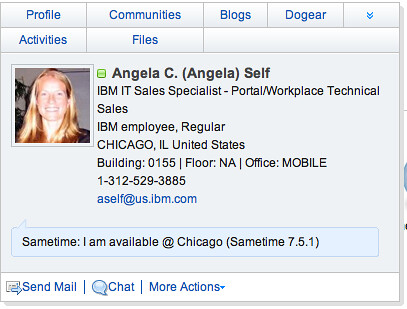
For the past couple of months I have been working at an all-Lotus POC (proof of concept) which includes Portal, Quickr, Sametime, Notes 8, and Lotus Connections for a multi-national insurance firm. One of the things that they've wanted to see is Sametime presence awareness in the Lotus Connections Profiles pop-up business card (aka. person tag). In fact, many customers have asked me about it!

I had heard from development that they were working on adding that for Lotus Connections R2 and had seen some screenshots. Today, I'm happy to announce that it's working in the TAP environment!!!

(picture updated on 6/6/2008)
STPresenceR2
You must know, however, that this only works if:
  1. You have the Sametime v7.5.1 (and above) client installed on your computer, and
  2. You are signed on to the Sametime server, and
  3. You install the WebLinks plugin

I'm sure by now you are using a feed reader and subscribing to my Dogears. Therefore, you already have a link with instructions on how to get this working on your computer. Enjoy and happy demoing!!!!!

Thursday, March 6, 2008

Why I Love Feed Readers...

View Comments

(Editor's note: This could be part II of a "Why I love x" series. The original 'Why I love Dogear' became a presentation by Sacha Chua. Sacha, if you are out there, feel free to convert this blog post into a presentation as well)

I don't know what it is, but isn't it interesting when a topic doesn't come up for a while, and then comes up a LOT all of a sudden? On Monday, Laurisa Rodriguez and I were talking about how customers still don't see the value of Aggregators (aka feed reader, aka news reader, aka feed aggregator, etc...). In social software, I believe there's no way to keep up with everything without a feed reader. I mean you have Activities, Blogs, Dogear, Communities, Quickr places, etc. To the uninitiated, this can be overwhelming, and perhaps, a bit discouraging.

Yesterday, another co-worker and I were talking about this same thing. We were a bit concerned about all the great content that's out there. "People", however, may not be consuming this content since they don't have a feed reader. Today, I found out (using my Feed Reader) that yet another co-worker, Heath was running into a similar problem with customers.

In order to get you to start using a feed reader, let me tell you a quick story. (that's right, you don't have to install anything, since Notes 8 has a feed reader, and you already have Notes 8, right ?)

As you may know, you can pretty much subscribe to anything within Lotus Connections. I, particularly, subscribe to Gina Poole's bookmarks. Two weeks ago, she posted a bookmark to an article published by my alma mater, MIT. The article, Harnessing the Power of Social Applications, provides a great reference to the usefulness of social software! It tells several stories on how social software has made significant impact in companies like Dunkin' Donuts, AOL, Comcast etc.. However, this impact was caused by the customers of these companies, and not by their employees! I used this as an example with a customer last week. I was brought in to demo WebSphere Portal to this telco customer. At one point they brought up how they are not fond of social software and block it so that their employees don't waste time in places such as Facebook.

I took this opportunity to see if I could sell Lotus Connections. I suggested why they need to bring social software inside and make it available to their employees before they lose more revenue due to declining customer numbers! I cited some examples from the article above. The customer LOVED the examples and they went from not even considering Lotus Connections (or any other social software), to seriously start making plans and prepare an RFP for social software. Of course, I volunteered to help them create the RFP so that I can influence their requirementssmile.

I fully expect that we'll win this account soon. And I had to admit, I was going through hell trying to get this customer to see the value of social software. But because I was watching Gina through my feed reader, I was able to consume her knowledge, put it in the back of my brain and use it when I really needed it! This stored away knowledge helped me create a very solid opportunity for Lotus Connections when all I was trying to do was sell Portal.

Now look for this icon and click it!! That's the easiest way to subscribe to all the feeds that are out there!

P.S. I thought a comment made by Laurisa on another blog was awesome (and so true): "With a feed reader, I'm as smart as the person that I subscribe to, 10 minutes later!!"
Friday, February 29, 2008

A couple of new features added to Profiles 2.0

View Comments
Just wanted to bring to your attention a couple of new features and changes which will be available in Lotus Connections Profiles v2.0.  However, since we are cool people, we get to see a sneak peek of these features in TAP.

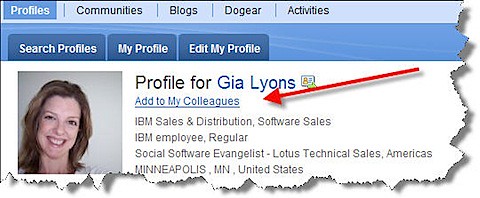
Today, I noticed the addition of 'Add to my colleagues' when you are viewing someone's profile:

profilescolleagues

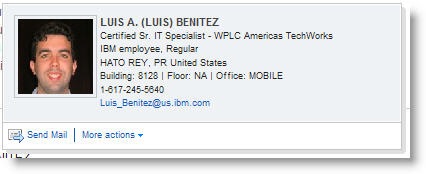
When you click on that link, you can enter a message which will be sent via email to the person you are trying to 'friend'.  Not only that, but we have an updated Person card:

newbusinesscard
Now, anywhere you see a name you can send that person an email.  Additionally, if you expand 'More actions' you can add that person as a colleague!!!  Now, imagine yourself browsing a document library, or browsing Dogears.  You find this person who has a lot of interesting materials and you want to add them immediately to your list of Colleagues!!  There's no need whatsoever to stop what you are doing, go find them in Profiles and then add as a colleague.. you can do it from anywhere the pop-up business card shows up!! Let me repeat that.. you can do that from ANYWHERE the pop-up business card shows up -- including non-Lotus Connections applications (e.g your intranet portal, your document repository, your rich client applications, etc...)

Very cool!!!!!

Ohh.. and don't forget that in 2.0 you have total control on the links that appear in the pop-up business card!

Thursday, February 28, 2008

Lotus Connections and Sharepoint Capabilities

View Comments
I've gotten te same question from two customers,so it's time to blog about it.  Mainly, they want to know what is possible today with Lotus Connections and Microsoft Sharepoint.  Let me clarify, though, that there's no  integration out of the box with Connections and Sharepoint.  The following are all capabilities that are available leveraging the Lotus Connections APIs:

  • Expose Dogears in Sharepoint 
  • Expose Blogs in Sharepoint 
  • Expose PersonCard in Sharepoint (documented in my article)
  • Link to Profiles (instead of the Sharepoint user info page) when clicking on a user's name in Sharepoint (documented in developwerWorks my article)
  • Use Communities as an access control into Sharepoint sites
  • Adding a 'Dogear this' button to Sharepoint pages
  • Add a widget to the Lotus Connections Homepage with 'My Sharepoint Sites' (similar to the Quickr porlet: My Places) 
  • Add 'My Sites' as a link in the PersonCard which takes someone to a user's list of Sharepoint
Note: Updated 8/29/2008 to include link to 'My Site' integration in Person Card.

Customizations available to Lotus Connections Profiles

View Comments
I've also been getting a lot of questions as to what can be customized and/or configured inside of Lotus Connections Profiles.  I'm also in the process of updating the Lotus Connections POT presentations to reflect this.  I, of course, wanted to give my faithful readers a sneak peek!!  So here you go:

What can be extended / changed in Profiles ?

  • Field names (e.g. Change 'Department Name' to 'Business Unit Name')
  • You can add up to 3 extra fields in 1.x and up to 99 in 2.0
  • You can change the order in which the fields are displayed / edited
  • You can change which fields are editable and which aren't 
  • You can specify which fields are synchronized back to the data source and which aren't
  • In 2.0 you can specify which fields show up in the business card
  • In 2.0 you can add extra links in the pop-up business card
  • Branding
And this is all done by modifying an XML file!  No code is needed -- this is purely configuration!!

Branding, of course, could require some coding if it's beyond changing colors and the nav bar logo.