Pages

Friday, February 29, 2008

A couple of new features added to Profiles 2.0

View Comments
Just wanted to bring to your attention a couple of new features and changes which will be available in Lotus Connections Profiles v2.0.  However, since we are cool people, we get to see a sneak peek of these features in TAP.

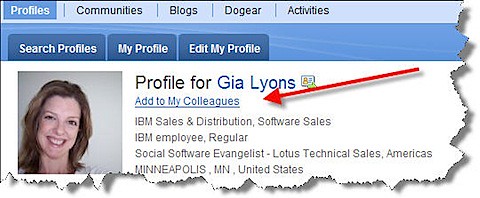
Today, I noticed the addition of 'Add to my colleagues' when you are viewing someone's profile:
profilescolleagues

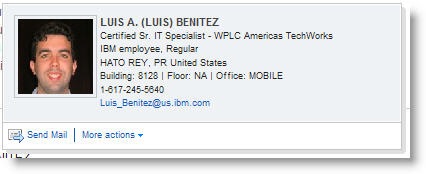
When you click on that link, you can enter a message which will be sent via email to the person you are trying to 'friend'.  Not only that, but we have an updated Person card:
newbusinesscard
Now, anywhere you see a name you can send that person an email.  Additionally, if you expand 'More actions' you can add that person as a colleague!!!  Now, imagine yourself browsing a document library, or browsing Dogears.  You find this person who has a lot of interesting materials and you want to add them immediately to your list of Colleagues!!  There's no need whatsoever to stop what you are doing, go find them in Profiles and then add as a colleague.. you can do it from anywhere the pop-up business card shows up!! Let me repeat that.. you can do that from ANYWHERE the pop-up business card shows up -- including non-Lotus Connections applications (e.g your intranet portal, your document repository, your rich client applications, etc...)

Very cool!!!!!

Ohh.. and don't forget that in 2.0 you have total control on the links that appear in the pop-up business card!

Thursday, February 28, 2008

Lotus Connections and Sharepoint Capabilities

View Comments
I've gotten te same question from two customers,so it's time to blog about it.  Mainly, they want to know what is possible today with Lotus Connections and Microsoft Sharepoint.  Let me clarify, though, that there's no  integration out of the box with Connections and Sharepoint.  The following are all capabilities that are available leveraging the Lotus Connections APIs:

  • Expose Dogears in Sharepoint 
  • Expose Blogs in Sharepoint 
  • Expose PersonCard in Sharepoint (documented in my article)
  • Link to Profiles (instead of the Sharepoint user info page) when clicking on a user's name in Sharepoint (documented in developwerWorks my article)
  • Use Communities as an access control into Sharepoint sites
  • Adding a 'Dogear this' button to Sharepoint pages
  • Add a widget to the Lotus Connections Homepage with 'My Sharepoint Sites' (similar to the Quickr porlet: My Places) 
  • Add 'My Sites' as a link in the PersonCard which takes someone to a user's list of Sharepoint
Note: Updated 8/29/2008 to include link to 'My Site' integration in Person Card.

Customizations available to Lotus Connections Profiles

View Comments
I've also been getting a lot of questions as to what can be customized and/or configured inside of Lotus Connections Profiles.  I'm also in the process of updating the Lotus Connections POT presentations to reflect this.  I, of course, wanted to give my faithful readers a sneak peek!!  So here you go:

What can be extended / changed in Profiles ?

  • Field names (e.g. Change 'Department Name' to 'Business Unit Name')
  • You can add up to 3 extra fields in 1.x and up to 99 in 2.0
  • You can change the order in which the fields are displayed / edited
  • You can change which fields are editable and which aren't 
  • You can specify which fields are synchronized back to the data source and which aren't
  • In 2.0 you can specify which fields show up in the business card
  • In 2.0 you can add extra links in the pop-up business card
  • Branding
And this is all done by modifying an XML file!  No code is needed -- this is purely configuration!!

Branding, of course, could require some coding if it's beyond changing colors and the nav bar logo.

Saturday, February 23, 2008

I'm addicted!

View Comments
I'm 71% addicted -- I can't imagine what you had to answer to get an 80% addiction!!! smile


71%How Addicted to Blogging Are You?

Wednesday, February 20, 2008

HD DVD is dead -- take that Mircrosoft

View Comments
So in true spirit of "sticking up to the man", I thought I would blog about the huge announcement made by Toshiba late yesterday.  I wonder what that means to all the Xbox owners?  Do they have to send in all their Xboxes to get them re-furbished and converted into BlueRay?   What about the current HD-DVD owner ?  Is Toshiba and Microsoft going to provide some kind of refund or coupons to switch over to BlueRay? 

I haven't seen anything in the news as to how this is going to affect Microsoft but they were one of the big proponents of this format.  My theory was that BlueRay was going to win since that's what ships with most PlayStations and we all know how PlayStation totally overshadows the Xbox in market share.